2005 NISSAN NAVARA display
[x] Cancel search: displayPage 2166 of 3171
FRONT FOG LAMP
LT-83
C
D
E
F
G
H
I
J
L
MA
B
LT
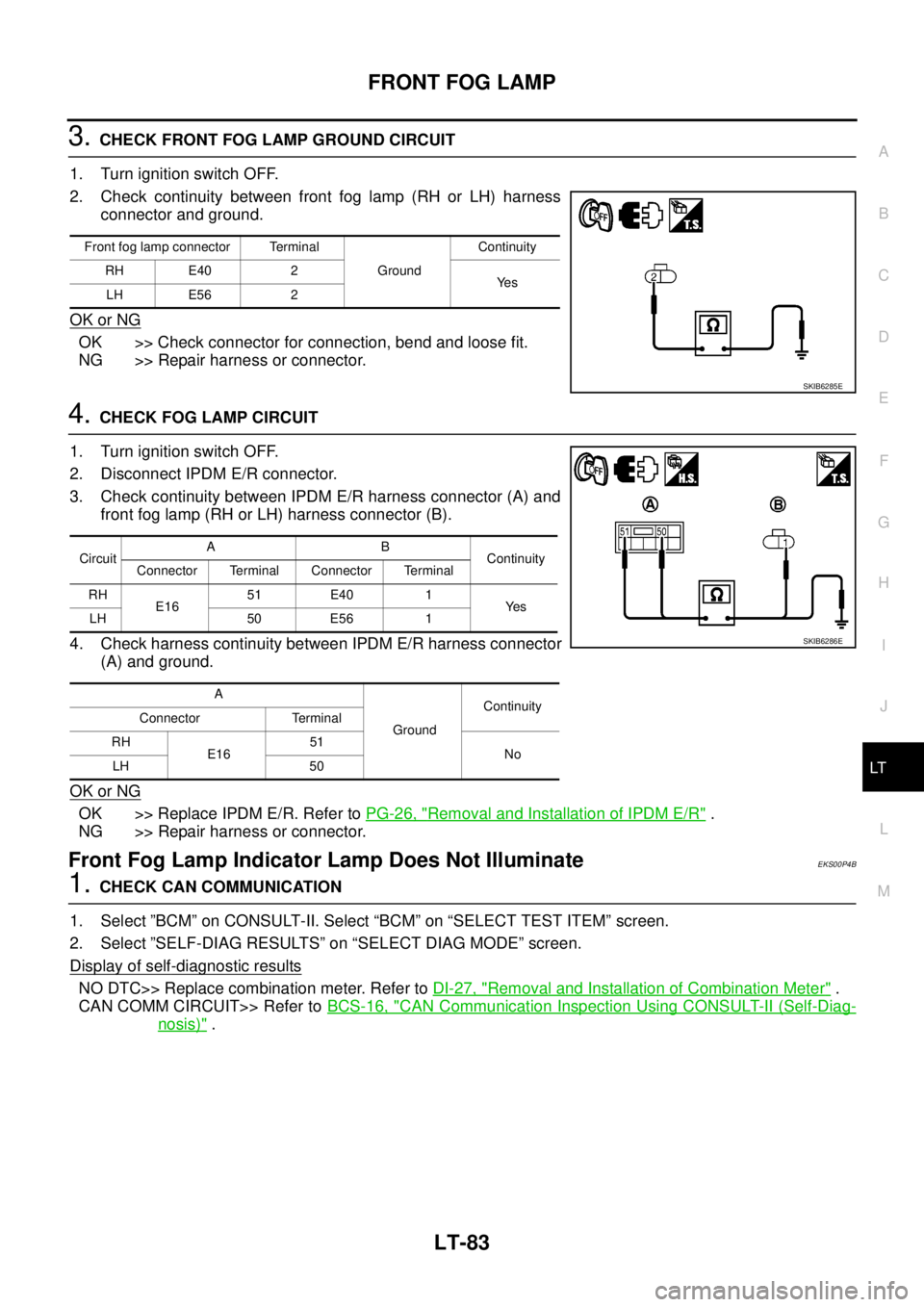
3.CHECK FRONT FOG LAMP GROUND CIRCUIT
1. Turn ignition switch OFF.
2. Check continuity between front fog lamp (RH or LH) harness
connector and ground.
OK or NG
OK >> Check connector for connection, bend and loose fit.
NG >> Repair harness or connector.
4.CHECK FOG LAMP CIRCUIT
1. Turn ignition switch OFF.
2. Disconnect IPDM E/R connector.
3. Check continuity between IPDM E/R harness connector (A) and
front fog lamp (RH or LH) harness connector (B).
4. Check harness continuity between IPDM E/R harness connector
(A) and ground.
OK or NG
OK >> Replace IPDM E/R. Refer toPG-26, "Removal and Installation of IPDM E/R".
NG >> Repair harness or connector.
Front Fog Lamp Indicator Lamp Does Not IlluminateEKS00P4B
1.CHECK CAN COMMUNICATION
1. Select ”BCM” on CONSULT-II. Select “BCM” on “SELECT TEST ITEM” screen.
2. Select ”SELF-DIAG RESULTS” on “SELECT DIAG MODE” screen.
Display of self
-diagnostic results
NO DTC>> Replace combination meter. Refer toDI-27, "Removal and Installation of Combination Meter".
CAN COMM CIRCUIT>> Refer toBCS-16, "
CAN Communication Inspection Using CONSULT-II (Self-Diag-
nosis)".
Front fog lamp connector Terminal
GroundContinuity
RH E40 2
Ye s
LH E56 2
SKIB6285E
CircuitAB
Continuity
Connector Terminal Connector Terminal
RH
E1651 E40 1
Ye s
LH 50 E56 1
A
GroundContinuity
Connector Terminal
RH
E1651
No
LH 50
SKIB6286E
Page 2167 of 3171
LT-84
FRONT FOG LAMP
Front Fog Lamps Do Not Turn OFF
EKS00P4C
1.CHECK FRONT FOG LAMP TURN OFF
Make sure that lighting switch is OFF. And make sure front fog lamp turns off when ignition switch is turned
OFF.
OK or NG
OK >> GO TO 3.
NG >> GO TO 2.
2.CHECK COMBINATION SWITCH INPUT SIGNAL
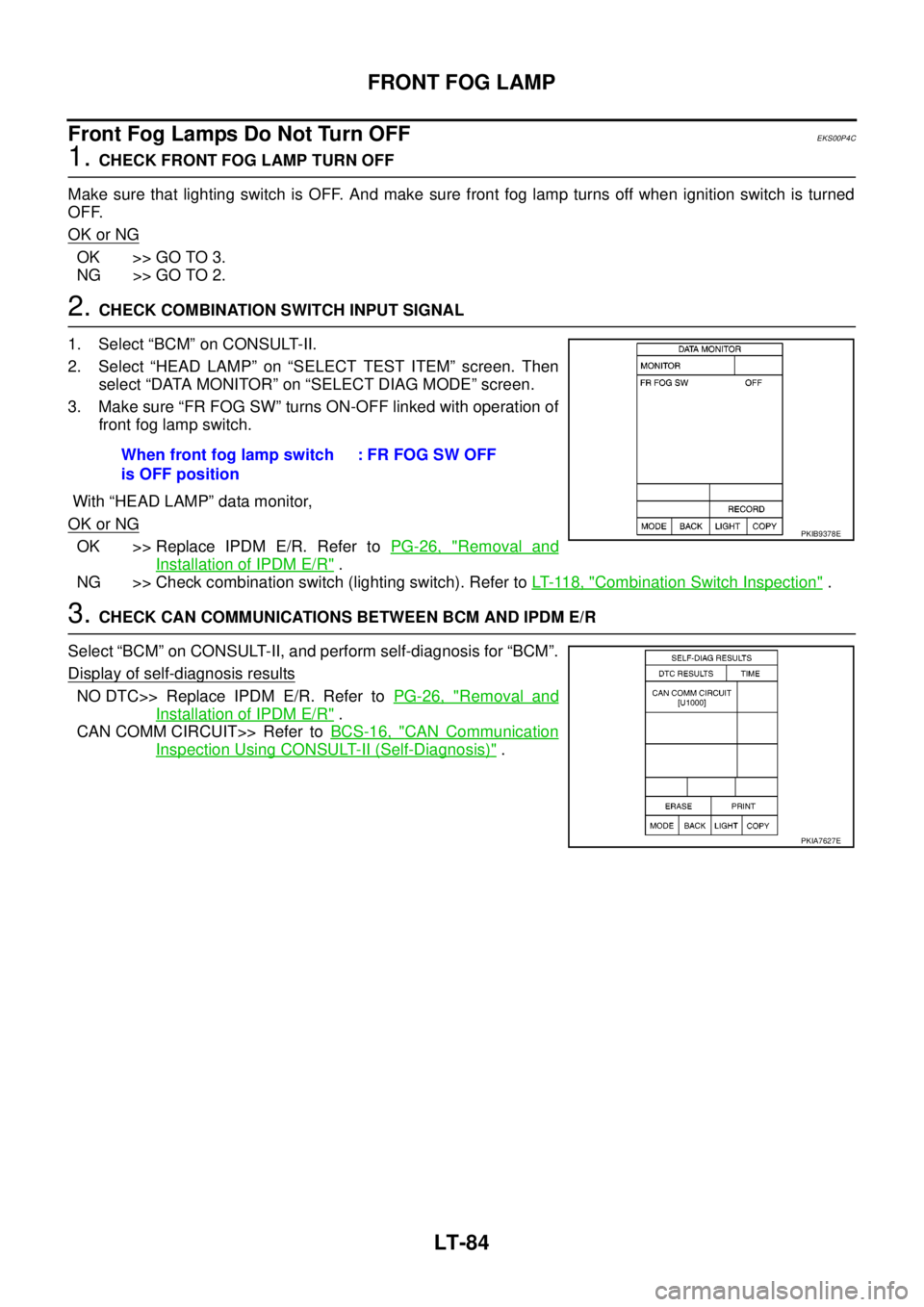
1. Select “BCM” on CONSULT-II.
2. Select “HEAD LAMP” on “SELECT TEST ITEM” screen. Then
select “DATA MONITOR” on “SELECT DIAG MODE” screen.
3. Make sure “FR FOG SW” turns ON-OFF linked with operation of
front fog lamp switch.
With “HEAD LAMP” data monitor,
OK or NG
OK >> Replace IPDM E/R. Refer toPG-26, "Removal and
Installation of IPDM E/R".
NG >> Check combination switch (lighting switch). Refer toLT- 11 8 , "
Combination Switch Inspection".
3.CHECK CAN COMMUNICATIONS BETWEEN BCM AND IPDM E/R
Select “BCM” on CONSULT-II, and perform self-diagnosis for “BCM”.
Display of self-diagnosis results
NO DTC>> Replace IPDM E/R. Refer toPG-26, "Removal and
Installation of IPDM E/R".
CAN COMM CIRCUIT>> Refer toBCS-16, "
CAN Communication
Inspection Using CONSULT-II (Self-Diagnosis)". When front fog lamp switch
is OFF position: FR FOG SW OFF
PKIB9378E
PKIA7627E
Page 2178 of 3171
REAR FOG LAMP
LT-95
C
D
E
F
G
H
I
J
L
MA
B
LT
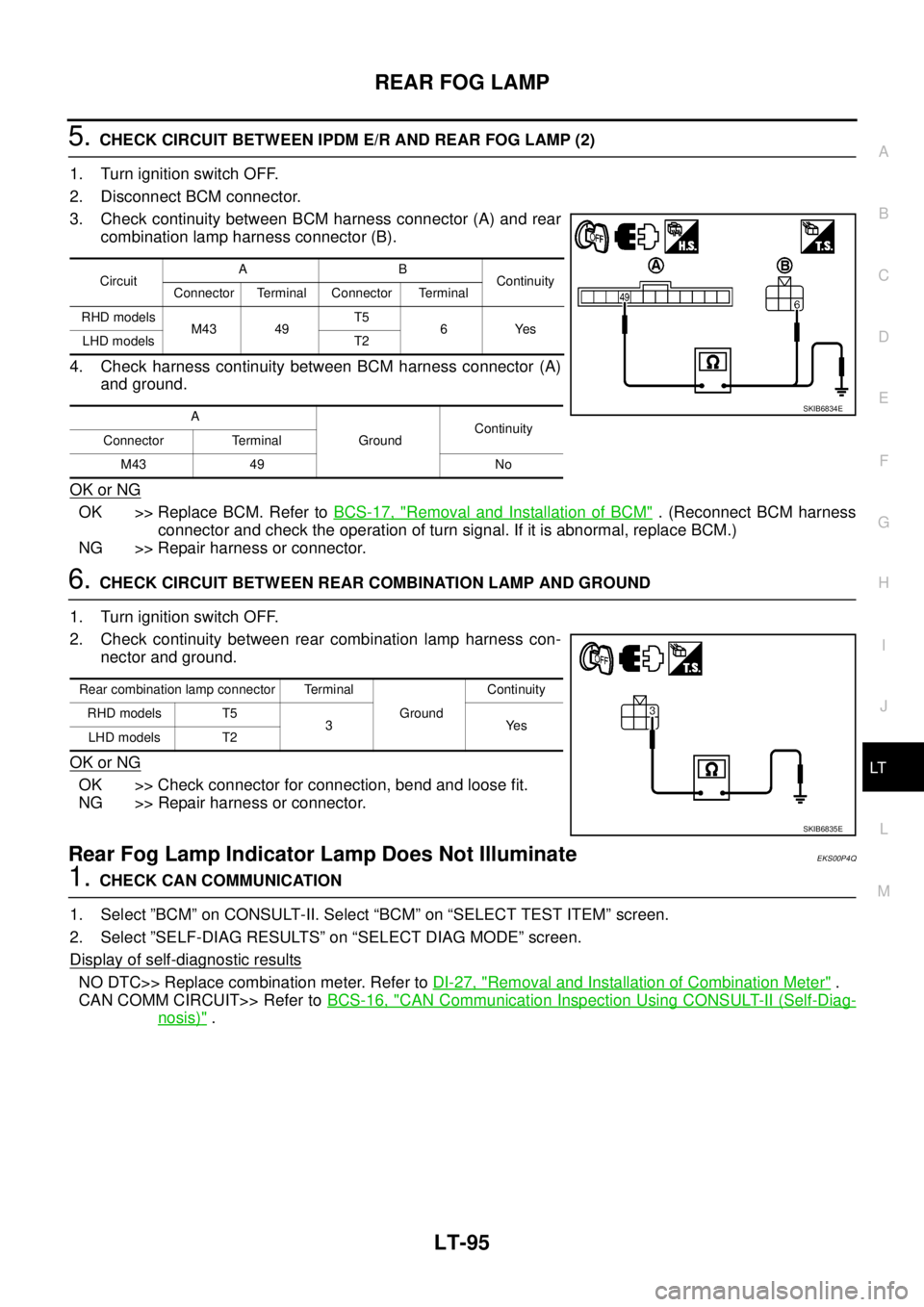
5.CHECK CIRCUIT BETWEEN IPDM E/R AND REAR FOG LAMP (2)
1. Turn ignition switch OFF.
2. Disconnect BCM connector.
3. Check continuity between BCM harness connector (A) and rear
combination lamp harness connector (B).
4. Check harness continuity between BCM harness connector (A)
and ground.
OK or NG
OK >> Replace BCM. Refer toBCS-17, "Removal and Installation of BCM". (Reconnect BCM harness
connector and check the operation of turn signal. If it is abnormal, replace BCM.)
NG >> Repair harness or connector.
6.CHECK CIRCUIT BETWEEN REAR COMBINATION LAMP AND GROUND
1. Turn ignition switch OFF.
2. Check continuity between rear combination lamp harness con-
nector and ground.
OK or NG
OK >> Check connector for connection, bend and loose fit.
NG >> Repair harness or connector.
Rear Fog Lamp Indicator Lamp Does Not IlluminateEKS00P4Q
1.CHECK CAN COMMUNICATION
1. Select ”BCM” on CONSULT-II. Select “BCM” on “SELECT TEST ITEM” screen.
2. Select ”SELF-DIAG RESULTS” on “SELECT DIAG MODE” screen.
Display of self
-diagnostic results
NO DTC>> Replace combination meter. Refer toDI-27, "Removal and Installation of Combination Meter".
CAN COMM CIRCUIT>> Refer toBCS-16, "
CAN Communication Inspection Using CONSULT-II (Self-Diag-
nosis)".
CircuitAB
Continuity
Connector Terminal Connector Terminal
RHD models
M43 49T5
6Yes
LHD models T2
A
GroundContinuity
Connector Terminal
M43 49 No
SKIB6834E
Rear combination lamp connector Terminal
GroundContinuity
RHD models T5
3Yes
LHD models T2
SKIB6835E
Page 2188 of 3171
TURN SIGNAL AND HAZARD WARNING LAMPS
LT-105
C
D
E
F
G
H
I
J
L
MA
B
LT
CONSULT-II Function (BCM)EKS00P8C
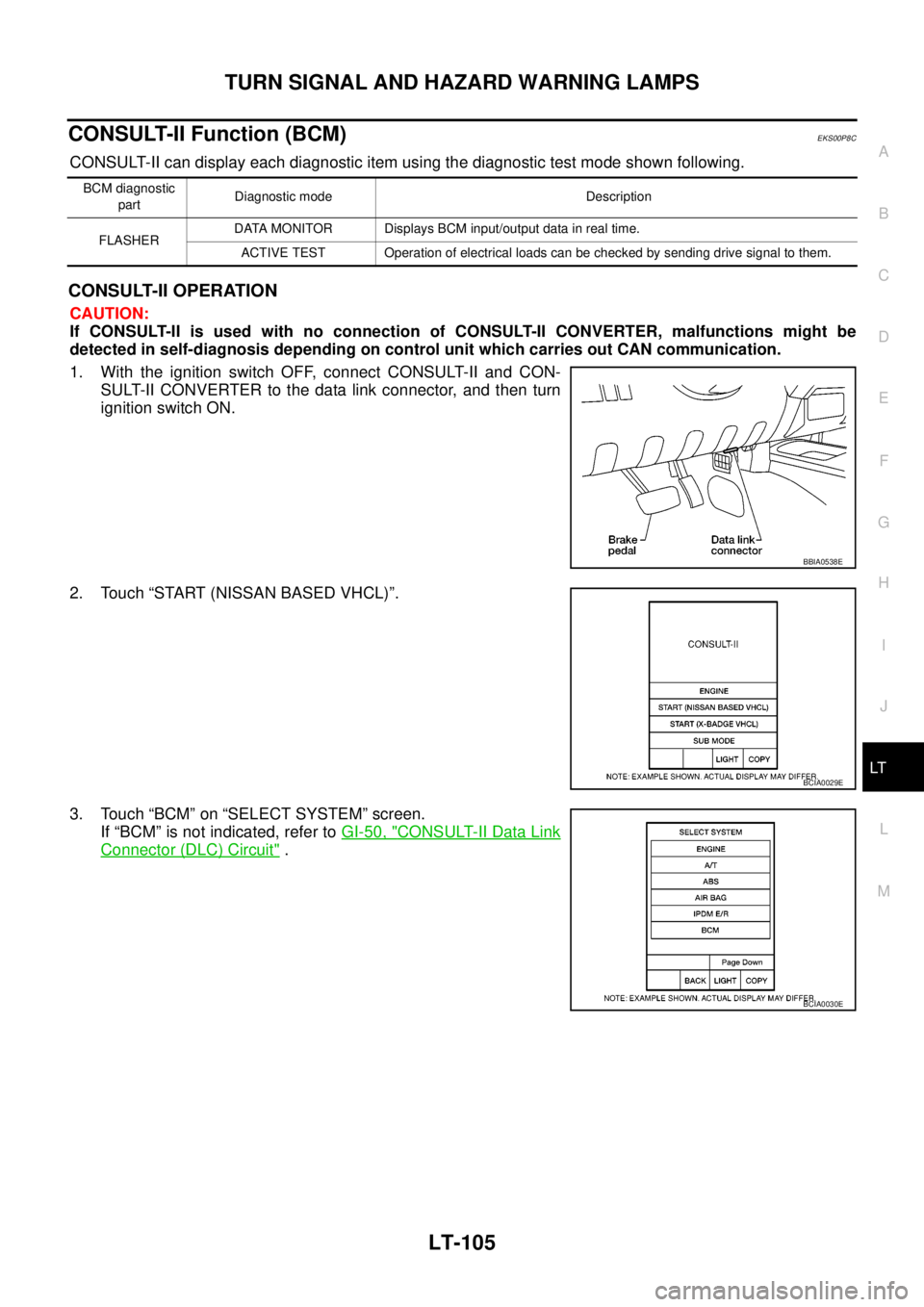
CONSULT-II can display each diagnostic item using the diagnostic test mode shown following.
CONSULT-II OPERATION
CAUTION:
If CONSULT-II is used with no connection of CONSULT-II CONVERTER, malfunctions might be
detected in self-diagnosis depending on control unit which carries out CAN communication.
1. With the ignition switch OFF, connect CONSULT-II and CON-
SULT-II CONVERTER to the data link connector, and then turn
ignition switch ON.
2. Touch “START (NISSAN BASED VHCL)”.
3. Touch “BCM” on “SELECT SYSTEM” screen.
If “BCM” is not indicated, refer toGI-50, "
CONSULT-II Data Link
Connector (DLC) Circuit".
BCM diagnostic
partDiagnostic mode Description
FLASHERDATA MONITOR Displays BCM input/output data in real time.
ACTIVE TEST Operation of electrical loads can be checked by sending drive signal to them.
BBIA0538E
BCIA0029E
BCIA0030E
Page 2189 of 3171
LT-106
TURN SIGNAL AND HAZARD WARNING LAMPS
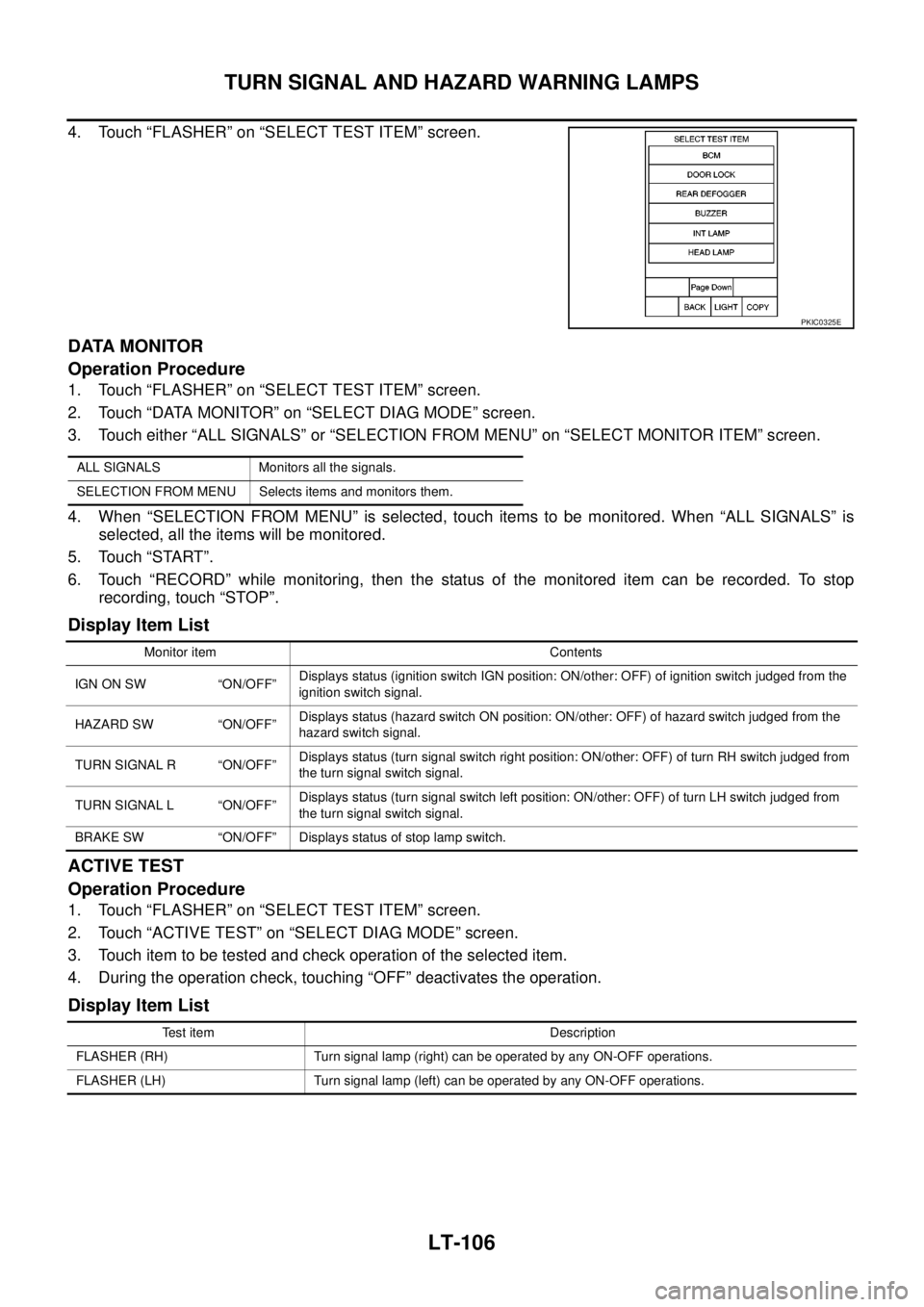
4. Touch “FLASHER” on “SELECT TEST ITEM” screen.
DATA MONITOR
Operation Procedure
1. Touch “FLASHER” on “SELECT TEST ITEM” screen.
2. Touch “DATA MONITOR” on “SELECT DIAG MODE” screen.
3. Touch either “ALL SIGNALS” or “SELECTION FROM MENU” on “SELECT MONITOR ITEM” screen.
4. When “SELECTION FROM MENU” is selected, touch items to be monitored. When “ALL SIGNALS” is
selected, all the items will be monitored.
5. Touch “START”.
6. Touch “RECORD” while monitoring, then the status of the monitored item can be recorded. To stop
recording, touch “STOP”.
Display Item List
ACTIVE TEST
Operation Procedure
1. Touch “FLASHER” on “SELECT TEST ITEM” screen.
2. Touch “ACTIVE TEST” on “SELECT DIAG MODE” screen.
3. Touch item to be tested and check operation of the selected item.
4. During the operation check, touching “OFF” deactivates the operation.
Display Item List
PKIC0325E
ALL SIGNALS Monitors all the signals.
SELECTION FROM MENU Selects items and monitors them.
Monitor item Contents
IGN ON SW “ON/OFF”Displays status (ignition switch IGN position: ON/other: OFF) of ignition switch judged from the
ignition switch signal.
HAZARD SW “ON/OFF”Displays status (hazard switch ON position: ON/other: OFF) of hazard switch judged from the
hazard switch signal.
TURN SIGNAL R “ON/OFF”Displays status (turn signal switch right position: ON/other: OFF) of turn RH switch judged from
the turn signal switch signal.
TURN SIGNAL L “ON/OFF”Displays status (turn signal switch left position: ON/other: OFF) of turn LH switch judged from
the turn signal switch signal.
BRAKE SW “ON/OFF” Displays status of stop lamp switch.
Test item Description
FLASHER (RH) Turn signal lamp (right) can be operated by any ON-OFF operations.
FLASHER (LH) Turn signal lamp (left) can be operated by any ON-OFF operations.
Page 2193 of 3171
LT-110
TURN SIGNAL AND HAZARD WARNING LAMPS
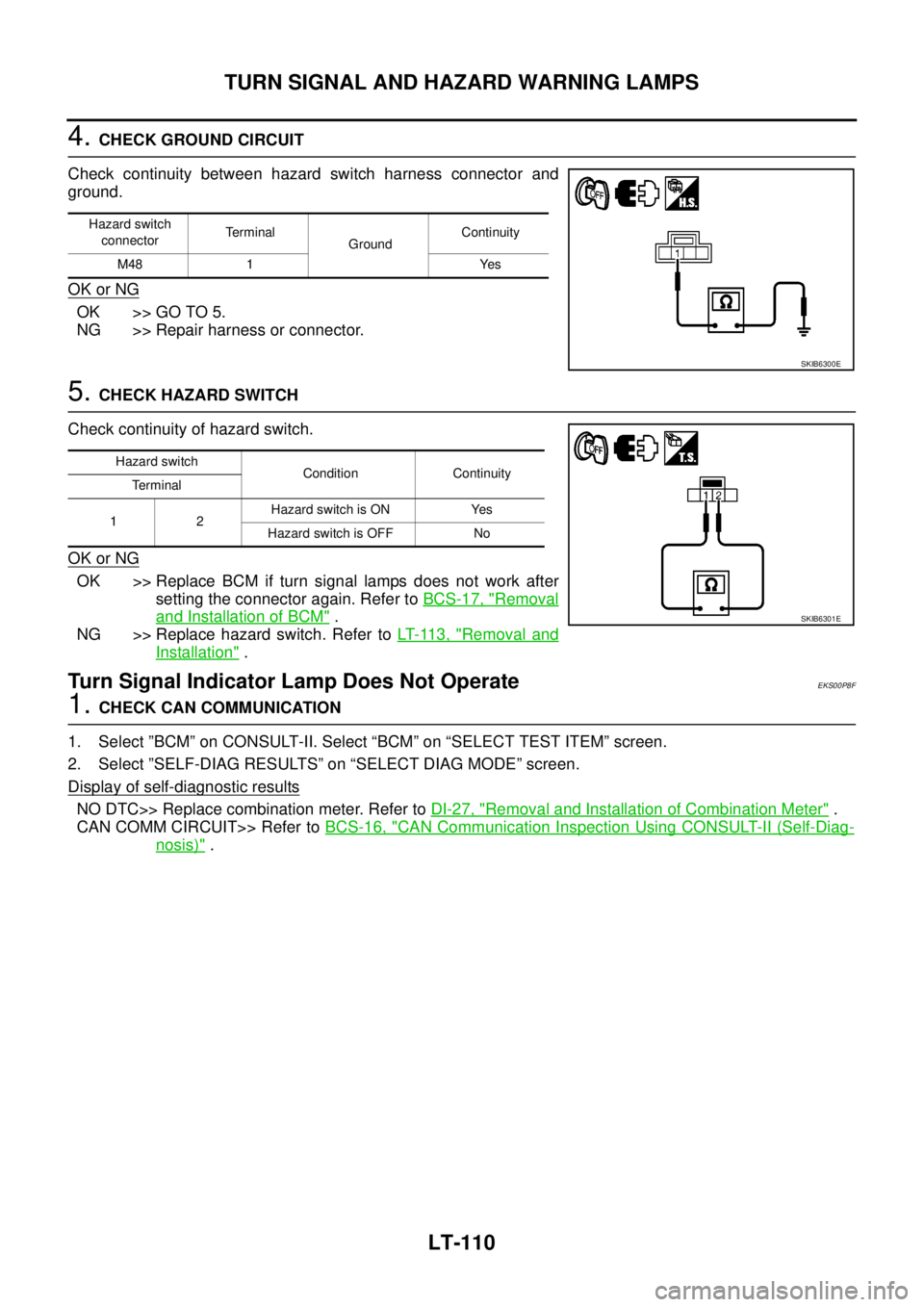
4.CHECK GROUND CIRCUIT
Check continuity between hazard switch harness connector and
ground.
OK or NG
OK >> GO TO 5.
NG >> Repair harness or connector.
5.CHECK HAZARD SWITCH
Check continuity of hazard switch.
OK or NG
OK >> Replace BCM if turn signal lamps does not work after
setting the connector again. Refer toBCS-17, "
Removal
and Installation of BCM".
NG >> Replace hazard switch. Refer toLT- 11 3 , "
Removal and
Installation".
Turn Signal Indicator Lamp Does Not OperateEKS00P8F
1.CHECK CAN COMMUNICATION
1. Select ”BCM” on CONSULT-II. Select “BCM” on “SELECT TEST ITEM” screen.
2. Select ”SELF-DIAG RESULTS” on “SELECT DIAG MODE” screen.
Display of self
-diagnostic results
NO DTC>> Replace combination meter. Refer toDI-27, "Removal and Installation of Combination Meter".
CAN COMM CIRCUIT>> Refer toBCS-16, "
CAN Communication Inspection Using CONSULT-II (Self-Diag-
nosis)".
Hazard switch
connectorTerminal
GroundContinuity
M48 1 Yes
SKIB6300E
Hazard switch
Condition Continuity
Terminal
12Hazard switch is ON Yes
Hazard switch is OFF No
SKIB6301E
Page 2198 of 3171

COMBINATION SWITCH
LT-115
C
D
E
F
G
H
I
J
L
MA
B
LT
Combination Switch Reading FunctionEKS00P9W
Refer toBCS-3, "COMBINATION SWITCH READING FUNCTION".
CONSULT-II Function (BCM)EKS00P9X
CONSULT-II can display each diagnostic item using the diagnostic test mode shown following.
CONSULT-II OPERATION
CAUTION:
If CONSULT-II is used with no connection of CONSULT-II CONVERTER, malfunctions might be
detected in self-diagnosis depending on control unit which carries out CAN communication.
1. With the ignition switch OFF, connect CONSULT-II and CON-
SULT-II CONVERTER to the data link connector, and then turn
ignition switch ON.
2. Touch “START (NISSAN BASED VHCL)”.
3. Touch “BCM” on “SELECT SYSTEM” screen.
If “BCM” is not indicated, refer toGI-50, "
CONSULT-II Data Link
Connector (DLC) Circuit".
BCM diagnostic part Diagnostic mode Description
COMBINATION SWITCH DATA MONITOR Displays BCM input/output data in real time.
BBIA0538E
BCIA0029E
BCIA0030E
Page 2199 of 3171
LT-116
COMBINATION SWITCH
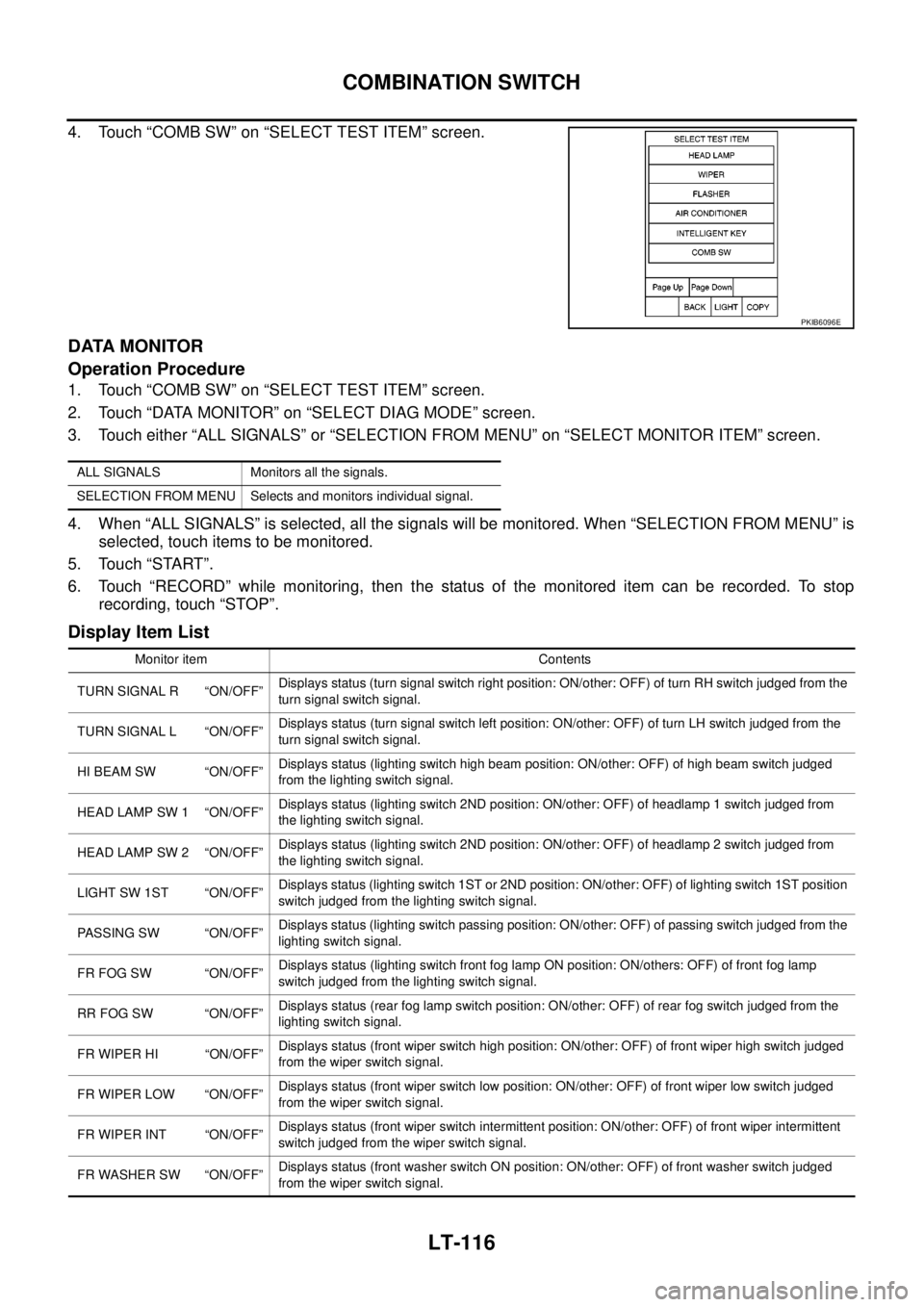
4. Touch “COMB SW” on “SELECT TEST ITEM” screen.
DATA MONITOR
Operation Procedure
1. Touch “COMB SW” on “SELECT TEST ITEM” screen.
2. Touch “DATA MONITOR” on “SELECT DIAG MODE” screen.
3. Touch either “ALL SIGNALS” or “SELECTION FROM MENU” on “SELECT MONITOR ITEM” screen.
4. When “ALL SIGNALS” is selected, all the signals will be monitored. When “SELECTION FROM MENU” is
selected, touch items to be monitored.
5. Touch “START”.
6. Touch “RECORD” while monitoring, then the status of the monitored item can be recorded. To stop
recording, touch “STOP”.
Display Item List
PKIB6096E
ALL SIGNALS Monitors all the signals.
SELECTION FROM MENU Selects and monitors individual signal.
Monitor item Contents
TURN SIGNAL R “ON/OFF”Displays status (turn signal switch right position: ON/other: OFF) of turn RH switch judged from the
turn signal switch signal.
TURN SIGNAL L “ON/OFF”Displays status (turn signal switch left position: ON/other: OFF) of turn LH switch judged from the
turn signal switch signal.
HI BEAM SW “ON/OFF”Displays status (lighting switch high beam position: ON/other: OFF) of high beam switch judged
from the lighting switch signal.
HEAD LAMP SW 1 “ON/OFF”Displays status (lighting switch 2ND position: ON/other: OFF) of headlamp 1 switch judged from
the lighting switch signal.
HEAD LAMP SW 2 “ON/OFF”Displays status (lighting switch 2ND position: ON/other: OFF) of headlamp 2 switch judged from
the lighting switch signal.
LIGHT SW 1ST “ON/OFF”Displays status (lighting switch 1ST or 2ND position: ON/other: OFF) of lighting switch 1ST position
switch judged from the lighting switch signal.
PASSING SW “ON/OFF”Displays status (lighting switch passing position: ON/other: OFF) of passing switch judged from the
lighting switch signal.
FR FOG SW “ON/OFF”Displays status (lighting switch front fog lamp ON position: ON/others: OFF) of front fog lamp
switch judged from the lighting switch signal.
RR FOG SW “ON/OFF”Displays status (rear fog lamp switch position: ON/other: OFF) of rear fog switch judged from the
lighting switch signal.
FR WIPER HI “ON/OFF”Displays status (front wiper switch high position: ON/other: OFF) of front wiper high switch judged
from the wiper switch signal.
FR WIPER LOW “ON/OFF”Displays status (front wiper switch low position: ON/other: OFF) of front wiper low switch judged
from the wiper switch signal.
FR WIPER INT “ON/OFF”Displays status (front wiper switch intermittent position: ON/other: OFF) of front wiper intermittent
switch judged from the wiper switch signal.
FR WASHER SW “ON/OFF”Displays status (front washer switch ON position: ON/other: OFF) of front washer switch judged
from the wiper switch signal.