2005 NISSAN NAVARA display
[x] Cancel search: displayPage 1770 of 3171
INSTRUMENT PANEL ASSEMBLY
IP-11
C
D
E
F
G
H
J
K
L
MA
B
IP
1. Remove the center console. Refer toIP-16, "CENTER CONSOLE".
2. Remove the steering column covers. Refer toPS-11, "
STEERING COLUMN".
3. Remove the combination meter. Refer toIP-13, "
COMBINATION METER".
4. Release then disconnect the optical sensor harness.
5. Remove the LH and RH front pillar upper garnish.
6. Remove cluster lid C.
7. Remove screws fixing CD Audio bracket, then remove CD Audio unit assembly. (If equipped). Refer toAV-
73, "Auido Unit (1CD Player Type)".
8. Remove cluster lid D. Refer toIP-12, "
CLUSTER LID D".
9. Remove screws fixing GPS Antenna, then move GPS Antenna.
10. Remove screws fixing display unit bracket, then remove display unit assembly. (If equipped)
11. Remove front passenger air bag module.
12. Remove instrument panel.
lDisconnect harnesses to instrument panel speakers LH and RH and remove speakers.
lDisconnect all remaining harnesses.
lRemove the passenger air bag module. Refer toSRS-40, "FRONT PASSENGER AIR BAG MODULE".
Installation
Installation is in the reverse order of removal.
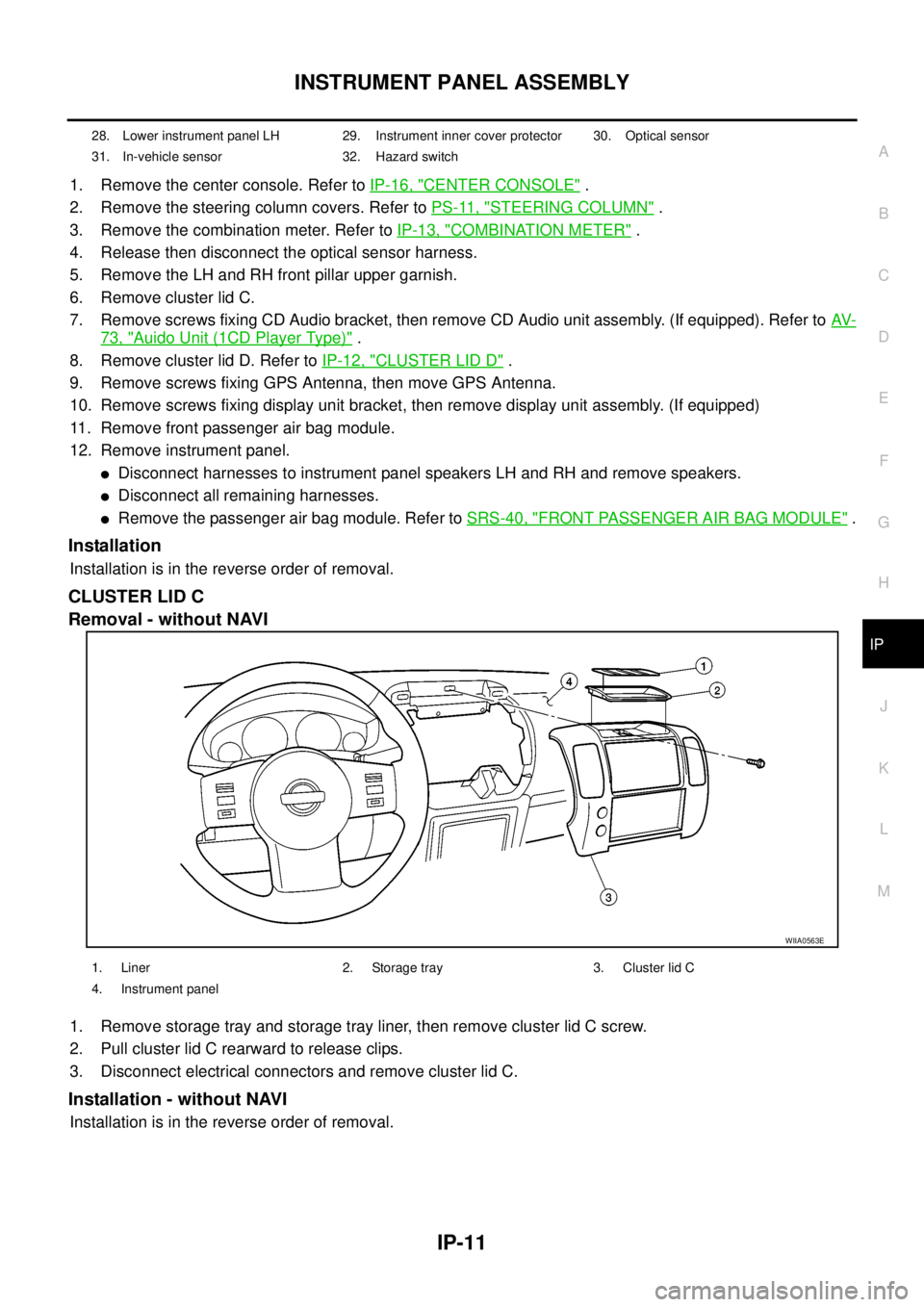
CLUSTER LID C
Removal - without NAVI
1. Remove storage tray and storage tray liner, then remove cluster lid C screw.
2. Pull cluster lid C rearward to release clips.
3. Disconnect electrical connectors and remove cluster lid C.
Installation - without NAVI
Installation is in the reverse order of removal.
28. Lower instrument panel LH 29. Instrument inner cover protector 30. Optical sensor
31. In-vehicle sensor 32. Hazard switch
WIIA0563E
1. Liner 2. Storage tray 3. Cluster lid C
4. Instrument panel
Page 1778 of 3171
LAN-1
LAN SYSTEM
K ELECTRICAL
CONTENTS
C
D
E
F
G
H
I
J
L
M
SECTIONLAN
A
B
LAN
LAN SYSTEM
CAN
PRECAUTIONS .......................................................... 3
Precautions for Supplemental Restraint System
(SRS)“AIRBAG”and“SEATBELTPRE-TEN-
SIONER” .................................................................. 3
Precautions When Using CONSULT-II ..................... 3
CHECK POINTS FOR USING CONSULT-II ......... 3
Precautions For Trouble Diagnosis .......................... 3
CAN SYSTEM ....................................................... 3
Precautions For Harness Repair .............................. 3
CAN SYSTEM ....................................................... 3
TROUBLE DIAGNOSES WORK FLOW .................... 5
When Displaying CAN Communication System
Errors ....................................................................... 5
WHEN A MALFUNCTION IS DETECTED BY
CAN COMMUNICATION SYSTEM ....................... 5
WHEN A MALFUNCTION IS DETECTED
EXCEPT CAN COMMUNICATION SYSTEM ........ 5
TROUBLE DIAGNOSIS FLOW CHART ............... 6
Diagnosis Procedure ................................................ 7
SELECTING CAN SYSTEM TYPE (HOW TO
USE SPECIFICATION TABLE) ............................. 7
ACQUISITION OF DATA BY CONSULT-II ............ 8
HOW TO USE CHECK SHEET TABLE ................ 9
CAN Diagnostic Support Monitor ........................... 15
DESCRIPTION OF “CAN DIAG SUPPORT
MNTR” SCREEN FOR ECM ............................... 15
DESCRIPTION OF “CAN DIAG SUPPORT
MNTR” SCREEN FOR TCM ............................... 16
DESCRIPTION OF “CAN DIAG SUPPORT
MNTR” SCREEN FOR NAVI CONTROL UNIT ... 17
DESCRIPTION OF “CAN DIAG SUPPORT
MNTR” SCREEN FOR DIFFERENTIAL LOCK
CONTROL UNIT ................................................. 18
DESCRIPTION OF “CAN DIAG SUPPORT
MNTR” SCREEN FOR FRONT AIR CONTROL... 19
DESCRIPTION OF “CAN DIAG SUPPORT
MNTR” SCREEN FOR BCM ............................... 20
DESCRIPTION OF “CAN DIAG SUPPORT
MNTR” SCREEN FOR TRANSFER CONTROLUNIT .................................................................... 21
DESCRIPTION OF “CAN DIAG SUPPORT
MNTR” SCREEN FOR ABS ACTUATOR AND
ELECTRIC UNIT (CONTROL UNIT) ................... 21
DESCRIPTION OF “CAN DIAG SUPPORT
MNTR” SCREEN FOR IPDM E/R ....................... 22
CAN COMMUNICATION ........................................... 23
System Description ................................................. 23
Component Parts and Harness Connector Location... 23
LHD MODELS ..................................................... 23
RHD MODELS .................................................... 24
Schematic ............................................................... 25
Wiring Diagram — CAN — ..................................... 26
CAN Communication Unit ....................................... 30
TYPE 1/ TYPE 2/ TYPE 3 ................................... 32
TYPE 4/ TYPE 5 .................................................. 34
TYPE 6/ TYPE 7/ TYPE 8/ TYPE 9/ TYPE 10/
TYPE 11/ TYPE 16/ TYPE 17 .............................. 36
TYPE 12/ TYPE 13/ TYPE 14/ TYPE 15 ............. 40
CAN SYSTEM (TYPE 1) ........................................... 44
Component Parts and Harness Connector Location... 44
Schematic ............................................................... 44
Wiring Diagram — CAN — ..................................... 44
Check Sheet ........................................................... 45
CHECK SHEET RESULTS (EXAMPLE) ............. 47
CAN SYSTEM (TYPE 2) ........................................... 56
Component Parts and Harness Connector Location... 56
Schematic ............................................................... 56
Wiring Diagram — CAN — ..................................... 56
Check Sheet ........................................................... 57
CHECK SHEET RESULTS (EXAMPLE) ............. 59
CAN SYSTEM (TYPE 3) ........................................... 68
Component Parts and Harness Connector Location... 68
Schematic ............................................................... 68
Wiring Diagram — CAN — ..................................... 68
Check Sheet ........................................................... 69
CHECK SHEET RESULTS (EXAMPLE) ............. 71
CAN SYSTEM (TYPE 4) ........................................... 82
Component Parts and Harness Connector Location... 82
Schematic ............................................................... 82
Page 1782 of 3171
![NISSAN NAVARA 2005 Repair Workshop Manual TROUBLE DIAGNOSES WORK FLOW
LAN-5
[CAN]
C
D
E
F
G
H
I
J
L
MA
B
LAN
TROUBLE DIAGNOSES WORK FLOWPFP:00004
When Displaying CAN Communication System ErrorsEKS00LBH
WHEN A MALFUNCTION IS DETECTED BY CAN CO](/manual-img/5/57362/w960_57362-1781.png "NISSAN NAVARA 2005 Repair Workshop Manual TROUBLE DIAGNOSES WORK FLOW
LAN-5
[CAN]
C
D
E
F
G
H
I
J
L
MA
B
LAN
TROUBLE DIAGNOSES WORK FLOWPFP:00004
When Displaying CAN Communication System ErrorsEKS00LBH
WHEN A MALFUNCTION IS DETECTED BY CAN CO")
TROUBLE DIAGNOSES WORK FLOW
LAN-5
[CAN]
C
D
E
F
G
H
I
J
L
MA
B
LAN
TROUBLE DIAGNOSES WORK FLOWPFP:00004
When Displaying CAN Communication System ErrorsEKS00LBH
WHEN A MALFUNCTION IS DETECTED BY CAN COMMUNICATION SYSTEM
lCAN communication line is open. (CAN H, CAN L, or both)
lCAN communication line is shorted. (Ground, between CAN lines, or other harnesses)
lThe areas related to CAN communication of unit is malfunctioning.
WHEN A MALFUNCTION IS DETECTED EXCEPT CAN COMMUNICATION SYSTEM
lRemoval and installation of parts : When the units that perform CAN communication or the sensors
related to CAN communication are removed and installed, malfunction may be detected (or DTC other
than CAN communication may be detected).
lFuse blown out (removed): CAN communication of the unit may be stopped at such time.
lLow voltage : If the voltage decreases because of battery discharge when IGN is ON, malfunction may be
detected by self-diagnosis according to the units.
Page 1786 of 3171
![NISSAN NAVARA 2005 Repair Workshop Manual TROUBLE DIAGNOSES WORK FLOW
LAN-9
[CAN]
C
D
E
F
G
H
I
J
L
MA
B
LAN
HOW TO USE CHECK SHEET TABLE
1. Unit names displayed on CONSULT-II
2. “No indication” : Put a check mark to it if the unit name d](/manual-img/5/57362/w960_57362-1785.png "NISSAN NAVARA 2005 Repair Workshop Manual TROUBLE DIAGNOSES WORK FLOW
LAN-9
[CAN]
C
D
E
F
G
H
I
J
L
MA
B
LAN
HOW TO USE CHECK SHEET TABLE
1. Unit names displayed on CONSULT-II
2. “No indication” : Put a check mark to it if the unit name d")
TROUBLE DIAGNOSES WORK FLOW
LAN-9
[CAN]
C
D
E
F
G
H
I
J
L
MA
B
LAN
HOW TO USE CHECK SHEET TABLE
1. Unit names displayed on CONSULT-II
2. “No indication” : Put a check mark to it if the unit name described in step 1 is not displayed on “SELECT
SYSTEM” screen of CONSULT-II. (Unit communicating with CONSULT-II via CAN communication line)
“–” : Column not used (Unit communicating with CONSULT-II excluding CAN communication line)
3. “NG” : Display “NG” when malfunction is detected in the initial diagnosis of the diagnosed unit. Replace
the unit if “NG” is displayed.
“–” : Column not used (Initial diagnosis is not performed.)
4. “UNKWN” : Display “UNKWN” when the diagnosed unit does not transmit the data normally. Put a check
mark to it if “UNKWN” is displayed on CONSULT-II.
“–” : Column not used (Transmit diagnosis is not performed.)
5. “UNKWN” : Display “UNKWN” when the diagnosed unit does not receive the data normally. Put a check
mark to it if “UNKWN” is displayed on CONSULT-II.
“–” : Column not used (It is not necessary for CAN communication trouble diagnosis.)
NOTE:
CAN communication diagnosis checks if CAN communication works normally. (Contents of data are not diag-
nosed.)
lWhen the initial conditions are reproduced, refer toLAN-10, "Example of Filling in Check Sheet When Ini-
tial Conditions Are Reproduced".
lWhen the initial conditions are not reproduced, refer toLAN-13, "Example of Filling in Check Sheet When
Initial Conditions Are Not Reproduced".
PKIC2525E
Page 1787 of 3171
![NISSAN NAVARA 2005 Repair Workshop Manual LAN-10
[CAN]
TROUBLE DIAGNOSES WORK FLOW
Example of Filling in Check Sheet When Initial Conditions Are Reproduced
1. Put a check mark to “No indication” if some of unit names listed on the column](/manual-img/5/57362/w960_57362-1786.png "NISSAN NAVARA 2005 Repair Workshop Manual LAN-10
[CAN]
TROUBLE DIAGNOSES WORK FLOW
Example of Filling in Check Sheet When Initial Conditions Are Reproduced
1. Put a check mark to “No indication” if some of unit names listed on the column")
LAN-10
[CAN]
TROUBLE DIAGNOSES WORK FLOW
Example of Filling in Check Sheet When Initial Conditions Are Reproduced
1. Put a check mark to “No indication” if some of unit names listed on the column of diagnosis system selec-
tion screen of a check sheet table are not displayed on “SELECT SYSTEM” screen attached to the check
sheet.
NOTE:
Put a check mark to “No indication” of METER because METER is not displayed on “SELECT SYSTEM”
screen.
2. Confirm the unit name that “UNKWN” is displayed from the copy of “CAN DIAG SUPPORT MNTR” screen
of “ENGINE” attached to the check sheet, and then put a check mark to the check sheet table.
NOTE:
In “CAN DIAG SUPPORT MNTR” screen, “UNKWN” is displayed on “METER/M&A”. Put a check mark to
it.
PKIC2526E
Page 1788 of 3171
![NISSAN NAVARA 2005 Repair Workshop Manual TROUBLE DIAGNOSES WORK FLOW
LAN-11
[CAN]
C
D
E
F
G
H
I
J
L
MA
B
LAN
3. Confirm the unit name that “UNKWN” is displayed on the copy of “CAN DIAG SUPPORT MNTR” screen
of “A/T”, “HVAC”, â](/manual-img/5/57362/w960_57362-1787.png "NISSAN NAVARA 2005 Repair Workshop Manual TROUBLE DIAGNOSES WORK FLOW
LAN-11
[CAN]
C
D
E
F
G
H
I
J
L
MA
B
LAN
3. Confirm the unit name that “UNKWN” is displayed on the copy of “CAN DIAG SUPPORT MNTR” screen
of “A/T”, “HVAC”, â")
TROUBLE DIAGNOSES WORK FLOW
LAN-11
[CAN]
C
D
E
F
G
H
I
J
L
MA
B
LAN
3. Confirm the unit name that “UNKWN” is displayed on the copy of “CAN DIAG SUPPORT MNTR” screen
of “A/T”, “HVAC”, “BCM”, “ABS” and “IPDM E/R” as well as “ENGINE”. And then, put a check mark to the
check sheet table.
NOTE:
lFor “A/T”, “UNKWN” is displayed on “METER/M&A”, “ICC/e4WD” and “AWD/4WD”. But put a check
mark to “METER/M&A” because “UNKWN” is listed on the column of reception diagnosis of the check
sheet table.
lFor “HVAC”, “UNKWN” is not displayed. Do not put a check mark to it.
lFor “BCM”, “UNKWN” is displayed on “METER/M&A” and “I-KEY”. But put a check mark to “METER/
M&A” because “UNKWN” is listed on the column of reception diagnosis of the check sheet table.
lFor “ABS”, “UNKWN” is not displayed. Do not put a check mark to it.
lFor “IPDM E/R”, “UNKWN” is not displayed. Do not put a check mark to it.
PKIC2527E
Page 1790 of 3171
![NISSAN NAVARA 2005 Repair Workshop Manual TROUBLE DIAGNOSES WORK FLOW
LAN-13
[CAN]
C
D
E
F
G
H
I
J
L
MA
B
LAN
Example of Filling in Check Sheet When Initial Conditions Are Not Reproduced
1. See “SELF-DIAG RESULTS” of all units attached to](/manual-img/5/57362/w960_57362-1789.png "NISSAN NAVARA 2005 Repair Workshop Manual TROUBLE DIAGNOSES WORK FLOW
LAN-13
[CAN]
C
D
E
F
G
H
I
J
L
MA
B
LAN
Example of Filling in Check Sheet When Initial Conditions Are Not Reproduced
1. See “SELF-DIAG RESULTS” of all units attached to")
TROUBLE DIAGNOSES WORK FLOW
LAN-13
[CAN]
C
D
E
F
G
H
I
J
L
MA
B
LAN
Example of Filling in Check Sheet When Initial Conditions Are Not Reproduced
1. See “SELF-DIAG RESULTS” of all units attached to the check sheet. If “CAN COMM CIRCUIT” or “CAN
COMM CIRCUIT [U1000]” is displayed, put a check mark to the applicable column of self-diagnostic
results of the check sheet table.
NOTE:
lFor “ENGINE”, “CAN COMM CIRCUIT [U1000]” is displayed. Put a check mark to it.
lFor “A/T”, “CAN COMM CIRCUIT [U1000]” is displayed. Put a check mark to it.
lFor “HVAC”, “NO DTC IS DETECTED” is displayed. Do not put a check mark to it.
lFor “BCM”, “NO DTC IS DETECTED” is displayed. Do not put a check mark to it.
lFor “METER”, “CAN COMM CIRCUIT [U1000]” is displayed. Put a check mark to it.
lFor “ABS”, “NO DTC IS DETECTED” is displayed. Do not put a check mark to it.
lFor “IPDM E/R”, “NO DTC IS DETECTED” is displayed. Do not put a check mark to it.
PKIC2529E
Page 1792 of 3171
![NISSAN NAVARA 2005 Repair Workshop Manual TROUBLE DIAGNOSES WORK FLOW
LAN-15
[CAN]
C
D
E
F
G
H
I
J
L
MA
B
LAN
CAN Diagnostic Support MonitorEKS00LBJ
DESCRIPTION OF “CAN DIAG SUPPORT MNTR” SCREEN
FOR ECM
Display Results (Present)
lOK: Norm](/manual-img/5/57362/w960_57362-1791.png "NISSAN NAVARA 2005 Repair Workshop Manual TROUBLE DIAGNOSES WORK FLOW
LAN-15
[CAN]
C
D
E
F
G
H
I
J
L
MA
B
LAN
CAN Diagnostic Support MonitorEKS00LBJ
DESCRIPTION OF “CAN DIAG SUPPORT MNTR” SCREEN
FOR ECM
Display Results (Present)
lOK: Norm")
TROUBLE DIAGNOSES WORK FLOW
LAN-15
[CAN]
C
D
E
F
G
H
I
J
L
MA
B
LAN
CAN Diagnostic Support MonitorEKS00LBJ
DESCRIPTION OF “CAN DIAG SUPPORT MNTR” SCREEN
FOR ECM
Display Results (Present)
lOK: Normal
lNG: Malfunction
lUNKWN: The diagnosed unit does not transmit or receive the applicable data normally.
SKIB4863E
“SELECT SYSTEM”
screen“CAN DIAG SUPPORT
MNTR” screenDescription Present
ENGINEINITIAL DIAG Make sure that microcomputer in ECU works normally. OK/NG
TRANSMIT DIAG Make sure of normal transmission. OK/UNKWN
TCM Make sure of normal reception from TCM. OK/UNKWN
VDC/TCS/ABS VDC/TCS/ABS is not diagnosed. OK
METER/M&A Make sure of normal reception from combination meter. OK/UNKWN
BCM/SEC Make sure of normal reception from BCM. OK/UNKWN
HVACMake sure of normal reception from HVAC.
(Not available for CAN system diagnosis.)OK/UNKWN