2005 NISSAN NAVARA warning
[x] Cancel search: warningPage 2934 of 3171
![NISSAN NAVARA 2005 Repair Workshop Manual TROUBLE DIAGNOSIS
SRS-25
C
D
E
F
G
I
J
K
L
MA
B
SRS
6. Touch “SELF-DIAG [CURRENT]”.
7. If no malfunction is detected on “SELF-DIAG [CURRENT]”,
repair of SRS is completed. Go to step 8.
If any](/manual-img/5/57362/w960_57362-2933.png "NISSAN NAVARA 2005 Repair Workshop Manual TROUBLE DIAGNOSIS
SRS-25
C
D
E
F
G
I
J
K
L
MA
B
SRS
6. Touch “SELF-DIAG [CURRENT]”.
7. If no malfunction is detected on “SELF-DIAG [CURRENT]”,
repair of SRS is completed. Go to step 8.
If any")
TROUBLE DIAGNOSIS
SRS-25
C
D
E
F
G
I
J
K
L
MA
B
SRS
6. Touch “SELF-DIAG [CURRENT]”.
7. If no malfunction is detected on “SELF-DIAG [CURRENT]”,
repair of SRS is completed. Go to step 8.
If any malfunction is detected on “SELF-DIAG [CURRENT]”, the
malfunctioning part is not repaired completely or another mal-
functioning part is detected. Go toSRS-20, "
DIAGNOSTIC
PROCEDURE 2", and repair malfunctioning part completely.
8. Touch “ERASE”.
NOTE:
Touch “ERASE” to clear the memory of the malfunction
(“SELF-DIAG [PAST]”).
If the memory of the malfunction in “SELF-DIAG [PAST]” is not
erased, the User mode shows the system malfunction by the
operation of the warning lamp even if the malfunction is repaired
completely.
9. Touch “BACK” key of CONSULT-II to “SELECT DIAG MODE”
screen. Touch “SELF-DIAG [PAST]”.
10. Check that no malfunction is detected on “SELF-DIAG [PAST]”.
11. Touch “BACK” key of CONSULT-II until “SELECT SYSTEM”
appears in order to return to User mode from Diagnosis mode.
12. Turn ignition switch OFF then turn off and disconnect CON-
SULT-II. GotoSRS-18, "
Checking SRS Operation Using“AIR
BAG”Warning Lamp—User Mode".
BCIA0031E
SRS701
WHIA0152E
BCIA0031E
SRS702
Page 2937 of 3171
SRS-28
TROUBLE DIAGNOSIS
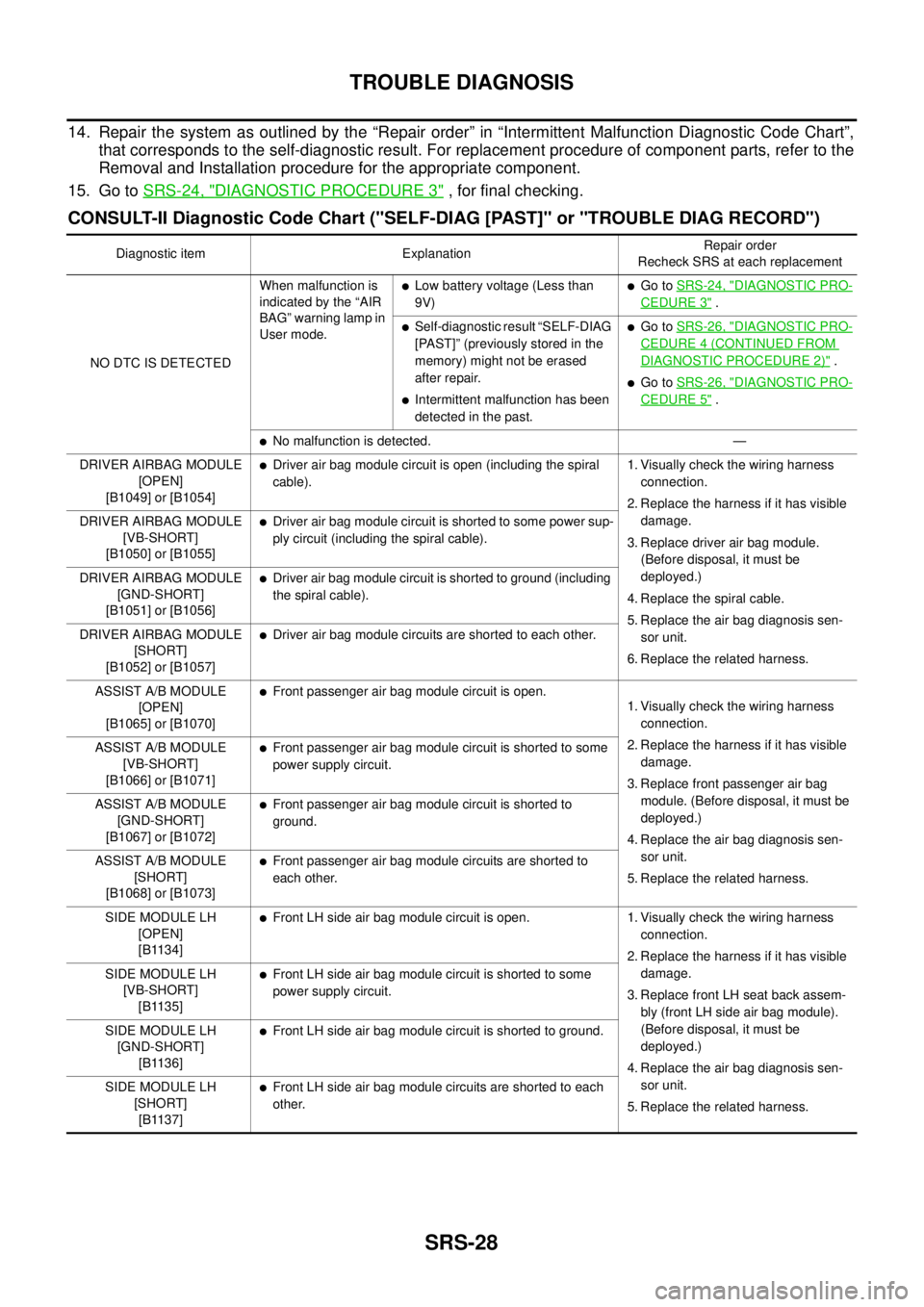
14. Repair the system as outlined by the “Repair order” in “Intermittent Malfunction Diagnostic Code Chart”,
that corresponds to the self-diagnostic result. For replacement procedure of component parts, refer to the
Removal and Installation procedure for the appropriate component.
15. Go toSRS-24, "
DIAGNOSTIC PROCEDURE 3", for final checking.
CONSULT-II Diagnostic Code Chart ("SELF-DIAG [PAST]" or "TROUBLE DIAG RECORD")
Diagnostic item ExplanationRepair order
Recheck SRS at each replacement
NO DTC IS DETECTEDWhen malfunction is
indicated by the “AIR
BAG” warning lamp in
User mode.
lLow battery voltage (Less than
9V)lGo toSRS-24, "DIAGNOSTIC PRO-
CEDURE 3".
lSelf-diagnostic result “SELF-DIAG
[PAST]” (previously stored in the
memory) might not be erased
after repair.
lIntermittent malfunction has been
detected in the past.
lGo toSRS-26, "DIAGNOSTIC PRO-
CEDURE 4 (CONTINUED FROM
DIAGNOSTIC PROCEDURE 2)".
lGo toSRS-26, "DIAGNOSTIC PRO-
CEDURE 5".
lNo malfunction is detected. —
DRIVER AIRBAG MODULE
[OPEN]
[B1049] or [B1054]
lDriver air bag module circuit is open (including the spiral
cable).1. Visually check the wiring harness
connection.
2. Replace the harness if it has visible
damage.
3. Replace driver air bag module.
(Before disposal, it must be
deployed.)
4. Replace the spiral cable.
5. Replace the air bag diagnosis sen-
sor unit.
6. Replace the related harness. DRIVER AIRBAG MODULE
[VB-SHORT]
[B1050] or [B1055]
lDriver air bag module circuit is shorted to some power sup-
ply circuit (including the spiral cable).
DRIVER AIRBAG MODULE
[GND-SHORT]
[B1051] or [B1056]
lDriver air bag module circuit is shorted to ground (including
the spiral cable).
DRIVER AIRBAG MODULE
[SHORT]
[B1052] or [B1057]
lDriver air bag module circuits are shorted to each other.
ASSIST A/B MODULE
[OPEN]
[B1065] or [B1070]
lFront passenger air bag module circuit is open.
1. Visually check the wiring harness
connection.
2. Replace the harness if it has visible
damage.
3. Replace front passenger air bag
module. (Before disposal, it must be
deployed.)
4. Replace the air bag diagnosis sen-
sor unit.
5. Replace the related harness. ASSIST A/B MODULE
[VB-SHORT]
[B1066] or [B1071]
lFront passenger air bag module circuit is shorted to some
power supply circuit.
ASSIST A/B MODULE
[GND-SHORT]
[B1067] or [B1072]
lFront passenger air bag module circuit is shorted to
ground.
ASSIST A/B MODULE
[SHORT]
[B1068] or [B1073]
lFront passenger air bag module circuits are shorted to
each other.
SIDE MODULE LH
[OPEN]
[B1134]
lFront LH side air bag module circuit is open. 1. Visually check the wiring harness
connection.
2. Replace the harness if it has visible
damage.
3. Replace front LH seat back assem-
bly (front LH side air bag module).
(Before disposal, it must be
deployed.)
4. Replace the air bag diagnosis sen-
sor unit.
5. Replace the related harness. SIDE MODULE LH
[VB-SHORT]
[B1135]
lFront LH side air bag module circuit is shorted to some
power supply circuit.
SIDE MODULE LH
[GND-SHORT]
[B1136]
lFront LH side air bag module circuit is shorted to ground.
SIDE MODULE LH
[SHORT]
[B1137]
lFront LH side air bag module circuits are shorted to each
other.
Page 2939 of 3171

SRS-30
TROUBLE DIAGNOSIS
Trouble Diagnosis Without CONSULT-II
EHS001XP
DIAGNOSTIC PROCEDURE 6
Inspect SRS Malfunction Using "AIR BAG" Warning Lamp—Diagnosis Mode
NOTE:
SRS will not enter Diagnosis mode if no malfunction is detected in User mode.
1. Turn ignition switch ON.
2. After “AIR BAG” warning lamp lights for 7 seconds, turn ignition switch OFF within 1 second.
3. Wait more than 3 seconds.
4. Repeat steps 1 to 3 two more times (3 times total).
5. Turn ignition switch ON.
SRS is now in Diagnosis mode.
"AIR BAG" warning lamp operates in Diagnosis mode as follows:
CURTAIN MODULE LH
[OPEN]
[B1150]lThe circuit for LH side curtain air bag module is open. 1. Visually check the wiring harness
connection.
2. Replace the harness if it has visible
damage.
3. Replace LH side curtain air bag
module.
(Before disposal, it must be
deployed.)
4. Replace the air bag diagnosis sen-
sor unit.
5. Replace the related harness. CURTAIN MODULE LH
[VB-SHORT]
[B1151]
lThe circuit for LH side curtain air bag module is shorted to
some power supply circuits.
CURTAIN MODULE LH
[GND-SHORT]
[B1152]
lThe circuit for LH side curtain air bag module is shorted to
ground.
CURTAIN MODULE LH
[SHORT]
[B1153]
lThe circuits for the LH side curtain air bag module are
shorted to each other.
CURTAIN MODULE RH
[OPEN]
[B1145]
lThe circuit for RH side curtain air bag module is open. 1. Visually check the wiring harness
connection.
2. Replace the harness if it has visible
damage.
3. Replace RH side curtain air bag
module.
(Before disposal, it must be
deployed.)
4. Replace the air bag diagnosis sen-
sor unit.
5. Replace the related harness. CURTAIN MODULE RH
[VB-SHORT]
[B1146]
lThe circuit for RH side curtain air bag module is shorted to
some power supply circuits.
CURTAIN MODULE RH
[GND-SHORT]
[B1147]
lThe circuit for RH side curtain air bag module is shorted to
ground.
CURTAIN MODULE RH
[SHORT]
[B1148]
lThe circuits for the RH side curtain air bag module are
shorted to each other.
CONTROL UNIT
[B1XXX]
lAir bag diagnosis sensor unit is malfunctioning. 1. Visually check the wiring harness
connection.
2. Replace the harness if it has visible
damage.
3. Replace the air bag diagnosis sen-
sor unit. Diagnostic item ExplanationRepair order
Recheck SRS at each replacement
Page 2940 of 3171
TROUBLE DIAGNOSIS
SRS-31
C
D
E
F
G
I
J
K
L
MA
B
SRS
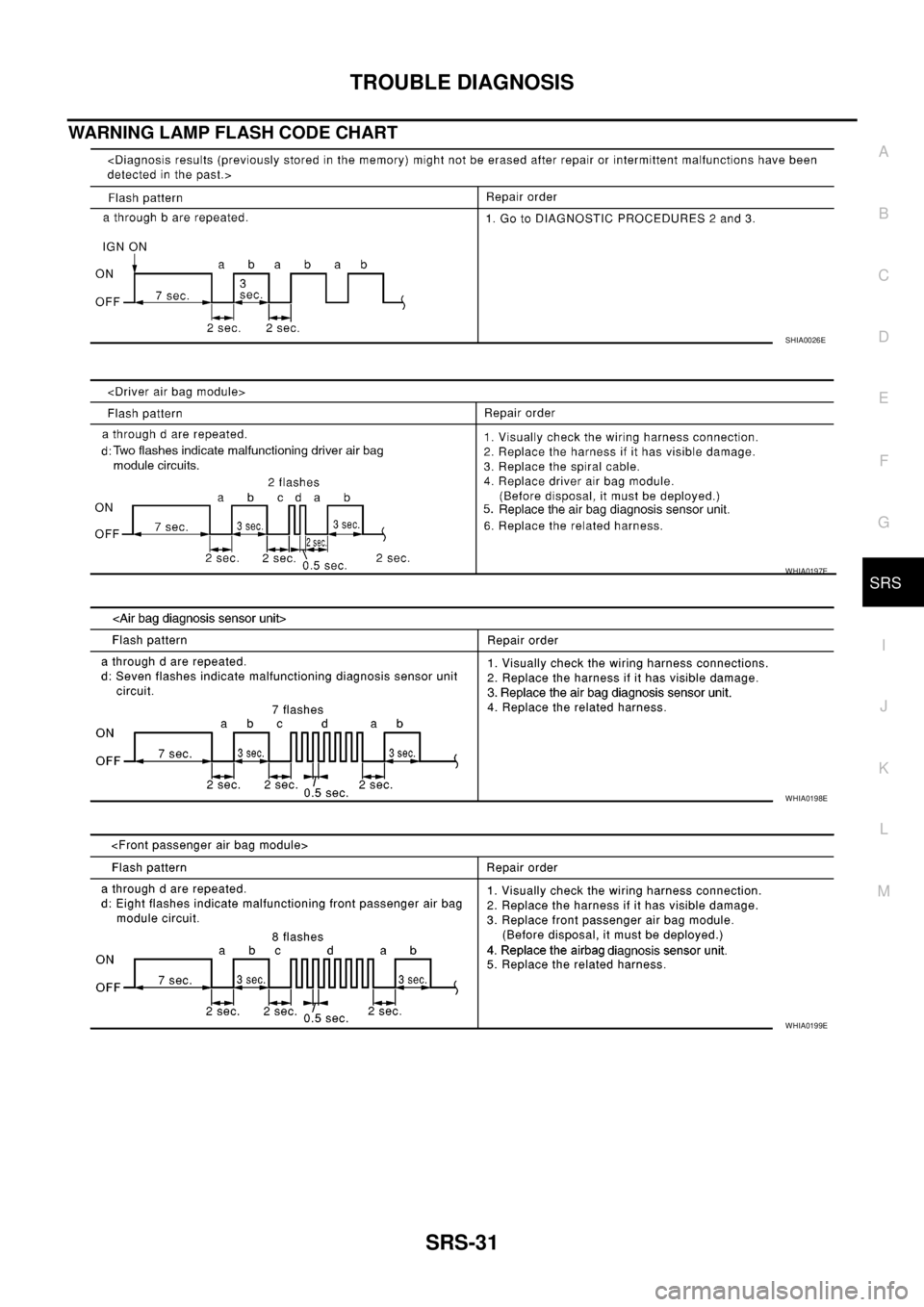
WARNING LAMP FLASH CODE CHART
SHIA0026E
WHIA0197E
WHIA0198E
WHIA0199E
Page 2943 of 3171
SRS-34
TROUBLE DIAGNOSIS
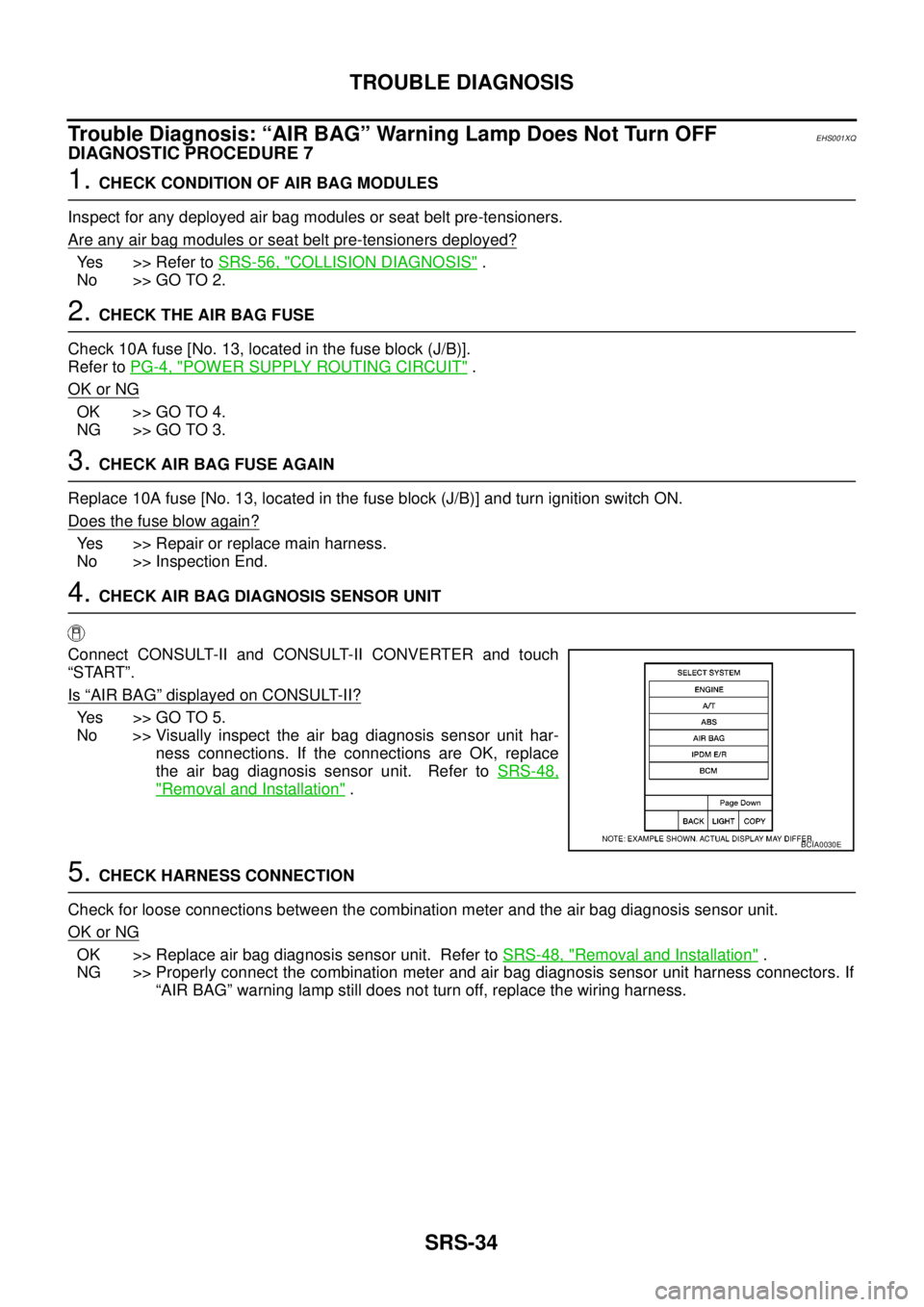
Trouble Diagnosis: “AIR BAG” Warning Lamp Does Not Turn OFF
EHS001XQ
DIAGNOSTIC PROCEDURE 7
1.CHECK CONDITION OF AIR BAG MODULES
Inspect for any deployed air bag modules or seat belt pre-tensioners.
Are any air bag modules or seat belt pre-tensioners deployed?
Yes >> Refer toSRS-56, "COLLISION DIAGNOSIS".
No >> GO TO 2.
2.CHECK THE AIR BAG FUSE
Check 10A fuse [No. 13, located in the fuse block (J/B)].
Refer toPG-4, "
POWER SUPPLY ROUTING CIRCUIT".
OK or NG
OK >> GO TO 4.
NG >> GO TO 3.
3.CHECK AIR BAG FUSE AGAIN
Replace 10A fuse [No. 13, located in the fuse block (J/B)] and turn ignition switch ON.
Does the fuse blow again?
Yes >> Repair or replace main harness.
No >> Inspection End.
4.CHECK AIR BAG DIAGNOSIS SENSOR UNIT
Connect CONSULT-II and CONSULT-II CONVERTER and touch
“START”.
Is
“AIR BAG”displayed on CONSULT-II?
Yes >>GOTO5.
No >> Visually inspect the air bag diagnosis sensor unit har-
ness connections. If the connections are OK, replace
the air bag diagnosis sensor unit. Refer toSRS-48,
"Removal and Installation".
5.CHECK HARNESS CONNECTION
Check for loose connections between the combination meter and the air bag diagnosis sensor unit.
OK or NG
OK >> Replace air bag diagnosis sensor unit. Refer toSRS-48, "Removal and Installation".
NG >> Properly connect the combination meter and air bag diagnosis sensor unit harness connectors. If
“AIR BAG” warning lamp still does not turn off, replace the wiring harness.
BCIA0030E
Page 2944 of 3171
TROUBLE DIAGNOSIS
SRS-35
C
D
E
F
G
I
J
K
L
MA
B
SRS
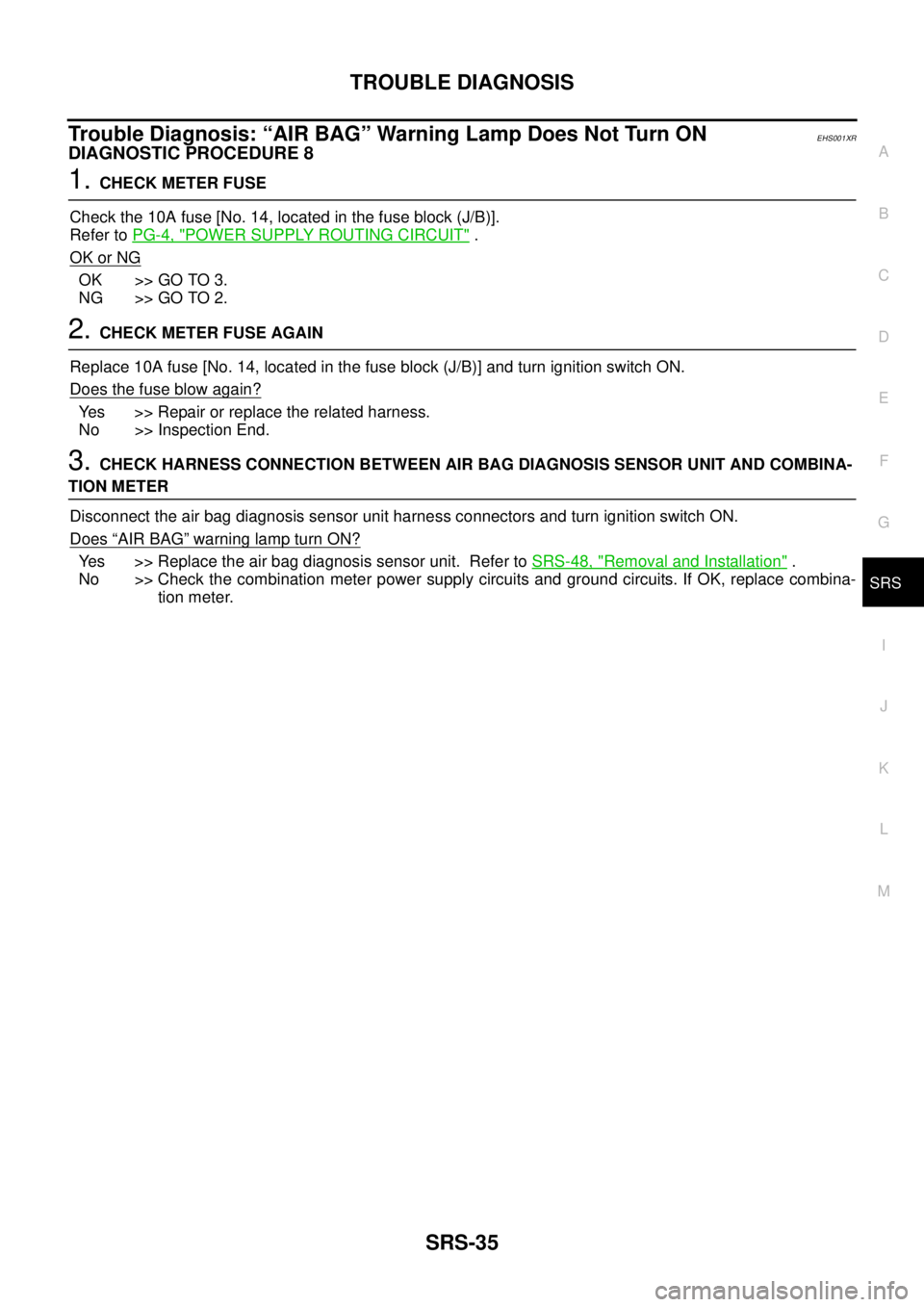
Trouble Diagnosis: “AIR BAG” Warning Lamp Does Not Turn ONEHS001XR
DIAGNOSTIC PROCEDURE 8
1.CHECK METER FUSE
Check the 10A fuse [No. 14, located in the fuse block (J/B)].
Refer toPG-4, "
POWER SUPPLY ROUTING CIRCUIT".
OK or NG
OK >> GO TO 3.
NG >> GO TO 2.
2.CHECK METER FUSE AGAIN
Replace 10A fuse [No. 14, located in the fuse block (J/B)] and turn ignition switch ON.
Does the fuse blow again?
Yes >> Repair or replace the related harness.
No >> Inspection End.
3.CHECK HARNESS CONNECTION BETWEEN AIR BAG DIAGNOSIS SENSOR UNIT AND COMBINA-
TION METER
Disconnect the air bag diagnosis sensor unit harness connectors and turn ignition switch ON.
Does
“AIR BAG”warninglampturnON?
Yes >> Replace the air bag diagnosis sensor unit. Refer toSRS-48, "Removal and Installation".
No >> Check the combination meter power supply circuits and ground circuits. If OK, replace combina-
tion meter.
Page 2952 of 3171
FRONT SIDE AIR BAG MODULE
SRS-43
C
D
E
F
G
I
J
K
L
MA
B
SRS
FRONT SIDE AIR BAG MODULEPFP:K8EH0
Removal and InstallationEHS001XV
REMOVAL
WARNING:
Removal of front side air bag module should only be done to allow deployment of front side air bag
module prior to disposal of seatback assembly.
Only complete seatback assemblies can be replaced. Refer toSE-26, "
SEATBACK (POWER AND MAN-
UAL SEAT)"andSE-27, "SEATBACK (FRAT FOLD SEAT)".
CAUTION:
lBefore servicing the SRS, turn the ignition switch off, disconnect both battery cables and wait at
least 3 minutes.
lWhen servicing the SRS, do not work from directly in front of air bag module.
1. Remove the front seat. Refer toSE-23, "
REMOVAL".
2. Remove the seatback trim and pad. Refer toSE-26, "
SEATBACK (POWER AND MANUAL SEAT)"and
SE-27, "
SEATBACK (FRAT FOLD SEAT)".
3. Remove the seatback rear finisher and remove the retainers securing the seat cushion trim. Refer toSE-
24, "SEAT CUSHION (POWER SEAT)"andSE-25, "SEAT CUSHION (MANUAL SEAT)".
4. Remove air bag module harness clips.
5. Remove the fasteners from the front side air bag module and remove the front side air bag module.
CAUTION:
lWhen using a clip removal tool to remove the seatback
board, take care not to damage the harness for front side air
bag module.
lWhen servicing the SRS, do not work from directly in front
of air bag module.
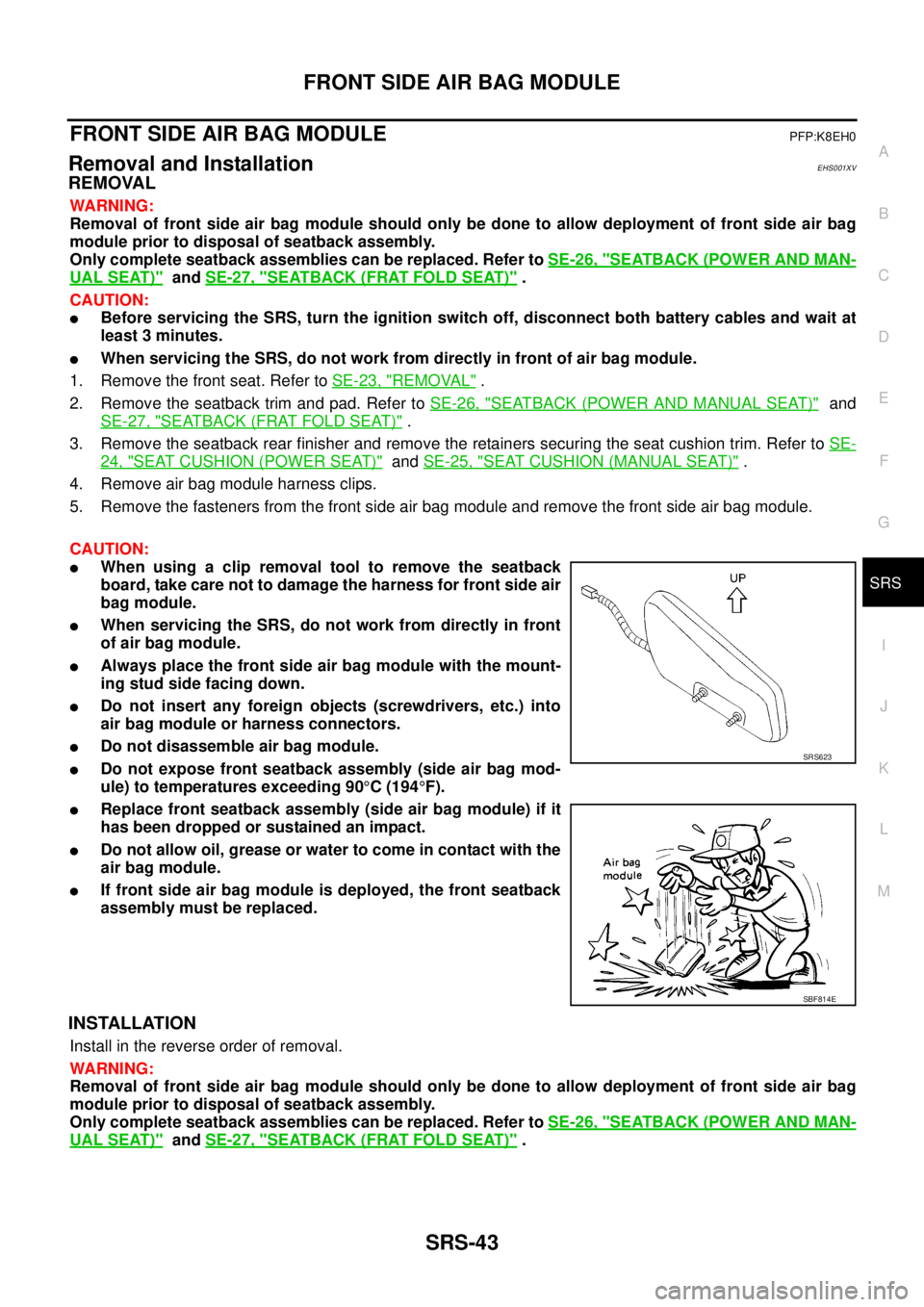
lAlways place the front side air bag module with the mount-
ing stud side facing down.
lDo not insert any foreign objects (screwdrivers, etc.) into
air bag module or harness connectors.
lDo not disassemble air bag module.
lDo not expose front seatback assembly (side air bag mod-
ule) to temperatures exceeding 90°C(194°F).
lReplace front seatback assembly (side air bag module) if it
has been dropped or sustained an impact.
lDo not allow oil, grease or water to come in contact with the
air bag module.
lIf front side air bag module is deployed, the front seatback
assembly must be replaced.
INSTALLATION
Install in the reverse order of removal.
WARNING:
Removal of front side air bag module should only be done to allow deployment of front side air bag
module prior to disposal of seatback assembly.
Only complete seatback assemblies can be replaced. Refer toSE-26, "
SEATBACK (POWER AND MAN-
UAL SEAT)"andSE-27, "SEATBACK (FRAT FOLD SEAT)".
SRS623
SBF814E
Page 2966 of 3171
COLLISION DIAGNOSIS
SRS-57
C
D
E
F
G
I
J
K
L
MA
B
SRS
lAfter the work is completed, perform self-diagnosis to check that no malfunction is detected. Refer to
SRS-18, "
SRS Operation Check".
WHEN SRS IS ACTIVATED IN THE SIDE COLLISION
1. Replace the following components:
–Front seat back assembly (on the side on which side air bag is activated)
–Diagnosis sensor unit
–(LH or RH) side air bag (satellite) sensor (on the side on which side air bag is activated)
2. Check the SRS components and the related parts using the following table.
–Replace any SRS components and the related parts showing visible signs of damage (dents, cracks,
deformation).
3. Conduct self-diagnosis using CONSULT-II and “AIR BAG” warning lamp. Refer toSRS-18, "
SRS Opera-
tion Check"for details. Ensure entire SRS operates properly.
WHENSRSISNOTACTIVATEDINTHESIDECOLLISION
1. Check the SRS components and the related parts using the following table.
–If the front seat back assembly is damaged, the front seat back assembly must be replaced.
2. Conduct self-diagnosis using CONSULT-II and “AIR BAG” warning lamp. Refer toSRS-18, "
SRS Opera-
tion Check"for details. Ensure entire SRS operates properly.
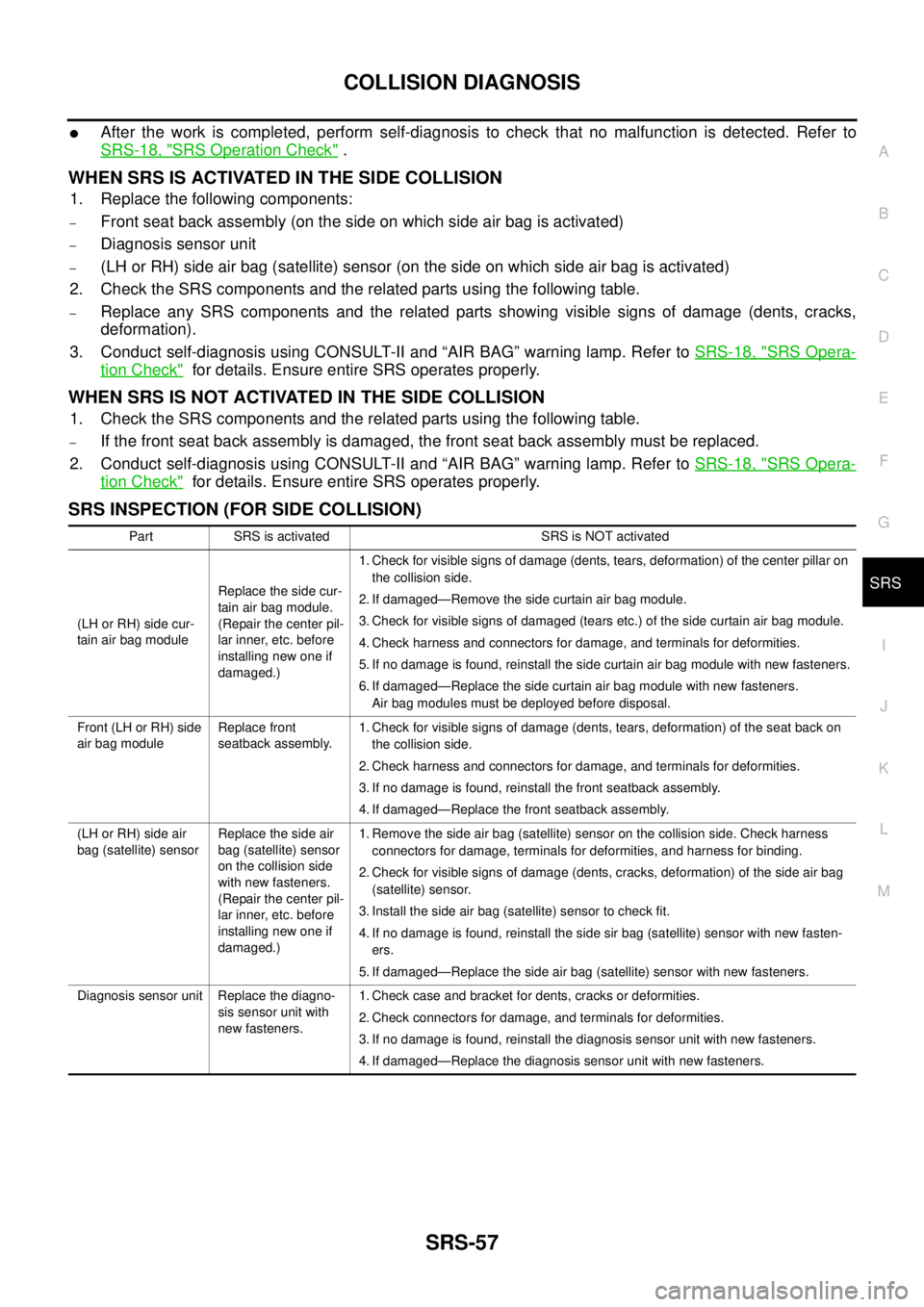
SRS INSPECTION (FOR SIDE COLLISION)
Part SRS is activated SRS is NOT activated
(LH or RH) side cur-
tain air bag moduleReplace the side cur-
tain air bag module.
(Repair the center pil-
lar inner, etc. before
installing new one if
damaged.)1. Check for visible signs of damage (dents, tears, deformation) of the center pillar on
the collision side.
2. If damaged—Remove the side curtain air bag module.
3. Check for visible signs of damaged (tears etc.) of the side curtain air bag module.
4. Check harness and connectors for damage, and terminals for deformities.
5. If no damage is found, reinstall the side curtain air bag module with new fasteners.
6. If damaged—Replace the side curtain air bag module with new fasteners.
Air bag modules must be deployed before disposal.
Front (LH or RH) side
air bag moduleReplace front
seatback assembly.1. Check for visible signs of damage (dents, tears, deformation) of the seat back on
the collision side.
2. Check harness and connectors for damage, and terminals for deformities.
3. If no damage is found, reinstall the front seatback assembly.
4. If damaged—Replace the front seatback assembly.
(LH or RH) side air
bag (satellite) sensorReplace the side air
bag (satellite) sensor
on the collision side
with new fasteners.
(Repair the center pil-
lar inner, etc. before
installing new one if
damaged.)1. Remove the side air bag (satellite) sensor on the collision side. Check harness
connectors for damage, terminals for deformities, and harness for binding.
2. Check for visible signs of damage (dents, cracks, deformation) of the side air bag
(satellite) sensor.
3. Install the side air bag (satellite) sensor to check fit.
4. If no damage is found, reinstall the side sir bag (satellite) sensor with new fasten-
ers.
5. If damaged—Replace the side air bag (satellite) sensor with new fasteners.
Diagnosis sensor unit Replace the diagno-
sis sensor unit with
new fasteners.1. Check case and bracket for dents, cracks or deformities.
2. Check connectors for damage, and terminals for deformities.
3. If no damage is found, reinstall the diagnosis sensor unit with new fasteners.
4. If damaged—Replace the diagnosis sensor unit with new fasteners.