Page 2535 of 3502
POWER WINDOW SYSTEM
GW-41
C
D
E
F
G
H
J
K
L
MA
B
GW
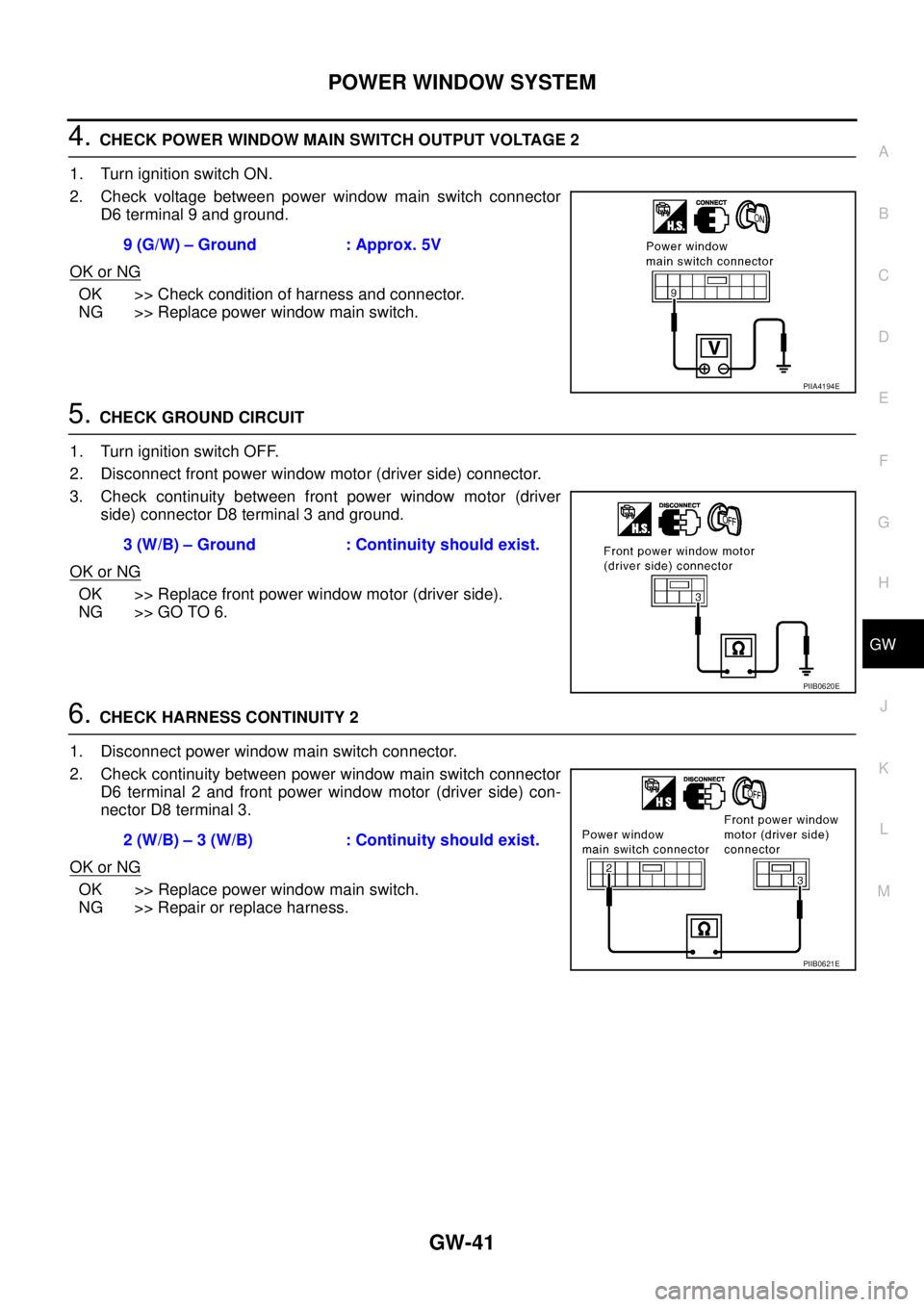
4. CHECK POWER WINDOW MAIN SWITCH OUTPUT VOLTAGE 2
1. Turn ignition switch ON.
2. Check voltage between power window main switch connector
D6 terminal 9 and ground.
OK or NG
OK >> Check condition of harness and connector.
NG >> Replace power window main switch.
5. CHECK GROUND CIRCUIT
1. Turn ignition switch OFF.
2. Disconnect front power window motor (driver side) connector.
3. Check continuity between front power window motor (driver
side) connector D8 terminal 3 and ground.
OK or NG
OK >> Replace front power window motor (driver side).
NG >> GO TO 6.
6. CHECK HARNESS CONTINUITY 2
1. Disconnect power window main switch connector.
2. Check continuity between power window main switch connector
D6 terminal 2 and front power window motor (driver side) con-
nector D8 terminal 3.
OK or NG
OK >> Replace power window main switch.
NG >> Repair or replace harness.9 (G/W) – Ground : Approx. 5V
PIIA4194E
3 (W/B) – Ground : Continuity should exist.
PIIB0620E
2 (W/B) – 3 (W/B) : Continuity should exist.
PIIB0621E
Page 2536 of 3502
GW-42
POWER WINDOW SYSTEM
Check Encoder Circuit (Driver Side) BIS000ZM
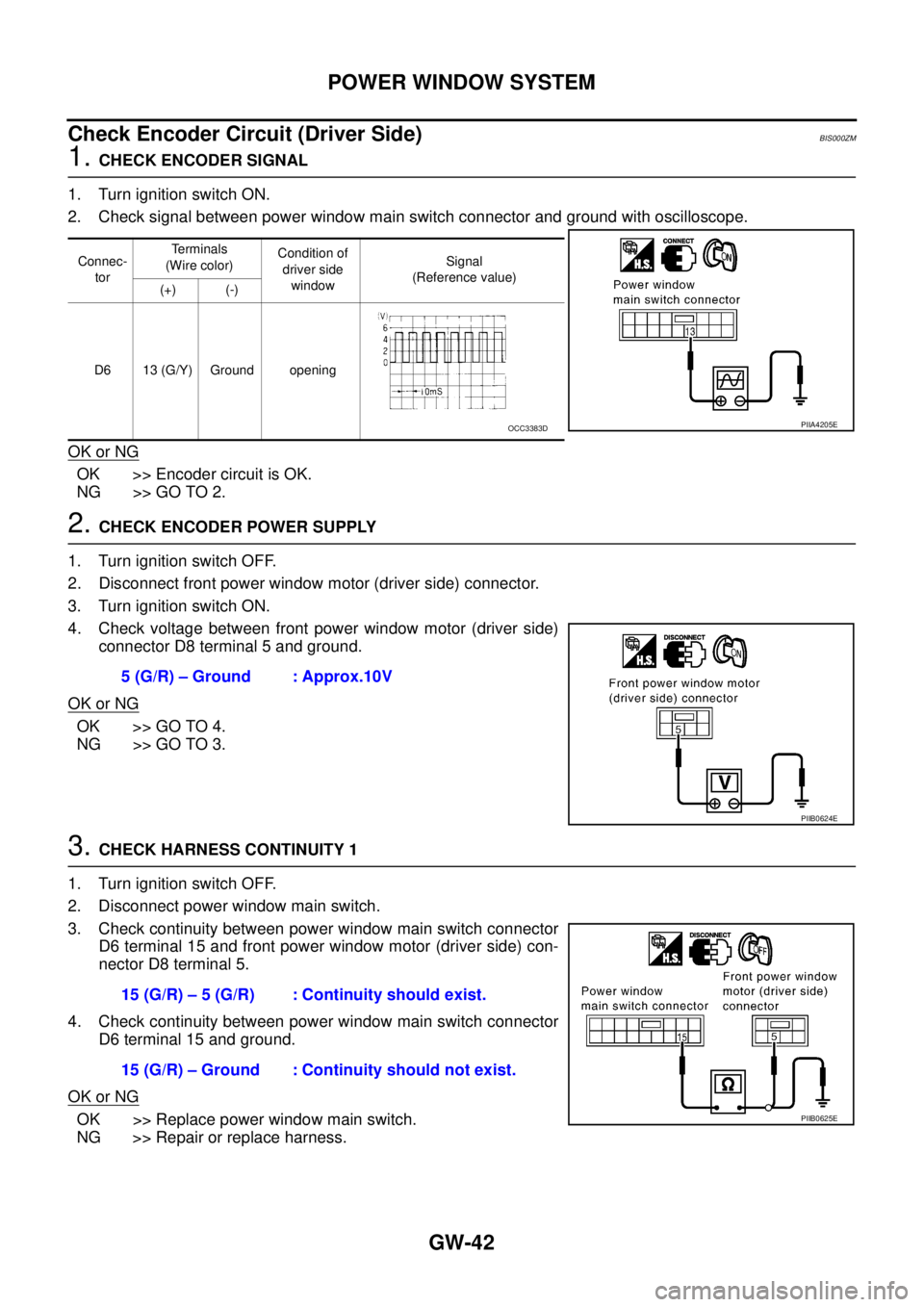
1. CHECK ENCODER SIGNAL
1. Turn ignition switch ON.
2. Check signal between power window main switch connector and ground with oscilloscope.
OK or NG
OK >> Encoder circuit is OK.
NG >> GO TO 2.
2. CHECK ENCODER POWER SUPPLY
1. Turn ignition switch OFF.
2. Disconnect front power window motor (driver side) connector.
3. Turn ignition switch ON.
4. Check voltage between front power window motor (driver side)
connector D8 terminal 5 and ground.
OK or NG
OK >> GO TO 4.
NG >> GO TO 3.
3. CHECK HARNESS CONTINUITY 1
1. Turn ignition switch OFF.
2. Disconnect power window main switch.
3. Check continuity between power window main switch connector
D6 terminal 15 and front power window motor (driver side) con-
nector D8 terminal 5.
4. Check continuity between power window main switch connector
D6 terminal 15 and ground.
OK or NG
OK >> Replace power window main switch.
NG >> Repair or replace harness.
Connec-
torTerminals
(Wire color)Condition of
driver side
windowSignal
(Reference value)
(+) (-)
D6 13 (G/Y) Ground opening
PIIA4205EOCC3383D
5 (G/R) – Ground : Approx.10V
PIIB0624E
15 (G/R) – 5 (G/R) : Continuity should exist.
15 (G/R) – Ground : Continuity should not exist.
PIIB0625E
Page 2537 of 3502
POWER WINDOW SYSTEM
GW-43
C
D
E
F
G
H
J
K
L
MA
B
GW
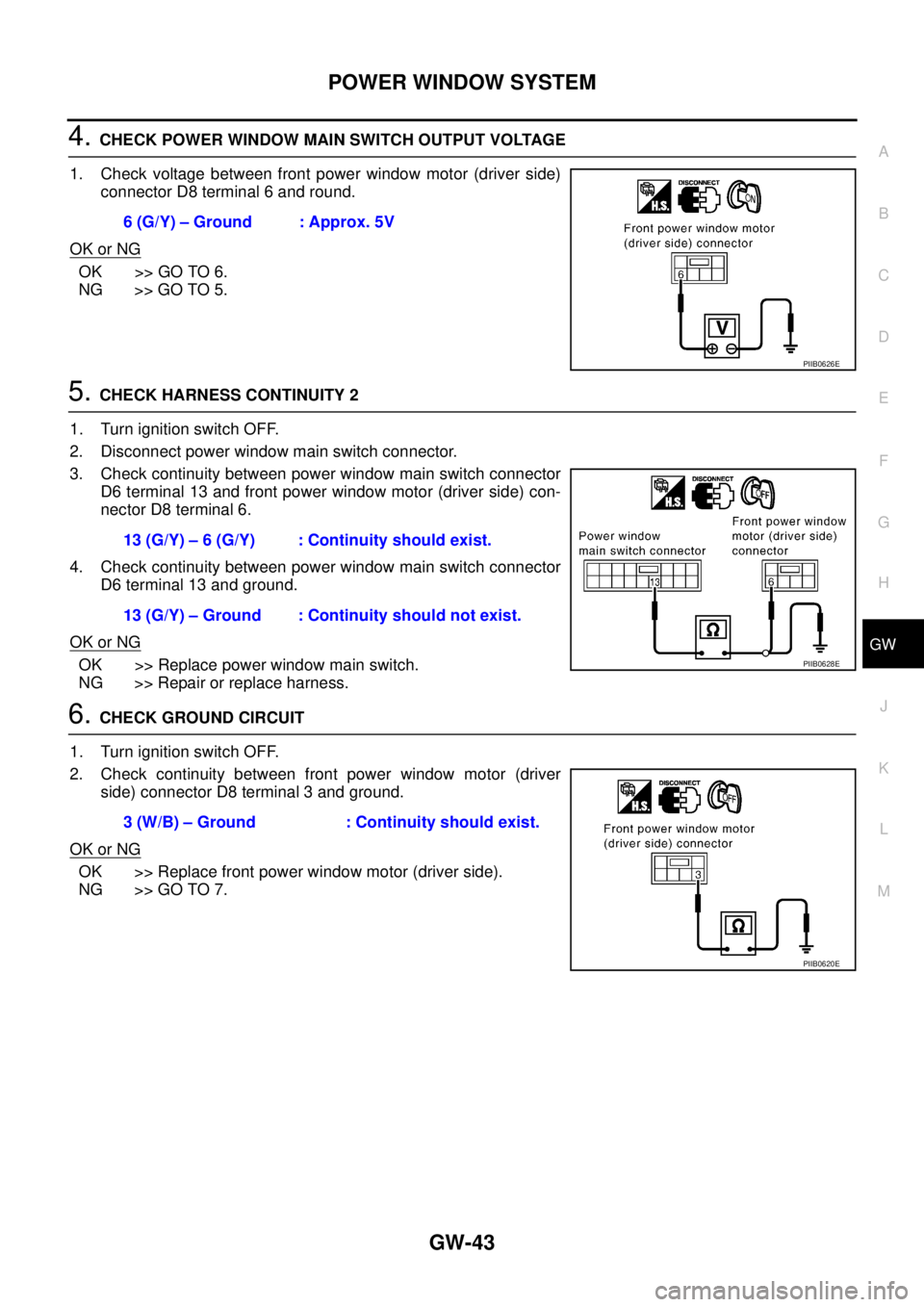
4. CHECK POWER WINDOW MAIN SWITCH OUTPUT VOLTAGE
1. Check voltage between front power window motor (driver side)
connector D8 terminal 6 and round.
OK or NG
OK >> GO TO 6.
NG >> GO TO 5.
5. CHECK HARNESS CONTINUITY 2
1. Turn ignition switch OFF.
2. Disconnect power window main switch connector.
3. Check continuity between power window main switch connector
D6 terminal 13 and front power window motor (driver side) con-
nector D8 terminal 6.
4. Check continuity between power window main switch connector
D6 terminal 13 and ground.
OK or NG
OK >> Replace power window main switch.
NG >> Repair or replace harness.
6. CHECK GROUND CIRCUIT
1. Turn ignition switch OFF.
2. Check continuity between front power window motor (driver
side) connector D8 terminal 3 and ground.
OK or NG
OK >> Replace front power window motor (driver side).
NG >> GO TO 7.6 (G/Y) – Ground : Approx. 5V
PIIB0626E
13 (G/Y) – 6 (G/Y) : Continuity should exist.
13 (G/Y) – Ground : Continuity should not exist.
PIIB0628E
3 (W/B) – Ground : Continuity should exist.
PIIB0620E
Page 2538 of 3502
GW-44
POWER WINDOW SYSTEM
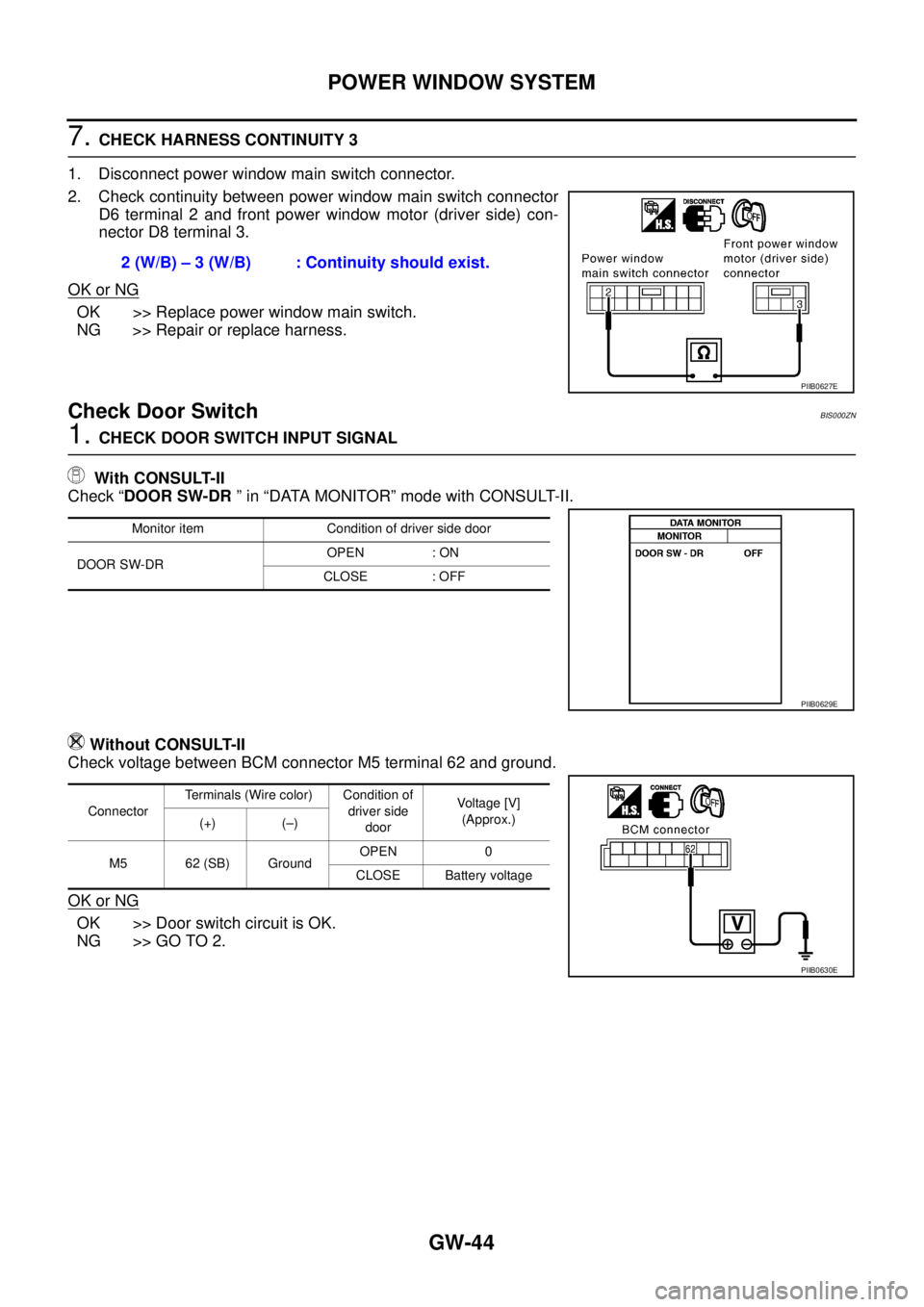
7. CHECK HARNESS CONTINUITY 3
1. Disconnect power window main switch connector.
2. Check continuity between power window main switch connector
D6 terminal 2 and front power window motor (driver side) con-
nector D8 terminal 3.
OK or NG
OK >> Replace power window main switch.
NG >> Repair or replace harness.
Check Door Switch BIS000ZN
1. CHECK DOOR SWITCH INPUT SIGNAL
With CONSULT-II
Check “DOOR SW-DR ” in “DATA MONITOR” mode with CONSULT-II.
Without CONSULT-II
Check voltage between BCM connector M5 terminal 62 and ground.
OK or NG
OK >> Door switch circuit is OK.
NG >> GO TO 2.2 (W/B) – 3 (W/B) : Continuity should exist.
PIIB0627E
Monitor item Condition of driver side door
DOOR SW-DROPEN : ON
CLOSE : OFF
PIIB0629E
ConnectorTerminals (Wire color) Condition of
driver side
doorVoltage [V]
(Approx.)
(+) (–)
M5 62 (SB) GroundOPEN 0
CLOSE Battery voltage
PIIB0630E
Page 2539 of 3502
POWER WINDOW SYSTEM
GW-45
C
D
E
F
G
H
J
K
L
MA
B
GW
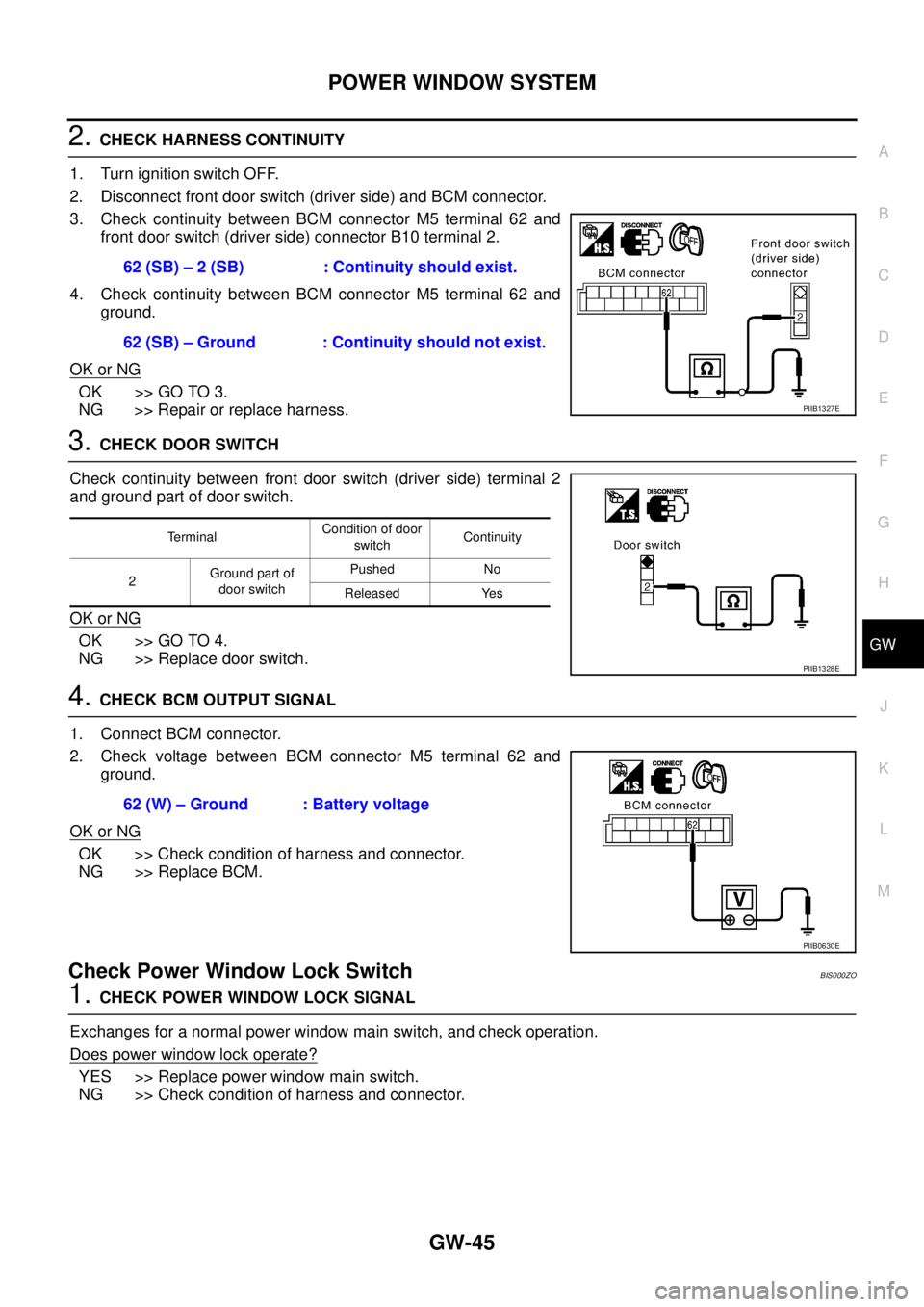
2. CHECK HARNESS CONTINUITY
1. Turn ignition switch OFF.
2. Disconnect front door switch (driver side) and BCM connector.
3. Check continuity between BCM connector M5 terminal 62 and
front door switch (driver side) connector B10 terminal 2.
4. Check continuity between BCM connector M5 terminal 62 and
ground.
OK or NG
OK >> GO TO 3.
NG >> Repair or replace harness.
3. CHECK DOOR SWITCH
Check continuity between front door switch (driver side) terminal 2
and ground part of door switch.
OK or NG
OK >> GO TO 4.
NG >> Replace door switch.
4. CHECK BCM OUTPUT SIGNAL
1. Connect BCM connector.
2. Check voltage between BCM connector M5 terminal 62 and
ground.
OK or NG
OK >> Check condition of harness and connector.
NG >> Replace BCM.
Check Power Window Lock Switch BIS000ZO
1. CHECK POWER WINDOW LOCK SIGNAL
Exchanges for a normal power window main switch, and check operation.
Does power window lock operate?
YES >> Replace power window main switch.
NG >> Check condition of harness and connector.62 (SB) – 2 (SB) : Continuity should exist.
62 (SB) – Ground : Continuity should not exist.
PIIB1327E
TerminalCondition of door
switchContinuity
2Ground part of
door switchPushed No
Released Yes
PIIB1328E
62 (W) – Ground : Battery voltage
PIIB0630E
Page 2540 of 3502
GW-46
FRONT DOOR GLASS AND REGULATOR
FRONT DOOR GLASS AND REGULATORPFP:80300
Removal and InstallationBIS000ZP
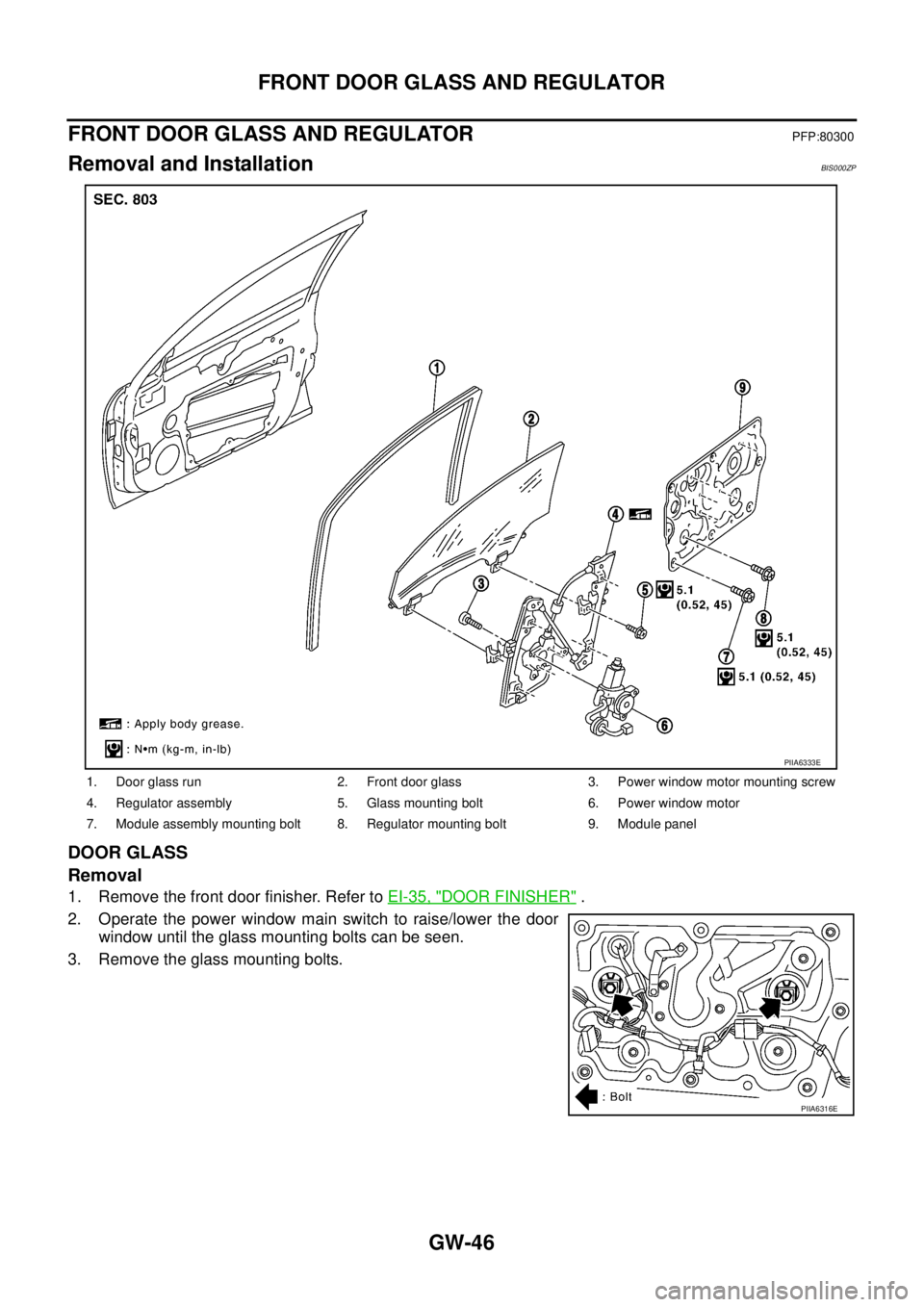
DOOR GLASS
Removal
1. Remove the front door finisher. Refer to EI-35, "DOOR FINISHER" .
2. Operate the power window main switch to raise/lower the door
window until the glass mounting bolts can be seen.
3. Remove the glass mounting bolts.
1. Door glass run 2. Front door glass 3. Power window motor mounting screw
4. Regulator assembly 5. Glass mounting bolt 6. Power window motor
7. Module assembly mounting bolt 8. Regulator mounting bolt 9. Module panel
PIIA6333E
PIIA6316E
Page 2541 of 3502
FRONT DOOR GLASS AND REGULATOR
GW-47
C
D
E
F
G
H
J
K
L
MA
B
GW
4. While holding the door window, raise it at the rear end to pull the
glass out of the sash toward the outside of the door.
Installation
Install in the reverse order of removal.
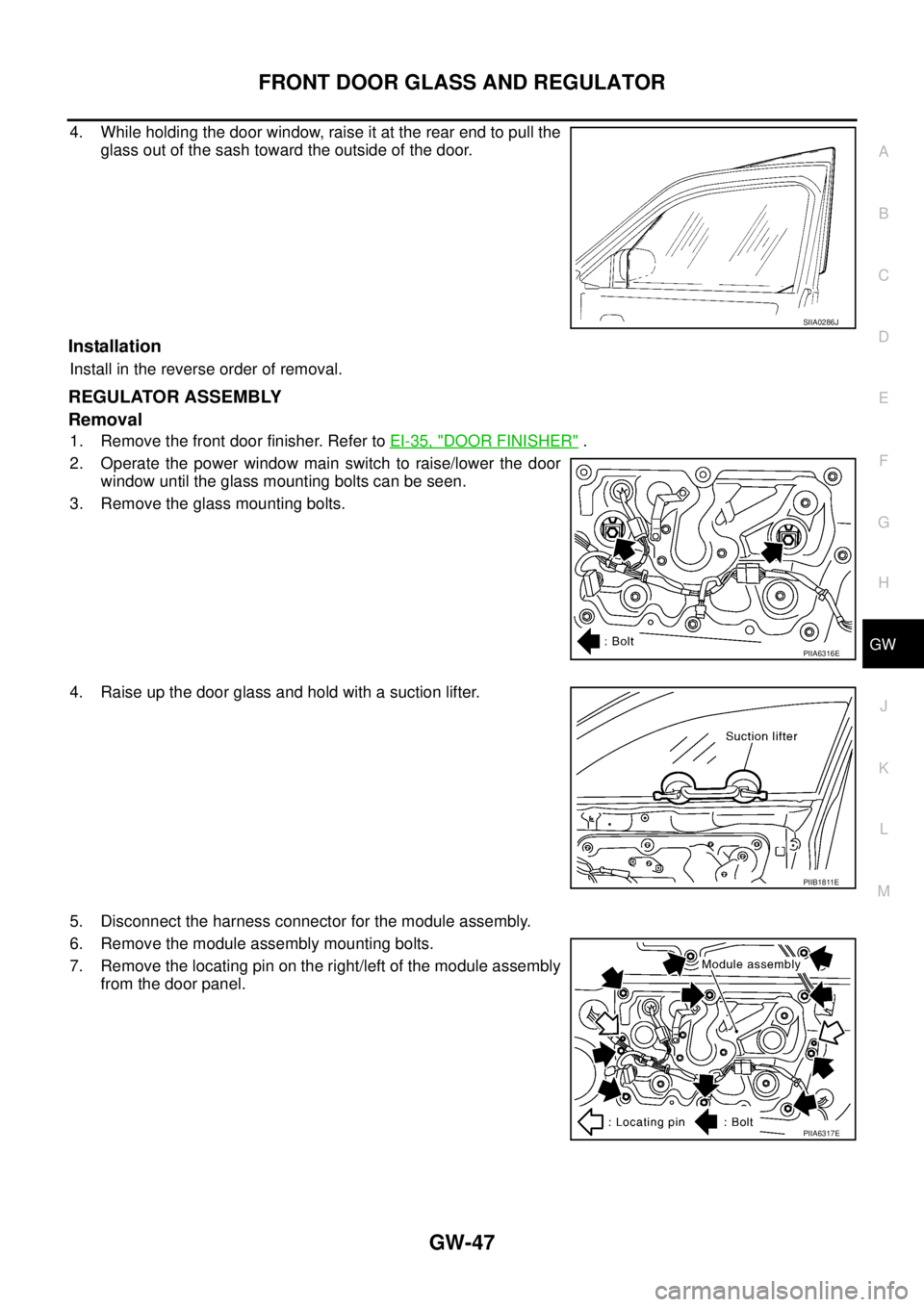
REGULATOR ASSEMBLY
Removal
1. Remove the front door finisher. Refer to EI-35, "DOOR FINISHER" .
2. Operate the power window main switch to raise/lower the door
window until the glass mounting bolts can be seen.
3. Remove the glass mounting bolts.
4. Raise up the door glass and hold with a suction lifter.
5. Disconnect the harness connector for the module assembly.
6. Remove the module assembly mounting bolts.
7. Remove the locating pin on the right/left of the module assembly
from the door panel.
SIIA0286J
PIIA6316E
PIIB1811E
PIIA6317E
Page 2542 of 3502
GW-48
FRONT DOOR GLASS AND REGULATOR
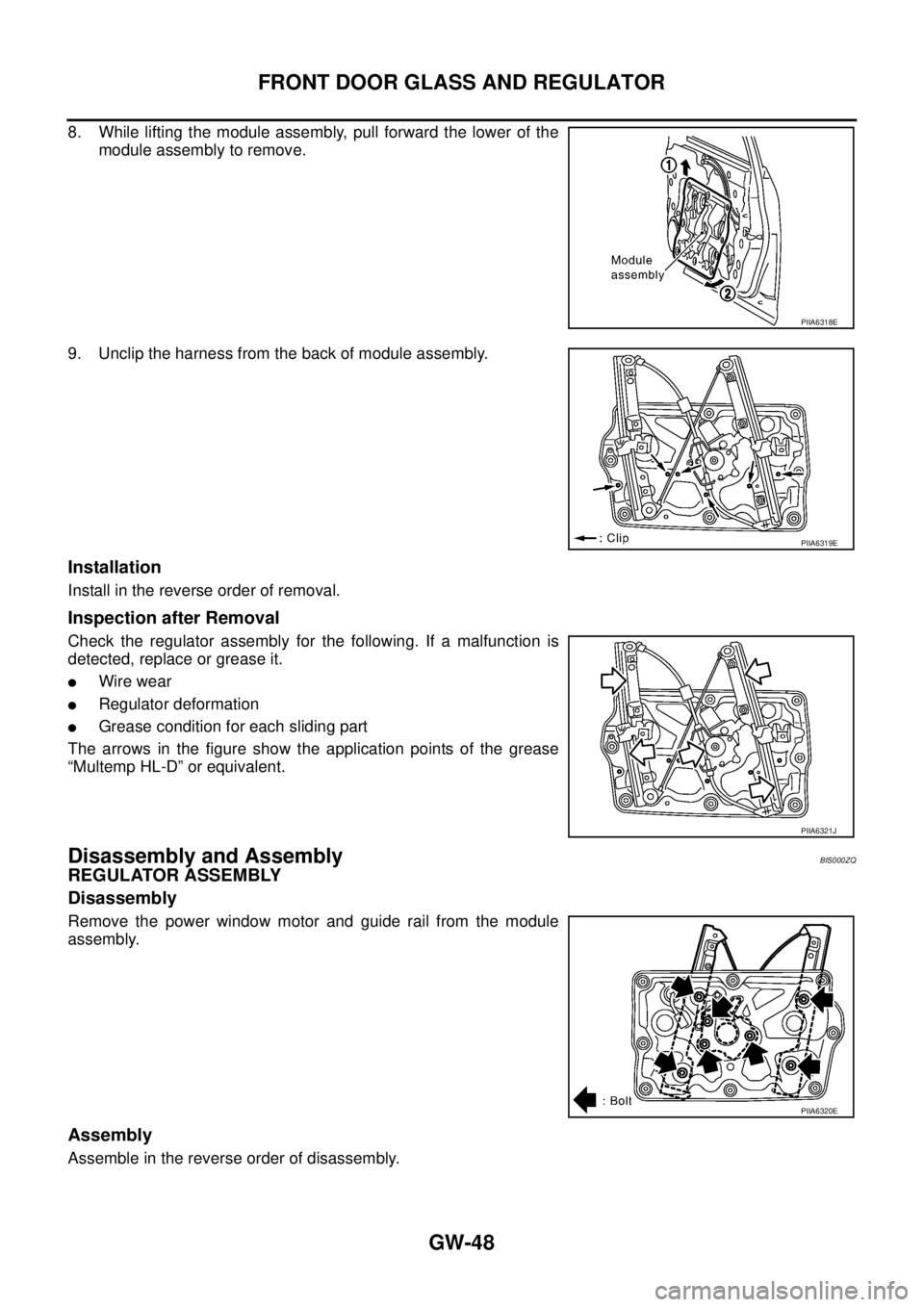
8. While lifting the module assembly, pull forward the lower of the
module assembly to remove.
9. Unclip the harness from the back of module assembly.
Installation
Install in the reverse order of removal.
Inspection after Removal
Check the regulator assembly for the following. If a malfunction is
detected, replace or grease it.
�Wire wear
�Regulator deformation
�Grease condition for each sliding part
The arrows in the figure show the application points of the grease
“Multemp HL-D” or equivalent.
Disassembly and AssemblyBIS000ZQ
REGULATOR ASSEMBLY
Disassembly
Remove the power window motor and guide rail from the module
assembly.
Assembly
Assemble in the reverse order of disassembly.
PIIA6318E
PIIA6319E
PIIA6321J
PIIA6320E