2003 NISSAN TEANA Power
[x] Cancel search: PowerPage 2527 of 3502
POWER WINDOW SYSTEM
GW-33
C
D
E
F
G
H
J
K
L
MA
B
GW
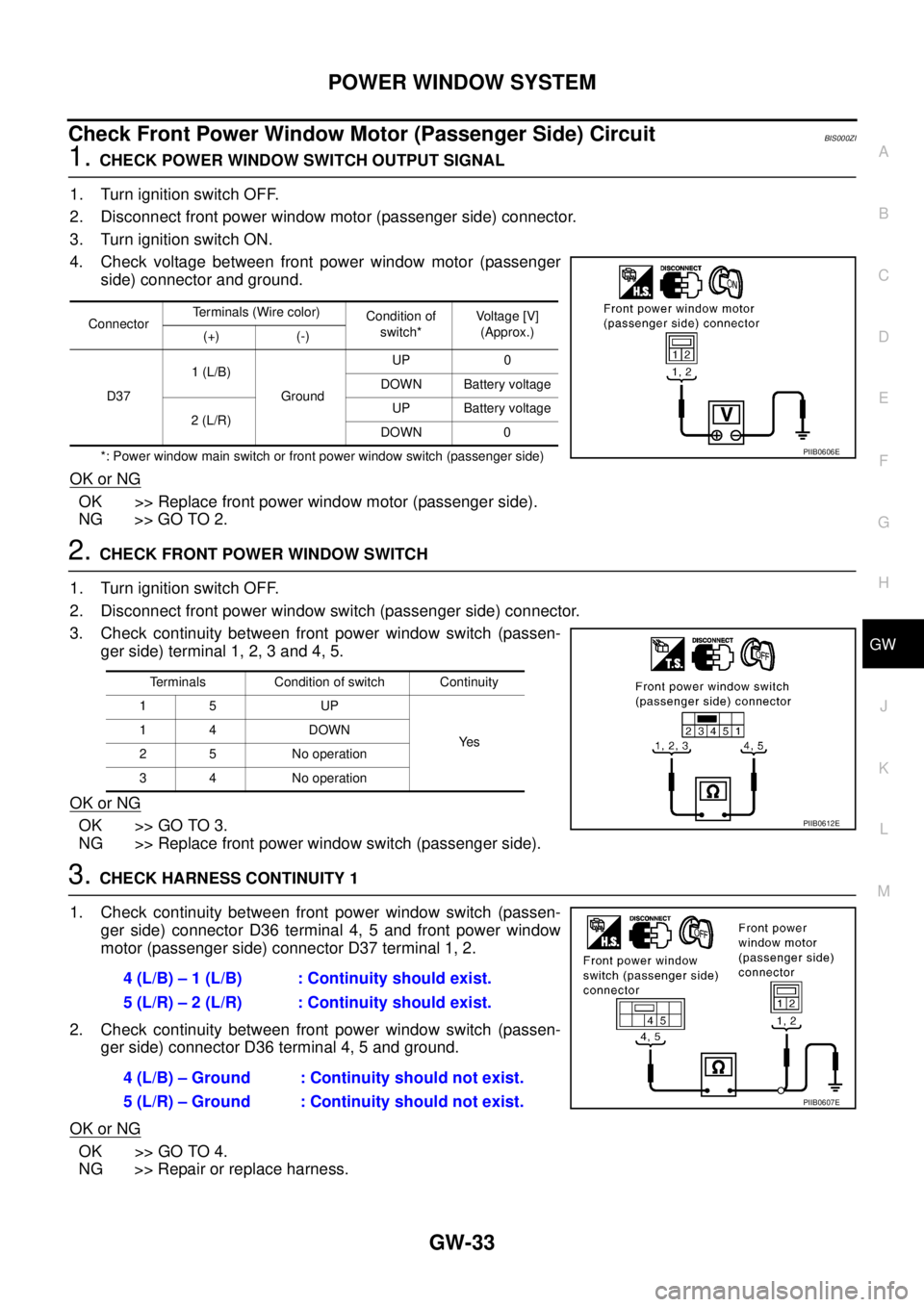
Check Front Power Window Motor (Passenger Side) Circuit BIS000ZI
1. CHECK POWER WINDOW SWITCH OUTPUT SIGNAL
1. Turn ignition switch OFF.
2. Disconnect front power window motor (passenger side) connector.
3. Turn ignition switch ON.
4. Check voltage between front power window motor (passenger
side) connector and ground.
*: Power window main switch or front power window switch (passenger side)
OK or NG
OK >> Replace front power window motor (passenger side).
NG >> GO TO 2.
2. CHECK FRONT POWER WINDOW SWITCH
1. Turn ignition switch OFF.
2. Disconnect front power window switch (passenger side) connector.
3. Check continuity between front power window switch (passen-
ger side) terminal 1, 2, 3 and 4, 5.
OK or NG
OK >> GO TO 3.
NG >> Replace front power window switch (passenger side).
3. CHECK HARNESS CONTINUITY 1
1. Check continuity between front power window switch (passen-
ger side) connector D36 terminal 4, 5 and front power window
motor (passenger side) connector D37 terminal 1, 2.
2. Check continuity between front power window switch (passen-
ger side) connector D36 terminal 4, 5 and ground.
OK or NG
OK >> GO TO 4.
NG >> Repair or replace harness.
ConnectorTerminals (Wire color)
Condition of
switch*Voltage [V]
(Approx.)
(+) (-)
D371 (L/B)
GroundUP 0
DOWN Battery voltage
2 (L/R)UP Battery voltage
DOWN 0
PIIB0606E
Terminals Condition of switch Continuity
15 UP
Ye s 14 DOWN
2 5 No operation
3 4 No operation
PIIB0612E
4 (L/B) – 1 (L/B) : Continuity should exist.
5 (L/R) – 2 (L/R) : Continuity should exist.
4 (L/B) – Ground : Continuity should not exist.
5 (L/R) – Ground : Continuity should not exist.
PIIB0607E
Page 2528 of 3502
GW-34
POWER WINDOW SYSTEM
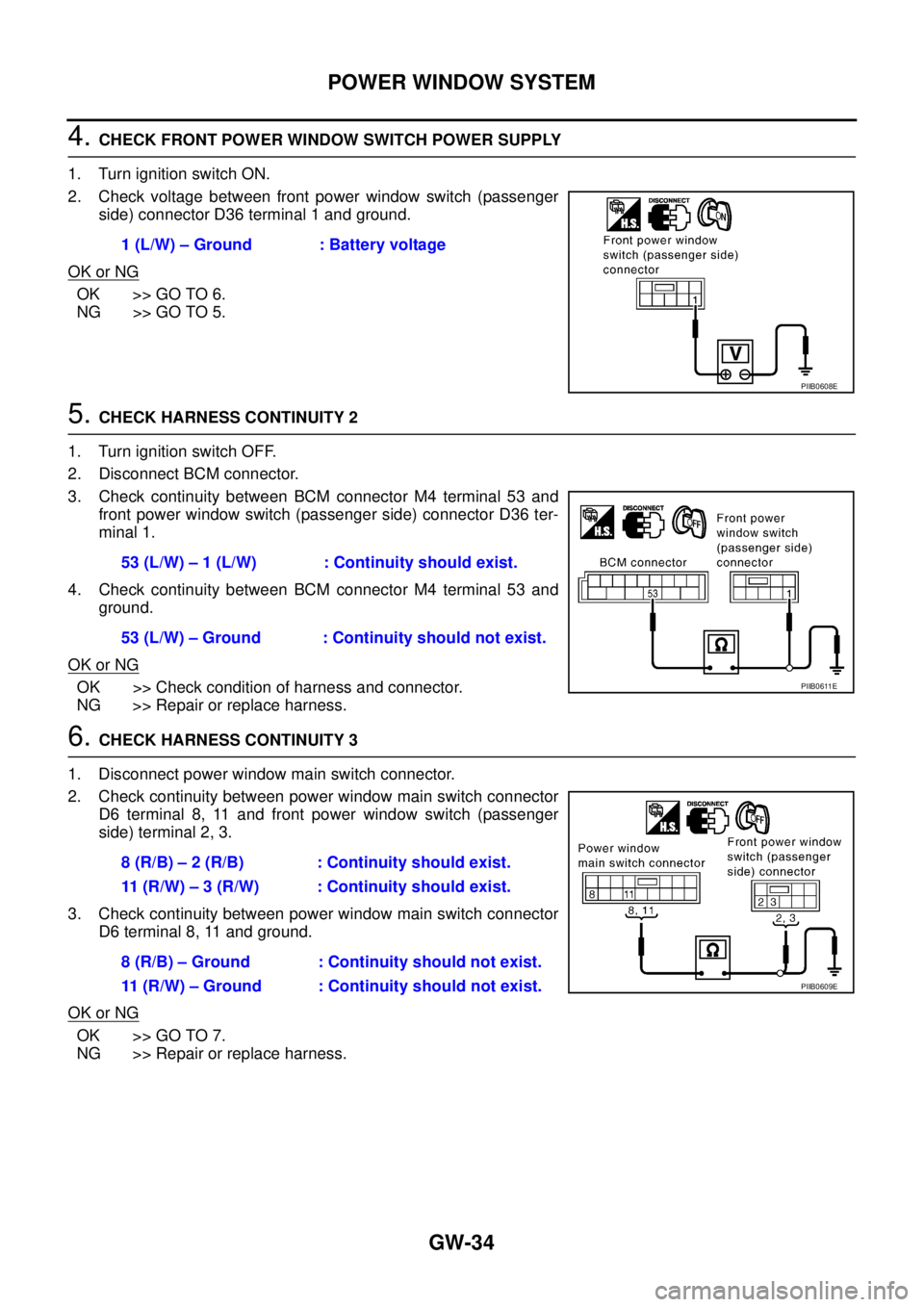
4. CHECK FRONT POWER WINDOW SWITCH POWER SUPPLY
1. Turn ignition switch ON.
2. Check voltage between front power window switch (passenger
side) connector D36 terminal 1 and ground.
OK or NG
OK >> GO TO 6.
NG >> GO TO 5.
5. CHECK HARNESS CONTINUITY 2
1. Turn ignition switch OFF.
2. Disconnect BCM connector.
3. Check continuity between BCM connector M4 terminal 53 and
front power window switch (passenger side) connector D36 ter-
minal 1.
4. Check continuity between BCM connector M4 terminal 53 and
ground.
OK or NG
OK >> Check condition of harness and connector.
NG >> Repair or replace harness.
6. CHECK HARNESS CONTINUITY 3
1. Disconnect power window main switch connector.
2. Check continuity between power window main switch connector
D6 terminal 8, 11 and front power window switch (passenger
side) terminal 2, 3.
3. Check continuity between power window main switch connector
D6 terminal 8, 11 and ground.
OK or NG
OK >> GO TO 7.
NG >> Repair or replace harness.1 (L/W) – Ground : Battery voltage
PIIB0608E
53 (L/W) – 1 (L/W) : Continuity should exist.
53 (L/W) – Ground : Continuity should not exist.
PIIB0611E
8 (R/B) – 2 (R/B) : Continuity should exist.
11 (R/W) – 3 (R/W) : Continuity should exist.
8 (R/B) – Ground : Continuity should not exist.
11 (R/W) – Ground : Continuity should not exist.
PIIB0609E
Page 2529 of 3502
POWER WINDOW SYSTEM
GW-35
C
D
E
F
G
H
J
K
L
MA
B
GW
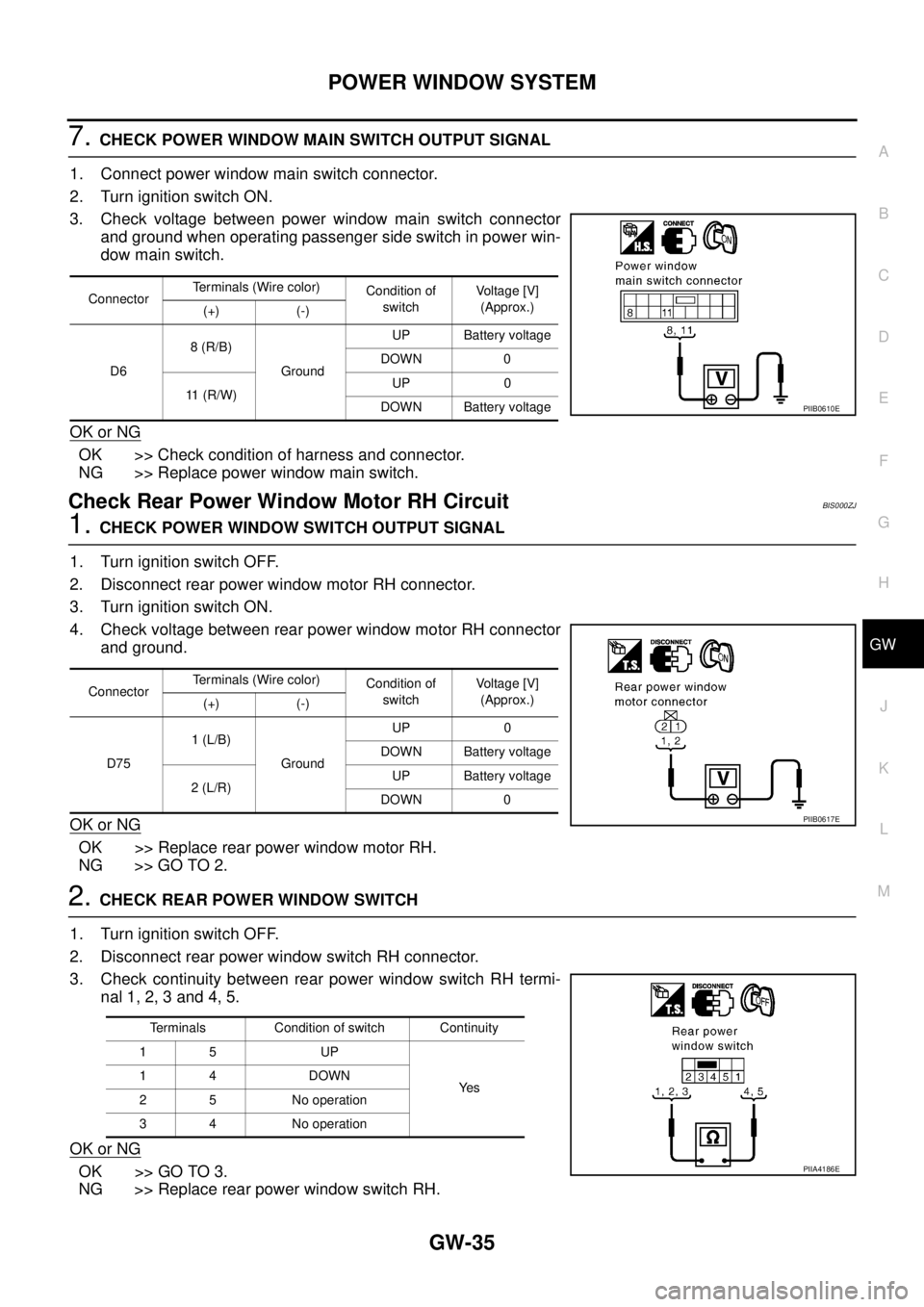
7. CHECK POWER WINDOW MAIN SWITCH OUTPUT SIGNAL
1. Connect power window main switch connector.
2. Turn ignition switch ON.
3. Check voltage between power window main switch connector
and ground when operating passenger side switch in power win-
dow main switch.
OK or NG
OK >> Check condition of harness and connector.
NG >> Replace power window main switch.
Check Rear Power Window Motor RH Circuit BIS000ZJ
1. CHECK POWER WINDOW SWITCH OUTPUT SIGNAL
1. Turn ignition switch OFF.
2. Disconnect rear power window motor RH connector.
3. Turn ignition switch ON.
4. Check voltage between rear power window motor RH connector
and ground.
OK or NG
OK >> Replace rear power window motor RH.
NG >> GO TO 2.
2. CHECK REAR POWER WINDOW SWITCH
1. Turn ignition switch OFF.
2. Disconnect rear power window switch RH connector.
3. Check continuity between rear power window switch RH termi-
nal 1, 2, 3 and 4, 5.
OK or NG
OK >> GO TO 3.
NG >> Replace rear power window switch RH.
ConnectorTerminals (Wire color)
Condition of
switchVoltage [V]
(Approx.)
(+) (-)
D68 (R/B)
GroundUP Battery voltage
DOWN 0
11 (R/W)UP 0
DOWN Battery voltage
PIIB0610E
ConnectorTerminals (Wire color)
Condition of
switchVoltage [V]
(Approx.)
(+) (-)
D751 (L/B)
GroundUP 0
DOWN Battery voltage
2 (L/R)UP Battery voltage
DOWN 0
PIIB0617E
Terminals Condition of switch Continuity
15 UP
Ye s 14 DOWN
2 5 No operation
3 4 No operation
PIIA4186E
Page 2530 of 3502
GW-36
POWER WINDOW SYSTEM
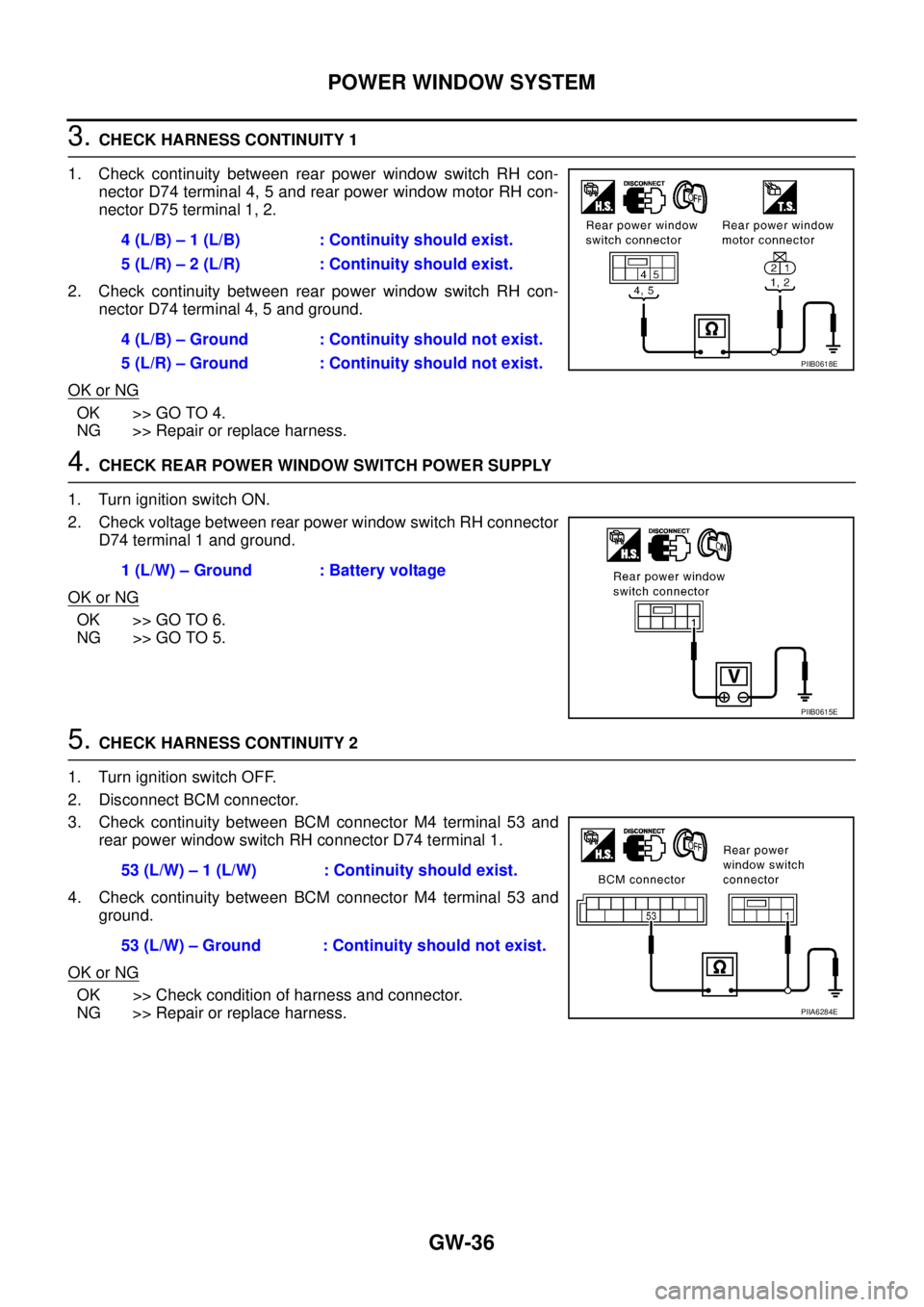
3. CHECK HARNESS CONTINUITY 1
1. Check continuity between rear power window switch RH con-
nector D74 terminal 4, 5 and rear power window motor RH con-
nector D75 terminal 1, 2.
2. Check continuity between rear power window switch RH con-
nector D74 terminal 4, 5 and ground.
OK or NG
OK >> GO TO 4.
NG >> Repair or replace harness.
4. CHECK REAR POWER WINDOW SWITCH POWER SUPPLY
1. Turn ignition switch ON.
2. Check voltage between rear power window switch RH connector
D74 terminal 1 and ground.
OK or NG
OK >> GO TO 6.
NG >> GO TO 5.
5. CHECK HARNESS CONTINUITY 2
1. Turn ignition switch OFF.
2. Disconnect BCM connector.
3. Check continuity between BCM connector M4 terminal 53 and
rear power window switch RH connector D74 terminal 1.
4. Check continuity between BCM connector M4 terminal 53 and
ground.
OK or NG
OK >> Check condition of harness and connector.
NG >> Repair or replace harness.4 (L/B) – 1 (L/B) : Continuity should exist.
5 (L/R) – 2 (L/R) : Continuity should exist.
4 (L/B) – Ground : Continuity should not exist.
5 (L/R) – Ground : Continuity should not exist.
PIIB0618E
1 (L/W) – Ground : Battery voltage
PIIB0615E
53 (L/W) – 1 (L/W) : Continuity should exist.
53 (L/W) – Ground : Continuity should not exist.
PIIA6284E
Page 2531 of 3502
POWER WINDOW SYSTEM
GW-37
C
D
E
F
G
H
J
K
L
MA
B
GW
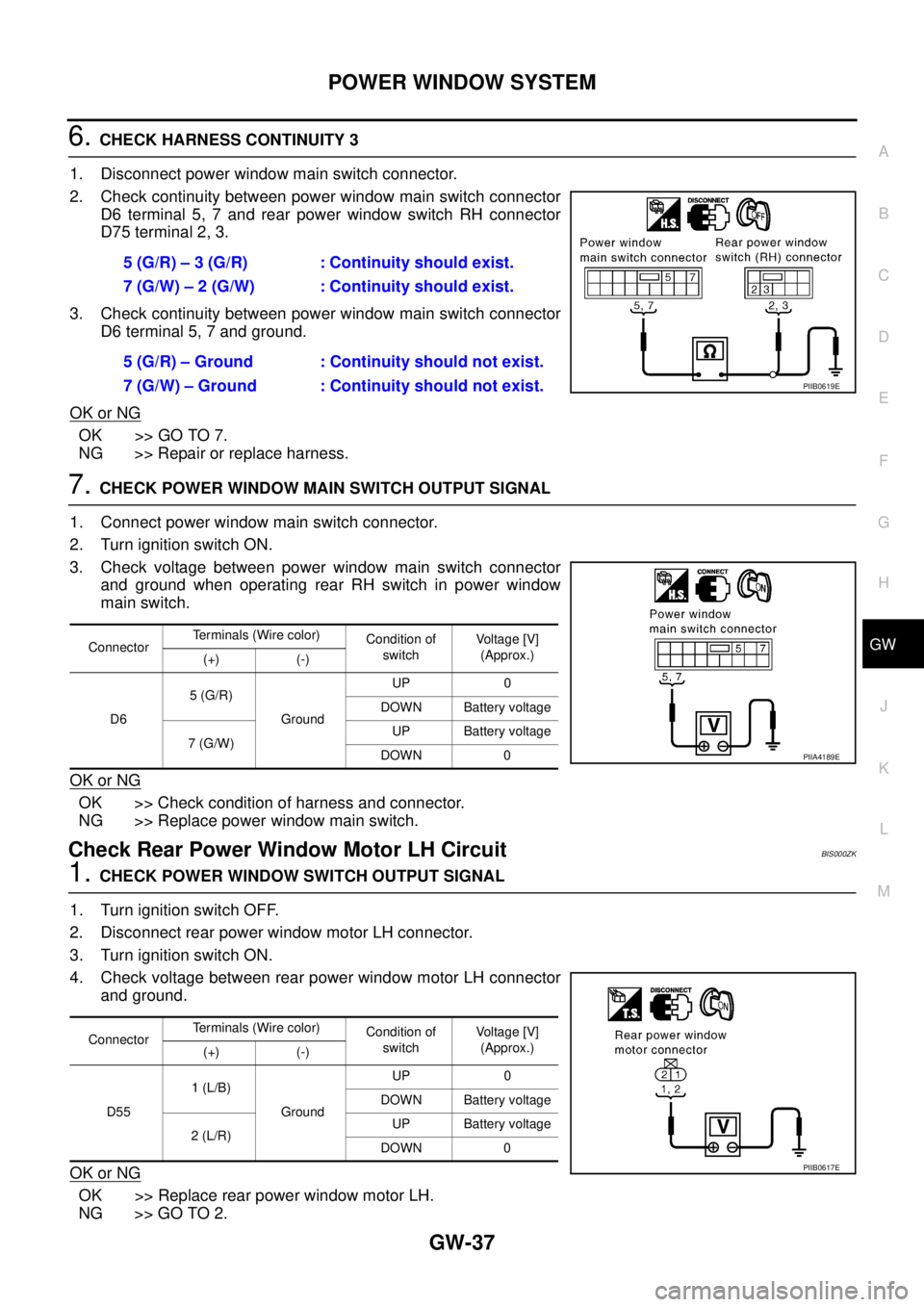
6. CHECK HARNESS CONTINUITY 3
1. Disconnect power window main switch connector.
2. Check continuity between power window main switch connector
D6 terminal 5, 7 and rear power window switch RH connector
D75 terminal 2, 3.
3. Check continuity between power window main switch connector
D6 terminal 5, 7 and ground.
OK or NG
OK >> GO TO 7.
NG >> Repair or replace harness.
7. CHECK POWER WINDOW MAIN SWITCH OUTPUT SIGNAL
1. Connect power window main switch connector.
2. Turn ignition switch ON.
3. Check voltage between power window main switch connector
and ground when operating rear RH switch in power window
main switch.
OK or NG
OK >> Check condition of harness and connector.
NG >> Replace power window main switch.
Check Rear Power Window Motor LH Circuit BIS000ZK
1. CHECK POWER WINDOW SWITCH OUTPUT SIGNAL
1. Turn ignition switch OFF.
2. Disconnect rear power window motor LH connector.
3. Turn ignition switch ON.
4. Check voltage between rear power window motor LH connector
and ground.
OK or NG
OK >> Replace rear power window motor LH.
NG >> GO TO 2.5 (G/R) – 3 (G/R) : Continuity should exist.
7 (G/W) – 2 (G/W) : Continuity should exist.
5 (G/R) – Ground : Continuity should not exist.
7 (G/W) – Ground : Continuity should not exist.
PIIB0619E
ConnectorTerminals (Wire color)
Condition of
switchVoltage [V]
(Approx.)
(+) (-)
D65 (G/R)
GroundUP 0
DOWN Battery voltage
7 (G/W)UP Battery voltage
DOWN 0
PIIA4189E
ConnectorTerminals (Wire color)
Condition of
switchVoltage [V]
(Approx.)
(+) (-)
D551 (L/B)
GroundUP 0
DOWN Battery voltage
2 (L/R)UP Battery voltage
DOWN 0
PIIB0617E
Page 2532 of 3502
GW-38
POWER WINDOW SYSTEM
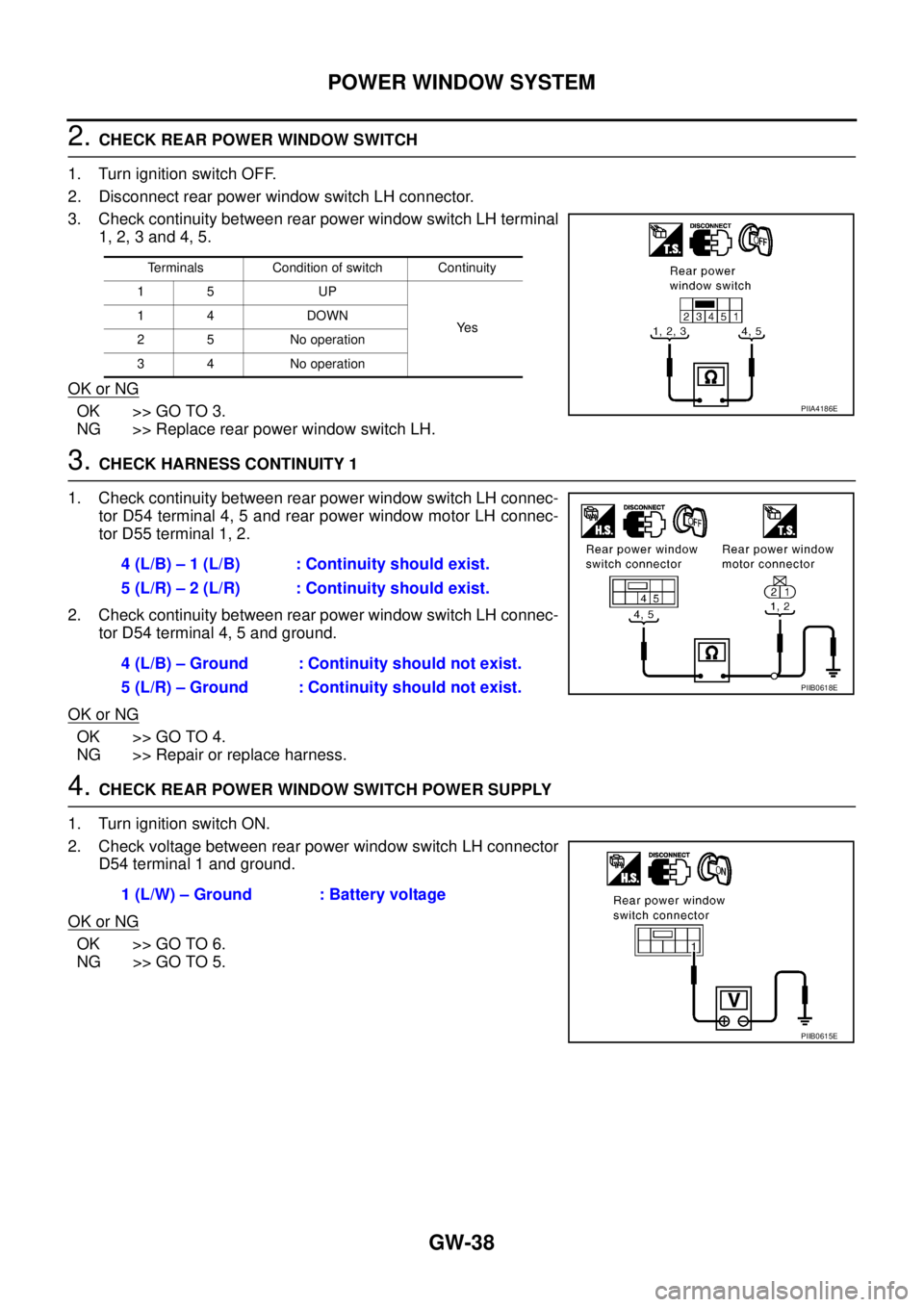
2. CHECK REAR POWER WINDOW SWITCH
1. Turn ignition switch OFF.
2. Disconnect rear power window switch LH connector.
3. Check continuity between rear power window switch LH terminal
1, 2, 3 and 4, 5.
OK or NG
OK >> GO TO 3.
NG >> Replace rear power window switch LH.
3. CHECK HARNESS CONTINUITY 1
1. Check continuity between rear power window switch LH connec-
tor D54 terminal 4, 5 and rear power window motor LH connec-
tor D55 terminal 1, 2.
2. Check continuity between rear power window switch LH connec-
tor D54 terminal 4, 5 and ground.
OK or NG
OK >> GO TO 4.
NG >> Repair or replace harness.
4. CHECK REAR POWER WINDOW SWITCH POWER SUPPLY
1. Turn ignition switch ON.
2. Check voltage between rear power window switch LH connector
D54 terminal 1 and ground.
OK or NG
OK >> GO TO 6.
NG >> GO TO 5.
Terminals Condition of switch Continuity
15 UP
Ye s 14 DOWN
2 5 No operation
3 4 No operation
PIIA4186E
4 (L/B) – 1 (L/B) : Continuity should exist.
5 (L/R) – 2 (L/R) : Continuity should exist.
4 (L/B) – Ground : Continuity should not exist.
5 (L/R) – Ground : Continuity should not exist.
PIIB0618E
1 (L/W) – Ground : Battery voltage
PIIB0615E
Page 2533 of 3502
POWER WINDOW SYSTEM
GW-39
C
D
E
F
G
H
J
K
L
MA
B
GW
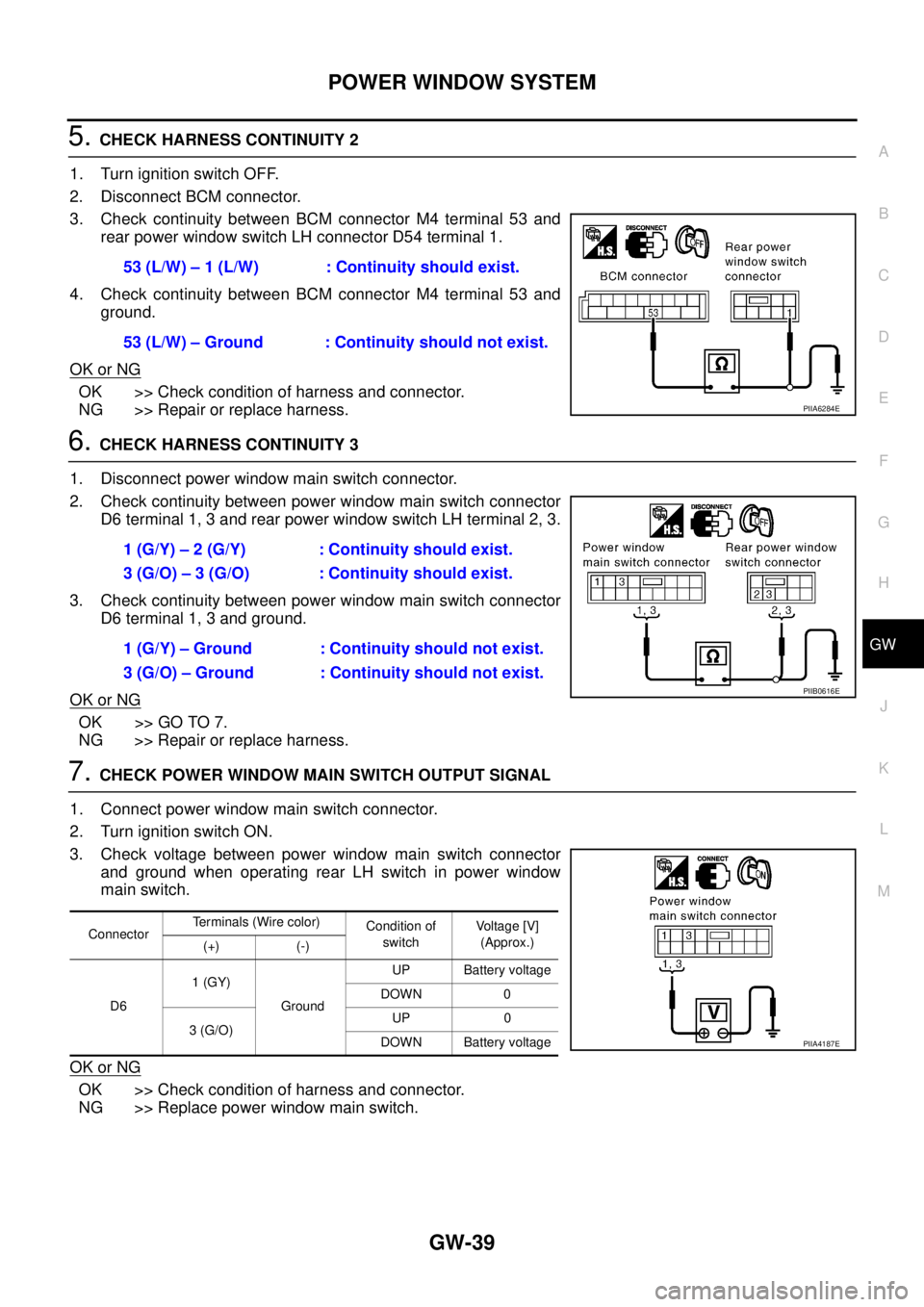
5. CHECK HARNESS CONTINUITY 2
1. Turn ignition switch OFF.
2. Disconnect BCM connector.
3. Check continuity between BCM connector M4 terminal 53 and
rear power window switch LH connector D54 terminal 1.
4. Check continuity between BCM connector M4 terminal 53 and
ground.
OK or NG
OK >> Check condition of harness and connector.
NG >> Repair or replace harness.
6. CHECK HARNESS CONTINUITY 3
1. Disconnect power window main switch connector.
2. Check continuity between power window main switch connector
D6 terminal 1, 3 and rear power window switch LH terminal 2, 3.
3. Check continuity between power window main switch connector
D6 terminal 1, 3 and ground.
OK or NG
OK >> GO TO 7.
NG >> Repair or replace harness.
7. CHECK POWER WINDOW MAIN SWITCH OUTPUT SIGNAL
1. Connect power window main switch connector.
2. Turn ignition switch ON.
3. Check voltage between power window main switch connector
and ground when operating rear LH switch in power window
main switch.
OK or NG
OK >> Check condition of harness and connector.
NG >> Replace power window main switch.53 (L/W) – 1 (L/W) : Continuity should exist.
53 (L/W) – Ground : Continuity should not exist.
PIIA6284E
1 (G/Y) – 2 (G/Y) : Continuity should exist.
3 (G/O) – 3 (G/O) : Continuity should exist.
1 (G/Y) – Ground : Continuity should not exist.
3 (G/O) – Ground : Continuity should not exist.
PIIB0616E
ConnectorTerminals (Wire color)
Condition of
switchVoltage [V]
(Approx.)
(+) (-)
D61 (GY)
GroundUP Battery voltage
DOWN 0
3 (G/O)UP 0
DOWN Battery voltage
PIIA4187E
Page 2534 of 3502
GW-40
POWER WINDOW SYSTEM
Check Limit Switch Circuit (Driver Side)BIS000ZL
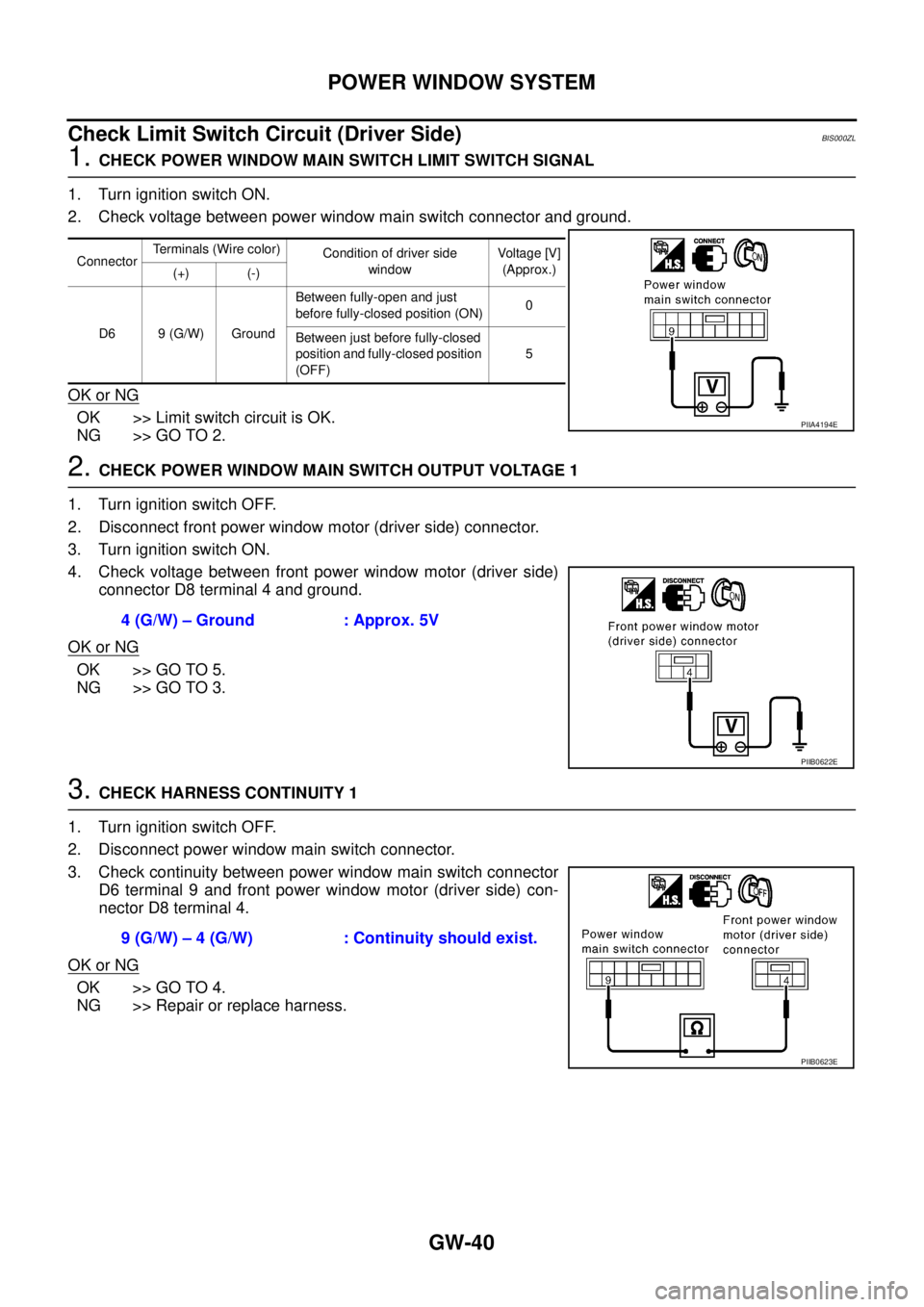
1. CHECK POWER WINDOW MAIN SWITCH LIMIT SWITCH SIGNAL
1. Turn ignition switch ON.
2. Check voltage between power window main switch connector and ground.
OK or NG
OK >> Limit switch circuit is OK.
NG >> GO TO 2.
2. CHECK POWER WINDOW MAIN SWITCH OUTPUT VOLTAGE 1
1. Turn ignition switch OFF.
2. Disconnect front power window motor (driver side) connector.
3. Turn ignition switch ON.
4. Check voltage between front power window motor (driver side)
connector D8 terminal 4 and ground.
OK or NG
OK >> GO TO 5.
NG >> GO TO 3.
3. CHECK HARNESS CONTINUITY 1
1. Turn ignition switch OFF.
2. Disconnect power window main switch connector.
3. Check continuity between power window main switch connector
D6 terminal 9 and front power window motor (driver side) con-
nector D8 terminal 4.
OK or NG
OK >> GO TO 4.
NG >> Repair or replace harness.
ConnectorTerminals (Wire color)
Condition of driver side
windowVoltage [V]
(Approx.)
(+) (-)
D6 9 (G/W) GroundBetween fully-open and just
before fully-closed position (ON)0
Between just before fully-closed
position and fully-closed position
(OFF)5
PIIA4194E
4 (G/W) – Ground : Approx. 5V
PIIB0622E
9 (G/W) – 4 (G/W) : Continuity should exist.
PIIB0623E