Page 2497 of 4323
I28358
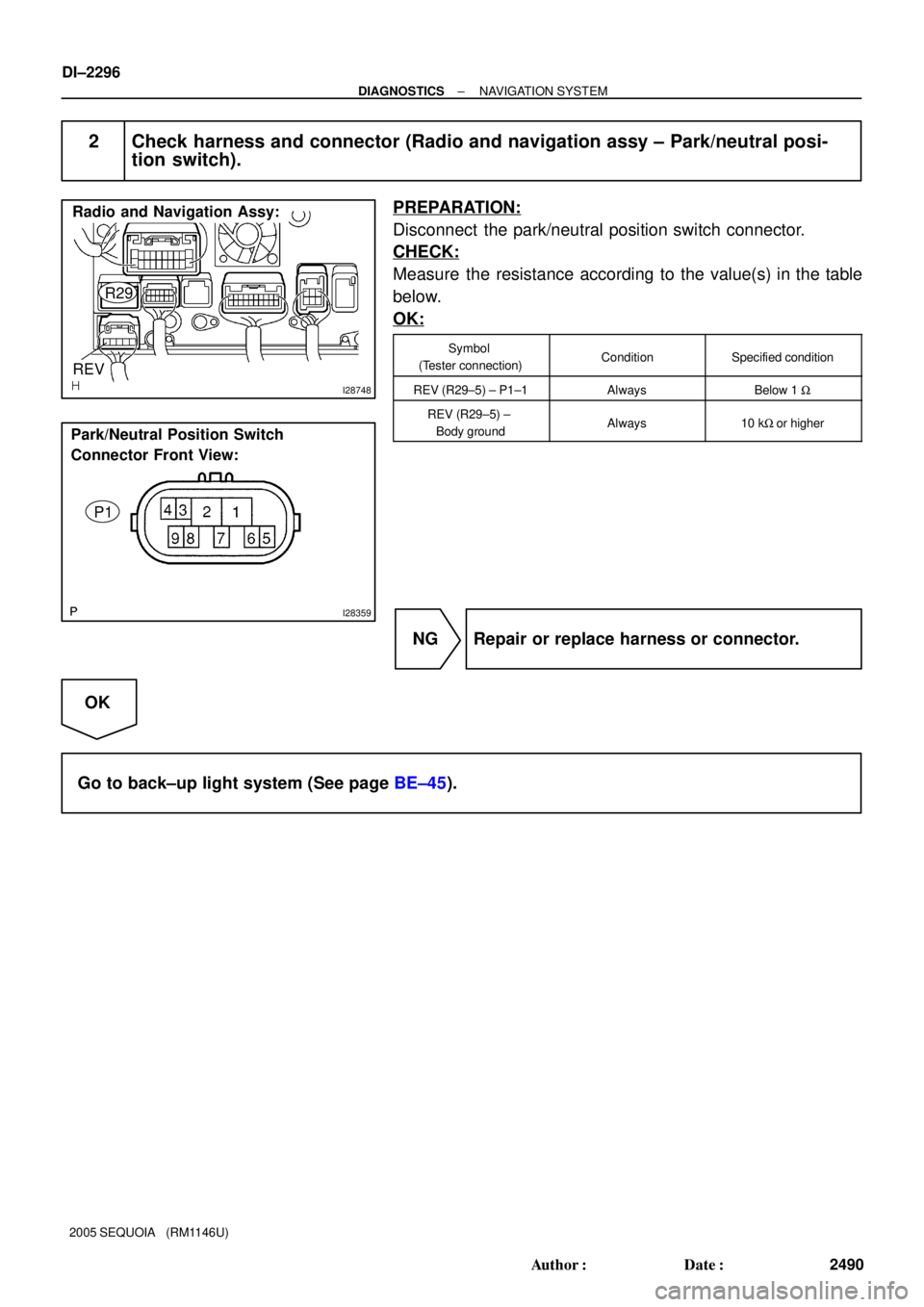
Radio and Navigation Assy:
REV
R29
± DIAGNOSTICSNAVIGATION SYSTEM
DI±2295
2489 Author�: Date�:
2005 SEQUOIA (RM1146U)
INSPECTION PROCEDURE
1 Inspect radio and navigation assy (REV).
PREPARATION:
Disconnect the radio and navigation assy connector.
CHECK:
Measure the resistance according to the value(s) in the table
below.
OK:
Symbol
(Tester connection)ConditionSpecified condition
REV (R29±5) ±
Body groundIgnition switch is on.
Shift lever is moved to R
position.
10 to 14 V
REV (R29±5) ±
Body groundIgnition switch is on.
Shift lever is moved to any
position except R.
Below 1 V
OK Replace radio and navigation assy.
NG
Page 2498 of 4323
I28748
Radio and Navigation Assy:
REV
R29
I28359
Park/Neutral Position Switch
Connector Front View:
P1
DI±2296
± DIAGNOSTICSNAVIGATION SYSTEM
2490 Author�: Date�:
2005 SEQUOIA (RM1146U)
2 Check harness and connector (Radio and navigation assy ± Park/neutral posi-
tion switch).
PREPARATION:
Disconnect the park/neutral position switch connector.
CHECK:
Measure the resistance according to the value(s) in the table
below.
OK:
Symbol
(Tester connection)ConditionSpecified condition
REV (R29±5) ± P1±1AlwaysBelow 1 W
REV (R29±5) ±
Body groundAlways10 kW or higher
NG Repair or replace harness or connector.
OK
Go to back±up light system (See page BE±45).
Page 3424 of 4323
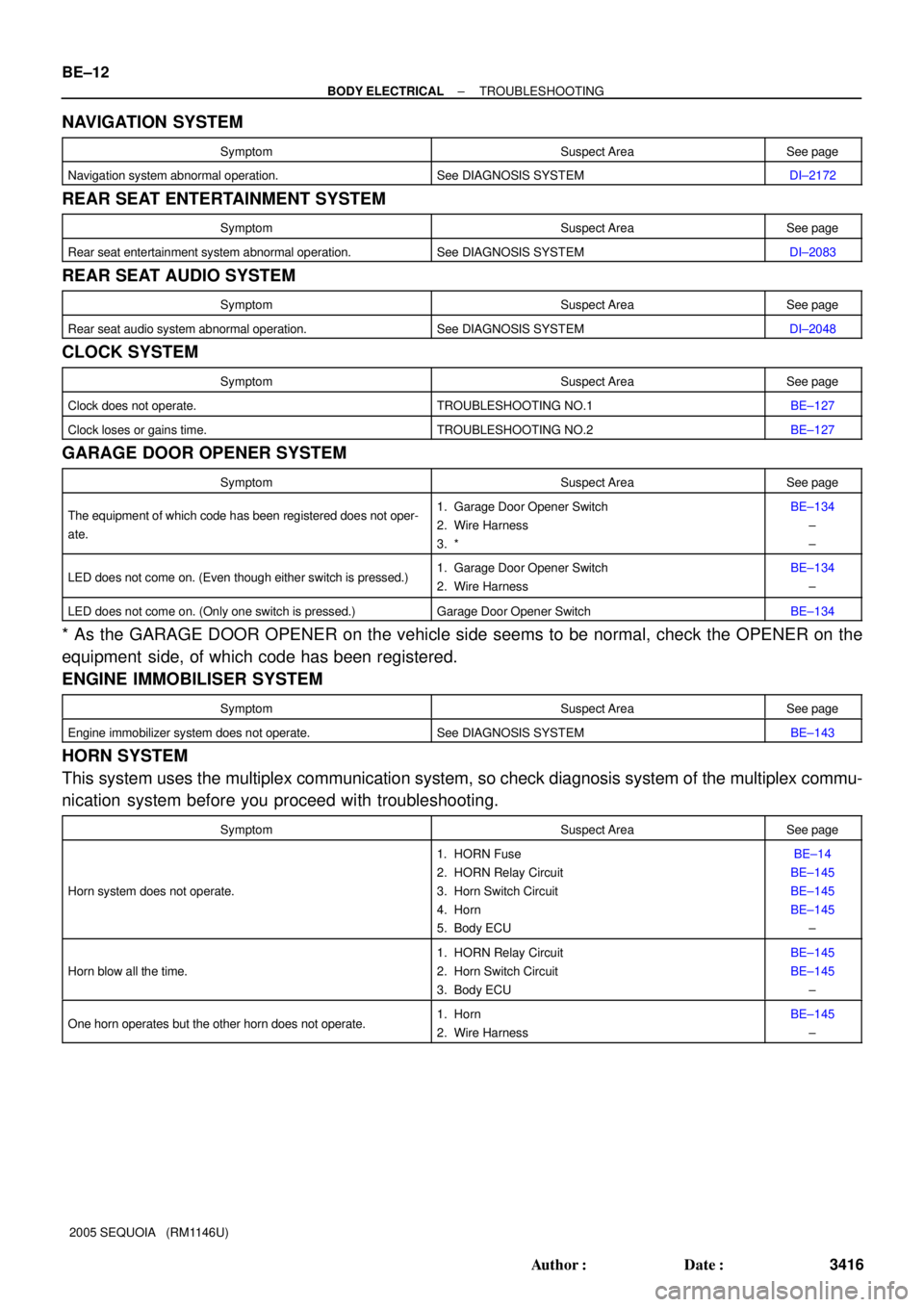
BE±12
± BODY ELECTRICALTROUBLESHOOTING
3416 Author�: Date�:
2005 SEQUOIA (RM1146U)
NAVIGATION SYSTEM
SymptomSuspect AreaSee page
Navigation system abnormal operation.See DIAGNOSIS SYSTEMDI±2172
REAR SEAT ENTERTAINMENT SYSTEM
SymptomSuspect AreaSee page
Rear seat entertainment system abnormal operation.See DIAGNOSIS SYSTEMDI±2083
REAR SEAT AUDIO SYSTEM
SymptomSuspect AreaSee page
Rear seat audio system abnormal operation.See DIAGNOSIS SYSTEMDI±2048
CLOCK SYSTEM
SymptomSuspect AreaSee page
Clock does not operate.TROUBLESHOOTING NO.1BE±127
Clock loses or gains time.TROUBLESHOOTING NO.2BE±127
GARAGE DOOR OPENER SYSTEM
SymptomSuspect AreaSee page
The equipment of which code has been registered does not oper-
ate.1. Garage Door Opener Switch
2. Wire Harness
3. *BE±134
±
±
LED does not come on. (Even though either switch is pressed.)1. Garage Door Opener Switch
2. Wire HarnessBE±134
±
LED does not come on. (Only one switch is pressed.)Garage Door Opener SwitchBE±134
* As the GARAGE DOOR OPENER on the vehicle side seems to be normal, check the OPENER on the
equipment side, of which code has been registered.
ENGINE IMMOBILISER SYSTEM
SymptomSuspect AreaSee page
Engine immobilizer system does not operate.See DIAGNOSIS SYSTEMBE±143
HORN SYSTEM
This system uses the multiplex communication system, so check diagnosis system of the multiplex commu-
nication system before you proceed with troubleshooting.
SymptomSuspect AreaSee page
Horn system does not operate.
1. HORN Fuse
2. HORN Relay Circuit
3. Horn Switch Circuit
4. Horn
5. Body ECUBE±14
BE±145
BE±145
BE±145
±
Horn blow all the time.
1. HORN Relay Circuit
2. Horn Switch Circuit
3. Body ECUBE±145
BE±145
±
One horn operates but the other horn does not operate.1. Horn
2. Wire HarnessBE±145
±
Page 3863 of 4323
05_SEQUOIA_U (L/O 0408)
4
2005 SEQUOIA from Aug. '04 Prod. (OM34424U)
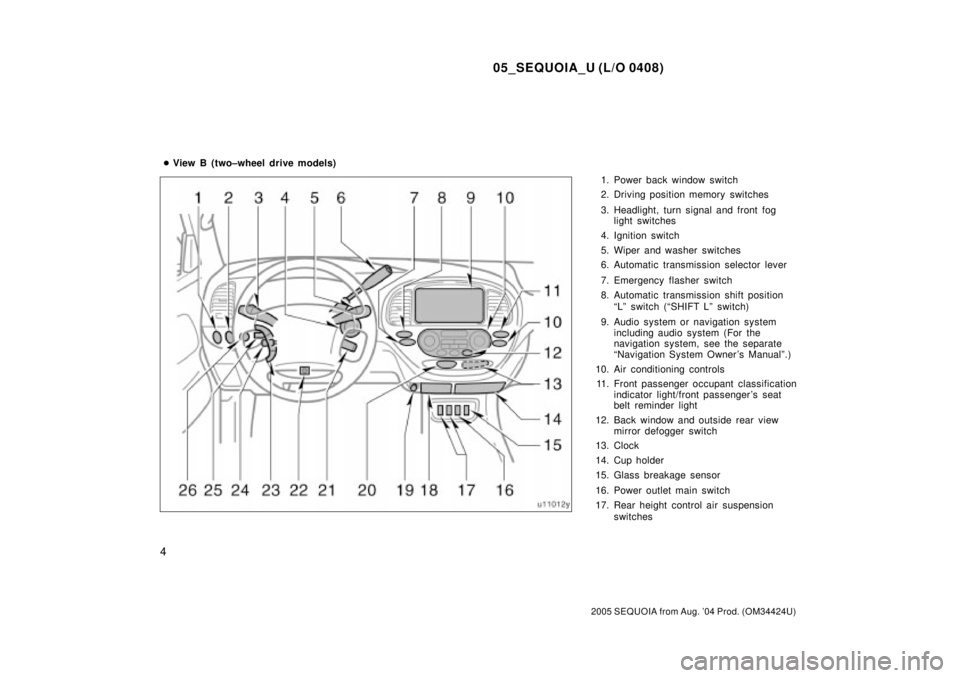
1. Power back window switch
2. Driving position memory switches
3. Headlight, turn signal and front fog
light switches
4. Ignition switch
5. Wiper and washer switches
6. Automatic transmission selector lever
7. Emergency flasher switch
8. Automatic transmission shift position
ªLº switch (ªSHIFT Lº switch)
9. Audio system or navigation system
including audio system (For the
navigation system, see the separate
ªNavigation System Owner 's Manualº.)
10. Air conditioning controls
11. Front passenger occupant classification
indicator light/front passenger 's seat
belt reminder light
12. Back window and outside rear view
mirror defogger switch
13. Clock
14. Cup holder
15. Glass breakage sensor
16. Power outlet main switch
17. Rear height control air suspension
switches �View B (two±wheel drive models)
Page 3865 of 4323
05_SEQUOIA_U (L/O 0408)
6
2005 SEQUOIA from Aug. '04 Prod. (OM34424U)
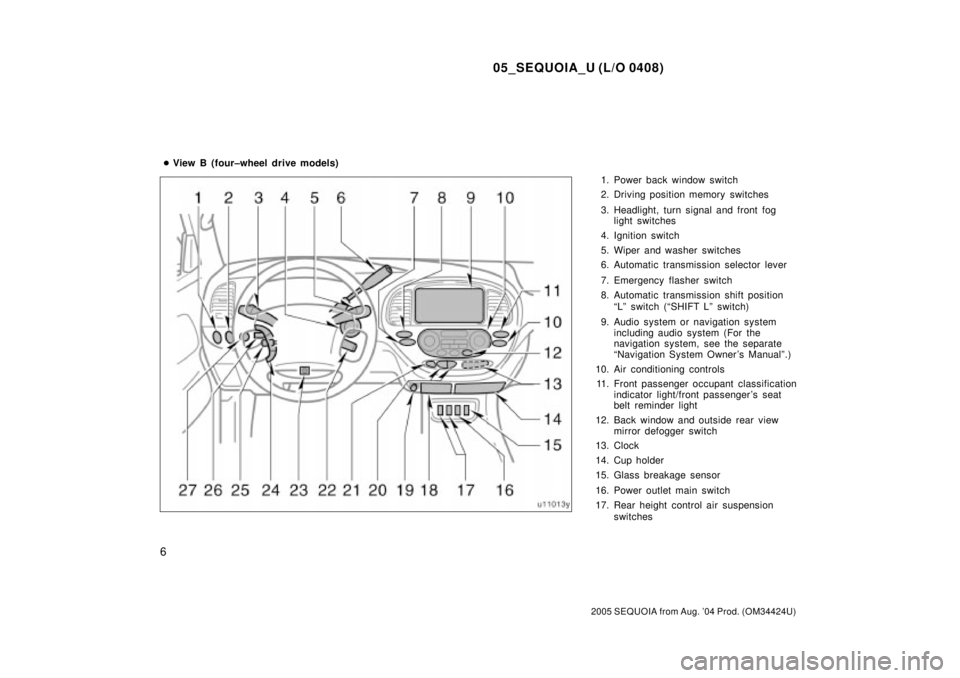
1. Power back window switch
2. Driving position memory switches
3. Headlight, turn signal and front fog
light switches
4. Ignition switch
5. Wiper and washer switches
6. Automatic transmission selector lever
7. Emergency flasher switch
8. Automatic transmission shift position
ªLº switch (ªSHIFT Lº switch)
9. Audio system or navigation system
including audio system (For the
navigation system, see the separate
ªNavigation System Owner 's Manualº.)
10. Air conditioning controls
11. Front passenger occupant classification
indicator light/front passenger 's seat
belt reminder light
12. Back window and outside rear view
mirror defogger switch
13. Clock
14. Cup holder
15. Glass breakage sensor
16. Power outlet main switch
17. Rear height control air suspension
switches �View B (four±wheel drive models)
Page 4110 of 4323
05_SEQUOIA_U (L/O 0408)
251
2005 SEQUOIA from Aug. '04 Prod. (OM34424U)
To select the DVD mode, push the
ªDVDº button on the controller.
You can also select the DVD mode on the
mode selection screen mentioned above.
Vehicles with navigation systemÐThe
ªDVD Hint!º screen appears when the
DVD mode is first selected after you
turn the ignition key to the ªACCº or
ªONº position.
Push the ªOKº switch when you read the
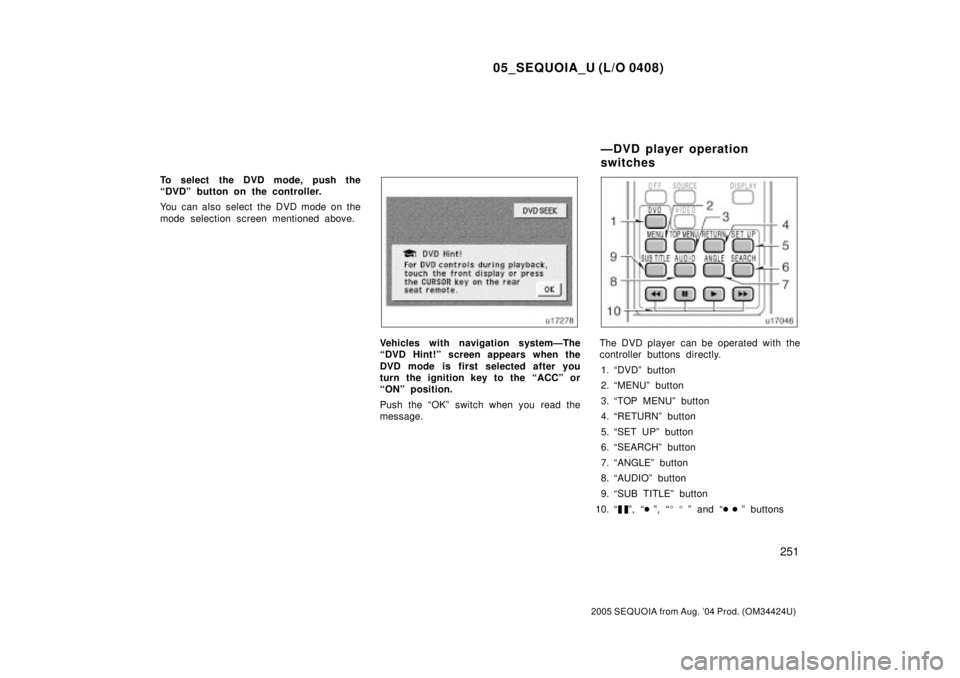
message.The DVD player can be operated with the
controller buttons directly.
1. ªDVDº button
2. ªMENUº button
3. ªTOP MENUº button
4. ªRETURNº button
5. ªSET UPº button
6. ªSEARCHº button
7. ªANGLEº button
8. ªAUDIOº button
9. ªSUB TITLEº button
10. ª
º, ª�º, ª��º and ª��º buttons
ÐDVD player operation
switches