Page 1937 of 2898
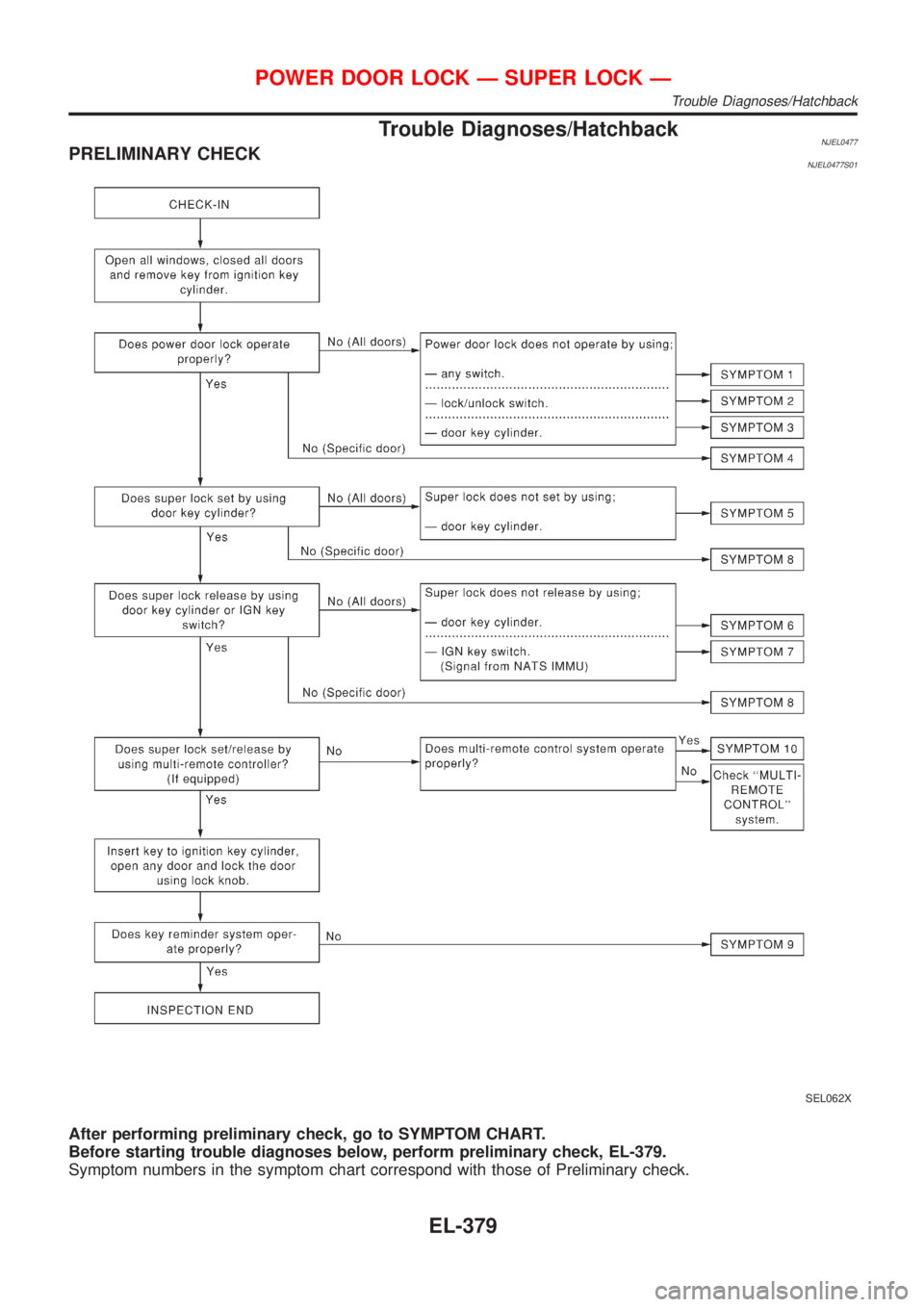
Trouble Diagnoses/HatchbackNJEL0477PRELIMINARY CHECKNJEL0477S01
SEL062X
After performing preliminary check, go to SYMPTOM CHART.
Before starting trouble diagnoses below, perform preliminary check, EL-379.
Symptom numbers in the symptom chart correspond with those of Preliminary check.
POWER DOOR LOCK Ð SUPER LOCK Ð
Trouble Diagnoses/Hatchback
EL-379
Page 2012 of 2898
for example, when the vehicle is in a tunnel, in a parking lot
inside building, under an elevated superhighway or near strong
power lines, the location may not be detected. Turbulent/
electric weather conditions may also affect positioning perfor-
mance. If something is placed on the antenna, the radio wave
from GPS satellites may not be received.
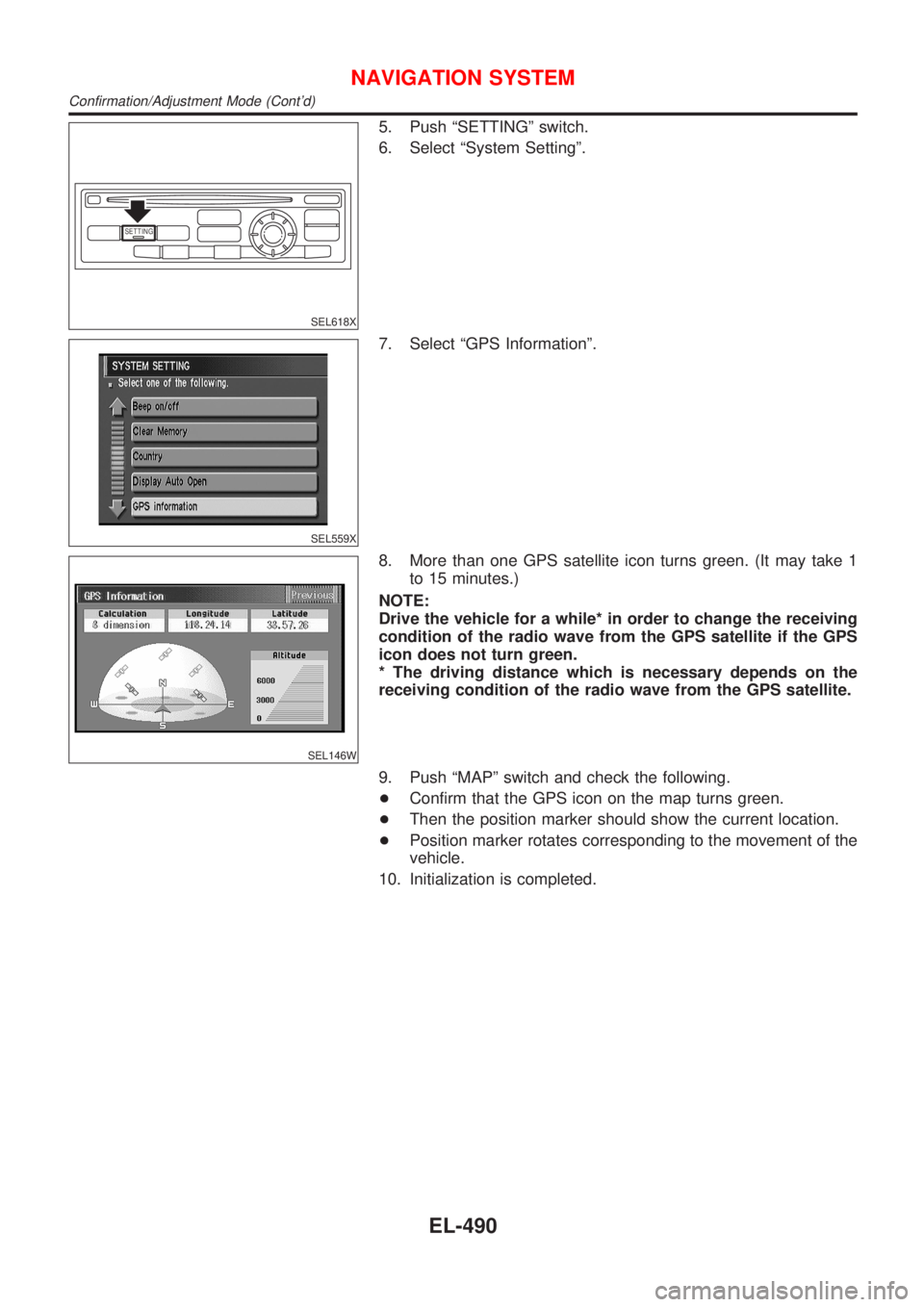
SEL507X
COMPONENT DESCRIPTIONNJEL0516S02NAVI Control UnitNJEL0516S0201+The gyro (angular speed sensor) and the CD-ROM drive are
built-in units that control the navigation functions.
+Signals are received from the gyro, the vehicle speed sensor,
and the GPS antenna. Vehicle location is determined by com-
bining this data with the data contained in the CD-ROM map.
Locational information is shown on liquid crystal display panel.
SEL506X
CD-ROM DriverNJEL0516S0202Maps, traffic control regulations, and other pertinent information
can be easily red from the CD-ROM disc.
Map CD-ROMNJEL0516S0203+The map CD-ROM has maps, traffic control regulations, and
other pertinent information.
+To improve CD-ROM map matching and route determination
functions, the CD-ROM uses an exclusive Nissan format.
Therefore, the use of a CD-ROM provided by other manufac-
turers cannot be used.
SEL690V
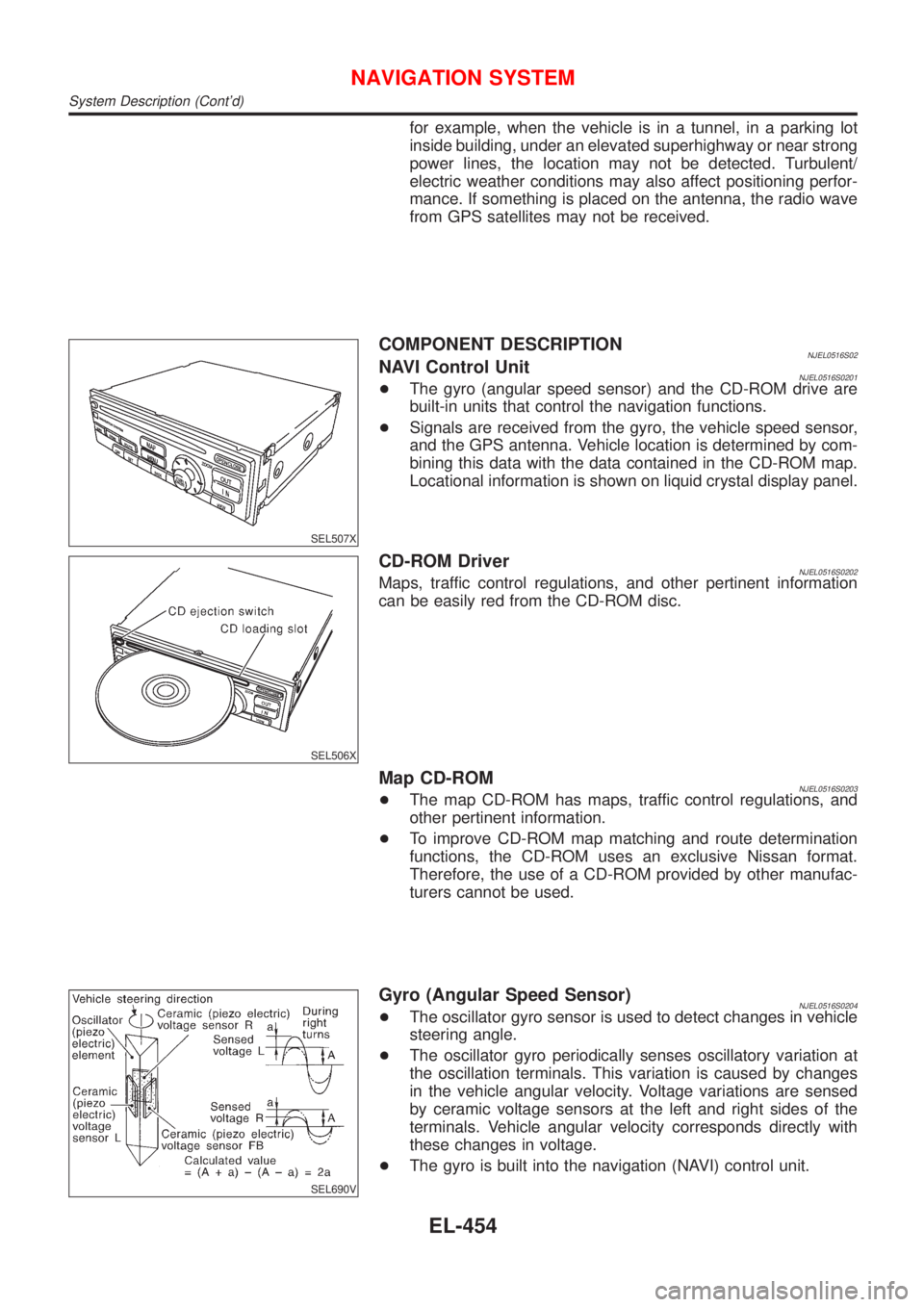
Gyro (Angular Speed Sensor)NJEL0516S0204+The oscillator gyro sensor is used to detect changes in vehicle
steering angle.
+The oscillator gyro periodically senses oscillatory variation at
the oscillation terminals. This variation is caused by changes
in the vehicle angular velocity. Voltage variations are sensed
by ceramic voltage sensors at the left and right sides of the
terminals. Vehicle angular velocity corresponds directly with
these changes in voltage.
+The gyro is built into the navigation (NAVI) control unit.
NAVIGATION SYSTEM
System Description (Cont'd)
EL-454
Page 2048 of 2898
SETTING
SEL618X
5. Push ªSETTINGº switch.
6. Select ªSystem Settingº.
SEL559X
7. Select ªGPS Informationº.
SEL146W
8. More than one GPS satellite icon turns green. (It may take 1
to 15 minutes.)
NOTE:
Drive the vehicle for a while* in order to change the receiving
condition of the radio wave from the GPS satellite if the GPS
icon does not turn green.
* The driving distance which is necessary depends on the
receiving condition of the radio wave from the GPS satellite.
9. Push ªMAPº switch and check the following.
+Confirm that the GPS icon on the map turns green.
+Then the position marker should show the current location.
+Position marker rotates corresponding to the movement of the
vehicle.
10. Initialization is completed.
NAVIGATION SYSTEM
Confirmation/Adjustment Mode (Cont'd)
EL-490
Page 2049 of 2898
Control Panel Mode=NJEL0521APPLICATION ITEMSNJEL0521S01
Mode Description Reference page
Display Auto OpenDisplay can be set to open by either of the following controls.
+Display will be opened when OPEN/CLOSE SW is selected with Key SW positioned
ACC.
+Display will be automatically opened when Key SW is turned from OFF to ACC.EL-492
GPS InformationThe GPS data includes longitude, latitude and altitude (distance above sea level) of the
present vehicle position, and current date and time for the area in which the vehicle is
being driven.
Also indicated are the GPS reception conditions and the GPS satellite position.EL-492
LanguageLanguage can be selected for the display and voice guidance.
Use the program CD-ROM disk to change the language.EL-493
Quick Stop Customer
SettingOne facility of your selection can be added to your Quick Stop. EL-493
Route Priorities Priorities of search request and automatic re-searching can be set for route search. EL-493
Tracking Tracking to the present vehicle position can be displayed. EL-494
Display SettingThe following display settings can be customized.
+Display color (Day mode or Night mode)
+Brightness of displayEL-494
HeadingHeading of the map display can be customized for either north heading or the actual
driving direction of the vehicle.EL-495
Nearby Display IconsIcons of facilities can be displayed.
Facilities to be displayed can be selected from the variety selections.EL-495
Adjust Current Loca-
tionCurrent location of position marker can be adjusted. Direction of position marker also
can be calibrated when heading direction of the vehicle on the display is not matched
with the actual direction.EL-496
Avoid Area Setting A particular area can be avoided when routing. Ð
Beep On/Off Beep sounds which corresponds to the system operation can be activated/deactivated. EL-496
Clear Memory Address book, Previous destination or Avoid area can be deleted. EL-497
CountryWhen two or more countries are included in one CD-ROM disk, the destination can be
selected from the country name.EL-497
SETTING
SEL618X
HOW TO PERFORM CONTROL PANEL MODENJEL0521S021. Start the engine.
2. Push ªOPEN/CLOSEº switch and then open the display.
3. Push ªSETTINGº switch.
+For further procedures, refer to the following pages which
describe each application item of the control panel mode.
NAVIGATION SYSTEM
Control Panel Mode
EL-491
Page 2054 of 2898

SEL552X
6. Select and touch an item on the list.
7. Push ªMAPº switch, then the display will go back to the current
location map.
SEL553X
ªADJUST CURRENT LOCATIONº MODENJEL0521S121. Start the engine.
2. Push ªOPEN/CLOSEº switch and then open the display.
3. Push ªSETTINGº switch.
4. Select ªSystem Settingº.
5. Select ªAdjust Current Locationº.
SEL554X
6. Select ªºorªº to calibrate the heading direction.
(Arrow marks will rotate corresponding to the calibration key.)
7. Select ªSetº. Then the vehicle mark will be matched to the
arrow mark.
8. Display will show ªHeading direction has been calibratedº and
then go back to the current location map.
SEL555X
ªBEEP ON/OFFº MODENJEL0521S131. Start the engine.
2. Push ªOPEN/CLOSEº switch and then open display.
3. Push ªSETTINGº switch.
4. Select ªSystem Settingº.
5. Touch ªBeep On/Offº.
SEL556X
6. Select ªOnº or ªOffº icon.
+If you want the beep sound, select ªOnº.
+If you do not want the beep sound, select ªOffº.
7. Push ªPREVIOUSº switch, then the display will go back to the
current location map.
NAVIGATION SYSTEM
Control Panel Mode (Cont'd)
EL-496
Page 2068 of 2898
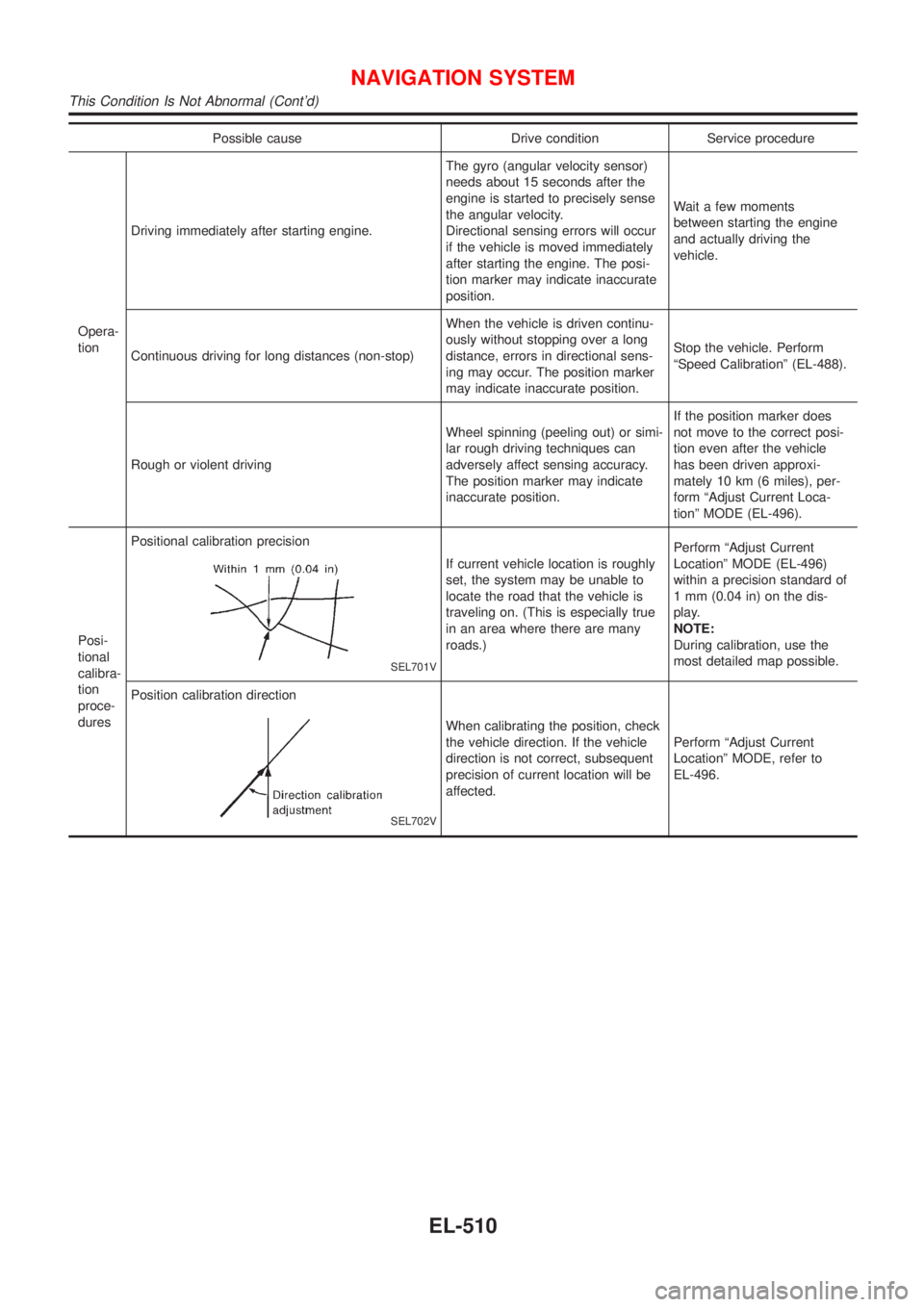
Possible cause Drive condition Service procedure
Opera-
tionDriving immediately after starting engine.The gyro (angular velocity sensor)
needs about 15 seconds after the
engine is started to precisely sense
the angular velocity.
Directional sensing errors will occur
if the vehicle is moved immediately
after starting the engine. The posi-
tion marker may indicate inaccurate
position.Wait a few moments
between starting the engine
and actually driving the
vehicle.
Continuous driving for long distances (non-stop)When the vehicle is driven continu-
ously without stopping over a long
distance, errors in directional sens-
ing may occur. The position marker
may indicate inaccurate position.Stop the vehicle. Perform
ªSpeed Calibrationº (EL-488).
Rough or violent drivingWheel spinning (peeling out) or simi-
lar rough driving techniques can
adversely affect sensing accuracy.
The position marker may indicate
inaccurate position.If the position marker does
not move to the correct posi-
tion even after the vehicle
has been driven approxi-
mately 10 km (6 miles), per-
form ªAdjust Current Loca-
tionº MODE (EL-496).
Posi-
tional
calibra-
tion
proce-
duresPositional calibration precision
SEL701V
If current vehicle location is roughly
set, the system may be unable to
locate the road that the vehicle is
traveling on. (This is especially true
in an area where there are many
roads.)Perform ªAdjust Current
Locationº MODE (EL-496)
within a precision standard of
1 mm (0.04 in) on the dis-
play.
NOTE:
During calibration, use the
most detailed map possible.
Position calibration direction
SEL702V
When calibrating the position, check
the vehicle direction. If the vehicle
direction is not correct, subsequent
precision of current location will be
affected.Perform ªAdjust Current
Locationº MODE, refer to
EL-496.
NAVIGATION SYSTEM
This Condition Is Not Abnormal (Cont'd)
EL-510
Page 2194 of 2898
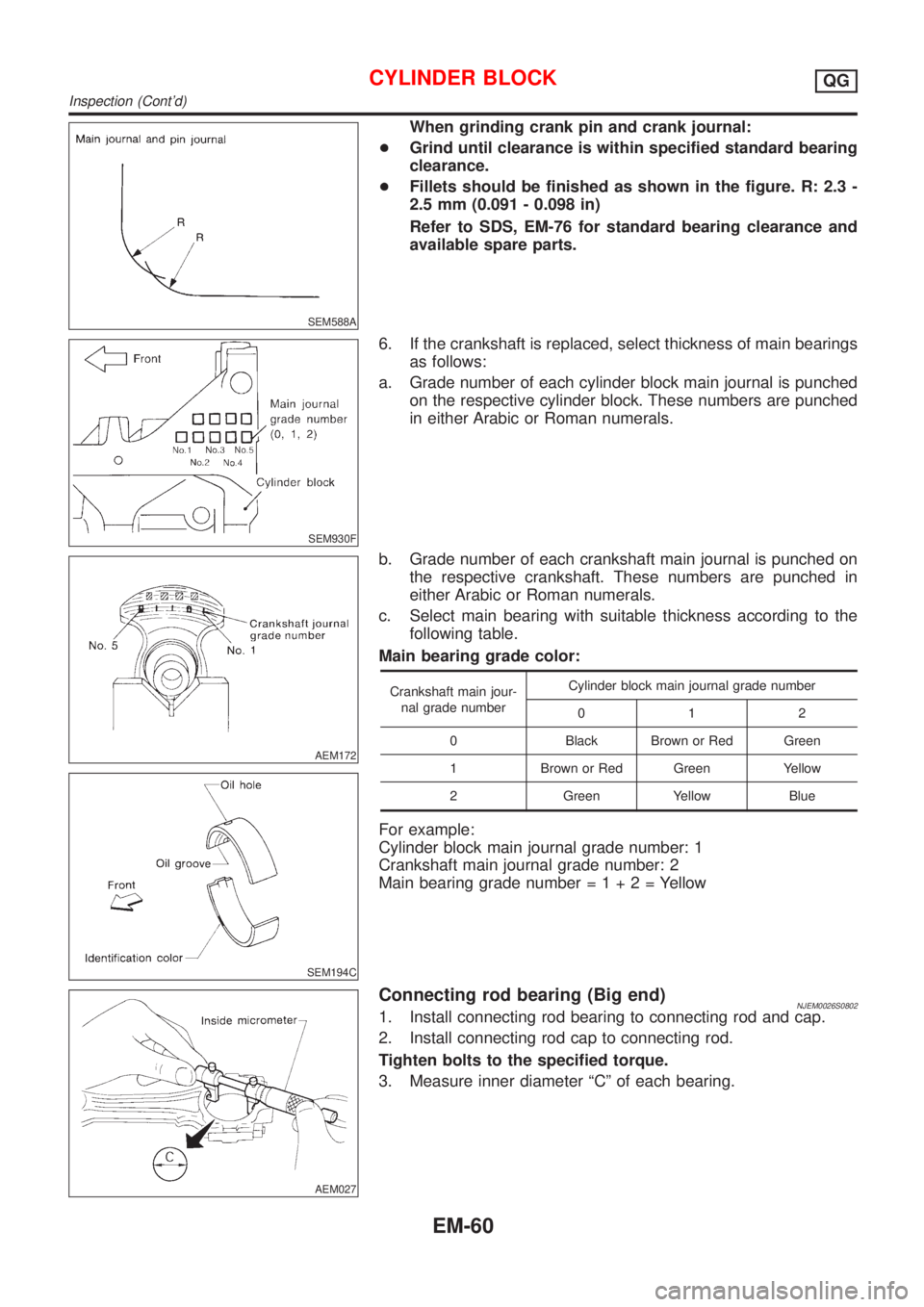
SEM588A
When grinding crank pin and crank journal:
+Grind until clearance is within specified standard bearing
clearance.
+Fillets should be finished as shown in the figure. R: 2.3 -
2.5 mm (0.091 - 0.098 in)
Refer to SDS, EM-76 for standard bearing clearance and
available spare parts.
SEM930F
6. If the crankshaft is replaced, select thickness of main bearings
as follows:
a. Grade number of each cylinder block main journal is punched
on the respective cylinder block. These numbers are punched
in either Arabic or Roman numerals.
AEM172
SEM194C
b. Grade number of each crankshaft main journal is punched on
the respective crankshaft. These numbers are punched in
either Arabic or Roman numerals.
c. Select main bearing with suitable thickness according to the
following table.
Main bearing grade color:
Crankshaft main jour-
nal grade numberCylinder block main journal grade number
012
0 Black Brown or Red Green
1 Brown or Red Green Yellow
2 Green Yellow Blue
For example:
Cylinder block main journal grade number: 1
Crankshaft main journal grade number: 2
Main bearing grade number=1+2=Yellow
AEM027
Connecting rod bearing (Big end)NJEM0026S08021. Install connecting rod bearing to connecting rod and cap.
2. Install connecting rod cap to connecting rod.
Tighten bolts to the specified torque.
3. Measure inner diameter ªCº of each bearing.
CYLINDER BLOCKQG
Inspection (Cont'd)
EM-60
Page 2196 of 2898
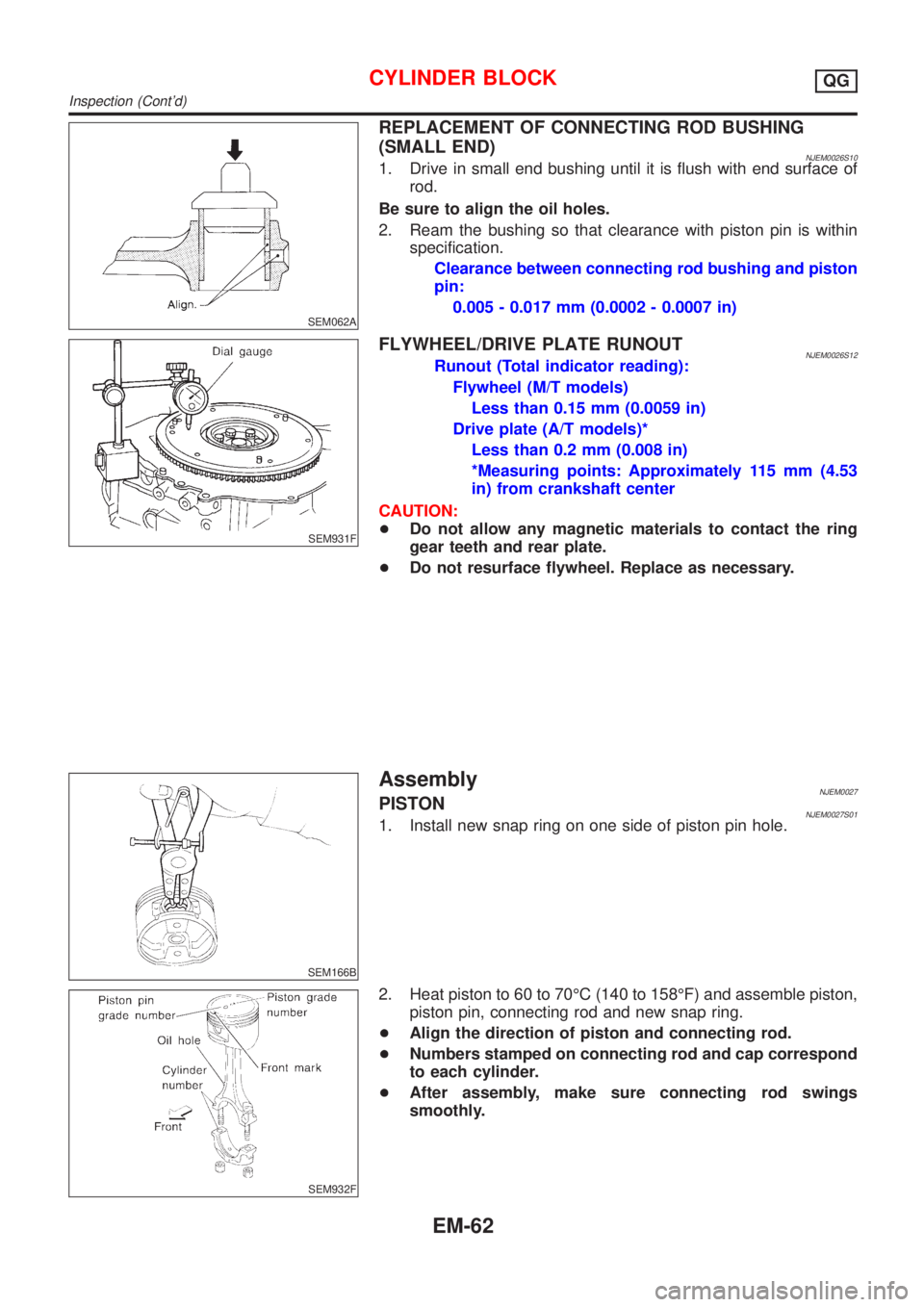
SEM062A
REPLACEMENT OF CONNECTING ROD BUSHING
(SMALL END)
NJEM0026S101. Drive in small end bushing until it is flush with end surface of
rod.
Be sure to align the oil holes.
2. Ream the bushing so that clearance with piston pin is within
specification.
Clearance between connecting rod bushing and piston
pin:
0.005 - 0.017 mm (0.0002 - 0.0007 in)
SEM931F
FLYWHEEL/DRIVE PLATE RUNOUTNJEM0026S12Runout (Total indicator reading):
Flywheel (M/T models)
Less than 0.15 mm (0.0059 in)
Drive plate (A/T models)*
Less than 0.2 mm (0.008 in)
*Measuring points: Approximately 115 mm (4.53
in) from crankshaft center
CAUTION:
+Do not allow any magnetic materials to contact the ring
gear teeth and rear plate.
+Do not resurface flywheel. Replace as necessary.
SEM166B
AssemblyNJEM0027PISTONNJEM0027S011. Install new snap ring on one side of piston pin hole.
SEM932F
2. Heat piston to 60 to 70ÉC (140 to 158ÉF) and assemble piston,
piston pin, connecting rod and new snap ring.
+Align the direction of piston and connecting rod.
+Numbers stamped on connecting rod and cap correspond
to each cylinder.
+After assembly, make sure connecting rod swings
smoothly.
CYLINDER BLOCKQG
Inspection (Cont'd)
EM-62