Page 220 of 363
CONT INUED
If the ABS indicator and the brake
system indicator come on together,
and the parking brake is f ully
released, the front-to-rear braking
distribution system may also shut
down.
Test your brakes as instructed on
page . If the brakes f eel normal,
drive slowly and have your vehicle
repaired by your dealer as soon as
possible. Avoid sudden hard braking
which could cause the rear wheels to
lock up and possibly lead to a loss of
control.Driving with TCS requires no special
skills or technique. The TCS does
not control your vehicle’s whole
braking system and cannot prevent
skidding if you enter a corner too
f ast. It is still your responsibility to
drive at reasonable speeds and to
leave a sufficient margin of safety.
The TCS indicator will come on
alongwiththeABSindicatorif there
is a problem with the anti-lock brake
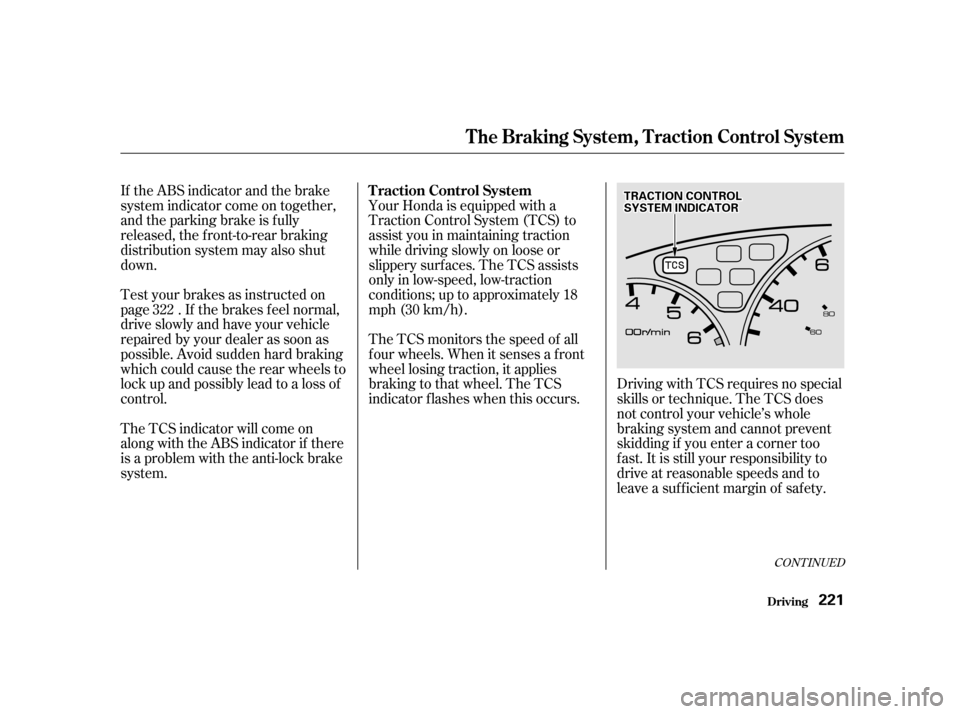
system. Your Honda is equipped with a
Traction Control System (TCS) to
assist you in maintaining traction
while driving slowly on loose or
slippery surf aces. The TCS assists
only in low-speed, low-traction
conditions; up to approximately 18
mph (30 km/h).
The TCS monitors the speed of all
f our wheels. When it senses a f ront
wheel losing traction, it applies
braking to that wheel. The TCS
indicator f lashes when this occurs.
322
The Braking System, Traction Control System
Driving
Traction Control System
221
TTRRAACCTTIIOONNCCOONNTTRROOLLSSYYSSTTEEMMIINNDDIICCAATTOORR
Page 222 of 363

If the TCS indicator comes on and
stays on for more than 10 minutes
while driving, pull to the side of the
road when it is safe and turn off the
engine. Reset the system by
restarting the engine, and watch the
TCS indicator. If the indicator
remains on, or comes back on while
driving, have the system inspected
by your Honda dealer. You can still
drive the vehicle without TCS.
This indicator will come on along
with the ABS indicator if there is a
problem in the anti-lock brake
system (see on page).
The TCS indicator may occasionally
come on f or one or two seconds and
then go out. This is normal.
The Traction Control System turns
on every time you start the engine,
even if you turned it of f the last time
you drove the vehicle.
The TCS indicator comes on or
f lashes under the f ollowing condi-
tions:
When you turn the ignition switch
to ON (II).
When you manually turn of f the
TCS.
It f lashes when the TCS is
regulating wheelspin.
If the system’s diagnostics senses
a problem in the TCS, the indica-
tor will come on and stay on.
If the brakes overheat, the
indicator will come on. 220
Traction Control System
Driving
ABS Indicator
T CS Indicat or
223
Page 224 of 363
�µCheck your tires
f requently f or wear and proper
pressure. Both are important in
preventing ‘‘hydroplaning’’ (loss of
traction on a wet surface). In the
winter, mount snow tires on all f our
wheels f or the best handling.
Watch road conditions caref ully,
they can change f rom moment to
moment. Wet leaves can be as slip-
pery as ice. ‘‘Clear’’ roads can have
patches of ice. Driving conditions
can be very hazardous when the
outside temperature is near f reezing.
The road surf ace can become
covered with areas of water puddles
mixed with areas of ice, so your
traction can change without warning.
Be caref ul when downshif ting. If
traction is low, you can lock up the
drive wheels f or a moment and cause
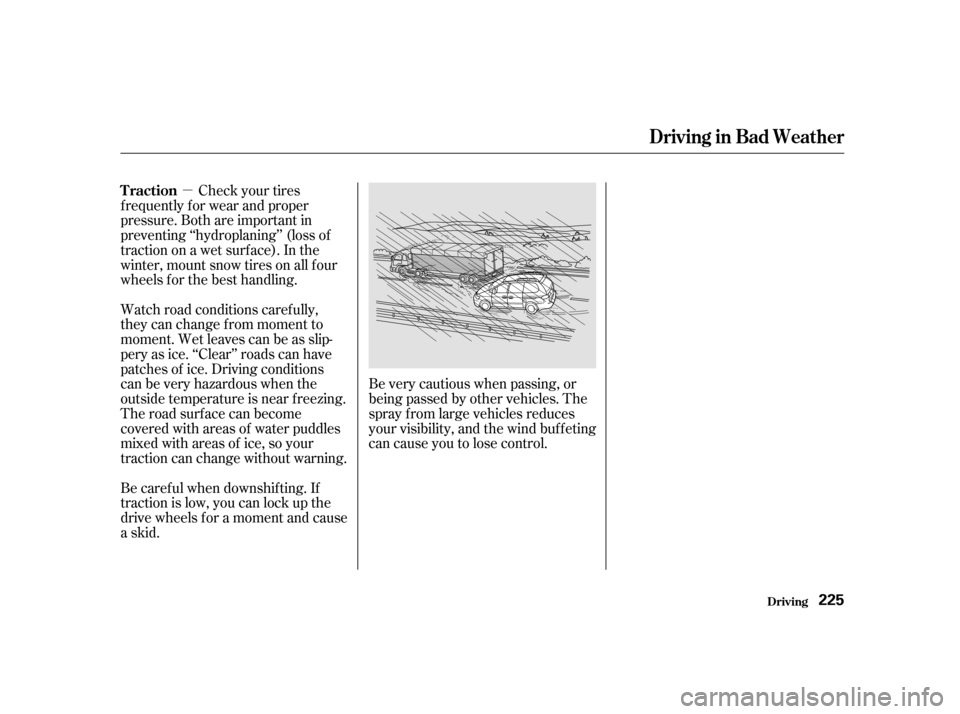
askid. Be very cautious when passing, or
beingpassedbyothervehicles.The
spray f rom large vehicles reduces
your visibility, and the wind buf f eting
can cause you to lose control.
Driving in Bad Weather
Driving
Traction
225
Page 241 of 363

�µ
�µ
�Î �Î�Ì
�Ì
�Ì
�Ì
�Î
�Ì�Î
Follow the Severe Conditions
Maintenance Schedule if you
drive your vehicle
under one or more of the
f ollowing conditions:Driving less than 5 miles (8
km) per trip or, in f reezing
temperatures, driving less
than 10 miles (16 km) per trip.
Driving in extremely hot
[over 90°F (32°C)] conditions.
Extensive idling or long
periods of stop-and-go driving.
Trailer towing, driving with a
roof top carrier, or driving in
mountainous conditions.
Driving on muddy, dusty, or
de-iced roads.
Follow the Maintenance
Schedule f or Severe Conditions.
MAINLY
Maint enance U.S. Owners
Canadian Owners
242 Visually inspect the following items:
Refer to page for replacement
information under special driving
conditions.
Refer to page for replacement
information under special driving
conditions.
Replace every 3,750 miles (6,000 km) or 6 months
Check oil and coolant at each fuel stop
Service at the indicated
distance or time whichever
comes first.
miles x 1,000
km x 1,000
months
120,000 miles (192,000 km) or 120 months, thereafter every60,000 miles (96,000 km) or 60 months
Tie rod ends, steering gear box, and boots
Suspension components
Driveshaft boots
Brake hoses and lines (including ABS)
All fluid levels and conditions of fluids
Cooling system hoses and connections
Exhaust system
Fuel lines and connections
Lights and controls
Vehicle underbody Every 7,500 miles (12,000 km) or 6 months
Rotate tires every 7,500 miles (12,000 km) Every 36 months
Inspect every 7,500 miles (12,000 km) or 6 months
Replace engine oil and oil filter
Check engine oil and coolant
Clean ( ) or replace ( ) air cleaner element
Use normal schedule except in dusty
conditions
Inspect valve clearance
Replace spark plugs
Inspect and adjust drive belts
Inspect idle speed
Replace engine coolant
Replace transmission fluid
Inspect front and rear brakes
Replace brake fluid
Check parking brake adjustment
Replace air conditioning filter
Lubricate all hinges, locks and latches
Rotate tires (Check tire inflation and condition
at least once per month) 152412
304824457236 60964875
120 60 90
144 72 105168
84 120192
96
Adjust only if noisy
1: 2:: See page 239. 273272
Replace timing belt and inspect water pump,1
2
Maintenance Schedule for Severe Conditions
Page 242 of 363

�Ø �Ø�Ø�Ø�Ø�Ø�Ø�Ø �Ø �Ø �Ø �Ø�Ø�Ø�Ø
�Ø �Ø
�Ì�Ì
CONT INUED
Maint enance 243
A, B, C, D
Severe Conditions:
A B C
Use this schedule if your vehicle is MAINLY driven in any of the following Severe Conditions, o
r normally driven in Canada; otherwise use the Normal
Schedule. Service at the indicated distance or time, whichever comes first. Do the items in as required for each distance/time.
Driving less than 5 miles (8 km) per trip or, in freezing temperatures, driving less than 10 miles (16 km) p er trip.
Driving in extremely hot (over 90°F/32°C) conditions.
Extensive idling or long periods of stop-and-go driving.
Trailer towing, driving with a roof rack, or driving in mountainous conditions.
Driving on muddy, dusty, or de-iced roads.
3,750 mi/6,000 km/-
7,500 mi/12,000 km/6 mos
11,250 mi/18,000 km/-
15,000 mi/24,000 km/1 yr
18,750 mi/30,000 km/-
22,500 mi/36,000 km/1½ yrs
26,250 mi/42,000 km/-
30,000 mi/48,000 km/2 yrs
33,750 mi/54,000 km/-
37,500 mi/60,000 km/2½ yrs
41,250 mi/66,000 km/-
45,000 mi/72,000 km/3 yrs
48,750 mi/78,000 km/-
52,500 mi/84,000 km/3½ yrs Replace engine oil and filter.
Inspect front and rear brakes.
Rotate tires (follow pattern on page 276 ).
Inspect tie rod ends, steering gearbox and boots.
Inspect suspension components.
Inspect driveshaft boots.
Check parking brake adjustment.
Lubricate all hinges, locks and latches, with
multipurpose grease.
Inspect brake hoses and lines (including ABS).
Check all fluid levels, condition of fluids, and check
for leaks.
Inspect cooling system hoses and connections.
Inspect exhaust system .
Inspect fuel lines and connections .
Check all lights.
Inspect the underbody.
Do items in A.
Do items in A, B.
Do items in A.
Clean air cleaner element. Do items in A, B, C.
Do items in A.
Do items in A, B.
Do items in A.
DoitemsinA,B,C,D.
Do items in A.
Do items in A, B.
Do items in A. Clean air cleaner element.
DoitemsinA,B,C,E.
Do items in A.
Do items in A, B.
·····
Maintenance Schedule for Severe Conditions (listed by distance/time)
Page 253 of 363
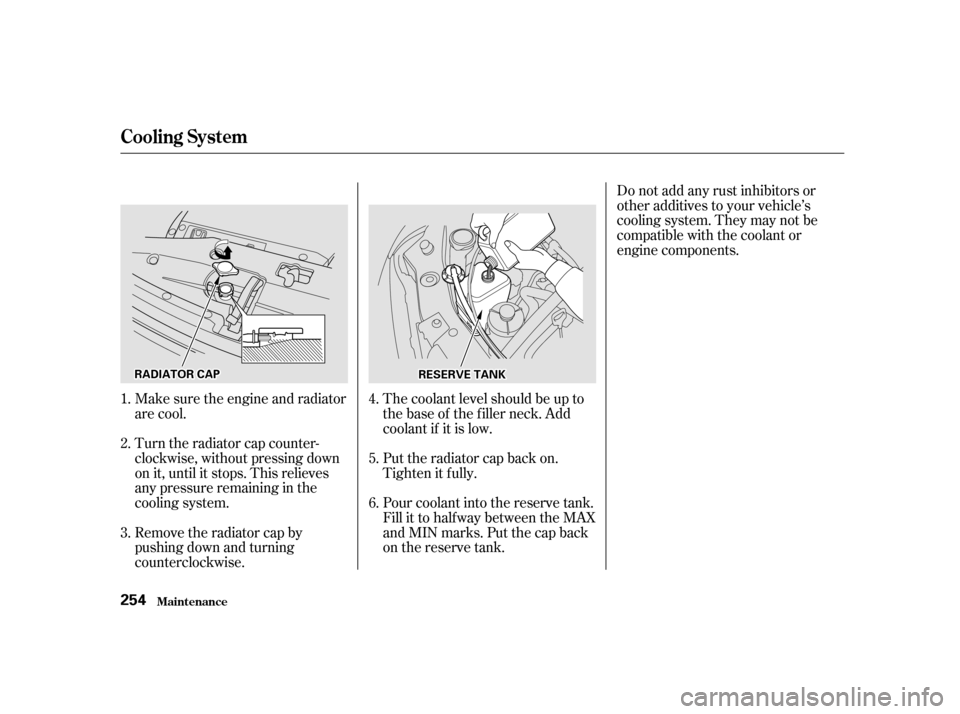
Make sure the engine and radiator
are cool.
Turn the radiator cap counter-
clockwise, without pressing down
on it, until it stops. This relieves
any pressure remaining in the
cooling system.
Remove the radiator cap by
pushing down and turning
counterclockwise.The coolant level should be up to
the base of the f iller neck. Add
coolant if it is low.
Put the radiator cap back on.
Tighten it f ully.
Pour coolant into the reserve tank.
Fill it to half way between the MAX
and MIN marks. Put the cap back
on the reserve tank.Do not add any rust inhibitors or
other additives to your vehicle’s
cooling system. They may not be
compatible with the coolant or
engine components.
3. 4. 5. 6.
1.2.
Cooling Syst em
Maint enance
254
RRAADDIIAATTOORRCCAAPPRREESSEERRVVEETTAANNKK
Page 254 of 363
CONT INUED
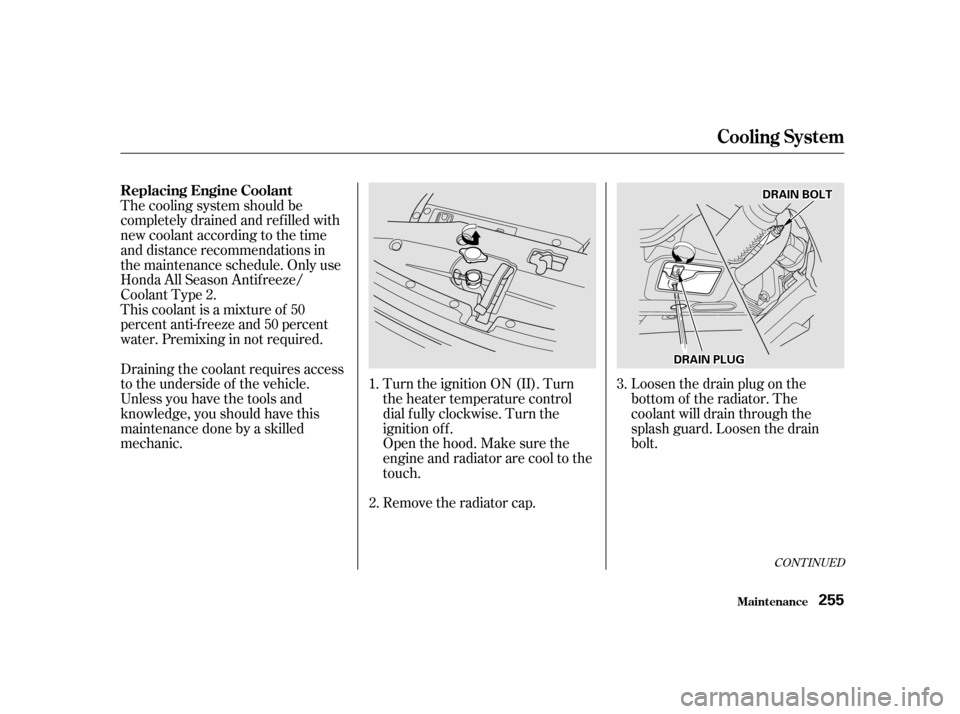
Loosen the drain plug on the
bottom of the radiator. The
coolant will drain through the
splash guard. Loosen the drain
bolt.
Turn the ignition ON (II). Turn
the heater temperature control
dial f ully clockwise. Turn the
ignition of f .
Openthehood.Makesurethe
engine and radiator are cool to the
touch.
Remove the radiator cap.
Thecoolingsystemshouldbe
completely drained and ref illed with
new coolant according to the time
and distance recommendations in
the maintenance schedule. Only use
Honda All Season Antif reeze/
Coolant Type 2.
This coolant is a mixture of 50
percent anti-f reeze and 50 percent
water. Premixing in not required.
Draining the coolant requires access
to the underside of the vehicle.
Unless you have the tools and
knowledge, you should have this
maintenance done by a skilled
mechanic.
1.
3.
2.
Replacing Engine Coolant
Cooling Syst em
Maint enance
255
DDRRAAIINNBBOOLLTT
DDRRAAIINNPPLLUUGG
Page 255 of 363
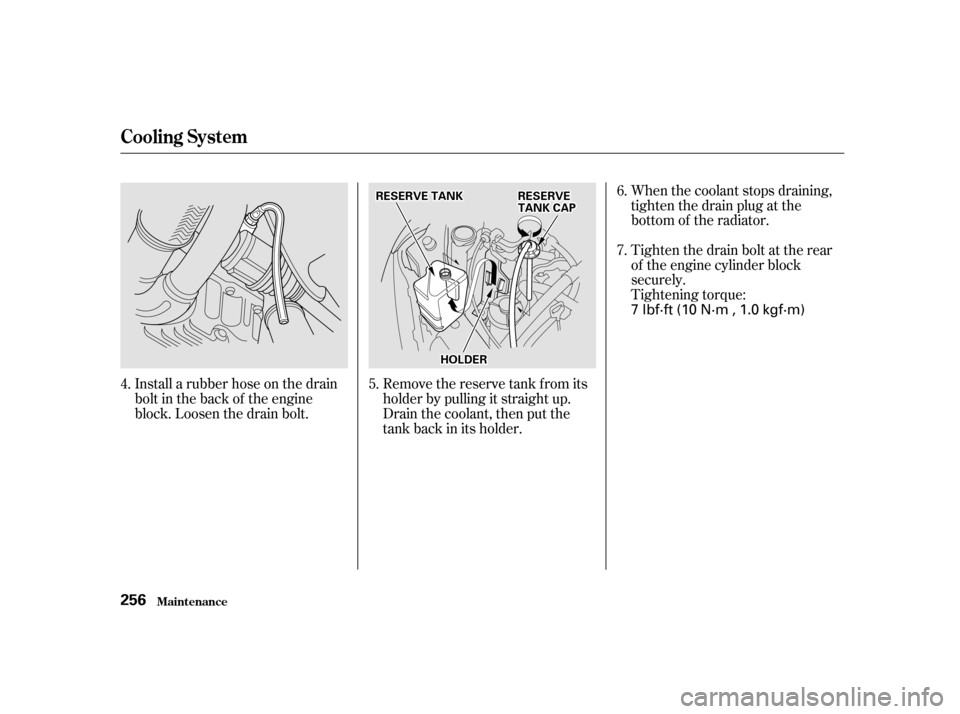
When the coolant stops draining,
tightenthedrainplugatthe
bottom of the radiator.
Tighten the drain bolt at the rear
of the engine cylinder block
securely.
Tightening torque:
Remove the reserve tank f rom its
holder by pulling it straight up.
Drain the coolant, then put the
tank back in its holder.
Install a rubber hose on the drain
bolt in the back of the engine
block. Loosen the drain bolt. 6.
4. 5. 7.
Cooling Syst em
Maint enance
256
RREESSEERRVVEETTAANNKKRREESSEERRVVEETTAANNKKCCAAPP
HHOOLLDDEERR 7 lbf·ft (10 N·m , 1.0 kgf·m)