Page 131 of 363
The cargo area light comes on
whenanydoororthetailgateis
opened if the switch in the light is
in the door activated (center)
position. When the doors and the
tailgate are closed, it can be turned
on with the switch in the light.When the switch is in the ON
position:
All the individual map lights come
onandstayonaslongasthe
switch remains in the ON position.
The cargo area light comes on and
stays on if the switch in the light is
in the door activated (center)
position. The lights go out about six seconds
after all the doors and the tailgate
are closed.
With the light control switch in the
Door Activated position, all the
individual map lights and the cargo
area light (with the switch in the
center position) come on when you
unlock the door with the remote
transmitter (see page ).
With any door or the tailgate left
open, the lights stay on about three
minutes, then go out.
85On EX model
Interior Lights
Inst rument s and Cont rols
132
Page 135 of 363
Proper use of the Heating and
Cooling system can make the
interior dry and comf ortable, and
keep the windows clear f or best
visibility.
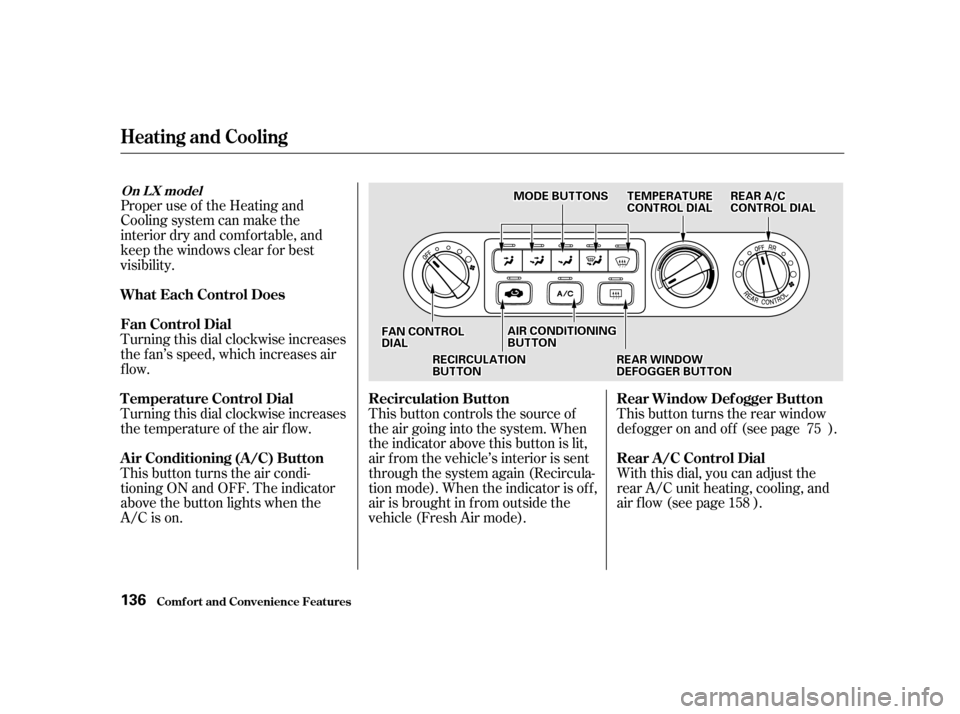
Turning this dial clockwise increases
the f an’s speed, which increases air
flow.
Turning this dial clockwise increases
the temperature of the air flow.
This button turns the air condi-
tioning ON and OFF. The indicator
above the button lights when the
A/C is on.This button controls the source of
the air going into the system. When
the indicator above this button is lit,
air f rom the vehicle’s interior is sent
through the system again (Recircula-
tion mode). When the indicator is off,
air is brought in f rom outside the
vehicle (Fresh Air mode).This button turns the rear window
def ogger on and of f (see page ).
With this dial, you can adjust the
rear A/C unit heating, cooling, and
air flow (see page ).
75
158
Comf ort and Convenience Feat ures
Heating and Cooling
What Each Control Does
Fan Control Dial
T emperature Control Dial
Air Conditioning (A/C) Button Recirculation Button Rear Window Def ogger Button
Rear A /C Control Dial
On L X model
136
FFAANNCCOONNTTRROOLLDDIIAALL
RREEAARRAA//CCCCOONNTTRROOLLDDIIAALL
RREECCIIRRCCUULLAATTIIOONNBBUUTTTTOONN
AAIIRRCCOONNDDIITTIIOONNIINNGGBBUUTTTTOONN
RREEAARRWWIINNDDOOWWDDEEFFOOGGGGEERRBBUUTTTTOONN
TTEEMMPPEERRAATTUURREECCOONNTTRROOLLDDIIAALLMMOODDEEBBUUTTTTOONNSS
Page 148 of 363
You can manually select the f an
speedbyturningthefancontroldial.
When you turn the dial clockwise,
the fan is taken out of automatic
mode and starts to run at its lowest
speed. Turning the dial f ully
clockwise increases the f an’s speed,
which increases air flow.
With this dial, you can adjust the
rear A/C unit heating, cooling, and
air flow (see page ).
Use the MODE button to select the
vents the air flows from. Some air
will f low f rom the dashboard corner
vents in all modes. Each time you
press the MODE button, the display
shows the mode selected. Press the
button four times to see all the
modes.158
CONT INUED
Fan Cont rol Dial
Rear A /C Cont rol DialMode Button
Climat e Cont rol Syst em
Comf ort and Convenience Feat ures 149
MMOODDEEBBUUTTTTOONNFFAANNCCOONNTTRROOLLDDIIAALL
RREEAARRAA//CCCCOONNTTRROOLLDDIIAALL
Page 158 of 363
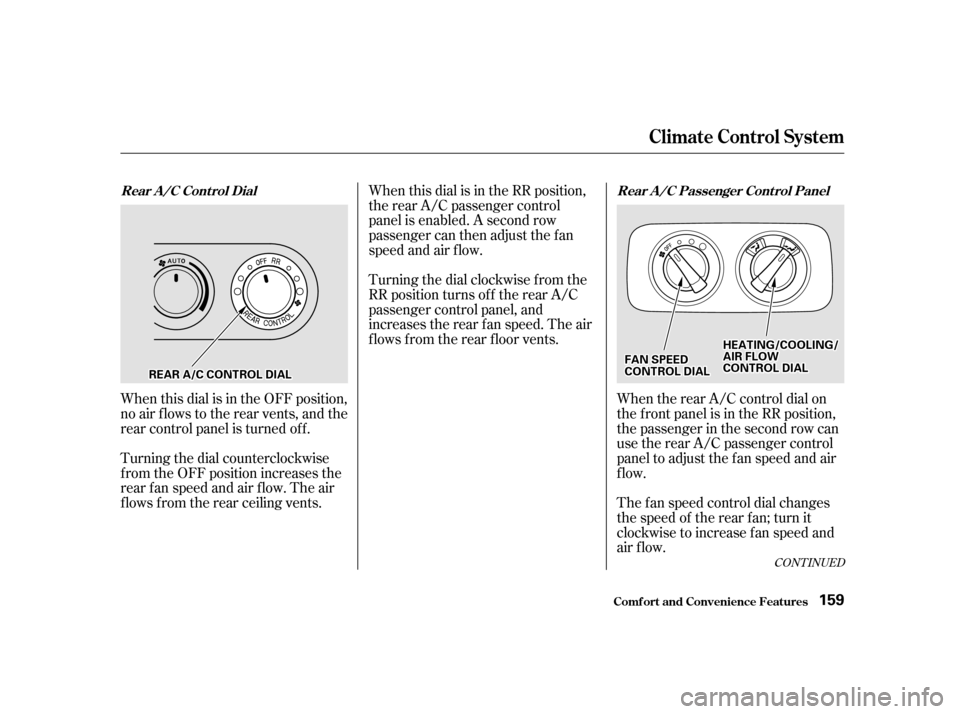
When this dial is in the OFF position,
no air flows to the rear vents, and the
rear control panel is turned of f .
Turning the dial counterclockwise
f rom the OFF position increases the
rear fan speed and air flow. The air
f lows f rom the rear ceiling vents.When this dial is in the RR position,
the rear A/C passenger control
panel is enabled. A second row
passenger can then adjust the fan
speed and air f low.
Turning the dial clockwise f rom the
RR position turns of f the rear A/C
passenger control panel, and
increases the rear f an speed. The air
f lows f rom the rear f loor vents.
When the rear A/C control dial on
the f ront panel is in the RR position,
the passenger in the second row can
use the rear A/C passenger control
panel to adjust the f an speed and air
flow.
The f an speed control dial changes
the speed of the rear f an; turn it
clockwise to increase fan speed and
air flow.
CONT INUED
Climat e Cont rol Syst em
Comf ort and Convenience Feat ures
Rear A/C Control Dial Rear A/C Passenger Control Panel
159
RREEAARRAA//CCCCOONNTTRROOLLDDIIAALL
HHEEAATTIINNGG//CCOOOOLLIINNGG//AAIIRRFFLLOOWWCCOONNTTRROOLLDDIIAALLFFAANNSSPPEEEEDDCCOONNTTRROOLLDDIIAALL
Page 192 of 363
Once the security system is set,
opening any door (without using the
key or the remote transmitter), or
the hood, will cause it to alarm. It
also alarms if the radio is removed
f rom the dashboard or the wiring is
cut.Do not attempt to alter this system
or add other devices to it.
The security system helps to protect
your vehicle and valuables f rom thef t.
The horn sounds and a combination
of headlights, parking lights, side
marker lights and taillights f lashes if
someone attempts to break into your
vehicleorremovetheradio.This
alarm continues f or two minutes,
then the alarm stops. To reset an
alarming system before the two
minutes have elapsed, unlock either
f ront door with the key or the
remote transmitter.
The security system sets auto-
matically fifteen seconds after you
lock the doors, hood, and tailgate.
For the system to activate, you must
lock the doors f rom the outside with
the key, or remote transmitter. The
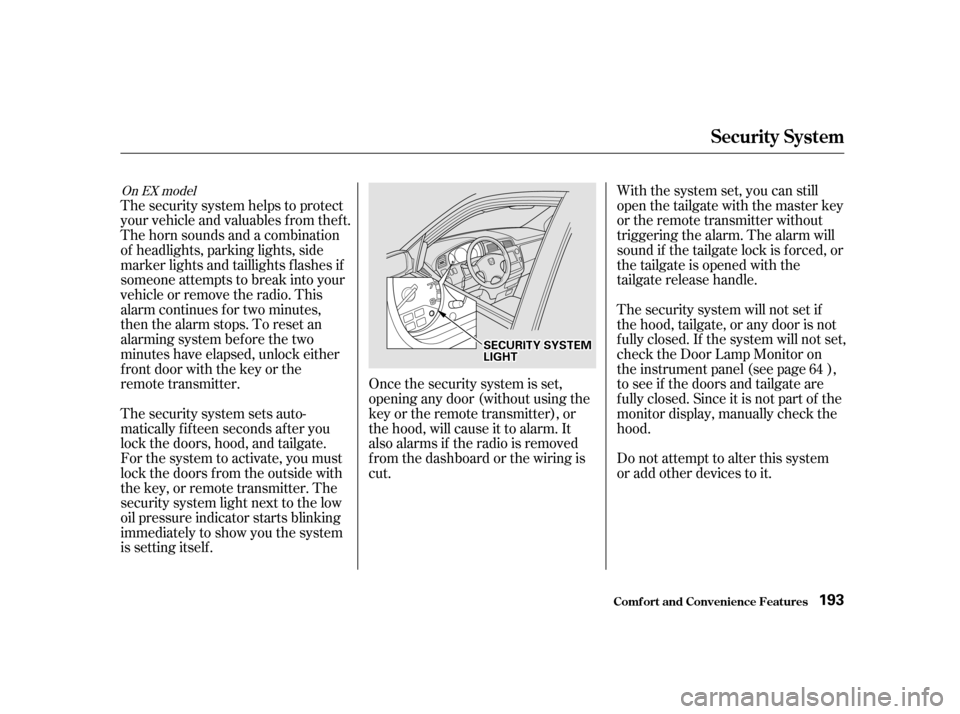
security system light next to the low
oil pressure indicator starts blinking
immediately to show you the system
is setting itself . With the system set, you can still
open the tailgate with the master key
or the remote transmitter without
triggering the alarm. The alarm will
sound if the tailgate lock is f orced, or
the tailgate is opened with the
tailgate release handle.
The security system will not set if
the hood, tailgate, or any door is not
f ully closed. If the system will not set,
check the Door Lamp Monitor on
the instrument panel (see page ),
to see if the doors and tailgate are
f ully closed. Since it is not part of the
monitor display, manually check thehood.
64
On EX model
Security System
Comf ort and Convenience Feat ures
193
SSEECCUURRIITTYYSSYYSSTTEEMMLLIIGGHHTT
Page 202 of 363

Your dealer has genuine Honda
accessories that allow you to
personalize your vehicle. These
accessories have been designed and
approved f or your vehicle, and are
covered by warranty.However, if electronic accessories
are improperly installed, or exceed
your vehicle’s electrical system
capacity, they can interf ere with theoperation of your vehicle, or even
cause the airbags to deploy.
Make sure the accessory does not
obscure any lights, or interf ere
with proper vehicle operation or
perf ormance.
Be sure electronic accessories do
not overload electrical circuits
(see page ).
Have the installer contact your
Honda dealer f or assistance bef ore
installing any electronic accessory.
If possible, have your dealer inspect
the f inal installation.
Modif ying your vehicle, or installing
some non-Honda accessories, can
make your vehicle unsaf e. Bef ore
you make any modif ications or add
anyaccessories,besuretoreadthe
f ollowing inf ormation.
Bef ore installing any accessory:
When properly installed, cellular
phones, alarms, two-way radios, and
low-powered audio systems should
not interf ere with your vehicle’s
computer-controlled systems, such
as the SRS and anti-lock brake
system.
Non-Honda accessories are usually
designed f or universal applications.
Although aftermarket accessories
may f it on your vehicle, they may not
meet f actory specif ications, and
could adversely af f ect your vehicle’s
handling and stability. (See
‘‘Modif ications’’ on page f or
additional information.)
204 323
A ccessories
A ccessories and Modif ications
Bef ore Driving
203
Improper accessories or
modifications can affect your
vehicle’s handling, stability and
performance, and cause a
crash in which you can be hurt
or killed.
Follow all instructions in this
owner’s manual regarding
accessories and modifications.
Page 203 of 363

Do not remove any original
equipment or modif y your vehicle in
any way that would alter its design or
operation. This could make your
vehicle unsaf e and illegal to drive.
Such modif ications can adversely
af f ect handling, and interf ere with
the operation of the vehicle’s anti-
lock brakes and other systems.In addition, any modif ications that
decrease ground clearance increase
the chance of undercarriage parts
striking a curb, speed bump, or other
raised object, which could cause
your airbags to deploy.
Do not modif y your steering wheel
or any other part of your
Supplemental Restraint System.
Modif ications could make the
system inef f ective.
Any object attached to
or placed on the covers marked ‘‘SRS
AIRBAG,’’ in the center of the
steering wheel and on top of the
dashboard, could interf ere with the
proper operation of the airbags. Or,
if the airbags inf late, the objects
could be propelled inside the vehicle
and hurt someone.
For example, do not make any
modif ications that would change the
ride height of your vehicle, or install
wheels and tires with a dif f erent
overall diameter.
Modif ications
Additional Saf ety PrecautionDo not at t ach or place object s on t he
airbag covers.
A ccessories and Modif ications
Bef ore Driving
204
Page 208 of 363

This section gives you tips on
starting the engine under various
conditions, and how to operate the
automatic transmission. It also
includes important inf ormation on
parking your vehicle, the braking
system, the Traction Control System,
and f acts you need if you are
planning to tow a trailer.........................
Preparing to Drive . 210
.......................
Starting the Engine . 211
Starting in Cold Weather ....................
at High Altitude . 211
..............
Automatic Transmission . 212
.
Shif t Lever Position Indicator . 212
................
Shif t Lever Positions . 213
..............
Engine Speed Limiter . 215
....................
Shif t Lock Release . 215
...........................................
Parking . 217
.....................
The Braking System . 218
.............
Brake Wear Indicators . 218
...............
Brake System Design . 219
.......................
Anti-lock Brakes . 219
Important Saf ety .........................
Reminders . 220
........................
ABS Indicator . 220
..............
Traction Control System . 221
...............
TCS ON/OFF Switch . 222
............................
TCS Indicator . 223
...............
Driving in Bad Weather . 224
...........................
Towing a Trailer . 226
Driving
Driving 209