2001 CHRYSLER VOYAGER wheel
[x] Cancel search: wheelPage 159 of 4284

Symptom:
ORC, NO PCI TRANSMISSION - STORED
When Monitored and Set Condition:
ORC, NO PCI TRANSMISSION - STORED
When Monitored: With the ignition in the On position and the ORC transmitting
information on the PCI BUS.
Set Condition: The code will set if the ORC cannot detect the ORC transmitting
information on the PCI BUS for 5 consecutive seconds. NOTE: Any PCI Bus Failure will
cause this code to set.
POSSIBLE CAUSES
ACTIVE OR STORED CODE PRESENT
STORED CODE OR INTERMITTENT CONDITION
TEST ACTION APPLICABILITY
1 Turn the ignition on.
NOTE: Ensure the battery is fully charged.
Active codes must be resolved before diagnosing stored codes.
With the DRBIIIt, record and erase all DTCs from all modules.
With the DRB III monitor active codes as you work through the system.
Wiggle the wiring harness and connectors of the Airbag System and rotate the
steering wheel from stop to stop.
NOTE: Check connectors - Clean / repair as necessary.
You have just attempted to simulate the condition that initially set the trouble code
message.
The following additional checks may assist you in identifying a possible intermittent
problem:
- Visually inspect related wire harness connectors. Look for broken, bent, pushed out,
spread, corroded, or contaminated terminals.
- Visually inspect the related harnesses. Look for chafed, pierced, pinched or partially
broken wire.
- Refer to Wiring Diagrams and Technical Service Bulletins that may apply.
Did the DTC become active ?All
Ye s®Select appropriate active symptom from Symptom List.
No®No problem found at this time. Erase all codes before returning
vehicle to customer.
130
AIRBAG
Page 260 of 4284
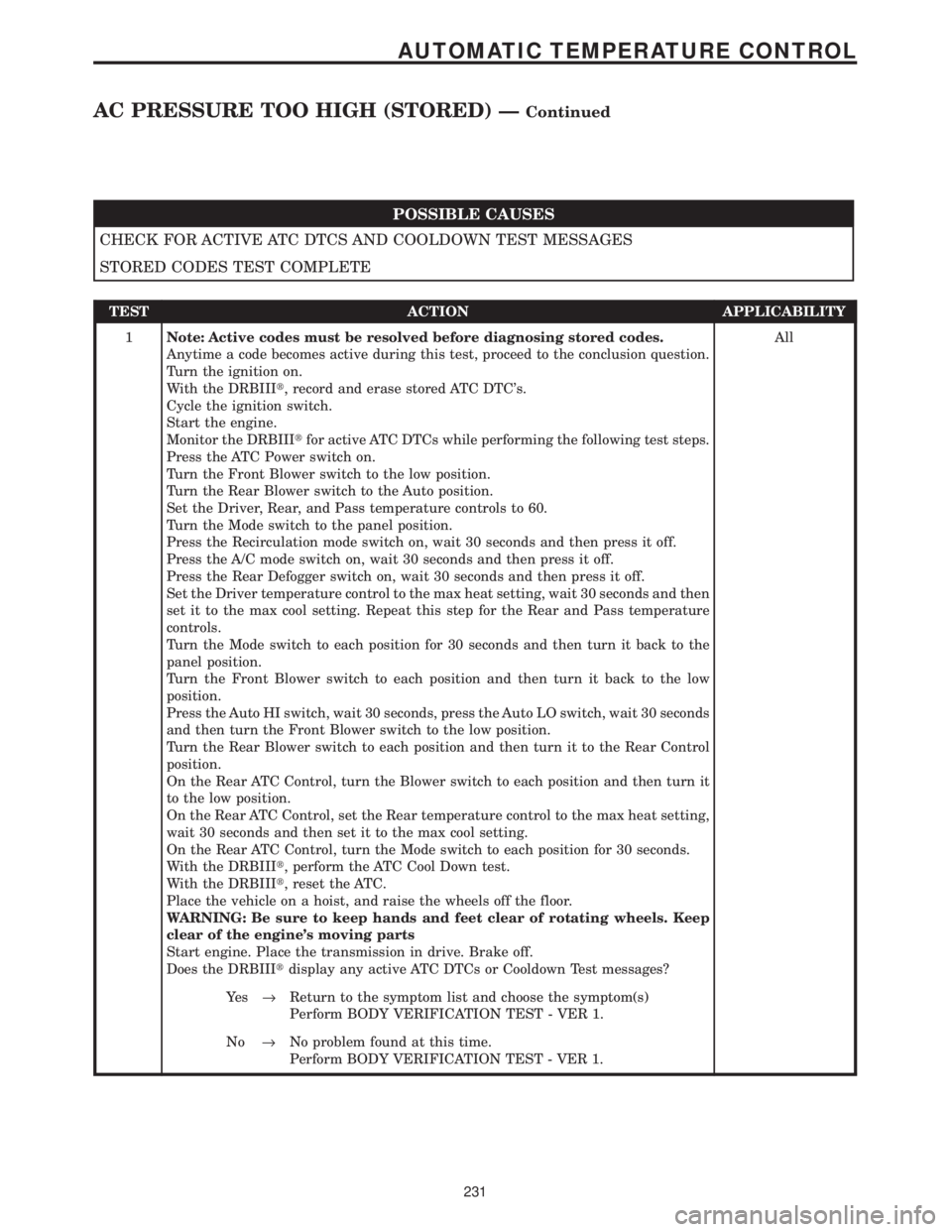
POSSIBLE CAUSES
CHECK FOR ACTIVE ATC DTCS AND COOLDOWN TEST MESSAGES
STORED CODES TEST COMPLETE
TEST ACTION APPLICABILITY
1Note: Active codes must be resolved before diagnosing stored codes.
Anytime a code becomes active during this test, proceed to the conclusion question.
Turn the ignition on.
With the DRBIIIt, record and erase stored ATC DTC's.
Cycle the ignition switch.
Start the engine.
Monitor the DRBIIItfor active ATC DTCs while performing the following test steps.
Press the ATC Power switch on.
Turn the Front Blower switch to the low position.
Turn the Rear Blower switch to the Auto position.
Set the Driver, Rear, and Pass temperature controls to 60.
Turn the Mode switch to the panel position.
Press the Recirculation mode switch on, wait 30 seconds and then press it off.
Press the A/C mode switch on, wait 30 seconds and then press it off.
Press the Rear Defogger switch on, wait 30 seconds and then press it off.
Set the Driver temperature control to the max heat setting, wait 30 seconds and then
set it to the max cool setting. Repeat this step for the Rear and Pass temperature
controls.
Turn the Mode switch to each position for 30 seconds and then turn it back to the
panel position.
Turn the Front Blower switch to each position and then turn it back to the low
position.
Press the Auto HI switch, wait 30 seconds, press the Auto LO switch, wait 30 seconds
and then turn the Front Blower switch to the low position.
Turn the Rear Blower switch to each position and then turn it to the Rear Control
position.
On the Rear ATC Control, turn the Blower switch to each position and then turn it
to the low position.
On the Rear ATC Control, set the Rear temperature control to the max heat setting,
wait 30 seconds and then set it to the max cool setting.
On the Rear ATC Control, turn the Mode switch to each position for 30 seconds.
With the DRBIIIt, perform the ATC Cool Down test.
With the DRBIIIt, reset the ATC.
Place the vehicle on a hoist, and raise the wheels off the floor.
WARNING: Be sure to keep hands and feet clear of rotating wheels. Keep
clear of the engine's moving parts
Start engine. Place the transmission in drive. Brake off.
Does the DRBIIItdisplay any active ATC DTCs or Cooldown Test messages?All
Ye s®Return to the symptom list and choose the symptom(s)
Perform BODY VERIFICATION TEST - VER 1.
No®No problem found at this time.
Perform BODY VERIFICATION TEST - VER 1.
231
AUTOMATIC TEMPERATURE CONTROL
AC PRESSURE TOO HIGH (STORED) ÐContinued
Page 547 of 4284

POSSIBLE CAUSES
CHECK FOR ACTIVE HVAC DTCS, & COOLDOWN TEST & DOOR RECALIBRATION MESSAGES
STORED CODE(S) TEST COMPLETE
TEST ACTION APPLICABILITY
1NOTE: Active codes must be resolved before diagnosing stored codes.
NOTE: Anytime a code becomes active during this test, proceed to the
conclusion question.
Turn the ignition on.
With the DRBIIIt, record and erase stored HVAC DTC's.
Cycle the ignition switch.
Start the engine.
Monitor the DRBIIItfor active HVAC DTCs while performing the following test
steps.
Manually press the A/C - Heater Control power switch on.
Turn the front blower motor control switch knob to the low position.
If equipped, turn the rear blower motor control switch knob to the low position.
Set the passenger blend control switch to the full cold position.
If equipped, set the zone/driver blend control switch to the full cold position.
Turn the mode select switch knob to the panel position.
Manually press the recirculation mode switch on, wait 30 seconds then press it off.
Manually press the A/C mode switch on, wait 30 seconds then press it off.
Manually press the rear window defogger switch on, wait 30 seconds then press it off.
Manually sweep the passenger blend control switch from full cold to full hot then
back to full cold.
If equipped, manually sweep the zone/driver blend control switch from full cold to full
hot then back to full cold.
Manually sweep the front blower motor control switch knob through all positions.
If equipped, manually sweep the rear blower motor control switch knob through all
positions.
If equipped, turn the rear blower motor control switch knob to the rear position.
If equipped, on the Rear Blower Rear Control, manually sweep the rear blower motor
control switch knob through all positions.
If equipped, on the Rear Blower Rear Control, manually sweep the rear blend/mode
control switch knob from full cold to full hot then back to full cold.
With the DRBIIIt, actuate the AC Cooldown Test.
With the DRBIIIt, actuate the HVAC Door Recalibration Test.
Place the vehicle on a hoist, and raise the wheels off the floor.
WARNING: Be sure to keep hands and feet clear of rotating wheels. Keep
clear of the engine's moving parts
Start the engine. Place the transmission in drive. Brake off.
Does the DRBIIItdisplay any active HVAC DTC(s), Cooldown Test or Door Recali-
bration message(s)?All
Ye s®Return to the symptom list and choose the symptom(s).
Perform BODY VERIFICATION TEST - VER 1.
No®No problem found at this time.
Perform BODY VERIFICATION TEST - VER 1.
518
HEATING & A/C
A/C FAULT (STORED) - MANUAL A/C ÐContinued
Page 1064 of 4284
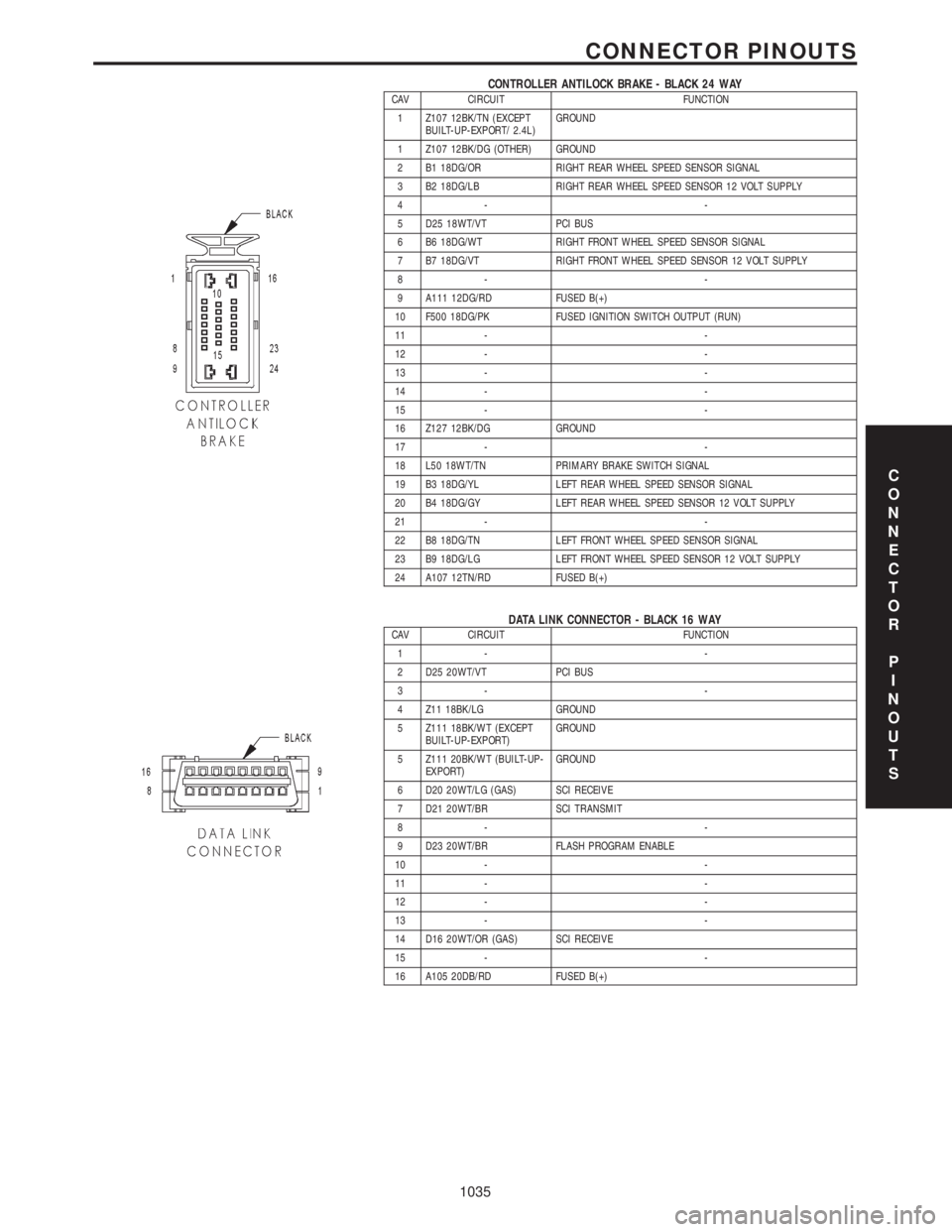
CONTROLLER ANTILOCK BRAKE - BLACK 24 WAYCAV CIRCUIT FUNCTION
1 Z107 12BK/TN (EXCEPT
BUILT-UP-EXPORT/ 2.4L)GROUND
1 Z107 12BK/DG (OTHER) GROUND
2 B1 18DG/OR RIGHT REAR WHEEL SPEED SENSOR SIGNAL
3 B2 18DG/LB RIGHT REAR WHEEL SPEED SENSOR 12 VOLT SUPPLY
4- -
5 D25 18WT/VT PCI BUS
6 B6 18DG/WT RIGHT FRONT WHEEL SPEED SENSOR SIGNAL
7 B7 18DG/VT RIGHT FRONT WHEEL SPEED SENSOR 12 VOLT SUPPLY
8- -
9 A111 12DG/RD FUSED B(+)
10 F500 18DG/PK FUSED IGNITION SWITCH OUTPUT (RUN)
11 - -
12 - -
13 - -
14 - -
15 - -
16 Z127 12BK/DG GROUND
17 - -
18 L50 18WT/TN PRIMARY BRAKE SWITCH SIGNAL
19 B3 18DG/YL LEFT REAR WHEEL SPEED SENSOR SIGNAL
20 B4 18DG/GY LEFT REAR WHEEL SPEED SENSOR 12 VOLT SUPPLY
21 - -
22 B8 18DG/TN LEFT FRONT WHEEL SPEED SENSOR SIGNAL
23 B9 18DG/LG LEFT FRONT WHEEL SPEED SENSOR 12 VOLT SUPPLY
24 A107 12TN/RD FUSED B(+)
DATA LINK CONNECTOR - BLACK 16 WAYCAV CIRCUIT FUNCTION
1- -
2 D25 20WT/VT PCI BUS
3- -
4 Z11 18BK/LG GROUND
5 Z111 18BK/WT (EXCEPT
BUILT-UP-EXPORT)GROUND
5 Z111 20BK/WT (BUILT-UP-
EXPORT)GROUND
6 D20 20WT/LG (GAS) SCI RECEIVE
7 D21 20WT/BR SCI TRANSMIT
8- -
9 D23 20WT/BR FLASH PROGRAM ENABLE
10 - -
11 - -
12 - -
13 - -
14 D16 20WT/OR (GAS) SCI RECEIVE
15 - -
16 A105 20DB/RD FUSED B(+)
C
O
N
N
E
C
T
O
R
P
I
N
O
U
T
S
1035
CONNECTOR PINOUTS
Page 1156 of 4284
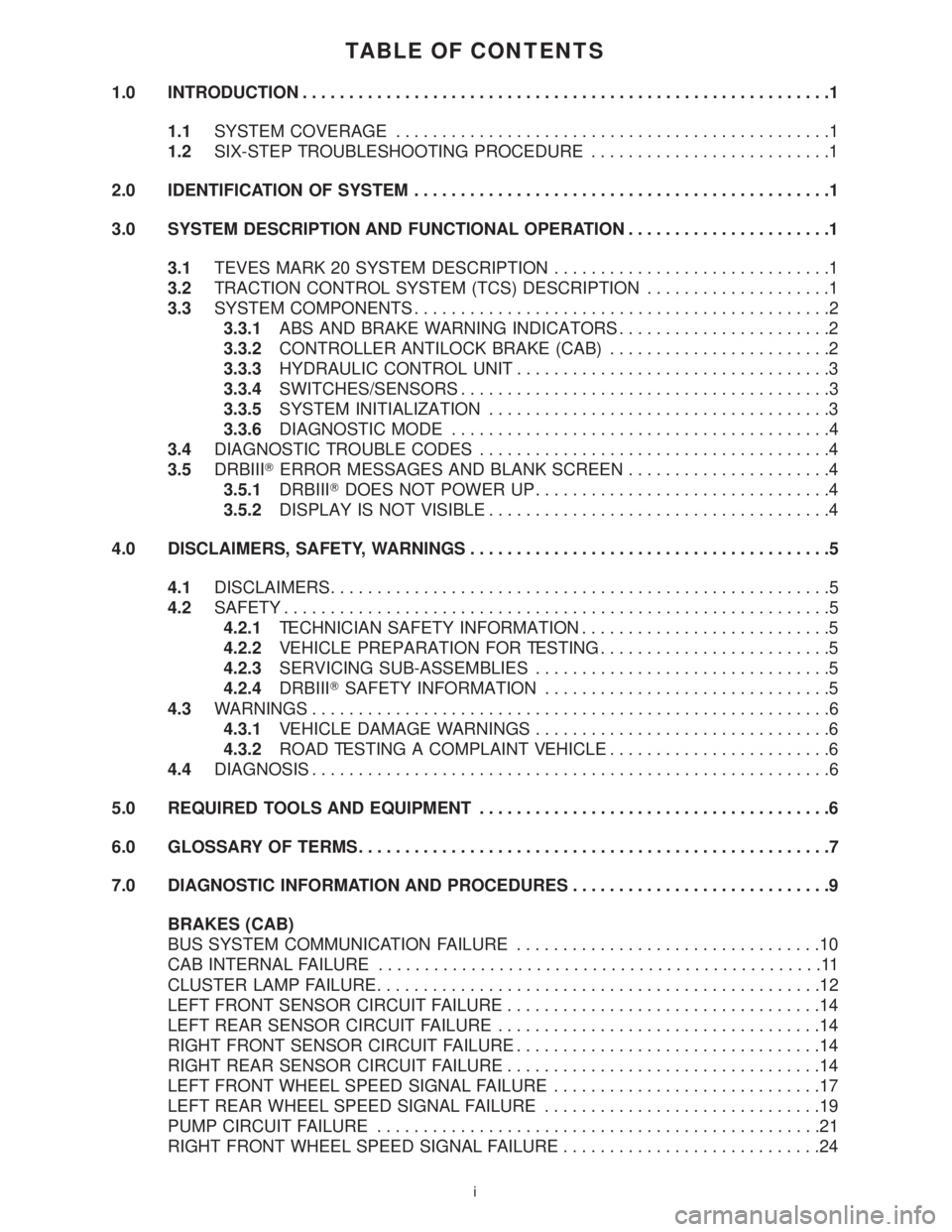
TABLE OF CONTENTS
1.0 INTRODUCTION.........................................................1
1.1SYSTEM COVERAGE...............................................1
1.2SIX-STEP TROUBLESHOOTING PROCEDURE..........................1
2.0 IDENTIFICATION OF SYSTEM.............................................1
3.0 SYSTEM DESCRIPTION AND FUNCTIONAL OPERATION......................1
3.1TEVES MARK 20 SYSTEM DESCRIPTION..............................1
3.2TRACTION CONTROL SYSTEM (TCS) DESCRIPTION....................1
3.3SYSTEM COMPONENTS.............................................2
3.3.1ABS AND BRAKE WARNING INDICATORS.......................2
3.3.2CONTROLLER ANTILOCK BRAKE (CAB)........................2
3.3.3HYDRAULIC CONTROL UNIT..................................3
3.3.4SWITCHES/SENSORS........................................3
3.3.5SYSTEM INITIALIZATION.....................................3
3.3.6DIAGNOSTIC MODE.........................................4
3.4DIAGNOSTIC TROUBLE CODES......................................4
3.5DRBIIITERROR MESSAGES AND BLANK SCREEN......................4
3.5.1DRBIIITDOES NOT POWER UP................................4
3.5.2DISPLAY IS NOT VISIBLE.....................................4
4.0 DISCLAIMERS, SAFETY, WARNINGS.......................................5
4.1DISCLAIMERS......................................................5
4.2SAFETY...........................................................5
4.2.1TECHNICIAN SAFETY INFORMATION...........................5
4.2.2VEHICLE PREPARATION FOR TESTING.........................5
4.2.3SERVICING SUB-ASSEMBLIES................................5
4.2.4DRBIIITSAFETY INFORMATION...............................5
4.3WARNINGS........................................................6
4.3.1VEHICLE DAMAGE WARNINGS................................6
4.3.2ROAD TESTING A COMPLAINT VEHICLE........................6
4.4DIAGNOSIS........................................................6
5.0 REQUIRED TOOLS AND EQUIPMENT......................................6
6.0 GLOSSARY OF TERMS...................................................7
7.0 DIAGNOSTIC INFORMATION AND PROCEDURES............................9
BRAKES (CAB)
BUS SYSTEM COMMUNICATION FAILURE.................................10
CAB INTERNAL FAILURE................................................11
CLUSTER LAMP FAILURE................................................12
LEFT FRONT SENSOR CIRCUIT FAILURE..................................14
LEFT REAR SENSOR CIRCUIT FAILURE...................................14
RIGHT FRONT SENSOR CIRCUIT FAILURE.................................14
RIGHT REAR SENSOR CIRCUIT FAILURE..................................14
LEFT FRONT WHEEL SPEED SIGNAL FAILURE.............................17
LEFT REAR WHEEL SPEED SIGNAL FAILURE..............................19
PUMP CIRCUIT FAILURE................................................21
RIGHT FRONT WHEEL SPEED SIGNAL FAILURE............................24
i
Page 1157 of 4284
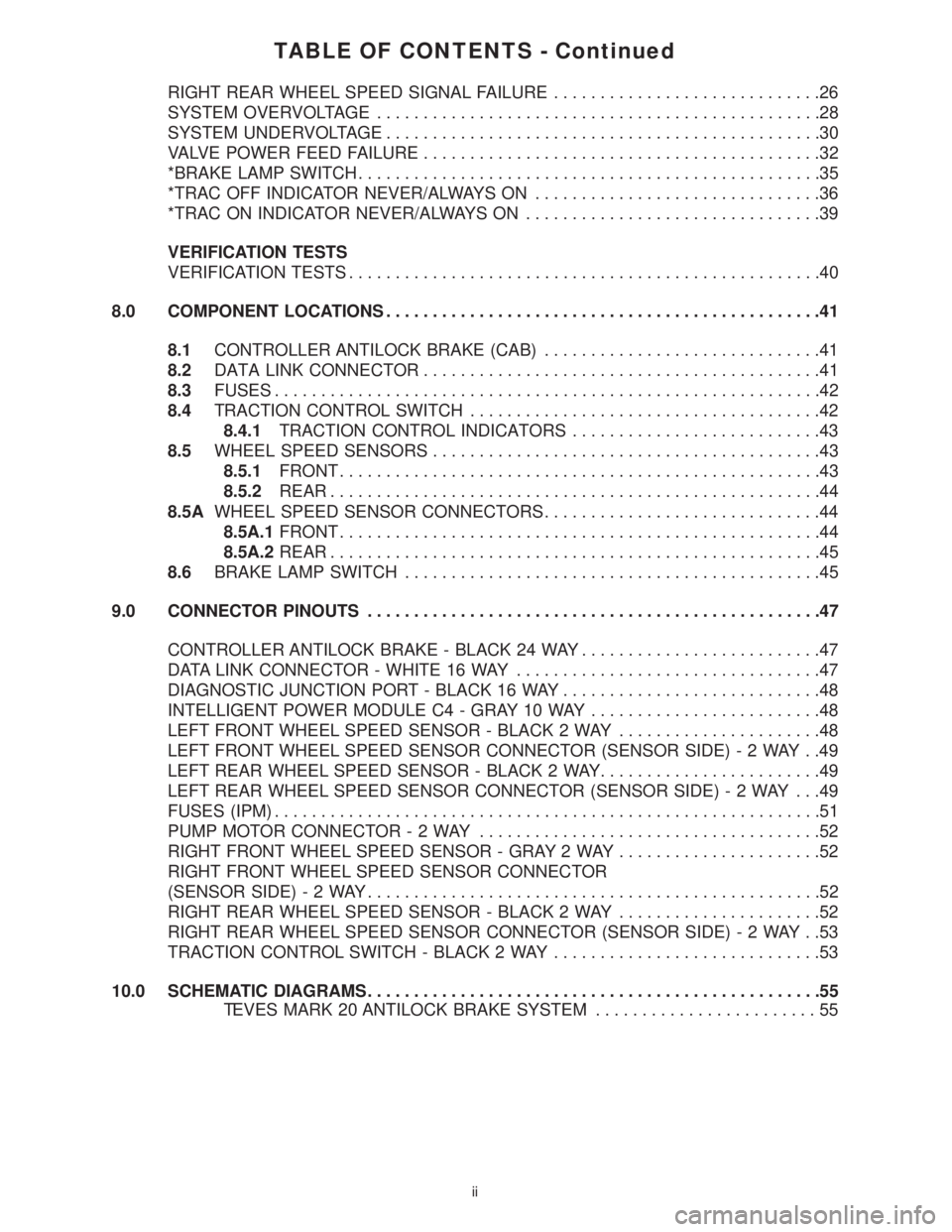
TABLE OF CONTENTS - Continued
RIGHT REAR WHEEL SPEED SIGNAL FAILURE.............................26
SYSTEM OVERVOLTAGE................................................28
SYSTEM UNDERVOLTAGE...............................................30
VALVE POWER FEED FAILURE...........................................32
*BRAKE LAMP SWITCH..................................................35
*TRAC OFF INDICATOR NEVER/ALWAYS ON...............................36
*TRAC ON INDICATOR NEVER/ALWAYS ON................................39
VERIFICATION TESTS
VERIFICATION TESTS...................................................40
8.0 COMPONENT LOCATIONS...............................................41
8.1CONTROLLER ANTILOCK BRAKE (CAB)..............................41
8.2DATA LINK CONNECTOR...........................................41
8.3FUSES...........................................................42
8.4TRACTION CONTROL SWITCH......................................42
8.4.1TRACTION CONTROL INDICATORS...........................43
8.5WHEEL SPEED SENSORS..........................................43
8.5.1FRONT....................................................43
8.5.2REAR.....................................................44
8.5AWHEEL SPEED SENSOR CONNECTORS..............................44
8.5A.1FRONT....................................................44
8.5A.2REAR.....................................................45
8.6BRAKE LAMP SWITCH.............................................45
9.0 CONNECTOR PINOUTS.................................................47
CONTROLLER ANTILOCK BRAKE - BLACK 24 WAY..........................47
DATA LINK CONNECTOR - WHITE 16 WAY.................................47
DIAGNOSTIC JUNCTION PORT - BLACK 16 WAY............................48
INTELLIGENT POWER MODULE C4 - GRAY 10 WAY.........................48
LEFT FRONT WHEEL SPEED SENSOR - BLACK 2 WAY......................48
LEFT FRONT WHEEL SPEED SENSOR CONNECTOR (SENSOR SIDE)-2WAY..49
LEFT REAR WHEEL SPEED SENSOR - BLACK 2 WAY........................49
LEFT REAR WHEEL SPEED SENSOR CONNECTOR (SENSOR SIDE)-2WAY ...49
FUSES (IPM)...........................................................51
PUMP MOTOR CONNECTOR-2WAY.....................................52
RIGHT FRONT WHEEL SPEED SENSOR - GRAY 2 WAY......................52
RIGHT FRONT WHEEL SPEED SENSOR CONNECTOR
(SENSOR SIDE)-2WAY.................................................52
RIGHT REAR WHEEL SPEED SENSOR - BLACK 2 WAY......................52
RIGHT REAR WHEEL SPEED SENSOR CONNECTOR (SENSOR SIDE)-2WAY..53
TRACTION CONTROL SWITCH - BLACK 2 WAY.............................53
10.0 SCHEMATIC DIAGRAMS.................................................55
TEVES MARK 20 ANTILOCK BRAKE SYSTEM........................55
ii
Page 1158 of 4284
1.0 INTRODUCTION
The procedures contained in this manual include
all the specifications, instructions, and graphics
needed to diagnose Mark 20 Antilock Braking Sys-
tem (ABS) and Mark 20 Antilock Braking System
with Traction Control. The diagnostics in this man-
ual are based on the failure condition or symptom
being present at time of diagnosis.
Please follow the recommendations below when
choosing your diagnostic path.
1. First make sure the DRBIIItis communicating
with the CAB. If the DRBIIItdisplays a ªNo
Responseº condition, you must diagnose that
first.
2. Read DTC's (diagnostic trouble codes) with the
DRBIIIt.
3. If no DTC's are present, identify the customer
complaint.
4. Once the DTC or customer complaint is identi-
fied, locate the matching test in the Table of
Contents and begin to diagnose the symptom.
All component location views are in Section 8.0.
All connector pinouts are in Section 9.0. All sche-
matics are in Section 10.0.
An * placed before the symptom description indi-
cates a concern with no associated DTC.
When repairs are required, refer to the appropri-
ate service manual for the proper removal and
repair procedure.
Diagnostic procedures change every year. New
diagnostic systems may be added; carry over sys-
tems may be enhanced. READ THIS MANUAL
BEFORE TRYING TO DIAGNOSE A VEHICLE
CODE. It is recommended that you review the
entire manual to become familiar with all new and
changed diagnostic procedures.
After using this book, if you have any comments
or recommendations, please fill out the form at the
back of the book and mail it back to us.
1.1 SYSTEM COVERAGE
This diagnostic procedure manual covers the an-
tilock braking system (ABS) and traction control
system found on: 2001 Chrysler Town and Country,
Dodge Caravan and Grand Caravan.
1.2 SIX-STEP TROUBLESHOOTING
PROCEDURE
Diagnosis of the controller antilock brake module
is done in six basic steps:
²verification of complaint
²verification of any related symptoms
²symptom analysis
²problem isolation
²repair of isolated problem
²verification of proper operation
2.0 IDENTIFICATION OF
SYSTEM
Vehicles equipped with the Teves Mark 20 an-
tilock brake system can be identified by the pres-
ence of the controller antilock brake module located
beneath the master cylinder.
3.0 SYSTEM DESCRIPTION AND
FUNCTIONAL OPERATION
3.1 TEVES MARK 20 SYSTEM
DESCRIPTION
The controller antilock brake module is used to
monitor wheel speeds and to modulate (control)
hydraulic pressure in each brake channel. The
modulated hydraulic pressure is used to prevent
wheel lock-up during braking.
The Teves Mark 20 system uses a diagonal split
hydraulic brake system.
In the standard brake mode
the master cylinder primary circuit supplies pressure
to the right front and left rear wheel brakes, and the
secondary master cylinder circuit supplies pressure
to the left front and right rear wheel brakes.
3.2 TRACTION CONTROL SYSTEM (TCS)
DESCRIPTION
The main purpose of traction control is to reduce
wheel slip and maintain traction at the driven
wheels when road surfaces are slippery. The trac-
tion control system reduces wheel slip by braking
the wheel that is losing traction. The system is
designed to operate at speeds below 56 km/h (35
mph).
The Controller Antilock Brake (CAB) monitors
wheel speeds. If, during acceleration, the module
detects front (drive) wheel slip and the brakes are
not applied, the CAB will enter traction control
mode. Traction control works in the following order
when drive wheel slip is detected.
1. Close the (normally open) isolation valves.
2. Start pump/motor and supply volume/pressure
to front hydraulic circuits (pump runs continu-
ously during traction control).
3. Open and close build and decay valves to main-
tain minimum wheel slip and maximum trac-
tion.
1
GENERAL INFORMATION
Page 1159 of 4284
The cycling of the build and decay valves is
similar to the ABS except that they work to control
wheel spin by applying brakes. ABS function is to
control wheel skid by releasing brakes.
Two pressure relief valves allow excess fluid vol-
ume to return to the reservoir when not used by the
build/decay cycles. These are required because the
pump supplies more volume than the traction con-
trol system requires.
If at any time the brake pedal is applied during a
traction control cycle, the brake lamp switch will
trigger the CAB to switch off the traction control.
The traction control system will be enabled at
each ignition cycle. It may be turned off by depress-
ing the Traction Control Switch. The traction con-
trol system function lamp will illuminate ªTRAC
OFFº immediately upon depressing the traction
control switch button. Only the ªTRACº portion of
the ªTRAC OFFº indicator will illuminate during a
traction control event. If the CAB calculates that
the brake temperatures are high, the traction con-
trol system will become inoperative until a time-out
period has elapsed. When in this thermal protection
mode, the traction control ªTRAC OFFº lamp will
illuminate; however, a fault will not be registered.
3.3 SYSTEM COMPONENTS
²controller antilock brake (CAB)
²vacuum booster
²master cylinder
²ABS integrated electronic control module/
hydraulic control unit (HCU), valve block assem-
bly: 8 valve solenoids (4 inlet valves, 4 outlet
valves, 2 accumulators) 1 motor, 2 pump
²ABS integrated electronic control module with
traction control same as above but has 10 valve
solenoids.
²4 wheel speed sensor/tone wheel assemblies
²ABS warning indicator
²fuses and wiring harness
²fluid reservoir
²TRAC/TRAC OFF indicator
3.3.1 ABS AND BRAKE WARNING
INDICATORS
The amber ABS warning indicator is located in
the instrument cluster. It is used to inform the
driver that the antilock function has been turned
off. The ABS warning indicator is controlled by the
CAB. The CAB controls the lamp with a command
over the PCI bus.
The ABS Warning Indicator will remain lit during
every key cycle until a circuit or component fault is
repaired and the CAB no longer detects the fault.After repair of a sensor signal fault or a pump motor
fault, the CAB must sense all four wheels at 25
km/h (15 mph) before it will extinguish the ABS and
TRAC OFF Indicators.
The Instrument Cluster will illuminate the ABS
Warning Indicator if it loses communication with
the CAB.
The red BRAKE warning indicator is also located
in the instrument cluster. It can be activated in
several ways. Application of the parking brake or a
low fluid signal from the fluid level switch located in
the master cylinder reservoir will cause the indica-
tor to come on.
3.3.2 CONTROLLER ANTILOCK BRAKE
(CAB)
The Controller Antilock Brake (CAB) is a
microprocessor-based device that monitors wheel
speeds and controls the antilock functions. The
CAB contains two microprocessors that receive
identical sensor signals and then independently
process the information. The results are then com-
pared to make sure that they agree. Otherwise, the
CAB will turn off the antilock and turn on the ABS
amber warning indicator.
The primary functions of the CAB are to:
²detect wheel locking tendencies
²control fluid pressure modulation to the brakes
during antilock stop
²monitor the system for proper operation
²manage traction control functions
²provide communication to the DRBIIItwhile in
diagnostic mode
²store diagnostic information in non-volatile memory
The CAB continuously monitors the speed of each
wheel. When a wheel locking tendency is detected,
the CAB will command the appropriate valve to
modulate brake fluid pressure in its hydraulic unit.
Brake pedal position is maintained during an an-
tilock stop by being a closed system with the use of
2 accumulators. The CAB continues to control pres-
sure in individual hydraulic circuits until a wheel
locking tendency is no longer present. The CAB
turns on the pump motor during an antilock stop.
The antilock brake system is constantly moni-
tored by the CAB for proper operation. If the CAB
detects a system malfunction, it can disable the
antilock system and turn on the ABS warning
indicator. If the antilock function is disabled, the
system will revert to standard base brake system
operation.
The CAB inputs include the following:
²diagnostic communication
²four wheel speed sensors
2
GENERAL INFORMATION