Page 120 of 352
Digital Clock , Cente r Tabl e
Digita l Cloc k
The digital clock displays the time
with the ignition switch ON (II).
To set the clock:
1. Turn the ignition switch ON (II) to display the time. 2. Press and hold the H button until
the hour advances to the desired
hour.
3. Press and hold the M button until
the numbers advance to the
desired time.
You can use R to quickly set the timeto the nearest hour. If the displayedtime is before the half hour, pressingR sets the clock back to the previous
hour. If the displayed time is after
the half hour, pressing R sets the clock forward to the beginning of the
next hour. For example:
1:06 would RESET to 1:00.
1:52 would RESET to 2:00.
Cente r Tabl e
To use the center table, pull up the
outside edge of the table until it
latches. To store it, pull the lever and
lower the table.
CONTINUED
Instrument s an d Control s
Page 126 of 352
Storage Box , Coa t Hoo k
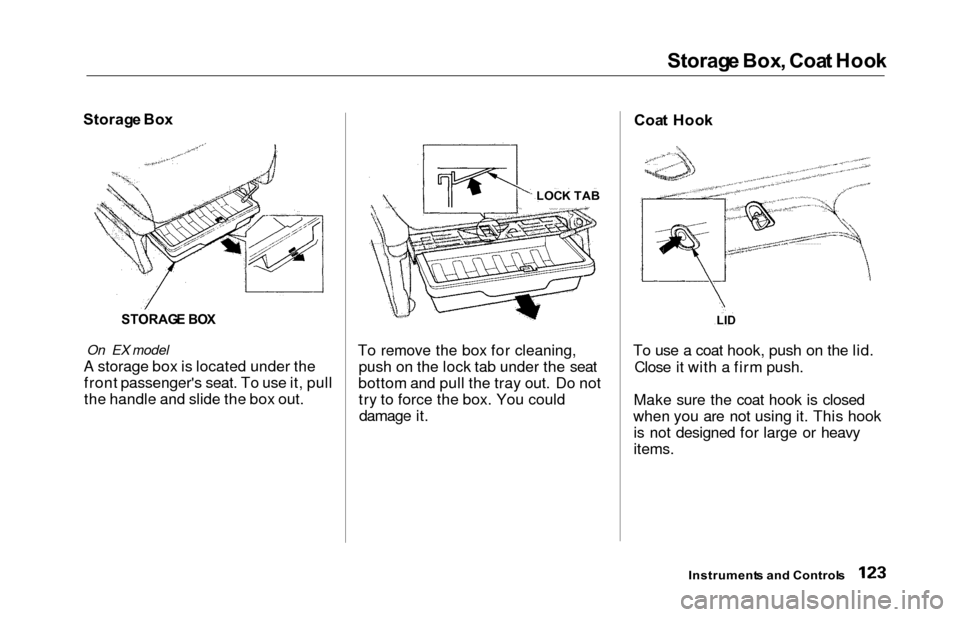
Storag e Bo x
STORAG E BO X
On EX model
A storage box is located under the
front passenger's seat. To use it, pull
the handle and slide the box out. To remove the box for cleaning,
push on the lock tab under the seat
bottom and pull the tray out. Do not try to force the box. You coulddamage it. Coa
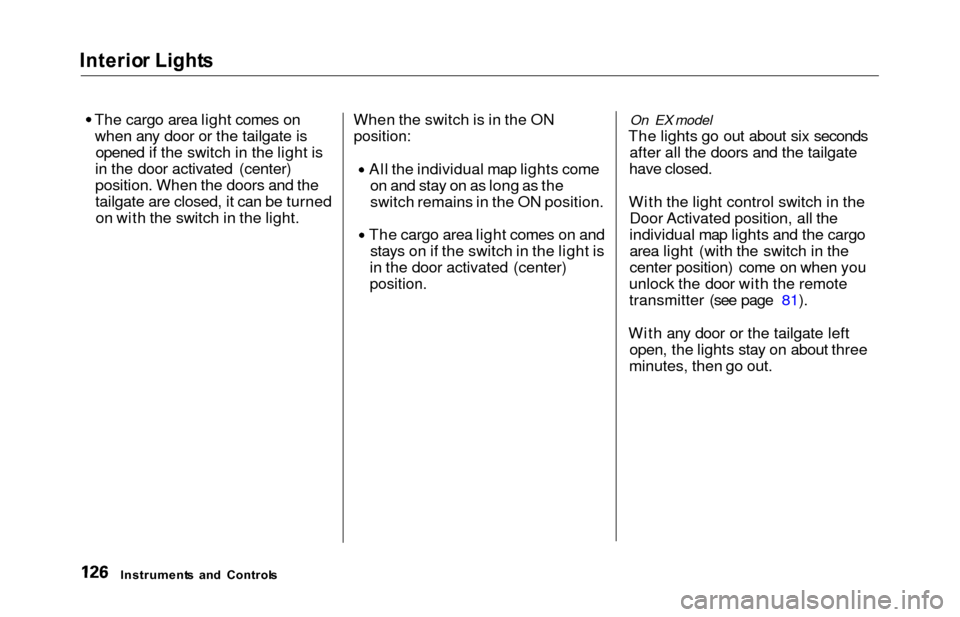
t Hoo k
To use a coat hook, push on the lid. Close it with a firm push.
Make sure the coat hook is closed
when you are not using it. This hook is not designed for large or heavy
items.
Instrument s an d Control s
LID
LOC K TA B
Page 129 of 352
Interio
r Light s
The cargo area light comes on when any door or the tailgate is opened if the switch in the light is
in the door activated (center)
position. When the doors and the
tailgate are closed, it can be turned on with the switch in the light. When the switch is in the ON
position:
All the individual map lights come
on and stay on as long as the
switch remains in the ON position. The cargo area light comes on and
stays on if the switch in the light is
in the door activated (center)
position.
On EX model
The lights go out about six seconds after all the doors and the tailgate
have closed.
With the light control switch in the Door Activated position, all the
individual map lights and the cargo
area light (with the switch in the
center position) come on when you
unlock the door with the remote
transmitter (see page 81).
With any door or the tailgate left open, the lights stay on about three
minutes, then go out.
Instrument s an d Control s
Page 133 of 352
Heating an d Coolin g
On LX model
Proper use of the Heating and
Cooling system can make the
interior dry and comfortable, and
keep the windows clear for best
visibility.
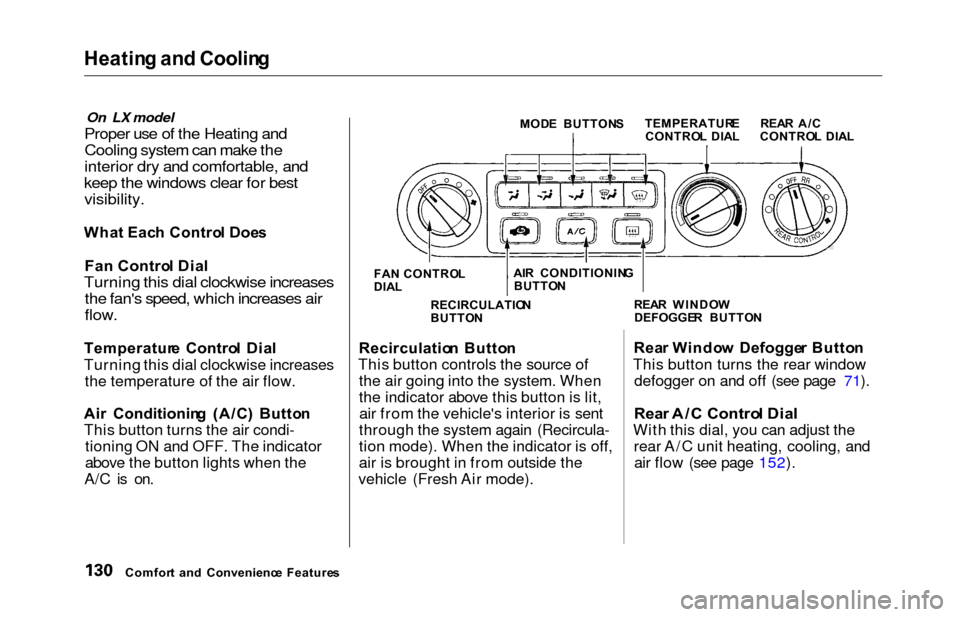
Wha t Eac h Contro l Doe s
Fa n Contro l Dia l
Turning this dial clockwise increases
the fan's speed, which increases air
flow.
Temperatur e Contro l Dia l
Turning this dial clockwise increases the temperature of the air flow.
Ai r Conditionin g (A/C ) Butto n
This button turns the air condi- tioning ON and OFF. The indicator
above the button lights when the
A/C is on.
MOD E BUTTON S
FA N CONTRO L
DIA L
Recirculatio n Butto n
This button controls the source of the air going into the system. When
the indicator above this button is lit,air from the vehicle's interior is sent
through the system again (Recircula-
tion mode). When the indicator is off,
air is brought in from outside the
vehicle (Fresh Air mode). Rea
r Windo w Defogge r Butto n
This button turns the rear window defogger on and off (see page 71).
Rea r A/ C Contro l Dia l
With this dial, you can adjust the
rear A/C unit heating, cooling, andair flow (see page 152).
Comfor t an d Convenienc e Feature s RECIRCULATIO
N
BUTTO N REA
R WINDO W
DEFOGGE R BUTTO N
TEMPERATUR
E
CONTRO L DIA L REA
R A/ C
CONTRO L DIA L
AI R CONDITIONIN G
BUTTO N
Page 146 of 352
Climate Contro l Syste m
Fan Control Dial
You can manually select the fan
speed by turning the fan control dial.
When you turn the dial clockwise, the fan is taken out of automaticmode and starts to run at its lowestspeed. Turning the dial fully
clockwise increases the fan's speed,
which increases air flow.
Rear A/C Control Dial
With this dial, you can adjust the rear A/C unit heating, cooling, andair flow (see page 152).
Mode Button
Use the MODE button to select the
vents the air flows from. Some air will flow from the dashboard corner
vents in all modes. Each time you
press the MODE button, the display shows the mode selected. Press the
button four times to see all the
modes.
MOD E BUTTO N
REAR A/ C CONTRO L DIA L
CONTINUED
Comfor t an d Convenienc e Feature s
FA
N CONTRO L DIA L
Page 156 of 352
Climat
e Contro l Syste m
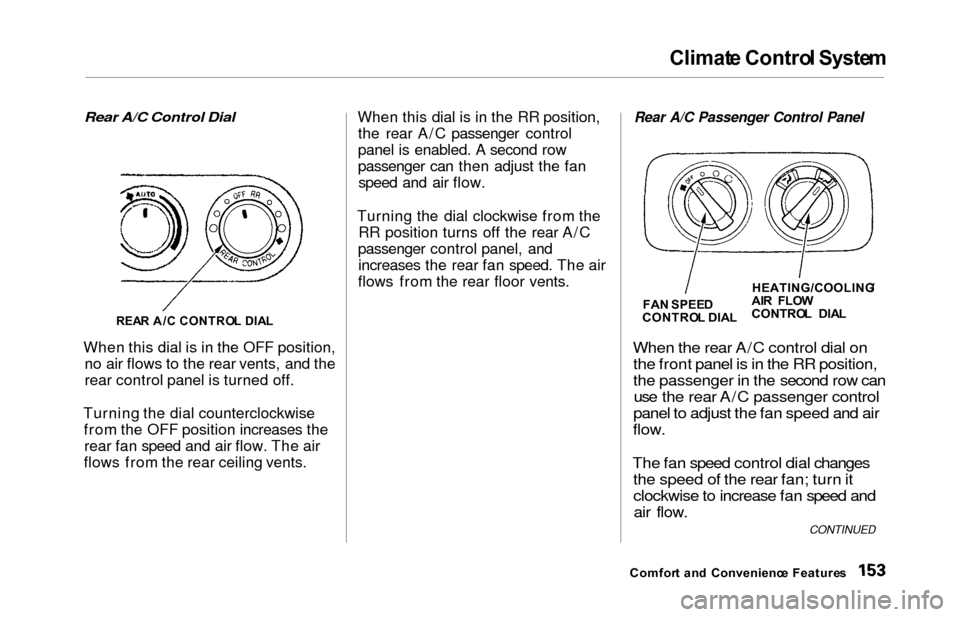
Rear A/C Control Dial
When this dial is in the OFF position, no air flows to the rear vents, and the
rear control panel is turned off.
Turning the dial counterclockwise from the OFF position increases therear fan speed and air flow. The air
flows from the rear ceiling vents. When this dial is in the RR position,
the rear A/C passenger control
panel is enabled. A second row
passenger can then adjust the fanspeed and air flow.
Turning the dial clockwise from the RR position turns off the rear A/C
passenger control panel, and increases the rear fan speed. The air
flows from the rear floor vents.
Rear A/C Passenger Control Panel
When the
rear A/C control dial on
the front panel is in the RR position,
the passenger in the second row can use the rear A/C passenger control
panel to adjust the fan speed and air
flow.
The fan speed control dial changes the speed of the rear fan; turn it
clockwise to increase fan speed andair flow.
Comfor t an d Convenienc e Feature s
REA
R A/ C CONTRO L DIA L
FA
N SPEE D
CONTRO L DIA LHEATING/COOLING
/
AI R FLO W
CONTRO L DIA L
CONTINUED
Page 198 of 352
Accessorie
s an d Modification s
Modifying your vehicle, or installing
some non-Honda accessories, can
make your vehicle unsafe. Before
you make any modifications or add any accessories, be sure to read the
following information.
Accessorie s
Your dealer has Genuine Honda accessories that allow you to
personalize your vehicle. These accessories have been designed and
approved for your vehicle, and are
covered by warranty.
Non-Honda accessories are usually
designed for universal applications.
Although aftermarket accessories may fit on your vehicle, they may not
meet factory specifications, andcould adversely affect your vehicle's
handling and stability. (See "Modifications" on page 196 for
additional information.) When properly installed, cellular
phones, alarms, two-way radios, and
low-powered audio systems should
not interfere with your vehicle's
computer-controlled systems, such
as the SRS and anti-lock brake
system.
However, if electronic accessories
are improperly installed, or exceed
your vehicle's electrical system capacity, they can interfere with the operation of your vehicle, or even
cause the airbags to deploy.
Before installing any accessory:
Make sure the accessory does notobscure any lights, or interfere
with proper vehicle operation or performance.
Be sure electronic accessories do
not overload electrical circuits (see page 311). Have the installer contact your
Honda dealer for assistance before
installing any electronic accessory.
If possible, have your dealer inspect
the final installation.
Before Drivin g
Improper accessories or
modifications can affect your
vehicle's handling, stability and performance, and cause a
crash in which you can be hurt
or killed.
Follow all instructions in this
owner's manual regarding
accessories and modifications.
Page 199 of 352
Accessories an d Modification s
Modification s
Do not remove any original
equipment or modify your vehicle in
any way that would alter its design or
operation. This could make your
vehicle unsafe and illegal to drive.
For example, do not make any
modifications that would change the
ride height of your vehicle, or install
wheels and tires with a different overall diameter.
Such modifications can adversely
affect handling, and interfere with
the operation of the vehicle's anti-
lock brakes and other systems. In addition, any modifications that
decrease ground clearance increase
the chance of undercarriage parts striking a curb, speed bump, or other
raised object, which could cause
your airbags to deploy.
Do not modify your steering wheel
or any other part of your
Supplemental Restraint System. Modifications could make the
system ineffective. Additiona
l Safet y Precautio n
Do not attach or place objects on the
airbag covers. Any object attached to
or placed on the covers marked "SRS
AIRBAG," in the center of the steering wheel and on top of the
dashboard, could interfere with the
proper operation of the airbags. Or,
if the airbags inflate, the objects
could be propelled inside the vehicle and hurt someone.
Befor e Drivin g