Page 96 of 352
Power Slidin g Door s (E X Model )
If a person or object is in the way
after the door begins to close, the
door handles cannot be used to stop
the door. To stop the door, use the dashboard switches or the remote
transmitter.
A Note About Refueling
Before refueling, make sure the driver's side sliding door is fully
closed. When you release the fuel fill
door, the driver's side sliding door
automatically locks so it cannot open
and interfere with the fuel door. If a
passenger attempts to unlock the door by cycling the lock knob several
times, the door may unlock and can be opened.
If a passenger needs to get out of the
vehicle while you are refueling, instruct that person to exit on the
passenger's side, not the driver's
side.
After you close the fuel fill door, the sliding door does not automatically
unlock. You must unlock it manually.
Parking Facing Downhill
When parking facing downhill on a steep grade, the power sliding doors
may not open or close as they do
normally.
Make sure the MAIN switch is in
the ON position. This allows the
power assist to keep the doors
from slamming shut.
If the MAIN switch is off, the doorcan slam shut and possibly injure
someone.
Make sure the power sliding doors
are latched in the fully-open
position, then hold the door open
while allowing your passengers to enter or exit the vehicle. Do not
pull the inside or outside door
handle, or the latch will release
and the door will close.
How to Reset the Power Sliding
Doors
If your vehicle's battery is
disconnected or goes dead while asliding door is open, the power
sliding door system needs to be reset.
After reconnecting the battery:
Close each sliding door completely
by hand; or
Move the MAIN switch on the
dashboard to the ON position.
Push and hold the top of each door switch until each sliding door
closes completely.
If the power sliding doors are closed, the system will reset itselfautomatically once the battery has
been reconnected. If the power sliding doors do notoperate properly after resetting,
have your vehicle checked by a Honda dealer.
Instrument s an d Control s
CONTINUED
Page 99 of 352
HomeLink Universa l Transmitte r
Before you begin — If you just took
delivery of your vehicle and have
not trained any of the buttons in the
HomeLink transmitter before, you should erase any previously learned
codes before training the first
button. To do this, press and hold the two outside buttons on the
HomeLink transmitter until the red light flashes. Release the buttons,
then proceed to Step 1.
If you are training the second or
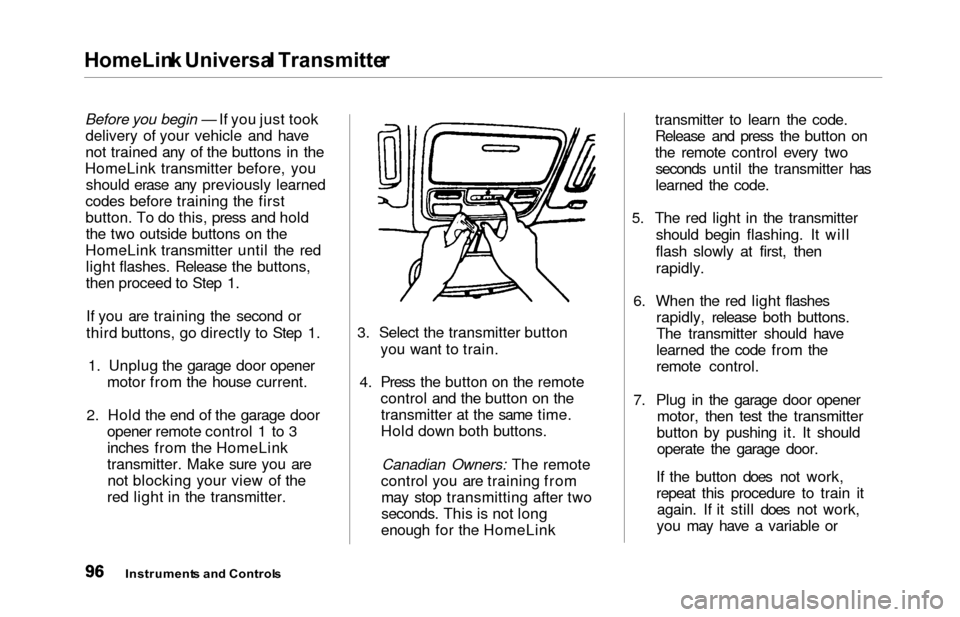
third buttons, go directly to Step 1. 1. Unplug the garage door opener motor from the house current.
2. Hold the end of the garage door opener remote control 1 to 3
inches from the HomeLink
transmitter. Make sure you arenot blocking your view of the
red light in the transmitter. 3. Select the transmitter button
you want to train.
4. Press the button on the remote control and the button on thetransmitter at the same time.
Hold down both buttons.
Canadian Owners: The remote
control you are training from may stop transmitting after two
seconds. This is not long
enough for the HomeLink transmitter to learn the code.
Release and press the button on
the remote control every two
seconds until the transmitter has
learned the code.
5. The red light in the transmitter should begin flashing. It will
flash slowly at first, then
rapidly.
6. When the red light flashes rapidly, release both buttons.
The transmitter should have
learned the code from the
remote control.
7. Plug in the garage door opener motor, then test the transmitter
button by pushing it. It should operate the garage door.
If the button does not work,
repeat this procedure to train it again. If it still does not work,
you may have a variable or
Instrument s an d Control s
Page 103 of 352
Seats
Seat Adjustment s
See pages 12 — 13 for important safety
information and warnings about how to
properly position seats and seat-backs.
The EX model has a power adjustable driver's seat. All other
models have manual driver's seat
adjustments.
The front passenger's seat, and the seats in the second and third rows
adjust manually.
Make all seat adjustments before
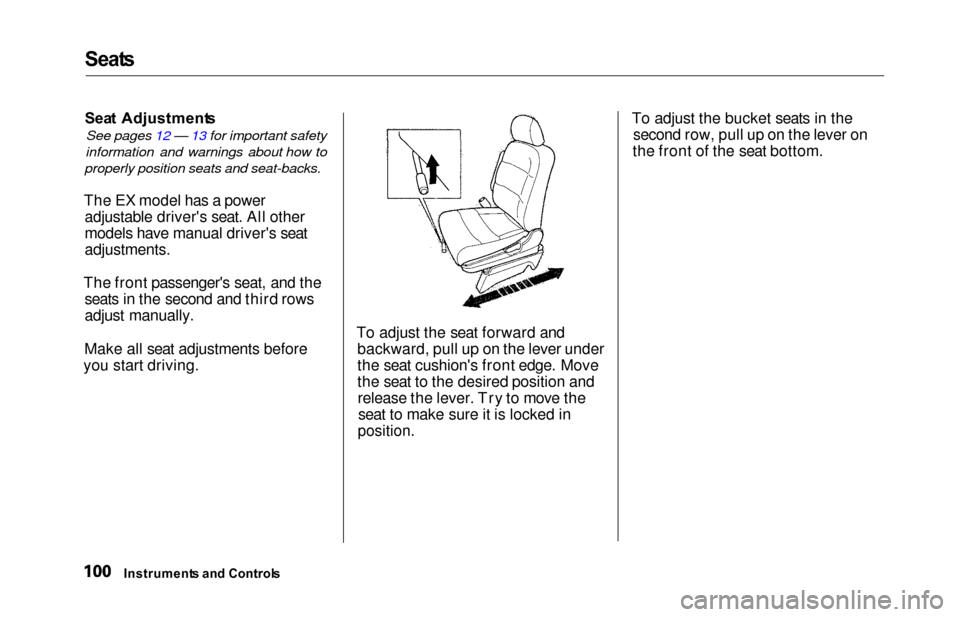
you start driving. To adjust the seat forward and
backward, pull up on the lever under
the seat cushion's front edge. Move
the seat to the desired position andrelease the lever. Try to move theseat to make sure it is locked in
position.
To adjust the bucket seats in the second row, pull up on the lever on
the front of the seat bottom.
Instrument s an d Control s
Page 109 of 352
Seats
Movin g th e Secon d Ro w Bucke t
Sea t
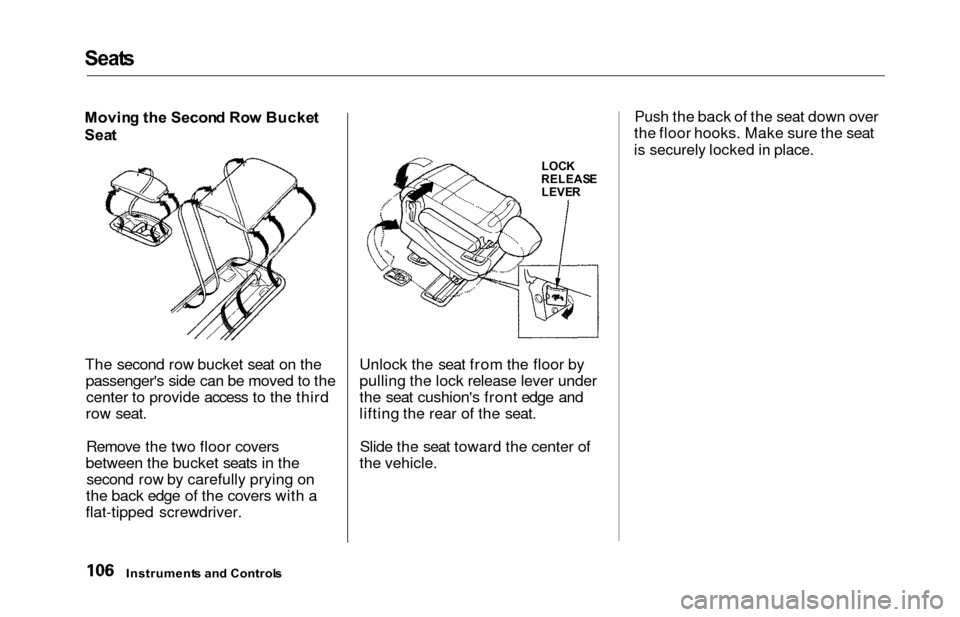
The second row bucket seat on the passenger's side can be moved to thecenter to provide access to the third
row seat.
Remove the two floor covers
between the bucket seats in the second row by carefully prying on
the back edge of the covers with a
flat-tipped screwdriver. Unlock the seat from the floor by
pulling the lock release lever under
the seat cushion's front edge and
lifting the rear of the seat.
Slide the seat toward the center of
the vehicle. Push the back of the seat down over
the floor hooks. Make sure the seat
is securely locked in place.
Instrument s an d Control s
LOCK
RELEAS E
LEVE R
Page 110 of 352
Seats
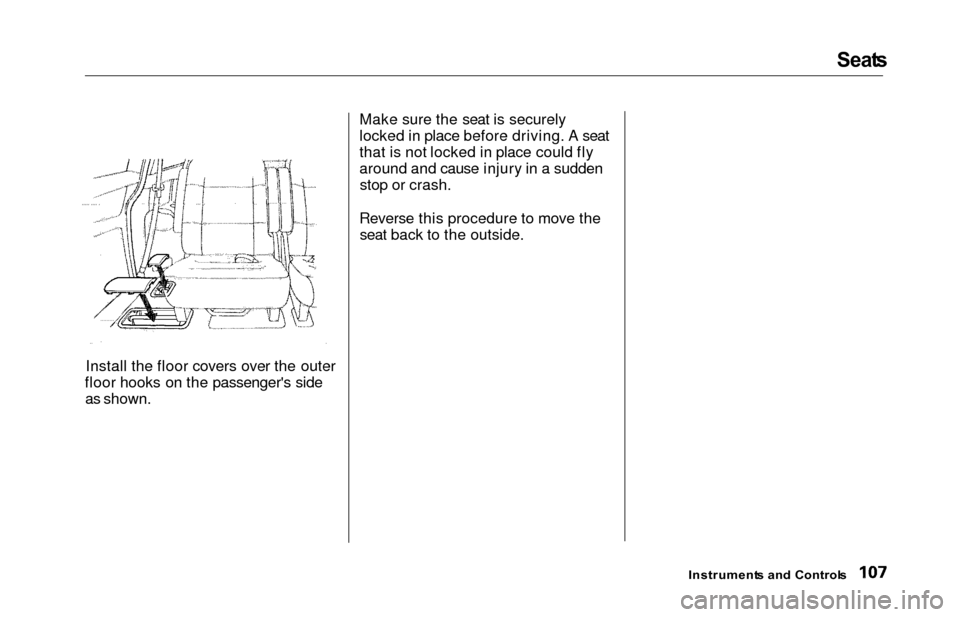
Install the floor covers over the outer
floor hooks on the passenger's side as shown. Make sure the seat is securely
locked in place before driving. A seat
that is not locked in place could fly
around and cause injury in a sudden
stop or crash.
Reverse this procedure to move the seat back to the outside.
Instrument s an d Control s
Page 111 of 352
Seats
Removin g th e Bucke t Seat s in th e
Secon d Ro w
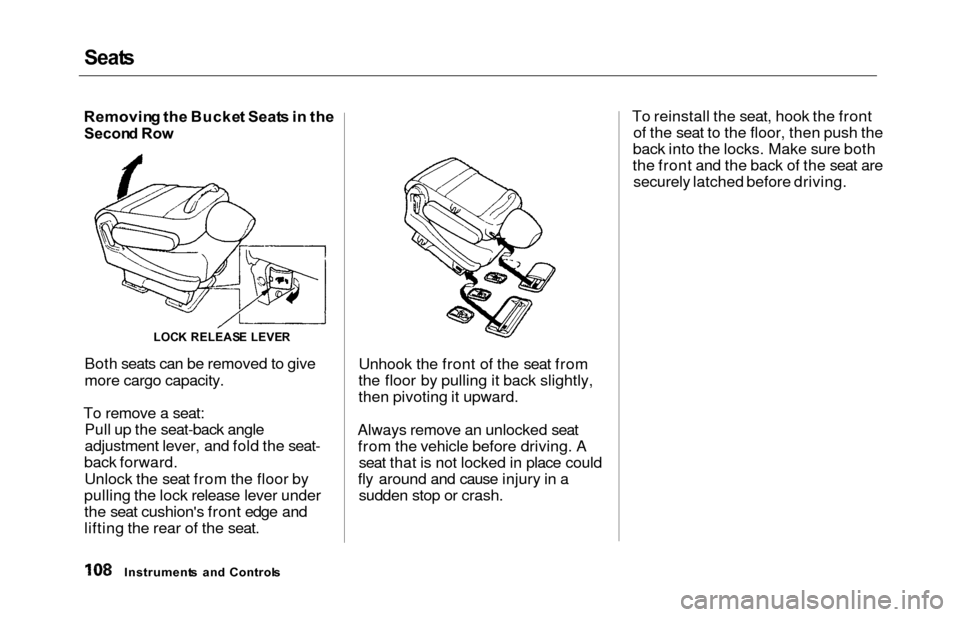
Both seats can be removed to give
more cargo capacity.
To remove a seat: Pull up the seat-back angle
adjustment lever, and fold the seat-
back forward.
Unlock the seat from the floor by
pulling the lock release lever under
the seat cushion's front edge and
lifting the rear of the seat. Unhook the front of the seat from
the floor by pulling it back slightly,
then pivoting it upward.
Always remove an unlocked seat from the vehicle before driving. A seat that is not locked in place could
fly around and cause injury in a sudden stop or crash. To reinstall the seat, hook the front
of the seat to the floor, then push the
back into the locks. Make sure both
the front and the back of the seat are securely latched before driving.
Instrument s an d Control s
LOCK RELEAS E LEVE R
Page 112 of 352
Seat
s
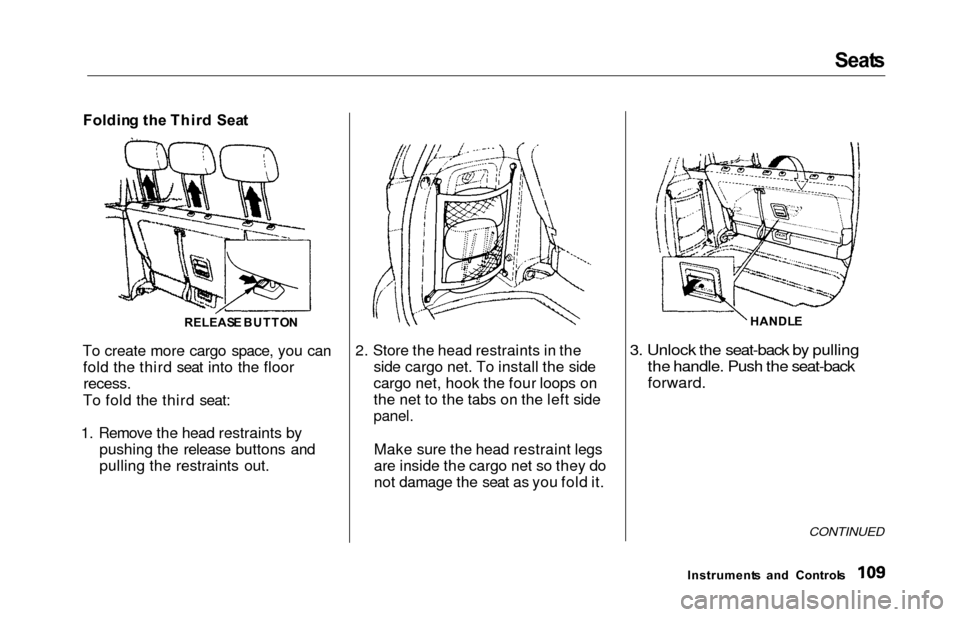
Foldin g th e Thir d Sea t
To create more cargo space, you can fold the third seat into the floor
recess.
To fold the third seat:
1. Remove the head restraints by pushing the release buttons and
pulling the restraints out. 2. Store the head restraints in the
side cargo net. To install the side
cargo net, hook the four loops on
the net to the tabs on the left side
panel.
Make sure the head restraint legs
are inside the cargo net so they do
not damage the seat as you fold it.
3. Unlock the seat-back by pulling
the handle. Push the seat-back
forward.
CONTINUED
Instrument s an d Control s
RELEAS
E BUTTO N HANDL
E
Page 114 of 352
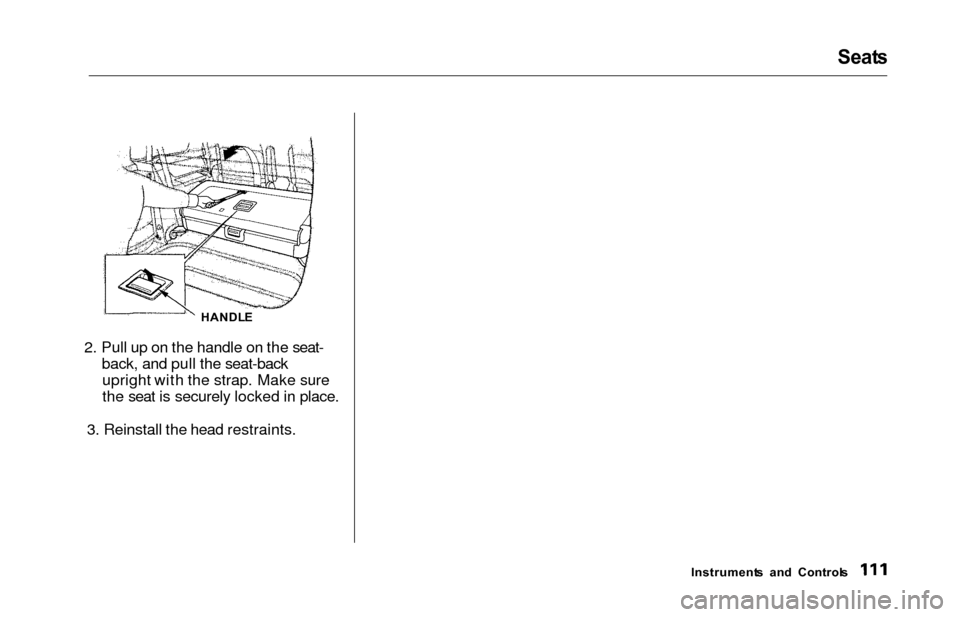
2. Pull up on the handle on the seat-back, and pull the seat-backupright with the strap. Make sure
the seat is securely locked in place.
3. Reinstall the head restraints.
Seat s
Instrument s an d Control s
HANDL
E