Page 278 of 352
Lights
5. Remove the socket by turning it
one-quarter turn counterclockwise.
6. Pull the bulb straight out of its
socket.
Push the new bulb straight into
the socket until it bottoms.
7. Reinstall the socket into the light assembly by turning it clockwise
until it locks.
8. Test the lights to make sure the new bulb is working.
9. When reinstalling the taillight assembly, align and pop the snap
fasteners in place. Tighten the two
mounting screws and reinstall the
covers in place. Replacin
g Rea r Bulb s
(i n Tailgate )
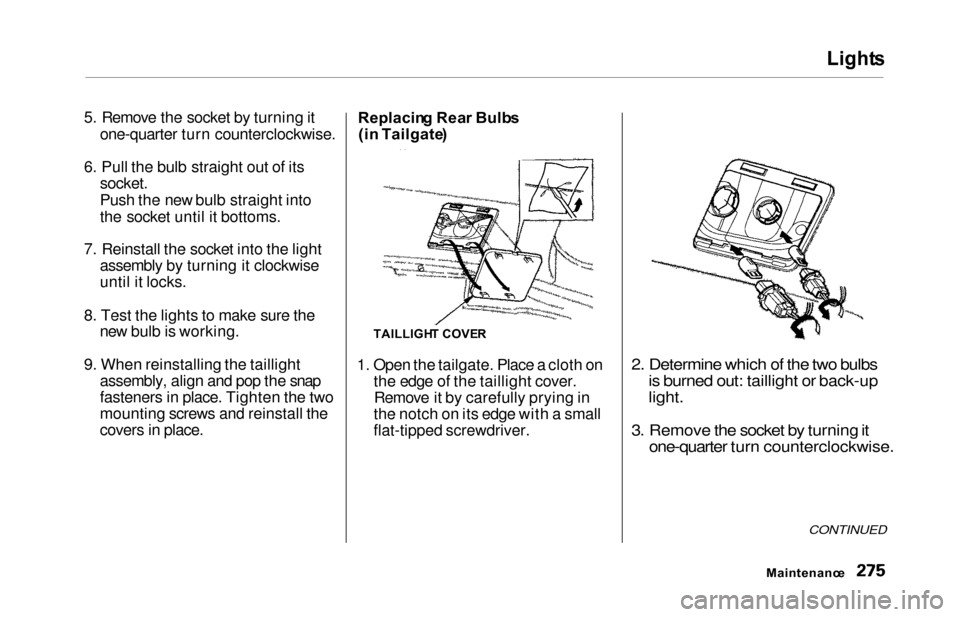
1. Open the tailgate. Place a cloth on the edge of the taillight cover.Remove it by carefully prying in
the notch on its edge with a small
flat-tipped screwdriver.
2. Determine which of the two bulbs is burned out: taillight or back-up
light.
3. Remove the socket by turning it one-quarter turn counterclockwise.
CONTINUED
Maintenanc e
TAILLIGHT COVE R
Page 279 of 352
Lights
4. Pull the bulb straight out of its
socket.
Push the new bulb straight into
the socket until it bottoms.
5. Insert the socket back into the light assembly. Turn it clockwise
to lock it in place.
6. Test the lights to make sure the new bulb is working.
7. Reinstall the taillight cover. Replacin
g a High-moun t Brak e
Ligh t Bul b
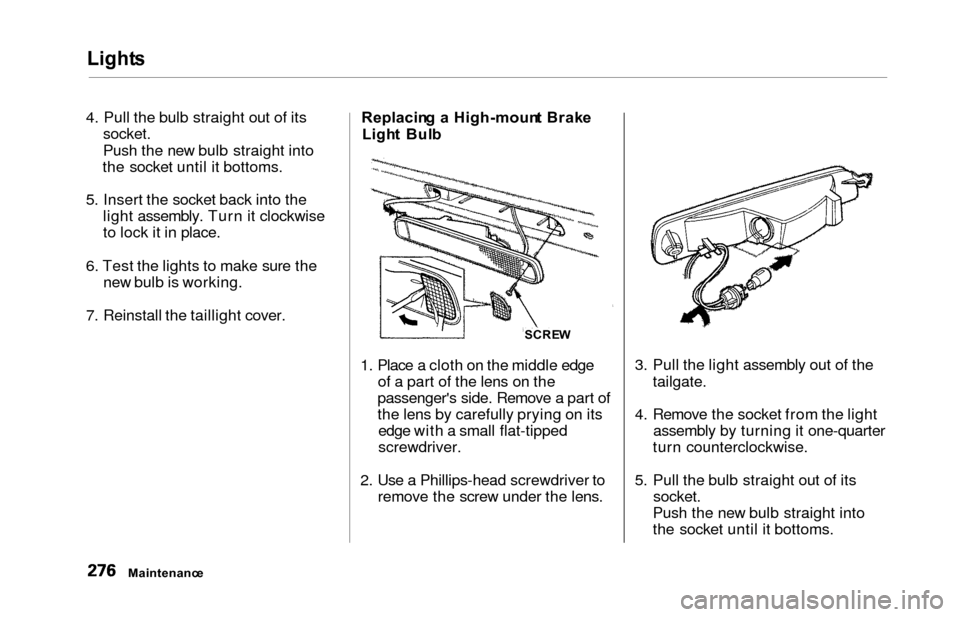
1. Place a cloth on the middle edge of a part of the lens on the
passenger's side. Remove a part of
the lens by carefully prying on its edge with a small flat-tipped
screwdriver.
2. Use a Phillips-head screwdriver to remove the screw under the lens. 3. Pull the light assembly out of the
tailgate.
4. Remove the socket from the light assembly by turning it one-quarter
turn counterclockwise.
5. Pull the bulb straight out of its socket.
Push the new bulb straight into
the socket until it bottoms.
Maintenanc e SCRE
W
Page 280 of 352
Lights
6. Put the socket back into the light
assembly and turn it clockwise to
lock it in place.
7. Test the light to make sure the new bulb is working.
8. Put the light assembly back into the tailgate. Install the screw and
tighten it securely. Reinstall the
lens piece.
Replacin g a Rea r Licens e Bul b
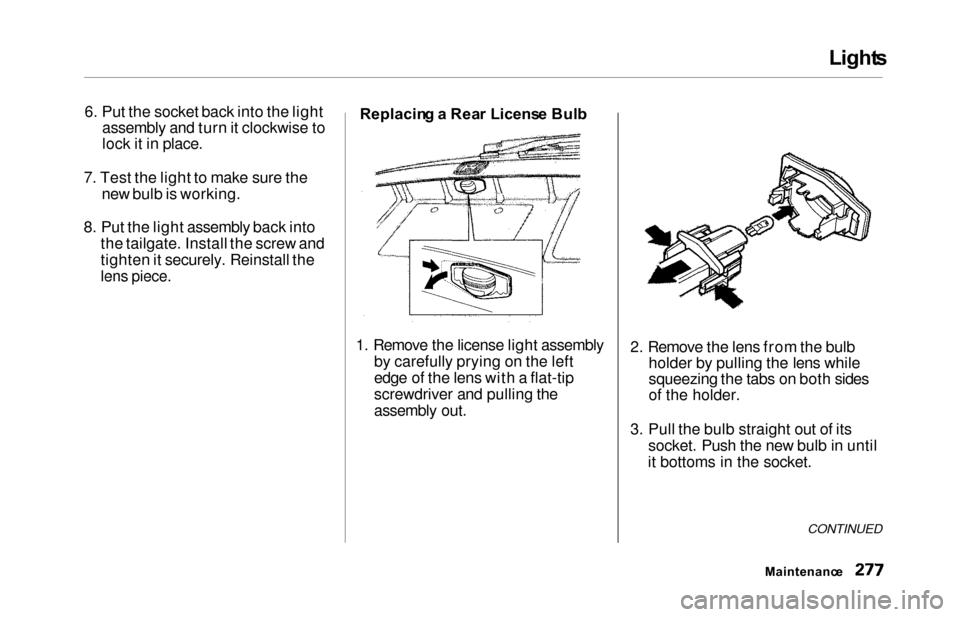
1. Remove the license light assembly by carefully prying on the left
edge of the lens with a flat-tip
screwdriver and pulling the
assembly out. 2. Remove the lens from the bulb
holder by pulling the lens while
squeezing the tabs on both sides
of the holder.
3. Pull the bulb straight out of its socket. Push the new bulb in until
it bottoms in the socket.
CONTINUED
Maintenanc e
Page 284 of 352
Storing You r Vehicl e
If you need to park your vehicle for
an extended period (more than one
month), there are several things you
should do to prepare it for storage.
Proper preparation helps prevent
deterioration and makes it easier to
get your vehicle back on the road. If
possible, store your vehicle indoors.
Fill the fuel tank.Change the engine oil and filter
(see page 241).
Wash and dry the exterior
completely.
Clean the interior. Make sure the
carpeting, floor mats, etc. are
completely dry.
Leave the parking brake off. Put
the transmission in Park.
Block the rear wheels.
If the vehicle is to be stored for a
longer period, it should be
supported on jackstands so the
tires are off the ground. Leave one window open slightly (if
the vehicle is being stored
indoors).
Disconnect the battery.
Support the front and rear wiper
blade arms with a folded towel or rag so they do not touch the
windshield.
To minimize sticking, apply a silicone spray lubricant to all door
and tailgate seals. Also, apply a
vehicle body wax to the painted surfaces that mate with the door
and tailgate seals.
Cover the vehicle with a
"breathable" cover, one made
from a porous material such as cotton. Nonporous materials, such
as plastic sheeting, trap moisture,
which can damage the paint.
If possible, run the engine for a
while periodically (preferably once a month).
If you store your vehicle for 12
months or longer, have your Honda
dealer perform the inspections called
for in the 24 months/30,000 miles (48,000 km) maintenance schedule
(Normal Conditions) as soon as you
take it out of storage (see page 230).
The replacements called for in the maintenance schedule are not
needed unless the vehicle hasactually reached that time or mileage.
Maintenanc e
Page 296 of 352
Changing a Fla t Tir e
If you have a flat tire while driving,
stop in a safe place to change it.
Stopping in traffic or on the shoulder of a busy road is dangerous. Driveslowly along the shoulder until you
get to an exit or an area to stop that
is far away from the traffic lanes.
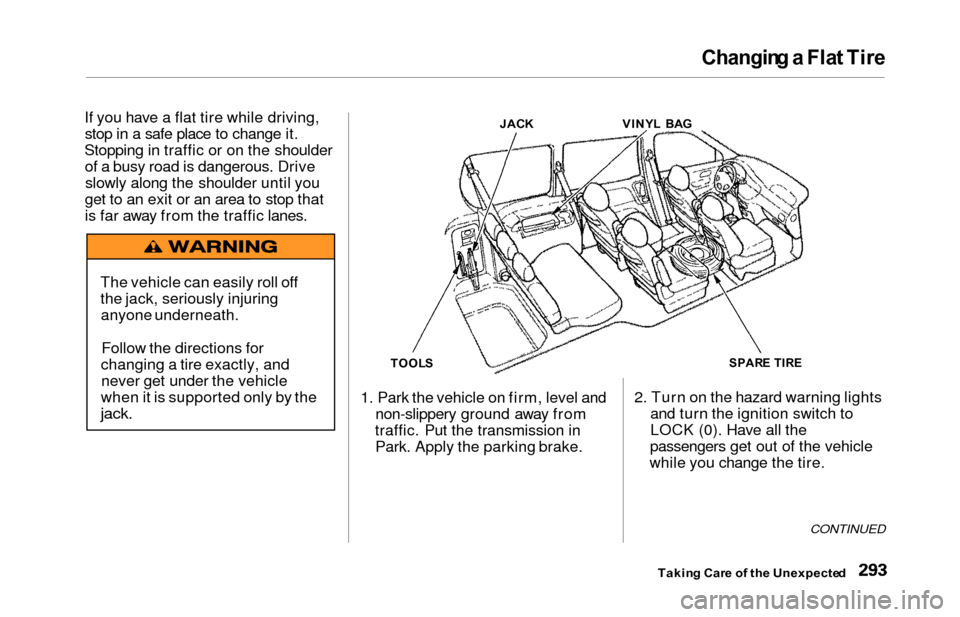
1. Park the vehicle on firm, level andnon-slippery ground away from
traffic. Put the transmission in Park. Apply the parking brake. 2. Turn on the hazard warning lights
and turn the ignition switch to
LOCK (0). Have all the
passengers get out of the vehicle
while you change the tire.
CONTINUED
Takin g Car e o f th e Unexpecte d
The vehicle can easily roll off
the jack, seriously injuring
anyone underneath.
Follow the directions for
changing a tire exactly, and never get under the vehicle
when it is supported only by the
jack.
TOOL S JAC
K VINYL BA GSPAR E TIR E
Page 297 of 352
Changing a Fla t Tir e
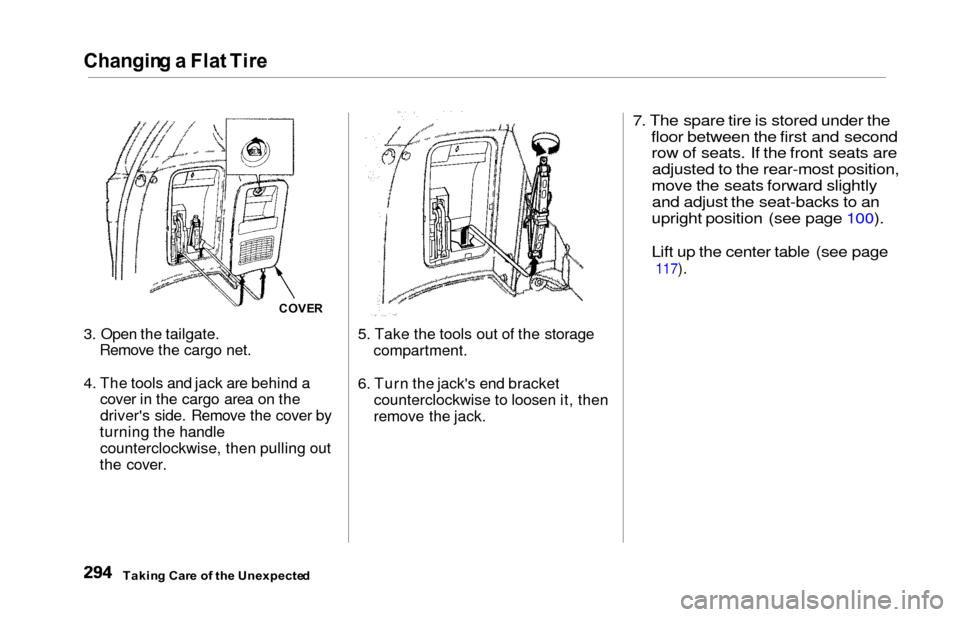
3. Open the tailgate.
Remove the cargo net.
4. The tools and jack are behind a cover in the cargo area on the
driver's side. Remove the cover by
turning the handle counterclockwise, then pulling out
the cover. 5. Take the tools out of the storage
compartment.
6. Turn the jack's end bracket counterclockwise to loosen it, then
remove the jack.
7. The spare tire is stored under the
floor between the first and second row of seats. If the front seats areadjusted to the rear-most position,
move the seats forward slightly and adjust the seat-backs to an
upright position (see page 100).
Lift up the center table (see page
117).
Takin g Car e o f th e Unexpecte d
COVER
Page 299 of 352
Changing a Fla t Tir e
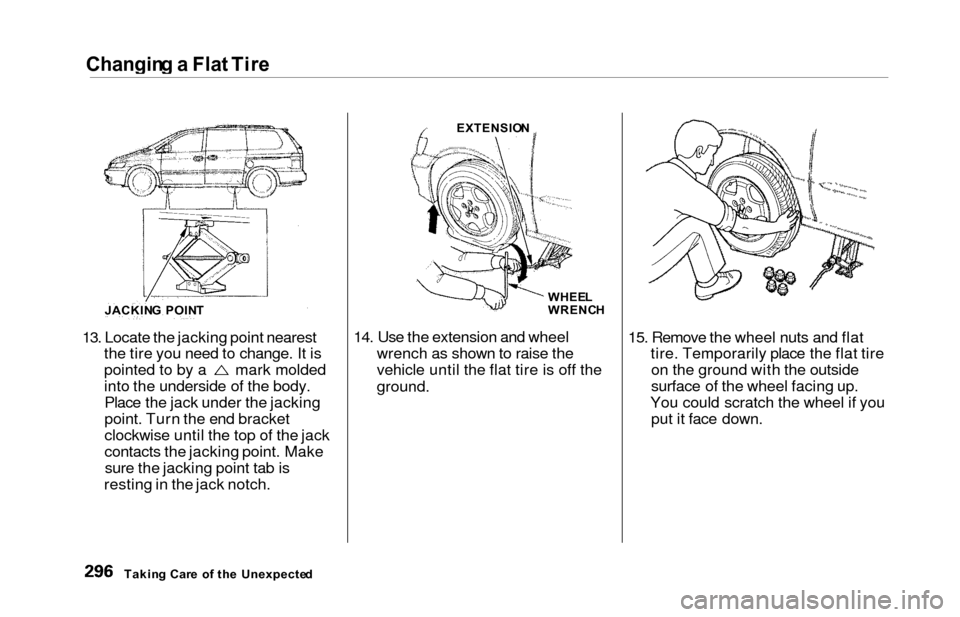
13. Locate the jacking point nearest
the tire you need to change. It is
pointed to by a mark molded
into the underside of the body.Place the jack under the jacking
point. Turn the end bracket
clockwise until the top of the jack
contacts the jacking point. Makesure the jacking point tab is
resting in the jack notch. 14. Use the extension and wheel
wrench as shown to raise the
vehicle until the flat tire is off the
ground.
15. Remove the wheel nuts and flattire. Temporarily place the flat tireon the ground with the outside
surface of the wheel facing up.
You could scratch the wheel if you put it face down.
Takin g Car e o f th e Unexpecte d
JACKIN
G POIN T EXTENSIO
N
WHEE L
WRENC H
Page 303 of 352
Changing a Flat Tire
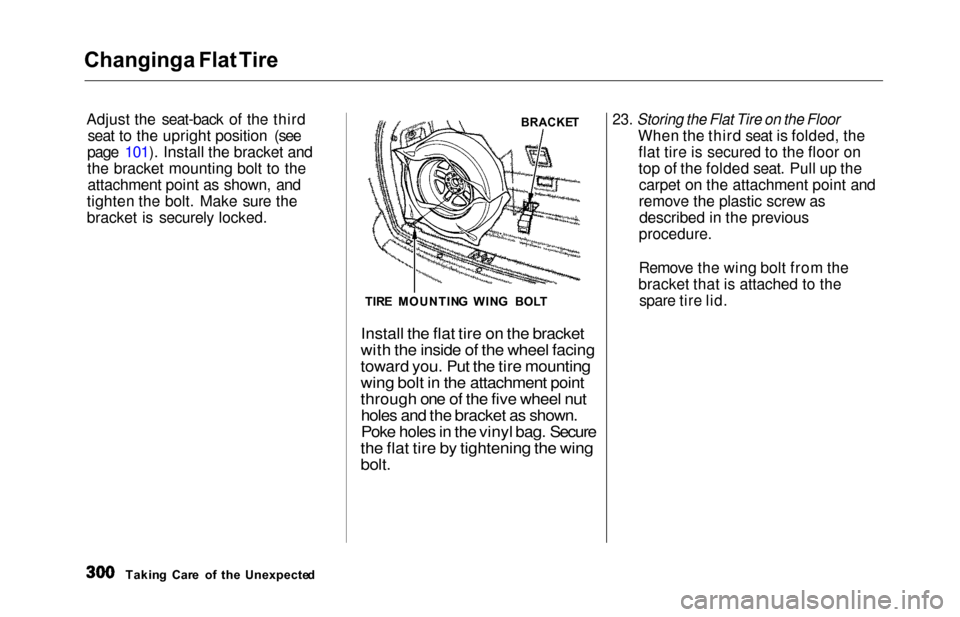
Adjust th
e seat-back of the third
seat to the upright position (see
page 101). Install the bracket and
the bracket mounting bolt to the attachment point as shown, and
tighten the bolt. Make sure the
bracket is securely locked.
23. Storing the Flat Tire on the Floor
When the third seat is folded, the
flat tire is secured to the floor on
top of the folded seat. Pull up thecarpet on the attachment point and
remove the plastic screw asdescribed in the previous
procedure.
Remove the wing bolt from the
bracket that is attached to the spare tire lid.
Takin g Car e o f th e Unexpecte d
BRACKE T
TIR E MOUNTIN G
WIN
G BOL T
Install the flat tire on the bracket
with the inside of the wheel facing
toward you. Put the tire mounting
wing bolt in the attachment point
through one of the five wheel nut
holes and the bracket as shown.
Poke holes in the vinyl bag. Secure
the flat tire by tightening the wing
bolt.