2000 HONDA ODYSSEY liquid
[x] Cancel search: liquidPage 80 of 352

Keys an d Lock s
These keys contain electronic
circuits that are activated by the
Immobilizer System. They will not
work to start the engine if the circuits are damaged.
Protect the keys from directsunlight, high temperature, and
high humidity.
Do not drop the keys or set heavy
objects on them.
Keep the keys away from liquids.
If they get wet, dry them immedi-
ately with a soft cloth.
The keys do not contain batteries. Do not try to take them apart.
Remote Transmitter
Some models also come with a
remote transmitter; see page 81 for
an explanation of its operation. Immobilize
r Syste m
The Immobilizer System protects
your vehicle from theft. A properly- coded master or valet key must be
used in the ignition switch for theengine to start. If an improperly-
coded key (or other device) is used,
the engine's fuel system is disabled.
When you turn the ignition switch to ON (II), the Immobilizer System
indicator should come on for a few seconds, then go out. If the indicator
starts to blink, it means the system
does not recognize the coding of the
key. Turn the ignition switch to LOCK (0), remove the key, reinsert
it, and turn the switch to ON (II)
again.
The system may not recognize your key's coding if another immobilizer
key or other metal object is near the ignition switch when you insert the
key. To make sure the system recognizes the key code: Do not keep other immobilizer
keys on the same key ring.
Use a plastic or leather key fob,
not metal.
Keep other keys away from your
vehicle's key and the ignition switch while trying to start the
engine.
If the system repeatedly does not
recognize the coding of your key,
contact your Honda dealer.
This indicator will also blink several
times when you turn the ignitionswitch from ON (II) to ACCESSORY (I) or LOCK (0).
Do not attempt to alter this system
or add other devices to it. Electrical
problems could result that may make
your vehicle undriveable. If you have lost your key and you
cannot start the engine, contact your
Honda dealer.
Instrument s an d Control s
CONTINUED
Page 87 of 352

Keys an d Lock s
Transmitter Care
Avoid severe shock to the trans-
mitter, such as dropping or throwing
it. Also, protect it from extreme hot or cold temperatures.
Clean the transmitter case with a
soft cloth. Do not use strong
cleaners or solvents that could harm
the case. Immersing the transmitter
in any liquid will harm the trans-
mitter and cause it to not function
properly.
If you lose a transmitter, you will
need to have the replacement
programmed to your vehicle's system by your Honda dealer. Any
other transmitters you have will also
need to be reprogrammed.
As required by the FCC:
This device complies with Part 15 of the
FCC rules. Operation is subject to the
following two conditions: (1) This device may not cause harmful interference, and (2) this device must accept any
interference received, including
interference that may cause undesired
operation.
Changes or modifications not expressly
approved by the party responsible for
compliance could void the user's
authority to operate the equipment.
This device complies with Industry
Canada Standard RSS-210.
Operation is subject to the following two
conditions: (1) this device may not cause
interference, and (2) this device must accept any interference that may cause undesired operation of the device.
Instrument s an d Control s
Page 122 of 352
Beverage Holde r
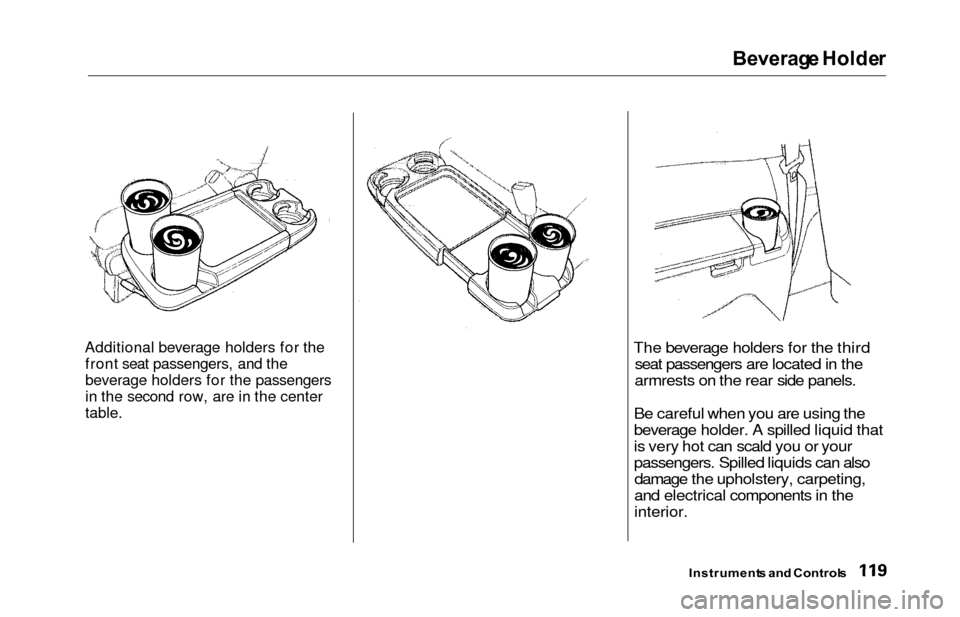
Additional beverage holders for the
front seat passengers, and the
beverage holders for the passengers
in the second row, are in the center
table.The beverage holders for the third seat passengers are located in the
armrests on the rear side panels.
Be careful when you are using the
beverage holder. A spilled liquid that
is very hot can scald you or your
passengers. Spilled liquids can also damage the upholstery, carpeting,
and electrical components in the
interior.
Instrument s an d Control s
Page 154 of 352
Climat
e Contro l Syste m
Sunligh t Sensor/Temperatur e
Senso r
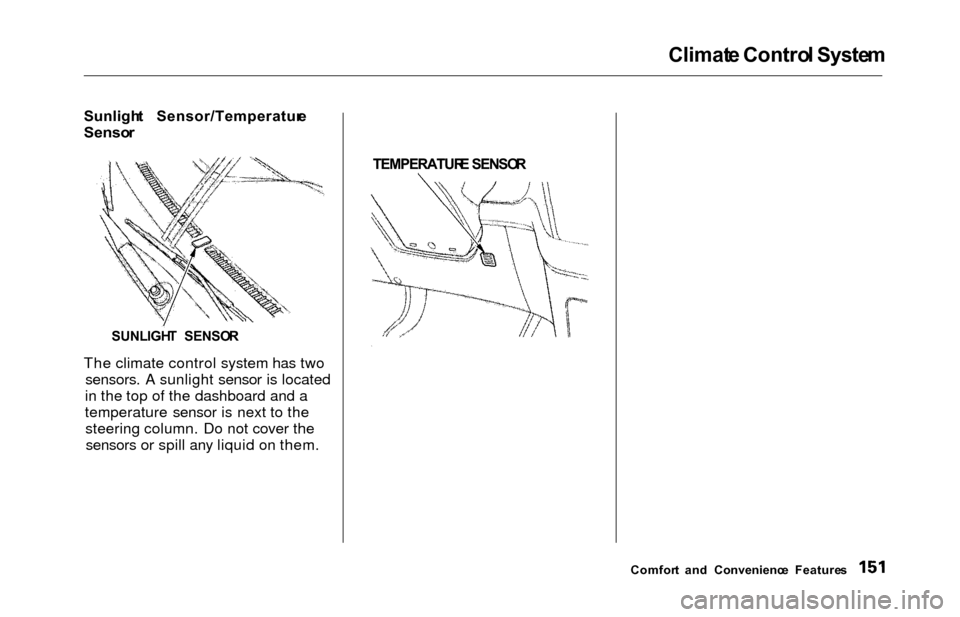
The climate control system has two sensors. A sunlight sensor is located
in the top of the dashboard and a
temperature sensor is next to the steering column. Do not cover thesensors or spill any liquid on them.
TEMPERATUR
E SENSO R
Comfort an d Convenienc e Feature s
SUNLIGH
T SENSO R
Page 181 of 352

Audio Syste m
Protectin g Compac t Disc s
Handle a CD by its edges; never
touch either surface. Contamination
from fingerprints, liquids, felt-tip pens, and labels can cause the CD tonot play properly, or possibly jam in
the drive.
When a CD is not being played, store it in its case to protect it from dustand other contamination. To prevent
warpage, keep CDs out of direct sunlight and extreme heat. To clean a disc, use a clean soft cloth.
Wipe across the disc from the centerto the outside edge. A new CD may be rough on the
inner and outer edges. The small
plastic pieces causing this roughness can flake off and fall on the re-
cording surface of the disc, causing
skipping or other problems. Remove
these pieces by rubbing the inner and outer edges with the side of a
pencil or pen.
Never try to insert foreign objects in
the CD player or the magazine.
Comfor t an d Convenienc e Feature s
Page 287 of 352
Exterior Car e
Washin g
Frequent washing helps preserve
your vehicle's beauty. Dirt and grit can scratch the paint, while tree sap
and bird droppings can permanently
ruin the finish.
Wash your vehicle in a shady area, not in direct sunlight. If the vehicle is
parked in the sun, move it into theshade and let the exterior cool down
before you start.
Only use the solvents and cleaners
recommended in this Owner's
Manual.
Chemical solvents and strong cleaners
can damage the paint, metal, and
plastic on your vehicle.
Rinse the vehicle thoroughly with
cool water to remove loose dirt.
Fill a bucket with cool water. Mix
in a mild detergent, such as dishwashing liquid or a product
made especially for car washing.
Wash the vehicle using the water and detergent solution and a soft-
bristle brush, sponge, or soft cloth.
Start at the top and work your waydown. Rinse frequently.
Check the body for road tar, tree
sap, etc. Remove these stains with
tar remover or turpentine. Rinse it off immediately so it does not
harm the finish. Remember to re-
wax these areas, even if the rest of the vehicle does not need waxing. When you have washed and rinsed
the whole exterior, dry it with a
chamois or soft towel. Letting itair-dry will cause dulling and water
spots.
As you dry the vehicle, inspect it for chips and scratches that could allow
corrosion to start. Repair them with
touch-up paint (see page 285).
The radio antenna on your vehicle does
not need to be removed when you use a
"drive-through' car wash. However, if
you remove the antenna, make sure to
reinstall it and tighten it securely using
an appropriate tool.
Appearanc e Car e
NOTIC E NOTIC
E
Page 288 of 352

Exterior Car e
Waxin g
Always wash and dry the whole
vehicle before waxing it. You should wax your vehicle, including the metal
trim, whenever water sits on thesurface in large patches. It should
form into beads or droplets after
waxing.
You should use a quality liquid or paste wax. Apply it according to the
instructions on the container. In
general, there are two types of
products:
Waxes — A wax coats the finish and protects it from damage by exposureto sunlight, air pollution, etc. Youshould use a wax on your Honda
when it is new.
Polishes — Polishes and cleaner/
waxes can restore the shine to paint that has oxidized and lost some of itsshine. They normally contain mild
abrasives and solvents that remove the top layer of the finish. You
should use a polish on your Honda if
the finish does not have its original shine after using a wax.
Cleaning tar, insects, etc. with
removers also takes off the wax.
Remember to re-wax those areas,
even if the rest of the vehicle does
not need waxing.
Aluminu m Wheel s
On some models
Clean your Honda's aluminum alloy
wheels as you do the rest of the exterior. Wash them with the same
solution, and rinse them thoroughly.
The wheels have a protective clear- coat that keeps the aluminum from
corroding and tarnishing. Using
harsh chemicals, including some
commercial wheel cleaners, or stiff
brushes can damage this clear-coat. Only use a mild detergent and soft
brush or sponge to clean the wheels. Pain
t Touch-u p
Your dealer has touch-up paint to match your vehicle's color. The color
code is printed on a sticker on thedriver's doorjamb. Take this code to
your dealer so you are sure to get the correct color.
Inspect your vehicle frequently for
chips or scratches in the paint.Repair them right away to prevent
corrosion of the metal underneath.
Use the touch-up paint only on small
chips and scratches. More extensive
paint damage should be repaired by a professional.
Appearanc e Car e
Page 290 of 352
Interior Car e
Dirt build-up in the loops of the seat
belt anchors can cause the belts to retract slowly. Wipe the insides of
the loops with a clean clothdampened in mild soap and warm
water or isopropyl alcohol. Window
s
Clean the windows, inside and out,
with a commercially-available glass cleaner. You can also use a mixture
of one part white vinegar to ten parts
water. This will remove the haze that
builds up on the inside of the
windows. Use a soft cloth or paper towels to clean all glass and clear
plastic surfaces.
The rear window defogger wires are
bonded to the inside of the glass.
Wiping vigorously up-and-down can
dislodge and break the defogger wires.
When cleaning the rear window, use
gentle pressure and wipe side-to-side.
Ai r Freshener s
If you want to use an air freshener/
deodorizer in the interior of your
vehicle, it is best to use a solid type. Some liquid air fresheners contain
chemicals that may cause parts of
the interior trim and fabric to crack or discolor.
If you use a liquid air freshener,
make sure you fasten it securely so itdoes not spill as you drive.
Appearanc e Car e
NOTIC E