Page 47 of 352
Protecting Childre n
Attach the tether strap hook to the
tether attachment point and tighten
the strap according to the child seat
maker's instruction. Make sure the
strap is not twisted.
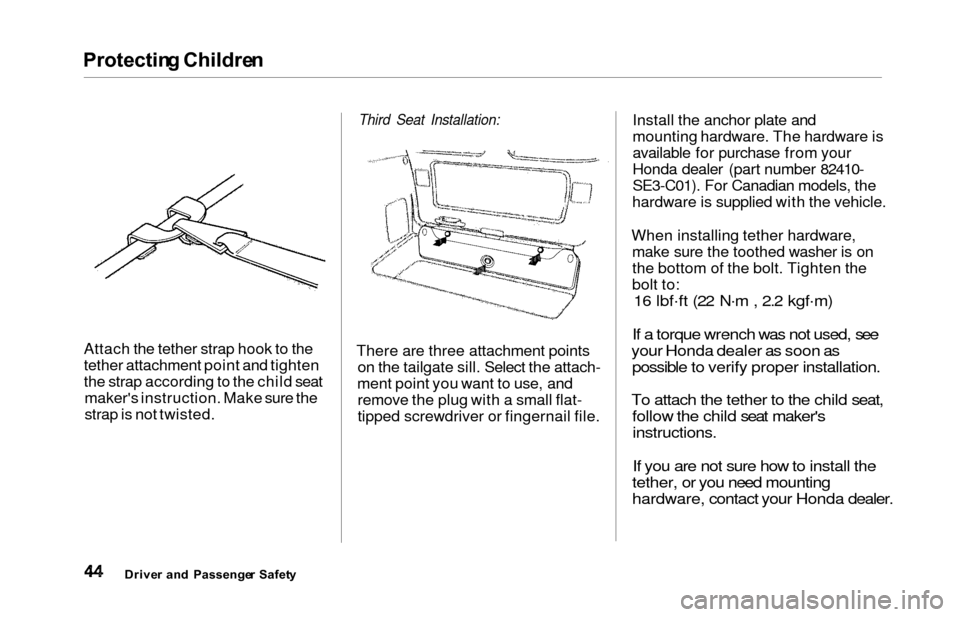
Third Seat Installation:
There are three attachment points on the tailgate sill. Select the attach-
ment point you want to use, and remove the plug with a small flat-
tipped screwdriver or fingernail file. Install the anchor plate and
mounting hardware. The hardware is
available for purchase from your
Honda dealer (part number 82410-
SE3-C01). For Canadian models, the
hardware is supplied with the vehicle.
When installing tether hardware, make sure the toothed washer is on
the bottom of the bolt. Tighten the
bolt to:
16 lbf .
ft (22 N .
m , 2.2 kgf .
m)
If a torque wrench was not used, see
your Honda dealer as soon as possible to verify proper installation.
To attach the tether to the child seat, follow the child seat maker's
instructions.
If you are not sure how to install the
tether, or you need mounting
hardware, contact your Honda dealer.
Drive r an d Passenge r Safet y
Page 259 of 352
Spark Plug s
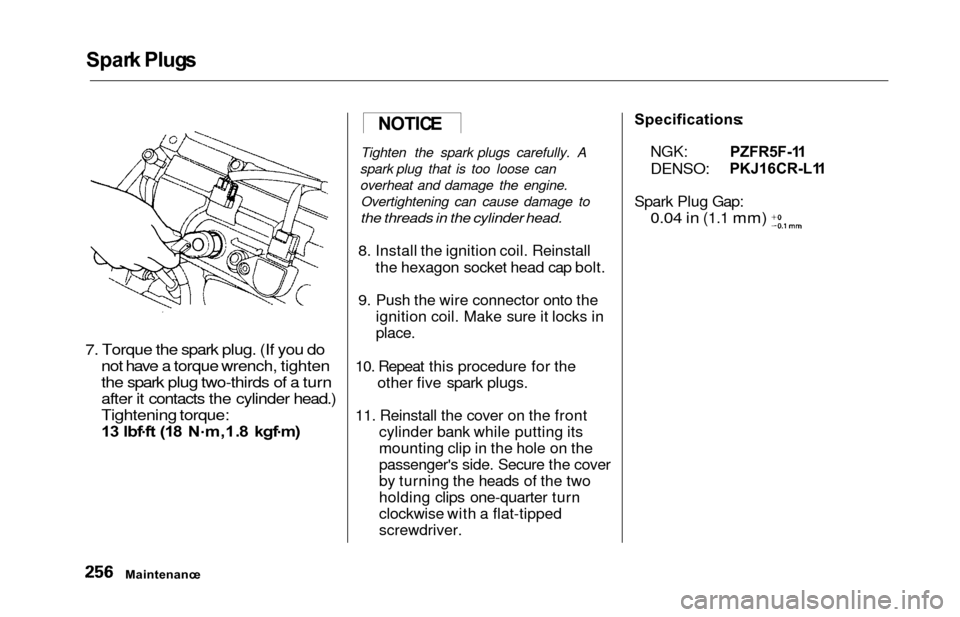
7. Torque the spark plug. (If you do
not have a torque wrench, tighten
the spark plug two-thirds of a turn
after it contacts the cylinder head.)
Tightening torque:
13 lbf .
f t (1 8 N .
m,1. 8 kgf .
m )
Tighten the spark plugs carefully. A
spark plug that is too loose can
overheat and damage the engine. Overtightening can cause damage to
the threads in the cylinder head.
8. Install the ignition coil. Reinstall the hexagon socket head cap bolt.
9. Push the wire connector onto the ignition coil. Make sure it locks in
place.
10. Repeat this procedure for the other five spark plugs.
11. Reinstall the cover on the front cylinder bank while putting its
mounting clip in the hole on the
passenger's side. Secure the cover
by turning the heads of the two
holding clips one-quarter turn
clockwise with a flat-tipped
screwdriver.
Specifications :
NGK:
DENSO:
PZFR5F-11
PKJ16CR-L1 1
Spark Plug Gap:
0.04 in (1.1 mm)
Maintenance
NOTICE
Page 277 of 352
Lights
4. Remove the socket from the
headlight assembly by turning it
one-quarter turn counterclockwise.
5. Remove the burned out bulb from the socket by pushing it in and
turning counterclockwise until it
unlocks.
6. Install the new bulb in the socket. Turn it clockwise to lock it in place.
7. Insert the socket back into the headlight assembly. Turn it
clockwise to lock it in place.
8. Test the lights to make sure the new bulb is working.
9. Put the inner fender in place. Install the two holding clips. Lock
each clip in place by pushing on
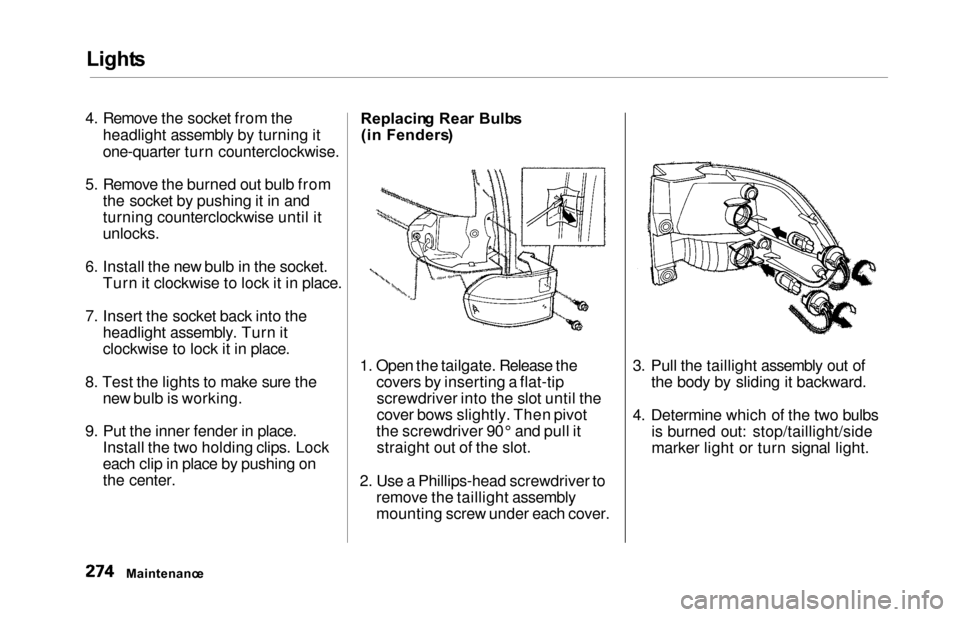
the center. Replacin
g Rea r Bulb s
(i n Fenders )
1. Open the tailgate. Release the covers by inserting a flat-tipscrewdriver into the slot until the
cover bows slightly. Then pivot
the screwdriver 90° and pull it straight out of the slot.
2. Use a Phillips-head screwdriver to remove the taillight assembly
mounting screw under each cover. 3. Pull the taillight assembly out of
the body by sliding it backward.
4. Determine which of the two bulbs is burned out: stop/taillight/side
marker light or turn signal light.
Maintenanc e
Page 278 of 352
Lights
5. Remove the socket by turning it
one-quarter turn counterclockwise.
6. Pull the bulb straight out of its
socket.
Push the new bulb straight into
the socket until it bottoms.
7. Reinstall the socket into the light assembly by turning it clockwise
until it locks.
8. Test the lights to make sure the new bulb is working.
9. When reinstalling the taillight assembly, align and pop the snap
fasteners in place. Tighten the two
mounting screws and reinstall the
covers in place. Replacin
g Rea r Bulb s
(i n Tailgate )
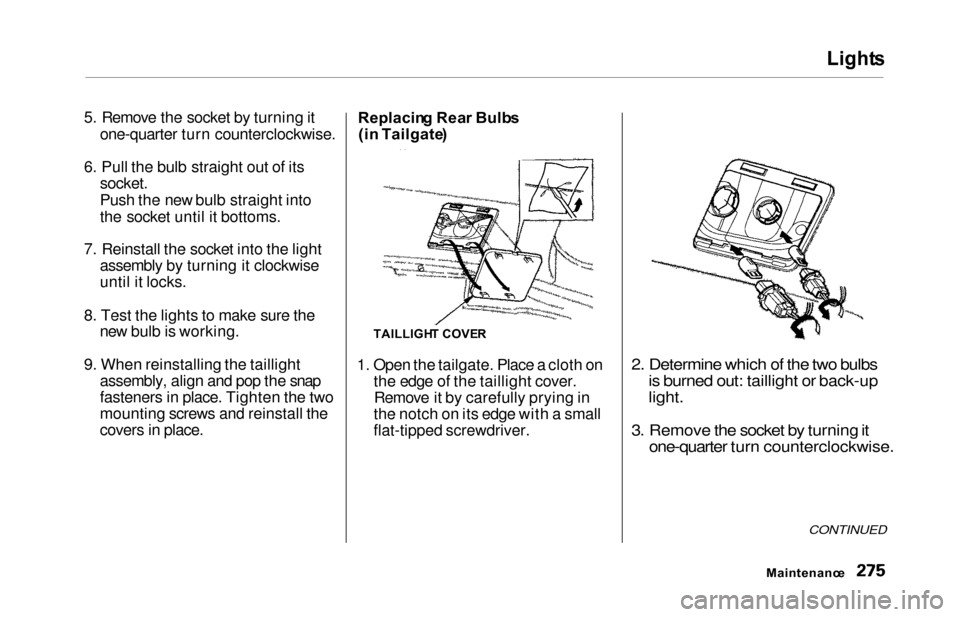
1. Open the tailgate. Place a cloth on the edge of the taillight cover.Remove it by carefully prying in
the notch on its edge with a small
flat-tipped screwdriver.
2. Determine which of the two bulbs is burned out: taillight or back-up
light.
3. Remove the socket by turning it one-quarter turn counterclockwise.
CONTINUED
Maintenanc e
TAILLIGHT COVE R
Page 295 of 352

Compact Spar e Tir e
Your vehicle has a compact spare
tire that takes up less space. Use thisspare tire as a temporary replace-
ment only. Get your regular tire
repaired or replaced and put back on
your vehicle as soon as you can.
Check the inflation pressure of the
compact spare tire every time you
check the other tires. It should be
inflated to: 60 psi (420 kPa , 4.2 kgf/cm
2)
Follow these precautions whenever
you are using the compact spare tire:
Do not exceed 50 mph (80 km/h)
under any circumstances.
This tire gives a harsher ride and less traction on some road sur-
faces than the regular tire. Use
greater caution while driving on
this tire. Do not mount snow chains on the
compact spare.
Do not use the compact spare tire
if you are towing a trailer.
The wheel of the compact spare
tire is designed especially to fit
your vehicle. Do not use your
spare tire on another vehicle
unless it is the same make and
model.
On EX model
Turn off the Traction ControlSystem (see page 213 ). Driving
with the compact spare tire may
activate the TCS.
The compact spare tire has a shorter
tread life than a regular tire. Replace
it when you can see the tread wear
indicator bars. The replacement
should be the same size and design
tire, mounted on the same wheel.
The compact spare tire is not
designed to be mounted on a regular
wheel, and the compact wheel is not
designed for mounting a regular tire.
Takin g Car e o f th e Unexpecte d
INDICATOR LOCATIO N MAR K
TREA D WEA R INDICATO R BA R
Page 300 of 352
Changing a Fla t Tir e
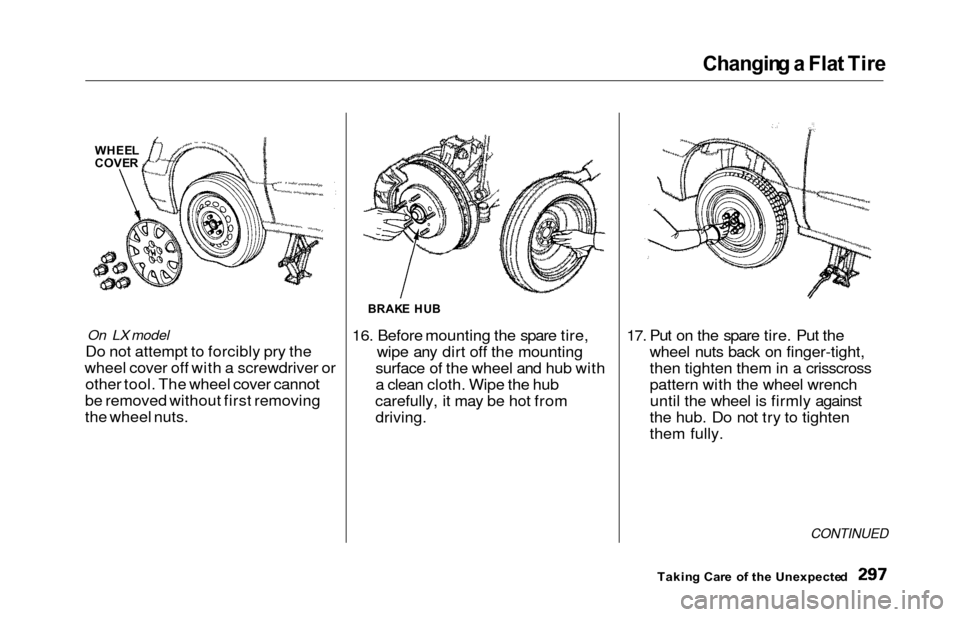
On LX model
Do not attempt to forcibly pry the
wheel cover off with a screwdriver or other tool. The wheel cover cannot
be removed without first removing
the wheel nuts. 16. Before mounting the spare tire,
wipe any dirt off the mounting
surface of the wheel and hub with
a clean cloth. Wipe the hub
carefully, it may be hot from
driving.
17. Put on the spare tire. Put the wheel nuts back on finger-tight,
then tighten them in a crisscross
pattern with the wheel wrenchuntil the wheel is firmly against
the hub. Do not try to tighten
them fully.
CONTINUED
Takin g Car e o f th e Unexpecte d
BRAKE HU B
WHEE L
COVE R
Page 302 of 352
Changing a Fla t Tir e
21. Storing the flat tire behind the third
seat
When the third seat is not folded,
the flat tire is secured behind the
third seat.
On EX model
Turn on the sliding door MAIN switch so you can open the door.
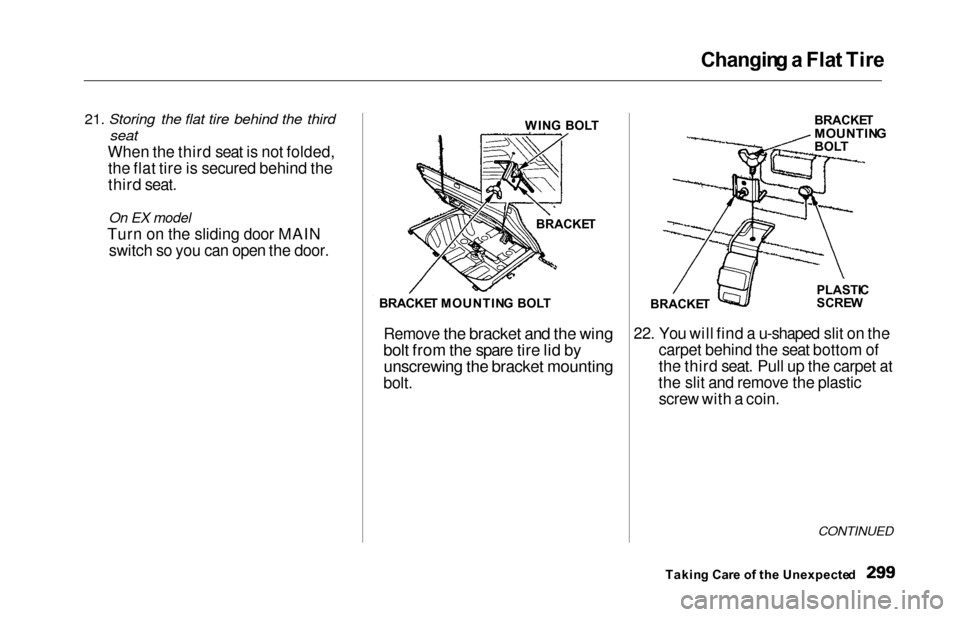
Remove the bracket and the wing
bolt from the spare tire lid by unscrewing the bracket mounting
bolt. 22. You will find a u-shaped slit on the
carpet behind the seat bottom of
the third seat. Pull up the carpet at
the slit and remove the plastic screw with a coin.
CONTINUED
Takin g Car e o f th e Unexpecte d
WIN
G BOL T
BRACKE T
BRACKE T MOUNTIN G BOL T BRACKE
T
MOUNTIN GBOLT
PLASTI C
SCRE W
BRACKE T
Page 303 of 352
Changing a Flat Tire
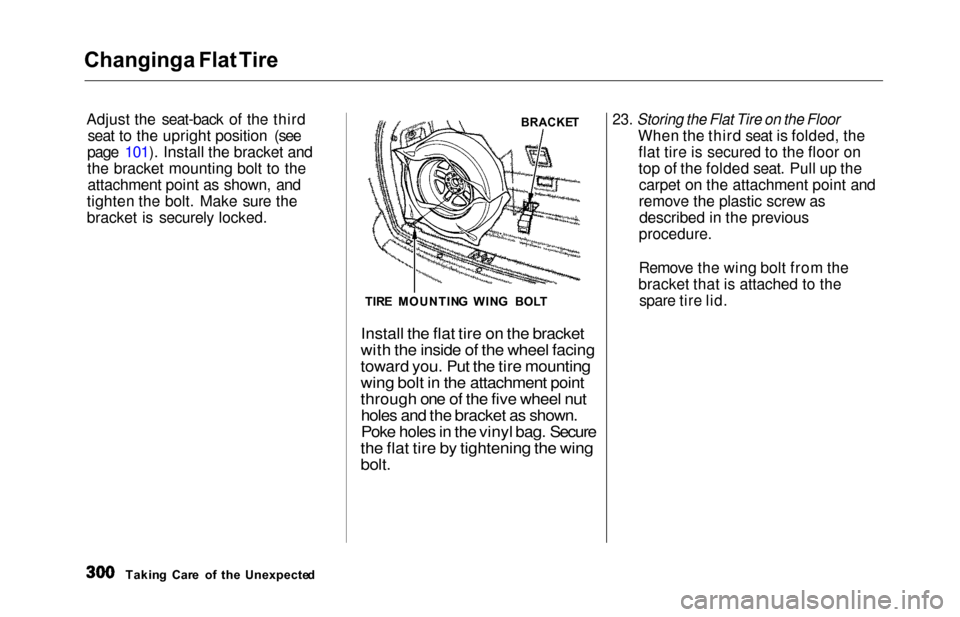
Adjust th
e seat-back of the third
seat to the upright position (see
page 101). Install the bracket and
the bracket mounting bolt to the attachment point as shown, and
tighten the bolt. Make sure the
bracket is securely locked.
23. Storing the Flat Tire on the Floor
When the third seat is folded, the
flat tire is secured to the floor on
top of the folded seat. Pull up thecarpet on the attachment point and
remove the plastic screw asdescribed in the previous
procedure.
Remove the wing bolt from the
bracket that is attached to the spare tire lid.
Takin g Car e o f th e Unexpecte d
BRACKE T
TIR E MOUNTIN G
WIN
G BOL T
Install the flat tire on the bracket
with the inside of the wheel facing
toward you. Put the tire mounting
wing bolt in the attachment point
through one of the five wheel nut
holes and the bracket as shown.
Poke holes in the vinyl bag. Secure
the flat tire by tightening the wing
bolt.