2000 DODGE NEON horn
[x] Cancel search: hornPage 347 of 1285
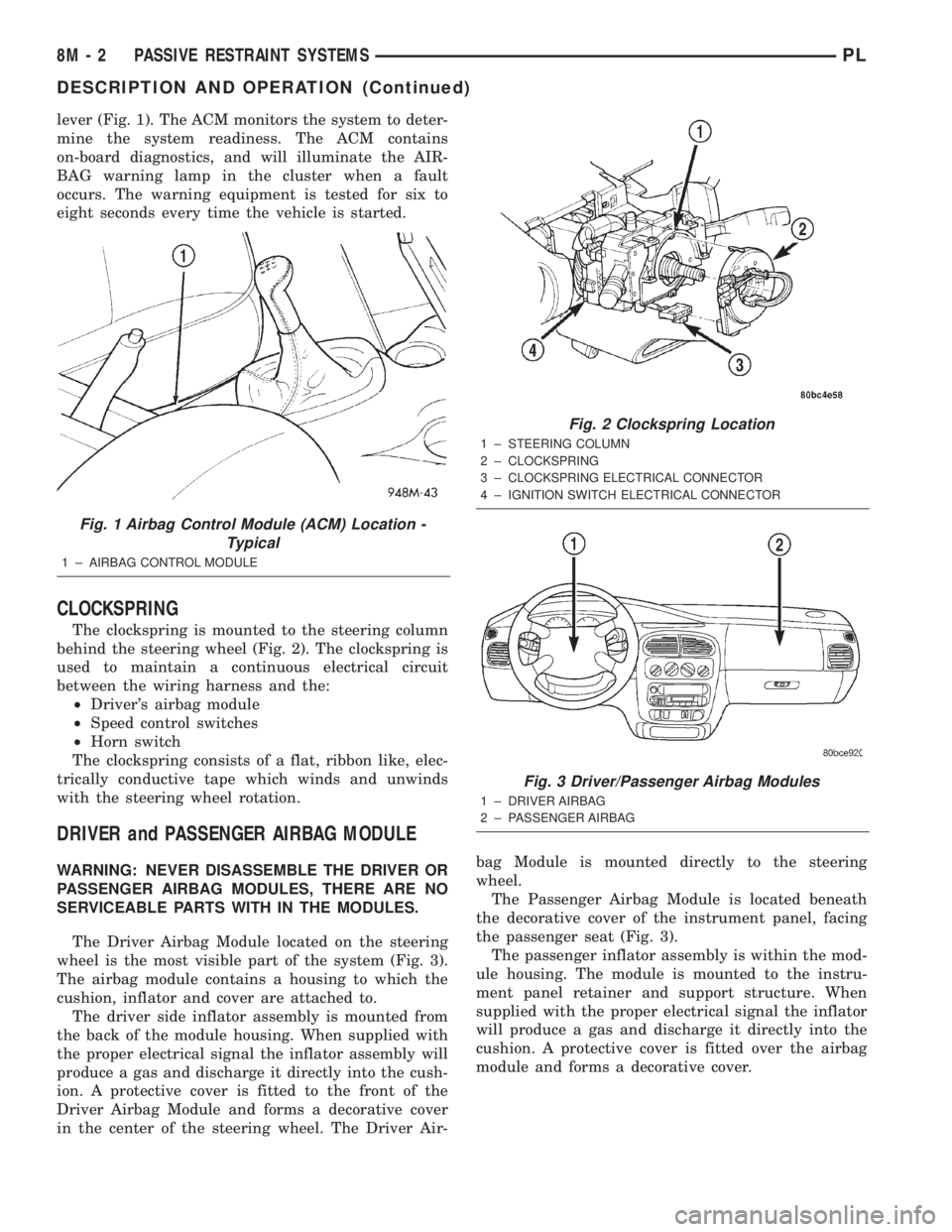
lever (Fig. 1). The ACM monitors the system to deter-
mine the system readiness. The ACM contains
on-board diagnostics, and will illuminate the AIR-
BAG warning lamp in the cluster when a fault
occurs. The warning equipment is tested for six to
eight seconds every time the vehicle is started.
CLOCKSPRING
The clockspring is mounted to the steering column
behind the steering wheel (Fig. 2). The clockspring is
used to maintain a continuous electrical circuit
between the wiring harness and the:
²Driver's airbag module
²Speed control switches
²Horn switch
The clockspring consists of a flat, ribbon like, elec-
trically conductive tape which winds and unwinds
with the steering wheel rotation.
DRIVER and PASSENGER AIRBAG MODULE
WARNING: NEVER DISASSEMBLE THE DRIVER OR
PASSENGER AIRBAG MODULES, THERE ARE NO
SERVICEABLE PARTS WITH IN THE MODULES.
The Driver Airbag Module located on the steering
wheel is the most visible part of the system (Fig. 3).
The airbag module contains a housing to which the
cushion, inflator and cover are attached to.
The driver side inflator assembly is mounted from
the back of the module housing. When supplied with
the proper electrical signal the inflator assembly will
produce a gas and discharge it directly into the cush-
ion. A protective cover is fitted to the front of the
Driver Airbag Module and forms a decorative cover
in the center of the steering wheel. The Driver Air-bag Module is mounted directly to the steering
wheel.
The Passenger Airbag Module is located beneath
the decorative cover of the instrument panel, facing
the passenger seat (Fig. 3).
The passenger inflator assembly is within the mod-
ule housing. The module is mounted to the instru-
ment panel retainer and support structure. When
supplied with the proper electrical signal the inflator
will produce a gas and discharge it directly into the
cushion. A protective cover is fitted over the airbag
module and forms a decorative cover.
Fig. 1 Airbag Control Module (ACM) Location -
Typical
1 ± AIRBAG CONTROL MODULE
Fig. 2 Clockspring Location
1 ± STEERING COLUMN
2 ± CLOCKSPRING
3 ± CLOCKSPRING ELECTRICAL CONNECTOR
4 ± IGNITION SWITCH ELECTRICAL CONNECTOR
Fig. 3 Driver/Passenger Airbag Modules
1 ± DRIVER AIRBAG
2 ± PASSENGER AIRBAG
8M - 2 PASSIVE RESTRAINT SYSTEMSPL
DESCRIPTION AND OPERATION (Continued)
Page 350 of 1285
(3) Install center console assembly. Refer to Group
23 Body, Floor Console Removal and Installation.
(4) Do not connect battery negative cable. Refer to
Diagnosis and Testing for Airbag System Test for the
proper procedures.
CLOCKSPRING
WARNING: DISCONNECT AND ISOLATE THE BAT-
TERY NEGATIVE (GROUND) CABLE BEFORE
BEGINNING ANY AIRBAG SYSTEM COMPONENT
REMOVAL OR INSTALLATION PROCEDURE. THIS
WILL DISABLE THE AIRBAG SYSTEM. FAILURE TO
DISCONNECT BATTERY COULD RESULT IN ACCI-
DENTAL AIRBAG DEPLOYMENT AND POSSIBLE
PERSONAL INJURY.
ALLOW SYSTEM CAPACITOR TO DISCHARGE
FOR 1 MINUTE BEFORE REMOVING ANY AIRBAG
COMPONENTS.
REMOVAL
(1) Place the front road wheels in the straight
ahead position then:
²Rotate the steering wheel half turn (180
degrees) to the right (clockwise).
²Lock column with ignition lock cylinder.
(2) Disconnect and isolate the battery negative
cable (Fig. 4).
(3) Wait one minute for the reserve capacitor to
discharge before removing non-deployed module.
(4) Remove steering wheel. Refer to Steering
Wheel Removal and Installation in this section.
(5) Remove upper and lower steering column
shrouds to gain access to clockspring wiring. Refer to
Group 8E Instrument Panel Systems, Steering Col-
umn Shroud Removal and Installation.
(6) Remove multi-function switch. Refer to Group
8J-Turn Signal and Hazard Warning Systems, Multi-
Function Switch Removal and Installation.
(7) Disconnect the 7-way connector between the
clockspring and the instrument panel wiring harness
at the base of the clockspring.
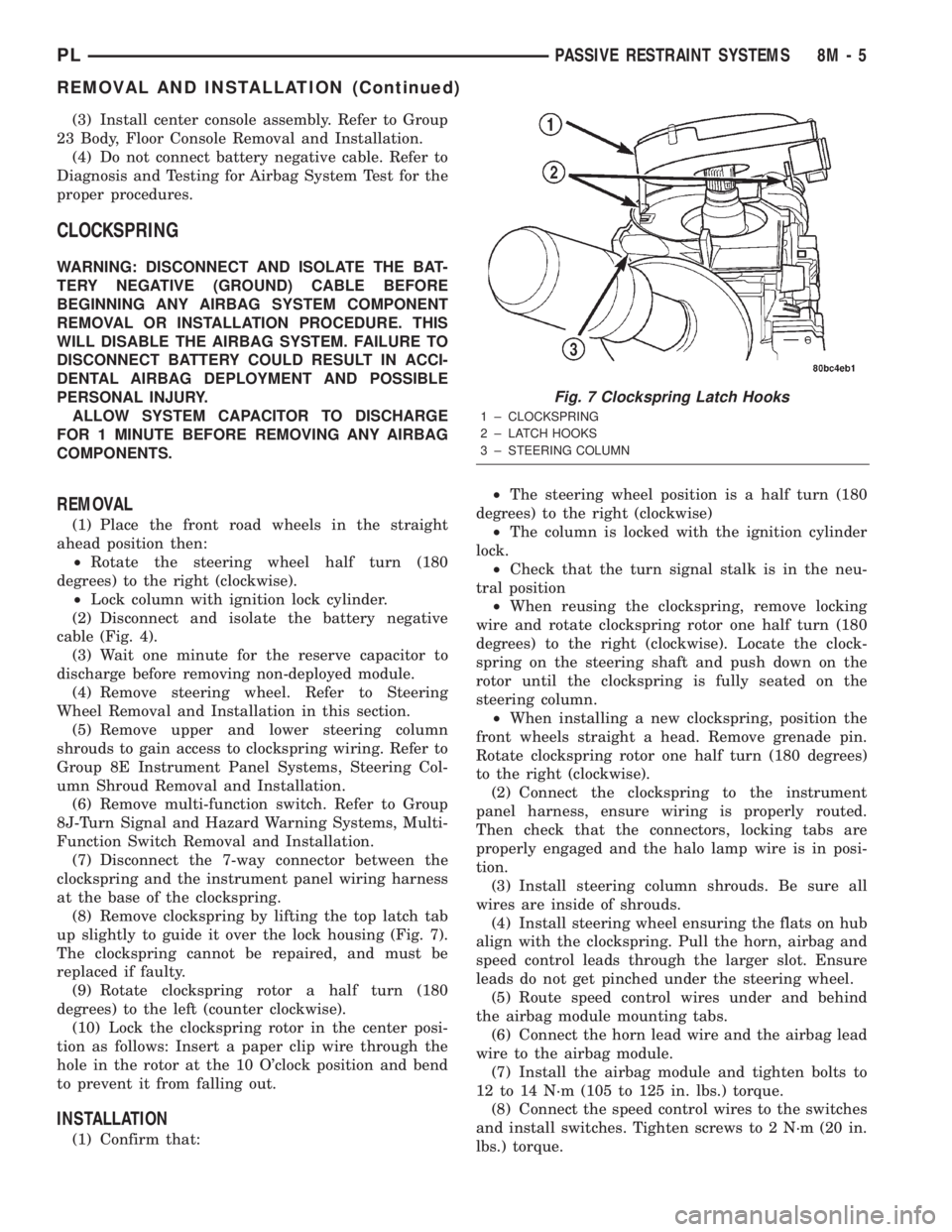
(8) Remove clockspring by lifting the top latch tab
up slightly to guide it over the lock housing (Fig. 7).
The clockspring cannot be repaired, and must be
replaced if faulty.
(9) Rotate clockspring rotor a half turn (180
degrees) to the left (counter clockwise).
(10) Lock the clockspring rotor in the center posi-
tion as follows: Insert a paper clip wire through the
hole in the rotor at the 10 O'clock position and bend
to prevent it from falling out.
INSTALLATION
(1) Confirm that:²The steering wheel position is a half turn (180
degrees) to the right (clockwise)
²The column is locked with the ignition cylinder
lock.
²Check that the turn signal stalk is in the neu-
tral position
²When reusing the clockspring, remove locking
wire and rotate clockspring rotor one half turn (180
degrees) to the right (clockwise). Locate the clock-
spring on the steering shaft and push down on the
rotor until the clockspring is fully seated on the
steering column.
²When installing a new clockspring, position the
front wheels straight a head. Remove grenade pin.
Rotate clockspring rotor one half turn (180 degrees)
to the right (clockwise).
(2) Connect the clockspring to the instrument
panel harness, ensure wiring is properly routed.
Then check that the connectors, locking tabs are
properly engaged and the halo lamp wire is in posi-
tion.
(3) Install steering column shrouds. Be sure all
wires are inside of shrouds.
(4) Install steering wheel ensuring the flats on hub
align with the clockspring. Pull the horn, airbag and
speed control leads through the larger slot. Ensure
leads do not get pinched under the steering wheel.
(5) Route speed control wires under and behind
the airbag module mounting tabs.
(6) Connect the horn lead wire and the airbag lead
wire to the airbag module.
(7) Install the airbag module and tighten bolts to
12 to 14 N´m (105 to 125 in. lbs.) torque.
(8) Connect the speed control wires to the switches
and install switches. Tighten screws to 2 N´m (20 in.
lbs.) torque.
Fig. 7 Clockspring Latch Hooks
1 ± CLOCKSPRING
2 ± LATCH HOOKS
3 ± STEERING COLUMN
PLPASSIVE RESTRAINT SYSTEMS 8M - 5
REMOVAL AND INSTALLATION (Continued)
Page 351 of 1285
(9) Do not connect the battery negative cable.
Refer to Diagnosis and Testing for Airbag System
Test procedures.
DRIVER AIRBAG MODULE
WARNING: DISCONNECT AND ISOLATE THE BAT-
TERY NEGATIVE (GROUND) CABLE BEFORE
BEGINNING ANY AIRBAG SYSTEM COMPONENT
REMOVAL OR INSTALLATION PROCEDURE. THIS
WILL DISABLE THE AIRBAG SYSTEM. FAILURE TO
DISCONNECT BATTERY COULD RESULT IN ACCI-
DENTAL AIRBAG DEPLOYMENT AND POSSIBLE
PERSONAL INJURY.
ALLOW SYSTEM CAPACITOR TO DISCHARGE
FOR 1 MINUTE BEFORE REMOVING ANY AIRBAG
COMPONENTS.
REMOVAL
When removing a deployed module, rubber gloves,
eye protection and long sleeved shirt should be worn,
as there may be deposits on the surface which could
irritate the skin and eyes.
(1) Disconnect and isolate the battery negative
cable (Fig. 4).
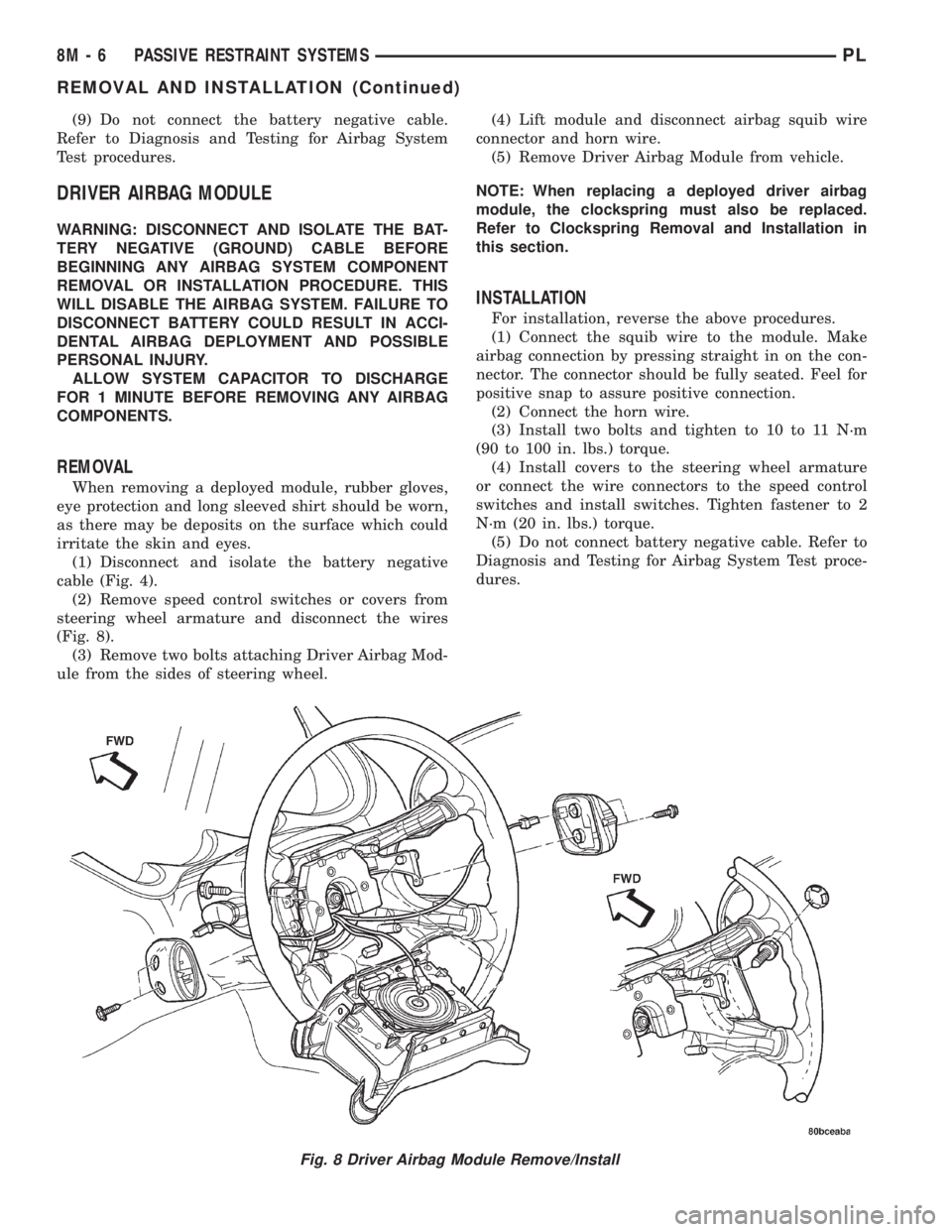
(2) Remove speed control switches or covers from
steering wheel armature and disconnect the wires
(Fig. 8).
(3) Remove two bolts attaching Driver Airbag Mod-
ule from the sides of steering wheel.(4) Lift module and disconnect airbag squib wire
connector and horn wire.
(5) Remove Driver Airbag Module from vehicle.
NOTE: When replacing a deployed driver airbag
module, the clockspring must also be replaced.
Refer to Clockspring Removal and Installation in
this section.
INSTALLATION
For installation, reverse the above procedures.
(1) Connect the squib wire to the module. Make
airbag connection by pressing straight in on the con-
nector. The connector should be fully seated. Feel for
positive snap to assure positive connection.
(2) Connect the horn wire.
(3) Install two bolts and tighten to 10 to 11 N´m
(90 to 100 in. lbs.) torque.
(4) Install covers to the steering wheel armature
or connect the wire connectors to the speed control
switches and install switches. Tighten fastener to 2
N´m (20 in. lbs.) torque.
(5) Do not connect battery negative cable. Refer to
Diagnosis and Testing for Airbag System Test proce-
dures.
Fig. 8 Driver Airbag Module Remove/Install
8M - 6 PASSIVE RESTRAINT SYSTEMSPL
REMOVAL AND INSTALLATION (Continued)
Page 353 of 1285
INSTALLATION
For installation, reverse the above procedures.
Ensure that the red locking tab is in the lock position
after installing the connector. Tighten trim screws to
2 N´m (20 in. lbs.) torque. Tighten the three module
retaining nuts to 22 to 34 N´m (200 to 300 in. lbs.)
torque. Do not connect battery negative cable. Refer
to Diagnosis and Testing for Airbag System Test pro-
cedures.
DEPLOYED MODULE
REMOVAL
When removing a deployed module, rubber gloves,
eye protection, and a long-sleeved shirt should be
worn, as there may be deposits on the surface which
could irritate the skin and eyes.
(1) Roll/fold airbag towards instrument panel.
(2) Close door over folded airbag and tape door
closed.
(3) Disconnect and isolate the battery negative
cable (Fig. 4).
(4) Remove instrument panel top cover. Refer to
Group 8E Instrument Panel Systems, Instrument
Panel Top Cover Removal and Installation.
(5) Remove three screws to glove box door and
remove door from instrument panel.
(6) Remove three passenger airbag cover screws
attaching cover to top of instrument panel (Fig. 9).
(7) Remove two passenger airbag cover screws
attaching cover to front lower instrument panel.
(8) Remove three module attaching nuts from the
support structure.
(9) Lift module up until the wire connector is visi-
ble and disconnect the 4-way wire connector from
module. Unlock the red locking tab and compress
lock to release the connector (Fig. 10).
INSTALLATION
For installation, reverse the above procedures.
Ensure that the red locking tab is in the lock position
after installing the connector. Tighten trim screws to
2 N´m (20 in. lbs.) torque. Tighten the module nuts to
22 to 34 N´m (200 to 300 in. lbs.) torque. Do not con-
nect battery negative cable. Refer to Diagnosis and
Testing for Airbag System Test procedures.
STEERING WHEEL
WARNING: DISCONNECT AND ISOLATE THE BAT-
TERY NEGATIVE (GROUND) CABLE BEFORE
BEGINNING ANY AIRBAG SYSTEM COMPONENT
REMOVAL OR INSTALLATION PROCEDURE. THIS
WILL DISABLE THE AIRBAG SYSTEM. FAILURE TO
DISCONNECT BATTERY COULD RESULT IN ACCI-DENTAL AIRBAG DEPLOYMENT AND POSSIBLE
PERSONAL INJURY.
ALLOW SYSTEM CAPACITOR TO DISCHARGE
FOR 1 MINUTE BEFORE REMOVING ANY AIRBAG
COMPONENTS.
REMOVAL
(1) Adjust the steering wheel so that the tires are
in the straight ahead position. Then:
(a) Rotate the steering wheel half turn (180
degrees) to the right (clockwise).
(b) Lock column with the ignition cylinder lock.
(2) Disconnect and isolate the battery negative
cable (Fig. 4).
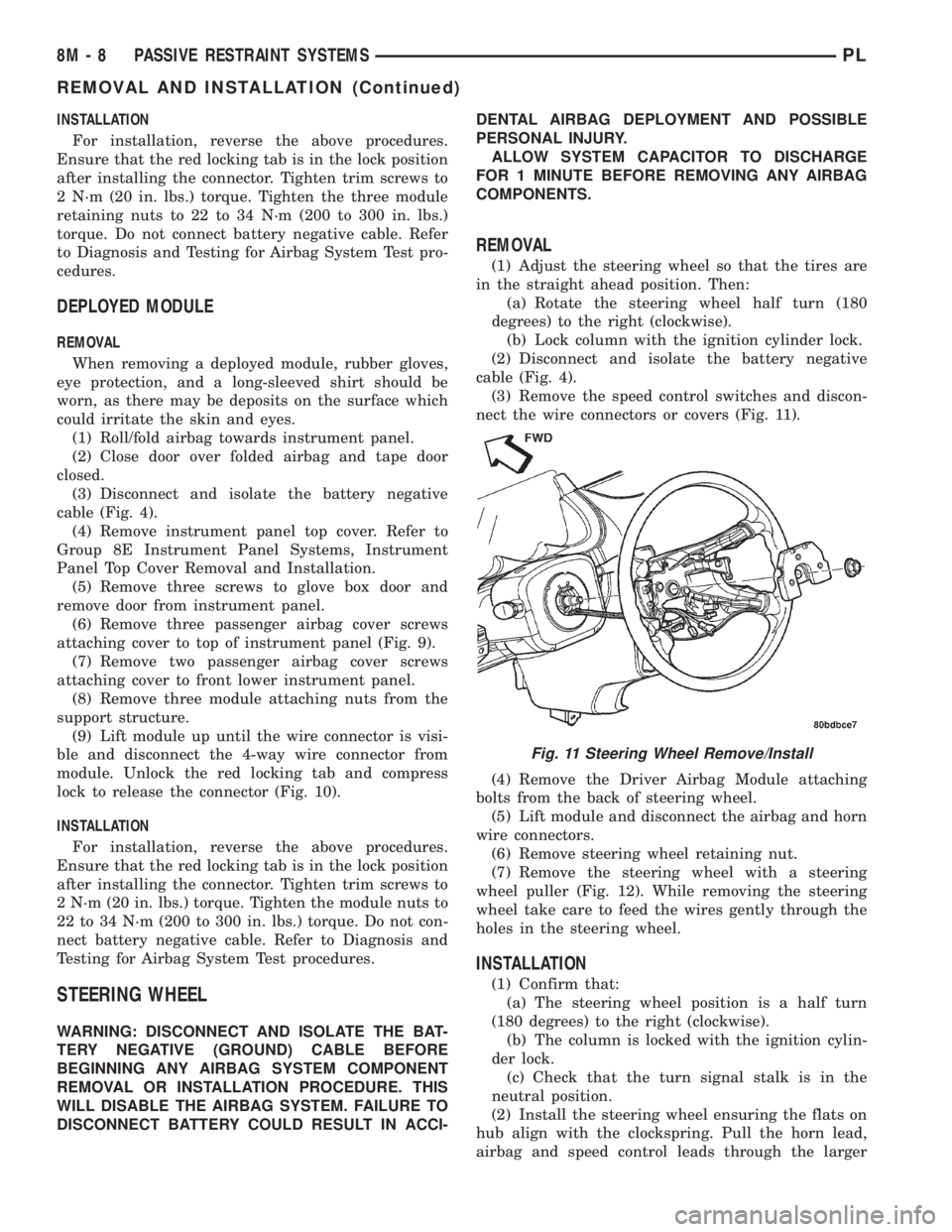
(3) Remove the speed control switches and discon-
nect the wire connectors or covers (Fig. 11).
(4) Remove the Driver Airbag Module attaching
bolts from the back of steering wheel.
(5) Lift module and disconnect the airbag and horn
wire connectors.
(6) Remove steering wheel retaining nut.
(7) Remove the steering wheel with a steering
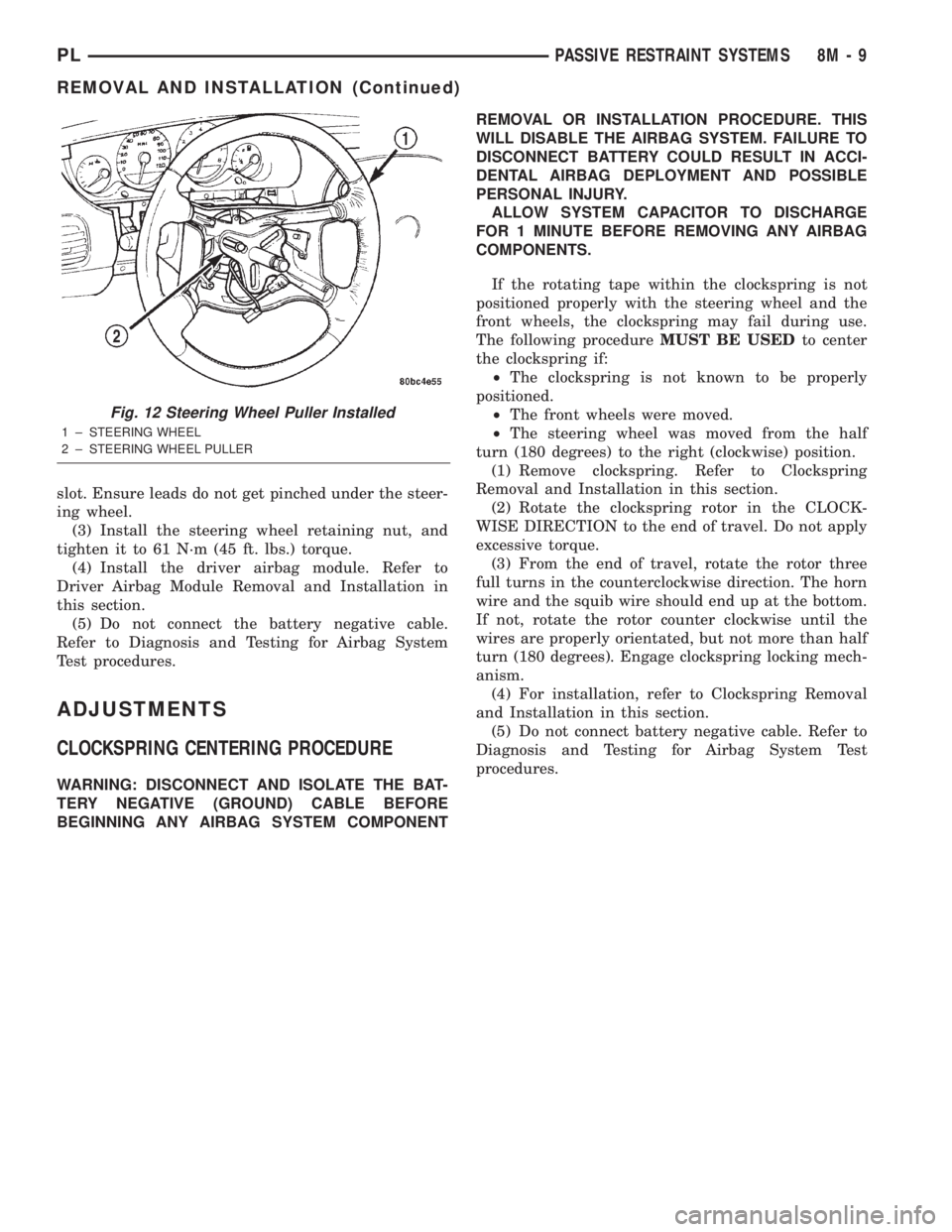
wheel puller (Fig. 12). While removing the steering
wheel take care to feed the wires gently through the
holes in the steering wheel.
INSTALLATION
(1) Confirm that:
(a) The steering wheel position is a half turn
(180 degrees) to the right (clockwise).
(b) The column is locked with the ignition cylin-
der lock.
(c) Check that the turn signal stalk is in the
neutral position.
(2) Install the steering wheel ensuring the flats on
hub align with the clockspring. Pull the horn lead,
airbag and speed control leads through the larger
Fig. 11 Steering Wheel Remove/Install
8M - 8 PASSIVE RESTRAINT SYSTEMSPL
REMOVAL AND INSTALLATION (Continued)
Page 354 of 1285
slot. Ensure leads do not get pinched under the steer-
ing wheel.
(3) Install the steering wheel retaining nut, and
tighten it to 61 N´m (45 ft. lbs.) torque.
(4) Install the driver airbag module. Refer to
Driver Airbag Module Removal and Installation in
this section.
(5) Do not connect the battery negative cable.
Refer to Diagnosis and Testing for Airbag System
Test procedures.
ADJUSTMENTS
CLOCKSPRING CENTERING PROCEDURE
WARNING: DISCONNECT AND ISOLATE THE BAT-
TERY NEGATIVE (GROUND) CABLE BEFORE
BEGINNING ANY AIRBAG SYSTEM COMPONENTREMOVAL OR INSTALLATION PROCEDURE. THIS
WILL DISABLE THE AIRBAG SYSTEM. FAILURE TO
DISCONNECT BATTERY COULD RESULT IN ACCI-
DENTAL AIRBAG DEPLOYMENT AND POSSIBLE
PERSONAL INJURY.
ALLOW SYSTEM CAPACITOR TO DISCHARGE
FOR 1 MINUTE BEFORE REMOVING ANY AIRBAG
COMPONENTS.
If the rotating tape within the clockspring is not
positioned properly with the steering wheel and the
front wheels, the clockspring may fail during use.
The following procedureMUST BE USEDto center
the clockspring if:
²The clockspring is not known to be properly
positioned.
²The front wheels were moved.
²The steering wheel was moved from the half
turn (180 degrees) to the right (clockwise) position.
(1) Remove clockspring. Refer to Clockspring
Removal and Installation in this section.
(2) Rotate the clockspring rotor in the CLOCK-
WISE DIRECTION to the end of travel. Do not apply
excessive torque.
(3) From the end of travel, rotate the rotor three
full turns in the counterclockwise direction. The horn
wire and the squib wire should end up at the bottom.
If not, rotate the rotor counter clockwise until the
wires are properly orientated, but not more than half
turn (180 degrees). Engage clockspring locking mech-
anism.
(4) For installation, refer to Clockspring Removal
and Installation in this section.
(5) Do not connect battery negative cable. Refer to
Diagnosis and Testing for Airbag System Test
procedures.
Fig. 12 Steering Wheel Puller Installed
1 ± STEERING WHEEL
2 ± STEERING WHEEL PULLER
PLPASSIVE RESTRAINT SYSTEMS 8M - 9
REMOVAL AND INSTALLATION (Continued)
Page 367 of 1285

REMOTE KEYLESS ENTRY (RKE)
TABLE OF CONTENTS
page page
DESCRIPTION AND OPERATION
INTRODUCTION..........................4
REMOTE KEYLESS ENTRY SYSTEM..........5
REMOTE KEYLESS ENTRY TRANSMITTER.....5
HORN CHIRP TOGGLE.....................5
DIAGNOSIS AND TESTING
REMOTE KEYLESS ENTRY MODULE..........5
DECKLID RELEASE SOLENOID...............5
SERVICE PROCEDURES
HORN CHIRP TOGGLE.....................5SWITCHING OPERATING MODES/
CONFIGURING A NEW MODULE............6
TRANSMITTER PROGRAMMING..............6
REMOVAL AND INSTALLATION
DECK LID RELEASE SOLENOID..............6
REMOTE KEYLESS ENTRY MODULE..........6
SPECIFICATIONS
TRANSMITTER BATTERY...................7
TRANSMITTER RANGE.....................7
DESCRIPTION AND OPERATION
INTRODUCTION
The system allows locking and unlocking of vehicle
door(s), deck lid release, and panic by remote control
using a hand held radio frequency transmitter (Fig.
1). The module must be in the customer usage mode
of operation for the remote keyless entry system to
function.
The receiver may receive signals from up to four
transmitters. Each transmitter has its own code, and
the code is programmed and stored into RKE module
memory. If a transmitter is replaced or additional
transmitters are added, the codes for all units have
to be reprogrammed into the RKE module memory. If
a receiver module is replaced, the transmitter codes
must be stored in the new receiver memory (by per-
forming the steps for programming transmitters).The RKE module is capable of retaining all transmit-
ter codes when power is removed from the module.
Operation of the Remote Keyless Entry system
works in a similar manner to the central locking/un-
locking feature. With the double activation unlock
feature enabled, the first press of the transmitter
UNLOCK button will electrically unlock the driver
door, and a second press of the UNLOCK button
(within five seconds of the first) will unlock all vehi-
cle doors. With the double activation feature dis-
abled, all vehicle doors will unlock upon the first
press of the transmitter UNLOCK button. The vehi-
cle is locked electrically by pressing the transmitter
LOCK button once, regardless of the state of the dou-
ble activation unlock feature. The vehicle is shipped
with the double activation unlock feature enabled.
The deck lid can be unlatched manually via the
key cylinder from outside the vehicle, or by depress-
ing the deck lid release button on the RKE transmit-
ter twice (within five seconds).
The RKE module has three modes of operation
including customer usage mode, dealer lot storage
mode, and shipping mode. The customer usage mode
provides full functionality of the module and is the
mode in which the RKE module should be operating
when used by the customer. Dealer lot storage mode
and shipping modes are reduced power modes meant
to extend vehicle battery life during shipping and
storage in the dealer lot. Dealer lot storage mode pro-
vides limited VTSS and power door lock functions,
but disables the Remote Keyless Entry (RKE) func-
tions. This mode is intended to be used when the
vehicle is on the dealer lot to provide VTSS coverage
of the vehicle while minimizing battery drain. Ship-
ping mode disables all normal functions (i.e. power
door locks, RKE, and VTSS) of the module, and is
intended to be used when the vehicle is shipped from
the assembly plant.
Fig. 1 Remote Keyless Entry (Key Fob) Transmitter
1 ± BATTERIES
8P - 4 POWER LOCK SYSTEMSPL
Page 368 of 1285
NOTE: The dealer must remove the module from
ªShip Modeº and place the RKE Module into either
the ªDealer Lotº storage or ªCustomer Usageº
modes of operation after receiving the vehicle from
the assembly plant. Refer to Group 8Q-Vehicle
Theft/Security Systems, Switching Operating
Modes/Configuring a New Module under Service
Procedures.
REMOTE KEYLESS ENTRY SYSTEM
The system allows locking and unlock of vehicle
door(s) and deck lid by remote control using a hand
held radio frequency (RF) transmitter. The vehicle
speed must be less than five miles per hour before
the deck lid can be unlatched with the transmitter.
The receiver may receive signals from four transmit-
ters. Each transmitter has its own code and the code
has been stored in memory. If the transmitter is
replaced or other transmitters are added, the code for
each unit must be learned.
REMOTE KEYLESS ENTRY TRANSMITTER
The transmitter has four buttons for operation
(Fig. 1). They are LOCK, UNLOCK, DECK LID
RELEASE, and PANIC.
²The UNLOCK button will unlock the driver door
and enable illuminated entry. Pushing and releasing
the button once will unlock the driver door. Pushing
and releasing the button two times within a five sec-
ond period will unlock all doors (double unlock acti-
vation enabled).
²Upon pressing the LOCK button, the horn will
sound a short chirp (if enabled) and flash the park
lamps to notify that the all door lock signal was
received and acted upon. Illuminated entry is can-
celled and the interior lamps are faded to off.
²Pushing and releasing the DECK LID
RELEASE button twice within a five second period
will actuate the decklid release solenoid, causing the
deck lid to be slightly ajar. If so desired, the decklid
may be set to release after one button push by the
dealer. For procedures on programming with the
DRB IIItscan tool, refer to the proper Body Diagnos-
tic Procedures Manual.
²Pushing the PANIC button will cause the panic
alarm to sound for three minutes, until the panic
button is pressed a second time, or until the vehicle
reaches a speed of 15 mph.
HORN CHIRP TOGGLE
Once the transmitters have been programmed, the
horn chirp can be enabled/disabled by sending the
horn chirp toggle operation code to the RKE Module.
This can be done using a DRB IIItscan tool or by
the customer. The horn chirp will enter the oppositestate of its current programmed state by receiving
this operation code. The RKE module is responsible
for keeping track of the horn chirp status.
DIAGNOSIS AND TESTING
REMOTE KEYLESS ENTRY MODULE
For procedures on diagnosing and testing the RKE
Module's RKE functions, refer to the proper Body
Diagnostic Procedures Manual.
DECKLID RELEASE SOLENOID
(1) Confirm operation of RKE transmitter(s) by
actuating Lock and Unlock functions.
(2) Confirm lead is connected to deck lid release
solenoid.
(3) Unplug lead, and use an ohmmeter to verify
continuity of connection between pin 2 of the harness
connector and ground. Refer to Group 8W-Wiring
Diagrams for Connector Pin-Outs.
(4) Connect test light to pin 1 of the harness con-
nector and actuate decklid release button on trans-
mitter. Refer to Group 8W-Wiring Diagrams for
Connector Pin-Outs.
(5) If test light comes on, the wiring circuit
between the RKE module and the solenoid is func-
tional, and the decklid solenoid should be replaced.
(6) If test light does not come on, refer to the
proper Body Diagnostic Procedures Manual for fur-
ther troubleshooting information.
SERVICE PROCEDURES
HORN CHIRP TOGGLE
The toggling of the horn chirp (between enabled
and disabled) can be performed with the use of the
DRB IIItscan tool or by the customer.
DRB lllTPROGRAMMING
When using the DRB IIItscan tool, select:
(1) ªTheft Alarmº
(2) ªVTSSº
(3) ªMiscellaneousº
and then the desired function.
CUSTOMER PROGRAMMING
Using a transmitter programmed to the RKE Mod-
ule, the status of the horn chirp may be toggled by
the customer.
NOTE: The RKE Module is responsible for keeping
track of the horn chirp status; thus this procedure
does not need to be repeated for each transmitter
programmed to the system.
PLPOWER LOCK SYSTEMS 8P - 5
DESCRIPTION AND OPERATION (Continued)
Page 372 of 1285
VEHICLE THEFT/SECURITY SYSTEM
TABLE OF CONTENTS
page page
DESCRIPTION AND OPERATION
INTRODUCTION..........................1
VEHICLE THEFT/SECURITY SYSTEM (VTSS)...1
SENTRY KEY IMMOBILIZER SYSTEM (SKIS)...2
SENTRY KEY IMMOBILIZER MODULE
(SKIM)................................2
SENTRY KEY IMMOBILIZER SYSTEM
TRANSPONDER.........................3
SENTRY KEY IMMOBILIZER SYSTEM
INDICATOR LAMP.......................4
TRIGGERING THE VTSS....................4
DIAGNOSIS AND TESTING
SENTRY KEY IMMOBILIZER SYSTEM.........4
VEHICLE THEFT/SECURITY SYSTEM (VTSS)...5SERVICE PROCEDURES
SENTRY KEY IMMOBILIZER SYSTEM
INITIALIZATION.........................5
SENTRY KEY IMMOBILIZER SYSTEM
TRANSPONDER PROGRAMMING...........5
SWITCHING OPERATING MODES/
CONFIGURING A NEW MODULE............6
REMOVAL AND INSTALLATION
DOOR CYLINDER LOCK SWITCH.............7
HOOD AJAR SWITCH......................7
SENTRY KEY IMMOBILIZER MODULE
(SKIM)................................7
VEHICLE THEFT/SECURITY SYSTEM DECK
LID SECURITY (KNOCK OUT) SWITCH.......8
DESCRIPTION AND OPERATION
INTRODUCTION
The Vehicle Theft/Security System (VTSS) is
designed to protect against whole vehicle theft. The
system monitors vehicle doors, hood, trunk key cylin-
der, and ignition for unauthorized operation.
The VTSS activates:
²Sounding of the horn.
²Flashing of the park lamps.
²Flashing of the headlamps.
The RKE Module has three modes of operation
including customer usage mode, dealer lot storage
mode, and shipping mode. The customer usage mode
provides full functionality of the module and is the
mode in which the RKE Module should be operating
when used by the customer. Dealer lot storage mode
and shipping mode are reduced power modes meant
to extend vehicle battery life during shipping and
storage in the dealer lot. Dealer lot storage mode pro-
vides limited VTSS and power door lock functions,
and disables the Remote Keyless Entry (RKE) func-
tions. This mode is intended to be used when the
vehicle is on the dealer lot to provide VTSS coverage
of the vehicle while minimizing battery drain. Ship-
ping mode disables all normal functions of the mod-
ule with the exception of communications over the
vehicle's PCI bus, and is intended to be used when
the vehicle is shipped from the assembly plant. The
dealer must remove the module from shipping modeand place it into either the dealer lot storage or cus-
tomer usage modes of operation.
NOTE: The dealer must remove the module from
ªShip Modeº and place the RKE Module into either
the ªDealer Lotº storage or ªCustomer Usageº
modes of operation after receiving the vehicle from
the assembly plant. Refer to Switching Operating
Modes/Configuring a New Module under Service
Procedures in this section.
VEHICLE THEFT/SECURITY SYSTEM (VTSS)
In the customer usage mode of operation, the sys-
tem is armed when the vehicle is locked using the:
²Power door lock switches.
²Remote Keyless Entry (RKE) transmitter.
After the vehicle is locked and the last door is
closed, the circular red VTSS indicator in the instru-
ment cluster will flash quickly for 16 seconds, indi-
cating that arming is in progress. If no monitored
systems are activated during this period (excluding
the hood and trunk key cylinder), the system will
arm. After 16 seconds, the LED will continue to flash
at a slower rate indicating the system is armed.
If the hood ajar switch and/or trunk key cylinder
switch(s) are not sensed by the system, the indicator
LED will remain lit during the arming process,
although the system will still arm. If the VTSS indi-
cator does not illuminate at all upon door closing it
indicates that the system is not arming.
PLVEHICLE THEFT/SECURITY SYSTEM 8Q - 1