2000 AUDI ALLROAD warning
[x] Cancel search: warningPage 140 of 306

--------------------CONTROLS AND
EQUIPMEN T
When the red blinking symbols appear,
three warning tones will sound at the same
time. These symbols represent Danger.
• Do not continue to operate the
vehicle. The problem muat be lo
cated and corrected immediately.
Pull off the road to a safe area, well away
from traffic, stop the engine and operate the
emergency flasher. Use other warning de
vices to alert motorists. Contact your autho
rized Audi Dealer or a qualified workshop.
In the event of multiple malfunctions, the
symbols will blink successively in two-sec
ond interva ls. The symbols will continue to
blink until the malfunction is corrected.
Note If a malfunction is detected while you are
using the Navigation System, the Naviga
tion System display will be switched off for
a few seconds and the Priority 1 Warning
symbol will appear. After that, the symbol
will change into the Priority 2 display, and
the Navigation System will be visible once
again.
As long there is a Priority 1 malfunction
present, Priority 2 malfunctions will not be
displayed. Ye
llow Symbols (priority 2)
Brake light is defective
Headlight and/or taillight is defective
B rake pads worn
Windshield wiper fluid reserv oir
level is too low (moving symbol)
Fuel level is low (@)
�
0 Battery
voltage is too low/too high 0
Check engine oil level
Engine oil sensor defective �ENSOR
Speed warning (USA Models)
Speed warning (Canada Models)
Dynamic headlight dimmer
control not functioning 9
8
When the yellow symbols appear, only one
warning tone will sound at the same time.
These symbols represent a Warn ing.
Have the malfunction displayed corrected
as soon as possible. In the event of mul tiple
malfunctions, the symbols will appear suc
cessively in two-second intervals.
139
Page 142 of 306

--------------------CONTROLS AND
EQUIPMEN T
If there are one or more faults, the driver in
formation disappears about 15 seconds af
ter the engine has been started and the ap
propriate fault symbol appears in the
display.
If neither "OK" nor any other fault symbol
appear in the displa y, the auto-check sy
stem must itself be checked. Displays
In case of a malfunction or component fail
ure, the acoustic warning will sound and the
following symbols can appear.
Brake light
USA models:
Canada models: BRAKE
LIGHT
(@)
The following electrical components should
be checked, repaired or replaced, as neces
sary:
• Brake light bulbs
• Fuses
• All wiring connections Engine
coolant
temperature /level
If the light flashes, either the coolant ten:
perature is too high, or the coolant level1s
too low.
• If the light starts to f_lash, move
the vehicle a safe d1stance off
the road, stop the engine, depress
the emergency flasher switch, turn
off the engine and let it cool down.
Check coolant level. Top up as necessary
(see "Cooling system", page 238). ·
g Always heed all WA RNINGS
� on page 232.
141
Page 143 of 306

CONT
ROLS AND EQUIPMENT---------------------
�W ARNING
• The engine compartment of any
motor vehicle is a potentially haz
ardous area. Before you check any
thing in the engine compartment,
stop the engine and let it cool
down. Always exercise extreme
caution when working under the
engine hood. Heed all of the
WA RNINGS on page 232.
• To reduce the risk of being
burned, never open the hood if you
see or hear steam or coolant es
caping from the engine compart
ment. Wait until no steam or cool
ant can be seen or heard before
carefully opening the hood.
• Never touch the radiator fan.
The auxiliary fan is temperature
controlled and can switch on sud
denly.
14 2 �
WARNING continued
• Reduce the risk of scalding from
hot coolant by following these
steps:
If the coolant reservoir cap must
be removed. wait until the en
gine has cooled down.
- Protect face, hands. and arms
from escaping fluid and steam
by cov ering the cap with a large.
thick rag.
Tu rn the cap slowly and very
carefully in a counter-clockwise
direction while applying light.
downward pressure on the top
of the cap.
- To help avoid being burned. do
not spill antifreeze or coolant on
the exhaust system or hot en
gine parts. Under some condi·
tions. the ethylene glycol in en·
gine coolant can catch fire. •
If a visual check shows the coolant level
and the V-belt normal, and the warning light
still does not go out, do not continue
driving. See your authorized Audi Dealer.
• If the coolant level and the V-belt are nor
mal, the malfunc tion may be in the auxiliary
radiator fan. You can continue driving to the
nearest authorized Audi Dealer. The wind
from the moving vehicle and the main radia
tor fan driven by the V-belt will be enough to
keep the angine cool. However, avoid idling
for a long time or driving very slowly.
If the V-belt is torn, the main radiator fan, the
power steering and the gener ator will also
not work.
Obtain expert assistance.
Refer to "Coolant temperature gauge" on
page 118 for detai ls.
Page 144 of 306

---------------------CONTROLS AND EQUIPMENT
Engine oil pressure
If this warning light comes on, 1t Indi cates
that the engine oil pressure is too low.
• Stop the engine immediately,
check the engine oil level and
add oil if necessary.
If engine oil level is normal but the
light comes on again, do not con
tinua to operate the vehicle. This
could damage the engine.
Tu rn the engine off and contact the nearest
Audi Dealer for assistance.
The oil pressure warning light is not
an indicator for low engine oil level.
To check the oil level, always use
dipstick (sea page 235).
Make it a habit to have the engine oil
level checked with every fuel filling.
A Always heed all WA RNINGS
� on page 232. Brake
pads worn
0
See your Audi Dealer promptly to have front
and rear brake pads checked and replaced
as necessary.
Headlights I tail lights
�
Check, repair or replace:
• Light bulbs
• Fuses
• Electrical connections.
Washer fluid
Replenish the windshield washer
fluid in the container (see page 250).
Fuel Pull into the next filling station and
fill up. Battery
voltage too high
t::::1
or too low
See your Audi Dealer promptly to locate and
correct the problem. The battery may be run
down, the generator may be overcharging,
or the V-belt tension may need adjustment.
The voltage in the electrical system is dis
played on the voltmeter. See page 120 for
additional details.
143
Page 145 of 306

CONTROLS AND EQUIPMENT---------------------
Check
engine oil level �N
Check the engine oil level as soon as pos
sible by using the dip stick. Add engine oil
accordingly. See page 236.
Engine oil sensor
defective �ENOOR
Contact an authorized Audi dealer and have
the engine oil sensor inspected.
Speed warning 8 or 8
The stored speed h·as been exceeded. Slow
down or set new speed.
Dynamic headlight dimmer �(D
control• not functioning =1.
•
Have your authorized Audi dealer repair the
headlight dimmer control.
Refer to "Xenon lights" on page 157 for de
tails.
14 4 Speed
warning
You can store a road speed which is not to
be exceeded. As soon as you exceed that
speed by approximately 6 miles (1 0 kilome
ters), a warning tone sounds and "MPH"
("k m/h ") appears in the disp lay.
Nota Always monitor the vehicle speed by
means of the speedometer. The speed
warning device may only be used as a re
minder not to exceed the posted speed
limit. The
following describes how to store or de
lete speed warnings 1 and 2.
Speed warning 1
The ''MPH" ("km/h ") disappears when you
reduce the speed below the stored speed.
Also, the ''MPH" goes out when the driving
speed increases approximately 25 mph
(40 km/h) over the set speed for at least
1 0 seconds. The stored speed is not de
leted.
Selec ting speed limit
Press the test button for the Auto-Check
control briefly when the desired speed is in
dicated on the speedometer. The speed
warning symbol lights up when the button
is released to confirm that the selected
speed has been stored.
The set speed limit remains stored until
another speed is selected by pressing the
button again or until the memory is cleared.
Page 146 of 306

Cancelling speed limit
Press the test button for at least 1 second
when the yehicle is moving at a speed
above 3 miles (5 km/h). The display will
show the warning symbol crossed through
to confirm that the speed limit has been
cleared.
Speed warning 2
82
When the ignition is switc hed off, the driver
can store a permanent speed limit
warning in the unit. The
warning is shown in the display as de
scribed. The warning symbol only goes out
once the road speed has fallen below the
stored value again.
We recommend to store this speed limit
v:' arning if you wish to be reminded of a par
ticular speed limit in addition to speed limit
warning 1. (For instance when driving in
countries with general speed limits or if a
particular speed should not be exceeded
when winter tires are fitted, etc.)
Selecting speed limit
• Press the test button briefly with the
ignition switched off. The mileage re
corder display will then light up.
• Press the test button again and hold for
at least 2 seconds. The speed limit currently
set appears in the disp lay.
• To change the speed limit, press the top
or bottom of the function selector switch for
the trip computer (see arrow illustration).
The speed limit displayed will then increase
or decrease by 6 miles (1 0 km/h ) at a time. CONT
ROLS AND EQUIPMENT
• A few seconds after the button is re
leased, the display lighting goes out again.
Cancelling speed limit
P _ress the .test button briefly with the igni
tion sw1tched off; the display will light
up. Press the test button again for at least
2 seconds: the display will show the .speed
limit currently set. Now press and hold the
"R eset" button for the trip computer until
the crossed-out warning symbol appears.
145
Page 149 of 306
CONTROLS ANDEO�PMENT-----------------------------------------
Switches
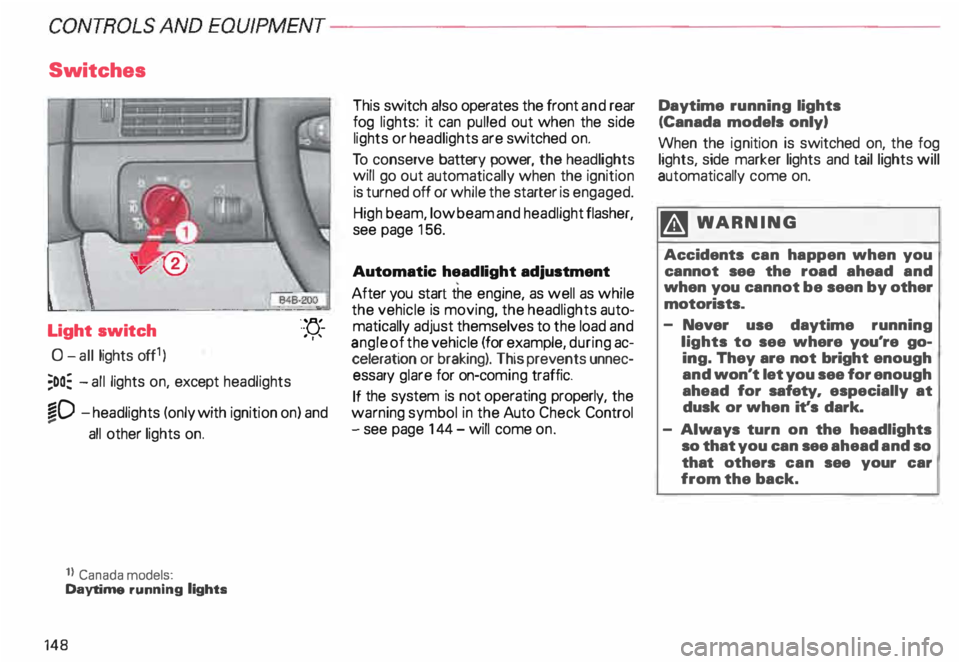
Light switch
0- all lights off1)
;oo: -all lights on, except headlights "-
YJ.-
. ''
�D -headlights (only with ignition on) and
...
all other lights on.
1} Canada models:
Daytime running lights
148 This
switch also operates the front and rear
fog lights: it can pulled out when the side
lights or headlights are switched on.
To conserve battery power, the headlights
will go out automatically when the ignition
is turned off or while the starter is engaged.
High beam, low beam and headlight flasher,
see page 156.
Automatic headlight adjustment
After you start the engine, as well as while
the vehicle is moving, the headlights auto
matically adjust themselves to the load and
angle of the vehicle (for example, during ac
celeration or braking). This prevents unnec
essary glare for on-com ing traffic.
If the system is not operating properly, the
warning symbol in the Auto Check Control
- see page 144- will come on. Daytime
running lights
(Canada models only)
When the ignition is switched on, the fog
lights, side marker lights and taillights will
automatically come on.
�W ARNING
Accidents can happen when you
cannot see the road ahead and
when you cannot be seen by other
motorists.
- Never use daytime running
lights to see where you're go
ing. They are not bright enough
and won't let you see for enough
ahead for safety, especially at
dusk or when it's dark.
- Always turn on the headlights
so that you can see ahead and so
that others can see your car
from the back.
Page 153 of 306
CONTROLS AND EQUIPMENT---------------------
1
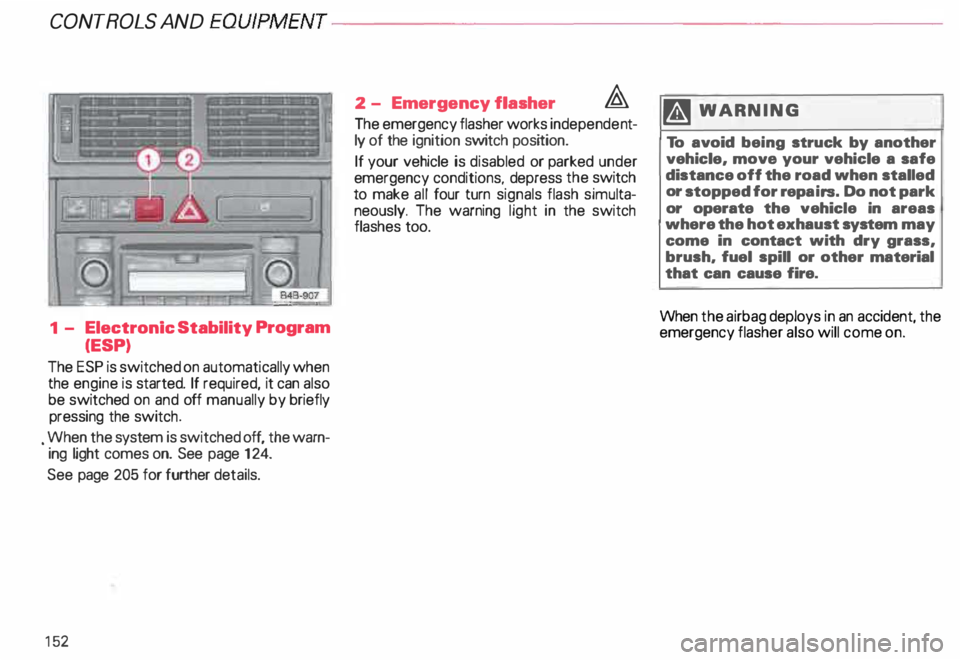
- Electronic Stability Program
(ESP)
The ESP is switched on automatically when
the engine is started. If required, it can also
be switched on and off manually by briefly
pressing the switch .
. When the system is switched off, the warn
ing light comes on. See page 124.
See page 205 for further details.
15 2 2
- Emergency flasher �
The emergency flasher works independe nt
ly of the ignition switch position.
If your vehicle is disabled or parked under
emergency conditions, depress the switch
to make all four turn signals flash simulta
neously. The warning light in the switch
flashes too. ftl
WARN ING
To avoid being struck by another
vehicle, move your vehicle a safe
distance off the road when stalled
or stopped for repairs. Do not park
or operate the vehicle in areas
where the hot exhaust system may
come in contact with dry grass,
brush, fuel spill or other material
that can cause fire.
When the airbag deploys in an accident, the
emergency flasher also will come on.