1997 LINCOLN MARK VIII Time
[x] Cancel search: TimePage 35 of 315

30Vehicle System Status DisplaysThese messages are displayed on the Message
Center when the operator uses one of the vehicle
systems below, or the operation of a vehicle system
occurs.q
PHONE SCREENÐ This display will show
the status of the cellular phone usage (if the
vehicle is equipped with the factory installed
cellular phone). This display will automatically
appear on the message center during usage of
the cellular phone, unless a warning is being
displayed or the phone screen feature is turned
off in the DRIVER SETTINGS MENU. To return
to an Operator Selectable Feature display during
a phone call, press the corresponding button
(i.e., FUEL STATUS, FUEL ECONOMY, etc.).
This will disable the PHONE SCREEN
temporarily till the next phone event occurs.
q
AUTO LAMP DELAY STATUS SCREENÐ
This display will automatically appear on the
message center during adjustment of the
autolamp delay time when the headlamp switch
is adjusted, unless a warning is being displayed.
This display indicates the amount of time the
lights will stay on after the ignition is turned off
if the autolamps are turned on.
q
PERSONALITY EVENT SCREENÐ These
displays will automatically appear on the
message center when a vehicle system is
adjusted, and saved to the driver's personality
profile (i.e., seat position is adjusted, etc.) or
when a new driver personality profile is
selected, or the personality feature is turned off.
These messages will not appear if a warning is
displayed on the Message Center.
File:03fnis8.ex
Update:Thu Jun 27 10:00:37 1996
Page 40 of 315

35
CHECK TRANS-MISSIONÐ This warning
message is displayed when the transmission is not
operating properly. If this warning stays on or
comes on, contact your dealer for transmission
service as soon as safely possible.
TRANS-MISSION OVERHEATÐ This warning
message is displayed when the transmission is
overheating. This warning may appear when towing
heavy loads, or driving in a low gear at high speed
for an extended period of time. Stop the vehicle as
soon as safely possible, turn off the engine and let it
cool. Check the transmission fluid and level
following the instructions in theMaintenance and
Carechapter. If this warning stays on or continues
to come on, contact your dealer for transmission
service as soon as safely possible.CHECK BRAKE LAMPSÐ This warning message
is displayed when you turn on the brake lamps and
at least one of them is burned out. Check the
lamps as soon as safely possible, and have the
burned out lamp replaced following the instructions
in theMaintenance and Carechapter. Note the
center high mounted stop lamp is not monitored.
CHECK HEADLAMPSÐ This warning message is
displayed when you turn on the headlamps and at
least one of them is burned out. Check the lamps
as soon as safely possible, and have the burned out
lamp replaced following the instructions in the
Maintenance and Carechapter. Note the high
beam lamps are not monitored.
CHECK TAIL LAMPSÐ This warning message is
displayed when you turn on the tail lamps and at
least one of them is burned out. Check the lamps
as soon as safely possible, and have the burned out
lamp replaced following the instructions in the
Maintenance and Carechapter.
File:03fnis8.ex
Update:Thu Jun 27 10:00:37 1996
Page 42 of 315

37
AIR RIDE SWITCH OFFÐ This warning message
is displayed when the AIR SUSPENSION SERVICE
SWITCH is in the OFF position. The air suspension
service switch is located in the vehicle trunk in the
jack stowage area on the left side. For more
information refer to theAir Suspensionsection in
theDrivingchapter.
CHECK AIR RIDE SYSTEMÐ This warning
message is displayed when the Air Suspension
System is not operating properly. If this warning
message is displayed while driving, pull off the road
as soon as safely possible. If the vehicle is loaded
beyond the recommended maximum payload, the
ªCHECK AIR RIDE SYSTEMº message may be
displayed. This is a normal condition if the vehicle
is overloaded. To correct this condition, remove or
redistribute the payload per the recommended
maximum requirements. Turn the ignition switch
from ON to OFF to ON again. If the warning
message reappears, turn the Air Suspension Service
Switch (located in the vehicle trunk in the jackstowage area on the left side) OFF and contact your
dealer for service as soon as safely possible. For
further information refer to theAir Suspension
section in theDrivingchapter.
CHANGE OIL SOON/OIL CHANGE
REQUIREDÐ This warning message is displayed
when the engine oil life remaining is 5% or less.
When Oil Life Left is between 5% and 0%, the
ªCHANGE OIL SOONº message will be displayed.
When Oil Life Left reaches 0%, the ªOIL CHANGE
REQUIREDº message will be displayed.
An oil change is required whenever indicated by
the Message Center. USE ONLY RECOMMENDED
ENGINE OILS (seeEngine Oilin the Index).
The Message Center will tell you the percent of oil
left during System Check. This percentage is based
on your driving history and the time since your last
oil change. In order to ensure accurate oil life left
indications, you should only perform the following
OIL CHANGE RESET Procedure after you have the
oil changed.
File:03fnis8.ex
Update:Thu Jun 27 10:00:37 1996
Page 57 of 315

52can set to any desired frequency. These four
methods are described below.q
Using the ªTUNEº function
You can change the frequency up or down one
increment at a time by pressing and releasing either
the left
bor right
aside of the ªTUNEº button.
To change frequencies quickly, press and hold down
either the right or left side of the button.
Manual tuning adjusts your radio to any allowable
broadcast frequency, whether or not a station is
present on that frequency. (SeeAll About Radio
Frequenciesin this section.)
q
Using the ªSEEKº function
Press the right (
a) side of the ªSEEKº button to
select the next listenable station up the frequency
band. Press the left (
b) side of the button to select
the next listenable station down the frequency
band. By pressing and holding the button, listenablestations can be passed over to reach the desired
station.
q
Using the ªSCANº function
Pressing the ªSCANº or ªSCNº button will begin
the scan mode up the frequency band, stopping on
each listenable station for approximately five
seconds.
To stop the scan mode on the presently sampled
station, press the ªSCANº or ªSCNº button again.
q
Setting the station MEMORY PRESET buttons
Your radio is equipped with 6 station memory
buttons. These buttons can be used to select up
to 6 preset AM stations and 12 FM stations (6
in FM1 and 6 in FM2)
File:04fnas8.ex
Update:Wed Jun 19 10:43:44 1996
Page 61 of 315

56To stop the scan mode on the presently sampled
tape selection, press ªSCANº a second time.q
How to change the side of the tape being
played
The alternate side of the tape can be selected by
pressing the ªSIDE 1-2º button.
How to eject the tapeTo stop the tape and eject the cassette, press the
ªEJº button. The radio will resume playing if the
radio power is on. The tape cartridge can be ejected
with radio power (and/or ignition) on or off.How to store the tapePress the ªAM/FMº button to stop the tape player
and resume radio play.Using the DolbyHB noise reduction
featurePush thekbutton to activate Dolby B Noise
Reduction. Press again to deactivate.
Automatic tape tighteningYour audio system cassette tape player automatically
goes into momentary fast rewind (approximately 1
second) when a tape is first inserted to tighten any
loose tape in the cartridge.Tips on Caring for the Cassette Player
and TapesIn order to keep your cassette tape player
performing the way it was meant to, read and
follow these simple precautions:q
Using a Ford or equivalent cassette cleaning
cartridge to clean the tape player head after
10-12 hours of play will help maintain the best
playback sound and proper tape operation.
q
Only cassettes that are 90 minutes long or less
should be used. Tapes longer than 90 minutes
are thinner and subject to breakage or may jam
the tape player mechanism.
File:04fnas8.ex
Update:Wed Jun 19 10:43:44 1996
Page 62 of 315

57
q
Protect cassettes from exposure to direct
sunlight, high humidity and extreme heat or
cold. If they are exposed to extreme conditions,
allow them to reach a moderate temperature
before playing.
q
If a tape is loose inside the cassette, tighten it
before playing by putting your finger or a pencil
into one of the holes and turning the hub until
the tape is tight.
q
Loose labels on cassette tapes can become
lodged in the mechanism. Remove any loose
label material before inserting cassette.
q
Do not leave a tape in the cassette tape player.
High heat in the vehicle can cause the cassette
to warp.
Using the Controls of Your Compact
Disc Player (If equipped)NOTE:Radio power must be on to use the CD
player.
How to insert a CDYour CD player is equipped with power loading.
Once you insert a CD and push slightly, the loading
mechanism draws the CD the rest of the way in
and play will begin after a momentary pause.
Display indicates ªTR-__º (track number) while CD
is playing.
NOTE:A CD can be loaded with the ignition on
whether or not the radio power is on. However,
with radio power off, the CD is loaded and stored.Operating the ªSCANº functionPress the ªSCNº button to enter the scan mode.
The CD player will begin scanning the disc,
stopping on each listenable track for approximately
an eight second sampling. This continues until you
press the ªSCNº button a second time.How to stop CD playWhile in the CD mode, press the ªAM/FMº button
to stop CD play and resume radio play.
File:04fnas8.ex
Update:Wed Jun 19 10:43:44 1996
Page 65 of 315
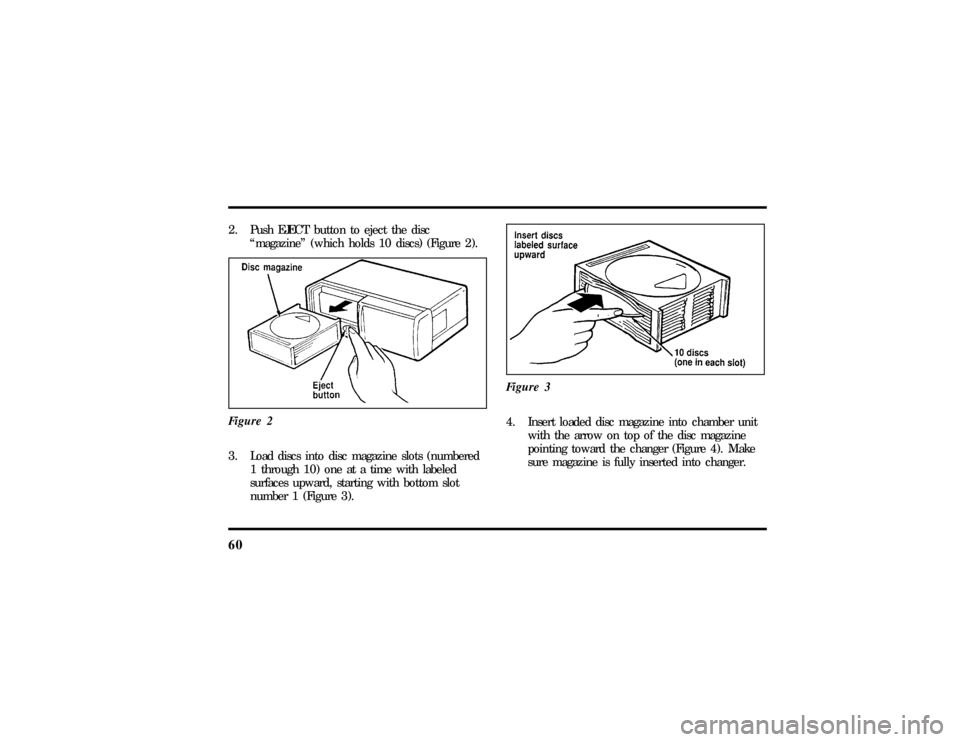
602. Push EJECT button to eject the disc
ªmagazineº (which holds 10 discs) (Figure 2).
Figure 23. Load discs into disc magazine slots (numbered
1 through 10) one at a time with labeled
surfaces upward, starting with bottom slot
number 1 (Figure 3).Figure 3
4. Insert loaded disc magazine into chamber unit
with the arrow on top of the disc magazine
pointing toward the changer (Figure 4). Make
sure magazine is fully inserted into changer.
File:04fnas8.ex
Update:Wed Jun 19 10:43:44 1996
Page 68 of 315

63
Operating the Shuffle featureWhile in the CD mode, pressing the
ªSHUFFLEº/#6 button will randomly select a track
from the disc currently being played. The display
will indicate ªSHFº followed by the disc and track
number (dd-tt).
The CD Changer will continue to randomly select
tracks for play until the shuffle feature is turned off
by pressing the ªSHUFFLEº button a second time.Operating the ªSCANº functionPress the ªSCANº button to enter the scan mode.
The CD player will begin scanning the disc,
stopping on each listenable track for approximately
an eight second sampling. This continues until you
press the ªSCANº button a second time.Operating the Shuffle and Scan features
simultaneouslyBoth the shuffle and scan features can be activated
simultaneously. In this mode, the player willrandomly pick a selection and play the first eight
seconds. This process is continued until either the
ªSCANº button or ªSHUFFLEº button is pressed a
second time.
How to stop CD playWhile in the CD mode, press the ªAM/FMº button
to stop CD play and resume radio play. Also,
loading a cassette into the cassette deck will stop
CD play and begin cassette play.How to take care of and clean the CD
Changer and discsTo ensure the continued performance of your CD
Changer, carefully read the following precautions:q
Always handle a disc by the edge. Never touch
the playing surface.
File:04fnas8.ex
Update:Wed Jun 19 10:43:44 1996