Page 128 of 315

123
Unlocking the doors and opening the
trunkTo unlock the driver's door, press the UNLOCK
control.
To unlock the passenger's door, press the UNLOCK
control a second time within five (5) seconds of
unlocking the driver's door.
To open the trunk, press the TRUNK button twice
within five (5) seconds.Locking the doorsTo lock all the doors, press the LOCK control. This
will also arm the anti-theft system (if equipped).
To signal that the doors are locked the horn will
chirp if the horn chirp feature is turned ON in the
driver settings menu in the message center.
Activating the remote personal alarmIf you wish to activate the remote personal alarm,
press the PANIC control. This will honk the horn
and flash the parking lamps and tail lamps for
approximately two minutes and forty-five seconds.
You can turn it OFF by pressing the PANIC control
again or by turning the ignition key to the RUN
position.Arming and Disarming the Alarm
SystemYour vehicle is equipped with the factory installed
anti-theft system. The remote entry system will
automatically arm it when the doors are locked
with the remote entry LOCK button. The remote
entry UNLOCK button will disarm or reset a
triggered anti-theft alarm.
The remote entry system is designed to work with
the factory installed anti-theft system. It may not
work with other anti-theft systems.
File:05fncf8.ex
Update:Thu Jun 27 10:02:20 1996
Page 129 of 315

124When you use the remote entry UNLOCK, TRUNK
or PANIC buttons, the illuminated entry system
turns on the interior lights for 25 seconds. You can
turn these lights off with the LOCK button or by
turning the ignition to the RUN position.Memory Seat/Mirrors/Steering Column
FeatureYour vehicle allows the remote keyless entry system
to control the Memory Seat/Mirrors/Steering
Column feature. With this feature, each of the first
two transmitters programmed will recall a different
seat position.
Pressing the transmitter UNLOCK button once will
unlock the driver's door and move the seat to its
corresponding memory seat/mirrors position, just as
if you had pressed the memory button in the
vehicle.When your dealer programs new transmitters, the
order of programming controls seat recall as follows:
q
First Transmitter Programmed Ð Recall
Seat/Mirrors/Steering Column Position #1
q
Second Transmitter Programmed Ð Recall
Seat/Mirrors/Steering Column Position #2
q
Third Transmitter Programmed Ð NO
Recall/Memory Seat/Mirrors/Steering Column
(allows only three positions)
You may change seat/mirrors positions at any time.
Once programmed, Transmitter #1 will always
move the seat/mirrors/steering column to position
#1.
The feature is turned on at the factory for your
convenience. You can deactivate the system by
using the OFF button or switching the key fob
switch to OFF.
File:05fncf8.ex
Update:Thu Jun 27 10:02:20 1996
Page 131 of 315

126Battery SaverWhen the ignition is turned off, the vehicle will
turn off battery voltage to the courtesy lamps after
10 minutes and the demand lamps after 30
minutes.
This will prevent draining of the battery if those
lights have been left on inadvertently or if a door is
not completely closed. Battery voltage to these
lamps will be restored when the keyless entry
keypad is used, the remote entry transmitter is
used, any door is opened, the trunk is opened, or
the ignition key is turned to the ON position.Perimeter Anti-Theft SystemWhen armed, this system helps to protect your
vehicle against break-ins or theft.
When an unauthorized entry occurs, the system
triggers and will:q
flash the headlamps, parking lamps, and alarm
indicator light
q
honk the horn
q
prevent the engine from starting
NOTE: The factory installed Remote Entry System
has a PANIC feature that also honks the vehicle
horn and flashes the interior/exterior lamps when
the PANIC button on the remote entry transmitter
is pushed.The PANIC alarm and the Anti-Theft
alarm are two separate features.Both the
anti-theft alarm and the PANIC feature can be
active at the same time.
To tell the difference between a PANIC alarm and
a triggered Anti-Theft alarm:
q
only the Anti-Theft alarm will cause the alarm
indicator light (located in the center of the
instrument cluster) to flash on and off.
q
only the Anti-Theft alarm will prevent the
engine from starting.
For more information on the PANIC alarm, see
Remote Entry Systemin the Index.
File:05fncf8.ex
Update:Thu Jun 27 10:02:20 1996
Page 141 of 315

136To operate the Heated Seat System:
1. Select mode.q
ªBothº to heat the seat back and seat cushion
q
ªBackº to heat the seat back only
2. Turn the knob to ªLOº (the lowest heat level).
Allow five minutes for the heat level to
stabilize.
3. If the heat level is not high enough for
comfort, select increased heat levels. Allow at
least two minutes for the heat level to stabilize
at any new level selected.
4. If the heated seat is not turned off, the seat
will heat up to the selected temperature level
each time the car is started.
NOTE:Cooling the seat down takes considerably
longer than increasing its heat level.
Auto-Glide SeatsAuto-Glide is a feature which automatically moves
the seat forward or rearward when the seatback is
tilted forward or rearward to allow ease of entry
into the rear seat.
NOTE:This feature can turned off. For more
information see theMessage Center Driver Settings
section in theInstrumentationchapter.
With the ignition OFF, the driver's seat Auto-Glide
will only function when the gearshift is in N
(Neutral) or P (Park), and at least one of the
vehicle's doors is open. If the ignition is ON,
Auto-Glide will function with the transmission
selector in N (Neutral) or P (Park).
With the ignition OFF, the passenger seat
Auto-Glide will only function when at least one of
the vehicle's doors are open. If the ignition is ON,
Auto-Glide will function. However, Auto-Glide will
operate while occupied during rear travel.
File:06fnss8.ex
Update:Wed Jun 19 15:04:39 1996
Page 142 of 315

137
If the seatback is moved from its forward stop angle
while the seat is traveling forward, the seat will
stop. If the seatback is returned to the forward stop
angle position, the seat will resume its forward
travel. If the seatback is returned to its upright
position, the seat will return to the original position.
If the transmission is shifted from N (Neutral) or P
(Park) while the driver's seat is moving, the seat
will stop where it is. Returning the gearshift to N
(Neutral) or P (Park) will allow seat movement to
continue. To allow movement without returning to
P (Park) or N (Neutral) will require the use of the
electric seat controls.
If you sit in the seat while the Auto-Glide is
moving rearward, the seat will continue to move.
If the seat stalls, or if any seat switch is
momentarily activated (excluding the lumbar switch)
while the seat is traveling forward, the seat will
stop. If the seatback is returned to its upright
position, the seat will return to the position it wasat when the ease of entry cycle was started. To
resume forward travel will require moving the
seatback off of its forward stop angle position and
returning it back to the same. Repositioning the seat
at this time using the seat controls will cancel
Auto-Glide.
If the ignition is off, and the last open door is
closed while a seat is moving, 30 seconds will be
allowed for the forward or rearward movement to
be completed.
Easy Access/Easy Out (driver side
only)The easy in/easy out feature of the driver seat
moves the seat two inches back when:q
the transmission is in N (Neutral) or P (Park)
q
the driver safety belt is buckled
q
the ignition switch is turned to OFF.
File:06fnss8.ex
Update:Wed Jun 19 15:04:39 1996
Page 163 of 315
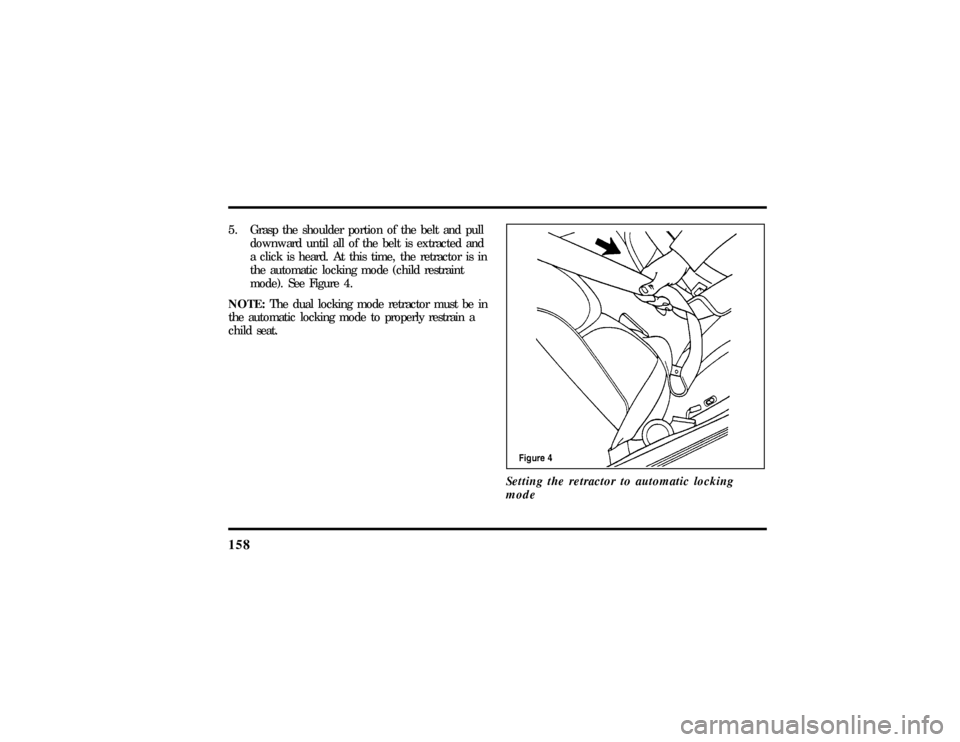
1585. Grasp the shoulder portion of the belt and pull
downward until all of the belt is extracted and
a click is heard. At this time, the retractor is in
the automatic locking mode (child restraint
mode). See Figure 4.
NOTE:The dual locking mode retractor must be in
the automatic locking mode to properly restrain a
child seat.
Setting the retractor to automatic locking
mode
File:06fnss8.ex
Update:Wed Jun 19 15:04:39 1996
Page 171 of 315

1663. Make sure that the gearshift is in P (Park) and
the parking brake is set before you turn the
key.
Before you start your vehicle, you should test the
warning lights on the instrument panel to make
sure that they work. Refer to theInstrumentation
chapter.Starting Your EngineTo start your engine:
1. Follow the steps underPreparing to Start Your
Vehicleat the beginning of this section.
2. Turn the ignition key to the ON position.
3. DO NOT depress the accelerator pedal when
starting your engine. DO NOT use the
accelerator while the vehicle is parked.
4. Turn the key to the START position (cranking)
until the engine starts. Allow the key to return
to the ON position after the engine has started.For a cold engine:
q
At temperatures10ÊF(-12ÊC) andbelow:If
the engine does not start infifteen (15)
secondson the first try, turn the key to OFF,
wait approximately ten (10) seconds so you do
not flood the engine, then try again.
q
At temperaturesabove10ÊF(-12ÊC):If the
engine does not start infive (5) secondson
the first try, turn the key to OFF, wait
approximately ten (10) seconds so you do not
flood the engine, then try again.
For a warm engine:
q
Do not hold the key in the START position for
more thanfive (5) secondsat a time. If the
engine does not start within five (5) seconds on
the first try, turn the key to the OFF position.
Wait a few seconds after the starter stops, then
try again.
File:08fnto8.ex
Update:Wed Jun 19 15:04:46 1996
Page 172 of 315

167
Whenever you start your vehicle, release the key as
soon as the engine starts. Excessive cranking could
damage the starter.
After you start the engine, let it idle for a few
seconds. Keep your foot on the brake pedal and put
the gearshift lever in gear. Release the parking
brake. Slowly release the brake pedal and drive
away in the normal manner.
NOTE:Your vehicle has an interlock that prevents
you from shifting out of P (Park) unless your foot is
on the brake pedal.
If the engine does not start after two attempts:
1. Turn the ignition key to the OFF position.
2. Press the accelerator all the way to the floor
and hold it.
3. Turn the ignition key to the START position.4. Release the ignition key when the engine starts.
5. Release the accelerator gradually as the engine
speeds up.
If the engine still does not start, the fuel pump
shut-off switch may have been activated. For
directions on how to reset the switch seeFuel
Pump Shut-Off Switchin the index.
A computer system controls the engine's idle speed.
When you start your vehicle, the engine's idle
speed normally runs higher than when it is warmed
up. These faster engine speeds will make your
vehicle move slightly faster than its normal idle
speed. It should, however, slow down after a short
time. If it does not, have the idle speed checked.
If the engine idle speed does not slow down
automatically, do not allow your vehicle to idle for
more than 10 minutes. Have the vehicle checked.
File:08fnto8.ex
Update:Wed Jun 19 15:04:46 1996