Page 281 of 1701
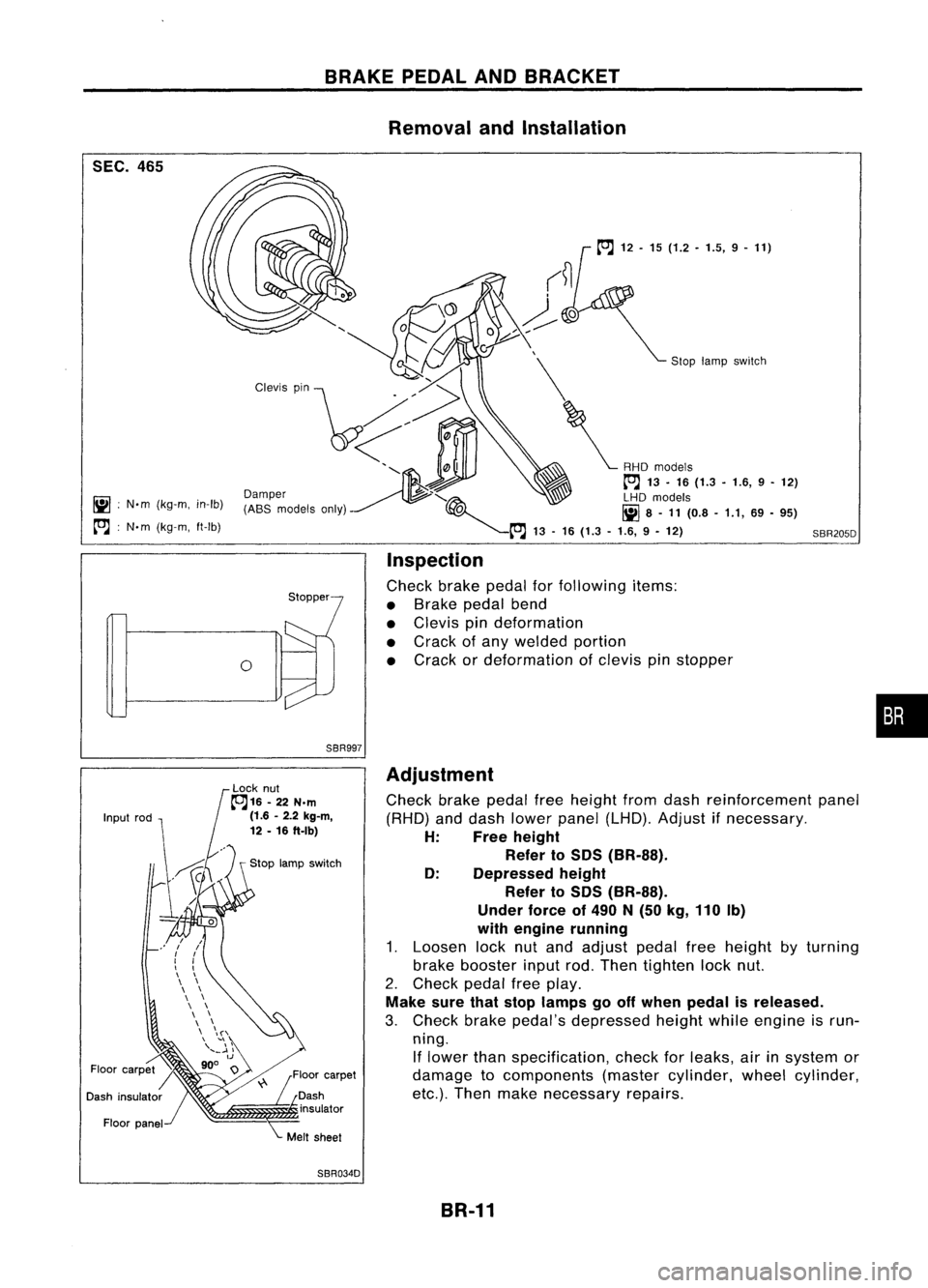
SEC.465
iii :
N'm (kg-m, in-Ib)
~ :N'm (kg-m, ft-Ib)
BRAKE
PEDALANDBRACKET
Removal andInstallation
Sloplamp sWitch
SBR205D
o
Inspection
Check brakepedalforfollowing items:
• Brake pedalbend
• Clevis pindeformation
• Crack ofany welded portion
• Crack ordeformation ofclevis pinstopper
•
SBR997
Adjustment
Check brakepedalfreeheight fromdash reinforcement panel
(RHD) anddash lower panel (LHD). Adjust ifnecessary.
H: Freeheight
Refer to
50S
(BR-SS).
0: Depressed height
Refer to
50S
(BR-SS).
Under forceof
490
N
(50
kg,
110
Ib)
with engine running
1. Loosen locknutand adjust pedalfreeheight byturning
brake booster inputrod.Then tighten locknut.
2. Check pedalfreeplay.
Make surethatstop lamps gooff when pedal isreleased.
3. Check brakepedal's depressed heightwhileengine isrun-
ning. If lower thanspecification, checkforleaks, airinsystem or
damage tocomponents (mastercylinder, wheelcylinder,
etc.). Then make necessary repairs.
SBR034D BR-11
Page 285 of 1701
OKNGBRAKE
BOOSTER
On-vehicle Service
OPERATING CHECK
• Depress brakepedalseveral timeswithengine off.After
exhausting vacuum,makesurethere isno change inpedal
stroke.
• Depress brakepedal, thenstart engine. Ifpedal goesdown
slightly, operation isnormal.
AIRTIGHT CHECK
• Start engine, andstop itafter oneortwo minutes. Depress
SBR002A
brakepedalseveral timesslowly. Booster isairtight ifpedal
stroke isless each time.
• Depress brakepedalwhileengine isrunning, andstop
engine withpedal depressed. Thepedal stroke should not
change afterholding pedaldownfor
30seconds.
SBR365AA Removal
CAUTION:
• Becareful nottosplash brakefluidonpainted areas;itmay
cause paintdamage. Ifbrake fluidissplashed onpainted
areas, washitaway withwater immediately.
• Be careful nottodeform orbend brake pipes, during
removal ofbooster.
SEC.
465.470
BR-15Gasket
~ :N.m (kg-m. ft-Ib)
SBR223BB
•
Page 288 of 1701
VACUUMHOSE
Inspection (Cont'd)
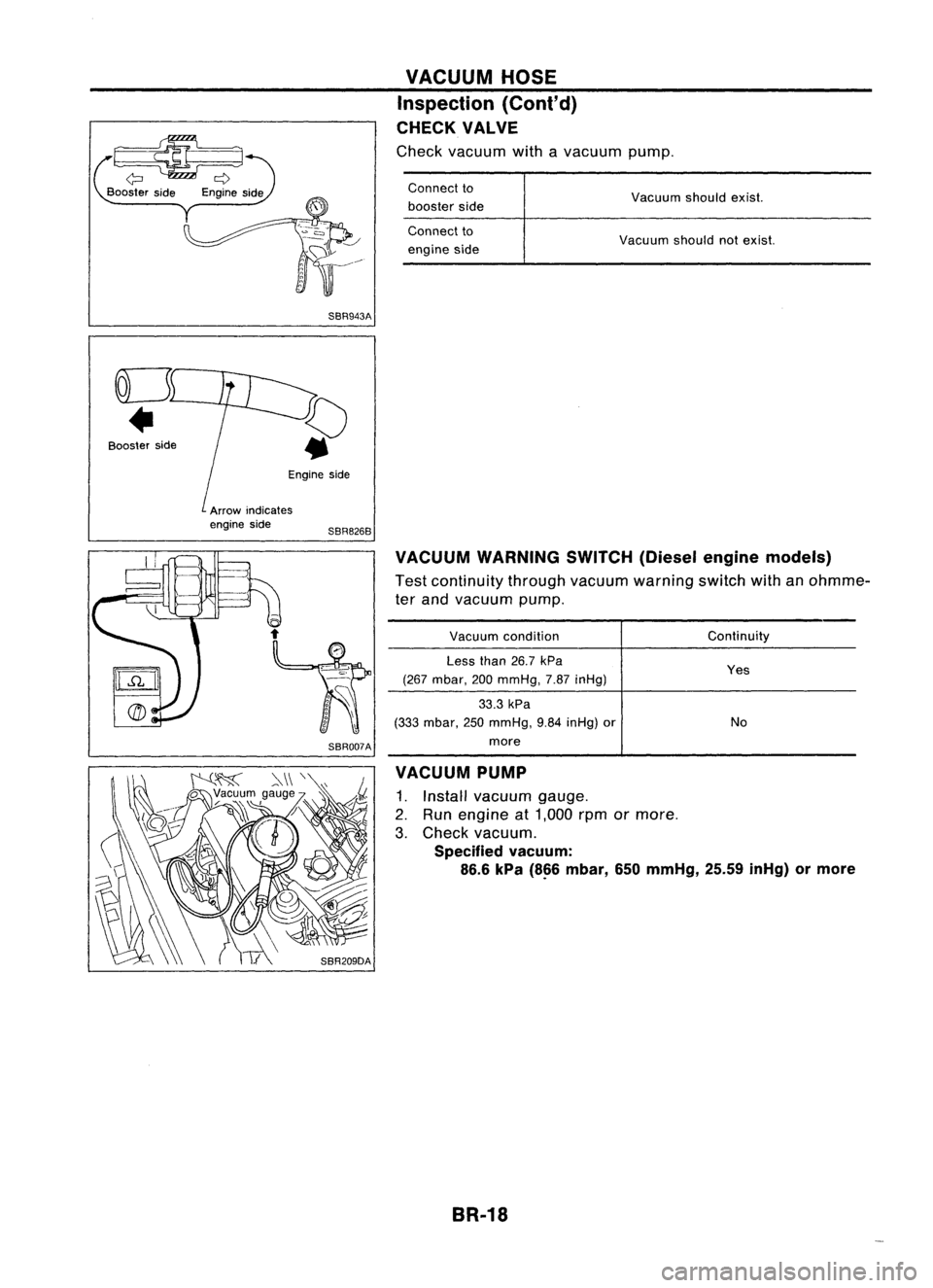
CHECK VALVE
Check vacuum withavacuum pump.
~
Booster side
SBR943A
Connect
to
booster side
Connect to
engine side Vacuum
shouldexist.
Vacuum shouldnotexist.
Engine side
VACUUM WARNING SWITCH(Dieselenginemodels)
Test continuity throughvacuum warning switchwithanohmme-
ter and vacuum pump.
Booster
side
Arrowindicates
engine side
SBR826B
SBR007A
Vacuum
condition
Less than26.7kPa
(267 mbar, 200mmHg, 7.87inHg)
33.3 kPa
(333 mbar, 250mmHg, 9.84inHg) or
more Continuity
Yes
No
VACUUM PUMP
1. Install vacuum gauge.
2. Run engine at1,000 rpmormore.
3. Check vacuum.
Specified vacuum:
86.6 kPa
(8~6
mbar, 650mmHg, 25.59inHg) ormore
BR-18
Page 307 of 1701
Togglelever
Stopper
Front
V
PARKING
BRAKECONTROL
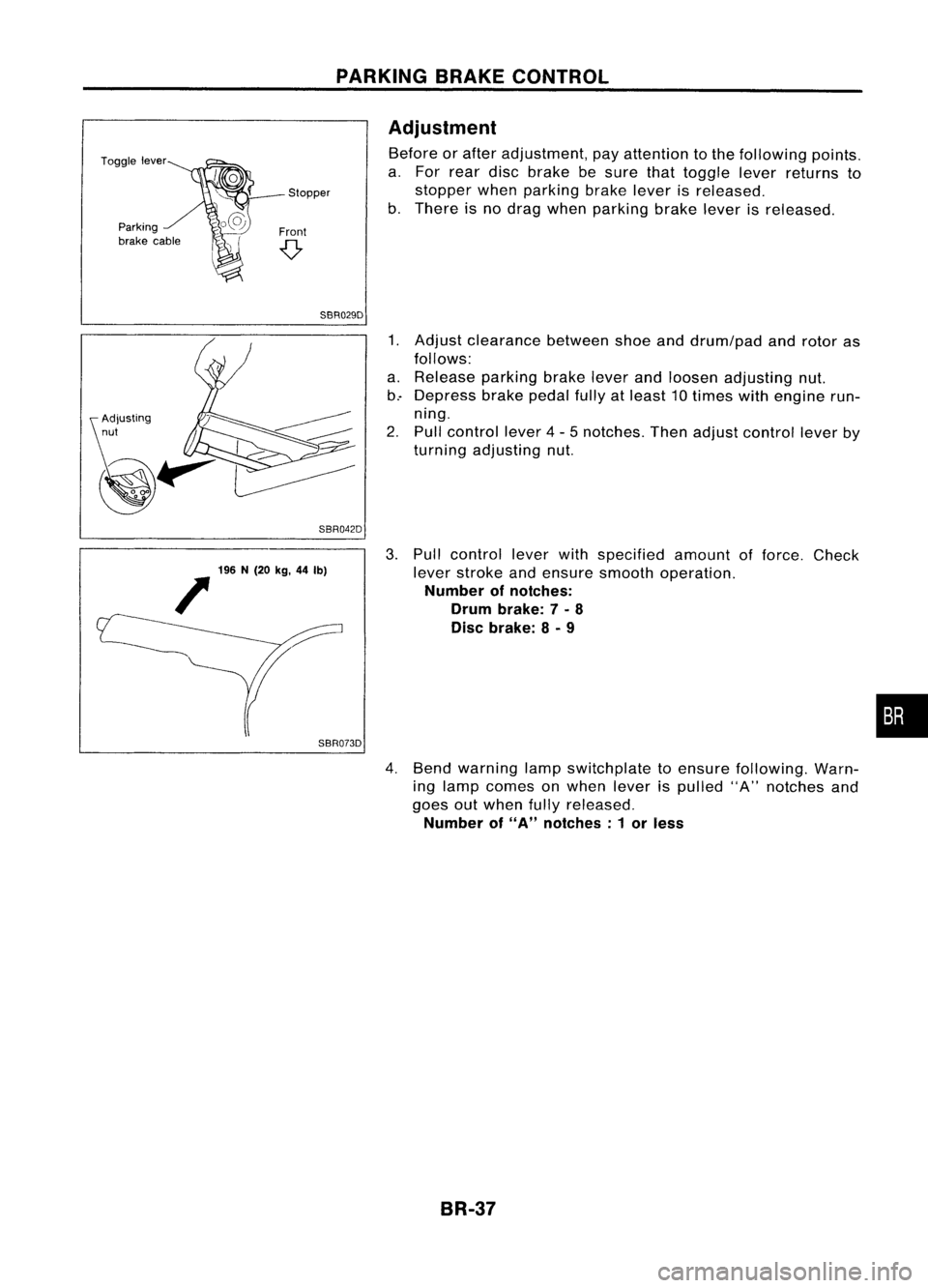
Adjustment
Before orafter adjustment, payattention tothe following points.
a. For rear discbrake besure thattoggle leverreturns to
stopper whenparking brakeleverisreleased.
b. There isno drag when parking brakeleverisreleased.
SBR029D
SBR042D
1.
Adjust clearance betweenshoeanddrum/pad androtor as
follows:
a. Release parkingbrakeleverandloosen adjusting nut.
b.- Depress brakepedalfullyatleast 10times withengine run-
ning.
2. Pull control lever4-5 notches. Thenadjust control leverby
turning adjusting nut.
196 N(20 kg,44Ib)
/
SBR073D
3.
Pull control leverwithspecified amountofforce. Check
lever stroke andensure smooth operation.
Number ofnotches:
Drum brake: 7-
8
Disc brake: 8-
9
4. Bend warning lampswitchplate toensure following. Warn-
ing lamp comes onwhen leverispulled "A"notches and
goes outwhen fullyreleased.
Number of
"A"
notches: 1or less
BR-37
•
Page 316 of 1701
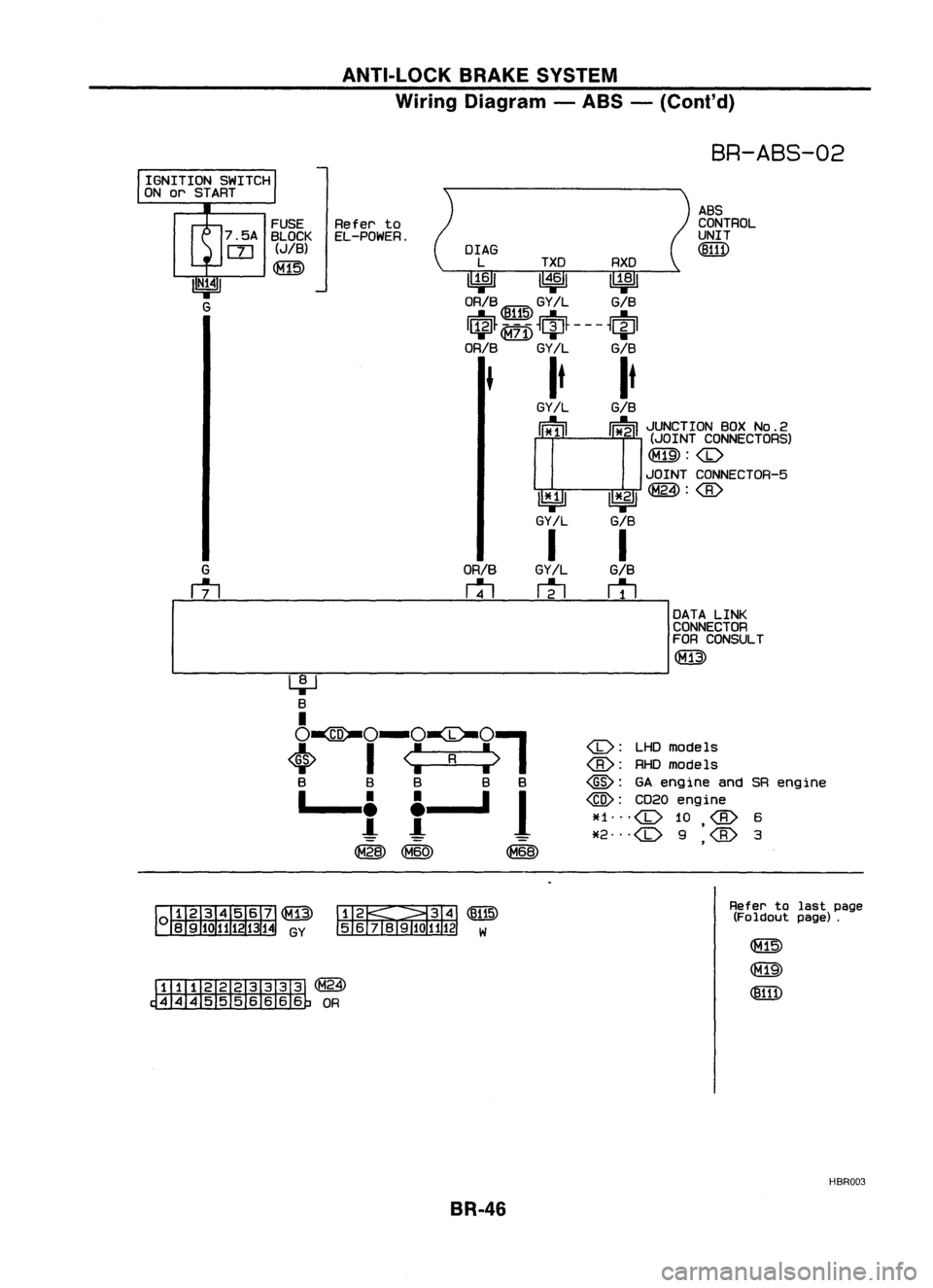
ANTI-LOCKBRAKESYSTEM
Wiring Diagram -ABS -(Coni' d)
BR-ABS-02
ABS
CONTROL
UNIT
(!ID1)
OrAG
L TXD RXD
~ 1~61~
ORIB ~ GY!L GIB
I$~ ~
~ciJ~ ---
~~I
ORIB
GY/L GIB
It It
GY!L
GIB
cr
l I~
i~MO~o~?ic~g~)
~:
JOINT CONNECTOR-5
~ 1*.21~:
GY/L GIB
I I
GY/L
GIB
m
r1l
ORIB
rtl
FUSE
Referto
7 .5A BLOCK EL-POWER.
rn
(JIB)
~
IGNITION
SWITCH
ON orSTART
I
DATALINK
CONNECTOR
FOR CONSULT
(M13)
-----------------------
<0:
LHDmodels
RHOmode Is
@:
GAengine andSRengine
@:
CD20engine
~f1
<0
10
6
*2
<0
9
'
3
,
~~(~)
56j819101112 W
~(~24)
~OR
Refer
tolast page
(Foldout page).
HBR003
BR-46
Page 323 of 1701
.=J
MPH
-~s::~
~~
___ --- warnin:1
TROUBLE
DIAGNOSES
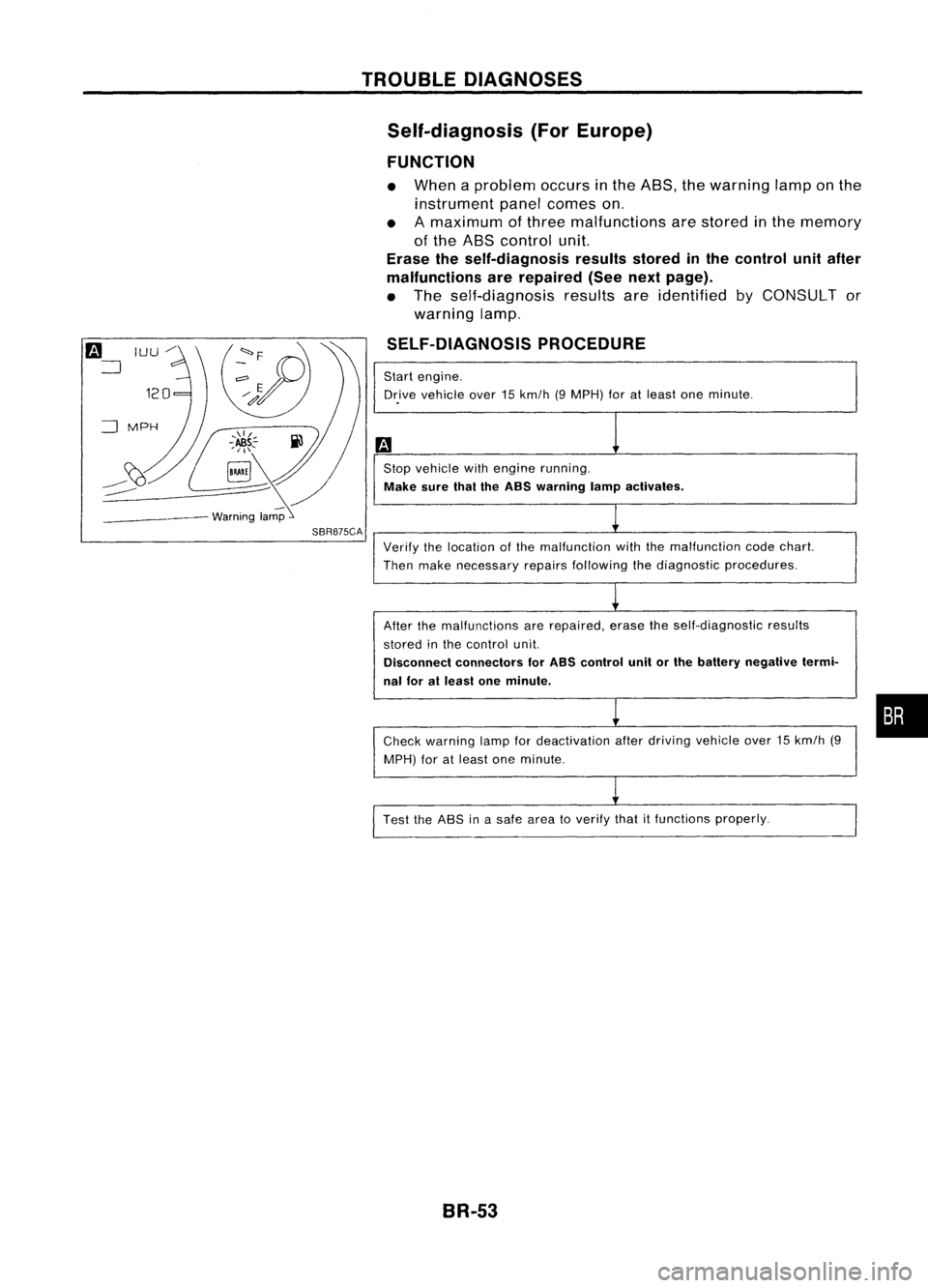
Self-diagnosis (ForEurope)
FUNCTION
• When aproblem occursinthe ABS, thewarning lamponthe
instrument panelcomes on.
• Amaximum ofthree malfunctions arestored inthe memory
of the ABS control unit.
Erase theself-diagnosis resultsstoredinthe control unitafter
malfunctions arerepaired (Seenextpage).
• The self-diagnosis resultsareidentified byCONSULT or
warning lamp.
SELF-DIAGNOSIS PROCEDURE
Start engine.
Dr.ive vehicle over15km/h (9MPH) foratleast oneminute .
Stop vehicle withengine running.
Make surethaitheASS warning lampactivates.
SBR875CA
Verifythelocation ofthe malfunction withthemalfunction codechart.
Then make necessary repairsfollowing thediagnostic procedures.
After themalfunctions arerepaired, erasetheself-diagnostic results
stored inthe control unit.
Disconnect connectors forASS control unitorthe battery negative termi-
nal foratleast oneminute.
Check warning lampfordeactivation afterdriving vehicle over15km/h (9
MPH) foratleast oneminute.
Test theASS inasafe area toverify thatitfunctions properly.
BR-53
•
Page 329 of 1701
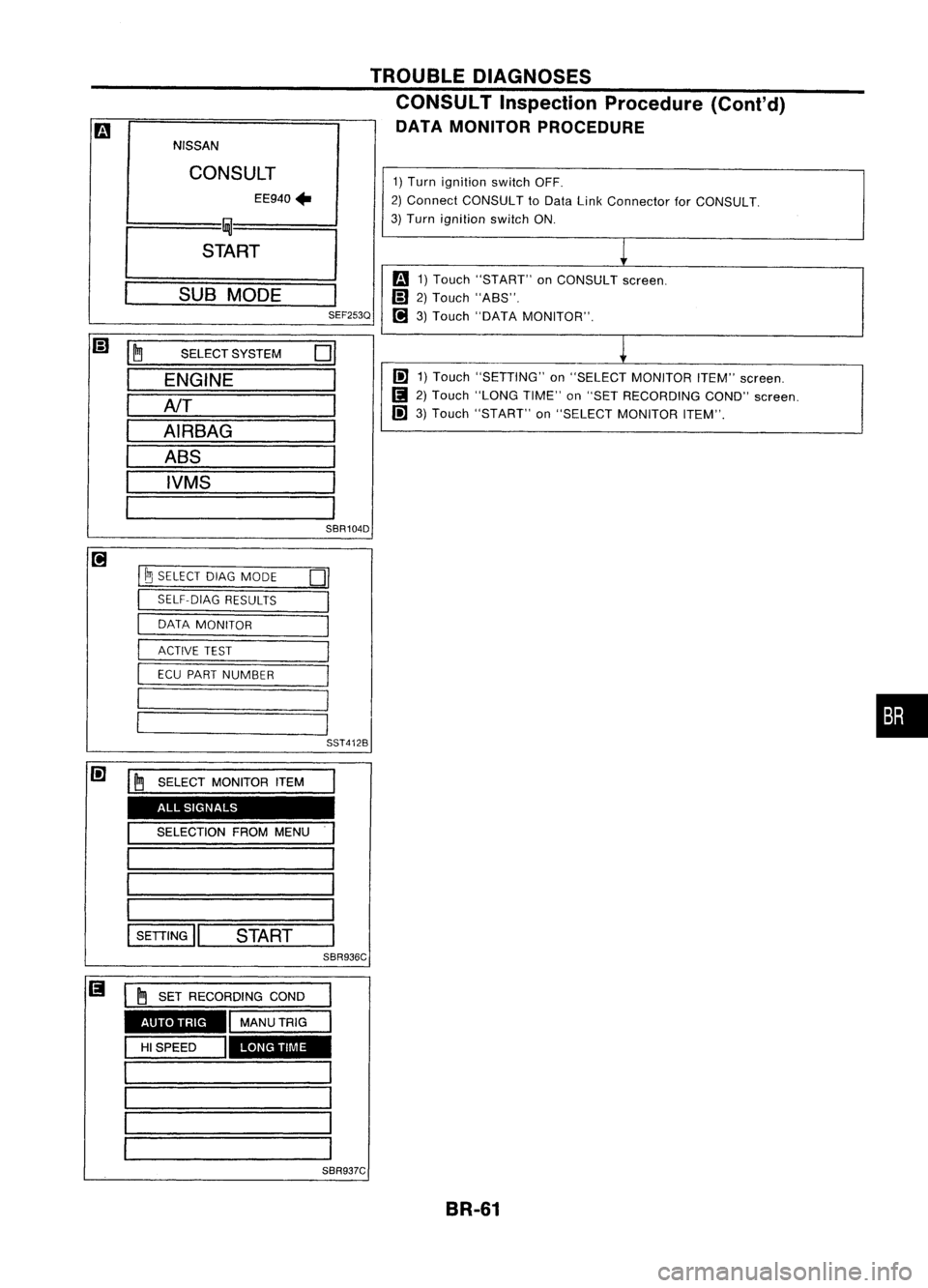
![NISSAN ALMERA N15 1995 Service Manual TROUBLEDIAGNOSES
Ii)
NISSAN
CONSULT
EE940.
I
~
I
START
I
SUB
MODE
,
SEF253Q
@]
~
SELECT
SYSTEM
0
ENGINE
AfT
AIRBAG ABS
IVMS
SBR104D
@]
I~
SELECT DIAGMODE
01
I
SELF-DIAG
RESULTS](/manual-img/5/57349/w960_57349-328.png "NISSAN ALMERA N15 1995 Service Manual TROUBLEDIAGNOSES
Ii)
NISSAN
CONSULT
EE940.
I
~
I
START
I
SUB
MODE
,
SEF253Q
@]
~
SELECT
SYSTEM
0
ENGINE
AfT
AIRBAG ABS
IVMS
SBR104D
@]
I~
SELECT DIAGMODE
01
I
SELF-DIAG
RESULTS")
TROUBLEDIAGNOSES
Ii)
NISSAN
CONSULT
EE940.
I
~
I
START
I
SUB
MODE
,
SEF253Q
@]
~
SELECT
SYSTEM
0
ENGINE
AfT
AIRBAG ABS
IVMS
SBR104D
@]
I~
SELECT DIAGMODE
01
I
SELF-DIAG
RESULTS
,
I
DATA
MONITOR
I
I
ACTIVE
TEST
I
ECU
PART NUMBER
I
I
SST412B
II
•SELF-DiAG RESULTS.
0
FAILURE DETECTED
TIME
FR RH SENSOR
0
[OPEN)
ERASE
II
PRINT
SBR950C CONSULT
Inspection Procedure
SELF-DIAGNOSIS PROCEDURE
m
1) Turn ignition switchOFF.
2) Connect CONSULT toData LinkCon-
nector forCONSULT.
1) Start engine.
2) Drive vehicle over30km/h (20MPH)
for atleast oneminute.
.
r
(;)
1)Stop vehicle withengine running
and touch "START" onCON-
SUL Tscreen.
• Program
card
AE950: ForAustralia
EE940: ExceptAustralia
(!]
2)Touch "ASS".
lP]
3)Touch "SELF-DIAG RESULTS".
• The screen showsthedetected mal-
function andthetimes ofignition
switch ONand OFF after itoccurred.
Make thenecessary repairsfollowing
the diagnostic procedures.
II
After themalfunctions arerepaired,
erase theself-diagnostic resultsstored
in the control unitbytouching
"ERASE".
Check warning lampfordeactivation
after driving vehicle over30km/h (20
MPH) foratleast oneminute.
Test theASS inasafe area toverify
that itfunctions properly.
Note: "SELF.DlAG RESULTS"screenshowsthedetected malfunction and
the times ofignition switchONand OFF after
it
occurred.
BR-59
•
Page 331 of 1701
1)Turn ignition switchOFF.
2) Connect CONSULT toData LinkConnector forCONSULT.
3) Turn ignition switchON.
1
m
1)Touch "START" onCONSULT screen.
Iil
2)Touch "A8S".
t!J
3)Touch "DATA MONITOR".
~
I!l
1)Touch "SETTING" on"SELECT MONITOR ITEM"screen.
(I
2)Touch "LONG TIME"on"SET RECORDING COND"screen.
I!l
3)Touch "START" on"SELECT MONITOR ITEM".
TROUBLE
DIAGNOSES
CONSULT Inspection Procedure (Cont'd)
DATA MONITOR PROCEDURE
Iil
~ SELECT
SYSTEM
01
ENGINE
AfT
AIRBAG ABS
IVMS
SBR104D
m
NISSAN
CONSULT EE940
+
I fDU
I
START
I
SUB
MODE
I
SEF253Q
t!J
I~
SELECT DIAGMODE
01
I
SELF-DIAG
RESULTS
I
I
DATA
MONITOR
I
I
ACTIVE
TEST
I
I
ECU
PART NUMBER
I
I
I
•
I
I
SST412B
I!l
I~SELECT
MONITOR ITEM
ALL SIGNALS
SELECTION FROMMENU
SETTING
II
START
SBR936C
AUTO TRIG
LONGTIME
SBR937C BR-61