Page 278 of 2389
Manual Shifting Test (A140E)
HINT: With this test, it can be determined whether the
trouble lies within the electrical circuit or is a mechani-
cal problem in the transaxle.
1. DISCONNECT ECT ECU CONNECTOR
(a) Remove the glove box.
(b) With the engine OFF, disconnect the ECT connector.
HINT: If the L, 2 and D range gear positions are difficult
to distinguish, perform the following road test.
wWhite driving, shift through the L, 2 and D ranges.
Check that the gear change corresponds to the shift
position.
3. CONNECT ECT ECU CONNECTOR2. INSPECT MANUAL DRIVING OPERATION
Check that the shift and gear positions correspond with
the table below.
Gear position
Shift positionP
' range R
range 2
range V
rangeL
range
Pawl
Lock Reverse
O/D 1st
3rd
± AUTOMATIC TRANSAXLETroubleshooting (Manual Shifting Test) (A140E)AT±23
Page 441 of 2389
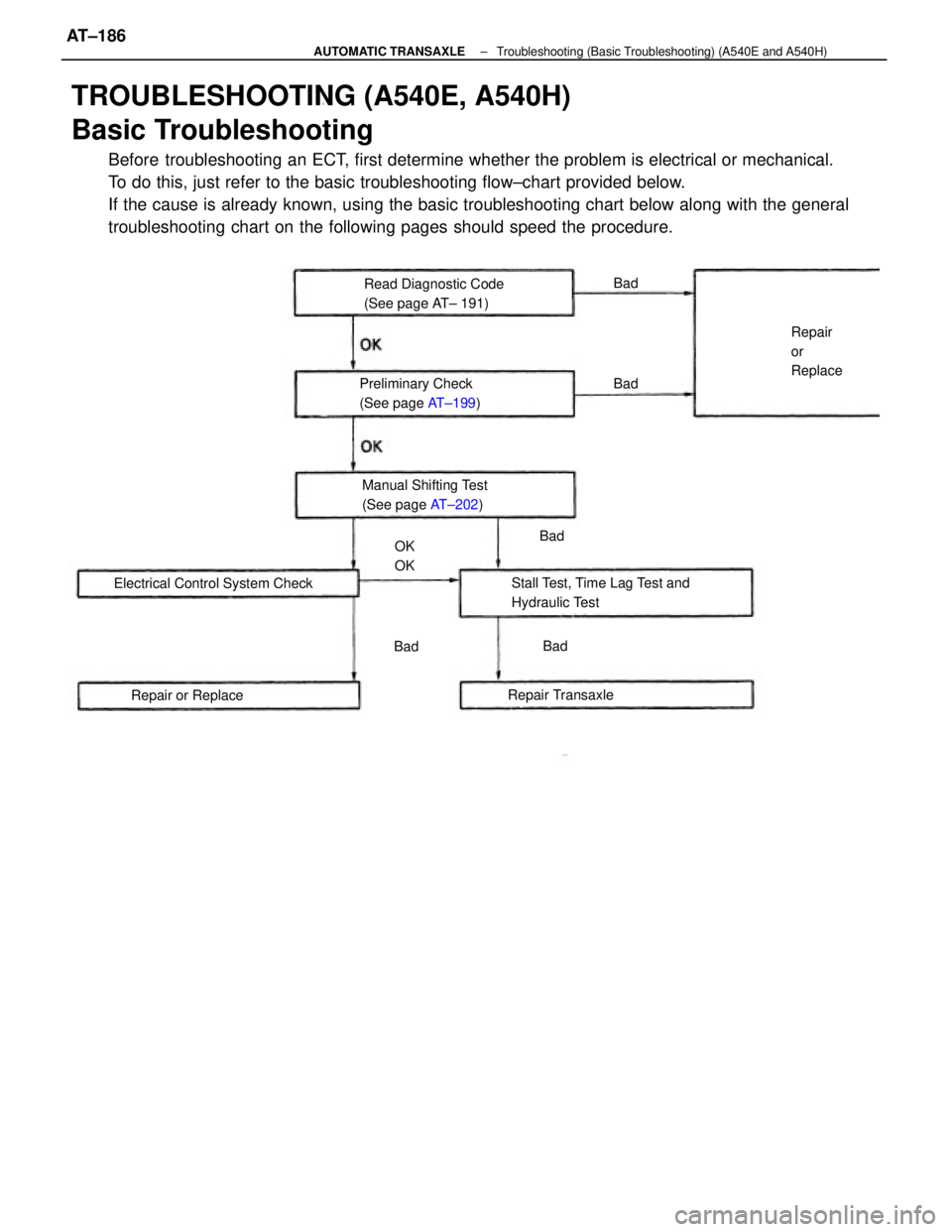
TROUBLESHOOTING (A540E, A540H)
Basic Troubleshooting
Before troubleshooting an ECT, first determine whether the problem is electrical or mechanical.
To do this, just refer to the basic troubleshooting flow±chart provided below.
If the cause is already known, using the basic troubleshooting chart below along with the general
troubleshooting chart on the following pages should speed the procedure.
Stall Test, Time Lag Test and
Hydraulic Test Electrical Control System CheckRead Diagnostic Code
(See page AT± 191)
Manual Shifting Test
(See page AT±202) Preliminary Check
(See page AT±199)
Repair Transaxle
Repair or ReplaceRepair
or
Replace
OK
OKBadBad Bad
Bad
Bad
± AUTOMATIC TRANSAXLETroubleshooting (Basic Troubleshooting) (A540E and A540H)AT±186
Page 445 of 2389

Diagnosis System
DESCRIPTION
1. A self±diagnosis function is. built into the electrical control
system. Warning is indicated by the overdrive OFF indicator.
HINT: Warning and diagnostic codes can be read only when
the overdrive switch is ON. If OFF, the overdrive OFF
indicator is lit continuously and will not blink.
(a) If a malfunction occurs within the speed sensors or sole-
noids, the overdrive OFF light will blink to warn the driver.
However, there will be no warning of a malfunction with
lock±up solenoid.
W The diagnostic code can be read by the number of
blinks of the overdrive OFF indicator when terminals
Tt and E1 are short±circuited. (See page AT± 191)
(c) The throttle position sensor or brake signal are not indicated,
but inspection can be made by checking the voltage at ter-
minal Tt of the check connector.
(d) The signals to each gear can be checked by measuring the
voltage at terminal Tt of the check connector while driving.
2. The diagnostic (malfunction) code is retained in memory by the
ECU and due to back±up voltage, is not canceled out when the
engine is turned off. Consequently, after repair, it is necessary
to turn the ignition switch off and remove the fuse EFI (15A)
(A540E) or DOME (20A)
(A540H) or disconnect the Engine and ECT ECU (A540E)
or ECT ECU (A540H) connector to cancel out the diagnostic
(malfunction) code. (See page AT±192)
HINT:
wLow battery voltage will cause faulty operation of the diag-
nosis system. Therefore, always check the battery first.
wUse a voltmeter and ohmmeter that have an impedance of
at least 10 k
�/V.
CHECK O/D OFF INDICATOR LIGHT
1. Turn the ignition switch ON.
2. The O/D OFF light will come on when the O/D switch
placed at OFF.
3. When the O/D switch is set to ON, the O/D OFF light should go
out.
If the O/D OFF light flashes when the O/D switch is set to
ON, the electronic control system is faulty.
± AUTOMATIC TRANSAXLETroubleshooting (Diagnosis System) (A540E and A540H)AT±190
Page 447 of 2389

AT4B'
HINT: If codes 62, 63, 64, 73 or 74 appear, there is an electrical malfunction in the solenoid.
Causes due t mechanical failure, such as a stuck valve, will not appear.
If codes 44 and 61 appear, check the both (vehicle and rear wheel) speed sensors.
AT2020
HINT: If codes 62, 63 or 64 appear, there is an electrical malfunction in the solenoid. Causes due
to mechanical failure, such as a stuck valve, will not appear.
Severed No. 2 center differential control solenoid valve or short circuit
± severed wire harness or short circuit. Defective rear wheel speed sensor (in transfer left case) ±
severed wire harness or short circuit
Defective vehicle speed sensor (in differential carrier cover)
severed wire harness or short circuit
Severed No. 1 center differential control solenoid valve or short
circuit ± severed wire harness or short circuit. Defective No. 1 speed sensor (in combination meter) ±
severed wire harness or short circuit
DIAGNOSTIC CODES.
(A540E)
Severed lock±up solenoid or short circuit ±
severed wire harness or short circuit Severed lock±up solenoid or short circuit ±
severed wire harness or short circuitDefective No. 2 speed sensor (in ATM) ±
severed wire harness or short circuit
Severed No. t solenoid or short circuit ±
severed wire harness or short circuit
Severed No. 2 solenoid or short circuit ±
severed wire harness or short circuit Severed No. 1 solenoid or short circuit ±
severed wire harness or short circuit
Severed No. 2 solenoid or short circuit ±
severed wire harness or short circuitDiagnosis System
Diagnosis System Light Pattern
Light Pattern
(A540H)
Code No.
Code
No.
Normal Normal
± AUTOMATIC TRANSAXLETroubleshooting (Diagnosis System) (A540E and A540H)AT±192
Page 457 of 2389
Manual Shifting Test
HINT: With this test, it can be determined whether the
trouble lies within the electrical circuit or is a mechani-
cal problem in the transaxle.
1. DISCONNECT SOLENOID WIRE
2. INSPECT MANUAL DRIVING OPERATION
Check that the shift and gear positions correspond
with the table below.
HINT: If the L, 2 and D range gear positions are diffi-
cult to distinguish, perform the following road test.
wWhile driving, shift through the L, 2 and D ranges,
Check that the gear change corresponds to the
shift position.
If any abnormality is found in the above test, the
problem lies in transaxle itself.
3. CONNECT SOLENOID WIRE
Shift position
Gear
positionP
range 2
range
range D
rangeR
range
Pawl
Lock Reverse O/D
O/D1 st
± AUTOMATIC TRANSAXLETroubleshooting (Manual Shifting Test) (A540E and
A540H)AT±202
Page 671 of 2389
3. REMOVE REAR VIEW MIRROR
(a) (Manual type)
Remove the setting screw and knob.
(b) Using a screwdriver, pry loose the retainer and re-
move the cover.
HINT: Tape the screwdriver tip before use.
(c) (Electrical type)
Disconnect the connector.
(d) Remove the three screws±and mirror.
(c) Insert a screwdriver between the retainers and door
trim to pry it loose.
HINT: Tape the screwdriver tip before use.
(d) (w/ Power Window and Power Door Lock)
Disconnect the connectors.
5. REMOVE SERVICE HOLE COVER
6. REMOVE OPENING CONTROL LINK FROM DOOR
LOCK
DISASSEMBLY OF FRONT DOOR
1. REMOVE REGULATOR HANDLE
(w/o POWER WINDOW)
Pull oft the snap ring with a cloth and remove the regulator
handle and plate.
2. REMOVE DOOR INSIDE HANDLE
(a) Remove the screw, and slide the handle forward.
(b) Disconnect the handle from the control link and re-
move the handle.
4. REMOVE DOOR TRIM
(a) Remove the two screws from the armrest.
(b) Remove the two caps and two screws.
± BODYFront DoorBO±5
Page 675 of 2389
(b) With the door glass fully closed, .adjust the door glass
stopper so it lightly makes contact with the glass
plate.
11. INSTALL OPENING CONTROL LINK
12. INSTALL SERVICE HOLE COVER
13. INSTALL DOOR TRIM8. INSTALL DOOR GLASS
(a) Place the glass in the door cavity.
(b) Install the glass to the regulator with the two mount-
ing nuts.
9. INSTALL DOOR GLASS RUN
14. INSTALL REAR VIEW MIRROR
(a) Install the mirror with the three screws.
(b) (Electrical type)
Connect the connector.
(c) Install the cover.
(d) (Manual type)
Install the knob with the setting screw.
15. INSTALL DOOR INSIDE HANDLE
(a) Connect the handle to the control link.
(b) Install the handle, slide it rearward, and install the
screw. 10. ADJUST DOOR GLASS
(a) Adjust the equalizer arm up or down and tighten it
where dimensions A and6, as shown, are equal.
± BODYFront DoorBO±9
Page 747 of 2389
BODY ELECTRICAL SYSTEM
± BODY ELECTRICAL SYSTEMBE±1