1982 CHEVROLET CAMARO radio
[x] Cancel search: radioPage 182 of 875

GM – CAMARO 1982-1992 – Repair Guide (Checked by WxMax) 182
ANTENNA
REMOVAL & INSTALLATION
Placement of tape on the right inner door edge will help prevent scratches
during the antenna removal an
d installation procedure.
1. Disconnect the negative battery terminal.
2. Remove the right side lower in strument panel sound insulator and
disconnect the antenna connection from the radio.
3. Raise and safely support the vehicle.
4. Disconnect the instrument panel harness from the radio.
5. Disconnect the power antenna lead, if equipped.
6. Disconnect the power antenna wire from the relay, if equipped.
7. Remove the right fender wheelhouse.
8. Loosen the fender-to-body attaching bolts and block the fender out.
9. Remove the antenna bezel and nut.
10. Remove the antenna assembly mounting screws.
11. Remove the grommet from the bul khead and pull the harness from the
vehicle interior.
12. Remove the antenna assembly from the vehicle.
In some cases, if the vehicle is equipped with a power antenna, it may be
repaired. Seek a profe ssional radio shop for pr oper repair of the antenna
assembly.
To install: 13. Install the antenna assembly into the vehicle.
14. Install the grommet and the harne ss into the vehicle interior.
15. Install the antenna assembly mounting screws.
16. Install the antenna bezel and nut.
17. Remove the fender block, tighten the fender-to-body attaching bolts.
Ensure any shims for the fender are reinstalled.
18. Install the right fender wheelhouse.
19. Lower the vehicle.
20. Connect the power antenna wire to the relay, if equipped.
21. Connect the power ant enna lead, if equipped.
22. Connect the instrument panel harness to the radio.
23. Connect the antenna connection to the r adio. Install the right side lower
instrument panel sound insulator
24. Connect the negative battery cable.
Page 200 of 875

GM – CAMARO 1982-1992 – Repair Guide (Checked by WxMax) 200
9. Lubricate the speedometer cable
with an appropriate lubricant, being
sure to cover the lower thirds of the cable.
10. Insert the cable into the casi ng, then connect the cable and casing
assembly to the speedometer.
11. Install the instrument cluster, then install the cluster attaching screws.
12. Install the instrument cluster trim plate.
13. On models without cruise control, connect the speedometer cable strap
at the power brake booste r. On models with cruise control, connect the
speedometer cable at the cr uise control transducer.
14. Connect the negative battery cable at the battery.
WIPER SWITCH
REMOVAL & INSTALLATION
The wiper switch is part of the multi-function lever, located on the steering
wheel column.
1. Disconnect the electrical connector of the multi-function lever, located
under the instrument panel.
2. Remove the protective cover from the wire.
3. Grasp the lever firmly, twist and pull (the tang on the lever must align
with the socket) the lever straight out.
4. Pull the wire through the steering column.
To install: 5. Slide a music wire tool through the steering column and connect the
lever wire to the tool wire; pull t he wire through the steering column.
6. Push the control lever into the sp ring loaded socket (be sure to align the
tang).
7. Install the protective cover to the wire.
8. Connect the electrical connector of the multi-function lever.
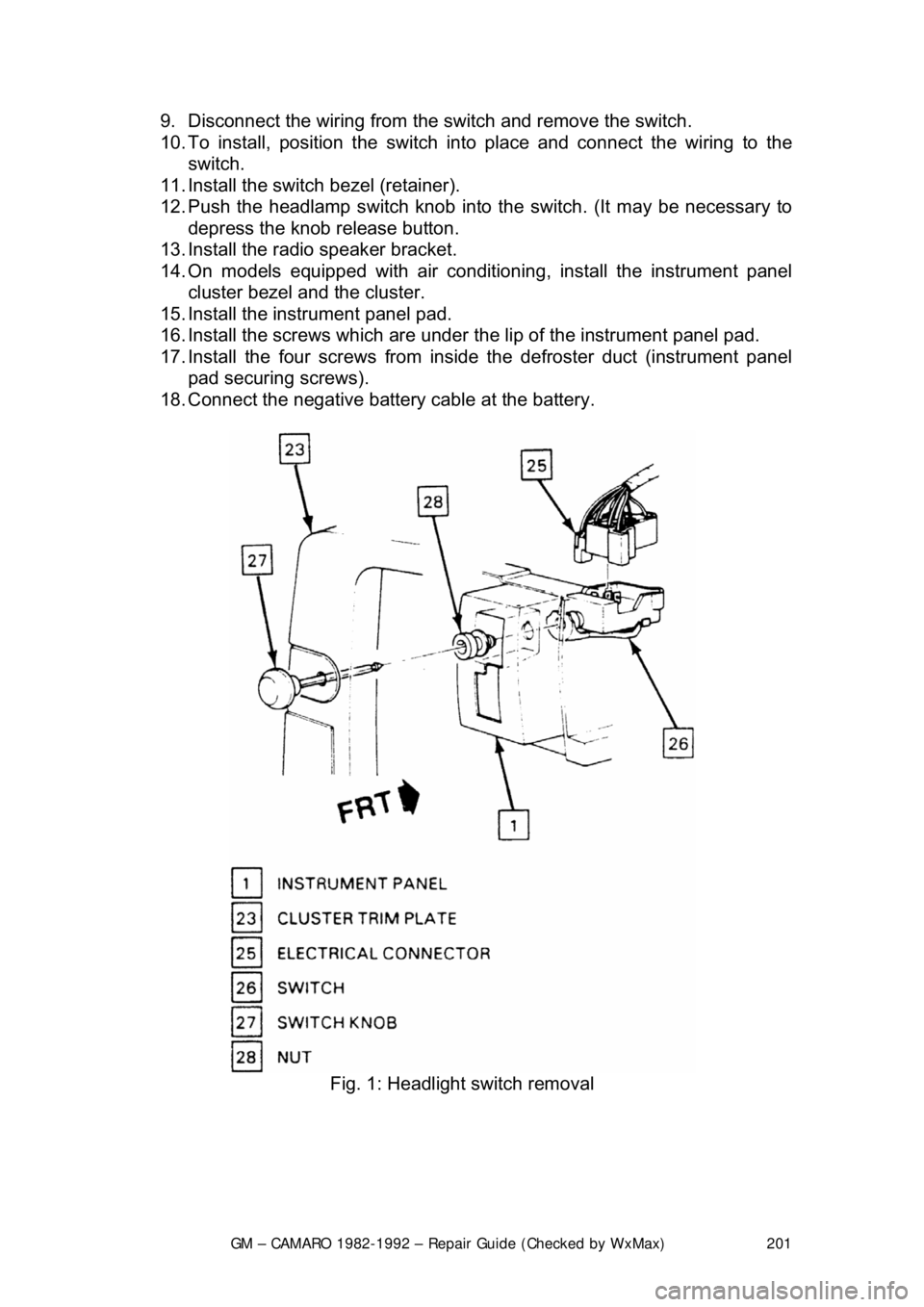
HEADLIGHT SWITCH
REMOVAL & INSTALLATION 1. Disconnect the negative batte ry cable at the battery.
2. Remove the four screws from insi de the defroster duct (instrument panel
pad securing screws).
3. Remove the screws which are under the lip of the instrument panel pad.
4. Remove the instrument panel pad.
5. On models equipped with air condition ing, remove the instrument panel
cluster bezel and the cluster.
6. Remove the radio speaker bracket.
7. Pull the headlamp switch knob to the ON position, depress the locking
button for the knob and shaft (locat ed on the switch), and remove the
knob and shaft.
8. Remove the switch bezel (retainer).
Page 201 of 875
GM – CAMARO 1982-1992 – Repair Guide (Checked by WxMax) 201
9. Disconnect the wiring from the
switch and remove the switch.
10. To install, position t he switch into place and connect the wiring to the
switch.
11. Install the switch bezel (retainer).
12. Push the headlamp switch knob into the switch. (It may be necessary to
depress the knob release button.
13. Install the radio speaker bracket.
14. On models equipped with air conditioni ng, install the instrument panel
cluster bezel and the cluster.
15. Install the inst rument panel pad.
16. Install the screws which are under t he lip of the instrument panel pad.
17. Install the four screw s from inside the defroster duct (instrument panel
pad securing screws).
18. Connect the negative battery cable at the battery.
Fig. 1: Headlight switch removal
Page 596 of 875

GM – CAMARO 1982-1992 – Repair Guide (Checked by WxMax) 596
recommended to have a qualified technici
an perform any further testing, if
needed.
FIELD SERVICE MODE
On fuel injected models, if the ALDL terminal B is grounded to terminal A with
the engine running, the system enters the Field Service Mode. In this mode, the
MIL will indicate whether the system is operating in open loop or closed loop.
If working in open loop, t he MIL will flash rapidly 2
1/2 times per second. In
closed loop, the flash rate slows to once per second. Additionally, if the system
is running lean in closed loop, the lamp will be off most of the cycle. A rich
condition in closed loop will cause the lamp to remain lit for most of the one
second cycle.
When operating in the Field Service M ode, additional codes cannot be stored
by the ECM. The closed loop timer is bypassed in this mode.
CLEARING CODES
Stored fault codes may be erased from me mory at any time by removing power
from the ECM for at least 30 seconds. It may be necessary to clear stored
codes during diagnosis to check for any re currence during a test drive, but the
stored should be written dow n when retrieved. The codes may still be required
for subsequent troubleshooting. Whenever a repair is complete, the stored
codes must be erased and the vehicle te st driven to confirm correct operation
and repair.
The ignition switch must be OFF any ti me power is disconnected or restored to
the ECM. Severe damage may result if this precaution is not observed.
Depending on the electric di stribution of the particular vehicle, power to the
ECM may be disconnected by removing the ECM fuse in the fusebox or
disconnecting the inline EC M power lead at the positive battery terminal.
Disconnecting the negative battery cable to clear codes will achieve the desired
result, but this will also clear other me mory data in the vehicle such as radio
presets or seat memory.
Page 639 of 875

GM – CAMARO 1982-1992 – Repair Guide (Checked by WxMax) 639
In the HEI system, as in other electr
onic ignition systems, the breaker points
have been replaced wit h an electronic switch - a tr ansistor - which is located
within the ignition module. This switching transistor pe rforms the same function
the points did in a conventi onal ignition system; it simply turns the coil's primary
current on and off at the correct time. Essentially, electronic and conventional
ignition systems operate on t he same principle.
The module which houses the switching transistor is controlled (turned on and
off) by a magnetically gener ated impulse induced in the pickup coil. When the
teeth of the rotating timer align with t he teeth of the pole piece, the induced
voltage in the pickup coil signals the elec tronic module to open the coil primary
circuit. The primary current then decreases, and a high voltage is induced in the
ignition coil secondary windings, which is then directed through the rotor and
high voltage leads (spark plug wires) to fire the spark plugs.
In essence, the pickup coil module system simply replaces the conventional
breaker points and condenser. The condenser found within the distributor is for
radio suppression purposes only and has nothing to do with the ignition
process. The ignition module automatically controls the dwell period, increasing
it with increasing en gine speed. Since dwell is co ntrolled in this manner, it
cannot be adjusted. The module itse lf is non-adjustable/non-repairable and
must be replaced if found defective.
SYSTEM PRECAUTIONS
Before proceeding with troubleshooting, ta ke note of the following precautions:
TIMING LIGHT USE
Care should be exercised when connec ting a timing light or other pick-up
equipment. Do not force anything between the boots and wiring, or through the
silicone jacket. Connections should be made in parallel using an adapter.
Inductive pickup timing lights are the bes t kind to use with the ignition systems
covered by this information.
SPARK PLUG WIRES
The plug wires used with these systems are of a different construction than
conventional wires. When replacing them, make sure you get the correct wires,
since conventional wires will not carry the voltage. Also, handle the wires
carefully to avoid cracking or splitti ng them, and NEVER pierce the wires.
TACHOMETER USE
Not all tachometers will operate or indi cate correctly when used on an HEI or
C
3I system. While some tachometers ma y give a reading, this does not
necessarily mean the reading is correct. In addition, some tachometers hook up
differently from others. If you cannot fi gure out whether or not your tachometer
will work on your car, check with the tachometer manufacturer.
Page 651 of 875

GM – CAMARO 1982-1992 – Repair Guide (Checked by WxMax) 651
Fig. 6: Removing the distri butor cap. Notice that all towers on cap are labeled
with the corresponding engine cylinder number.
ROTOR 1. Disconnect the negative battery cable.
2. Remove the distributor cap.
3. Unscrew the two rotor attaching screws and then lift off the rotor.
4. For installation, make sure the roto r is positioned in the correct direction
and tighten the retaining screws.
CAPACITOR
The capacitor, if equipped, is part of the ignition coil wire harness assembly.
Since the capacitor is used only for radio noise suppres sion, it will seldom need
replacement.
1. Disconnect the negative battery cable.
2. Remove the distributor cap and rotor.
3. Remove the capacitor attaching screws and unplug the connector from
the module. Remove the module.
To install: 4. Plug the connector into the capacitor. Install the capacitor and secure in
place using the mounting screws. Be sure the ground lead is under the
screw.
5. Install the rotor and distributor cap.