1969 FORD MUSTANG light
[x] Cancel search: lightPage 241 of 413
04-04-10
Rear Axle — Ford Light-Duty (WER)
04-04-10
the differential case and ring gear as-
sembly in the carrier without regard
to the matching of any particular gear
teeth.
12.
Slide the case assembly along
the bores until a slight amount of
backlash is felt between the gear teeth.
Hold the differential case in place.
13.
Set the adjusting nuts in the
bores so that they just contact the
bearing cups.
14.
Carefully position the bearing
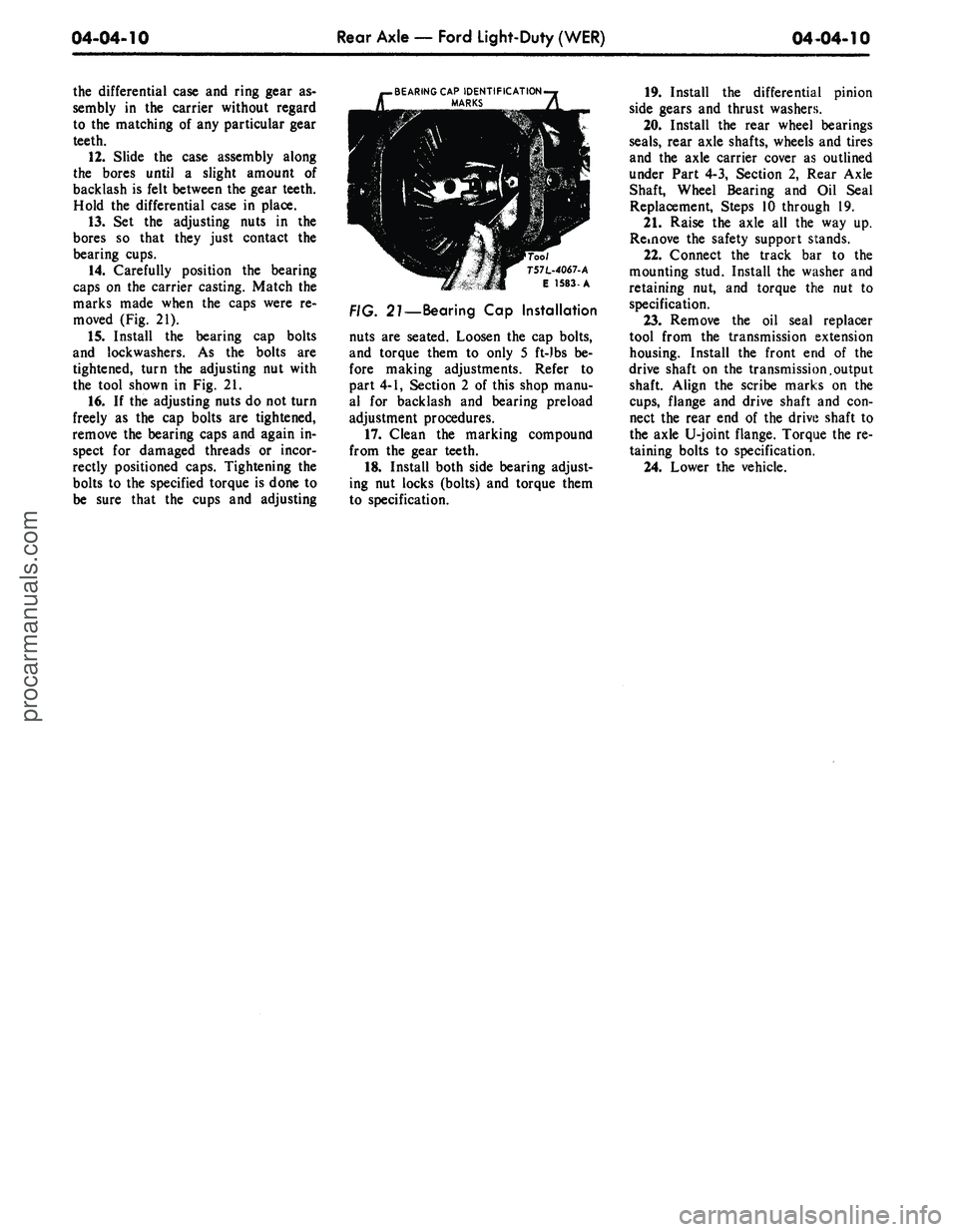
caps on the carrier casting. Match the
marks made when the caps were re-
moved (Fig. 21).
15.
Install the bearing cap bolts
and lockwashers. As the bolts are
tightened, turn the adjusting nut with
the tool shown in Fig. 21.
16.
If the adjusting nuts do not turn
freely as the cap bolts are tightened,
remove the bearing caps and again in-
spect for damaged threads or incor-
rectly positioned caps. Tightening the
bolts to the specified torque is done to
be sure that the cups and adjusting
.BEARING CAP IDENTIFICATION-j
MARKS
A
T57L-4067-A
E 1583-A
27—Bearing Cap Installation
nuts are seated. Loosen the cap bolts,
and torque them to only 5 ft-)bs be-
fore making adjustments. Refer to
part 4-1, Section 2 of this shop manu-
al for backlash and bearing preload
adjustment procedures.
17.
Clean the marking compound
from the gear teeth.
18.
Install both side bearing adjust-
ing nut locks (bolts) and torque them
to specification.
19.
Install the differential pinion
side gears and thrust washers.
20.
Install the rear wheel bearings
seals,
rear axle shafts, wheels and tires
and the axle carrier cover as outlined
under Part 4-3, Section 2, Rear Axle
Shaft, Wheel Bearing and Oil Seal
Replacement, Steps 10 through 19.
21.
Raise the axle all the way up.
Rdnove the safety support stands.
22.
Connect the track bar to the
mounting stud. Install the washer and
retaining nut, and torque the nut to
specification.
23.
Remove the oil seal replacer
tool from the transmission extension
housing. Install the front end of the
drive shaft on the transmission.output
shaft. Align the scribe marks on the
cups,
flange and drive shaft and con-
nect the rear end of the drive shaft to
the axle U-joint flange. Torque the re-
taining bolts to specification.
24.
Lower the vehicle.procarmanuals.com
Page 250 of 413

05-01-03
Drive Shaft
05-01-03
DUST SEAL-4859
BALL SOCKET-4A031
UNIVERSAL
JOINT KIT-4635
WASHER
BALL SEAT i \ SPRING
BEARING \\ RETAINER
SEAL
0 \ X \
CENTER
\ \ RETAINER \ YOKE-47R4
SPRING \
BALL SOCKET-4A031
SLIP YOKE-4841
C1770-A
FIG.
3—Drive Shaft and Universal Joints Disassembled —Thunderbird, Continental Mark
REMOVAL AND INSTALLATION
REMOVAL
1.
To maintain drive line balance,
mark the relationship of the rear drive
shaft yoke and the drive pinion flange
of the axle (if the yellow alignment
marks are not visible) with the shaft
so that they may be installed in their
original positions.
2.
Disconnect the rear U-joint or
rear double cardan joint from the
companion flange. Wrap tape around
the loose bearing caps to prevent
them from falling off the spider. Pull
the drive shaft toward the rear of the
vehicle until the slip yoke clears the
transmission extension housing and
the seal. On Lincoln Continental
models, remove the three roller bear-
ing assemblies off the spline teeth in-
side the slip yoke (Fig. 3). Install the
appropriate tool in the extension
housing to prevent lubricant leakage.
INSTALLATION
1.
If either the rubber seal on the
output shaft or the seal in the end of
the transmission extension housing is
damaged in any manner, replace the
seal or seals as required. Also, if the
lugs on the axle pinion flange are
shaved or distorted so that the bear-
ings slide, replace the flange.
2.
On Lincoln Continental models,
install the bearing assemblies over the
spline teeth in the slip yoke. Lubricate
the yoke spline with B8A-19589-A lu-
bricant. This spline is sealed so that
the transmission fluid does not
"wash" away the spline lubricant
(Figs.
4 and 5). Remove the tool from
the extension housing. Install the yoke
on the transmission output shaft. Do
not allow the yoke assembly to bot-
tom on the output shaft with excessive
force.
Install the drive shaft so that the
index marks or the yellow mark (if
visible) on the yoke (light side) is in
line with the yellow mark on the com-
panion flange. This prevents vibration
which occurs when the balance of the
shaft and balance of the axle pinion
flange become additive instead of neu-
01L SEAL (AUTOMATIC TRANSMISSION ONLY)
YOKE
SNAP RING (WRAP TYPE)
. 4—Output Shaft Spline Seal — All except Continental
Mark III and Thunderbird
E U73-Cprocarmanuals.com
Page 258 of 413

05-02-04
General Clutch Service
05-02-04
CLEANING AND INSPECTION
RELEASE BEARING
Wipe all oil and dirt off the release
bearing. The bearing is prelubricated
and should not be cleaned with sol-
vent.
Inspect the bearing retainer for
loose spring clips and rivets.
Inspect the release bearing assembly
for burrs which may cause the assem-
bly to drag on the transmission bear-
ing retainer. Any such burrs should be
cleaned up with fine crocus cloth. If
burrs are found, inspect the transmis-
sion input shaft bearing retainer for
evidence of scoring. Any scoring
should be polished out with crocus
cloth. Coat the bearing retainer with a
thin film of lithium-base grease
(C3VY-19586-A). Prior to release
bearing installation, apply a light film
of lithium base grease (C3VY-
19586-A) on both sides of the release
lever fork where it contacts the release
bearing hub and retaining springs.
Apply a light film of lithium base
grease (C3VY-19586-A) plate to the
release bearing surface that contacts
the pressure plate fingers. Carefully
fill the grease groove inside the bear-
ing hub with lithium base grease (no
polyethylene). Clean all excess grease
from the bore of the bearing hub. Ex-
cess grease will be forced onto the
spline by the transmission input shaft
bearing retainer and will contaminate
the clutch disc. Also, care must be
exercised when applying lubricants to
the release bearing, release bearing
hub and the release lever fork to avoid
excessive grease from contaminating
the clutch disc.
Hold the bearing inner race and ro-
tate the outer race while applying
pressure to it. If the bearing rotation
is rough or noisy, replace the bearing.
Most release bearing failures are
caused by improper clutch pedal ad-
justments. If the clutch linkage does
not have enough free travel, the re-
lease bearing will constantly touch the
release fingers and will spin whenever
the engine is running.
When installing a release bearing on
vehicles equipped with separate hub
and bearing, use the tool shown in
Fig. 5.
Release bearing failure can be
caused by the release lever contact
points being out of plane. Check the
wear on the release bearing assembly
where the release lever contacts it.
If one side of the assembly shows
more wear than the other, the release
lever is bent out of plane, or is not
centering on the bracket on the fly-
wheel housing.
Misalignment between the engine
and transmission can cause release
bearing failure. Other symptoms of
misalignment are transmission jump-
ing out of gear, especially third gear,
drive line vibration; excessive wear in
the pilot bushing, excessive clutch disc
spin time resulting in gear clash, and
excessive transmission gear wear.
PRESSURE PLATE AND COVER
Inspect the surface of the pressure
plate for burn marks, scores, or rid-
ges.
Generally, pressure plate resur-
facing is not recommended. However
minor burn marks, scores, or ridges
may be removed. During the resurfac-
ing process, the flatness of the pres-
sure plate must be maintained. If the
pressure plate is badly heat-checked or
deeply scored, replace the pressure
plate and cover assembly. Clean pres-
sure plate and flywheel surfaces with a
suitable solvent, such as alcohol to be
sure the surfaces are free from any oil
film. Do not use cleaners with petrole-
um base, and do not immerse the
pressure plate in the solvent.
Place the plate on the floor, being
careful not to score or scratch the sur-
face.
Force each individual finger
down, then release quickly. If the fin-
ger does not return quickly, a binding
condition is indicated, and the pres-
sure plate should be replaced.
The pressure plate should be lubri-
cated with a lithium-base grease be-
tween the driving lugs and the edges
of the pressure plate openings, as
shown in Fig. 6. Depress the pressure
plate fingers fully, apply the lubricant,
and then move the fingers up and
down until the lubricant is worked in.
Do not apply excessive lubricant.
CLUTCH DISC
Inspect the clutch disc facings for
oil or grease. Eliminate the source of
any oil or grease before replacing the
disc. An excessive amount of grease in
the pilot bushing or release bearing
hub will find its way to the disc fac-
ings.
Too much lubricant in the trans-
mission or a plugged transmission
vent will force the transmission lubri-
cant out the input shaft and onto the
disc facings. Also, rear main bearing
oil seal leaks or oil leaks from the fly-
wheel mounting bolts can contaminate
the clutch disc.
Inspect the clutch disc for worn or
loose facings. Check the disc for worn
or loose facings. Check the disc for
distortion and for loose rivets at the
hub.
Check for broken springs.
Springs loose enough to rattle will not
cause noise when the car is operating.
Replace the disc assembly if any of
these defects are present. Be especially
careful when installing a new disc to
avoid dropping it or contaminating it
with oil or grease.
PILOT BUSHING
Check the fit of the clutch pilot
bushing in the bore of the crankshaft.
The bushing is pressed into the
crankshaft and should not be loose.
Inspect the inner surface of the bush-
ing for wear or a bell-mouthed condi-
tion. If the bushing is worn or dam-
aged, replace the bushing with a new
service bearing. Refer to the applica-
ble engine for the replacement proce-
dure.
C 1785-A
FIG. 5—Installing Clutch Release
Bearing on Hub
PRESSURE PLATE
AND COVER
DRIVING
LUG
FLYWHEEL
C2048-A
FIG. 6—Pressure Plate Lubrication
Pointsprocarmanuals.com
Page 261 of 413

05-03-03
Clutch
05-03-03
CLUTCH PEDAL
ADJUSTMENTS
Adjust
the
clutch pedal free travel
whenever
the
clutch does
not
disen-
gage properly,
or
when
new
clutch
parts
are
installed. Improper adjust-
ment
of the
clutch pedal
is one of the
most frequent causes
of
clutch failure
and
can be a
contributing factor
in
some transmission failures.
FREE TRAVEL
1.
Disconnect
the
clutch return
spring from
the
release lever.
2.
Loosen
the
release lever
rod
locknut
and
adjusting
nut
(Figs.
1, 2
and
3).
3.
Move
the
clutch release lever
rearward until
the
release bearing
lightly contacts
the
clutch pressure
plate release fingers.
4.
Adjust
the rod
length until
the
rod seats
in the
release lever pocket.
5.
Insert
the
specified feeler gauge
between
the
adjusting
nut and the
swivel sleeve. Then tighten
the
adjust-
ing
nut
against
the
gauge finger tight.
6. Tighten
the
locknut against
the
adjusting
nut,
being careful
not to di-
sturb
the
adjustment. Torque
the
lock-
nut
to
specification
and
remove
the
feeler gauge.
7.
Install
the
clutch return spring.
8. Check
the
free travel
at the
pedal
for conformance
to
specification.
Re-
adjust
if
necessary.
9.
As a
final check, measure
the
pedal free travel with
the
transmission
in neutral
and the
engine running
at
about 3000
rpm. If the
pedal free
travel
at
this speed
is not a
minimum
of
1/2
inch, readjust
the
clutch pedal
free travel. Otherwise,
the
release
fin-
gers
may
contact
the
release bearing
continuously, resulting
in
premature
bearing
and
clutch failure. Free travel
must
be
exactly
to
specification.
CLUTCH ASSIST
SPRING REPLACEMENT
(FAIRLANE, FALCON,
MONTEGO)
1.
Remove
the
cotter
pin
from
the
clutch
rod at the
clutch pedal lever
as-
sembly inside
the
passenger compart-
ment.
2.
Grasp
the
clutch pedal lever
firmly
to
prevent slipping
and
remove
the clutch
rod
from
the
lever. Allow
the clutch pedal lever
to
rest
on the
floor panel.
3.
Remove
the
forward bolt secur-
ing
the
assist spring bracket
to the
brake pedal bracket
and
loosen
the
rear bolt
two or
three turns.
Do not
remove
the
rear bolt.
4.
Grasp
the
assist spring bracket
with pliers
and
rotate upward until
the
spring
can be
separated from
the
bracket.
BRAKE PEDAL
BRACKET
CLUTCH ASSIST SPRING
BRACKET
-
7535
CLUTCH PEDAL
7519
5.
Position
the
assist spring
in the
clutch pedal spring bracket
and the
assist spring bracket. Rotate
the
spring bracket downward until
the
forward bolt holes
in the
assist spring
bracket line
up
with
the
holes
in the
brake pedal bracket
(Fig. 4).
6. Install
the
forward bolt retaining
the assist spring bracket
to the
brake
pedal bracket
and
torque
the
forward
and rear bolts
to
specification.
7.
Install
the
clutch
rod to the
clutch pedal lever
and
insert
the
cotter
pin.
CLUTCH PEDAL, PEDAL
ASSIST SPRING AND/OR
BUSHING REMOVAL
AND INSTALLATION
FORD, MERCURY,
METEOR
1.
Remove
the pin
that secures
the
clutch pedal-to-equalizer
rod to the
clutch pedal.
2.
Grasp
the
clutch pecal lever
firmly
to
prevent slipping
and
remove
the clutch
rod
from
the
lever. Allow
the clutch pedal lever
to
rest
on the
floor.
3.
Loosen
the
lower bolt securing
the assist spring bracket
to the
pedal
support bracket
two or
three turns.
Then, remove
the
upper bolt from
the
bracket.
Do not
remove
the
lower
bolt.
4.
Grasp
the
assist spring bracket
with pliers
and
rotate
it
counterclock-
wise until
the
spring
is
free
(Fig 5).
5.
Remove
the
retaining ring from
the
end of the
clutch pedal shaft. Then
remove
the
shaft, bushings
and
clutch
pedal from
the
support.
6. Remove
the
bushings from
the
pedal shaft
and
pedal support
and
transfer
the
rubber pedal
pad.
7.
After lubricating
the
pedal shaft
ASSIST SPRING
LOWER BOLT
ASSIST SPRING BRACKET-
UPPER
BOL"
C 1769-B
FIG. 4—Clutch Pedal Assembly
—
Fairlane, Montego, Falcon
C2058-A
;. 5—Removing Clutch Assist
Spring
—
Ford,
Mercury and Meteorprocarmanuals.com
Page 262 of 413
05-03-04
Clutch
05-03-04
bushings, position the clutch pedal and
bushings in the pedal support.
8. Install the retaining ring on the
clutch pedal shaft.
9. Position the assist spring in the
pedal support bracket and the assist
spring bracket. Rotate the assist
spring bracket clockwise until the
upper bolt holes line up and install the
bolt. Torque both the upper and lower
bolts to specification.
10.
Check the clutch pedal free
travel and adjust as required.
MUSTANG, COUGAR
1.
Disconnect the battery ground
cable.
2.
Remove the steering column.
Refer to Group 3 of this manual for
the procedure.
3.
Remove the two capscrews re-
taining the master cylinder or booster
to the dash panel. Then remove the
two capscrews retaining the pedal sup-
port bracket to the dash panel.
4.
Working inside the vehicle, dis-
connect the clutch pedal-to-equalizer
rod at the clutch pedal by removing
the retainer and bushing.
5.
Secure the clutch pedal against
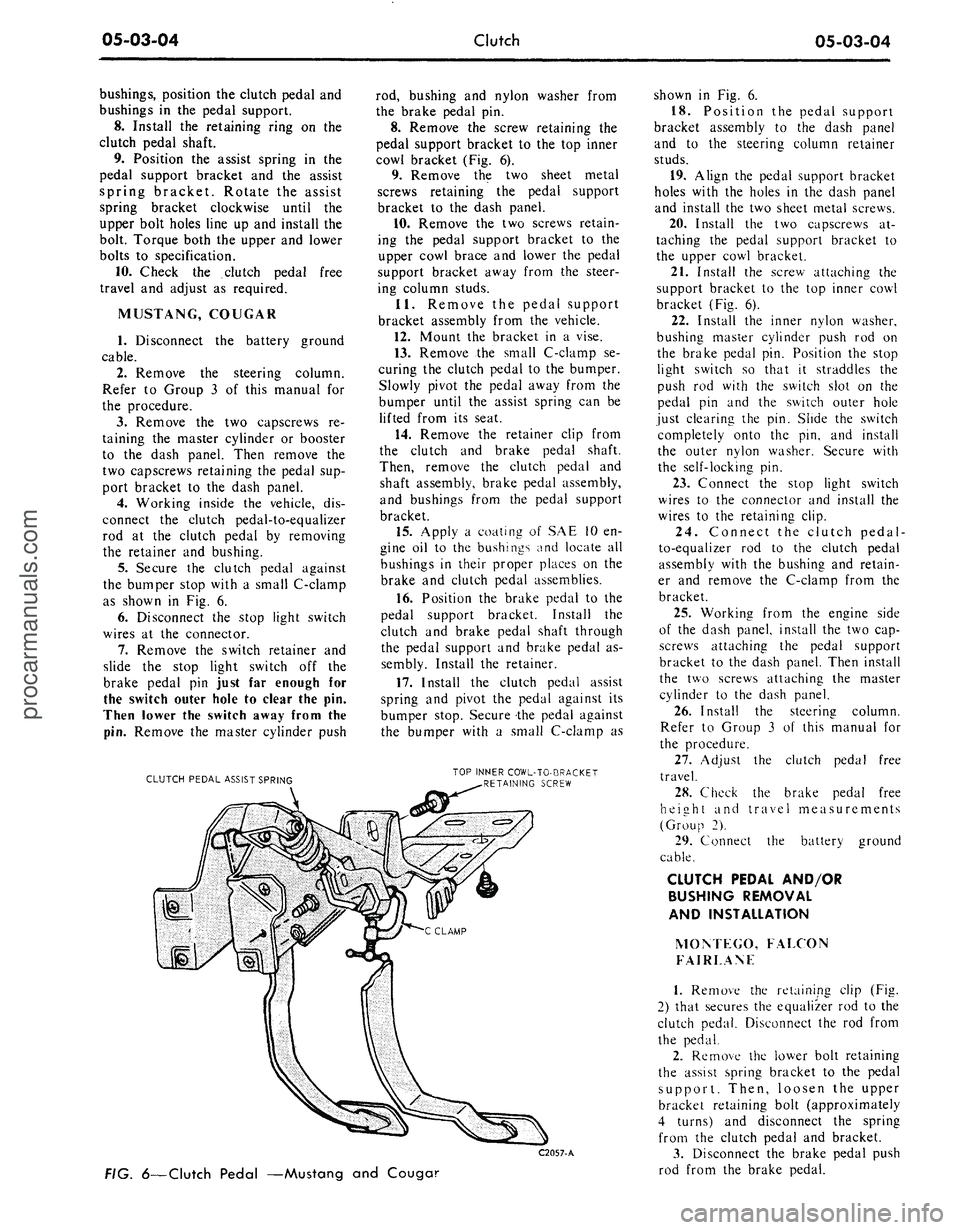
the bumper stop with a small C-clamp
as shown in Fig. 6.
6. Disconnect the stop light switch
wires at the connector.
7.
Remove the switch retainer and
slide the stop light switch off the
brake pedal pin just far enough for
the switch outer hole to clear the pin.
Then lower the switch away from the
pin.
Remove the master cylinder push
CLUTCH PEDAL ASSIST SPRING
rod, bushing and nylon washer from
the brake pedal pin.
8. Remove the screw retaining the
pedal support bracket to the top inner
cowl bracket (Fig. 6).
9. Remove the two sheet metal
screws retaining the pedal support
bracket to the dash panel.
10.
Remove the two screws retain-
ing the pedal support bracket to the
upper cowl brace and lower the pedal
support bracket away from the steer-
ing column studs.
11.
Remove the pedal support
bracket assembly from the vehicle.
12.
Mount the bracket in a vise.
13.
Remove the small C-clamp se-
curing the clutch pedal to the bumper.
Slowly pivot the pedal away from the
bumper until the assist spring can be
lifted from its seat.
14.
Remove the retainer clip from
the clutch and brake pedal shaft.
Then, remove the clutch pedal and
shaft assembly, brake pedal assembly,
and bushings from the pedal support
bracket.
15.
Apply a coating of SAE 10 en-
gine oil to the bushings and locate all
bushings in their proper places on the
brake and clutch pedal assemblies.
16.
Position the brake pedal to the
pedal support bracket. Install the
clutch and brake pedal shaft through
the pedal support and brake pedal as-
sembly. Install the retainer.
17.
Install the clutch pedal assist
spring and pivot the pedal against its
bumper stop. Secure the pedal against
the bumper with a small C-clamp as
TOP INNER COWL-TO-BRACKET
RETAINING SCREW
C2057-A
FIG.
6—Clutch
Pedal —Mustang and Couga?
shown in Fig. 6.
18.
Position the pedal support
bracket assembly to the dash panel
and to the steering column retainer
studs.
19.
Align the pedal support bracket
holes with the holes in the dash panel
and install the two sheet metal screws.
20.
Install the two capscrews at-
taching the pedal support bracket to
the upper cowl bracket.
21.
Install the screw attaching the
support bracket to the top inner cowl
bracket (Fig. 6).
22.
Install the inner nylon washer,
bushing master cylinder push rod on
the brake pedal pin. Position the stop
light switch so that it straddles the
push rod with the switch slot on the
pedal pin and the switch outer hole
just clearing the pin. Slide the switch
completely onto the pin, and install
the outer nylon washer. Secure with
the self-locking pin.
23.
Connect the stop light switch
wires to the connector and install the
wires to the retaining clip.
24.
Connect the clutch pedal-
to-equalizer rod to the clutch pedal
assembly with the bushing and retain-
er and remove the C-clamp from the
bracket.
25.
Working from the engine side
of the dash panel, install the two cap-
screws attaching the pedal support
bracket to the dash panel. Then install
the two screws attaching the master
cylinder to the dash panel.
26.
Install the steering column.
Refer to Group 3 of this manual for
the procedure.
27.
Adjust the clutch pedal free
travel.
28.
Check the brake pedal free
height and travel measurements
(Group 2).
29.
Connect the battery ground
cable.
CLUTCH PEDAL AND/OR
BUSHING REMOVAL
AND INSTALLATION
MOM EGO, FALCON
FAIRLANF
1.
Remove the retaining clip (Fig.
2) that secures the equalizer rod to the
clutch pedal. Disconnect the rod from
the pedal.
2.
Remove the lower bolt retaining
the assist spring bracket to the pedal
support. Then, loosen the upper
bracket retaining bolt (approximately
4 turns) and disconnect the spring
from the clutch pedal and bracket.
3.
Disconnect the brake pedal push
rod from the brake pedal.procarmanuals.com
Page 264 of 413

05-03-06
Clutch
05-03-06
8. Remove the starter cable then
remove the starter motor from the fly-
wheel housing.
9. Remove the bolts that secure the
engine rear plate to the front lower
part of the flywheel housing.
10.
Remove the flywheel housing
lower cover (390 CID housing only).
11.
Remove the bolts that attach
the housing to the cylinder block.
12.
Move the housing back just far
enough to clear the pressure plate,
then move it to the right to free the
pivot from the clutch equalizer bar. Be
careful not to disturb the linkage and
assist spring.
13.
Loosen the six pressure plate
cover attaching bolts evenly to release
the spring tension. If the same pres-
sure plate and cover is to be installed
after the clutch is overhauled, mark
the cover and flywheel so that the
pressure plate can be installed in the
same position.
14.
Remove the pressure plate and
the clutch disc from the flywheel.
CLUTCH INSTALLATION
1.
Install the clutch release lever if
it was removed.
2.
Place the clutch disc, and pres-
sure plate assembly in position on the
flywheel. Start the cover attaching
bolts to hold the pieces in place, but
do not tighten them. Avoid touching
the clutch disc facing, dropping the
parts or contaminating them with oil
or grease as clutch chatter may result.
3.
Align the clutch disc with the
tool shown in Fig. 7, and alternately
tighten the bolts a few turns at a time
until they are all tight. Then torque
the six pressure plate cover attaching
bolts to specification before removing
the tool.
4.
Apply a light film of grease
(C3VY-19586-A) to the outside diam-
eter of the transmission front bearing
retainer. Apply a light film of grease
(C3VY-19586-A) to both sides of the
release lever fork where it contacts the
release bearing bore spring clips.
Apply a light film of grease to the re-
lease bearing surface that contacts the
pressure plate release fingers. Fill the
grease groove of the release bearing
hub with lithium base grease (C3VY-
19586-A). Clean all excess grease
from inside the bore of bearing hub.
Excess grease will be forced onto the
spline by the transmission input shaft
bearing retainer and will contaminate
the clutch disc. Also, place the release
bearing and hub on the release lever.
5.
Make certain that the flywheel
housing and the cylinder block mount-
ing surfaces are clean. Position the
felt washer on the pivot in the fly-
wheel housing. Slip the pivot into the
clutch equalizer shaft being careful
not to disturb the linkage and at the
same time position the housing on the
dowels in the cylinder block. Install
and torque the attaching bolts to spec-
ification.
6. Install the starting motor and
connect the cable.
7.
The mounting surfaces of the
transmission and the flywheel housing
must be free of dirt, paint, and burrs.
Install two guide pins in the flywheel
housing lower mounting bolt holes.
Move the transmission forward on the
guide pins until it is tightly positioned
against the flywheel housing.
8. Install the two upper mounting
bolts.
Then, remove the guide pins
and install the two lower mounting
bolts.
Torque all the bolts to specifica-
tion.
9. Raise the rear of the engine and
install the crossmember. Install and
torque the crossmember attaching
bolts to specifications, then lower the
engine.
10.
Install the extension housing-
to-engine rear support attaching bolts.
Torque the bolts to specification.
11.
Remove the transmission jack
and connect the parking brake cable.
12.
If the vehicle is equipped with a
four-speed transmission, connect the
gear shift linkage control bracket to
the extension housing.
13.
Connect the gear shift rods to
the transmission. Adjust the shift link-
age as required.
14.
Connect the release lever retain-
ing spring. Install the flywheel housing
cover (390 CID housing only).
15.
Remove the tool from the
transmission output shaft and install
the drive shaft.
16.
Check the clutch pedal free
travel.
CLUTCH ARBOR CLUTCH DISC
PRESSURE PLATE
C 1788-A
FIG. 7—Installing Clutch Disc —
Typicalprocarmanuals.com
Page 276 of 413

06-02-07
Ford Design Three Speed Transmission
06-02-07
SNAP RINGS
FIG. 15—Input Shaft Gear Disassembled
C1802-
A
REMOVAL
INSTALLATION
C1O25-B
FIG. 76—Replacing Input Shaft
Bearing
chronizer
hub.
Make sure that
the
spring covers
all
insert grooves. Start
the
hub in the
sleeve making sure that
the alignment marks
are
properly
in-
dexed. Position
the
three inserts
in the
hub making sure that
the
small
end is
over
the
spring
and
that
the
shoulder
is
on the
inside
of the hub.
Slide
the
sleeve
and
reverse gear onto
the hub
until
the
detent
is
engaged. Install
the
front insert spring
in the hub to
hold
the inserts against
the hub. Be
sure
the spring humps
of the
rear spring
cover different inserts than
the
front
spring humps (Fig.
20).
BLOCKING RING
SLEEVE
AND
REVERSE GEAR
C1803-
A
FIG. 17—First
and
Reverse Synchronizer Disassembled
INSERT
HUB AND
SLEEVE ALIGNMENT MARKS
SPRING
BLOCKING m$ERTS
RING
INSERT SPRING
C1804-
A
FIG. 18—Second
and
Third Synchronizer Disassembled
4.
Install
one
insert spring (Fig.
18)
into
a
groove
of the
second
and
third
speed synchronizer
hub,
making sure
that
all
three insert slots
are
fully cov-
ered. With
the
alignment marks
on
the
hub and
sleeve aligned, start
the
hub into
the
sleeve. Place
the
three
in-
serts
on top of the
retaining spring
and push
the
assembly together.
In-
stall
the
remaining insert spring
so
that
the
spring ends cover
the
same
slots
as
does
the
other spring.
Do not
stagger
the
springs. Place
a
synchro-
nizer blocking ring
on
each
end of the
synchronizer sleeve.
COUNTERSHAFT GEAR
BEARINGS
1.
Remove
the
dummy shaft, fifty
roller bearings,
and the two
bearing
retainer washers from
the
countershaft
gear (Fig.
21).
2.
Coat
the
bore
in
each
end of the
countershaft gear with grease.
3.
Hold
the
dummy shaft
in the
gear
and
install
the
twenty-live roller
bearings
and a
retainer washer
in
each
end
of the
gear.
4.
Position
the
countershaft gear,
dummy shaft,
and
roller bearings
in
the case.
5.
Place
the
case
in a
vertical posi-
tion. Align
the
gear bore
and the
thrust washers with
the
bores
in the
case
and
install
the
countershaft.
6. Place
the
case
in a
horizontal
position
and
check
the
countershaft
gear
end
play with
a
feeler gauge.
The
end play should
be
within specifica-
tion.
If not
within specification,
re-
place
the
thrust washers.
7.
After establishing
the
correct end
play, install
the
dummy shaft
in the
countershaft gear
and
allow
the
gear
to remain
at the
bottom
of the
case
until
the
output
and
input shafts have
been installed.
GEAR SHIFT LEVER
AND
CONTROL ASSEMBLY
REMOVAL
AND
INSTALLATION—
FLOOR-MOUNTED
1.
Remove
the
four screws attach-
ing
the
lower boot
to the
floor
pan.
2.
Remove
the two
bolts attaching
the gear shift lever
to the
control
as-
sembly.
3.
Remove
the two
piece lock nuts
that connect
the
shift rods
to the con-
trol assembly.
4.
Remove
the
three bolts retaining
the shift control assembly
to the ex-
tension housing. Allow
the
back-up
light switch
to
hang free.procarmanuals.com
Page 277 of 413
06-02-08
Ford Design Three Speed Transmission
06-02-08
FIRST-REVERSE
SELECTOR LEVER
SELECTOR LEVER
SHAFT
SUPPORT BRACKET
SECOND-THIRD
SELECTOR LEVER
C
2053-A
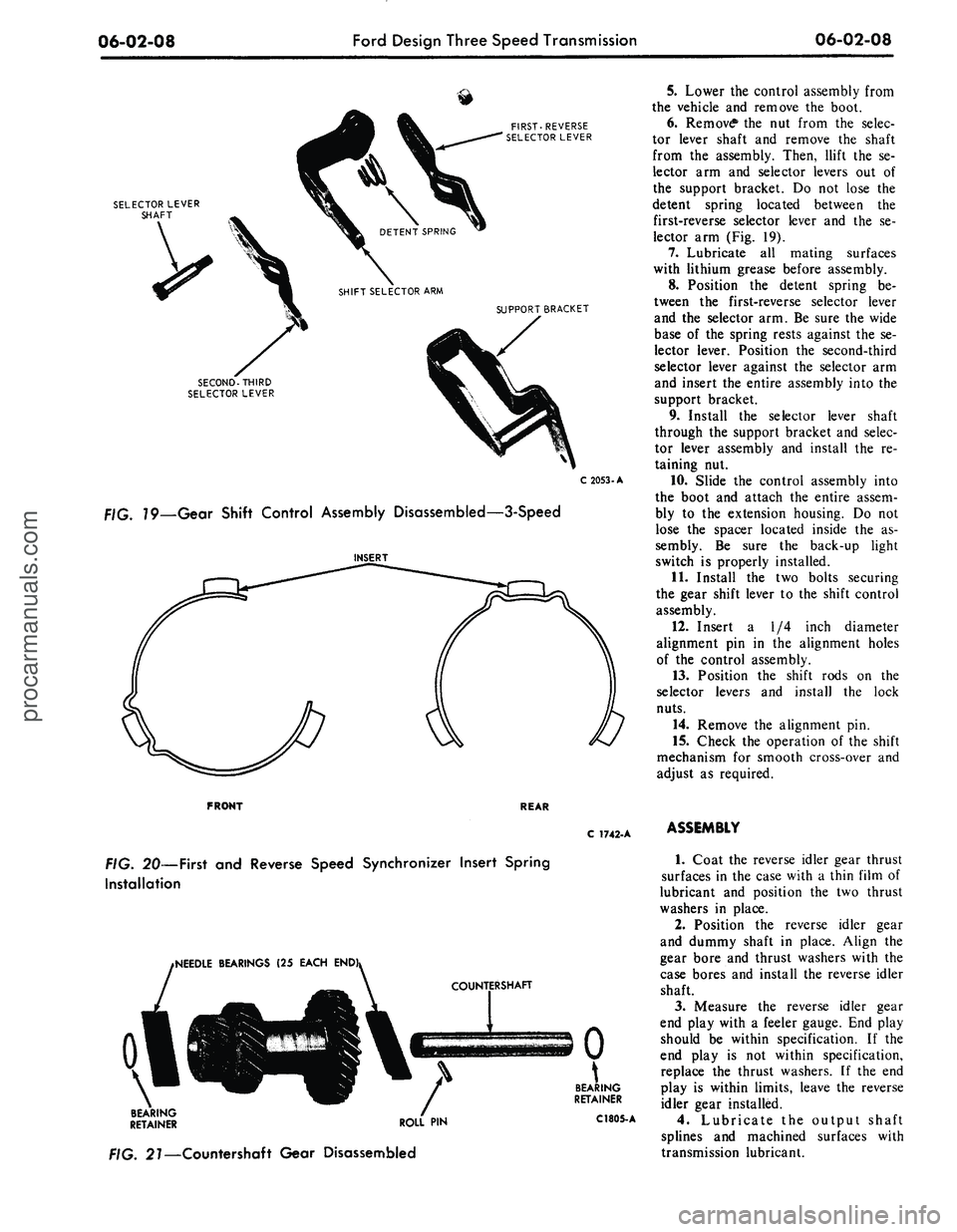
79—Gear Shift Control Assembly Disassembled—3-Speed
5.
Lower the control assembly from
the vehicle and remove the boot.
6. Remove* the nut from the selec-
tor lever shaft and remove the shaft
from the assembly. Then, llift the se-
lector arm and selector levers out of
the support bracket. Do not lose the
detent spring located between the
first-reverse selector lever and the se-
lector arm (Fig. 19).
7.
Lubricate all mating surfaces
with lithium grease before assembly.
8. Position the detent spring be-
tween the first-reverse selector lever
and the selector arm. Be sure the wide
base of the spring rests against the se-
lector lever. Position the second-third
selector lever against the selector arm
and insert the entire assembly into the
support bracket.
9. Install the selector lever shaft
through the support bracket and selec-
tor lever assembly and install the re-
taining nut.
10.
Slide the control assembly into
the boot and attach the entire assem-
bly to the extension housing. Do not
lose the spacer located inside the as-
sembly. Be sure the back-up light
switch is properly installed.
11.
Install the two bolts securing
the gear shift lever to the shift control
assembly.
12.
Insert a 1/4 inch diameter
alignment pin in the alignment holes
of the control assembly.
13.
Position the shift rods on the
selector levers and install the lock
nuts.
14.
Remove the alignment pin.
15.
Check the operation of the shift
mechanism for smooth cross-over and
adjust as required.
FRONT
REAR
C 1742-A
FIG.
20—First
and
Reverse Speed Synchronizer Insert Spring
Installation
iNEEDLE BEARINGS
(25
EACH
END
\
BEARING
RETAINER ROLL
PIN
. 27—Countershaft Gear Disassembled
BEARING
RETAINER
C1805-
A
ASSEMBLY
1.
Coat the reverse idler gear thrust
surfaces in the case with a thin film of
lubricant and position the two thrust
washers in place.
2.
Position the reverse idler gear
and dummy shaft in place. Align the
gear bore and thrust washers with the
case bores and install the reverse idler
shaft.
3.
Measure the reverse idler gear
end play with a feeler gauge. End play
should be within specification. If the
end play is not within specification,
replace the thrust washers. If the end
play is within limits, leave the reverse
idler gear installed.
4.
Lubricate the output shaft
splines and machined surfaces with
transmission lubricant.procarmanuals.com