1969 FORD MUSTANG flat tire
[x] Cancel search: flat tirePage 18 of 413

02-01-07
Brakes
02-01-07
CENTRALIZING THE
PRESSURE DIFFERENTIAL
VALVE
After a failure of the primary (front
brake) or secondary (rear brake) sys-
tem has been repaired and bled, the
dual-brake warning light will usually
continue to be illuminated due to the
pressure differential valve remaining in
the off-center position.
To centralize the pressure differen-
tial valve and turn off the warning
light after a repair operation, a pres-
sure differential or unbalance condi-
tion must be created in the opposite
brake system from the one that was
repaired or bled last.
1.
Turn the ignition switch to the
ACC or ON position. Loosen the dif-
ferential valve assembly brake tube
nut at the outlet port on the opposite
side of the brake system that was
wheel balanced, repaired and/or bled
last. Depress the brake pedal slowly to
build line pressure until the pressure
differential valve is moved to a cen-
tralized position and the brake warn-
ing light goes out; then, immediately
tighten the outlet port tube nut.
2.
Check the fluid level in the mas-
ter cylinder reservoirs and fill them to
within 1/4 inch of the top with the
specified brake fluid, if necessary.
3.
Turn the ignition switch to the
OFF position.
4.
Before driving the vehicle, check
the operation of the brakes and be
sure that a firm pedal is obtained.
CLEANING AND INSPECTION
DISC BRAKES
1.
Remove the wheel and tire and
the shoe and lining assemblies as out-
lined in Part 2-2, Section 2.
2.
On all models except Lincoln
Continental, make thickness measure-
ments with a micrometer across the
thinnest section of the shoe and lining.
If the assembly has worn to a thick-
ness of 0.230-inch (shoe and lining to-
gether) or 0.030-inch (lining material
only) at any one of three measuring
locations or if there is more than
0.125 taper from end to end or if lin-
ing shows evidence of brake fluid con-
tamination, replace all (4) shoe and
lining assemblies on both front wheels.
On Lincoln Continental brakes
make three thickness measurements
with a micrometer across the middle
section of the shoe and lining. Take
one reading at each side and one in
the center. If the assembly has worn
to a thickness of 0.231 inch (shoe and
lining together) or 0.066 inch (lining
material only) at any one of the three
measuring locations, replace all (4)
shoe and lining assemblies on both
front wheels.
3.
Check the caliper to spindle at-
taching bolts torque. Torque them to
specification, if required.
4.
To check rotor runout, first
eliminate the wheel bearing end play
by tightening the adjusting nut. After
tightening the nut, check to see that
the rotor can still be rotated.
5.
Clamp a dial indicator to the
caliper housing so that the stylus con-
tact the rotor at a point approximate-
ly 1 inch from the outer edge. Rotate
the rotor and take an indicator read-
ing. If the reading exceeds 0.003 inch
total lateral runout on the indicator,
replace or resurface the disc brake
rotor. The following requirement must
be met when resurfacing disc brake
rotors:
Rotunda Disc Brake Attachment
FRE-2249-2 is the only approved tool
to be used to refinish the disc brake
rotors.
The step-by-step resurfacing
procedure provided with the tool must
be adhered to.
The finished braking surface of the
rotor must be flat and parallel within
0.0007 inch; lateral runout must not
exceed 0.003 inch total indicator
reading, braking surface are to be 80/15
micro inches.
On all models except Lincoln Con-
tinental the minimum limiting dimen-
sion from the inboard bearing cup to
the inboard rotor face and the mini-
mum rotor thickness dimension, must
be observed when removing material
from the rotor braking surfaces. A
ball and gage bar (Rotunda Kit FRE
70160) is to be used when checking
minimum dimensions (Fig. 11).
FALCON-FAIRLANE
MUSTANG-COUGAR
MONTEGO
.046 MAX-**
.119
MAX.
FORD-MERCURY
METEOR - THUNDERBIRD
875
MIN
H1633-A
1.12
MIN.-^
??
— Disc Brake Rotor
Service Limits—All Models Except
Lincoln Continental
On Lincoln Continental models the
minimum limiting dimension (Fig. 12)
from the inboard bearing cup to the
inboard rotor face (dimension B)
and the outboard rotor surface and
the inboard bearing cup (dimension
A),
must be observed when remov-
ing material from the rotor braking
surfaces.
When the runout check is finished
be sure to adjust the bearings as out-
lined in Group 3, in order to prevent
bearing failure.
6. Check the rotor for scoring. Mi-
nor scores can be removed with a
fine emery cloth. If the rotor is ex-
cessively scored, refinish it as out-
lined in step 5 or replace the rotor,
if required.
7.
Visually check the caliper. If the
caliper housing is leaking it should be
replaced. If a seal is leaking the cali-
per must be disassembled and new
.seals installed. If a piston is seazed
in the bore a new caliper housing is
required.
On Lincoln Continental models the
two halves of the caliper assembly
should never be separated. Damage or
failure of one requires replacement of
both as a unit.
Check the brake hoses for signs of
cracking, leaks or abrasion. Replace
them if necessary.
DISC BRAKE SERVICE
PRECAUTIONS
1.
Grease or any other foreign ma-
terial must be kept off the caliper as-
sembly, surfaces of the rotor and ex-
ternal surfaces of the hub during serv-
ice operations. Handling of the rotor
and caliper assemblies should be done
in a way to avoid deformation of the
brake rotor and nicking or scratching
of brake linings.
2.
If a caliper piston is removed for
any reason, the piston seal must be re-
placed.
3.
During removal and installation
of a wheel assembly, exercise care not
to interfere with and damage the cali-procarmanuals.com
Page 28 of 413
02-02-09
Brake System
02-02-09
REMOVAL AND INSTALLATION
FRONT BRAKE DRUM
REMOVAL
1.
Raise the vehicle until the wheel
and tire clear the floor. Remove the
wheel cover or hub cap, and remove
the wheel and tire from the drum.
2.
Remove the grease cap from the
hub.
Remove the cotter pin, nut lock,
adjusting nut, and flat washer from
the spindle. Remove the outer bearing
cone and roller assembly.
3.
Pull the drum off the wheel
spindle.
4.
If the drum will not come off,
pry the rubber cover from the brake
backing plate. Insert a narrow screw-
driver through the slot and disengage
the adjusting lever from the adjusting
screw. While holding the adjusting
lever away from the screw, back off
the adjusting screw with the brake ad-
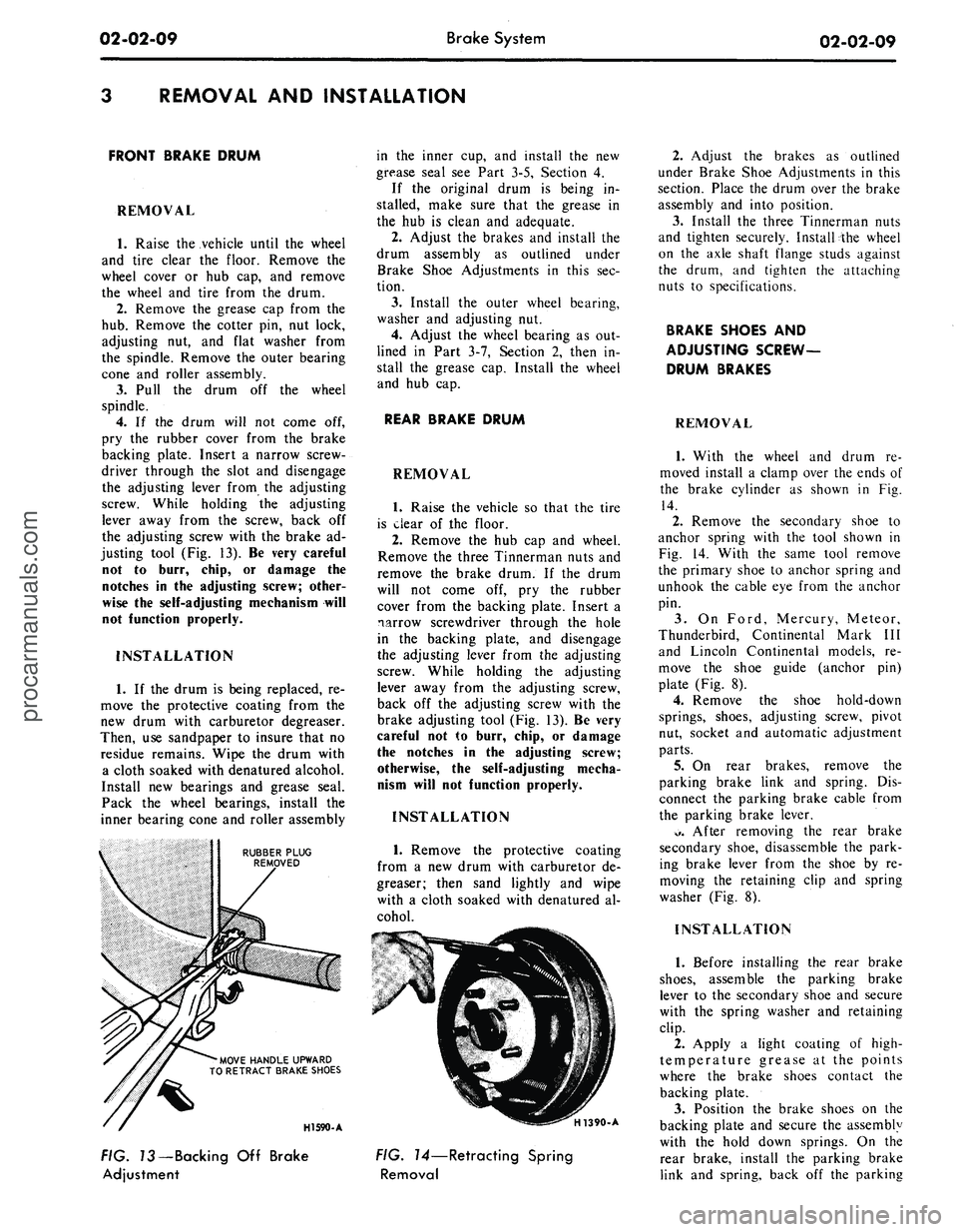
justing tool (Fig. 13). Be very careful
not to burr, chip, or damage the
notches in the adjusting screw; other-
wise the self-adjusting mechanism will
not function properly.
INSTALLATION
1.
If the drum is being replaced, re-
move the protective coating from the
new drum with carburetor degreaser.
Then, use sandpaper to insure that no
residue remains. Wipe the drum with
a cloth soaked with denatured alcohol.
Install new bearings and grease seal.
Pack the wheel bearings, install the
inner bearing cone and roller assembly
RUBBER PLUG
REMOVED
'MOVE HANDLE UPWARD
TO RETRACT BRAKE SHOES
in the inner cup, and install the new
grease seal see Part 3-5, Section 4.
If the original drum is being in-
stalled, make sure that the grease in
the hub is clean and adequate.
2.
Adjust the brakes and install the
drum assembly as outlined under
Brake Shoe Adjustments in this sec-
tion.
3.
Install the outer wheel bearing,
washer and adjusting nut.
4.
Adjust the wheel bearing as out-
lined in Part 3-7, Section 2, then in-
stall the grease cap. Install the wheel
and hub cap.
REAR BRAKE DRUM
REMOVAL
1.
Raise the vehicle so that the tire
is clear of the floor.
2.
Remove the hub cap and wheel.
Remove the three Tinnerman nuts and
remove the brake drum. If the drum
will not come off, pry the rubber
cover from the backing plate. Insert a
narrow screwdriver through the hole
in the backing plate, and disengage
the adjusting lever from the adjusting
screw. While holding the adjusting
lever away from the adjusting screw,
back off the adjusting screw with the
brake adjusting tool (Fig. 13). Be very
careful not to burr, chip, or damage
the notches in the adjusting screw;
otherwise, the self-adjusting mecha-
nism will not function properly.
INSTALLATION
1.
Remove the protective coating
from a new drum with carburetor de-
greaser; then sand lightly and wipe
with a cloth soaked with denatured al-
cohol.
HI 590-A
H1390-A
FIG. 73—Backing Off Brake
Adjustment
FIG. 14—Retracting Spring
Removal
2.
Adjust the brakes as outlined
under Brake Shoe Adjustments in this
section. Place the drum over the brake
assembly and into position.
3.
Install the three Tinnerman nuts
and tighten securely. Install the wheel
on the axle shaft flange studs against
the drum, and tighten the attaching
nuts to specifications.
BRAKE SHOES AND
ADJUSTING SCREW-
DRUM BRAKES
REMOVAL
1.
With the wheel and drum re-
moved install a clamp over the ends of
the brake cylinder as shown in Fig.
14.
2.
Remove the secondary shoe to
anchor spring with the tool shown in
Fig. 14. With the same tool remove
the primary shoe to anchor spring and
unhook the cable eye from the anchor
pin.
3.
On Ford, Mercury, Meteor,
Thunderbird, Continental Mark III
and Lincoln Continental models, re-
move the shoe guide (anchor pin)
plate (Fig. 8).
4.
Remove the shoe hold-down
springs, shoes, adjusting screw, pivot
nut, socket and automatic adjustment
parts.
5.
On rear brakes, remove the
parking brake link and spring. Dis-
connect the parking brake cable from
the parking brake lever.
*>.
After removing the rear brake
secondary shoe, disassemble the park-
ing brake lever from the shoe by re-
moving the retaining clip and spring
washer (Fig. 8).
INSTALLATION
1.
Before installing the rear brake
shoes,
assemble the parking brake
lever to the secondary shoe and secure
with the spring washer and retaining
clip.
2.
Apply a light coating of high-
temperature grease at the points
where the brake shoes contact the
backing plate.
3.
Position the brake shoes on the
backing plate and secure the assembly
with the hold down springs. On the
rear brake, install the parking brake
link and spring, back off the parkingprocarmanuals.com
Page 29 of 413

02-02-10
Brake System
02-02-10
brake adjustment then connect the
parking brake cable to the parking
brake lever (Fig. 8).
4.
Install the shoe guide (anchor
pin) plate on the anchor pin when so
equipped.
5.
Place the cable eye over the an-
chor pin with the crimped side toward
the backing plate.
6. Install the primary shoe to an-
chor spring (Fig. 15).
H1391-A
FIG. 75—Retracting Spring
Installation
7.
Install the cable guide on the
secondary shoe web with the flanged
hole fitted into the hole in the second-
ary shoe web. Thread the cable
around the cable guide groove (Fig.
8).
It
is
imperative that
the
cable
be
positioned
in
this groove
and not be-
tween
the
guide
and the
shoe
web.
8.
Install the secondary shoe to an-
chor spring with the tool shown in
Fig. 15.
Be certain that
the
cable
eye is not
cocked
or
binding
on the
anchor
pin
when installed.
All
parts should
be
flat
on
the
anchor
pin.
Remove
the
brake
cylinder clamp.
9. Apply high-temperature grease
(MIC-100-A) to the threads and the
socket end of the adjusting screw.
Turn the adjusting screw into the ad-
justing pivot nut to the limit of the
threads and then back off 1/2 turn.
Interchanging
the
brake shoe
ad-
justing screw assemblies from
one
side
of
the
vehicle
to the
other would cause
the brake shoes
to
retract rather than
expand each time
the
automatic
ad-
justing mechanism operated.
To pre-
vent installation on the wrong side of
the vehicle, the socket end of the ad-
justing screw is stamped with an R or
L (Fig. 16). The adjusting pivot nuts
can be distinguished by the number of
grooves machined around the body of
the nut. Two grooves on the nut indi-
cate a right thread; one groove indi-
cates a left thread.
10.
Place the adjusting socket on
the screw and install this assembly be-
tween the shoe ends with the adjusting
screw toothed wheel nearest the sec-
ondary shoe.
11.
Hook the cable hook into the
hole in the adjusting lever. The adjust-
ing levers are stamped with an R or L
to indicate their installation on right
or left brake assembly (Fig. 16).
12.
Position the hooked end of the
ADJUSTING LEVER
IDENTIFICATION LINES
H1143-C
FIG. 16—Adjusting Screw
and
Lever Identification
adjuster spring completely into the
large hole in the primary shoe web.
The last coil of the spring should be at
the edge of the hole. Connect the loop
end of the spring to the adjuster lever
hole.
13.
Pull the adjuster lever, cable
and automatic adjuster spring down
and toward the rear to engage the
pivot hook in the large hole in the sec-
ondary shoe web (Fig. 8).
14.
After installation, check the ac-
tion of the adjuster by pulling the sec-
tion of the cable between the cable
guide and the anchor pin toward the
secondary shoe web far enough to lift
the lever past a tooth on the adjusting
screw wheel. The lever should snap
into position behind the next tooth,
and release of the cable should cause
the adjuster spring to return the lever
to its original position. This return ac-
tion of the lever will turn the adjusting
screw.one tooth.
If pulling the cable does not pro-
duce the action described, or if the
lever action is sluggish instead of posi-
tive and sharp, check the position of
the lever on the adjusting screw
toothed wheel. With the brake in a
vertical position (anchor at the top),
the lever should contact the adjusting
wheel 3/16 inch (plus or minus 1/32
inch) above the centerline of the
screw. If the contact point is below
this centerline, the lever will not lock
on the teeth in the adjusting screw
wheel, and the screw will not be turned
as the lever is actuated by the cable.
To determine the cause of this con-
dition:
a. Check the cable end fittings. The
cable should completely fill or extend
slightly beyond the crimped section of
the fittings. If it does not meet this
specification, possible damage is indi-
cated and the cable assembly should
be replaced.
b.
Check the cable length. On
Ford, Mercury, Meteor, Thunderbird,
Continental Mark III, and Lincoln
Continental models, the cable should
measure 11 1/8 inches (plus or minus
1/64 inch) from the end of the cable
anchor to the end of the cable hook.
On Fairlane, Montego, Falcon,
Mustang, and Cougar models the
cable should measure 8 13/32 inches
on 9 inch brakes or 9 3/4 inches on
10 inch brakes from the end of the
cable anchor to the end of the cable
hook.
c. Check the cable guide for dam-
age.
The cable groove should be paral-
lel to the shoe web, and the body of
the guide should lie flat against the
web.
Replace the guide if it shows
damage.
d. Check the pivot hook on the
lever. The hook surfaces should be
square with the body of the lever for
proper pivoting. Replace the lever if
the hook shows damage.
e. See that the adjusting; screw
socket is properly seated in the notch
in the shoe web.
WHEEL CYLINDER
DRUM BRAKE
REMOVAL '
1.
Remove the wheel and the drum.
2.
Remove the brake shoe assem-
blies,
following procedures outlined in
this section.
3.
Disconnect the brake line from
the brake cylinder Figs. 17 thru 21.
On
a
vehicle with
a
vacuum brake
booster,
be
sure
the
engine
is
stopped
and there
is no
vacuum
in the
booster
system before disconnecting
the hy-
draulic lines.
To disconnect the hose at a front
cylinder, loosen the tube fitting that
connects the opposite end of the hose
to the brake tube at a bracket on the
frame. Remove the horseshoe-type re-
taining clip from the hose and brack-
et, disengage the hose from the brack-
et, then unscrew the entire hose as-
sembly from the front wheel cylinder.
At a rear cylinder, unscrew the tubeprocarmanuals.com
Page 38 of 413

02-02-19
Brake System
02-02-19
that the tabs on the shoe flanges seat
fully against the caliper bridges (Fig.
25).
2.
Install the caliper splash shield
and secure the shield to the caliper
with two retaining bolts (Fig. 4).
3.
Pump the brake pedal several
times until a firm pedal is obtained
and the shoe and lining assemblies are
properly seated.
4.
Install the wheel and tire assem-
bly on the hub and rotor assembly.
5.
Check and refill the master cyl-
inder reservoir with specified brake
fluid as required.
6. Road test the car.
It should not be necessary to bleed
the system after a shoe and lining re-
placement.
FRONT WHEEL HUB AND
ROTOR ASSEMBLY-
DISC BRAKES
REMOVAL
1.
Remove the wheel and tire from
the hub (Figs. 23 and 24). Be careful
to avoid damage or interference with
the bleeder screw fitting. On Lincoln
Continental models be careful to avoid
damage to the caliper splash shield or
transfer tube.
2.
Remove the caliper assembly
from the spindle and the rotor. If the
caliper does not require servicing, it is
not necessary to disconnect the brake
hose or remove the caliper from the
vehicle. Position the caliper out of the
way, and support it with a wire to
avoid damaging the caliper or stretch-
ing the hose. Insert a clean cardboard
spacer between the linings to prevent
the piston from coming out of the cyl-
inder bore while the caliper is re-
moved.
Handle the rotor and caliper assem-
blies in such a way as to avoid defor-
mation of the rotor and nicking,
scratching or contamination of the
brake linings.
3.
Remove the grease cap from the
hub.
Remove the cotter pin, nut lock,
adjusting nut, and flat washer from
the spindle. Remove the outer bearing
cone and roller assembly.
4.
Remove the hub and rotor as-
sembly from the spindle.
INSTALLATION
1.
If the rotor is being replaced, re-
move the protective coating from the
new rotor with carburetor degreaser.
Pack a new set of bearings with speci-
fied grease (M-1C75B), and install the
inner bearing cone and roller assembly
in the inner cup. Pack grease lightly
between the lips of a new grease seal
and install the seal (Figs. 23 and 24).
If the original rotor is being in-
stalled, make sure that the grease in
the hub is clean and adequate, that
the inner bearing and grease seal are
lubricated and in good condition, and
that the rotor braking surfaces are
clean.
2.
Install the hub and rotor assem-
bly on the spindle.
3.
Lubricate and install the outer
wheel bearing, washer and adjusting
nut.
4.
Adjust the wheel bearings to
specification, and then install the nut
lock, cotter pin, and grease cap. The
wheel bearing adjustment is especially
important with disc brakes.
5. Mount the caliper assembly on
the spindle following the Disc Brake
Caliper Assembly Installation proce-
dure in this section.
DISC BRAKE ROTOR
SPLASH SHIELD
REMOVAL
1.
Remove the caliper and the hub
and rotor assembly as outlined under
Removal in the foregoing procedure
(it is not necessary to disconnect hy-
draulic connections).
2.
Remove the three bolts that at-
tach the splash shield to the spindle,
and remove the shield (Figs. 23 and
24).
3.
Remove and discard the splash
shield to spindle gasket.
INSTALLATION
1.
Install a new splash shield to
spindle gasket.
2.
If the shield is bent, straighten it
out before installation. Position the
shield to the mounting bracket, install
the attaching bolts, nuts and torque
them to specification.
3.
Install the hub and rotor assem-
bly and the caliper as outlined under
Installation in the foregoing proce-
dure.
DUAL MASTER CYLINDER—
NON POWER BRAKES
FORD, MERCURY
AND METEOR
Removal
Refer to Fig. 26.
BUSHING
HAIRPIN
RETAINER
BUSHING
STOPLIGHT SWITCH
13480
HI 637-A
FIG. 26—Dual Master Cylinder Installation— Non Power Brakes
Ford,
Mercury, and Meteorprocarmanuals.com
Page 87 of 413
03-02-11
Suspension
03-02-11
nuts to specification. Make sure that
the joint is completely filled with the
specified lubricant.
9. Guide the ball joint stud into the
spindle. Install the stud nut and tor-
que it to specification. Continue to
tighten the nut to line up the cotter
pin hole. Install the cotter pin.
10.
Install the wheel and tire. Tor-
que the wheel nuts to specification.
STABILIZER REPAIR
FORD, MERCURY,
METEOR, THUNDERBIRD,
CONTINENTAL MARK III
To replace the end bushings on each
stabilizer link, use the following pro-
cedure.
1.
Raise the vehicle on a hoist.
2.
Remove the nut, washer and in-
sulator from the lower end of the sta-
bilizer bar attaching bolt.
3.
Remove the bolt and the remain-
ing washers(3) insulators (3) and the
spacer.
4.
Assemble a flat washer and a
new insulator on the bolt.
5.
Insert the bolt through the stabi-
lizer bar then install a new insulator
and a flat washer on it.
6. Install the spacer, flat washer
and another new insulator on the bolt
(Fig. 1).
7.
Insert the bolt through the lower
arm and install a new insulator and a
flat washer. Install and torque the at-
taching nut to specification.
COUGAR, FAIRLANE,
FALCON, MONTEGO,
MUSTANG
1.
Raise the vehicle high enough to
provide working space, and place sup-
ports under both front wheels.
2.
Disconnect the stabilizer from
each link. Disconnect both stabilizer
attaching brackets, and remove the
stabilizer.
3.
Coat the necessary parts of the
stabilizer with RUGLYDE or a com-
parable lubricant, and slide new insu-
lators onto the stabilizer.
4.
Secure each end of the stabilizer
bar to the lower arm making sure that
the bolt head is at the top (Fig. 2) to
eliminate interference with the brake
hose.
5.
Remove the supports and lower
the vehicle.
FRONT SUSPENSION LOWER
ARM STRUT AND/OR
BUSHING
FORD, MERCURY,
METEOR, THUNDERBIRD,
CONTINENTAL MARK III
1.
Remove the cotter pin from the
lower arm strut at the frame front
crossmember and remove the nut,
washer, and bushing from the strut.
2.
Remove nuts, washers, and bolts
attaching the strut and rubber bumper
to the lower arm (Fig. 1).
3.
Pull the strut from the frame
crossmember.
4.
Remove the crossmember rear
side bushing and washer from the
strut.
5.
Place the crossmember rear side
washer and bushing on the strut and
position the strut to the frame and
lower arm.
6. Position the rubber bumper on
the strut and install the bolts, washer,
and nuts attaching the strut to the
lower arm. Torque the nuts and bolts
to specification.
7.
Install the bushing, washer, and
nut on the strut at the front cross-
member. Tighten the nut and install
the cotter pin.
8. Check caster, camber, and toe-in
and adjust if necessary.
LOWER ARM STRUT AND/OR
BUSHING REPLACEMENT
COUGAR, FAIRLANE,
FALCON, MONTEGO,
MUSTANG
1.
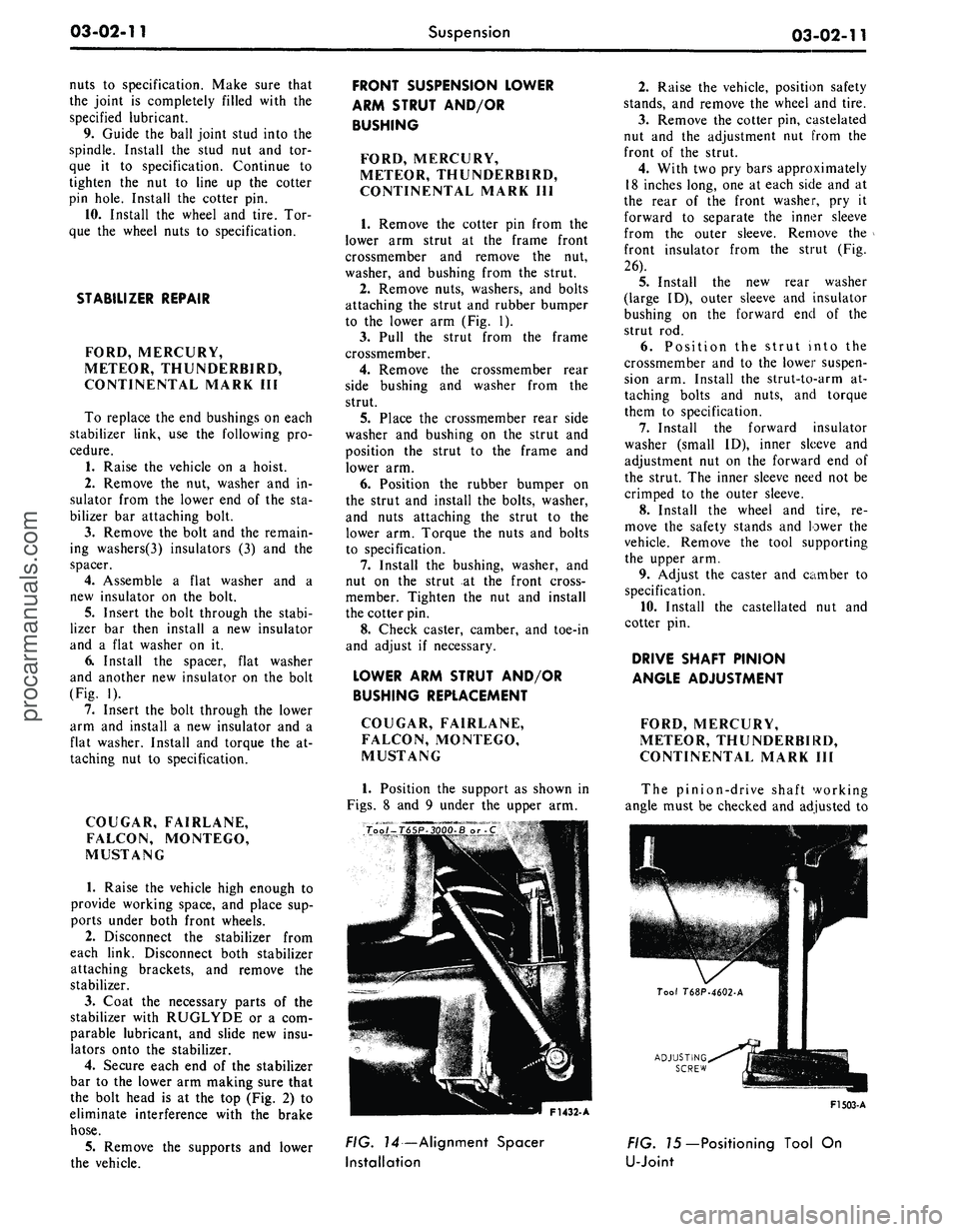
Position the support as shown in
Figs.
8 and 9 under the upper arm.
2.
Raise the vehicle, position safety
stands, and remove the wheel and tire.
3.
Remove the cotter pin, castelated
nut and the adjustment nut from the
front of the strut.
4.
With two pry bars approximately
18 inches long, one at each side and at
the rear of the front washer, pry it
forward to separate the inner sleeve
from the outer sleeve. Remove the
front insulator from the strut (Fig.
26).
5.
Install the new rear washer
(large ID), outer sleeve and insulator
bushing on the forward end of the
strut rod.
6. Position the strut into the
crossmember and to the lower suspen-
sion arm. Install the strut-to-arm at-
taching bolts and nuts, and torque
them to specification.
7.
Install the forward insulator
washer (small ID), inner sleeve and
adjustment nut on the forward end of
the strut. The inner sleeve need not be
crimped to the outer sleeve.
8. Install the wheel and tire, re-
move the safety stands and lower the
vehicle. Remove the tool supporting
the upper arm.
9. Adjust the caster and camber to
specification.
10.
Install the castellated nut and
cotter pin.
DRIVE SHAFT PINION
ANGLE ADJUSTMENT
FORD, MERCURY,
METEOR, THUNDERBIRD,
CONTINENTAL MARK III
The pinion-drive shaft working
angle must be checked and adjusted to
ADJUSTING
SCREW
F1432- A
F1503-A
FIG. 14—Alignment Spacer
Installation
FIG. 75—Positioning Tool On
U-Jointprocarmanuals.com
Page 97 of 413

03-02-21
Suspension
03-02-21
8. Place a box wrench over the
lower end of the ball joint remover
tool, and position the tool as in Fig.
13.
The tool should seat firmly against
the ends of both studs, and not
against the stud nuts.
9. Turn the wrench until both studs
are under tension, and then, tap the
spindle with a hammer near the studs
to loosen them from the spindle. Do
not loosen
the
studs with tool pressure
alone.
10.
Place a jack under the outer
end of the lower arm, and raise the
arm several inches. Remove both ball
stud nuts, and remove t^e spindle.
Installation
1.
Position the new spindle onto the
upper and lower ball joint studs, in-
stall the stud nuts and tighten the nuts
to specifications. Continue to tighten
both nuts until the cotter pin holes
line up with the slots, then install new
cotter pines.
2.
Connect the spindle connecting
rod to the spindle arm. Install the re-
taining nut and tighten the nut to
specification. Continue to tighten the
nut until the cotter pin hole lines up
with the slot, then install a new cotter
pin.
3.
Install the gasket and splash
shield on the spindle. Tighten the at-
taching bolts to specifications.
4.
Install the hub and rotor on the
spindle.
5.
Install the caliper to the spindle
and tighten the attaching bolts to spe-
cifications. Check for the correct flex-
ible hose routing (Part 2-2).
6. Install the wheel and tire and ad-
just the wheel bearings (Part 3-12).
7.
Lubricate the steering stop on
the lower arm and the mating flat on
the spindle with the specified lubri-
cant.
8. Remove the safety stands, lower
the car and check camber, caster and
toe-in.
FRONT SHOCK ABSORBER
REPLACEMENT
FORD, MERCURY,
METEOR, THUNDERBIRD,
CONTINENTAL MARK III
1.
Remove the nut, washer, and
bushing from the shock absorber
upper end.
2.
Raise the vehicle on a hoist and
install safety stands.
3.
Remove 2 bolts attaching the
shock absorber to the lower arm and
remove the shock absorber.
4.
Place a washer and bushing on
the shock absorber top stud and posi-
tion the shock absorber inside the
front spring. Install the 2 lower at-
taching bolts and torque them to spe-
cifications.
5.
Remove the safety stands and
lower the vehicle.
6. Place a bushing and washer on
the shock absorber top stud and in-
stall the attaching nut. Torque it to
specification.
COUGAR, FAIRLANE,
FALCON, MONTEGO,
MUSTANG
Removal
1. Raise the hood and remove 3
shock absorber upper mounting
bracket-to-spring tower attaching
nuts.
2.
Raise the front of the vehicle and
place safety stands under the lower
arms.
3.
Remove 2 shock absorber lower
attaching nuts and washers.
4.
Lift the shock absorber and
upper bracket from the spring tower
(Fig. 26) and remove the bracket from
the shock absorber.
Installation
1. Install the upper mounting
bracket on the shock absorber and
torque to specification.
2.
Position the shock absorber and
upper mounting bracket in the spring
tower, making sure the shock absor-
ber lower studs are in the pivot plate
holes.
3.
Install the 2 washers and attach-
ing nuts on the shock absorber lower
studs and torque to specification.
4.
Install the 3 shock absorber
upper mounting bracket-to-spring
tower attaching nuts and torque to
specification. Then, remove the safety
stands and lower the vehicle.
LINCOLN CONTINENTAL
Removal
1.
Remove the stud nut at the
upper eye of the shock absorber. Re-
move the upper eye stud bracket to
crossmember attaching bolt and re-
move the stud bracket. Refer to Fig.
22.
2.
Remove the bolts which attach
the shock absorber to the suspension
lower arm. Lower, and remove the
shock absorber.
3.
Examine the shock absorber unit
and rubber bushings. Replace parts
that are defective, deteriorated, or
worn.
Installation
1. Fully extend the shock absorber
and position it inside the coil spring.
Connect the lower end of the shock
absorber to the suspension lower arm.
Torque the attaching nuts to specifica-
tion.
2.
Insert the upper bracket stud
through the bushing in the shock ab-
sorber upper eye. Install the stud
bracket to crossmember attaching
bolt. Do not tighten the bolt: at this
time.
3.
Install the upper eye bracket
stud nut. Torque the nut to specifica-
tion.
4.
Torque the stud bracket- to-
crossmember attaching bolt to specifi-
cation.
The
shock absorber upper
eye
stud
nut
must
be
tightened
to com-
press
the
rubber bushing before
the
stud bracket
is
bolted
to the
crossmember;
otherwise,
the
upper
at-
tachment could
be
loose
and
noisy.
REAR SHOCK ABSORBER
REPLACEMENT
FORD, MERCURY,
METEOR, THUNDERBIRD,
CONTINENTAL MARK 1(11
1.
Raise the vehicle on a hoist.
2.
Remove the shock absorber at-
taching nut, washer and insulator
from the upper stud at the upper side
of the spring upper seat. Compress the
shock absorber to clear the hole in the
spring seat, and remove the inner in-
sulator and washer from the upper at-
taching stud.
3.
Remove the self-locking attach-
ing nut, and disconnect the shock ab-
sorber lower stud from the mounting
bracket on the rear axle housing (Fig.
4).
4.
Expel all air by performing step
3 On Vehicle Tests in Part 3-1.
5.
Place the inner washer and insu-
lator on the upper attaching stud, and
position the shock absorber so that
the upper attaching stud enters the
hole in the spring upper seat. While
holding the shock absorber in this po-
sition, install the outer insulator andprocarmanuals.com
Page 173 of 413

03-12-02
Wheels
And
Tires
03-12-02
LIFE GUARD TIRE
The Goodyear Power Cushion Tire
(available
on
Thunderbird, Lincoln
and Continental Mark
III
models)
fit-
ted with
the
Life Guard Safety Spare
provides
a
tire within
a
tire with
two
separate
air
chambers
(Fig.
3). If the
outer tire casing should
be
punctured
or otherwise damaged causing
it to go
flat,
the
Life Guard Safety Spare will
carry
the
load
of the
vehicle
and
will
allow driving
at
speeds
up to 40 mph
with good control
up to a
distance
of
40 miles.
A
Safety-Signal built into
the Life Guard tread produces
a
lope
or vibration indicating
the
outer tire
has lost pressure.
HUB AND ROTOR
ASSEMBLY
INNER
BEARING
CUP
GREASE
RETAINER
ADJUSTING
NUT
OUTER
BEARING
CONE
AND
ROLLER
INNER BEARING
CONE
AND
ROLLER
WHEEL
ASSEMBLY
F1416-A
F- 1380 •
A
FIG. 2—Front
Hub and
Rotor Bearing
and
Grease
Retainer Disc Brakes—Typical
FIG. 3—Life Guard Safety
Tire—Sectional View
IN-VEHICLE ADJUSTMENTS AND REPAIRS
HOISTING INSTRUCTIONS
Damage
to
steering linkage compo-
nents
and
front suspension struts
may
occur
if
care
is
not
exercised when
po-
sitioning
the
hoist adapters
of 2
post
hoists prior
to
lifting
the
vehicle.
If
a 2
post hoist
is
used
to
lift
the
vehicle, place
the
adapters under
the
lower arms
or
the No. 1
crossmember.
Do
not
allow
the
adapters
to
contact
steering linkage.
If the
adapters
are
placed under
the
crossmember,
a
piece
of wood (2x4x16 inches) should
be
placed
on the
hoist channel between
the adapters. This will prevent
the
adapters from damaging
the
front
sus-
pension struts.
FRONT WHEEL BEARING
ADJUSTMENT
The front wheel bearings should
be
adjusted
if the
wheel
is
loose
on the
spindle
or if the
wheel does
not
rotate
freely.
The
following procedures will
bring
the
bearing adjustment
to
speci-
fication.
DRUM BRAKES
1.
Raise
the
vehicle until
the
wheel
and tire clear
the
floor.
2.
Pry off the hub cap or
wheel
cover
and
remove
the
grease
cap (Fig.
1) from
the hu6.
3.
Wipe
the
excess grease from
the
end
of the
spindle,
and
remove
the
cotter
pin and nut
lock.
4.
While rotating
the
wheel,
hub,
and drum assembly, torque
the
adjust-
ing
nut to 17-25
ft-lbs
to
seat
the
bearings
(Fig.
4).
5.
Locate
the nut
lock
on the ad-
justing
nut so
that
the
castellations
on
the lock
are
aligned with
the
cotter
pin hole
in the
spindle.
6. Using
a 1
1/8-inch
box
wrench,
WITH WHEEL ROTATING
TORQUE ADJUSTING
NUT
TO 17-25 FT. LBS.
BACK ADJUSTING
NUT
OFF
1/2
TURN
back
off the
adjusting
nut one
half
turn. Retighten
the
adjusting
nut to
10-15 in-lbs with
a
torque wrench
or
finger tight.
7.
Position
the
lock
on the
adjust-
ing
nut and
install
a new
cotter
pin.
Bend
the
ends
of
the
cotter
pin
around
the castellated flange
of the nut
lock.
8. Check
the
front wheel rotation.
If
the
wheel rotates properly, install
the grease
cap and the hub cap or
wheel cover.
If the
wheel still rotates
roughly
or
noisily, clean, inspect
or
replace
the
bearings
and
cups
as re-
quired.
TIGHTEN ADJUSTING
NUT
TO
10-15 IN.-LBS.
INSTALL THE LOCK
AND
A
NEW COTTER
PIN
F1417-A
FIG. 4— Front Wheel Bearing Adjustmentprocarmanuals.com
Page 174 of 413

03-12-03
Wheels And Tires
03-12-03
DISC BRAKES
1.
Raise the vehicle until the wheel
and tire clear the floor.
2.
Pry off the wheel cover and re-
move the grease cap (Fig. 2) from the
hub.
3.
Wipe the excess grease from the
end of the spindle, and remove the ad-
justing nut cotter pin and nut lock.
4.
Loosen the bearing adjusting nut
three turns. Then, rock the wheel,
hub,
and rotor assembly in and out
several times to push the shoe and lin-
ings away from the rotor.
5.
While rotating the wheel, hub,
and rotor assembly, torque the adjust-
ing nut to 17-25 ft-lbs to seat the
bearings (Fig. 4).
6. Back the adjusting nut off one
half turn. Then, retighten the adjust-
ing nut to 10-15 in-lbs with a torque
wrench or finger tight.
7.
Locate the nut lock on the ad-
justing nut so that the castellations on
the lock are aligned with the cotter
pin hole in the spindle.
8. Install a new cotter pin, and
bend the ends of the cotter pin around
the castellated flange of the nut lock.
9. Check the front wheel rotation.
If the wheel rotates properly, install
the grease cap and the hub cap or
wheel cover. If the wheel still rotates
roughly or noisily, clean or replace the
bearings and cups as required.
10.
Before driving the vehicle,
pump the brake pedal several times to
obtain normal brake lining to rotor
clearance and restore normal brake
pedal travel.
BALANCING LIFE
GUARD TIRE
Tires fitted with the Life Guard
Safety Spare are balanced in the same
manner as conventional tires. If an ex-
cessive out of balance condition exists
the following procedure can be used to
correct the condition:
1.
Remove the core housing and de-
flate both air chambers.
2.
Install the core housing.
3.
Unseat the beads of tire with the
bead breakers away from the valve
stem as shown in Fig. 5.
F 1383
FIG. 5—Breaking Top Bead of
Tire From Wheel Rim
4.
Rotate tire casing 90 degrees on
the wheel rim.
5.
Rotate the tire casing back and
forth on the rim to center the valve.
6. Inflate both chambers of the tire
following steps 13 through 15 of the
Tire Installation procedure.
7.
Balance the tire in the normal
manner.
CORRECTING VIBRATION
AND SHAKE-
LIFE GUARD TIRE
The condition of excessive vibration
and shake is generally the result of an
incorrect pressure relationship between
the inner and outer air chambers that
may cause the life guard to shift posi-
tion within the tire. The following
procedure should be used to correct
vibration and shake conditions:
1.
Check pressure of the inner and
outer air chambers on all four tires.
2.
If the inner chamber has at least
five psi more pressure than the outer
chamber the pressures should be ad-
justed and the tires rebalanced if nec-
essary.
3.
If the pressures of the inner and
outer air chambers are equal the Air
Container is leaking. To repair the
leaking air container the recommend-
ed procedures for the removal, repair
of air container, mounting, and bal-
ancing should be followed.
REMOVAL AND INSTALLATION
HOISTING INSTRUCTIONS
Damage to steering linkage compo-
nents and front suspension struts may
occur if care is not exercised when po-
sitioning the hoist adapters of 2 post
hoists prior to lifting the vehicle.
If a 2 post hoist is used to lift the
vehicle, place the adapters under the
lower arms or the No. 1 crossmember.
Do not allow the adapters to contact
the steering linkage. If the adapters
are placed under the crossmember, a
piece of wood (2x4x16 inches) should
be placed on the hoist channel be-
tween the adapters. This will prevent
the adapters from damaging the front
suspension struts.
WHEELS AND TIRES
WHEEL AND TIRE
REMOVAL
1.
Pry off the wheel hub cap or
wheel cover. Loosen but do not re-
move the wheel hub nuts.
2.
Raise the vehicle until the
wheel and tire clear the floor.
3.
Remove the wheel hub nuts
from the bolts, and pull the wheel
and tire from hub and drum.
F1424-
A
FIG.
6—Bead
Loosening Tool
REMOVING CONVENTIONAL
TIRE FROM WHEEL
The tire can be demounted on a
mounting machine. Be sure that the
outer side of the wheel is positioned
downward. If tire irons are used, fol-
low the procedure given here.
1.
Remove the valve cap and core,
and deflate the tire completely.
2.
With a bead loosening tool,
break loose the tire side walls from
the wheel (Fig. 6).
3.
Position the outer side of the
wheel downward, and insert two tire
irons about eight inches apart between
the tire inner bead and the back side
of the wheel rim. Use only tire irons
with rounded edges or irons designed
for removing tubeless tires.
4.
Leave one tire iron in position,
and pry the rest of the bead over the
rim with the other iron. Take small
bites with the iron around the tire inprocarmanuals.com