1969 FORD MUSTANG gas
[x] Cancel search: gasPage 327 of 413

07-02-19
C4 Automatic Transmission
07-02-19
Tool-T64P-7A128-A
OIL
SCREEN
LOWER
VALVE BODY
-,
-^L*«^M*if
GASKET
UPPER
VALVE BODY
D1891-A
FIG. 54—Upper and Lower Valve Bodies Disassembled
MANUAL VALVE
D1892-A
FIG. 56—Removing Manual Valve
Exert downward pressure on the tool
and turn it counterclockwise until the
insert is removed.
CONTROL VALVE BODY
Disassembly
1.
Remove the eight screws that at-
tach the oil screen to the body and re-
move the screen (Fig. 54).
2.
Remove the seven attaching
screws from the underside of the lower
valve body. Separate the lower valve
body, gasket, separator plate and
hold-down plates (Fig. 55) from the
upper valve body. Be careful not to
lose the upper valve body steel ball
shuttle valve and spring when separat-
ing the upper and lower valve bodies.
3.
Depress the manual valve detent
spring with the tool shown in Fig. 56.
Remove the spring retaining pin (roll
SEPARATOR
PLATE
pin) from the upper valve body. Re-
move the spring and detent plunger.
4.
Slide the manual valve out of the
body.
5.
Remove the cut-back and the
back-out valve cover plate from the
valve body (Fig. 57).
6. Remove the cut-back valve from
the body.
7.
Remove the 2-3 back-out valve,
spring and the manual low valve from
the body.
8. Remove the 1-2 shift valve and
2-3 shift valve cover plate from the
valve body.
9. Remove the 2-3 shift valve and
the throttle modulator valve from the
body.
10.
Remove the 1-2 shift valve, D2
valve and the spring from the body.
11.
Remove the intermediate band
accumulator valve cover plate from
the valve body.
RUBBER BALL
SHUTTLE VALVE
SERVO
CHECK VALVE
RUBBER BALL
SHUTTLE VALVE
UPPER VALVE
BODY
D 1726-A
FIG. 55—Separating Upper and Lower Valve Bodies
12.
Remove the intermediate accu-
mulator sleeve, 3-2 control valve,
spring and the intermediate servo ac-
cumulator valve.
13.
Remove the pressure booster
valve, cover plate (Fig. 57).
14.
Remove the pressure booster
valve, sleeve, springs and the main re-
gulator valve.
15.
Remove the spring and the line
pressure coasting boost valve (Fig.
57).
16.
Carefully pry the downshift
valve retainer from the body, then re-
move the spring and valve.
17.
Hold the upper valve body as
shown in Fig. 58 and depress the
throttle booster valve plug to release
the retaining pin. Remove the plug,
valve and the spring.
18.
Remove the two hold-down
plates and the separator plate from
the lower body. Be careful not to lose
the rubber ball shuttle valve when re-
moving the separator plate and gasket
from the lower valve body.
Assembly
1.
Place the rubber ball shuttle
valve in the lower body as shown in
Fig. 55. Position the separator plate
and the two hold-down plates on the
lower valve body and install the four
attaching screws and torque them to
specification.
2.
Place the throttle booster valve
spring, valve (long end into spring)
and the plug (Fig. 57). Depress the
plug and install the retaining pin.
3.
Insert the downshift valve into
the body with the large diameter fac-
ing inward. Install the downshift valve
spring and the retainer (Fig. 57).procarmanuals.com
Page 329 of 413

07-02-21
C4 Automatic Transmission
07-02-21
D1893-A
FIG. 58—Removing or Installing
Throttle Booster Valve
4.
Insert the line pressure coasting
boost valve and spring in the body
(Fig. 57).
5.
Place the main regulator valve in
the body (Fig. 57) with the large di-
ameter facing inward. Install the two
springs and the pressure booster valve
and sleeve.
6. Hold the pressure booster valve
cover plate in place and install the
three attaching screws and torque
them to specification.
7.
Place the intermediate servo ac-
cummulator valve and spring in the
body. Install the interim iiate accum-
mulator sleeve and 3-2 control valve.
Secure the cover to the body with the
attaching screw. Torque the screw to
specifications.
8. Position the spring, D2 valve and
the I-2 shift valve in the body.
9. Place the throttle modulator
valve, spring, and 2-3 shift valve in the
body.
10.
Secure the 1-2 shift valve and
the 2-3 valve cover plate to the body
and torque the screws to specifica-
tions.
11.
Place the manual low valve,
spring, and the 2-3 back-out valve in
the body.
12.
Place the cut-back valve in the
body.
13.
Secure the cut-back and the
back-out cover plate to the body with
two screws. Torque the screws to
specifications.
14.
Slide the manual valve into the
body making sure that the notch for
the manual lever is toward the inside
and that the detent notches are facing
upward.
15.
Place the detent plunger and
spring in the body. Depress the spring
and install a new roll pin.
16.
Position a new rubber check
valve in the upper valve body (Fig.
55).
17.
Position the check valve and
spring in the upper valve body (Fig.
55).
Place a new gasket, the separator
plate and the lower valve body in
place on the upper valve body and se-
cure it with the seven attaching
screws. Torque the screws to specifica-
tions.
18.
Secure the oil screen to the
body with the eight attaching screws.
Torque the screws to specifications.
FRONT PUMP
Disassembly
1.
Remove the four seal rings from
stator support.
2.
Remove the five bolts that attach
the stator support to the front pump
housing. Remove the stator support
from the pump housing (Fig. 59).
3.
Remove the front and rear stator
bushings if they are worn or damaged.
Use the cape chisel (Fig. 60) and cut
along the bushing seam until the chisel
D 1731-A
FIG. 60—Removing Stator
Support Bushing
breaks through the bushing wall. Pry
the loose ends of the bushing up with
an awl and remove the bushing.
4.
Remove the drive and driven
gears from the front pump housing.
5.
Press the bushing from the front
pump housing as shown in Fig. 61.
Assembly
1.
Press a new bushing into the
pump housing with the handle and
tool shown in Fig. 61. Make sure the
bushing is installed with the slot and
groove positioned to the rear of the
pump body and 60 degrees below the
horizontal center line.
2.
Install the drive and driven gears
in the pump housing. Each gear has
an identification mark on the side of
the gear teeth that are chamfered. The
chamfered side with the identification
PUMP HOUSING
STATOR SUPPORT
FRONT PUMP SEAL
SEAL RINGS
SELECTIVE
THRUST WASHERS
GASKET
D 1894-B
59—Front Pump and Stator Support Disassembledprocarmanuals.com
Page 335 of 413
07-02-27
C4 Automatic Transmission
07-02-27
'OIL RINGS
SNAP RING
SECONDARY
GOVERNOR VALVE
1 v s
GOVERNOR HOUSING
D1907-A
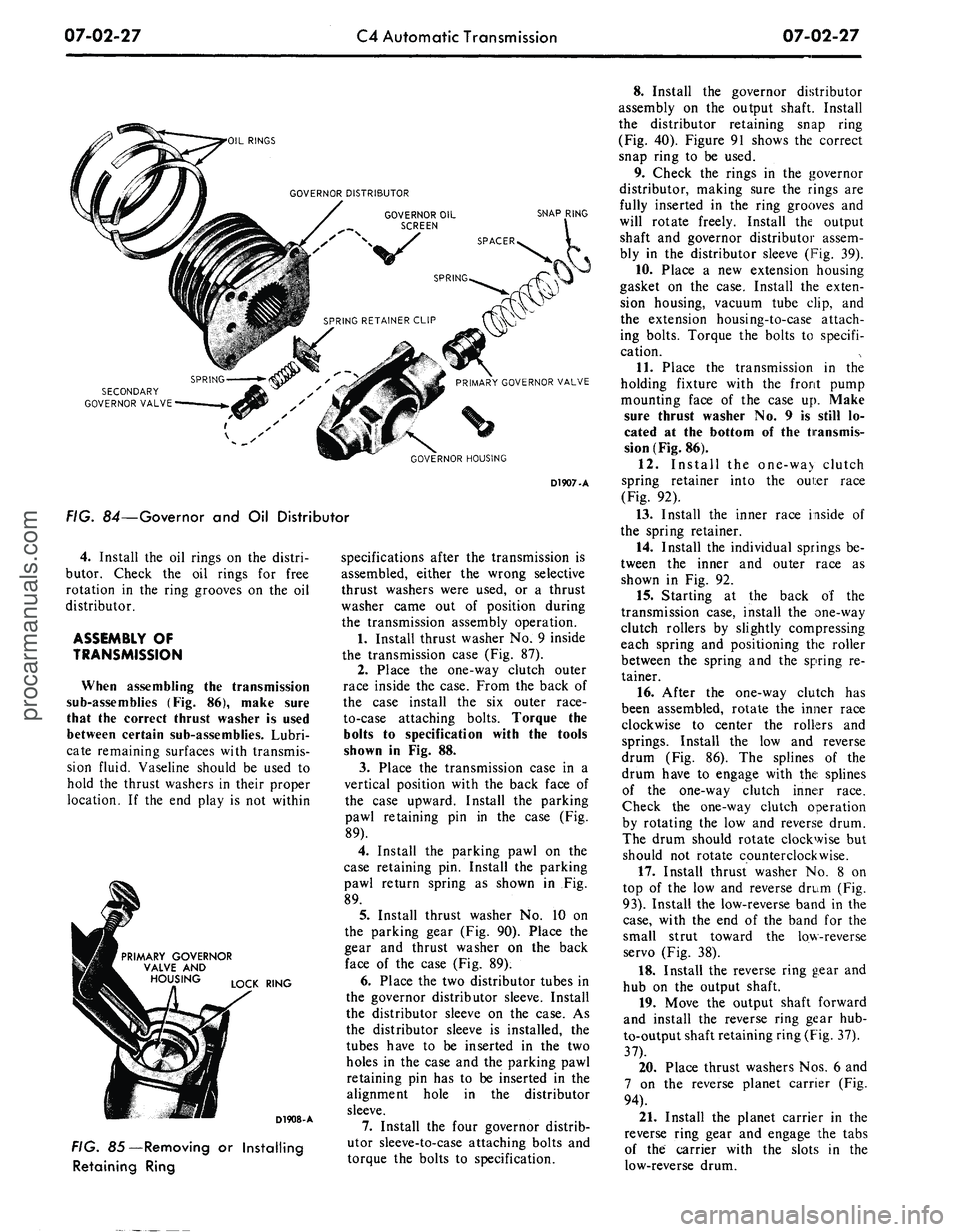
FIG. 84—Governor and Oil Distributor
4.
Install the oil rings on the distri-
butor. Check the oil rings for free
rotation in the ring grooves on the oil
distributor.
ASSEMBLY OF
TRANSMISSION
When assembling the transmission
sub-assemblies (Fig. 86), make sure
that the correct thrust washer is used
between certain sub-assemblies. Lubri-
cate remaining surfaces with transmis-
sion fluid. Vaseline should be used to
hold the thrust washers in their proper
location. If the end play is not within
PRIMARY GOVERNOR
VALVE AND
LOCK RING
D1908-A
FIG. 85—Removing or Installing
Retaining Ring
specifications after the transmission is
assembled, either the wrong selective
thrust washers were used, or a thrust
washer came out of position during
the transmission assembly operation.
1.
Install thrust washer No. 9 inside
the transmission case (Fig. 87).
2.
Place the one-way clutch outer
race inside the case. From the back of
the case install the six outer race-
to-case attaching bolts. Torque the
bolts to specification with the tools
shown in Fig. 88.
3.
Place the transmission case in a
vertical position with the back face of
the case upward. Install the parking
pawl retaining pin in the case (Fig.
89).
4.
Install the parking pawl on the
case retaining pin. Install the parking
pawl return spring as shown in Fig.
89.
5.
Install thrust washer No. 10 on
the parking gear (Fig. 90). Place the
gear and thrust washer on the back
face of the case (Fig. 89).
6. Place the two distributor tubes in
the governor distributor sleeve. Install
the distributor sleeve on the case. As
the distributor sleeve is installed, the
tubes have to be inserted in the two
holes in the case and the parking pawl
retaining pin has to be inserted in the
alignment hole in the distributor
sleeve.
7.
Install the four governor distrib-
utor sleeve-to-case attaching bolts and
torque the bolts to specification.
8. Install the governor distributor
assembly on the output shaft. Install
the distributor retaining snap ring
(Fig. 40). Figure 91 shows the correct
snap ring to be used.
9. Check the rings in the governor
distributor, making sure the rings are
fully inserted in the ring grooves and
will rotate freely. Install the output
shaft and governor distributor assem-
bly in the distributor sleeve (Fig. 39).
10.
Place a new extension housing
gasket on the case. Install the exten-
sion housing, vacuum tube clip, and
the extension housing-to-case attach-
ing bolts. Torque the bolts to specifi-
cation.
11.
Place the transmission in the
holding fixture with the front pump
mounting face of the case up. Make
sure thrust washer No. 9 is still lo-
cated at the bottom of the transmis-
sion (Fig. 86).
12.
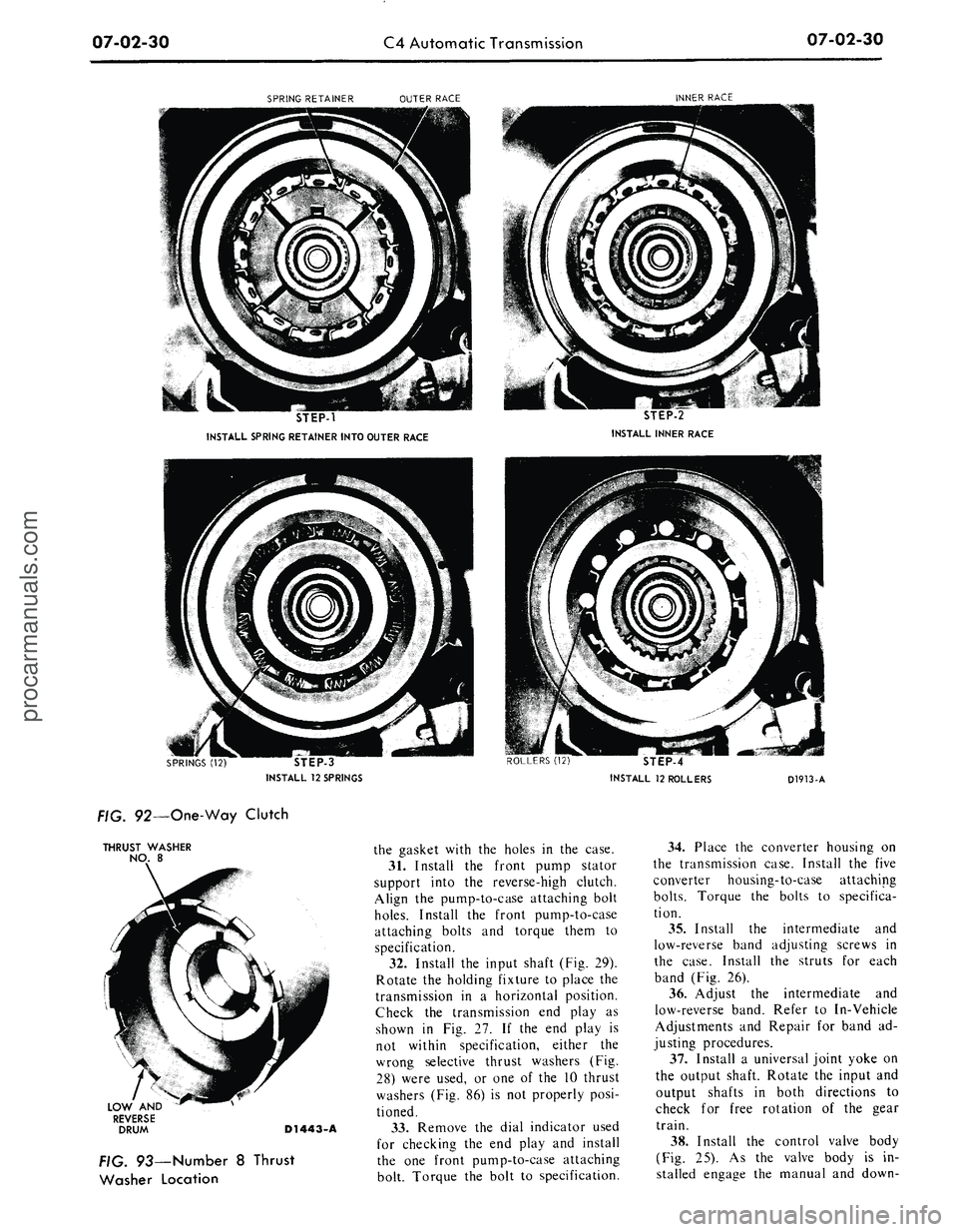
Install the one-wa> clutch
spring retainer into the oui:er race
(Fig. 92).
13.
Install the inner race inside of
the spring retainer.
14.
Install the individual springs be-
tween the inner and outer race as
shown in Fig. 92.
15.
Starting at the back of the
transmission case, install the one-way
clutch rollers by slightly compressing
each spring and positioning the roller
between the spring and the spring re-
tainer.
16.
After the one-way clutch has
been assembled, rotate the inner race
clockwise to center the rollers and
springs. Install the low and reverse
drum (Fig. 86). The splines of the
drum have to engage with the splines
of the one-way clutch inner race.
Check the one-way clutch operation
by rotating the low and reverse drum.
The drum should rotate clockwise but
should not rotate counterclockwise.
17.
Install thrust washer No. 8 on
top of the low and reverse drum (Fig.
93).
Install the low-reverse band in the
case,
with the end of the band for the
small strut toward the low-reverse
servo (Fig. 38).
18.
Install the reverse ring gear and
hub on the output shaft.
19.
Move the output shaft forward
and install the reverse ring gear hub-
to-output shaft retaining ring (Fig. 37).
37).
20.
Place thrust washers Nos. 6 and
7 on the reverse planet carrier (Fig.
94).
21.
Install the planet carrier in the
reverse ring gear and engage the tabs
of the carrier with the slots in the
low-reverse drum.procarmanuals.com
Page 336 of 413

07-02-28
C4
Automatic Transmission
07-02-28
y
Q
!
17
3*1
-
"
-N
1.
2.
3.
4.
5.
6.
7.
8.
9.
10.
11.
CONVERTER
INPUT SHAFT
CONVERTER HOUSING
FRONT PUMP
THRUST WASHER
NO. 1
THRUST WASHER
NO. 2
FRONT PUMP GASKET
INTERMEDIATE BAND
BAND STRUTS
REVERSE
AND
HIGH
CLUTCH DRUM
FORWARD CLUTCH
AND
CYLINDER
12.
13.
14.
15.
16.
17.
18.
19.
20.
THRUST WASHER
NO. 3
FORWARD CLUTCH
HUB
AND RING GEAR
THRUST WASHER
NO. 4
FRONT PLANET CARRIER
INPUT SHELL,
SUN
GEAR
AND THRUST WASHER
NO.
THRUST WASHER
NO. 6
REVERSE PLANET CARRIER
THRUST WASHER
NO. 7
SNAP RING
21.
22.
23.
24.
25.
26.
27.
28.
29.
REVERSEH*ING GEAR
AND
HUB
LOW
AND
REVERSE BAND
BAND STRUTS
THRUST WASHER
NO. 8
LOW
AND
REVERSE DRUM
ONE-WAY CLUTCH
INNER RACE
ROLLER
(12) AND
SPRING
(12)
SPRING
AND
ROLLER CAGE
ONE-WAY CLUTCH OUTER
RACE
30.
31.
32.
33.
34.
35.
36.
37.
38.
39.
40.
THRUST WASHER NO. 9
CASE
THRUST WASHER NO. 10
PARKING GEAR
GOVERNOR DISTRIBUTOR
SLEEVE
SNAP RING
GOVERNOR VALVES
&
DISTRIBUTOR
OUTPUT SHAFT
EXTENSION HOUSING
AND
GASKET
CONTROL VALVE BODY
OIL
PAN AND
GASKET
D 1378-D
FIG.
86—Transmission Sub-Assembliesprocarmanuals.com
Page 337 of 413

07-02-29
C4 Automatic Transmission
07-02-29
THRUST WASHER
NO. 9
PARKING GEAR
BOTTOM
OF CASE
FIG. 87—Number
9
Thrust
Washer Location
Tool-T65P-7B456-B
D1910-A
FIG. 88—Installing One-Way
Clutch Outer Race Attaching Bolts
REJURN
S
PAWL
PARKING
GEAR RETAINING
PIN
D1440-A
FIG. 89— Parking Pawl
and
Gear
THRUST
WASHER
NO.
10
D1911-A
FIG. 90—Number
10
Thrust
Washer Location
22.
On the
bench, install
the for-
ward clutch
in the
reverse-high clutch
by rotating
the
units
to
mesh
the
reverse-high clutch plates with
the
splines
of
the
forward clutch
(Fig. 95).
23.
Using
the end
play check read-
ing that
was
obtained during
the
transmission disassembly
to
determine
which
No.
2
steel backed thrustwasher
is required, proceed
as
follows:
a.
Position
the
stator support verti-
cally
on the
work bench
and
install
the correct
No. 2
thrustwasher
to
bring
the end
play within specifica-
tions.
RETAINS REVERSE RING GEAR
AND
HUB
TO
OUTPUT SHAFT
RETAINS GOVERNOR DISTRIBUTOR
TOOUTPUTSHAFT
D1549-A
FIG. 91—Governor
and
Reverse
Ring Hub-Retaining Snap Ring
Identification
b.
Install
the
reverse-high clutch
and
the
forward clutch
on the
stator
support.
c. Invert
the
complete unit making
sure that
the
intermediate brake drum
bushing
is
seated
on the
forward
clutch mating surface.
d.
Select
the
thickest fiber washer
(No.
1)
that
can be
inserted between
the stator support
and the
intermedi-
ate brake drum thrust surfaces
and
still maintain
a
slight clearance.
Do
not select
a
washer that must
be
forced between
the
stator support
and
intermediate brake drum.
e. Remove
the
intermediate brake
drum
and
forward clutch unit from
the stator support.
f.
Install
the
selected
Nos.
1 and 2
thrustwashers
on the
front pump
sta-
tor support
(Fig.
28)
using enough
vaseline
to
hold
the
thrust washers
in
position during
the
front pump instal-
lation.
24.
Install thrust washer
No.
3 on
the forward clutch
(Fig. 96).
25.
Install
the
forward clutch
hub
and ring
in the
forward clutch
by ro-
tating
the
units
to
mesh
the
forward
clutch plates with
the
splines
on the
forward clutch
hub (Fig. 97).
26.
Install thrust washer
No.
4 on
the front planet carrier
(Fig. 98).
In-
stall
the
front planet carrier into
the
forward clutch
hub and
ring gear.
Check
the
forward thrust bearing race
inside
the
planet carrier
for
proper
location against
the
thrust bearing.
Make sure
the
race
is
centered
for
alignment with
the sun
gear
on the
input shell
(Fig. 99).
27.
Install
the
input shell
and sun
gear
on
the
gear train
(Fig. 100). Ro-
tate
the
input shell
to
engage
the
drive
lugs
of the
reverse-high clutch.
If the
drive lugs will
not
engage,
the
outer
race inside
the
forward planet carrier
is
not
centered
to
engage
the end of
the
sun
gear inside
the
input shell.
Center
the
thrust bearing race
and
in-
stall
the
input shell.
28.
Hold
the
gear train together
and install
the
forward part
of the
gear train assembly
in the
case
(Fig.
33).
The input shell
sun
gear must mesh
with
the
reverse pinion gears.
The
front planet carrier internal splines
must mesh with
the
splines
on the out-
put shaft.
29.
A
new
band should
be
soaked
in transmission fluid
for
fifteen
min-
utes before
it is
installed. Install
the
intermediate band through
the
front
of
the case
(Fig. 31).
30.
Install
a
new
front pump gasket
on
the
case. Line
up
the
bolt holes
inprocarmanuals.com
Page 338 of 413
07-02-30
C4 Automatic Transmission
07-02-30
SPRING RETAINER
OUTER RACE
INNER RACE
STEP-1
INSTALL SPRING RETAINER INTO OUTER RACE
STEP-2
INSTALL INNER RACE
STEP-3
INSTALL
12
SPRINGS
ROLLERS
(12)
STEP-4
INSTALL
12
ROLLERS
D1913-A
FIG. 92—One-Way Clutch
THRUST
WASHER
NO.
8
LOW
AND
REVERSE
DRUM
D1443-A
FIG. 93—Number
8
Thrust
Washer Location
the gasket with
the
holes
in the
case.
31.
Install
the
front pump stator
support into
the
reverse-high clutch.
Align
the
pump-to-case attaching bolt
holes.
Install
the
front pump-to-case
attaching bolts
and
torque them
to
specification.
32.
Install
the
input shaft
(Fig.
29).
Rotate
the
holding fixture
to
place
the
transmission
in a
horizontal position.
Check
the
transmission
end
play
as
shown
in Fig. 27. If the end
play
is
not within specification, either
the
wrong selective thrust washers
(Fig.
28) were used,
or one of the 10
thrust
washers
(Fig.
86) is not
properly posi-
tioned.
33.
Remove
the
dial indicator used
for checking
the end
play
and
install
the
one
front pump-to-case attaching
bolt. Torque
the
bolt
to
specification.
34.
Place
the
converter housing
on
the transmission case. Install
the
five
converter housing-to-case attaching
bolts.
Torque
the
bolts
to
specifica-
tion.
35.
Install
the
intermediate
and
low-reverse band adjusting screws
in
the case. Install
the
struts
for
each
band
(Fig.
26).
36.
Adjust
the
intermediate
and
low-reverse band. Refer
to
In-Vehicle
Adjustments
and
Repair
for
band
ad-
justing procedures.
37.
Install
a
universal joint yoke
on
the output shaft. Rotate
the
input
and
output shafts
in
both directions
to
check
for
free rotation
of the
gear
train.
38.
Install
the
control valve body
(Fig.
25). As the
valve body
is in-
stalled engage
the
manual
and
down-procarmanuals.com
Page 339 of 413

07-02-31
C4 Automatic Transmission
07-02-31
REVERSE PLANET CARRIER
THRUST WASHER NO. 7
THRUST WASHER NO. 6
FIG. 94 —Number 6 and 7 Thrust Washer Location
D1444-A
shift valves with the inner control le-
vers.
Torque the control valve body-
to-case attaching bolts to specifica-
tion.
39.
Place a new pan gasket on the
case and install the pan and pan-
to-case attaching bolts. Torque the at-
taching bolts to specification.
40.
Remove the transmission from
FORWARD CLUTCH HUB
AND RING GEAR
FORWARD
CLUTCH
REVERSE-HIGH
CLUTCH
FORWARD
CLUTCH
D1914-A
FIG. 95—Installing Clutch Units
THRUST WASHER NO. 3 FORWARD
CLUTCH CYLINDER
REVERSE-HIGH CLUTCH
D1446-A
D1915-A
FIG. 96—Number 3 Thrust
Washer Location
FIG. 97—Installing Forward
Clutch Hub and Ring Gear
THRUS
WASHER
NO.
4
D1916-A
FIG. 98—Number 4 Thrust
Washer Location
the holding fixture. Install the two ex-
tension housing-to-case attaching
bolts.
Torque the bolts to specifica-
tion.
41
valve
Install the primary throttle
in the transmission case (Fig.
23).
42.
Install the vacuum unit, gasket,
and control rod in the case. Using the
tools shown in Fig. 101, torque the
vacuum unit to 15-23 ft-lbs.
FRONT PLANET
CARRIER
FORWARD CLUTCH
HUB AND
GEAR
FORWARD
CLUTCH
REVERSE-HIGH CLUTCH
FIG. 99—Installing Front
Planet Carrier
D1917-Aprocarmanuals.com
Page 349 of 413

07-03-09
FMX Transmission
07-03-09
4.
Remove the pointer back-up
shield attaching screws and the shield.
5.
Disconnect the dial indicator
light.
6. Disconnect the neutral start
switch and dial indicator light wires
from their connectors at the dash
panel.
7.
Remove the selector housing and
lever assembly attaching bolts. Re-
move the selector lever and housing.
8. Remove the selector lever to
housing attaching nut. Remove the
lever from the housing.
9. Install the selector lever in the
housing and install the attaching nut.
Torque the nut to 20 to 25 ft-lbs.
10.
Install the selector lever handle.
11.
Position the selector lever as
shown in Figure 10. With a feeler
gauge check the clearance between the
detent pawl and plate. The clearince
should be 0.005 to 0.010 inch. If nec-
essary, adjust the height of the detent
pawl as shown in Figure 10.
12.
Remo"~ the handle from tte se-
lector lever.
13.
Install the selector housing and
lever assembly as shown in Figure 4.
Torque the attaching bolts 4-6 ft-lbs.
14.
Connect the dial indicator light.
15.
Connect the neutral start switch
and dial indicator light wires to their
respective connectors at the dash
panel.
16.
Install the pointer back-up
shield and tighten the attaching
screws.
17.
Install the selector lever handle
and tighten the attaching screw.
18.
Position the selector lever in the
D position.
19.
Raise the vehicle. Install the
transmission manual lever rod to the
selector lever. Adjust the manual link-
age.
20.
Lower the vehicle and check the
transmission operation in each selec-
tor lever detent position.
BAND ADJUSTMENTS
FRONT BAND
ADJUSTMENT
1.
Drain the fluid from the trans-
mission by loosening the pan attach-
ing bolts starting at the rear of the
pan and working toward the front.
When most of the fluid has drained
from the pan, remove the remainder
of the attaching bolts. Use a clean
drain can equipped with a 100-mesh
screen if the fluid is to be reused.
Too/—
7225-C-13B
/A
-inch
Spacer
FRONT SERVO
ACTUATING LEVER
D 2048-A
FIG.
7
7—Adjusting Front Band—
Typical
2.
Remove the pan, then remove
the fluid filter and clip from the trans-
mission. Clean the inside of the pan.
Remove all gasket material from the
pan and pan mounting face of the
case.
3.
Loosen the front servo adjusting
screw lock nut.
4.
Pull back on the actuating rod,
and insert the 1/4 inch spacer between
the adjusting screw and servo piston
stem (Fig. 11). Tighten the adjusting
screw to 10 in-lbs. torque. Remove the
spacer and tighten the adjusting screw
an additional 3/4 turn. Hold the ad-
justing screw stationary and tighten
the lock nut securely.
5.
Install the transmission fluid
screen and clip. Install the pan using a
new gasket.
6. Refill the transmission to the
FULL mark on the dipstick.
7.
Start the engine and engage the
transmission in each drive range to fill
all fluid passages, then place the selec-
tor lever in the P position. Check the
fluid level and add enough fluid to
bring the level above the ADD mark
on the dipstick.
ALTERNATE FRONT
BAND ADJUSTMENT
1.
Drain the fluid from the trans-
mission. If the same fluid is to be
used again in the transmission after
Che band adjustment, filter the fluid
through a 100-mesh screen as it drains
from the transmission. Re-use the
fluid only if it is in good condition.
2.
Remove and thoroughly clean
the pan and screen. Discard the pan
gasket.
3.
Loosen the front servo adjusting
screw locknut two full turns with a
inch Driv
Detail #2
D.tai\
#3
T-Hond/e
Extension
Tool-758L-7195-A
f/2 inch Driv
Detail
#7
Qj-«—
TM-470 TM-82
D1950-A
FIG. 12—Front and Rear Band
Adjusting Tools
9/16-inch wrench. Check the. adjusting
screw for free rotation in the actuating
lever after the lock nut is loosened,
and free the screw if necessary.
4.
Pull the adjusting screw end of
the actuating lever away from the
servo body, and insert the 1/4 inch
spacer (Fig. 12) between the servo pis-
ton stem and the adjusting screw.
5.
Install the socket handle on the
9/16-inch socket.
6. Insert the T-handle extension
through the socket handle and socket,
and install the screwdriver socket on
the T-handle extension.
7.
Place the tool on the adjusting
screw so that the screwdriver socket
engages the screw and the 9/16-inch
socket engages the lock nut.
8. With a torque wrench on the T-
handle extension, tighten the adjusting
screw to 10 in-lbs torque.
9. Remove the spacer and tighten
the adjusting screw an additional 3/4
turn. Hold the adjusting screw station-
ary, and torque the lock nut to speci-
fication.
10.
Place a new gasket on the pan,
and install the screen and pan on the
transmission.
11.
Fill the transmission with fluid.
REAR BAND ADJUSTMENT—
FORD-METEOR
1.
Fold back the floor mat to ex-
pose the right side of the floor pan.
2.
Remove the access hole cover
from the floor pan. Remove all dirt
from the adjusting screw threads, then
oil the threads.
3.
Loosen the rear band adjusting
screw lock nut with the tool shown in
Fig. 13. Using the T-handle portion of
the tool, tighten the adjusting screw
until the wrench overruns.procarmanuals.com