1969 FORD MUSTANG parking brake
[x] Cancel search: parking brakePage 29 of 413

02-02-10
Brake System
02-02-10
brake adjustment then connect the
parking brake cable to the parking
brake lever (Fig. 8).
4.
Install the shoe guide (anchor
pin) plate on the anchor pin when so
equipped.
5.
Place the cable eye over the an-
chor pin with the crimped side toward
the backing plate.
6. Install the primary shoe to an-
chor spring (Fig. 15).
H1391-A
FIG. 75—Retracting Spring
Installation
7.
Install the cable guide on the
secondary shoe web with the flanged
hole fitted into the hole in the second-
ary shoe web. Thread the cable
around the cable guide groove (Fig.
8).
It
is
imperative that
the
cable
be
positioned
in
this groove
and not be-
tween
the
guide
and the
shoe
web.
8.
Install the secondary shoe to an-
chor spring with the tool shown in
Fig. 15.
Be certain that
the
cable
eye is not
cocked
or
binding
on the
anchor
pin
when installed.
All
parts should
be
flat
on
the
anchor
pin.
Remove
the
brake
cylinder clamp.
9. Apply high-temperature grease
(MIC-100-A) to the threads and the
socket end of the adjusting screw.
Turn the adjusting screw into the ad-
justing pivot nut to the limit of the
threads and then back off 1/2 turn.
Interchanging
the
brake shoe
ad-
justing screw assemblies from
one
side
of
the
vehicle
to the
other would cause
the brake shoes
to
retract rather than
expand each time
the
automatic
ad-
justing mechanism operated.
To pre-
vent installation on the wrong side of
the vehicle, the socket end of the ad-
justing screw is stamped with an R or
L (Fig. 16). The adjusting pivot nuts
can be distinguished by the number of
grooves machined around the body of
the nut. Two grooves on the nut indi-
cate a right thread; one groove indi-
cates a left thread.
10.
Place the adjusting socket on
the screw and install this assembly be-
tween the shoe ends with the adjusting
screw toothed wheel nearest the sec-
ondary shoe.
11.
Hook the cable hook into the
hole in the adjusting lever. The adjust-
ing levers are stamped with an R or L
to indicate their installation on right
or left brake assembly (Fig. 16).
12.
Position the hooked end of the
ADJUSTING LEVER
IDENTIFICATION LINES
H1143-C
FIG. 16—Adjusting Screw
and
Lever Identification
adjuster spring completely into the
large hole in the primary shoe web.
The last coil of the spring should be at
the edge of the hole. Connect the loop
end of the spring to the adjuster lever
hole.
13.
Pull the adjuster lever, cable
and automatic adjuster spring down
and toward the rear to engage the
pivot hook in the large hole in the sec-
ondary shoe web (Fig. 8).
14.
After installation, check the ac-
tion of the adjuster by pulling the sec-
tion of the cable between the cable
guide and the anchor pin toward the
secondary shoe web far enough to lift
the lever past a tooth on the adjusting
screw wheel. The lever should snap
into position behind the next tooth,
and release of the cable should cause
the adjuster spring to return the lever
to its original position. This return ac-
tion of the lever will turn the adjusting
screw.one tooth.
If pulling the cable does not pro-
duce the action described, or if the
lever action is sluggish instead of posi-
tive and sharp, check the position of
the lever on the adjusting screw
toothed wheel. With the brake in a
vertical position (anchor at the top),
the lever should contact the adjusting
wheel 3/16 inch (plus or minus 1/32
inch) above the centerline of the
screw. If the contact point is below
this centerline, the lever will not lock
on the teeth in the adjusting screw
wheel, and the screw will not be turned
as the lever is actuated by the cable.
To determine the cause of this con-
dition:
a. Check the cable end fittings. The
cable should completely fill or extend
slightly beyond the crimped section of
the fittings. If it does not meet this
specification, possible damage is indi-
cated and the cable assembly should
be replaced.
b.
Check the cable length. On
Ford, Mercury, Meteor, Thunderbird,
Continental Mark III, and Lincoln
Continental models, the cable should
measure 11 1/8 inches (plus or minus
1/64 inch) from the end of the cable
anchor to the end of the cable hook.
On Fairlane, Montego, Falcon,
Mustang, and Cougar models the
cable should measure 8 13/32 inches
on 9 inch brakes or 9 3/4 inches on
10 inch brakes from the end of the
cable anchor to the end of the cable
hook.
c. Check the cable guide for dam-
age.
The cable groove should be paral-
lel to the shoe web, and the body of
the guide should lie flat against the
web.
Replace the guide if it shows
damage.
d. Check the pivot hook on the
lever. The hook surfaces should be
square with the body of the lever for
proper pivoting. Replace the lever if
the hook shows damage.
e. See that the adjusting; screw
socket is properly seated in the notch
in the shoe web.
WHEEL CYLINDER
DRUM BRAKE
REMOVAL '
1.
Remove the wheel and the drum.
2.
Remove the brake shoe assem-
blies,
following procedures outlined in
this section.
3.
Disconnect the brake line from
the brake cylinder Figs. 17 thru 21.
On
a
vehicle with
a
vacuum brake
booster,
be
sure
the
engine
is
stopped
and there
is no
vacuum
in the
booster
system before disconnecting
the hy-
draulic lines.
To disconnect the hose at a front
cylinder, loosen the tube fitting that
connects the opposite end of the hose
to the brake tube at a bracket on the
frame. Remove the horseshoe-type re-
taining clip from the hose and brack-
et, disengage the hose from the brack-
et, then unscrew the entire hose as-
sembly from the front wheel cylinder.
At a rear cylinder, unscrew the tubeprocarmanuals.com
Page 35 of 413
02-02-16
Brake System
02-02-16
fitting that connects the tube to the
cylinder. Do not pull the metal tube
away from the cylinder. Pulling the
tube out of the cylinder connection
will bend the metal tube and make in-
stallation difficult. The tube will sepa-
rate from the cylinder when the cylin-
der is removed from the backing
plate.
4.
On all except the front wheels on
Ford, Mercury, and Meteor models,
remove the wheel cylinder attaching
bolts and lock washers and remove the
cylinder. On the front wheel of Ford,
Mercury and Meteor models, remove
the nut and washer that attaches the
cylinder to the anchor pin. Remove
the cylinder from the anchor pin.
INSTALLATION
Wipe the end(s) of the hydraulic
line to remove any foreign matter be-
fore making connections.
1.
On all models except Ford, Mer-
cury and Meteor, to install a front
wheel cylinder, position the cylinder to
the backing plate. Install the two lock
washers and attaching bolts. Torque
them to specifications.
On Ford, Mercury and Meteor
models, to install a front wheel cylin-
der, position the cylinder on the an-
chor pin against the backing plate. In-
stall the washer and cylinder attaching
nut on the anchor pin, and torque it
to specification. Lock the washer re-
tainer securely.
2.
Install a new copper gasket over
the hose fitting. Thread the hose into
the cylinder and tighten it to specified
torque.
3.
Engage the opposite end of the
hose to the bracket on the frame. In-
stall the horseshoe-type retaining clip,
and connect the brake tube to the
hose with the tube fitting nut. Tighten
the nut to specification with tool
1112-144.
4.
To install a rear wheel cylinder,
place the rear wheel cylinder into po-
sition. Enter the tubing into the cylin-
der, and start the tube fitting nut into
the threads of the cylinder.
5.
Secure the cylinder to the back-
ing plate by installing the attaching
bolts and lock washers.
6. Tighten the tube fitting nut to
specification with tool 1112-144.
7.
Install the links in the ends of
the wheel cylinder, install the shoes
and adjuster assemblies, and adjust
the shoes as outlined in this section.
8. Adjust the brakes (Part 2-2, Sec-
tion 2). Install the brake drum and
wheel. Bleed the brakes and centralize
the differential valve as outlined in
Part 2-1, Section 2.
BRAKE BACKING PLATE
DRUM BRAKE
REMOVAL
1.
Remove the wheel and brake
drum. Disconnect the brake line from
the brake cylinder.
2.
Remove the brake shoe and ad-
juster assemblies and the wheel cylin-
der as outlined in this section. On the
rear wheels, disconnect the parking
brake lever from the cable.
3.
If the rear backing plate is being
replaced, remove the axle shaft from
the applicable rear axle as outlined in
Group 4, Part 4-2— Rear Axle, Sec-
tion 2, disengage parking brake cable
retainer from backing plate. Remove
the backing plate and gasket.
If the front backing plate is being
replaced, remove the bolts and nuts
that secure the backing plate to the
front wheel spindle and remove the
plate and gasket.
INSTALLATION
If a rear backing plate is to be re-
placed, position a new rear backing
plate and gasket on the attaching
bolts in the axle housing flange. Insert
parking brake cable into backing plate
and secure retaining fingers. Install
the rear axle shaft for applicable rear
axle.
Refer to Group 4, Part 4-2 —
Rear Axle, Section 2 for the proper
installation procedure.
1.
If the front brake backing plate
is to be replaced, position a new front
backing plate and gasket to the wheel
spindle and install the attaching bolts
and nuts.
2.
Install the wheel cylinder and
connect the brake line as outlined in
this section.
3.
Install the brake shoe and ad-
juster assemblies as outlined in this
section. On a rear brake, connect the
parking brake cable to the lever.
4.
Adjust the brake shoes (Section
2),
and install the brake drums and
wheels. Bleed the brake system and
centralize the differential valve as out-
lined in Part 2-1, Section 2.
DISC BRAKE CALIPER
ASSEMBLY
ALL MODELS EXCEPT
LINCOLN CONTINENTAL
Removal
Refer to Figs. 22 and 23.
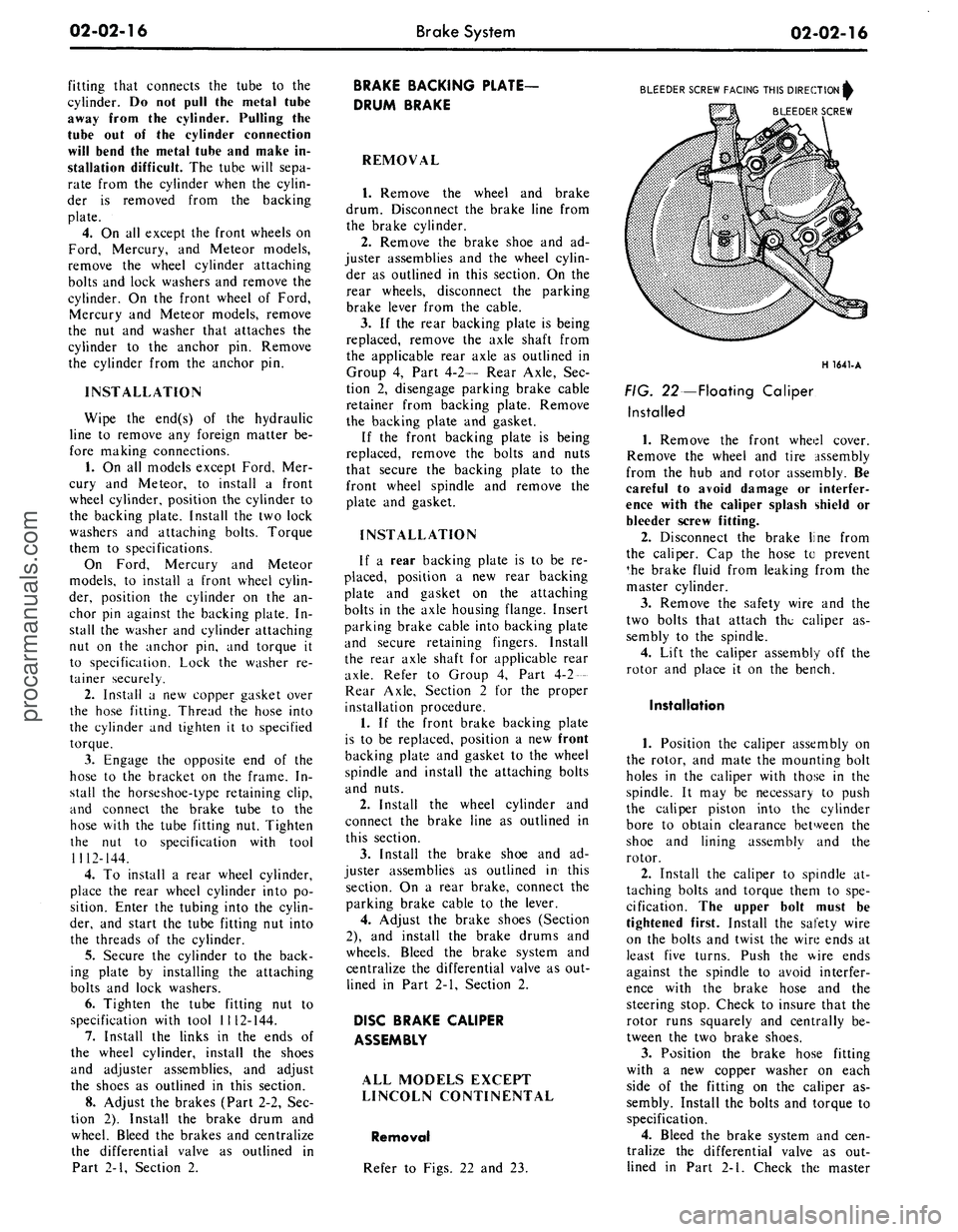
BLEEDER SCREW FACING THIS DIRECTION^
BLEEDER SCREW
H 1641-A
FIG. 22—Floating Caliper
Installed
1.
Remove the front wheel cover.
Remove the wheel and tire assembly
from the hub and rotor assembly. Be
careful to avoid damage or interfer-
ence with the caliper splash shield or
bleeder screw fitting.
2.
Disconnect the brake line from
the caliper. Cap the hose to prevent
*he brake fluid from leaking from the
master cylinder.
3.
Remove the safety wire and the
two bolts that attach the caliper as-
sembly to the spindle.
4.
Lift the caliper assembly off the
rotor and place it on the bench.
Installation
1.
Position the caliper assembly on
the rotor, and mate the mounting bolt
holes in the caliper with those in the
spindle. It may be necessary to push
the caliper piston into the cylinder
bore to obtain clearance between the
shoe and lining assembly and the
rotor.
2.
Install the caliper to spindle at-
taching bolts and torque them to spe-
cification. The upper bolt must be
tightened first. Install the safety wire
on the bolts and twist the wire ends at
least five turns. Push the wire ends
against the spindle to avoid interfer-
ence with the brake hose and the
steering stop. Check to insure that the
rotor runs squarely and centrally be-
tween the two brake shoes.
3.
Position the brake hose fitting
with a new copper washer on each
side of the fitting on the caliper as-
sembly. Install the bolts and torque to
specification.
4.
Bleed the brake system and cen-
tralize the differential valve as out-
lined in Part 2-1. Check the masterprocarmanuals.com
Page 46 of 413

02-02-27
Brake System
02-02-27
4.
Connect the stop light switch
wires to the connector, and install the
wires in the retaining clip.
5.
Torque the booster mounting
nuts to specifications.
LINCOLN CONTINENTAL
Removal
1.
Disconnect the battery ground
cable from the battery.
2.
It is necessary to obtain clear-
ance to remove vacuum hoses and the
electrical connector to the temperature
heat control box. Remove the two
screws retaining the relay to the fend-
er and push the relay aside. Discon-
nect the vacuum hoses and connector
at the heat control box.
3.
Working under the instrument
panel, disconnect the vacuum hoses,
wires and retaining clip from the tem-
perature heat control box. Remove the
two screws securing the temperature
control box to the dash panel.
4.
Remove the lower control hous-
ing retaining screws (6). Disconnect
the wire harnesses at the lower control
panel and place the panel aside. Re-
move the wire harness shield. Remove
the wire harness clip. Position the
wire harness aside. Remove the tem-
perature control box and position it
aside.
5.
Remove the hair-pin type retain-
er. Slide the stop light switch off the
brake pedal pin just far enough for
the switch outer hole to clear the pin.
Lift the switch upward from the pin.
Slide the master cylinder push rod,
nylon washers and bushing off the
brake pedal pin.
6. Remove the pivot bolt and nut
that holds the pedal to the pedal sup-
port bracket. Remove the brake pedal
assembly from the support bracket
and remove the bushings.
7.
If required, remove the brake
pedal pad retaining nuts and remove
the brake pedal pad.
Installation
1.
If the brake pedal pad was re-
moved, position the pad on the pedal.
Install the pad retaining nuts and tor-
que them to specification.
2.
Apply SAE 10 engine oil to the
bushings and locate all the bushings in
their proper places on the pedal as-
sembly.
3.
Install the brake pedal assembly
and bushings to the support bracket,
and then install the pivot bolt through
the support bracket and pedal assem-
bly. Install the pivot bolt nut and tor-
que it to specification.
4.
Install the inner nylon washer,the
master cylinder push rod link, and the
bushing on the brake pedal pin. Posi-
tion the switch so that it straddles the
push rod link with the switch slot on
the pedal and the switch outer hole
just clearing the pin. Install the outer
nylon washer as shown in Fig. 33. In-
stall the hair-pin type retainer on the
brake pedal pin.
5.
Connect the stop light switch
wires to the connector, and install the
wires in the retaining clip.
6. Position the wire harness and
clip on the temperature control box
and install the retaining screw. Posi-
tion the temperature control box to
the dash panel and install the two re-
taining bolts.
7.
Connect the vacuum lines and
the electrical connector to the control
box. Position the wire harness to the
control box and install the retaining
clip.
8. Position the wire harness shield
and install two retaining bolts.
9. Connect the wire harnesses to
the lower control panel and install the
retaining screws.
10.
Working within the engine
compartment, connect the wire con-
nector to the temperature heat control
box.
11.
Position the relay to the fender
apron and install the retaining bolts.
12.
Connect the ground cable to the
battery.
13.
Check the brakes and light
switch for proper operation. Close the
hood.
PARKING BRAKE CONTROL
ASSEMBLY
FORD, MERCURY
AND METEOR
Removal
Refer to Fig. 34.
1.
Make sure the parking brake is
fully released.
2.
Remove all tension from the rear
cables by backing off the adjusting nut
from the equalizer.
3.
Remove the roll pin that secures
the release knob to the cable and re-
move the knob.
4.
Remove the nut that secures the
release cable to the instrument panel
and remove the cable from the rear of
the instrument panel.
5.
Remove the two nuts attaching
the control assembly to the dash
panel.
6. Remove the cap screw attaching
the control assembly to the cowl side
bracket.
7.
Disconnect the hose to the park-
ing brake vacuum unit, if so equipped.
8. Remove the front cable assembly
retainer clip from the cable assembly
and disconnect the cable ball from the
control clevis.
9. Remove the control assembly
from the vehicle.
Installation
1.
Position the control assembly in
the vehicle.
2.
Fit the cable assembly through
its mounting hole and install the re-
taining clip. Connect the cable ball to
the control clevis.
3.
Connect the vacuum hose to the
parking brake unit, if so equipped.
4.
Install the attaching cap screw to
the cowl side bracket. Do not tighten.
5.
Install the two control assemb-
ly-to-dash panel nuts. Tighten the nuts
and the cap screw to specifications.
6. Insert the release cable into the
instrument panel and install the re-
taining nut.
7.
Install the release knob on the
cable with the roll pin.
8. Check the operation of the park-
ing brake. Adjust the parking brake
as required.
FAIRLANE, MONTEGO
AND FALCON
Removal
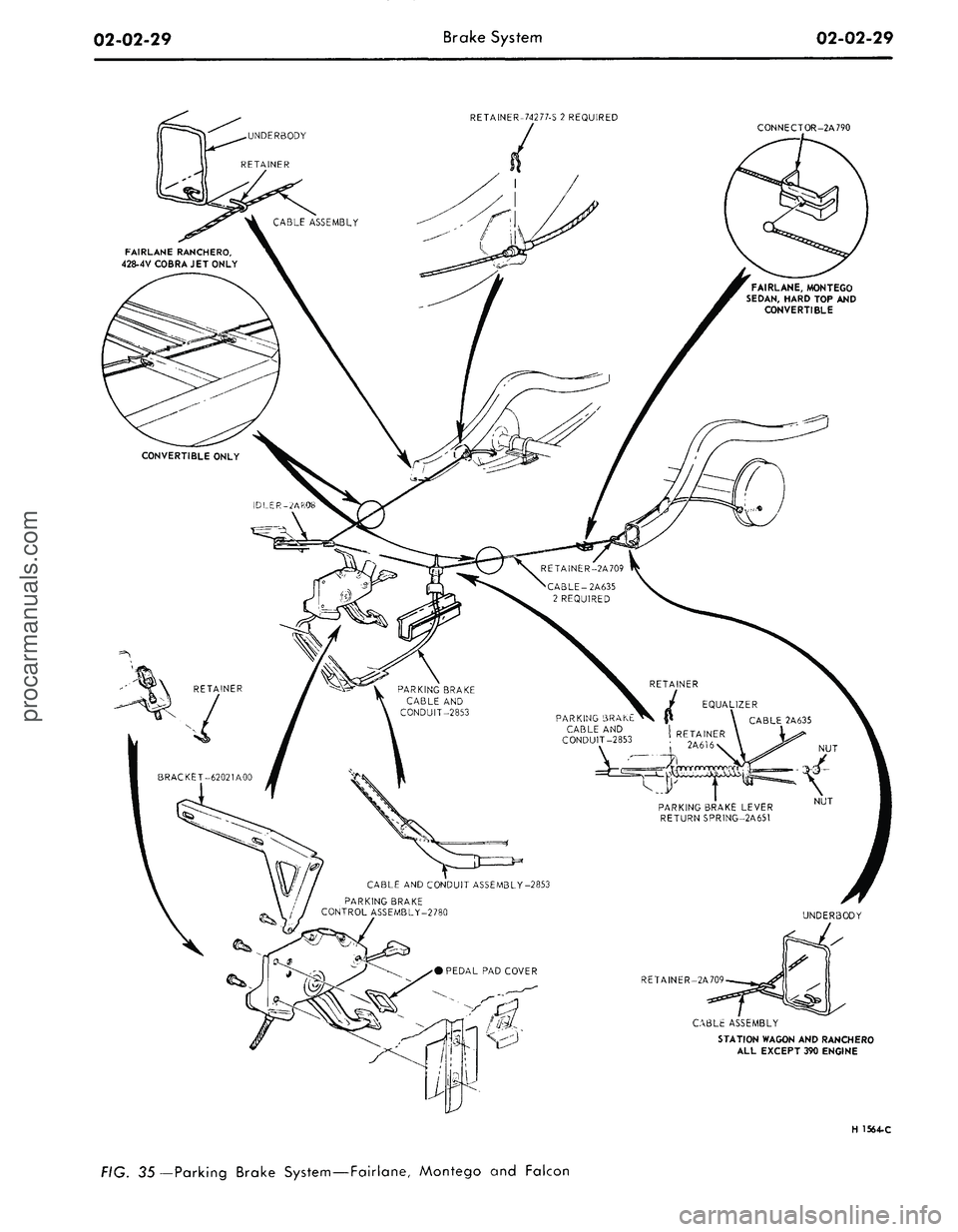
Refer to Fig. 35.
1.
Make sure the parking brake is
completely released.
2.
Remove all tension from the rear
cables by backing off the jam nut and
adjusting nut from the equalizer.
3.
Working inside the vehicle, re-
move the four bolts and one nut re-
taining the left air vent and cable as-
sembly to the dash and instrument
panels. Remove the vent assembly.
4.
Remove the parking brake front
cable ball retaining clip from the clev-
is.
5.
Disconnect the cable ball from
the notch in the brake clevis.
6. Remove the three screws that at-
tach the control assembly to the left
cowl inner side panel.procarmanuals.com
Page 47 of 413

BRAKE PEDAL BRACKET
CABLE MUST BE TIGHT
ON -4 CROSSMEMBER
INSTRUMENT PANEL
VIEWZ
VACUUM RELEASE
INSTRUMENT PANEL
CONTROL CABLE
CABLE AND HOUSING R.H.
.25 INSULATOR
.00 TO CLIP
VIEWX
CABLE AND HOUSING L.H.
CLIP
CROSSMEMBER
CABLE AND HOUSING R.H.
LOWER SUSPENSION ARM
INTERMEDIATE CABLE
CONVERTIBLE ONLY
EQUALIZER
VIEWY
VIEWZ
MANUAL RELEASE
PRONGS MUST BE SECURELY
LOCKED IN PLACE WITHIN
BRAKE DRUM
L.H. SHOWN R.H. TYPICAL
H1645-A
FIG. 34—Parking Brake System—Ford, Mercury and Meteorprocarmanuals.com
Page 48 of 413
02-02-29
Brake System
02-02-29
RETAINER-74277-S 2 REQUIRED
CONNECTOR-2A790
FAIRLANE, MONTEGO
SEDAN,
HARD TOP AND
CONVERTIBLE
PARKING BRAKE
CONTROL ASSEMBLY-2780
STATION WAGON AND RANCHERO
ALL EXCEPT 390 ENGINE
H 1564-C
FIG. 35 — Parking Brake System—Fairlane, Montego and Falconprocarmanuals.com
Page 49 of 413

02-02-30
Brake System
02-02-30
7.
Disconnect the wire lead at the
parking brake warning light switch
and remove the control assembly.
Installation
1.
Connect the wire lead to the
parking brake warning light switch.
2.
Position the control assembly to
the cowl inner side panel and install
the three attaching screws.
3.
Connect the ball-end of the park-
ing brake front cable assembly to the
control assembly, and install the hair-
pin retainer.
4.
Position the cable ball in the
notch in the brake clevis.
5.
Position the left air vent assem-
bly to the dash and instrument panels.
Install the four bolts and one nut re-
taining the air vent to the panels.
6. Check the operation of the park-
ing brake. Adjust the parking brake.
MUSTANG AND COUGAR
Removal
Refer to Fig. 36.
1.
Make sure the parking brake is
completely released,
2.
Remove all tension from the rear
cables by backing off the jam nut and
adjusting nut from the equalizer.
3.
Disconnect the wire lead at the
parking brake warning light switch (if
so equipped).
4.
Remove the parking brake front
cable ball retaining clip from the clev-
is.
5.
Remove the parking brake warn-
ing light switch and attaching screw (if
so equipped).
6. Disconnect the cable ball from
the notch in the brake clevis.
7.
Remove the three screws that at-
tach the control assembly to the left
cowl inner side panel.
8. Pull the control away from the
cowl, panel. Remove the hair-pin re-
tainer securing the front cable assem-
bly to the control assembly. Remove
the control assembly
Installation
1.
Connect the ball-end of the park-
ing brake front cable assembly to the
control assembly, and install the hair-
pin retainer.
2.
Position the control assembly to
the cowl inner side panel and install
the three attaching screws.
3.
Position the parking brake warn-
ing light switch and install the attach-
ing screw. Connect the parking brake
warning light switch wire lead (if vehi-
cle is so equipped).
4.
Position the cable ball in the
notch in the brake clevis.
5.
Check the operation of the park
ing brake. Adjust the parking brake.
THUNDERBIRD AND
CONTINENTAL MARK III
Removal
Refer to Fig. 37.
1.
Remove the two nuts retaining
the control to the dash panel.
2.
Remove two screws from the left
scuff plate.
3.
Remove one screw retaining the
left cowl trim panel and remove the
panel.
4.
Remove the two screws retaining
the left air duct and remove the air
duct.
5.
Remove the two screws retaining
the dimmer switch and position the
switch out of the way.
6. Remove the clip retaining the
cable assembly to the control.
7.
Disconnect the cable ball from
the control clevis.
8. Disconnect the vacuum hose at
the brake release.
9. Remove the bolt retaining the
control to the cowl side bracket and
remove the control.
Installation
1.
Position the parking brake con-
trol in the vehicle.
2.
Install the cable assembly in the
control and connect the cable ball to
the control clevis.
3.
Install the clip retaining the
cable to the control.
4.
Install the bolt retaining the con-
trol to the cowl side bracket.
5.
Connect the vacuum hose to the
parking brake release vacuum motor.
6. Position the dimmer switch and
install the retaining screws.
7.
Position the air duct and install
the retaining screws.
8. Position the cowl trim panel and
install the retaining screw.
9. Install the two scuff plate screws.
10.
Install the two nuts retaining
the control to the dash panel.
11.
Adjust the parking brakf
LINCOLN CONTINENTAL
Removal
Refer to Fig. 38.
1.
Raise the vehicle on a hoist.
2.
Loosen the parking brake cable
adjusting nut, remove the return
spring and remove the cable ball end
from the equalizer.
3.
Lower the vehicle.
4.
Disconnect the battery.
5.
Disconnect the wire harness con-
nector and two vacuum hoses at the
Automatic Temperature Control box.
6. Working inside the vehicle, re-
move the windshield wiper control
knob and bezel from the lower control
panel.
7.
Remove the screws retaining the
lower control panel. Lower the control
panel and disconnect wire harnesses
and vacuum hoses. Position the con-
trol panel aside.
8. Remove the screw retaining the
plastic wire cover and place 'the cover
aside.
9. Disconnect three vacuum hoses
and the wiring harness at the Auto-
matic Temperature Control box.
10.
Remove the two screws retain-
ing the Automatic Temperature Con-
trol box to the dash panel and remove
the box for clearance.
11.
Disconnect the ball end of the
cable from the control clevis.
12.
Remove the four bolts retaining
the control to the dash panel and
lower instrument panel flange.
13.
Disconnect the vacuum release
hose from the control and remove the
control assembly from the vehicle.
Installation
1.
Position the control assembly to
the dash panel and instrument panel
flange and install the four retaining
screws.
2.
Connect the vacuum release hose
to the control assembly.
3.
Connect the cable ball to the
control clevis.
4.
Position the Automatic Temper-
ature Control box to the dash panel
and install the retaining screws.
5.
Connect the wiring harness and
vacuum hoses to the Automatic Tem-
perature Control box.
6. Position the plastic wire covei
and install the retaining screw.
7.
Connect the wire harnesses and
vacuum lines to the lower control
panel and position the panel to the inprocarmanuals.com
Page 50 of 413

CABLE ASSEMBLY
2A635 R.H.
DUAL EXHAUST
PRONGS MUST BE SECURELY
LOCKED IN PLACE
EXTENSION SIDE MEMBER
EQUALIZER
2A602
VIEW IN CIRCLE R
TYPICAL 2 PLACES
CONVERTIBLE ONLY
VIEWY
VIEWZ
HI646-A
36—Parking Brake System—Mustang and Cougarprocarmanuals.com
Page 51 of 413

BOLT
2-REQUIRED
PARKING BRAKE
CONTROL ASSEMBLY
2780
2.00 ARMOR
I
A RKING
RRAKE
HONT CABLE-2853
ADJUSTING NUT
EQUALIZER-2A602
2628
CLIP
VIEWY 2A814 ASSEMBLY
BOLT-2 REQUIRED 2A706
2853 ASSEMBLY
PARKING BRAKE REAR
CABLE-2A635 2 REQUIRED
BRACKET-2A813
SCREW
4 REQUIRED
VIEWZ
8~-
VIEWX
HAIRPIN RETAINER-74277-S
PARKING BRAKE FRONT CABLE-2853
BOLT-374032-S 2 REQUIRED
7-12 LB. FT. APPLY CAULKING CORD
(AB19560-A) OVER HEADS OF SCREWS
AFTER ASSEMBLY.
WIRING HARNESS
HOSE
BRAKE SUPPORT
PARKING BRAKE
REAR CABLE-2A635
PARKING BRAKE
REAR CABLE-2A635
PARKING BRAKE
REAR CABLE-2A635
HAIRPIN RETAINER
( 2 REQUIRED
V1EWW
PARKING BRAKE
REAR CABLE-2A635
CLIP 2 REQUIRED
PRONGS MUST BE SECURELY
LOCKED IN PLACE
VtEWU
BOLT 2 REQUIRED
VIEWY
VIEWT
CABLE WllHIN BRAKE DRUM
H 1529-B
FIG. 38
Parking Brake System—Lincoln Continentalprocarmanuals.com