2023 TOYOTA COROLLA CROSS park assist
[x] Cancel search: park assistPage 257 of 500
2574-5. Using the driving support systems
4
Driving
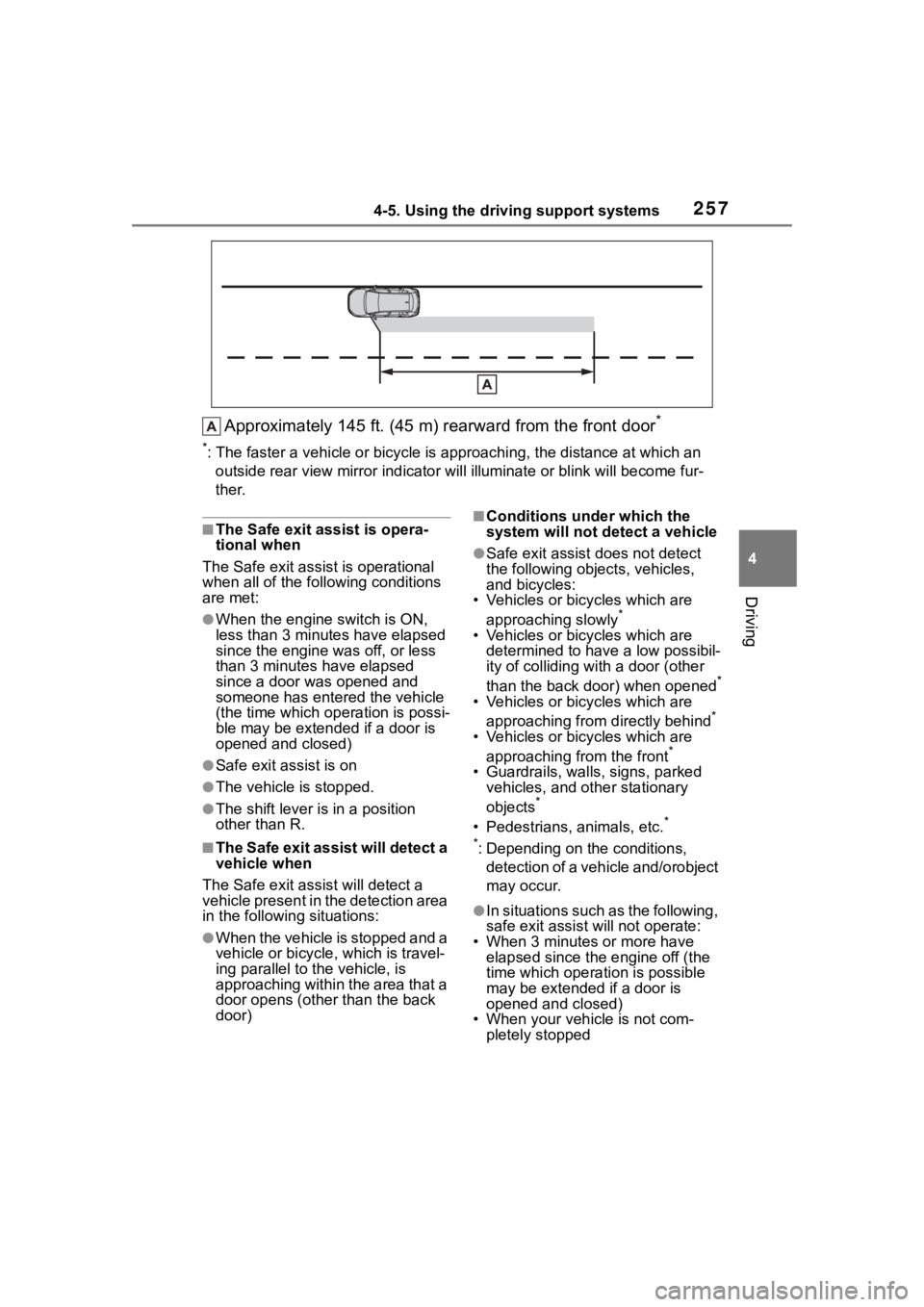
Approximately 145 ft. (45 m) rearward from the front door*
*: The faster a vehicle or bicycle is approaching, the distance at which an
outside rear view mirror ind icator will illuminate or blink wil l become fur-
ther.
■The Safe exit ass ist is opera-
tional when
The Safe exit assist is operational
when all of the following conditions
are met:
●When the engine switch is ON,
less than 3 minutes have elapsed
since the engine was off, or less
than 3 minutes have elapsed
since a door was opened and
someone has enter ed the vehicle
(the time which op eration is possi-
ble may be extended if a door is
opened and closed)
●Safe exit assist is on
●The vehicle is stopped.
●The shift lever is in a position
other than R.
■The Safe exit assist will detect a
vehicle when
The Safe exit assist will detect a
vehicle present in the detection area
in the followin g situations:
●When the vehicle is stopped and a
vehicle or bicycle, which is travel-
ing parallel to the vehicle, is
approaching within the area that a
door opens (other than the back
door)
■Conditions under which the
system will not detect a vehicle
●Safe exit assist does not detect
the following objects, vehicles,
and bicycles:
• Vehicles or bicycles which are
approaching slowly
*
• Vehicles or bicycles which are determined to have a low possibil-
ity of colliding wit h a door (other
than the back door) when opened
*
• Vehicles or bicycles which are approaching from directly behind*
• Vehicles or bicycles which are approaching from the front*
• Guardrails, walls, signs, parked vehicles, and other stationary
objects
*
• Pedestrians, animals, etc.*
*
: Depending on the conditions, detection of a vehicle and/orobject
may occur.
●In situations such as the following,
safe exit assist will not operate:
• When 3 minutes or more have elapsed since the engine off (the
time which operation is possible
may be extended if a door is
opened and closed)
• When your vehicle is not com- pletely stopped
Page 258 of 500

2584-5. Using the driving support systems
■Conditions under which the
system may not function cor-
rectly
●The Safe exit assist may not
detect vehicles correctly in the fol-
lowing situations:
• When the sensor is misaligned
due to a strong impact to the sen-
sor or its surrounding area
• When mud, snow, ice, a sticker, etc. is covering the sensor or sur-
rounding area on the rear bumper
• When the vehicle is stopped on a wet road surface, such as in a
puddle, while in inclement
weather, such as heavy rain,
snow, fog, etc.
• When a vehicle or bicycle approaches from behind a nearby
parked vehicle
• When an approaching vehicle or bicycle suddenly changes direc-
tion
• Immediately after a vehicle or bicycle starts moving
• When the back door is open
• When a bicycle carrier, ramp, or
other accessory is installed to the
back of the vehicle
• When a parked vehicle, wall, sign, person or other stationary object
is behind the vehicle
• When the vehicle is stopped at an angle to the road
• When a vehicle is traveling near
an approaching vehicle or bicycle
• When an approaching vehicle or bicycle is traveling along a station-
ary object, such a wall or sign
• When a vehicle or bicycle is approaching at high speed
• When towing with the vehicle
• When stopped on a steep slope
• When stopped on a curve or at the exit of a curve
●Instances of the Safe exit assist
unnecessarily detecting a vehicle
and/or object may increase in the
following situations:
• When the sensor is misaligned
due to a strong impact to the sen-
sor or its surrounding area
• When a vehicle or bicycle approaches from behind your
vehicle at an angle
• When the vehicle is stopped at an
angle to the road
• When a vehicle or bicycle approaches from behind a parked
vehicle at an angle
• When a parked vehicle, wall, sign, person or other stationary object
is behind the vehicle
• When an approaching vehicle or bicycle suddenly changes direc-
tion
• When an approaching vehicle or bicycle is traveling along a station-
ary object, such a wall or sign
• When the back door is open
• When a bicycle carrier, ramp, or other accessory is installed to the
back of the vehicle
• When a vehicle or bicycle is
approaching at high speed
• When towing with the vehicle
• When stopped on a steep slope
• When stopped on a curve or at the exit of a curve
Page 259 of 500

2594-5. Using the driving support systems
4
Driving
*: If equipped
■Types of sensorsFront corner sensors
Front center sensors
Rear corner sensors
Rear center sensors
■Display
When the sensors detect an
object, such as a wall, a graphic
is shown on the audio system
screen depending on the posi-
tion and distance to the object.
For details regarding the audio system screen, refer to the
“MULTIMEDIA OWNER’S MAN-
UAL”.
Front corner sensor detection
Front center sensor detection
Rear corner sensor detection
Rear center sensor detection
The intuitive parking assist can
be enabled/disabled on of
the multi-information display.
( P.449)
When the intuitive parking assist
function is disabled, the intuitive
parking assist OFF indicator
( P.74) illuminates.
To re-enable the system when it
was disabled, select on the
multi-information display, select and then On. If disabled
using this method, the system
will not be re-enabled by turning
the engine switch off and then to
ON.
Intuitive parking
assist*
The distance from your
vehicle to objects, such as a
wall, when parallel parking
or maneuvering into a
garage is measured by the
sensors and communicated
via the audio system screen
and a buzzer. Always check
the surrounding area when
using this system.
System components
Turning intuitive parking
assist on/off
Page 260 of 500

2604-5. Using the driving support systems
■The system can be operated
when
●The engine switch is in ON.
●Intuitive parking assist function is
on.
●The vehicle speed is less than
about 6 mph (10 km/h).
●A shift position other than P is
selected.
■If “Parking Assist Unavailable
Sensor Blocked” is displayed
on the multi-information display
A sensor may be covered with water
drops, ice, snow, dirt, etc.
Remove the water drops, ice, snow,
dirt, etc., from the sensor to return
the system to normal.
WARNING
■Cautions regarding the use of
the system
There is a limit to the degree of
recognition accuracy and control
performance that this system can
provide, do not ov erly rely on this
system. The driver is always
responsible for paying attention to
the vehicle’ surroundings and
driving safely.
■To ensure the system can
operate properly
Observe the following precau-
tions.
Failing to do so may result in the
vehicle being unable to be driven
safely and possibly cause an acci-
dent.
●Do not damage the sensors,
and always keep them clean.
●Do not attach a sticker or install
an electronic component, such
as a backlit license plate (espe-
cially fluorescent type), fog
lights, fender pole or wireless
antenna near a radar sensor.
●Do not subject the surrounding
area of the sensor to a strong
impact. If subjected to an
impact, have the vehicle
inspected by Toyota dealer. If
the front or rear bumper needs
to be removed/installed or
replaced, contact your Toyota
dealer.
●Do not modify, disassemble or
paint the sensors.
●Do not attach a license plate
cover.
●Keep your tires properly
inflated.
■When to disable the function
In the following situations, disable
the function as it may operate
even though there is no possibility
of a collision.
●Failing to observe the warnings
above.
●A non-genuine Toyota suspen-
sion (lowered suspension, etc.)
is installed.
■Notes when washing the vehi-
cle
Do not apply intensive bursts of
water or steam to the sensor
area.
Doing so may result in the sensor
malfunctioning.
●When using a high pressure
washer to wash the vehicle, do
not spray the sensors directly,
as doing so may cause a sensor
to malfunction.
●When using steam to clean the
vehicle, do not direct steam too
close to the sensors as doing so
may cause a sensor to malfunc-
tion.
Page 264 of 500

2644-5. Using the driving support systems
*: Automatic buzzer mute function is enabled. ( P.264)
■Buzzer operation and
approximate distance to
object
A buzzer sounds when the sen-
sors are operating.
The buzzer beeps faster as
the vehicle approaches an
object. When the vehicle
comes within approximately
1.0 ft. (30 cm) of the object,
the buzzer sounds continu-
ously.
When 2 or more sensors
simultaneously detect a static
object, the buzzer sounds for
the nearest object.
Even when the sensors are
operating, the buzzer will be
muted in some situations.
(automatic buzzer mute func-
tion)
■Adjusting the buzzer vol-
ume
The buzzer volume can be
adjusted on the multi-informa-
tion display.
The buzzer volume of the intui-
tive parking assist and RCTA (if
equipped) can be adjusted all
together on of the multi-information display.
(
P.449)
■Muting a buzzer
When an object is detected, the
temporary mute switch is dis-
played on the audio system
screen.
Select the switch to mute the
buzzer of the intuitive parking
assist and RCTA (if equipped)
all together.
Mute will be canceled automati-
cally in the following situations:
When the shift lever is
changed.
When the vehicle speed
exceeds a certain speed.
When there is a malfunction
in a sensor or the system is
temporarily unavailable.
When the operating function
is disabled manually.
When the engine switch is
turned off.
1.5 ft. to 1.0 ft. ( 45 cm to 30 cm)*Fast
Less than 1.0 ft. (30 cm),
Less than 0.5 ft. (15 cm)*Continuous
Approximate distance to obstacleBuzzer
Page 266 of 500

2664-5. Using the driving support systems
The PKSB (Parking Support
Brake) system can be
enabled/disabled on of the
multi-information display.
(P.449)
When the PKSB (Parking Sup-
port Brake) function is off, the
driving assist information indica-
tor ( P.74) will illuminate.
When turned OFF (disabled), the
PKSB (Parking Supp ort Brake) will
be disabled and will not be enabled
until the setting is changed to ON
again in multi-information display.
(The function will no t be reenabled
by operating the engine switch.)
If the engine output restriction con-
trol or brake control operates, a
buzzer will sound and a message
will be displayed on the multi-infor-
WARNING
■When to disable the PKSB
(Parking Support Brake) sys-
tem
In the following situations, disable
the PKSB (Parking Support
Brake) as the system may oper-
ate even though there is no possi-
bility of a collision.
●When inspecting the vehicle
using a chassis roller, chassis
dynamo or free roller
●When loading the vehicle onto a
boat, truck or other transport
vessel
●If the suspension has been
modified or tires of a size other
than specified are installed
●If the front of the vehicle is
raised or lowered due to the
carried load
●When equipment that may
obstruct a sensor is installed,
such as a towing eyelet, bumper
protector (an additional trim
strip, etc.), bicycle carrier, or
snow plow
●When using automatic car
washing devices
●If the vehicle cannot be driven in
a stable manner, such as when
the vehicle has been in an acci-
dent or is malfunctioning
●When the vehicle is driven in a
sporty manner or off-road
●When the tires are not properly
inflated
●When the tires are very worn
●When a tire chains or compact
spare tire is used
●When your vehicle is towing a
trailer or during emergency tow-
ing
■Precautions for the suspen-
sion
Do not modify the suspension of
the vehicle. If the height or tilt of
the vehicle is c hanged, the sen-
sors may not be able to detect
detectable objects and the system
may not operate correctly, possi-
bly leading to an accident.
Enabling/Disabling the
PKSB (Parking Support
Brake)
Displays and buzzers for
engine output restriction
control and brake control
Page 267 of 500
2674-5. Using the driving support systems
4
Driving
mation display, to alert the driver.
Depending on the situation, engine
output restriction control will oper-
ate to either limit acceleration or
restrict output as much as possible.
Engine output restriction con-
trol is operating (acceleration
restriction)
Acceleration greater than a certain
amount is restricted by the system.
Multi-information display: “Object
Detected Acceleration Reduced”
Driving assist information indicator:
Not illuminated
Buzzer: Does not sound
Engine output restriction con-
trol is operating (output
restricted as much as possi-
ble)
The system has determined that
stronger-than-normal brake opera-
tion is necessary. Multi-information
display: “BRAKE!”
Driving assist information indicator:
Not illuminated
Buzzer: Short beep
Brake control is operating
The system determined that emer-
gency braking is necessary.
Multi-information display: “BRAKE!”
Driving assist information indicator:
Not illuminated
Buzzer: Short beep
Vehicle stopped by system
operation
The vehicle has been stopped by
brake control operation.
Multi-information di splay: “Switch to
Brake” (If the acce lerator pedal is
not depressed, “Press Brake Pedal”
will be displayed.)
Driving assist information indicator:
Illuminated
Buzzer: Sounds repeatedly
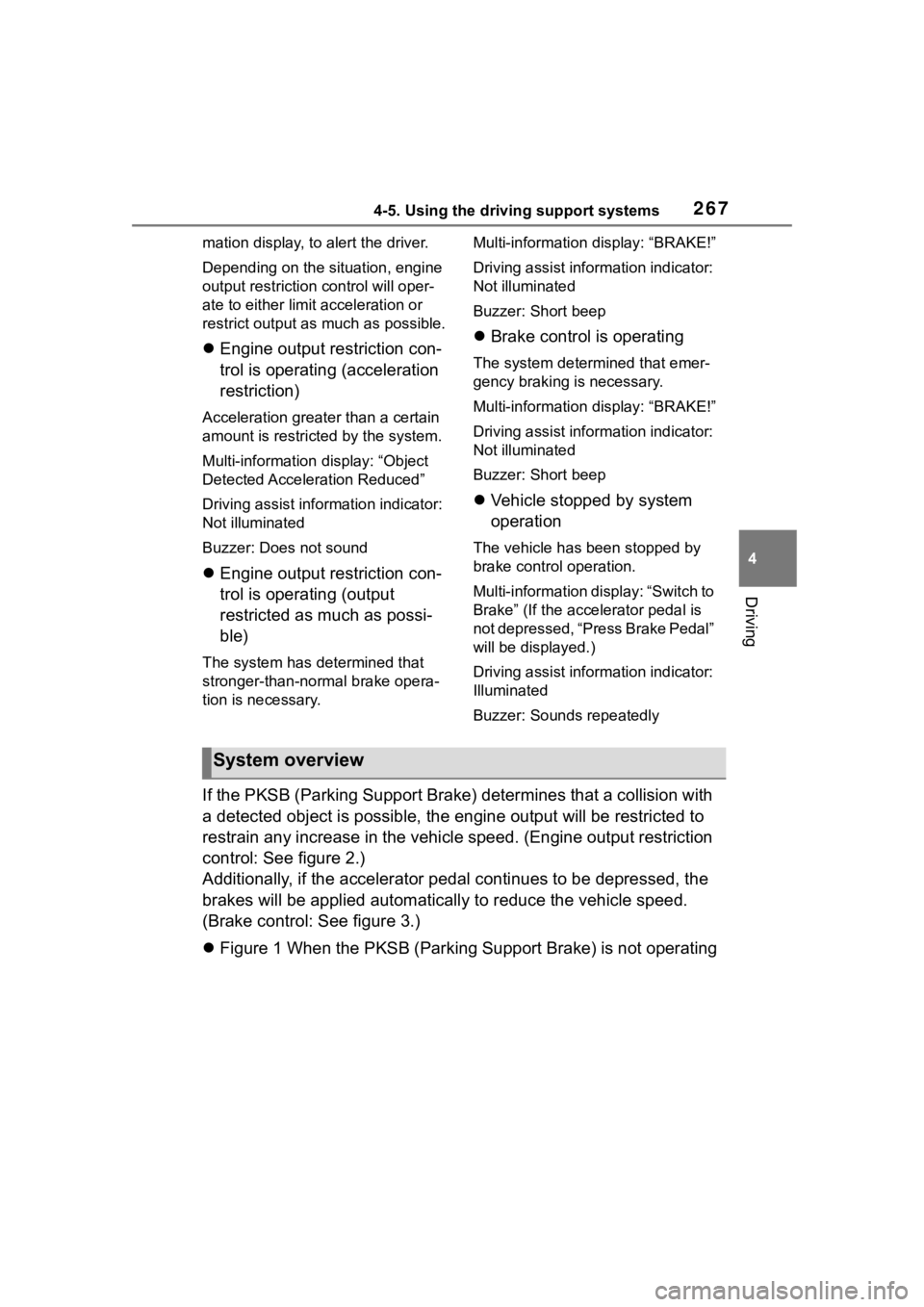
If the PKSB (Parking Support Brake) determines that a collision with
a detected object is possible, the engine output will be restri cted to
restrain any increase in the vehicle speed. (Engine output restriction
control: See figure 2.)
Additionally, if the accelerator pedal continues to be depresse d, the
brakes will be applied automatica lly to reduce the vehicle speed.
(Brake control: See figure 3.)
Figure 1 When the PKSB (Parking Support Brake) is not operating
System overview
Page 269 of 500
2694-5. Using the driving support systems
4
Driving
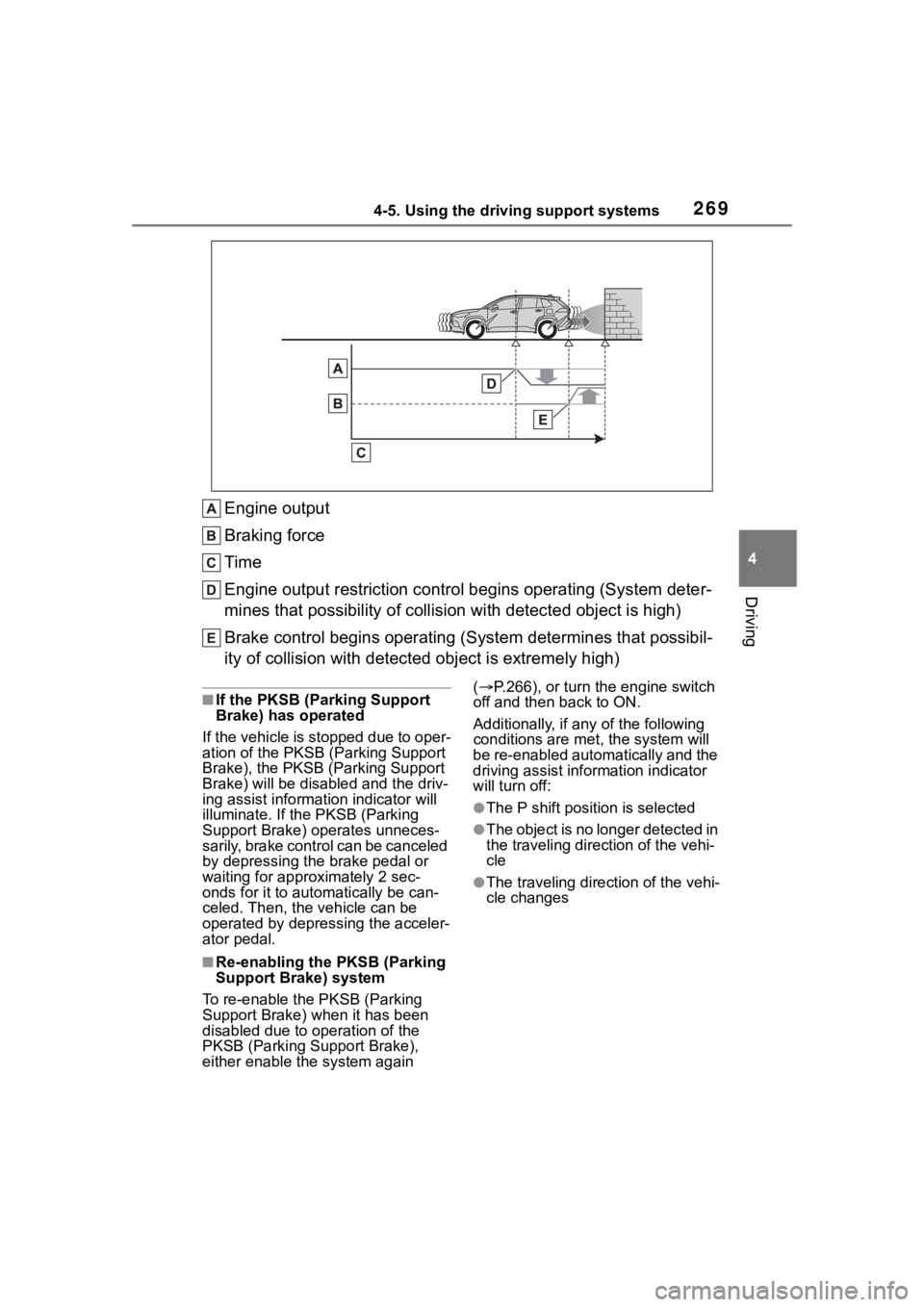
Engine output
Braking force
Time
Engine output restriction control begins operating (System deter-
mines that possibility of collision with detected object is high)
Brake control begins operating (S ystem determines that possibil-
ity of collision with detecte d object is extremely high)
■If the PKSB (Parking Support
Brake) has operated
If the vehicle is stopped due to oper-
ation of the PKSB (P arking Support
Brake), the PKSB (P arking Support
Brake) will be disabled and the driv-
ing assist informa tion indicator will
illuminate. If the PKSB (Parking
Support Brake) op erates unneces-
sarily, brake control can be canceled
by depressing the brake pedal or
waiting for approximately 2 sec-
onds for it to automatically be can-
celed. Then, the vehicle can be
operated by depress ing the acceler-
ator pedal.
■Re-enabling the PKSB (Parking
Support Brake) system
To re-enable the PKSB (Parking
Support Brake) when it has been
disabled due to operation of the
PKSB (Parking Support Brake),
either enable the system again (
P.266), or turn the engine switch
off and then back to ON.
Additionally, if a ny of the following
conditions are m et, the system will
be re-enabled automatically and the
driving assist inf ormation indicator
will turn off:
●The P shift position is selected
●The object is no longer detected in
the traveling direction of the vehi-
cle
●The traveling direction of the vehi-
cle changes