Page 135 of 690
USING GLOBAL OPENING
1.Press and release the unlock button onthe remote control.
2.Press and hold the unlock button on theremote control.
3.Release the button when the windowsstart to open.
Press the lock or the unlock button on theremote control to stop global opening.
Note:You can use global opening for a shortperiod of time when you unlock your vehicleusing the remote control.
SWITCHING GLOBAL OPENING ONAND OFF
1.Press the menu button on the steeringwheel to enter the information displaymain menu.
2.Select Settings.
3.Select Vehicle.
4.Select Windows.
5.Switch Remote Open on or off.
USING GLOBAL CLOSING
WARNING: When closing the powerwindows, verify they are free of obstructionand make sure that children and pets arenot in the proximity of the windowopenings.
1.Press and hold the lock button on theremote control.
2.Release the button when the windowsstart to close.
Press the lock or the unlock button on theremote control to stop global closing.
Note:Bounce-back is on during globalclosing. See What Is Window Bounce-Back(page 131).
SWITCHING GLOBAL CLOSING ONAND OFF
1.Press the menu button on the steeringwheel to enter the information displaymain menu.
2.Select Settings.
3.Select Vehicle.
4.Select Windows.
5.Switch Remote Close on or off.
WINDOW BOUNCE-BACK
WHAT IS WINDOW BOUNCE-BACK
The window stops and reverses somedistance if it detects an obstacle whenclosing.
OVERRIDING WINDOW BOUNCE-BACK
WARNING: If you overridebounce-back, the window does not reverseif it detects an obstacle. Take care whenclosing the windows to avoid personalinjury or damage to your vehicle.
131
2023 Corsair (CTF) Canada/United States of America, enUSA, Edition date: 202208, DOMWindows
Page 136 of 690
WARNING: Bounce-back is off untilyou reset the memory. Take care whenclosing the windows to avoid personalinjury or damage to your vehicle.
Note:The window stops if you release theswitch before the window fully closes.
Pull up the window switch and hold within afew seconds of the window reaching thebounce-back position. The window travelsup with no bounce-back protection. Thewindow stops if you release the switchbefore the window fully closes.
LOCKING THE REAR WINDOW
CONTROLS
Press the control to lock or unlockthe rear window controls. Itilluminates when you lock the rearwindow controls.
132
2023 Corsair (CTF) Canada/United States of America, enUSA, Edition date: 202208, DOMWindows
Page 137 of 690
INTERIOR MIRROR PRECAUTIONS
WARNING: Do not adjust the mirrorswhen your vehicle is moving. This couldresult in the loss of control of your vehicle,serious personal injury or death.
Note:Do not clean the mirror housing orglass with harsh abrasives, fuel or otherpetroleum-based cleaning products.
AUTO-DIMMING INTERIOR MIRROR
WHAT IS THE AUTO-DIMMINGINTERIOR MIRROR
The mirror dims to reduce the effect of brightlight from behind. It returns to normal whenthe bright light from behind is no longerpresent or if you shift into reverse (R).
AUTO-DIMMING INTERIOR MIRRORLIMITATIONS
Do not block the sensors on the front andback of the mirror.
Note:A rear center passenger or raised rearcenter head restraint could prevent light fromreaching the sensor.
133
2023 Corsair (CTF) Canada/United States of America, enUSA, Edition date: 202208, DOMInterior Mirror
Page 138 of 690
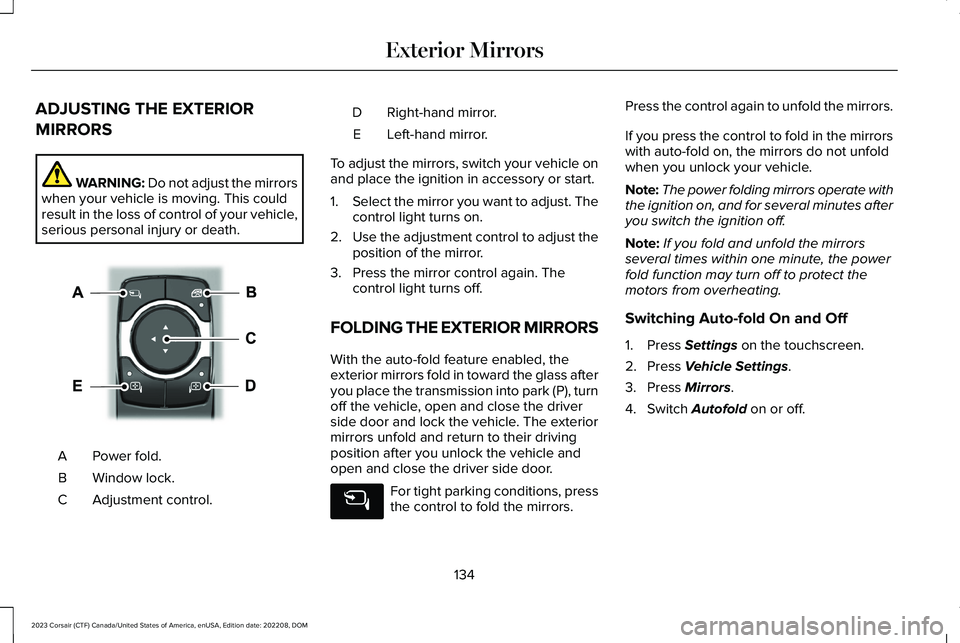
ADJUSTING THE EXTERIOR
MIRRORS
WARNING: Do not adjust the mirrorswhen your vehicle is moving. This couldresult in the loss of control of your vehicle,serious personal injury or death.
Power fold.A
Window lock.B
Adjustment control.C
Right-hand mirror.D
Left-hand mirror.E
To adjust the mirrors, switch your vehicle onand place the ignition in accessory or start.
1.Select the mirror you want to adjust. Thecontrol light turns on.
2.Use the adjustment control to adjust theposition of the mirror.
3.Press the mirror control again. Thecontrol light turns off.
FOLDING THE EXTERIOR MIRRORS
With the auto-fold feature enabled, theexterior mirrors fold in toward the glass afteryou place the transmission into park (P), turnoff the vehicle, open and close the driverside door and lock the vehicle. The exteriormirrors unfold and return to their drivingposition after you unlock the vehicle andopen and close the driver side door.
For tight parking conditions, pressthe control to fold the mirrors.
Press the control again to unfold the mirrors.
If you press the control to fold in the mirrorswith auto-fold on, the mirrors do not unfoldwhen you unlock your vehicle.
Note:The power folding mirrors operate withthe ignition on, and for several minutes afteryou switch the ignition off.
Note:If you fold and unfold the mirrorsseveral times within one minute, the powerfold function may turn off to protect themotors from overheating.
Switching Auto-fold On and Off
1.Press Settings on the touchscreen.
2.Press Vehicle Settings.
3.Press Mirrors.
4.Switch Autofold on or off.
134
2023 Corsair (CTF) Canada/United States of America, enUSA, Edition date: 202208, DOMExterior MirrorsE368669
Page 140 of 690
OPENING AND CLOSING THE
SUNSHADE
WARNING: Do not leave childrenunattended in your vehicle and do not letthem play with the sun shades. Failure tofollow this instruction could result inpersonal injury.
The controls are on the overhead console.
Opening the Sun Shade
Press and release the switch toactivate the one-touch openfeature. To stop movement, pressthe switch a second time. The sun shade alsoopens when you open the moonroof.
Note:The sun shade stops short of its fullyopened position for the comfort of rearpassengers. To fully open the sun shade,press the switch again.
Closing the Sun Shade
Press and release the switch toactivate the one-touch closefeature. To stop movement, pressthe switch a second time.
Note:If fully open, the sun shade stops aftercovering the rear glass panel. Press andrelease again to fully close the sun shade.
Note:The sun shade does not fully closeunless the moonroof glass is fully closed.
OPENING AND CLOSING THE
MOONROOF
WARNING: Do not leave childrenunattended in your vehicle and do not letthem play with the moonroof. Failure tofollow this instruction could result inpersonal injury.
The moonroof controls are located on theoverhead console and have a one-touchopen and close feature. To stop itsmovement during one-touch operation, pressthe control a second time.
Opening the Moonroof
Press and release the switch toactivate the one-touch openfeature. To stop movement, pressthe switch a second time.
Closing the Moonroof
WARNING: When closing themoonroof, verify that it is free ofobstruction and make sure that childrenand pets are not in the proximity of the roofopening.
Press and release the switch toactivate the one-touch closefeature, from either the open orvent positions. To stop movement, press theswitch a second time.
136
2023 Corsair (CTF) Canada/United States of America, enUSA, Edition date: 202208, DOMMoonroof (If Equipped)E312249 E312250 E340663 E340636
Page 141 of 690
VENTING THE MOONROOF
WARNING: Do not leave childrenunattended in your vehicle and do not letthem play with the moonroof. Failure tofollow this instruction could result inpersonal injury.
The moonroof controls are on the overheadconsole.
With the moonroof in the closedposition, press and release theswitch to vent the moonroof.
To close the moonroof from thevent position, press and releasethe moonroof close switch.
MOONROOF BOUNCE-BACK
WHAT IS MOONROOF BOUNCE-BACK
The moonroof stops and reverses somedistance if it detects an obstacle whenclosing.
OVERRIDING MOONROOF BOUNCE-BACK
Press and hold the close switch within twoseconds after the moonroof comes to a stop.
137
2023 Corsair (CTF) Canada/United States of America, enUSA, Edition date: 202208, DOMMoonroof (If Equipped)E340635 E340636
Page 144 of 690

Note:The low fuel reminder can appear atdifferent fuel gauge positions depending onfuel economy conditions. This variation isnormal.
WHAT IS DISTANCE TO EMPTY
Indicates the approximate distance yourvehicle can travel on the fuel remaining inthe tank. Changes in driving pattern cancause the value to not only decrease but alsoincrease or stay constant for periods of time.
ENGINE COOLANT TEMPERATURE
GAUGE
Indicates the engine coolant temperature.
WHAT ARE THE INSTRUMENT
CLUSTER WARNING LAMPS
Warning lamps alert you to a vehiclecondition that could become serious. Somelamps illuminate when you start your vehicleto make sure they work. If any lamps remainon after starting your vehicle, refer to therespective system warning lamp for furtherinformation.
INSTRUMENT CLUSTER WARNING
LAMPS
Depending on your vehicle options andinstrument cluster type, not all warning lampsshown are available.
Airbags
See Airbags (page 65).
Anti-Lock Brake System
If it illuminates when you aredriving, this indicates amalfunction. Your vehiclecontinues to have normal braking withoutthe anti-lock brake system function. Haveyour vehicle checked as soon as possible.
Battery
Illuminates when you switch theignition on.
If it illuminates when the engine isrunning, this indicates your vehicle requiresservice. Have your vehicle checked as soonas possible.
140
2023 Corsair (CTF) Canada/United States of America, enUSA, Edition date: 202208, DOMInstrument Cluster - Excluding: Plug-In Hybrid Electric Vehicle (PHEV)E67017 E67020 E67021
Page 145 of 690

Brake System
Illuminates red when you apply theparking brake and the ignition ison. If it illuminates when yourvehicle is moving, make sure theparking brake is released. If theparking brake is released, this indicates lowbrake fluid level or the brake system requiresservice. Have your vehicle checked as soonas possible.
Note:Indicators may vary depending onregion.
Door Ajar
Illuminates when you switch theignition on and remains on if anydoor is open.
Electric Parking Brake
Illuminates yellow or flashes whenthe electric parking brake requiresservice.
Note:Indicators may vary depending onregion.
Engine Coolant Temperature
If it illuminates, safely stop yourvehicle and switch it off.
Fasten Seatbelt
Illuminates and a tone sounds untilyou fasten the seatbelts.
Fasten Rear Seatbelt
Illuminates and a tone sounds tosignal the rear seatbelts are notfastened.
Hood Ajar
Illuminates when the ignition is onand the hood is not completelyclosed.
Liftgate Ajar
Illuminates when the liftgate is notcompletely closed.
Low Beam Warning
Illuminates when there is amalfunction with the LED low beamheadlamp.
Low Fuel Level
Illuminates when the fuel level islow.
Low Tire Pressure
Illuminates when your tire pressureis low. If illuminated, check yourtire pressure as soon as possible.If it begins to flash at any time, have thesystem checked as soon as possible.
141
2023 Corsair (CTF) Canada/United States of America, enUSA, Edition date: 202208, DOMInstrument Cluster - Excluding: Plug-In Hybrid Electric Vehicle (PHEV)E270480 E67024 E325775 E103308 E71880 E206718 E246598 E162453 E181350 E139232