2023 LINCOLN CORSAIR wheel
[x] Cancel search: wheelPage 214 of 690
ACCESSING THE PASSIVE KEY
BACKUP POSITION
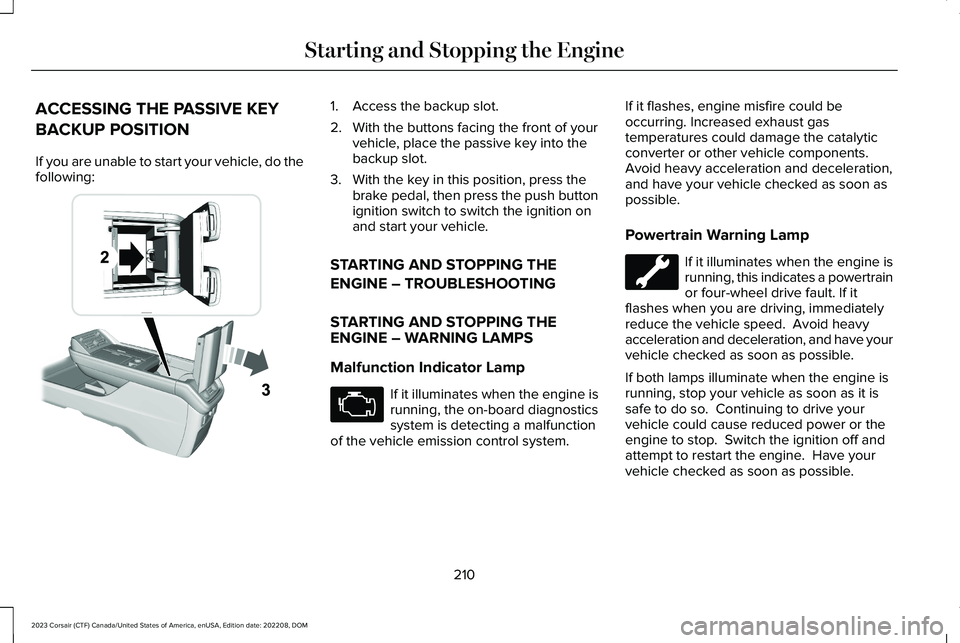
If you are unable to start your vehicle, do thefollowing:
1.Access the backup slot.
2.With the buttons facing the front of yourvehicle, place the passive key into thebackup slot.
3.With the key in this position, press thebrake pedal, then press the push buttonignition switch to switch the ignition onand start your vehicle.
STARTING AND STOPPING THE
ENGINE – TROUBLESHOOTING
STARTING AND STOPPING THEENGINE – WARNING LAMPS
Malfunction Indicator Lamp
If it illuminates when the engine isrunning, the on-board diagnosticssystem is detecting a malfunctionof the vehicle emission control system.
If it flashes, engine misfire could beoccurring. Increased exhaust gastemperatures could damage the catalyticconverter or other vehicle components.Avoid heavy acceleration and deceleration,and have your vehicle checked as soon aspossible.
Powertrain Warning Lamp
If it illuminates when the engine isrunning, this indicates a powertrainor four-wheel drive fault. If itflashes when you are driving, immediatelyreduce the vehicle speed. Avoid heavyacceleration and deceleration, and have yourvehicle checked as soon as possible.
If both lamps illuminate when the engine isrunning, stop your vehicle as soon as it issafe to do so. Continuing to drive yourvehicle could cause reduced power or theengine to stop. Switch the ignition off andattempt to restart the engine. Have yourvehicle checked as soon as possible.
210
2023 Corsair (CTF) Canada/United States of America, enUSA, Edition date: 202208, DOMStarting and Stopping the EngineE247437 E67028
Page 221 of 690
PLUG-IN HYBRID ELECTRIC VEHICLEINFORMATION – INFORMATIONMESSAGES
ActionMessage
Your vehicle needsconfirmation it isunplugged beforeallowing a start.Check to make sureyou unplugged yourvehicle and thenrespond to themessage promptbefore starting yourvehicle.
Vehicle Plugged In ?Yes No
Your vehicle detectsit is still plugged inafter you attempt tostart it.
Unplug Prior toStarting Vehicle
Your vehicle enablesthe engine due tothe climate controldefrost setting. Thisis normal operation.
Engine Enabled Dueto Defrost Setting
ActionMessage
For full defrost heat,select a drive modeother than Pure EV.The engine may runto provide morecabin heat.
Change Drive Modefor Full Defrost
Your vehicle enablesthe engine forsystem performance.This is normal opera-tion.
Engine Enabled forSystem Performance
Displays when amalfunction occursin the high voltageelectric system. Stop your vehicle assoon as it is safe todo so. Have yourvehicle checked assoon as possible.
Stop Safely Now
POWER FLOW
WHAT IS POWER FLOW
The power flow shows how power is beingused in the vehicle and also displays reasonsfor engine operation.
HOW DOES POWER FLOW WORK
The power flow information foryour plug-in hybrid vehicle isavailable through the Home screenor under Apps.
Vehicle Operational States
Power flows to or from the front and rearwheels depending on operational state anddriving conditions.
217
2023 Corsair (CTF) Canada/United States of America, enUSA, Edition date: 202208, DOMHybrid Electric Vehicle Information - Plug-In Hybrid Electric Vehicle (PHEV)E304437
Page 222 of 690
•Idling: The vehicle is running and in park(P). The engine and, or the high voltagebattery are on.
•Electric driving: The vehicle is runningand in drive (D) or neutral (N). The highvoltage battery provides power to thewheels.
•Hybrid driving: The vehicle is running andin drive (D) or neutral (N). The engine andthe high voltage battery provide powerto the wheels.
•Regenerative braking: The vehicle isrunning in drive (D) and is slowing down.The regenerative braking systemcaptures power and sends it back to thehigh voltage battery.
•Charging: The vehicle is plugged in andthe high voltage battery is being charged.
Engine On Due To
The following conditions help explain whythe engine is on and what you can do toallow all electric operation.
•Drive power: The engine is on due toaccelerator pedal pressure or speedcontrol activation. Reduce pressure onthe accelerator pedal or switch off thespeed control to return to full electricmode.
•High speed: The engine is on becausethe vehicle speed exceeds the level forfull electric operation. Reduce the speedto return to electric operation.
•Heater setting: The engine is on becauseof the heater setting. Reduce or switchoff the heater setting to return to electricoperation.
•Neutral gear: The engine is on becausethe vehicle is in neutral (N). Shift out ofneutral gear to return to electricoperation.
•Engine cold: The engine is on becauseit is cold. The vehicle returns to electricoperation once the engine is sufficientlywarm.
•Battery charging: The engine is on tocharge the high voltage battery. Thevehicle returns to electric operation oncethe battery is sufficiently charged.
•Low gear: The engine is on because thevehicle is in low (L). Shift out of low (L) toreturn to electric operation.
•Normal operation: The engine is on tooptimize vehicle operation. The vehiclereturns to electric operation whenpossible.
•Low use: The engine is on to maintainengine oil quality. The vehicle returns toelectric operation when low engine usemode is complete. See How Does LowEngine Use Mode Work (page 216).
•Engine braking active: The engine is onto provide increased powertrain braking.This can occur when you turn on thegrade assist feature, when speed controlis on or when driving with your foot offthe accelerator pedal. Turning off gradeassist or speed control may allow thevehicle to return to electric operation.
218
2023 Corsair (CTF) Canada/United States of America, enUSA, Edition date: 202208, DOMHybrid Electric Vehicle Information - Plug-In Hybrid Electric Vehicle (PHEV)
Page 234 of 690
Do not attempt to start the engine if you havefilled the fuel tank with incorrect fuel.Incorrect fuel use could cause damage notcovered by the vehicle Warranty. Have yourvehicle immediately checked.
MANUALLY OPENING THE FUELFILLER DOOR
WARNING: The fuel system may beunder pressure. If you hear a hissing soundnear the fuel filler inlet, do not refuel untilthe sound stops. Otherwise, fuel may sprayout, which could cause serious personalinjury.
Note:The transmission must be in park (P)or neutral (N).
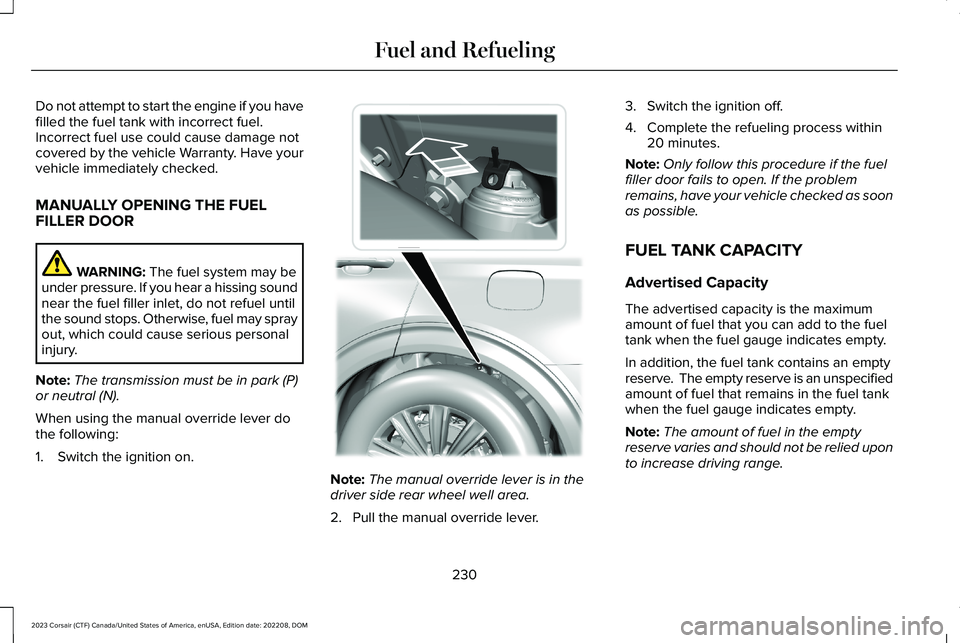
When using the manual override lever dothe following:
1.Switch the ignition on.
Note:The manual override lever is in thedriver side rear wheel well area.
2.Pull the manual override lever.
3.Switch the ignition off.
4.Complete the refueling process within20 minutes.
Note:Only follow this procedure if the fuelfiller door fails to open. If the problemremains, have your vehicle checked as soonas possible.
FUEL TANK CAPACITY
Advertised Capacity
The advertised capacity is the maximumamount of fuel that you can add to the fueltank when the fuel gauge indicates empty.
In addition, the fuel tank contains an emptyreserve. The empty reserve is an unspecifiedamount of fuel that remains in the fuel tankwhen the fuel gauge indicates empty.
Note:The amount of fuel in the emptyreserve varies and should not be relied uponto increase driving range.
230
2023 Corsair (CTF) Canada/United States of America, enUSA, Edition date: 202208, DOMFuel and RefuelingE297793
Page 251 of 690
•Ground fault circuit interrupter (GFCI)Protection: The charger has a groundfault circuit interrupter (GFCI) reactionsystem to protect against electric shock.If the charger module detects an outputground fault, it shuts down power to theoutput cable and illuminates the redindicator.
•Insulation: The charger module,connector, cable assembly, and chargecoupler are completely insulated. Thereare no exposed live parts, to protectagainst electric shock.
•Unintentional disconnection: The chargecoupler is designed to minimizeunintentional disconnection. A pilot signalwire in the cable and charge couplereliminates the possibility of electric shockwhen not connected to a vehicle or if anunintended disconnect occurs during acharge. Disconnection during chargingis safe.
LOCATING THE CHARGE PORT
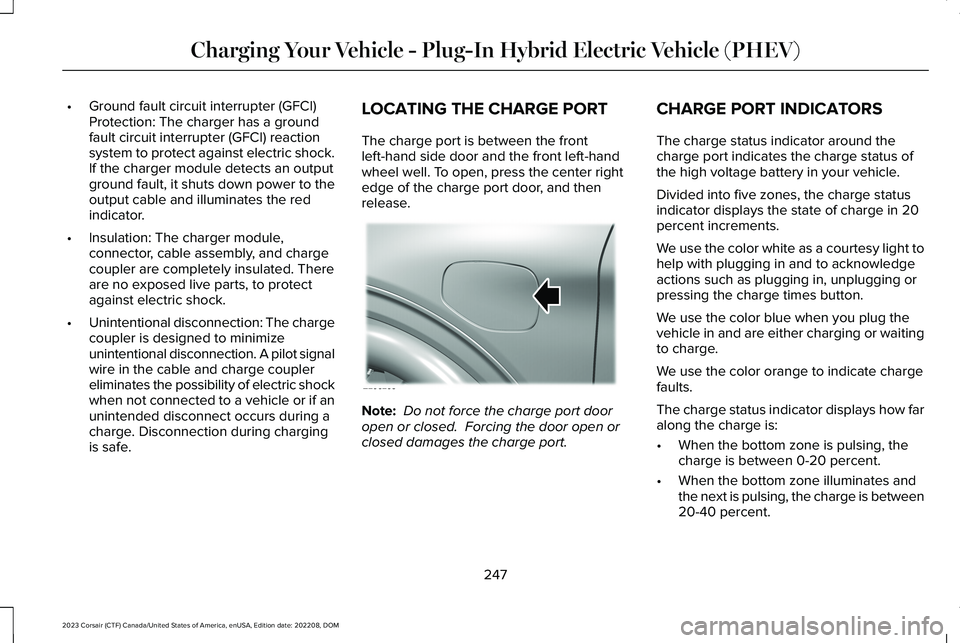
The charge port is between the frontleft-hand side door and the front left-handwheel well. To open, press the center rightedge of the charge port door, and thenrelease.
Note: Do not force the charge port dooropen or closed. Forcing the door open orclosed damages the charge port.
CHARGE PORT INDICATORS
The charge status indicator around thecharge port indicates the charge status ofthe high voltage battery in your vehicle.
Divided into five zones, the charge statusindicator displays the state of charge in 20percent increments.
We use the color white as a courtesy light tohelp with plugging in and to acknowledgeactions such as plugging in, unplugging orpressing the charge times button.
We use the color blue when you plug thevehicle in and are either charging or waitingto charge.
We use the color orange to indicate chargefaults.
The charge status indicator displays how faralong the charge is:
•When the bottom zone is pulsing, thecharge is between 0-20 percent.
•When the bottom zone illuminates andthe next is pulsing, the charge is between20-40 percent.
247
2023 Corsair (CTF) Canada/United States of America, enUSA, Edition date: 202208, DOMCharging Your Vehicle - Plug-In Hybrid Electric Vehicle (PHEV)E295258
Page 258 of 690
2.On the charging locations screen selectadd new location. You can also editsettings for previously saved locationslisted on this screen.
3.Select an address from the list of recentcharge locations.
4.Confirm that this is the location you wantto save with the help of the map view.Edit the location name if desired and seta maximum charge limit. Press continueto schedule.
Note:Depending on the GPS location, theaddress on the navigation may not preciselymatch up with your charging location.Confirm on the map that the pin is in theexpected location.
Note:Charging stops when your vehiclereaches the maximum charge limit setting.
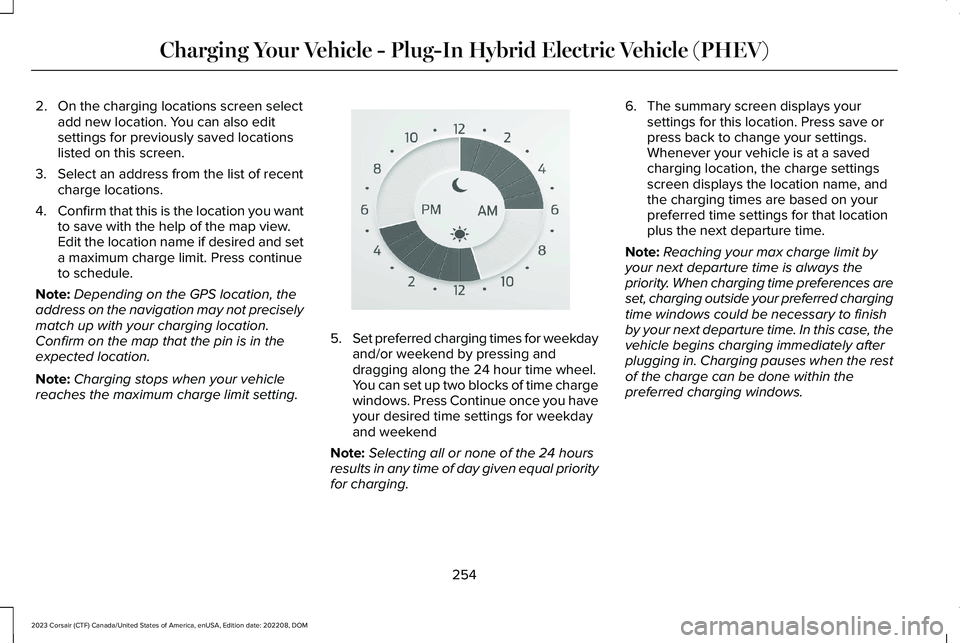
5.Set preferred charging times for weekdayand/or weekend by pressing anddragging along the 24 hour time wheel.You can set up two blocks of time chargewindows. Press Continue once you haveyour desired time settings for weekdayand weekend
Note:Selecting all or none of the 24 hoursresults in any time of day given equal priorityfor charging.
6.The summary screen displays yoursettings for this location. Press save orpress back to change your settings.Whenever your vehicle is at a savedcharging location, the charge settingsscreen displays the location name, andthe charging times are based on yourpreferred time settings for that locationplus the next departure time.
Note:Reaching your max charge limit byyour next departure time is always thepriority. When charging time preferences areset, charging outside your preferred chargingtime windows could be necessary to finishby your next departure time. In this case, thevehicle begins charging immediately afterplugging in. Charging pauses when the restof the charge can be done within thepreferred charging windows.
254
2023 Corsair (CTF) Canada/United States of America, enUSA, Edition date: 202208, DOMCharging Your Vehicle - Plug-In Hybrid Electric Vehicle (PHEV)E359594
Page 262 of 690
AUTOMATIC TRANSMISSION
PRECAUTIONS
WARNING: When your vehicle isstationary, keep the brake pedal fullypressed when shifting gears. Failure tofollow this instruction could result inpersonal injury, death or property damage.
WARNING: Do not apply the brakepedal and accelerator pedalsimultaneously. Applying both pedalssimultaneously for more than a fewseconds will limit power, which may resultin difficulty maintaining speed in traffic andcould lead to serious injury.
WARNING: Apply the parking brake,shift into park (P), switch the vehicle off andremove the key or remote control beforeyou leave your vehicle. Failure to followthis instruction could result in personalinjury or death.
AUTOMATIC TRANSMISSION
POSITIONS
PARK (P)
WARNING: Shift into park (P) onlywhen your vehicle is stationary.
In park (P) power is not transmitted to thedriven wheels.
Note:A tone sounds if you attempt to exityour vehicle without the vehicle in park (P).
Note:Your vehicle may not shift out of park(P) if the 12V battery has run out of charge.
Note:Your vehicle may not shift out of park(P) if a fuse is blown.
Note:Your vehicle may not shift out of park(P) unless the key or remote control is insideyour vehicle.
Note:The electronic parking brake couldapply when you power your vehicle on withthe selector in park (P).
Note:The electronic parking brake couldapply if you shift to park (P) without fullypressing the brake pedal.
Note:The electronic parking brake couldapply if you shift to park (P) on a slope.
Note:Do not manually release the parkingbrake when the selector is in park (P). SeeAutomatically Releasing the ElectricParking Brake (page 273).
Note:Your vehicle could shift into park (P) ifyou attempt to exit your vehicle without thetransmission in park (P). See How DoesAutomatic Return to Park (P) Work (page261).
Note:A tone could sound when you selectpark (P).
REVERSE (R)
WARNING: Shift into reverse (R) onlywhen your vehicle is stationary.
In reverse (R) power is transmitted to thedriven wheels.
258
2023 Corsair (CTF) Canada/United States of America, enUSA, Edition date: 202208, DOMAutomatic Transmission
Page 263 of 690
NEUTRAL (N)
WARNING: In neutral (N) your vehicleis free to roll.
In neutral (N) power is not transmitted to thedriven wheels.
DRIVE (D)
In drive (D) power is transmitted to the drivenwheels.
SHIFTING YOUR VEHICLE INTO
GEAR
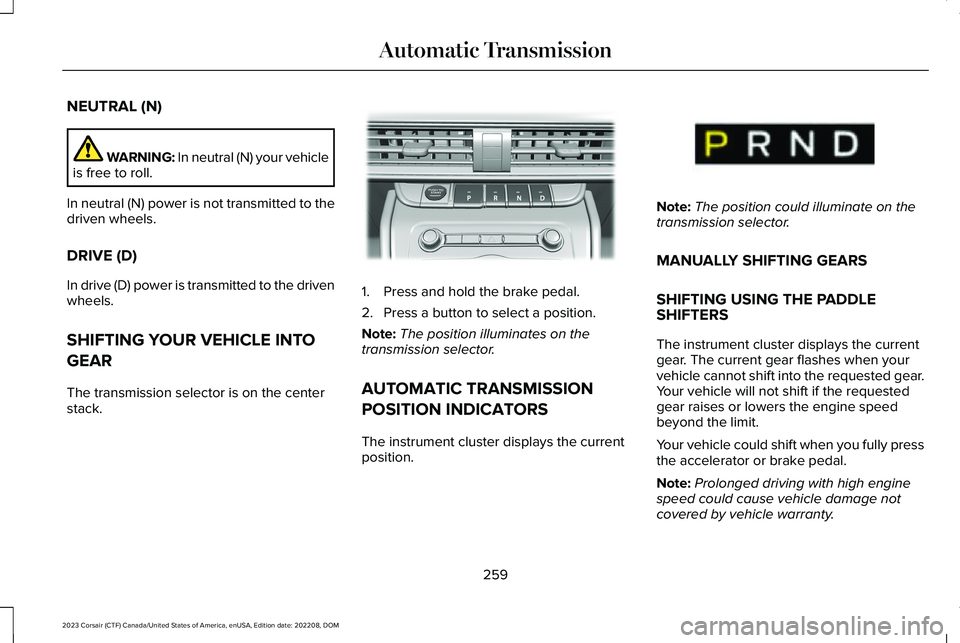
The transmission selector is on the centerstack.
1.Press and hold the brake pedal.
2.Press a button to select a position.
Note:The position illuminates on thetransmission selector.
AUTOMATIC TRANSMISSION
POSITION INDICATORS
The instrument cluster displays the currentposition.
Note:The position could illuminate on thetransmission selector.
MANUALLY SHIFTING GEARS
SHIFTING USING THE PADDLESHIFTERS
The instrument cluster displays the currentgear. The current gear flashes when yourvehicle cannot shift into the requested gear.Your vehicle will not shift if the requestedgear raises or lowers the engine speedbeyond the limit.
Your vehicle could shift when you fully pressthe accelerator or brake pedal.
Note:Prolonged driving with high enginespeed could cause vehicle damage notcovered by vehicle warranty.
259
2023 Corsair (CTF) Canada/United States of America, enUSA, Edition date: 202208, DOMAutomatic TransmissionE309222 E368319