2023 LINCOLN CORSAIR wheel
[x] Cancel search: wheelPage 72 of 690
AIRBAG PRECAUTIONS
WARNING: Airbags do not inflateslowly or gently, and the risk of injury froma deploying airbag is the greatest close tothe trim covering the airbag module.
WARNING: All occupants of yourvehicle, including the driver, should alwaysproperly wear their seatbelts, even whenan airbag supplemental restraint system isprovided. Failure to properly wear yourseatbelt could seriously increase the riskof injury or death.
WARNING: Properly secure children12 years old and under in a rear seatingposition whenever possible. If you areunable to properly secure all children in arear seating position, properly secure thelargest child on the front seat. If you mustuse a forward facing child restraint on thefront seat, move the seat as far back aspossible. Failure to follow theseinstructions could result in personal injuryor death.
WARNING: Do not place your armson the airbag cover or through the steeringwheel. Failure to follow this instructioncould result in personal injury.
WARNING: Keep the areas in frontof the airbags free from obstruction. Donot affix anything to or over the airbagcovers. Objects could become projectilesduring airbag deployment. Failure to followthis instruction could result in personalinjury or death.
WARNING: To reduce risk of injury,do not obstruct or place objects in thedeployment path of the airbag.
WARNING: Do not place a rearwardfacing child restraint in front of an activeairbag. Failure to follow this instructioncould result in personal injury or death.
WARNING: Do not attempt to service,repair, or modify the supplementaryrestraint system or associated components.Failure to follow this instruction could resultin personal injury or death.
WARNING: Several airbag systemcomponents get hot after inflation. Toreduce the risk of injury, do not touch themafter inflation.
WARNING: If a supplementaryrestraint system component has deployed,it will not function again. Have the systemand associated components inspected assoon as possible. Failure to follow thisinstruction could result in personal injuryor death.
68
2023 Corsair (CTF) Canada/United States of America, enUSA, Edition date: 202208, DOMAirbags
Page 80 of 690
WHAT IS 911 ASSIST
911 Assist is a SYNC system feature that cancall for help.
For more information, visitwww.owner.ford.com.
HOW DOES 911 ASSIST WORK
If a crash deploys an airbag, excluding kneeairbags and rear inflatable seatbelts, oractivates the fuel pump shut-off, your vehiclemay be able to contact emergency servicesby dialing 911 through a paired andconnected Bluetooth® enabled phone.
Not all crashes deploy an airbag or activatethe fuel pump shut-off. If a connected cellphone sustains damage or loses itsconnection to SYNC during a crash, SYNCsearches for and tries to connect to apreviously paired cell phone. SYNC thenattempts to call the emergency services.
Before making the call:
•SYNC provides about 10 seconds tocancel the call. If you fail to cancel thecall, SYNC attempts to dial 911.
•SYNC says the following, or a similarmessage: SYNC will attempt to call 911,to cancel the call, press Cancel on yourscreen or press and hold the phonebutton on your steering wheel.
If you do not cancel the call and SYNC makesa successful call a pre-recorded messageplays for the 911 operator. The occupants inyour vehicle are able to talk with theoperator. Be prepared to provide your name,phone number and location immediatelybecause not all 911 systems are capable ofreceiving this information electronically.
During an emergency call the systemtransmits vehicle data to the emergencyservice.
EMERGENCY CALL
REQUIREMENTS
WARNING: Do not wait for 911 Assistto make an emergency call if you can doit yourself. Dial emergency servicesimmediately to avoid delayed responsetime which could increase the risk ofserious injury or death after a crash. If youdo not hear 911 Assist within five secondsof the crash, the system or phone may bedamaged or non-functional.
WARNING: Always place your phonein a secure location in your vehicle so itdoes not become a projectile or getdamaged in a crash. Failure to do so maycause serious injury to someone ordamage the phone which could prevent911 Assist from working properly.
WARNING: Unless the 911 Assistsetting is set on before a crash, the systemwill not dial for help which could delayresponse time, potentially increasing therisk of serious injury or death after a crash.
76
2023 Corsair (CTF) Canada/United States of America, enUSA, Edition date: 202208, DOM911 Assist
Page 112 of 690

WHAT IS THE PERIMETER ALARM
The perimeter alarm is designed to detectunauthorized access to your vehicle.
WHAT ARE THE INTERIOR SENSORS
(If Equipped)
The interior sensors are designed to detectany movement inside your vehicle.
The interior sensors are in the overheadconsole.
Note:Do not cover the interior sensors.
WHAT ARE THE INCLINATIONSENSORS (If Equipped)
The inclination sensor is designed to detectan attempt to raise your vehicle, for exampleto remove a wheel or to tow it away.
WHAT IS THE BATTERY BACKUPALARM (If Equipped)
The battery backup alarm is an additionalalarm sounder that has its own battery. It candetect if the vehicle battery is disconnectedto overcome the alarm system.
ARMING THE ANTI-THEFT ALARMSYSTEM
The alarm is ready to arm when your vehicleis switched off.
Lock your vehicle with your remote controlto arm the alarm.
DISARMING THE ANTI-THEFT ALARMSYSTEM
Disarm the alarm by performing any of thefollowing actions:
•Unlock the doors or luggagecompartment with the remote control.
•Switch your vehicle on or start yourvehicle.
ANTI-THEFT ALARM SYSTEM
SETTINGS
WHAT ARE THE ALARM SECURITYLEVELS
You can select two levels of alarm security,all sensors and perimeter sensing.
All Sensors
All sensors is the standard setting.
In all sensors, all equipped sensors are onwhen you arm the alarm.
Note:Do not arm the alarm with all sensorsif passengers, animals or other movingobjects are inside your vehicle.
Perimeter Sensing
In perimeter sensing, the interior sensors areoff when you arm the alarm.
All the other equipped sensors activate whenyou arm the alarm in this mode.
108
2023 Corsair (CTF) Canada/United States of America, enUSA, Edition date: 202208, DOMSecurity
Page 115 of 690
ADJUSTING THE STEERING WHEEL
- VEHICLES WITH: POWER
ADJUSTABLE STEERING COLUMN
WARNING: Do not adjust the steeringwheel when your vehicle is moving.
Note: Make sure that you are sitting in thecorrect position. See Sitting in the CorrectPosition (page 178).
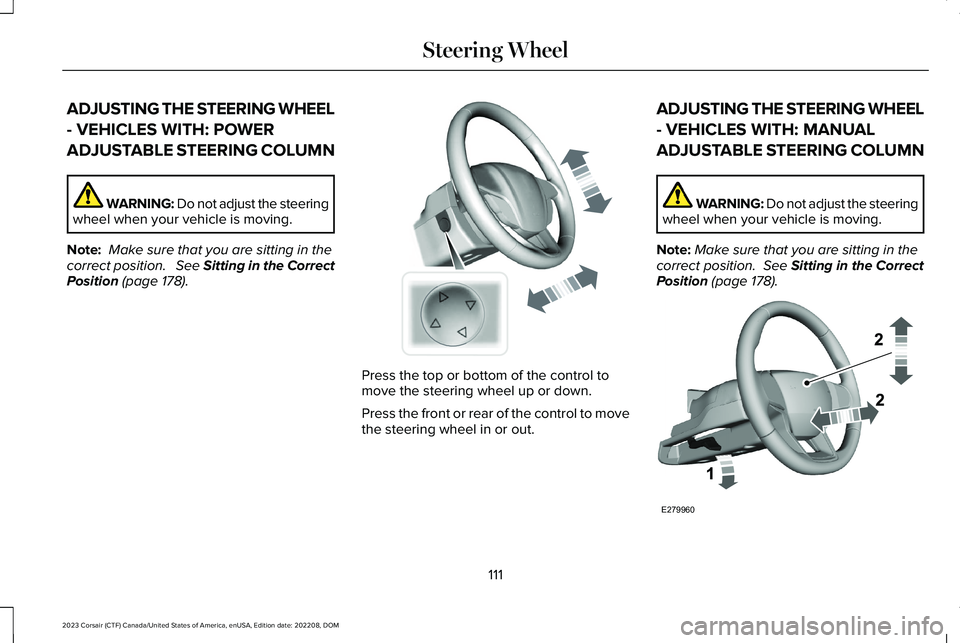
Press the top or bottom of the control tomove the steering wheel up or down.
Press the front or rear of the control to movethe steering wheel in or out.
ADJUSTING THE STEERING WHEEL
- VEHICLES WITH: MANUAL
ADJUSTABLE STEERING COLUMN
WARNING: Do not adjust the steeringwheel when your vehicle is moving.
Note:Make sure that you are sitting in thecorrect position. See Sitting in the CorrectPosition (page 178).
111
2023 Corsair (CTF) Canada/United States of America, enUSA, Edition date: 202208, DOMSteering WheelE261582 E279960
Page 116 of 690

1.Unlock the steering column.
2.Adjust the steering wheel to the desiredposition.
3.Lock the steering column.
RESETTING THE STOPPING
POSITION - VEHICLES WITH:
POWER ADJUSTABLE STEERING
COLUMN
Note:The steering wheel stops when itdetects an obstruction. This sets a newstopping position.
To reset the steering column to its normalstopping position:
1.Confirm there is nothing obstructing themotion of the steering column.
2.Press and hold the steering columncontrol until the steering column stopsmoving.
3.Press the steering column control again.
Note:The steering column may start to moveagain.
4.When the steering column stops,continue holding the control for a fewseconds.
5.Repeat for each direction, as necessary.
HORN
Press on the center of the steeringwheel near the horn icon toactivate the horn.
SWITCHING THE HEATED
STEERING WHEEL ON AND OFF (IF
EQUIPPED)
To activate the heated steeringwheel, press the button on theclimate control unit.
On some vehicles, an indicator on the buttonilluminates when the heated steering wheelis on.
Note:A sensor regulates the temperatureof the steering wheel.
112
2023 Corsair (CTF) Canada/United States of America, enUSA, Edition date: 202208, DOMSteering WheelE279962 E270945 E256621
Page 117 of 690

WIPERS
WIPER PRECAUTIONS
Do not operate the wipers on a drywindshield. This could scratch the glass ordamage the wiper blades. Use thewindshield washers before wiping a drywindshield.
Fully defrost the windshield before youswitch the windshield wipers on.
Switch the windshield wipers off beforeentering a car wash.
SWITCHING WINDSHIELD WIPERS ONAND OFF
Single wipe.A
Intermittent wipe.B
Normal wipe.C
High-speed wipe.D
Push the lever up or down tooperate the windshield wipers.
AUTOWIPERS
WHAT ARE AUTOWIPERS
Autowipers turns on and controls the speedand frequency of the windshield wipers.
AUTOWIPERS SETTINGS
1.Using the instrument cluster controls onthe steering wheel, select Settings.
2.Select Vehicle.
3.Select Wipers.
4.Switch Rain Sensing on or off.
Note:When you switch the feature off, thewipers do not operate based on the rainsensor. When you switch on the windshieldwipers to the intermittent wipe position withthe feature off, the wipers use the wipespeed set by the rotary control.
113
2023 Corsair (CTF) Canada/United States of America, enUSA, Edition date: 202208, DOMWipers and Washers E269410 E270969
Page 118 of 690

ADJUSTING THE SENSITIVITY OF THERAIN SENSOR
High sensitivity.A
Low sensitivity.B
Use the rotary control to set the sensitivityof the rain sensor.
When you select high sensitivity, the wipersoperate when the sensor detects a smallamount of water on the windshield.
When you select low sensitivity, the wipersoperate when the sensor detects a largeamount of water on the windshield.
SWITCHING THE REAR WINDOW
WIPER ON AND OFF
Intermittent wipe.A
Continuous wipe.B
Rear window wiper off.C
REVERSE WIPE
WHAT IS REVERSE WIPE
Reverse wipe turns on the rear window wiperwhen you shift into reverse (R) and thewindshield wipers are on.
REVERSE WIPE SETTINGS
1.Using the instrument cluster controls onthe steering wheel, select Settings.
2.Select Vehicle.
3.Select Wipers.
4.Switch Reverse Wiper on or off.
114
2023 Corsair (CTF) Canada/United States of America, enUSA, Edition date: 202208, DOMWipers and WashersE330179 E242324
Page 123 of 690

HEADLAMPS – TROUBLESHOOTING
HEADLAMPS – FREQUENTLY ASKEDQUESTIONS
Why is there condensation in the
headlamps?
•Headlamps have vents to accommodatenormal changes in air pressure.Condensation can be a naturalby-product of this design. When moist airenters the lamp assembly through thevents, there is a possibility thatcondensation can occur when thetemperature is cold. When normalcondensation occurs, a fine mist can formon the interior of the lens. The fine misteventually clears and exits through thevents during normal operation.
How much condensation is acceptable?
•The presence of a fine mist, for exampleno streaks, drip marks or large droplets.A fine mist covers less than 50% of thelens.
How long may it take for theacceptable condensation to becleared?
•Clearing time may take as long as 48hours under dry weather conditions.
How much condensation isunacceptable?
•A water puddle inside the lamp. Streaks,drip marks or large droplets present onthe interior of the lens.
What should I do if unacceptablecondensation is present?
•Have your vehicle checked as soon aspossible.
Why do my headlamps turn off when Ihave them switched on when I switchmy vehicle off?
•The battery saver turns the headlampsoff after a short period of time after youswitch your vehicle off.
AUTOLAMPS
WHAT ARE AUTOLAMPS
WARNING: The system does notrelieve you of your responsibility to drivewith due care and attention. You may needto override the system if it does not turnthe headlamps on in low visibilityconditions, for example daytime fog.
Autolamps turn the headlamps on in low lightsituations or when the windshield wipersoperate.
AUTOLAMP SETTINGS
1.Using the instrument cluster controls onthe steering wheel, select Settings.
2.Select Vehicle.
3.Select Lighting.
4.Select Autolamp Delay.
5.Select a setting and press the OK button.
119
2023 Corsair (CTF) Canada/United States of America, enUSA, Edition date: 202208, DOMExterior Lighting