Page 124 of 690

EXTERIOR LAMPS
USING THE TURN SIGNAL LAMPS
Push the lever up or down toswitch the turn signal lamps on.
Set the lever to the middle position to switchthe turn signal lamps off.
Note:Tap the lever up or down to make theturn signal lamps flash three times.
Turn Signal Lamp Indicator
It flashes when you switch the turnsignal lamps on.
Note:An increase in the rate of flashingwarns of a failed turn signal lamp.
SWITCHING THE DAYTIME RUNNINGLAMPS ON AND OFF - VEHICLESWITH: CONFIGURABLE DAYTIMERUNNING LAMPS
WARNING: The daytime runninglamps system does not activate the rearlamps and may not provide adequatelighting during low visibility drivingconditions. Make sure you switch theheadlamps on, as appropriate, during alllow visibility conditions. Failure to do somay result in a crash.
1.Using the instrument cluster controls onthe steering wheel, select Settings.
2.Select Vehicle.
3.Select Lighting.
4.Switch Daytime Running Lights on oroff.
The daytime running lamps turn on when allof the following occur:
•You switch the system on.
•You switch your vehicle on.
•The transmission is not in park (P) forvehicles with automatic transmissions oryou release the parking brake forvehicles with manual transmissions.
•The lighting control is in the autolampsposition.
•The headlamps are off.
Note:Other lighting control positions do notturn on the daytime running lamps.
120
2023 Corsair (CTF) Canada/United States of America, enUSA, Edition date: 202208, DOMExterior Lighting E273180 E67018 E67018
Page 125 of 690

SWITCHING THE DAYTIME RUNNINGLAMPS ON AND OFF - VEHICLESWITH: DAYTIME RUNNING LAMPS(DRL)
WARNING: The daytime runninglamps system does not activate the rearlamps and may not provide adequatelighting during low visibility drivingconditions. Make sure you switch theheadlamps on, as appropriate, during alllow visibility conditions. Failure to do somay result in a crash.
Daytime running lamps are always on unlessyou switch on the headlamps or your vehicleis in park (P).
SWITCHING WELCOME LIGHTING ONAND OFF
Welcome lighting slowly turns on the exteriorlamps when you approach your vehicle withan authenticated device or unlock the doors.
1.Using the instrument cluster controls onthe steering wheel, select Settings.
2.Select Vehicle.
3.Select Lighting.
4.Switch Welcome Lighting on or off.
EXTERIOR LAMP INDICATORS
Turn Signal Lamp
It flashes when you switch the turnsignal lamps on.
Note:An increase in the rate of flashingwarns of a failed turn signal lamp.
EXTERIOR LAMPS ON AUDIBLEWARNING
Sounds when you open the driver door andthe exterior lamps are on.
AUTOMATIC HIGH BEAM CONTROL
HOW DOES AUTOMATIC HIGH BEAMCONTROL WORK
Automatic high beam control turns the highbeams on if it is dark enough and no othertraffic is present. If it detects an approachingvehicle’s headlamps or tail lamps, or streetlighting ahead, the system turns the highbeams off.
A camera sensor, centrally mounted behindthe windshield of your vehicle, continuouslymonitors conditions to turn the high beamson and off.
121
2023 Corsair (CTF) Canada/United States of America, enUSA, Edition date: 202208, DOMExterior LightingE67018
Page 127 of 690

AUTOMATIC HIGH BEAM CONTROLLIMITATIONS
The system turns the high beams off if anyof the following occur:
•You switch the system off.
•You set the lighting control to anyposition except autolamps.
•The ambient light level is high enoughthat you do not require high beams.
•The system detects an approachingvehicle's headlamps or a leadingvehicle's tail lamps.
•The system detects severe rain, snow orfog.
•The system detects street lighting.
•The camera has reduced visibility.
•The vehicle speed falls belowapproximately 19 mph (30 km/h).
SWITCHING AUTOMATIC HIGH BEAMCONTROL ON AND OFF
1.Using the instrument cluster controls onthe steering wheel, select Settings.
2.Select Vehicle.
3.Select Lighting.
4.Switch Auto High Beam on or off.
AUTOMATIC HIGH BEAM CONTROLINDICATORS
Illuminates to confirm when thesystem is ready to assist.
OVERRIDING AUTOMATIC HIGH BEAMCONTROL
Push the lever away from you to switch thehigh beam on.
Push the lever away from you again to switchthe high beams off.
Push the lever away from you for a third timeto switch automatic high beam control backon.
123
2023 Corsair (CTF) Canada/United States of America, enUSA, Edition date: 202208, DOMExterior LightingE146105 E273182
Page 129 of 690
ADAPTIVE FRONT LIGHTING
HOW DOES ADAPTIVE FRONTLIGHTING WORK
WARNING: Inspect and replace thewindshield wiper blades regularly to makesure the camera sensor has a clear view.The windshield wiper blades must be thecorrect length.
Speed Dependent Lamps (If Equipped)
Provides additional light on the roaddepending on your vehicle speed andsteering wheel input.
Standard low beam.A
Additional lighting.B
Dynamic Bending Lamps (If Equipped)
Adapts when you are steering around acurve, the front camera detects lanemarkings indicating a curve or map dataindicates a curve.
Without dynamic bending lamps.A
With dynamic bending lamps.B
125
2023 Corsair (CTF) Canada/United States of America, enUSA, Edition date: 202208, DOMExterior LightingE275680 E161714
Page 130 of 690
Static Bending Lamps (If Equipped)
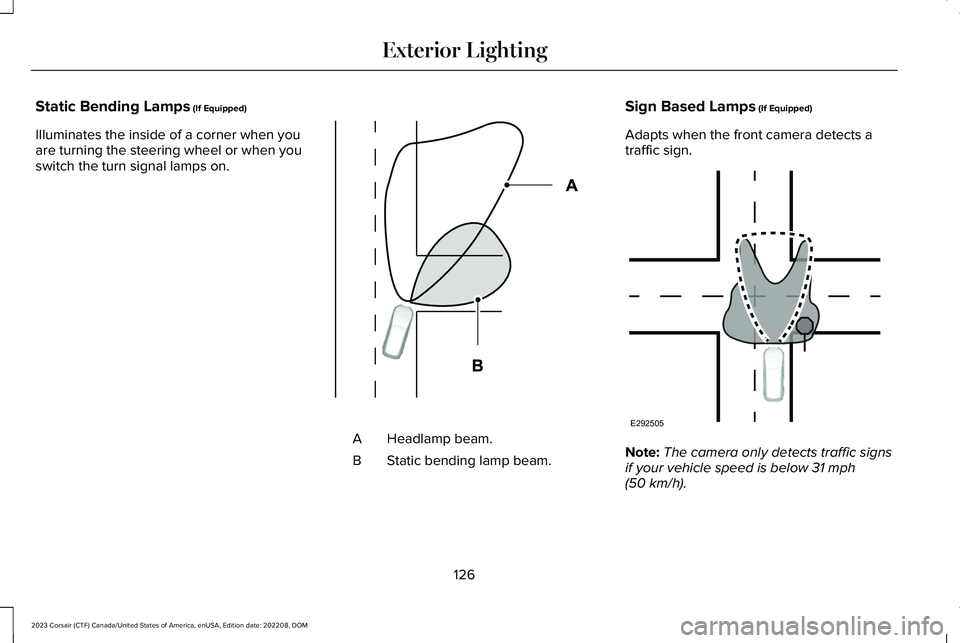
Illuminates the inside of a corner when youare turning the steering wheel or when youswitch the turn signal lamps on.
Headlamp beam.A
Static bending lamp beam.B
Sign Based Lamps (If Equipped)
Adapts when the front camera detects atraffic sign.
Note:The camera only detects traffic signsif your vehicle speed is below 31 mph(50 km/h).
126
2023 Corsair (CTF) Canada/United States of America, enUSA, Edition date: 202208, DOMExterior LightingE327599 E292505
Page 135 of 690
USING GLOBAL OPENING
1.Press and release the unlock button onthe remote control.
2.Press and hold the unlock button on theremote control.
3.Release the button when the windowsstart to open.
Press the lock or the unlock button on theremote control to stop global opening.
Note:You can use global opening for a shortperiod of time when you unlock your vehicleusing the remote control.
SWITCHING GLOBAL OPENING ONAND OFF
1.Press the menu button on the steeringwheel to enter the information displaymain menu.
2.Select Settings.
3.Select Vehicle.
4.Select Windows.
5.Switch Remote Open on or off.
USING GLOBAL CLOSING
WARNING: When closing the powerwindows, verify they are free of obstructionand make sure that children and pets arenot in the proximity of the windowopenings.
1.Press and hold the lock button on theremote control.
2.Release the button when the windowsstart to close.
Press the lock or the unlock button on theremote control to stop global closing.
Note:Bounce-back is on during globalclosing. See What Is Window Bounce-Back(page 131).
SWITCHING GLOBAL CLOSING ONAND OFF
1.Press the menu button on the steeringwheel to enter the information displaymain menu.
2.Select Settings.
3.Select Vehicle.
4.Select Windows.
5.Switch Remote Close on or off.
WINDOW BOUNCE-BACK
WHAT IS WINDOW BOUNCE-BACK
The window stops and reverses somedistance if it detects an obstacle whenclosing.
OVERRIDING WINDOW BOUNCE-BACK
WARNING: If you overridebounce-back, the window does not reverseif it detects an obstacle. Take care whenclosing the windows to avoid personalinjury or damage to your vehicle.
131
2023 Corsair (CTF) Canada/United States of America, enUSA, Edition date: 202208, DOMWindows
Page 150 of 690
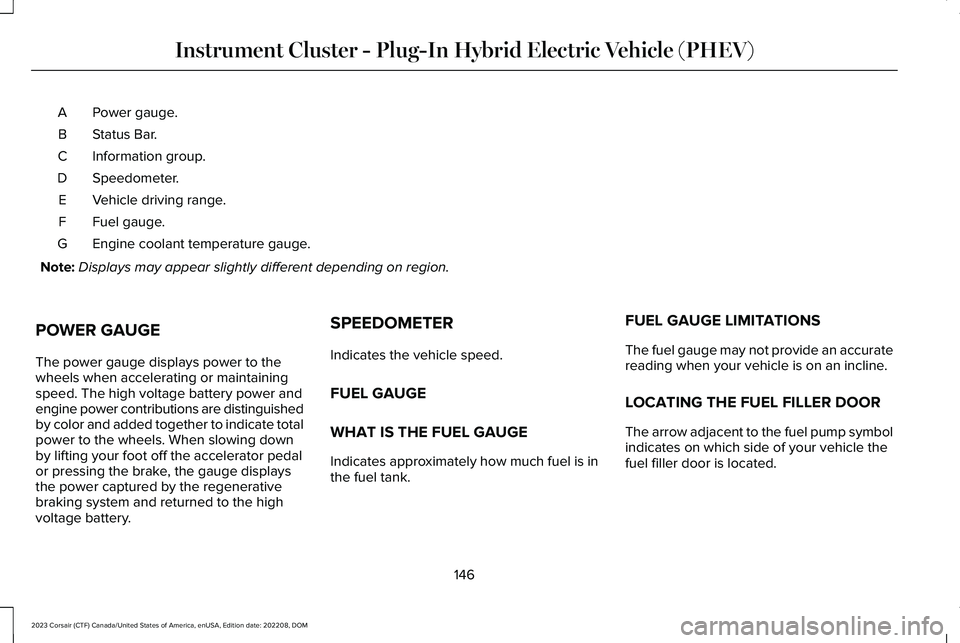
Power gauge.A
Status Bar.B
Information group.C
Speedometer.D
Vehicle driving range.E
Fuel gauge.F
Engine coolant temperature gauge.G
Note:Displays may appear slightly different depending on region.
POWER GAUGE
The power gauge displays power to thewheels when accelerating or maintainingspeed. The high voltage battery power andengine power contributions are distinguishedby color and added together to indicate totalpower to the wheels. When slowing downby lifting your foot off the accelerator pedalor pressing the brake, the gauge displaysthe power captured by the regenerativebraking system and returned to the highvoltage battery.
SPEEDOMETER
Indicates the vehicle speed.
FUEL GAUGE
WHAT IS THE FUEL GAUGE
Indicates approximately how much fuel is inthe fuel tank.
FUEL GAUGE LIMITATIONS
The fuel gauge may not provide an accuratereading when your vehicle is on an incline.
LOCATING THE FUEL FILLER DOOR
The arrow adjacent to the fuel pump symbolindicates on which side of your vehicle thefuel filler door is located.
146
2023 Corsair (CTF) Canada/United States of America, enUSA, Edition date: 202208, DOMInstrument Cluster - Plug-In Hybrid Electric Vehicle (PHEV)
Page 156 of 690
USING THE INSTRUMENT
CLUSTER DISPLAY CONTROLS
WARNING: Driving while distractedcan result in loss of vehicle control, crashand injury. We strongly recommend thatyou use extreme caution when using anydevice that may take your focus off theroad. Your primary responsibility is the safeoperation of your vehicle. We recommendagainst the use of any hand-held devicewhile driving and encourage the use ofvoice-operated systems when possible.Make sure you are aware of all applicablelocal laws that may affect the use ofelectronic devices while driving.
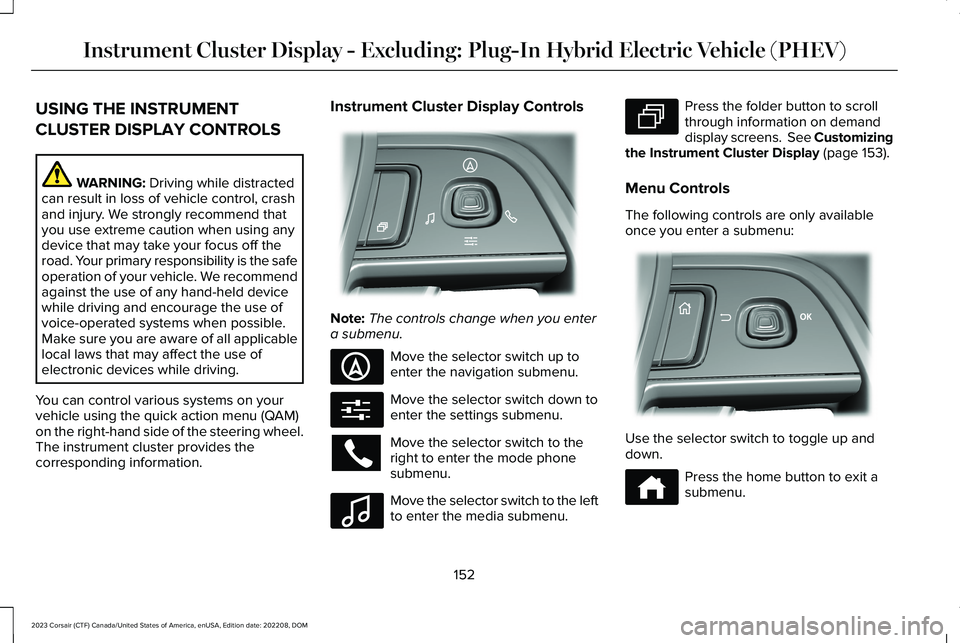
You can control various systems on yourvehicle using the quick action menu (QAM)on the right-hand side of the steering wheel.The instrument cluster provides thecorresponding information.
Instrument Cluster Display Controls
Note:The controls change when you entera submenu.
Move the selector switch up toenter the navigation submenu.
Move the selector switch down toenter the settings submenu.
Move the selector switch to theright to enter the mode phonesubmenu.
Move the selector switch to the leftto enter the media submenu.
Press the folder button to scrollthrough information on demanddisplay screens. See Customizingthe Instrument Cluster Display (page 153).
Menu Controls
The following controls are only availableonce you enter a submenu:
Use the selector switch to toggle up anddown.
Press the home button to exit asubmenu.
152
2023 Corsair (CTF) Canada/United States of America, enUSA, Edition date: 202208, DOMInstrument Cluster Display - Excluding: Plug-In Hybrid Electric Vehicle (PHEV)E281220 E281481 E280315 E100027 E281483 E299701 E272621