2023 FORD SUPER DUTY key
[x] Cancel search: keyPage 431 of 738
TOWING YOUR VEHICLE
PRECAUTIONS
Use the following guidelines when towingyour vehicle. Failure to follow thisinstruction could result in vehicle damagenot covered by the vehicle warranty.
Note:Make sure you properly secure yourvehicle to the tow vehicle.
Note:If you are unsure of the vehicle’sconfiguration, contact an authorized dealer.
RECREATIONALLY TOWING
YOUR VEHICLE - 4X4
WARNING: Do not disconnect thebattery when recreationally towing yourvehicle. This prevents the transfer casefrom shifting properly and could causethe vehicle to roll, even if thetransmission is in park (P).
WARNING: Placing the transfercase in its neutral position could causeyour vehicle to freely roll. Make sure youpress and hold the brake pedal and thevehicle is in a secure, safe position whenyou place the transfer case in its neutralposition.
Follow these guidelines if you have a needfor recreational towing. An example ofrecreational towing would be towing yourvehicle behind a motorhome. Theseguidelines are to make sure that you donot damage the transmission.
You can only tow your vehicle with allwheels on the ground by placing thetransfer case in its neutral position andengaging the recreational tow feature.Perform the following steps afterpositioning your vehicle behind the towvehicle and properly securing themtogether.
Note:Put your climate control system inrecirculated air mode to prevent exhaustfumes from entering your vehicle.
Note:Failure to put the transfer case in itsneutral position can damage vehiclecomponents.
Note: You can check the towing status atany time by opening the driver door orturning the ignition to the accessory or onposition.Neutral Tow Enabled LeaveTransmission in Neutral appears in theinstrument cluster display to confirm youcan recreationally tow your vehicle.
Note:If your vehicle has an anti-theftalarm, make sure you switch perimetersensing on when towing. See Setting theAlarm Security Level (page 104).
Switching Neutral Tow On
1.Place your vehicle in accessory modeby pressing the push button ignitionswitch once without pressing the brakepedal or by turning the ignition key tothe on position.
2.Press and hold the brake pedal.
3.Press the 2H button on the four-wheeldrive mode control.
4.Shift the transmission into neutral (N).
5.Using the instrument cluster controlson the steering wheel, select Settings.
6.Select Neutral Tow.
7.Press and hold the OK button until aconfirmation message appears in theinformation display.
427
2023 Super Duty (TFH) Canada/United States of America, enUSA, Edition date: 202211, DOMTowing Your Vehicle
Page 432 of 738
Note: If completed successfully, theinformation display shows Neutral TowEnabled Leave Transmission in Neutral.This indicates that your vehicle is safe totow with all wheels on the ground.
Note:If you do not see a confirmationmessage in the instrument cluster display,you must perform the procedure again fromthe beginning.
Note:You may hear noise as the transfercase shifts into its neutral position. This isnormal.
8.Release the brake pedal and leave thetransmission in neutral (N) and switchyour vehicle off by pressing the pushbutton ignition switch once withoutpressing the brake pedal or turning thekey as far toward the off position.
Note:Vehicles with keys do not turn to theoff position when the transmission is inneutral (N). You must leave the key in theignition when towing. Use the keyless entrykeypad or an extra set of keys to lock andunlock your vehicle.
Switching Neutral Tow Off
1.With your vehicle properly secured tothe tow vehicle, place your vehicle inaccessory mode by pressing the pushbutton ignition switch once withoutpressing the brake pedal or by turningthe ignition key to the on position.
2.Press and hold the brake pedal.
3.Shift the transmission to Park (P) andcontinue holding the brake pedal untilthe instrument cluster display shows2H and Neutral Tow Disabled.
4.Release the brake pedal.
Note:If completed successfully, theinstrument cluster displays 2H and NeutralTow Disabled.
Note:You must perform the switchingneutral tow on and switching neutral towoff procedures again from the beginning ifthe indicator light and message do notdisplay.
Note:You may hear a noise as the transfercase shifts out of its neutral position. Thisis normal.
5.Apply the parking brake, thendisconnect your vehicle from the towvehicle.
6.Release the parking brake, start theengine, and shift into drive (D) to makesure the transfer case is out of theneutral tow position.
7.If the transfer case does notsuccessfully shift out of its neutralposition, set the parking brake. Haveyour vehicle checked as soon aspossible.
Resolving the Shift Delayed PullForward Message
1.Press and hold the brake pedal.
2.Start your vehicle.
3.Shift into neutral (N).
4.With the vehicle running, shift into drive(D) and let the vehicle roll forward upto 3 ft (1 m).
Note:You may hear a noise as the transfercase shifts out of its neutral position. Thisis normal.
5.Make sure the instrument clusterdisplays Neutral Tow Disabled.
428
2023 Super Duty (TFH) Canada/United States of America, enUSA, Edition date: 202211, DOMTowing Your Vehicle
Page 453 of 738
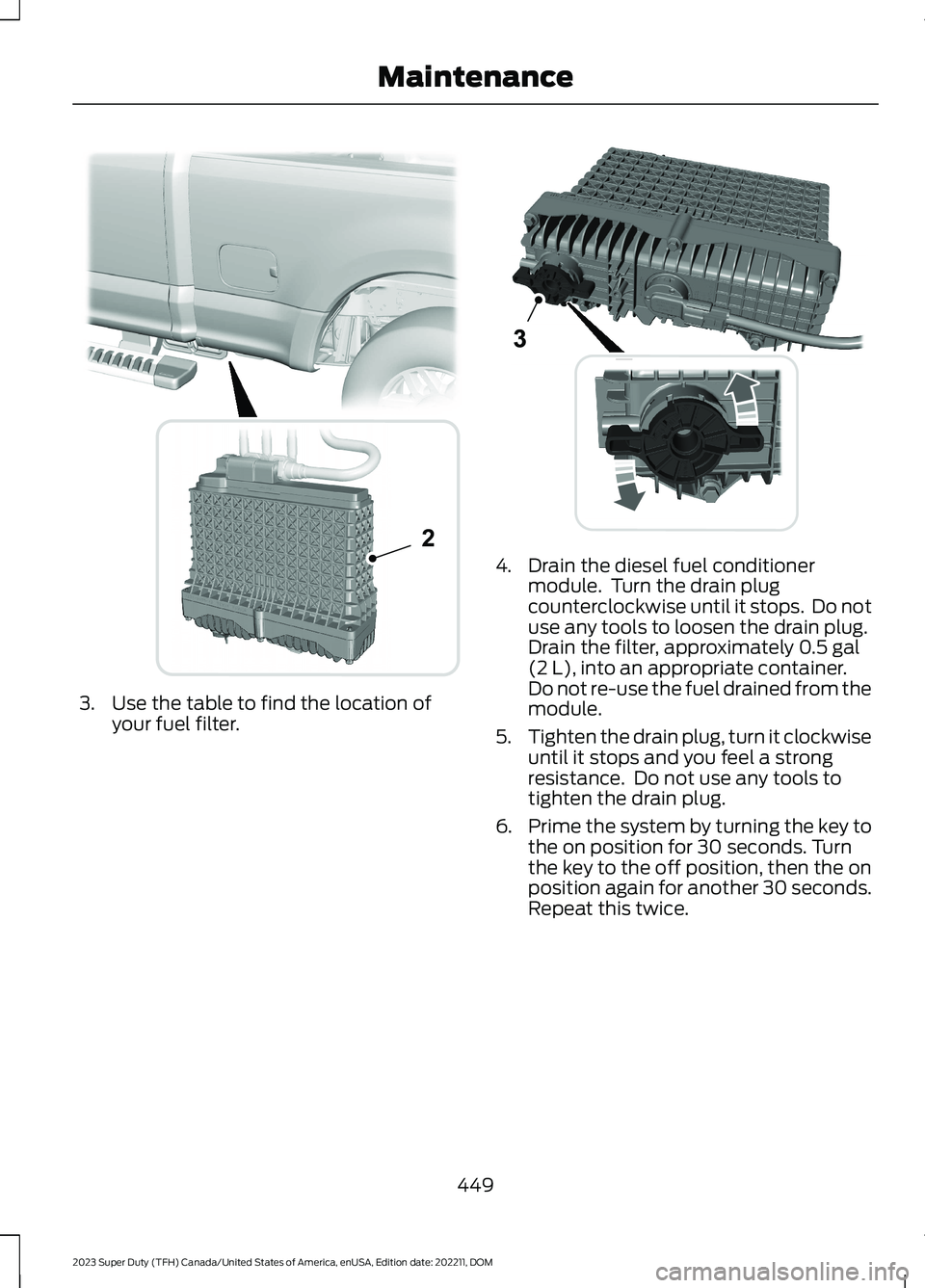
3.Use the table to find the location ofyour fuel filter.
4.Drain the diesel fuel conditionermodule. Turn the drain plugcounterclockwise until it stops. Do notuse any tools to loosen the drain plug.Drain the filter, approximately 0.5 gal(2 L), into an appropriate container.Do not re-use the fuel drained from themodule.
5.Tighten the drain plug, turn it clockwiseuntil it stops and you feel a strongresistance. Do not use any tools totighten the drain plug.
6.Prime the system by turning the key tothe on position for 30 seconds. Turnthe key to the off position, then the onposition again for another 30 seconds.Repeat this twice.
449
2023 Super Duty (TFH) Canada/United States of America, enUSA, Edition date: 202211, DOMMaintenance2 E226475 E269861
Page 465 of 738
High Series Lamps: Use a 6 mm hex key orPhillips PH1 screwdriver to adjust.
6.Repeat Steps 3 through 5 to adjust theother headlamp.
Note:The vertical adjuster is in the samelocation for all headlamps.
7.Close the hood and turn off the lamps.
Horizontal Aim Adjustment
Horizontal aim is not required for thisvehicle and is not adjustable.
EXTERIOR BULBS
EXTERIOR BULB SPECIFICATIONCHART
Replacement bulbs are specified in thechart below. Headlamp bulbs must bemarked with an authorized D.O.T. markingfor North America to make sure they havethe proper lamp performance, lightbrightness, light pattern and safe visibility.The correct bulbs will not damage thelamp assembly or void the lamp assemblywarranty and will provide quality bulbillumination time.
Power (Watt)SpecificationLamp
62/69H11L/9005LLHeadlamp. Low series.
LEDLEDHeadlamp. Mid/High series.
5W5WFront side marker lamp. Low series.
LEDLEDFront side marker lamp. Mid/Highseries.
62H11Front fog lamp.
LEDLEDFront fog lamp.3
30/74257NAFront turn signal and parking lamp.Low series.
LEDLEDFront turn signal and parking lamp.Mid/High series.
27/73157KRear lamp, brake lamp, and rear side
marker lamp. Low/Mid series.1
27/73175KRear turn signal lamp. Low/Mid series.1
LEDLEDRear lamp, brake lamp, rear turnsignal, rear side marker lamp and
reverse lamp. High series.1
27/73157KRear lamp, brake lamp, rear turn signal
and rear side marker lamp.2
461
2023 Super Duty (TFH) Canada/United States of America, enUSA, Edition date: 202211, DOMMaintenance
Page 507 of 738
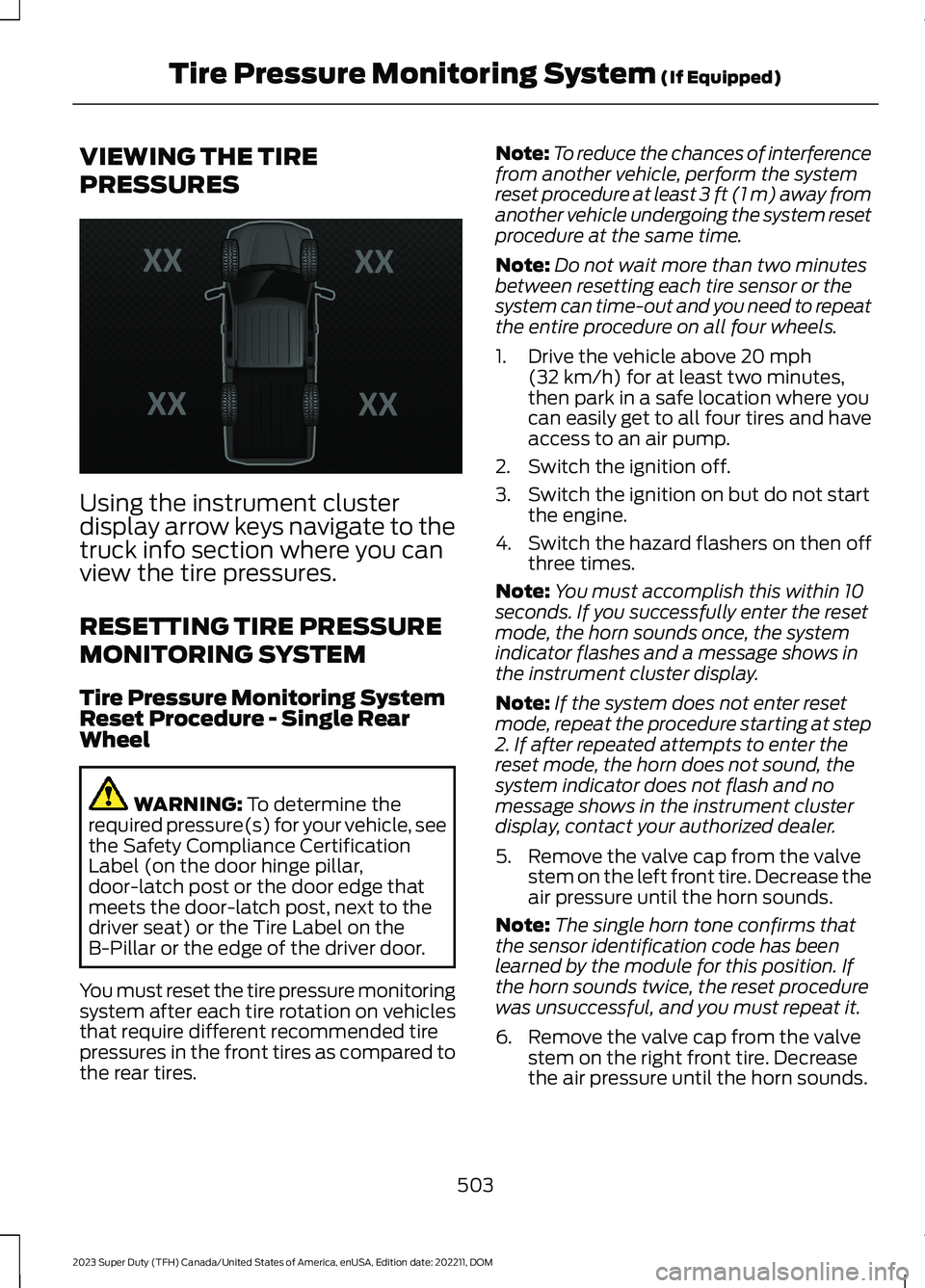
VIEWING THE TIRE
PRESSURES
Using the instrument clusterdisplay arrow keys navigate to thetruck info section where you canview the tire pressures.
RESETTING TIRE PRESSURE
MONITORING SYSTEM
Tire Pressure Monitoring SystemReset Procedure - Single RearWheel
WARNING: To determine therequired pressure(s) for your vehicle, seethe Safety Compliance CertificationLabel (on the door hinge pillar,door-latch post or the door edge thatmeets the door-latch post, next to thedriver seat) or the Tire Label on theB-Pillar or the edge of the driver door.
You must reset the tire pressure monitoringsystem after each tire rotation on vehiclesthat require different recommended tirepressures in the front tires as compared tothe rear tires.
Note:To reduce the chances of interferencefrom another vehicle, perform the systemreset procedure at least 3 ft (1 m) away fromanother vehicle undergoing the system resetprocedure at the same time.
Note:Do not wait more than two minutesbetween resetting each tire sensor or thesystem can time-out and you need to repeatthe entire procedure on all four wheels.
1.Drive the vehicle above 20 mph(32 km/h) for at least two minutes,then park in a safe location where youcan easily get to all four tires and haveaccess to an air pump.
2.Switch the ignition off.
3.Switch the ignition on but do not startthe engine.
4.Switch the hazard flashers on then offthree times.
Note:You must accomplish this within 10seconds. If you successfully enter the resetmode, the horn sounds once, the systemindicator flashes and a message shows inthe instrument cluster display.
Note:If the system does not enter resetmode, repeat the procedure starting at step2. If after repeated attempts to enter thereset mode, the horn does not sound, thesystem indicator does not flash and nomessage shows in the instrument clusterdisplay, contact your authorized dealer.
5.Remove the valve cap from the valvestem on the left front tire. Decrease theair pressure until the horn sounds.
Note:The single horn tone confirms thatthe sensor identification code has beenlearned by the module for this position. Ifthe horn sounds twice, the reset procedurewas unsuccessful, and you must repeat it.
6.Remove the valve cap from the valvestem on the right front tire. Decreasethe air pressure until the horn sounds.
503
2023 Super Duty (TFH) Canada/United States of America, enUSA, Edition date: 202211, DOMTire Pressure Monitoring System (If Equipped)E224333
Page 508 of 738
7.Repeat the previous step on the rightrear tire and then on the left rear tire.
8.Switch the ignition off.
Note:If the horn sounds twice again afterswitching the ignition off, and repeating theprocedure, contact your authorized dealerand have your vehicle checked as soon aspossible.
9.Set all four tires to the recommendedair pressure as indicated on the SafetyCompliance Certification Label.
Tire Pressure Monitoring SystemReset Procedure - Dual Rear Wheel
For further information seeUnderstanding Your Tire PressureMonitoring System and refer to DualRear Wheel, earlier in this section.
Read the entire procedure beforeattempting.
1.Drive the vehicle above 20 mph(32 km/h) for at least two minutes,then park in a safe location where youcan easily get to all six tires and haveaccess to an air pump.
2.Place the ignition in the off position andkeep the key in the ignition.
3.Cycle the ignition to the on positionwith the engine off.
4.Turn the hazard flashers on then offthree times. You must accomplish thiswithin 10 seconds. If you successfullyenter the reset mode, the horn soundsonce, the system indicator flashes anda message shows in the instrumentcluster display. If this does not occur,repeat the procedure starting at step2. If after repeated attempts to enterthe reset mode, the horn does notsound, the system indicator does notflash and no message shows in theinstrument cluster display, contact yourauthorized dealer as soon as possible.
5.Train the tire pressure monitoringsystem sensors in the tires using thefollowing system reset sequencestarting with the left front tire in thefollowing order: Left front - driver sidefront tire, Right front - passenger sidefront tire, Right outer rear -passengerside rear outer tire, Right inner rear -passenger side rear inner tire, Left outerrear - driver side rear outer tire, Leftinner rear - driver side rear inner tire.
6.Remove the valve cap from the valvestem on the left front tire. Decrease theair pressure until the horn sounds.
Note:The single horn chirp confirms thatthe sensor identification code has beenlearned by the module for this position. If adouble horn is heard, the reset procedurewas unsuccessful, and you must repeat it.
7.Remove the valve cap from the valvestem on the right front tire. Decreasethe air pressure until the horn sounds.
8.Remove the valve cap from the valvestem on the right outer rear tire.Decrease the air pressure until the hornsounds.
9.Remove the valve cap from the valvestem on the right inner rear tire.Decrease the air pressure until the hornsounds.
10.Remove the valve cap from the valvestem on the left outer rear tire.Decrease the air pressure until thehorn sounds.
11.Remove the valve cap from the valvestem on the left inner rear tire.Decrease the air pressure until thehorn sounds. Training is completeafter the horn sounds for the last tiretrained, the system indicator stopsflashing, and a message is shown inthe instrument cluster display.
504
2023 Super Duty (TFH) Canada/United States of America, enUSA, Edition date: 202211, DOMTire Pressure Monitoring System (If Equipped)
Page 516 of 738
6.Use the ignition key to open the lock atthe rear bumper.
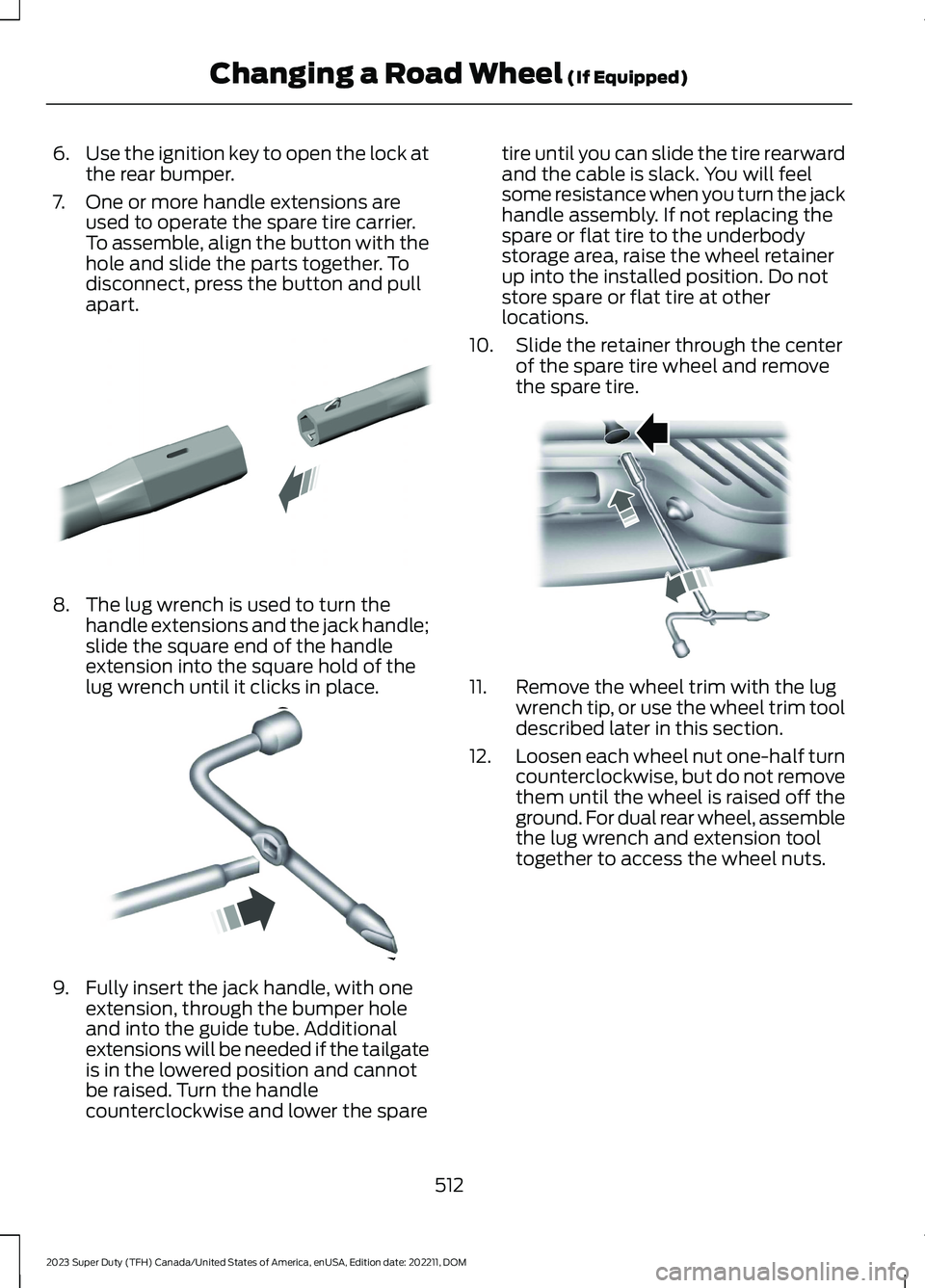
7.One or more handle extensions areused to operate the spare tire carrier.To assemble, align the button with thehole and slide the parts together. Todisconnect, press the button and pullapart.
8.The lug wrench is used to turn thehandle extensions and the jack handle;slide the square end of the handleextension into the square hold of thelug wrench until it clicks in place.
9.Fully insert the jack handle, with oneextension, through the bumper holeand into the guide tube. Additionalextensions will be needed if the tailgateis in the lowered position and cannotbe raised. Turn the handlecounterclockwise and lower the spare
tire until you can slide the tire rearwardand the cable is slack. You will feelsome resistance when you turn the jackhandle assembly. If not replacing thespare or flat tire to the underbodystorage area, raise the wheel retainerup into the installed position. Do notstore spare or flat tire at otherlocations.
10.Slide the retainer through the centerof the spare tire wheel and removethe spare tire.
11.Remove the wheel trim with the lugwrench tip, or use the wheel trim tooldescribed later in this section.
12.Loosen each wheel nut one-half turncounterclockwise, but do not removethem until the wheel is raised off theground. For dual rear wheel, assemblethe lug wrench and extension tooltogether to access the wheel nuts.
512
2023 Super Duty (TFH) Canada/United States of America, enUSA, Edition date: 202211, DOMChanging a Road Wheel (If Equipped)E308882 E162796 E310417
Page 573 of 738
PHONE PRECAUTIONS
WARNING: Driving while distractedcan result in loss of vehicle control, crashand injury. We strongly recommend thatyou use extreme caution when using anydevice that may take your focus off theroad. Your primary responsibility is thesafe operation of your vehicle. Werecommend against the use of anyhand-held device while driving andencourage the use of voice-operatedsystems when possible. Make sure youare aware of all applicable local lawsthat may affect the use of electronicdevices while driving.
CONNECTING YOUR PHONE
Go to the settings menu on your device andswitch Bluetooth® on.
Press the phone option on thefeature bar.
1.Press Add Phone.
Note:A prompt alerts you to search for yourvehicle on your cell phone.
2.Select your vehicle on your cell phone.
Note:A number appears on your cell phoneand on the touchscreen.
3.Confirm the number on your cell phonematches the number on thetouchscreen.
Note:The touchscreen indicates that youhave successfully paired your cell phone.
4.Approve phonebook download requeston your cell phone.
PHONE MENU
This menu becomes available after pairinga phone.
Recent Call List
Display and select an entry from a list ofprevious calls.
Contacts
Display a smart search form to look up yourcontacts. Use the List button toalphabetically sort your contacts.
Favorites
Display the list of favorite contacts thatare set up on your phone.
Messaging
Displays the list of text messages to read,listen to, or respond to.
Email
Displays the list of emails to read, listen to,or respond to.
Phone List
Display the list of paired or connecteddevices that you can select.
Note:Up to 12 devices can be stored.
Do Not Disturb
Reject incoming calls and switch ring tonesand alerts off.
Phone Keypad
Directly dial a number.
569
2023 Super Duty (TFH) Canada/United States of America, enUSA, Edition date: 202211, DOMPhone