2023 FORD SUPER DUTY key
[x] Cancel search: keyPage 344 of 738

Intersection Assist (If Equipped)
The pre-collision assist system mayoperate in a scenario where you are turningacross the path of an oncoming vehicle, orwith crossing pedestrians and cyclists.Detection of vehicles driving in anoncoming direction is active if your vehicleis driving at speeds up to 50 mph(80 km/h). Detection of crossingpedestrians and cyclists at an intersectionis active if your vehicle is driving at speedsup to 19 mph (30 km/h).
SWITCHING PRE-COLLISION
ASSIST ON AND OFF
To switch the system on or off, use thetouchscreen:
1.Press Features on the touchscreen.
2.Press Driver Assistance.
3.Press Pre-Collision Assist.
4.Switch the feature on or off.
Adjusting the Pre-Collision AssistSettings
You can adjust the following settings byusing the touchscreen controls in thepre-collision assist menu:
•Change alert and distance alertsensitivity to one of three possiblesettings.
•Switch distance indication and alert onor off.
•If required, switch automaticemergency braking on or off.
•If required, switch the entirepre-collision assist feature on or off.
•If required, switch evasive steeringassist on or off.
Note:Automatic emergency braking andevasive steering turn on every time youswitch the ignition on.
Note:If your vehicle has a radar sensor, werecommend that you switch the system offif you install a snow plow or similar objectin such a way that it may block the radarsensor. Your vehicle remembers the selectedsetting across key cycles.
Note:If you switch automatic emergencybraking off, evasive steering assist switchesoff.
340
2023 Super Duty (TFH) Canada/United States of America, enUSA, Edition date: 202211, DOMPre-Collision Assist (If Equipped)E309750
Page 361 of 738
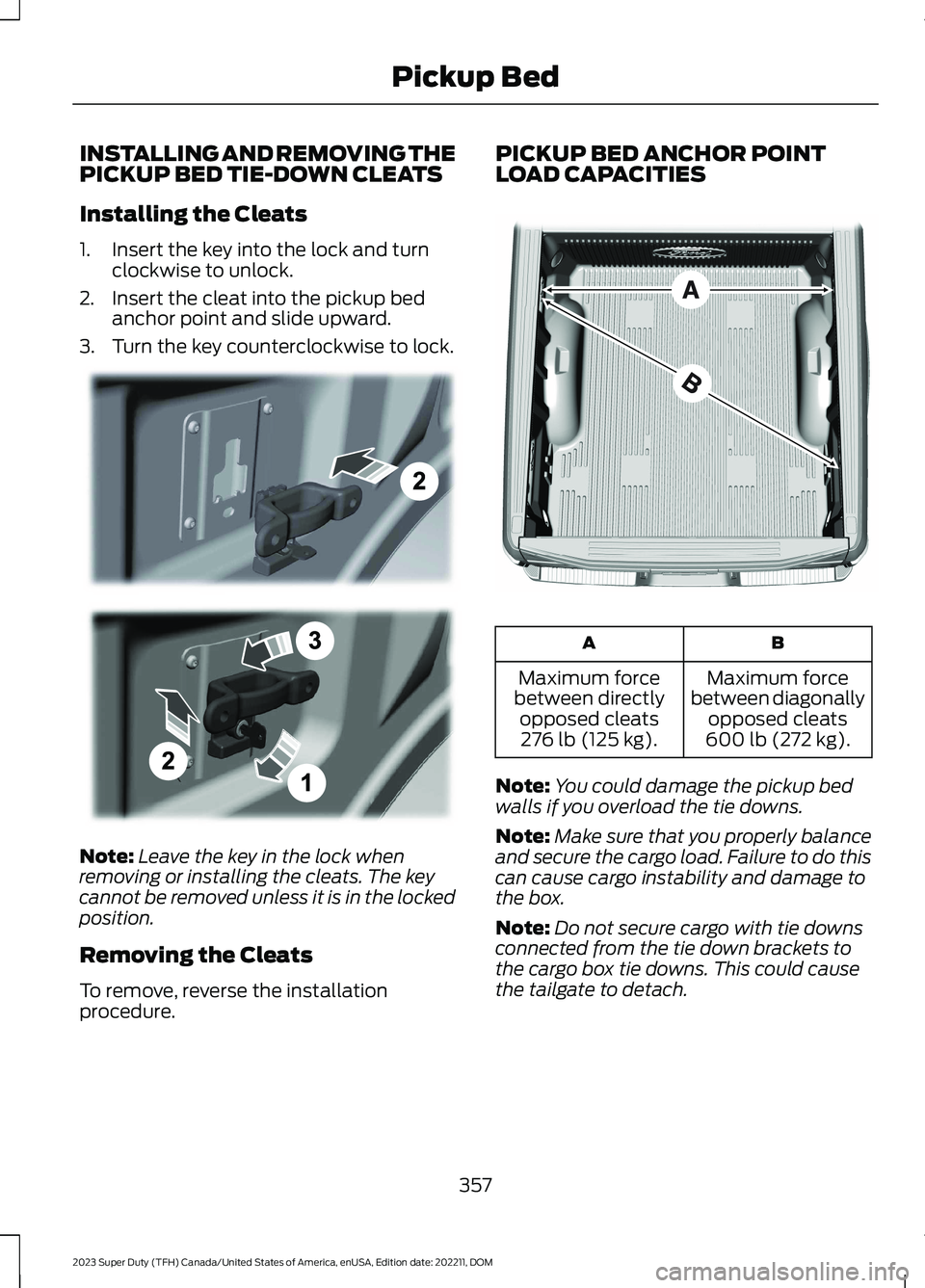
INSTALLING AND REMOVING THEPICKUP BED TIE-DOWN CLEATS
Installing the Cleats
1.Insert the key into the lock and turnclockwise to unlock.
2.Insert the cleat into the pickup bedanchor point and slide upward.
3.Turn the key counterclockwise to lock.
Note:Leave the key in the lock whenremoving or installing the cleats. The keycannot be removed unless it is in the lockedposition.
Removing the Cleats
To remove, reverse the installationprocedure.
PICKUP BED ANCHOR POINTLOAD CAPACITIES
BA
Maximum forcebetween diagonallyopposed cleats600 lb (272 kg).
Maximum forcebetween directlyopposed cleats276 lb (125 kg).
Note:You could damage the pickup bedwalls if you overload the tie downs.
Note:Make sure that you properly balanceand secure the cargo load. Failure to do thiscan cause cargo instability and damage tothe box.
Note:Do not secure cargo with tie downsconnected from the tie down brackets tothe cargo box tie downs. This could causethe tailgate to detach.
357
2023 Super Duty (TFH) Canada/United States of America, enUSA, Edition date: 202211, DOMPickup BedE327575 E327576
Page 388 of 738

WHAT IS ONBOARD SCALES
Onboard scales provides the estimatedpayload of your vehicle and warns whenyour vehicle is overloaded.
HOW DOES ONBOARD SCALES
WORK
Onboard scales uses sensors mounted tothe suspension to calculate the vehicle'spayload.
ONBOARD SCALES
LIMITATIONS
You cannot use the system if any of thefollowing occur:
•The wheels are not pointed straightahead.
•Your vehicle is not in park (P).
•Your vehicle is not on a level surface.
•The tire pressures are below therecommended levels.
•Your vehicle is off.
USING ONBOARD SCALES
1.Press Features on the touchscreen.
2.Press Onboard Scales.
Note:You can also access onboard scalesusing the FordPass app.
Settings menu.A
Estimated payload.B
Taillamps on and off.C
Taillamps
Press to see the vehicle's estimatedpayload on the vehicle's taillamp.
Onboard Scales Settings
Vehicle Mode
Press to return to the onboard scalesscreen.
Scale Mode
Press to see a representation of the weightadded to the vehicle's current payload andto reset the scale to zero.
Note:The scale settings remain betweenkey cycles.
Passenger and Cargo Load Reminder
Press to switch the load reminder on or off.
Set Passenger and Cargo Load Reminder
Press to set the estimated payload that isnot in the vehicle when you use on-boardscale.
384
2023 Super Duty (TFH) Canada/United States of America, enUSA, Edition date: 202211, DOMOnboard Scales (If Equipped)E390703
Page 403 of 738

What does it mean if the systemdisplays that it is not available?
There could be a sub-system that thesystem uses that is not correctlyoperating or there could be a batteryvoltage issue. If the system continuesto display it is not available, visit yourauthorized dealer to have your vehiclechecked.
What does it mean if the systemdisplays that driving is required toinitialize steering?
The steering system needs to learninternal parameters to fully turn on thefeature. Drive your vehicle straightforward above 25 mph (40 km/h) forapproximately 5 minutes. This couldalso occur when your vehicle is new,there is a battery voltage issue or if thesteering system has been serviced.
What does it mean if the system doesnot detect a trailer when configuredwith a sensor?
Verify that the sensor is properlyconnected. See Trailer SensorInstallation (page 388). Repeatcalibration on a different route if youhave verified sensor installation.
What does it mean if the systemrequires you to pull forward toinitialize?
This occurs when the vehicle has notmoved during the current key cycleafter you connect and select the trailerin the touchscreen or you operate thesystem at speeds below 1 mph(1 km/h) for an extended period oftime. Drive forward above 2 mph(3 km/h) and the system indicateswhen it initializes.
What does it mean if the trailer is at itsmaximum angle or the systemdeactivated by trailer angle?
You are at the maximum controllabletrailer angle for the system. Place yourvehicle in drive (D) and pull forward toget the truck and trailer back to anin-line position. If this messageconsistently displays, this couldindicate the sensor is incorrectlyinstalled, the trailer needs to berecalibrated or the drawbar or thetrailer dimensions are outside of thesupported range. The system isdesigned to work with drawbars thathave a license plate to hitch ball centermeasurement of 9–18 in (23–46 cm)when installed. The system is designedto work with trailers that have a hitchpoint to center of the axle or axlesmeasurement of 6–33 ft(1.85–10.05 m). Do not attempt to usedrawbars or trailers that have a lengthoutside of this range as the systemperformance degrades and couldcause improper system function.Check that the correct trailer isselected in the touchscreen. Verify thesensor is installed according to theinstructions included in the sensor kitand check that the drawbar and thetrailer dimensions are within theallowed range. Then, delete the trailerfrom the system and repeat the setupprocess to calibrate the trailer.
399
2023 Super Duty (TFH) Canada/United States of America, enUSA, Edition date: 202211, DOMTrailer Backup Assistance (If Equipped)
Page 414 of 738
What does it mean if the systemdisplays that it is not available?
There could be a sub-system that thesystem uses that is not correctlyoperating or there could be a batteryvoltage issue. If the system continuesto display it is not available, visit yourauthorized dealer to have your vehiclechecked.
What does it mean if the systemdisplays that driving is required toinitialize steering?
The steering system needs to learninternal parameters to fully turn on thefeature. Drive your vehicle straightforward above 25 mph (40 km/h) forapproximately 5 minutes. This couldalso occur when your vehicle is new,there is a battery voltage issue or if thesteering system has been serviced.
What does it mean if the system doesnot detect a trailer when configuredwith a sensor?
Verify that the sensor is properlyconnected. See Trailer SensorInstallation (page 403). Repeatcalibration on a different route if youhave verified sensor installation.
What does it mean if the systemrequires you to pull forward toinitialize?
This occurs when the vehicle has notmoved during the current key cycleafter you connect and select the trailerin the touchscreen or you operate thesystem at speeds below 1 mph(1 km/h) for an extended period oftime. Drive forward above 2 mph(3 km/h) and the system indicateswhen it initializes.
What does it mean if the trailer is at itsmaximum angle or the systemdeactivated by trailer angle?
You are at the maximum controllabletrailer angle for the system. Place yourvehicle in drive (D) and pull forward toget the truck and trailer back to anin-line position. If this messageconsistently displays, this couldindicate the sensor is incorrectlyinstalled, the trailer needs to berecalibrated or the drawbar or thetrailer dimensions are outside of thesupported range. The system isdesigned to work with drawbars thathave a license plate to hitch ball centermeasurement of 9–18 in (23–46 cm)when installed. The system is designedto work with trailers that have a hitchpoint to center of the axle or axlesmeasurement of 6–33 ft(1.85–10.05 m). Do not attempt to usedrawbars or trailers that have a lengthoutside of this range as the systemperformance degrades and couldcause improper system function.Check that the correct trailer isselected in the touchscreen. Verify thesensor is installed according to theinstructions included in the sensor kitand check that the drawbar and thetrailer dimensions are within theallowed range. Then, delete the trailerfrom the system and repeat the setupprocess to calibrate the trailer.
410
2023 Super Duty (TFH) Canada/United States of America, enUSA, Edition date: 202211, DOMTrailer Reverse Guidance (If Equipped)
Page 417 of 738
•If a large obstacle such as a rockcannot be avoided, choose a path thatplaces the rock directly under the tirerather than the undercarriage of thevehicle. This will help prevent damageto the vehicle.
•Ditches and washouts should becrossed at a 45° angle, allowing eachwheel to independently cross theobstacle.
Hill Climbing
WARNING: Extreme care shouldbe used when steering the vehicle inreverse down a slope so as not to causethe vehicle to swerve out of control.
•Always attempt to climb a steep hillalong the fall line of the slope and notdiagonally.
•If the vehicle is unable to make it upthe hill, DO NOT attempt to turn backdown the slope. Place the vehicle inlow range and slowly back down inreverse.
•When descending a steep slope, selectlow gear and engage hill descentcontrol. Use the throttle and brakepedals to control your descent speed.
Note:Hill descent control is functional inreverse and should be used in this situation.
DRIVING THROUGH WATERLIMITATIONS
WARNING: Do not attempt tocross a deep, fast flowing body of water.Failure to follow this instruction couldresult in the loss of control of yourvehicle, personal injury or death.
Determine the depth and speed of thecurrent before attempting a water crossing.As the water depth increases, reduce yourvehicle speed to avoid potential vehicledamage.
The key to a safe crossing is the waterdepth, current and bottom of the water'scondition. On soft bottoms, the vehiclesinks in, effectively increasing the waterlevel on the vehicle. Make sure to considerthis when determining the depth of water.Be aware that obstacles and debris maybe beneath the water’s surface.
Note:Cross flowing water at an angleheading slightly upstream.
Note:Tread lightly and avoid damage tothe environment.
Drive slowly when crossing water. Startvery slowly when entering, then buildmomentum. Proceed with a constant slowspeed lightly pressing on the accelerator.Ease off the accelerator as you reach theother side to diminish the front wave. Applythe accelerator slowly and as necessaryto climb out of the other side.
Note:Do not try to accelerate through thewater crossing.
When driving too fast in water or throughdeep water, the engine, transmission,transfer case, axles, electrical componentsor vehicle interior could ingest water.Muddy waters can reduce the coolingsystem effectiveness by depositing debrisinto the radiator. Water can causepermanent damage that may not becovered by your vehicle warranty. Seebelow for your vehicle’s capabilities.
413
2023 Super Duty (TFH) Canada/United States of America, enUSA, Edition date: 202211, DOMDriving Hints
Page 424 of 738
ROADSIDE ASSISTANCE
Vehicles Sold in the United States:Getting Roadside Assistance
If you have a vehicle concern, Ford MotorCompany offers a complimentary roadsideassistance program. This program isseparate from the New Vehicle LimitedWarranty.
The service is available:
•24 hours a day, seven days a week.
•For the coverage period supplied withyour vehicle.
Roadside Assistance covers:
•A flat tire change with a good spare(except vehicles supplied with a tireinflation kit).
•Battery jump start.
•Lock-out assistance (key replacementcost is the customer's responsibility).
•Fuel delivery — independent servicecontractors, if not prohibited by state,local or municipal law, shall deliver upto 2 gal (8 L) of gasoline or 5 gal (20 L)of diesel fuel to a disabled vehicle.Roadside assistance limits fuel deliveryservice to two no-charge occurrenceswithin a 12-month period.
•Winch out — available within 100 ft(30 m) of a paved or countymaintained road, no recoveries.
•Towing — independent servicecontractors, if not prohibited by state,local or municipal law, shall tow Fordeligible vehicles to an authorized dealerwithin 50 mi (80 km) of thedisablement location or to the nearestauthorized dealer. If a memberrequests a tow to an authorized dealerthat is more than 50 mi (80 km) fromthe disablement location, the membershall be responsible for any mileagecosts in excess of 50 mi (80 km).
•Roadside Assistance includes up to$200 for a towed trailer if the disabledeligible vehicle requires service at thenearest authorized dealer. If the towingvehicle is operational but the trailer isnot, then the trailer does not qualify forany roadside services.
Vehicles Sold in the United States:Using Roadside Assistance
Complete the roadside assistanceidentification card and place it in yourwallet for quick reference. This card is inthe Owner's Manual kit.
United States vehicle customers whorequire Roadside Assistance, call1-800-241-3673.
If you need to arrange roadside assistanceon your own, Ford Motor Companyreimburses a reasonable amount fortowing to the nearest dealership within50 mi (80 km). To obtain reimbursementinformation, United States vehiclecustomers call 1-800-241-3673.Customers need to submit their originalreceipts.
Vehicles Sold in Canada: GettingRoadside Assistance
If you have a vehicle concern, Ford MotorCompany of Canada, Limited offers acomplimentary roadside assistanceprogram. This program is eligible withinCanada or the continental United States.
420
2023 Super Duty (TFH) Canada/United States of America, enUSA, Edition date: 202211, DOMCrash and Breakdown Information
Page 425 of 738
The service is available 24 hours a day,seven days a week.
This program is separate from the NewVehicle Limited Warranty, but the coverageis concurrent with the powertrain coverageperiod of your vehicle. Canadian roadsidecoverage and benefits may differ from theU.S. coverage.
If you require more information, please callus in Canada at 1-800-665-2006, or visitour website at www.ford.ca.
SWITCHING THE HAZARD
FLASHERS ON AND OFF
The hazard flasher button is onthe instrument panel. Press thebutton to switch the hazardflashers on if your vehicle is creating asafety hazard for other road users.
When you switch the hazard flashers on,all front and rear direction indicators flash.
Note:The hazard flashers operate whenthe ignition is in any position, or if the key isnot in the ignition. The battery loses chargeand could have insufficient power to restartyour vehicle.
Press the button again to switch them off.
JUMP STARTING THE VEHICLE
JUMP STARTING PRECAUTIONS
WARNING: Batteries normallyproduce explosive gases which cancause personal injury. Therefore, do notallow flames, sparks or lightedsubstances to come near the battery.When working near the battery, alwaysshield your face and protect your eyes.Always provide correct ventilation.
WARNING: Keep batteries out ofreach of children. Batteries containsulfuric acid. Avoid contact with skin,eyes or clothing. Shield your eyes whenworking near the battery to protectagainst possible splashing of acidsolution. In case of acid contact with skinor eyes, flush immediately with water fora minimum of 15 minutes and get promptmedical attention. If acid is swallowed,call a physician immediately.
WARNING: Use only adequatelysized cables with insulated clamps.
WARNING: Make sure that thecables are clear of any moving parts andfuel delivery system parts.
WARNING: Connect batteries withonly the same nominal voltage.
WARNING: If the engine is runningwhile the hood is open, stay clear ofmoving engine components. Failure tofollow this warning could result in seriouspersonal injury or death.
Do not attempt to push-start an automatictransmission vehicle. This could causetransmission damage.
Do not disconnect the battery of thedisabled vehicle. This could damage yourvehicle's electrical system.
PREPARING THE VEHICLE
Use only a 12 volt supply to start yourvehicle.
Park the booster vehicle close to the hoodof the disabled vehicle, making sure thetwo vehicles do not touch.
421
2023 Super Duty (TFH) Canada/United States of America, enUSA, Edition date: 202211, DOMCrash and Breakdown InformationE75790