Page 176 of 738
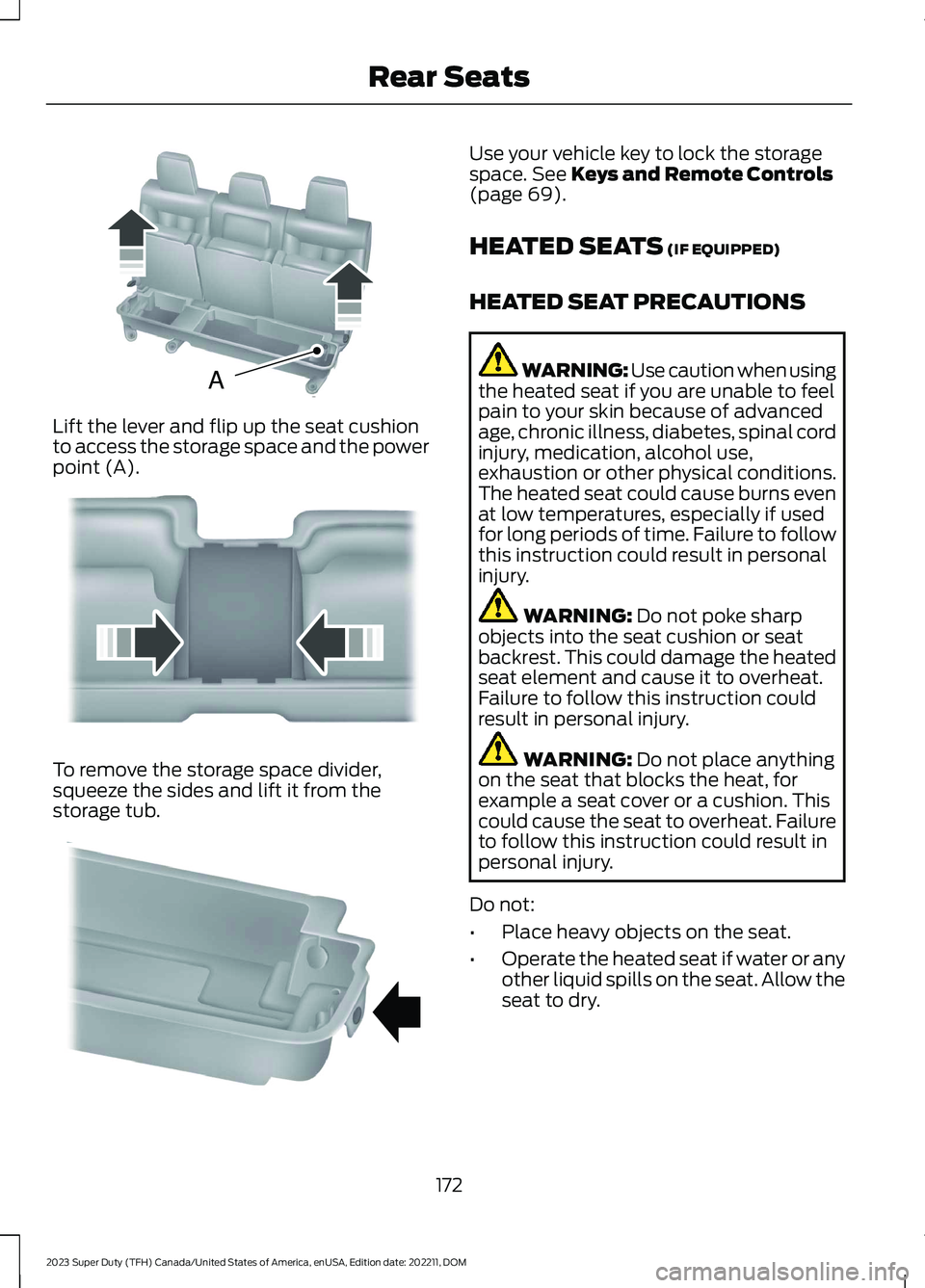
Lift the lever and flip up the seat cushionto access the storage space and the powerpoint (A).
To remove the storage space divider,squeeze the sides and lift it from thestorage tub.
Use your vehicle key to lock the storagespace. See Keys and Remote Controls(page 69).
HEATED SEATS (IF EQUIPPED)
HEATED SEAT PRECAUTIONS
WARNING: Use caution when usingthe heated seat if you are unable to feelpain to your skin because of advancedage, chronic illness, diabetes, spinal cordinjury, medication, alcohol use,exhaustion or other physical conditions.The heated seat could cause burns evenat low temperatures, especially if usedfor long periods of time. Failure to followthis instruction could result in personalinjury.
WARNING: Do not poke sharpobjects into the seat cushion or seatbackrest. This could damage the heatedseat element and cause it to overheat.Failure to follow this instruction couldresult in personal injury.
WARNING: Do not place anythingon the seat that blocks the heat, forexample a seat cover or a cushion. Thiscould cause the seat to overheat. Failureto follow this instruction could result inpersonal injury.
Do not:
•Place heavy objects on the seat.
•Operate the heated seat if water or anyother liquid spills on the seat. Allow theseat to dry.
172
2023 Super Duty (TFH) Canada/United States of America, enUSA, Edition date: 202211, DOMRear SeatsAE162739 E162740 E162741
Page 181 of 738
WHAT IS THE MEMORY
FUNCTION
The memory function recalls the positionof these features:
•Driver seat.
•Power mirrors.
•Optional power steering column.
•Optional power adjustable pedals.
MEMORY FUNCTION
PRECAUTIONS
WARNING: Before activating thememory seat, make sure that the areaimmediately surrounding the seat is clearof obstructions and that all occupantsare clear of moving parts.
WARNING: Do not use the memoryfunction when your vehicle is moving.
LOCATING THE MEMORY
FUNCTION BUTTONS
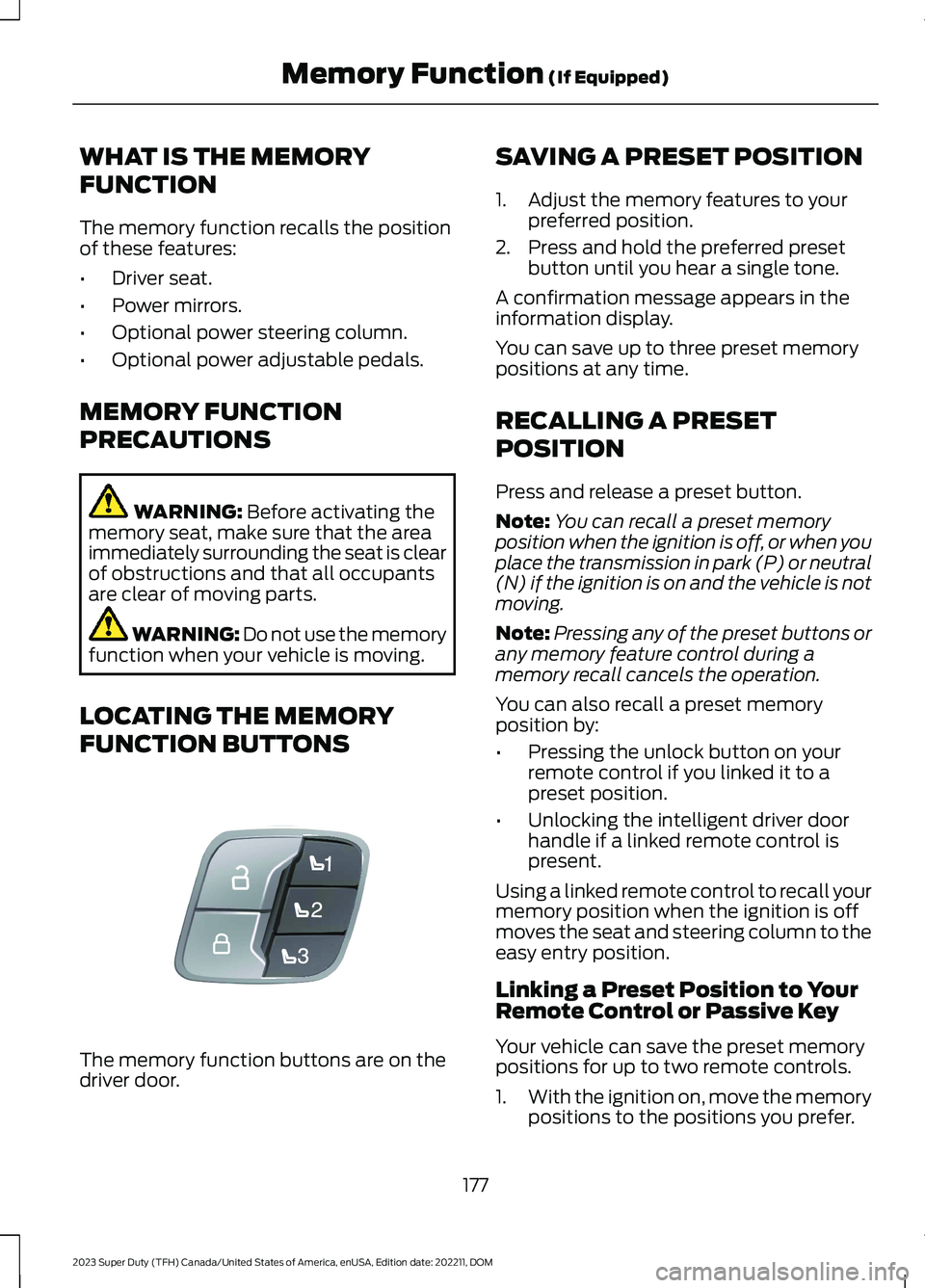
The memory function buttons are on thedriver door.
SAVING A PRESET POSITION
1.Adjust the memory features to yourpreferred position.
2.Press and hold the preferred presetbutton until you hear a single tone.
A confirmation message appears in theinformation display.
You can save up to three preset memorypositions at any time.
RECALLING A PRESET
POSITION
Press and release a preset button.
Note:You can recall a preset memoryposition when the ignition is off, or when youplace the transmission in park (P) or neutral(N) if the ignition is on and the vehicle is notmoving.
Note:Pressing any of the preset buttons orany memory feature control during amemory recall cancels the operation.
You can also recall a preset memoryposition by:
•Pressing the unlock button on yourremote control if you linked it to apreset position.
•Unlocking the intelligent driver doorhandle if a linked remote control ispresent.
Using a linked remote control to recall yourmemory position when the ignition is offmoves the seat and steering column to theeasy entry position.
Linking a Preset Position to YourRemote Control or Passive Key
Your vehicle can save the preset memorypositions for up to two remote controls.
1.With the ignition on, move the memorypositions to the positions you prefer.
177
2023 Super Duty (TFH) Canada/United States of America, enUSA, Edition date: 202211, DOMMemory Function (If Equipped)E307868
Page 182 of 738
2.Press and hold the preferred presetbutton for about five seconds. A tonesounds, and the instrument panelprompts you to press the lock buttonon your remote control.
3.Within ten seconds, press the lockbutton on the remote control you arelinking. The instrument panel indicatesa successful link.
To unlink a remote control, follow thesame procedure – except in step 3, pressthe unlock button on the remote control.
Note:If more than one linked remotecontrol is in range, the memory functionmoves to the settings of the first key toinitiate a memory recall.
MEMORY FUNCTION VIDEOS
Memory Seats Video Link
178
2023 Super Duty (TFH) Canada/United States of America, enUSA, Edition date: 202211, DOMMemory Function (If Equipped)
Page 194 of 738
WHAT IS UTILITY IDLE MODE
Utility idle mode allows you to remove thekey from the ignition and keep the vehicleand bed power point running.
SWITCHING UTILITY IDLE
MODE ON AND OFF
Switching Utility Idle On
1.Start the vehicle. See Starting andStopping the Engine (page 202).
2.Press Features on the touchscreen.
3.Press Pro Power Onboard.
4.Press Generator Mode.
5.Press Utility Idle.
6.Turn the key to position 0.
7.Remove the key from the ignition.
Switching Utility Idle Off using theKey
1.Insert the key into the ignition.
2.Turn the key to position III.
Switching Utility Idle Off using theCenter Display Screen
1.Start the vehicle. See Starting andStopping the Engine (page 202).
2.Press Features on the touchscreen.
3.Press Pro Power Onboard.
4.Press Generator Mode.
5.Press Utility Idle.
6.Press Turn Vehicle Off.
WHAT IS GENERATOR MODE
Generator mode uses the vehicle engineto increase power to the bed power outletsup to the rating listed on the power outletlabel.
SWITCHING GENERATOR
MODE ON AND OFF
Using the Center Display Screen
1.Start the vehicle. See Starting andStopping the Engine (page 202).
2.Press Features on the touchscreen.
3.Press Pro Power Onboard.
4.Press Generator Mode.
Using the Instrument Panel
Press the button to switchbetween off, convenience mode,and generator mode.
RESETTING GROUND FAULT
DETECTION
After disconnecting all electrical loads theground fault can be reset using theswitches on the power point, on theinstrument panel or on the touchscreen.
Use the controls on the touchscreen to testthe ground fault detection circuit.
190
2023 Super Duty (TFH) Canada/United States of America, enUSA, Edition date: 202211, DOMOnboard Generator (If Equipped)E311311
Page 199 of 738
WHAT IS THE WIRELESS
ACCESSORY CHARGER
The wireless accessory charger allows youto charge one compatible Qi wirelesscharging device on the charging area.
WIRELESS ACCESSORY
CHARGER PRECAUTIONS
WARNING: Wireless chargingdevices can affect the operation ofimplanted medical devices, includingcardiac pacemakers. If you have anyimplanted medical devices, werecommend that you consult with yourphysician.
WARNING: Remove all metalobjects like coins and keys from thecharging surface and remove any metalobjects attached to your mobile phonebefore placing the device on the chargingsurface. Some mobile devices or casesmay attract metal objects. Metal objectson the charging surface or attached tothe phone may become hot whilecharging is active. If an object is left onor near the charging surface or attachedto the phone while the device is charging,let the objects cool before removing toprevent personal injury.
Keep the charging area clean and removeforeign objects prior to charging a device.
Do not place items with a magnetic stripor radio-frequency identification chip, forexample passports, parking tickets,transportation passes or credit cards, nearthe charging area when charging a device.Damage could occur to the magnetic stripor radio-frequency identification chip.
Do not place metal objects, for exampleremote controls, coins and candywrappers, on or near the charging areawhen charging a device. Metal objects mayheat up and degrade the chargingperformance, in addition to causinginterruptions in charging.
Charging could be interrupted, degraded,or could stop if any of the following occur:
•The system detects a foreign object.
•The device is misaligned on thecharging area.
•The device moves on the activecharging area when the vehicle is inmotion.
•The vehicle ambient temperature is toohigh.
•You attempt to charge a non-Qicompatible device on the wirelesscharger.
Note:During charging, the device and thecharger could heat up, this is normal. If thebattery gets hotter than usual, the devicemay stop charging.
LOCATING THE WIRELESS
ACCESSORY CHARGER
The charging area is in the centerconsole media bin below theinstrument panel.
CHARGING A WIRELESS
DEVICE
Place the device on the center of thecharging surface with the charging sidedown. The charging stops after your devicereaches a full charge.
You can use the charger when the vehicleis in accessory mode, when the vehicle isrunning, or when SYNC is on.
195
2023 Super Duty (TFH) Canada/United States of America, enUSA, Edition date: 202211, DOMWireless Accessory ChargerE297549
Page 201 of 738
CUP HOLDERS
CUP HOLDER PRECAUTIONS
WARNING: Use caution whenstowing items or hot drinks in the cupholders. Items could become loose orspill during hard braking, acceleration orcrashes. Failure to follow this instructioncould result in personal injury.
GLOVE COMPARTMENT
OPENING THE GLOVECOMPARTMENT
Upper Glove Compartment (If
Equipped)
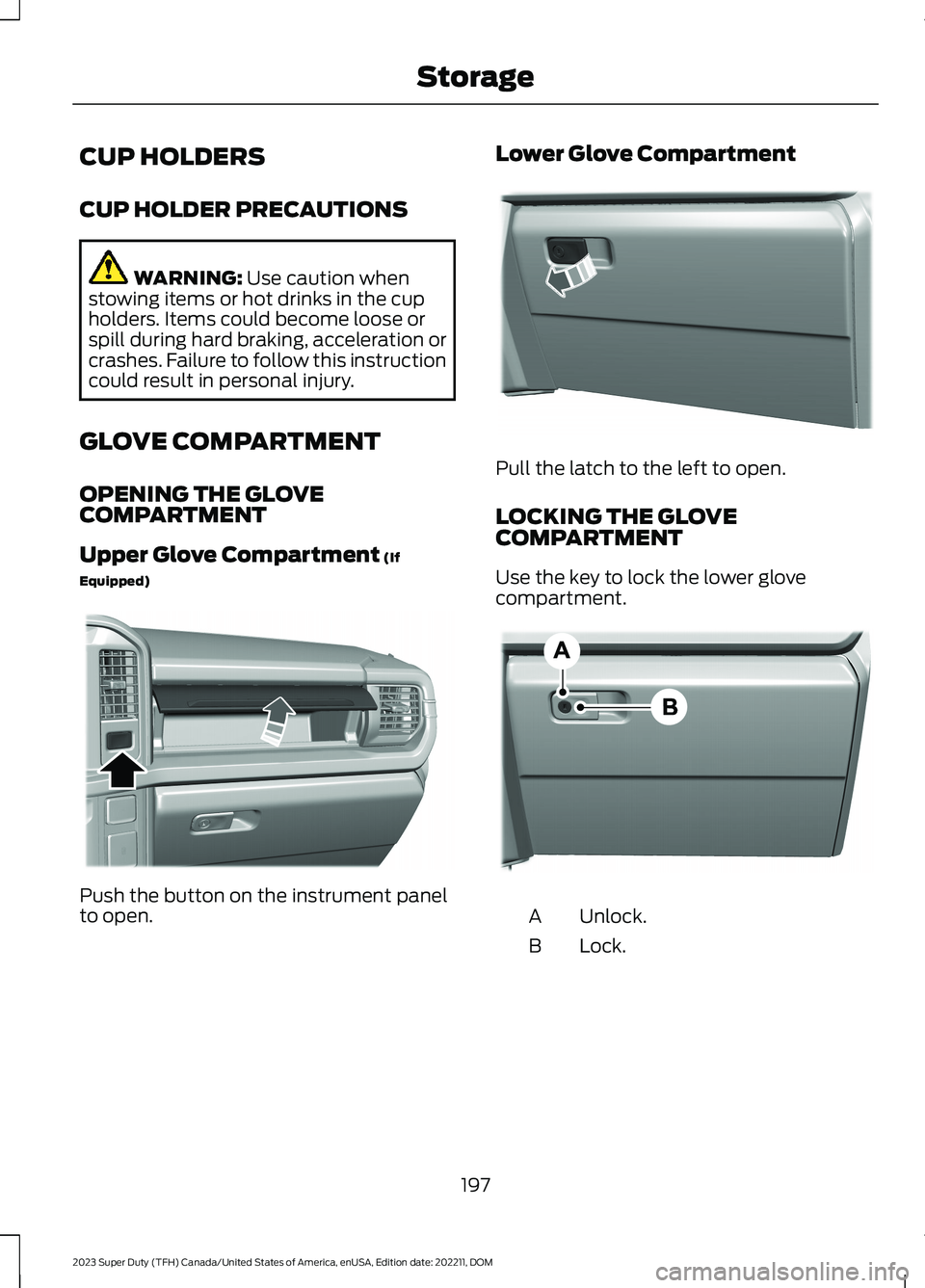
Push the button on the instrument panelto open.
Lower Glove Compartment
Pull the latch to the left to open.
LOCKING THE GLOVECOMPARTMENT
Use the key to lock the lower glovecompartment.
Unlock.A
Lock.B
197
2023 Super Duty (TFH) Canada/United States of America, enUSA, Edition date: 202211, DOMStorageE380778 E380779 E385980
Page 203 of 738
Locking the Front Under SeatStorage
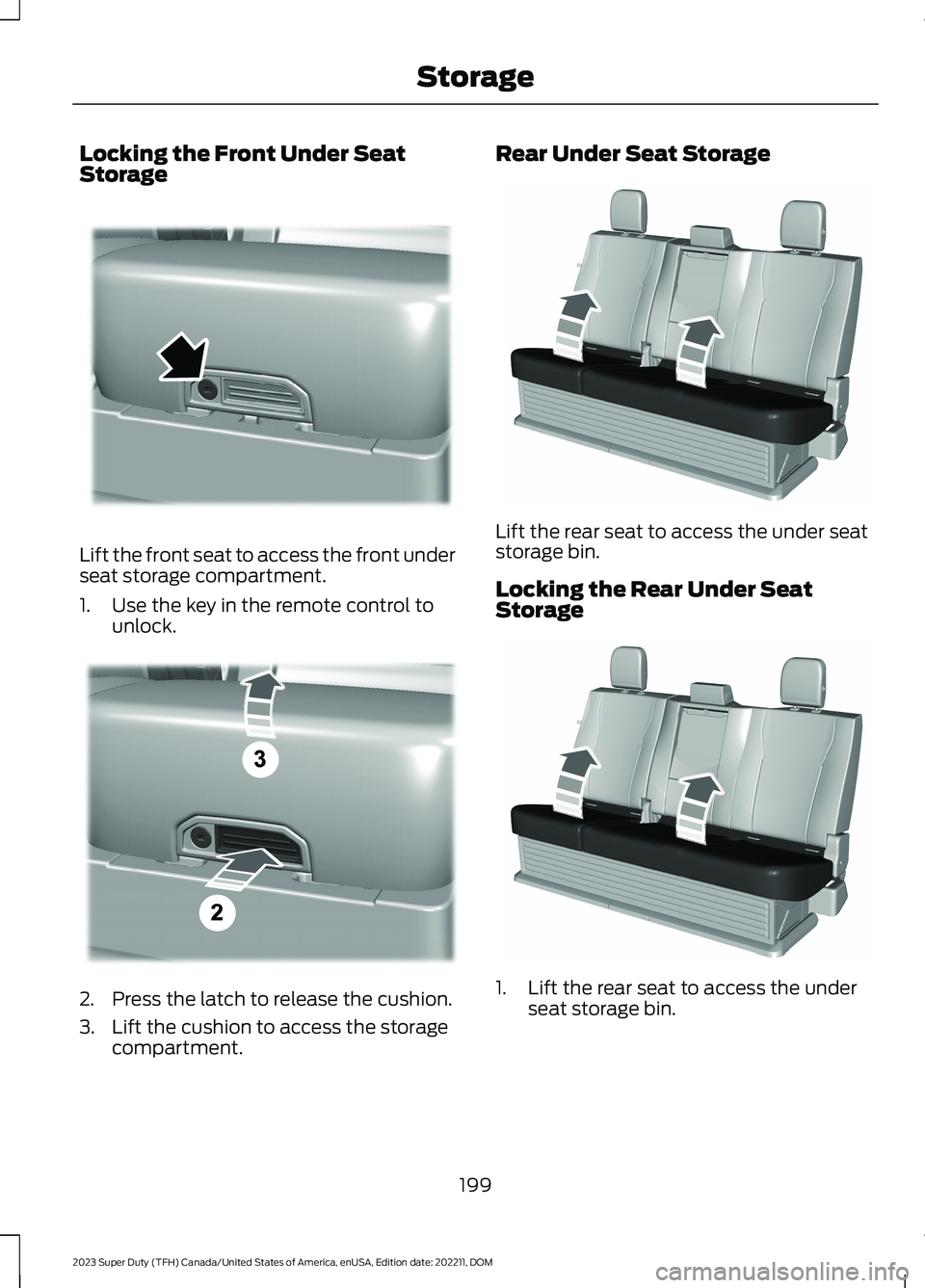
Lift the front seat to access the front underseat storage compartment.
1.Use the key in the remote control tounlock.
2.Press the latch to release the cushion.
3.Lift the cushion to access the storagecompartment.
Rear Under Seat Storage
Lift the rear seat to access the under seatstorage bin.
Locking the Rear Under SeatStorage
1.Lift the rear seat to access the underseat storage bin.
199
2023 Super Duty (TFH) Canada/United States of America, enUSA, Edition date: 202211, DOMStorageE390521 E390522 E229819 E229819
Page 204 of 738
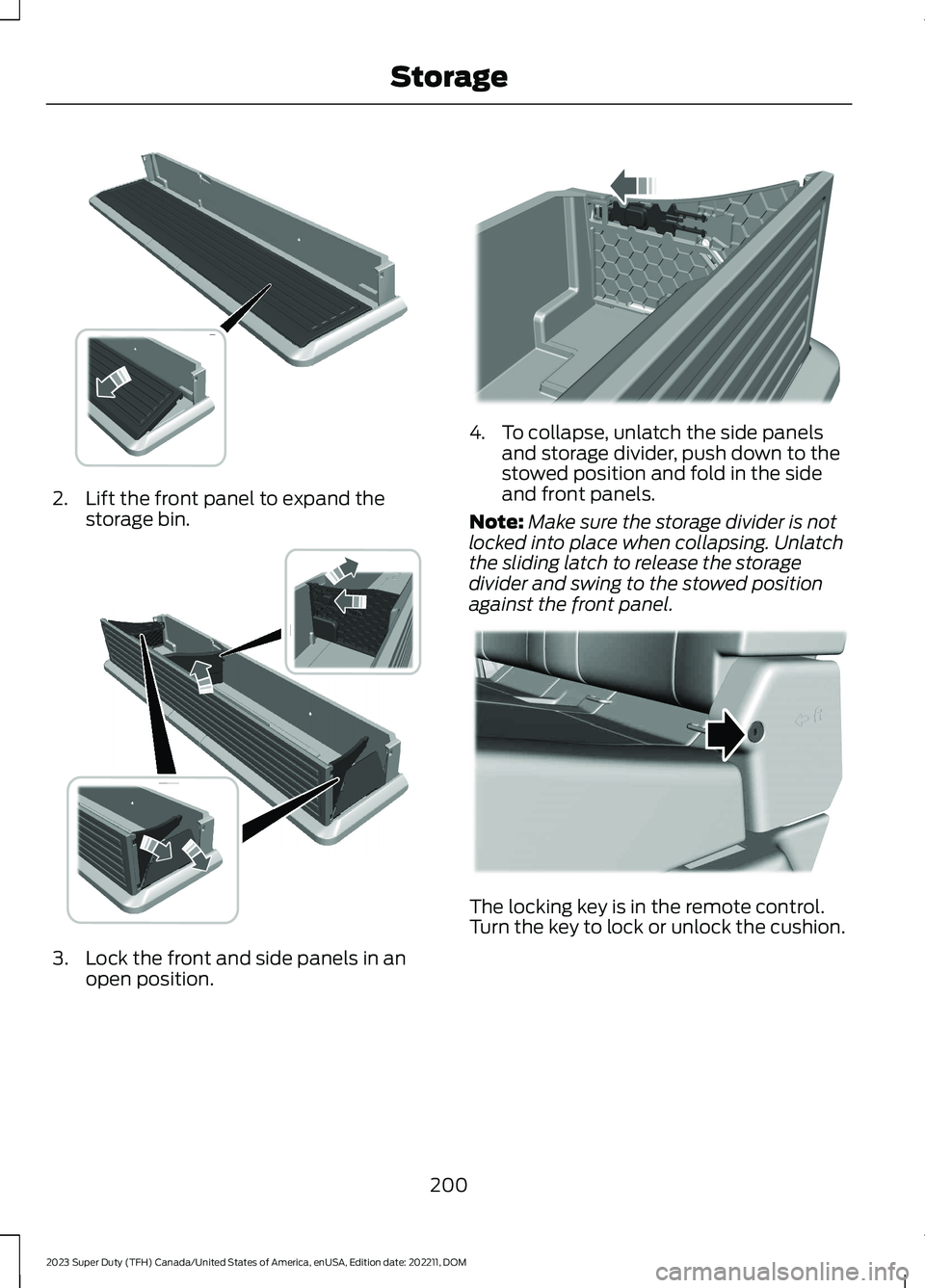
2.Lift the front panel to expand thestorage bin.
3.Lock the front and side panels in anopen position.
4.To collapse, unlatch the side panelsand storage divider, push down to thestowed position and fold in the sideand front panels.
Note:Make sure the storage divider is notlocked into place when collapsing. Unlatchthe sliding latch to release the storagedivider and swing to the stowed positionagainst the front panel.
The locking key is in the remote control.Turn the key to lock or unlock the cushion.
200
2023 Super Duty (TFH) Canada/United States of America, enUSA, Edition date: 202211, DOMStorage E375018 E375019 E375020 E224956