2023 FORD SUPER DUTY phone
[x] Cancel search: phonePage 20 of 738
Vehicle Identification
Vehicle Identification Number...............547
Connected Vehicle
What Is a Connected Vehicle.................548
Connected Vehicle Requirements.......548
Connected Vehicle Limitations.............548
Connecting the Vehicle to a MobileNetwork.....................................................548
Connecting the Vehicle to a Wi-FiNetwork.....................................................548
Connected Vehicle – Troubleshooting.......................................................................549
Connected Vehicle Videos......................550
Vehicle Wi-Fi Hotspot
Creating a Vehicle Wi-Fi Hotspot..........551
Changing the Vehicle Wi-Fi HotspotName or Password.................................551
Vehicle Wi-Fi Hotspot – Troubleshooting........................................................................552
Audio System
Audio System Precautions......................553
Identifying the Audio Unit.......................553
Switching the Audio Unit On and Off........................................................................553
Selecting the Audio Source....................553
Playing or Pausing the Audio Source........................................................................553
Adjusting the Volume...............................554
Switching Shuffle Mode On and Off........................................................................554
Switching Repeat Mode On and Off........................................................................554
Setting a Memory Preset.........................554
Muting the Audio........................................554
Adjusting the Sound Settings................554
Setting the Clock and Date.....................555
AM/FM Radio...............................................555
Switching the Display On and Off.......556
Digital Radio.................................................556
Satellite Radio..............................................557
Audio System – Troubleshooting........559
Center Display Overview
Center Display Precautions....................563
Center Display Limitations......................563
Status Bar.....................................................563
Feature Bar...................................................564
Information On Demand Screen..........564
Rebooting the Center Display...............564
Center Display Overview Videos..........564
Voice Interaction
Ford Assistant.............................................565
Alexa Built-In
What is Alexa Built-In................................567
Alexa Built-In Requirements..................567
Signing Into Your Account.......................567
Using Alexa Built-In...................................567
Alexa Built-In Settings..............................567
Phone
Phone Precautions....................................569
Connecting Your Phone...........................569
Phone Menu.................................................569
Making and Receiving a Phone Call......571
Sending and Receiving a Text Message........................................................................572
Switching Text Message Notification Onand Off........................................................573
Bluetooth®
Connecting a Bluetooth® Device.........574
Playing Media Using Bluetooth®..........574
Apps
App Precautions..........................................575
App Requirements.....................................575
16
2023 Super Duty (TFH) Canada/United States of America, enUSA, Edition date: 202211, DOMTable of Contents
Page 23 of 738
If you require assistance or clarification onpolicies or procedures, please contact thecustomer relationship center.
United States
Ford Motor CompanyCustomer Relationship CenterPO Box 6248Dearborn, MI 481261-800-392-3673 (FORD)TDD for the hearing impaired:7-1-1 (where offered by your telephoneservice provider)www.ford.com/help/contact/
Ford Credit - US Only
Ford Credit offers a full range of financingand lease plans to help you acquire yourvehicle. If you have financed or leased yourvehicle through Ford Credit, thank you foryour business.
For assistance call 1-800-727-7000, or formore information about Ford Credit andaccess to an account manager, visitwww.ford.com/finance.
Canada
Customer Relationship CentreFord Motor Company of Canada LimitedP.O. Box 2000Oakville, Ontario L6J 5E41-800-565-3673 (FORD)TDD for the hearing impaired:7-1-1 (where offered by your telephoneservice provider)www.ford.ca
Australia
Ford Motor Company of Australia Pty Ltd.Customer Relationship CentrePrivate Mail Bag 5Campbellfield, Victoria, 3061Telephone: (13 FORD) 13 3673E-mail: [email protected]
New Zealand
Ford Motor CompanyAttention: Customer Relationship CentrePrivate Bag 76912Manukau City 2241Telephone: 0800 367 369 (FORDNZ)E-mail: [email protected]
China - Imported Vehicle
Customer Relationship CenterTelephone: 400-690-1886Website: https://www.ford.com.cn/
China - Chang’An Ford
Customer Relationship CenterTelephone: 800-810-8168Mobile: 400-887-7766Website: https://www.ford.com.cn/
Asia Pacific Direct Markets(APDM)
E-mail: [email protected]
Caribbean, Central America andIsrael
Ford Motor CompanyFord Export OperationsAttention: Owner Relations1555 Fairlane DriveFairlane Business Park #3Allen Park, MI 48101Fax: (313) 390-0804Telephone: (313) 594-4857E-mail: [email protected]
U.S. Virgin Islands and Puerto Rico
Ford Motor CompanyFord Export OperationsAttention: Owner Relations1555 Fairlane DriveFairlane Business Park #3Allen Park, MI 48101Telephone: (800) 841-3673E-mail: [email protected]
19
2023 Super Duty (TFH) Canada/United States of America, enUSA, Edition date: 202211, DOMContacting Us
Page 24 of 738
Argentina
Telephone: 0800-888-3673
Brazil
Website: www.ford.com.brTelephone: 0800-703-3673E-mail: [email protected]
North Africa
E-mail: [email protected]
South Africa
Telephone: 0860011022Email: [email protected]
Sub-Saharan Africa
E-mail: [email protected]
Puerto Rico
Ford International Business Development,Inc.P.O. Box 11957Caparra Heights StationSan Juan, PR 00922-19571-800-392-3673 (FORD)Fax: (313) 390-0804E-mail: [email protected]
Middle East
Ford Middle East Customer RelationshipCenterP.O. Box 21740Dubai, United Arab EmiratesTelephone: 80004441066Toll-free number for the Kingdom of SaudiArabia: 8008443673Mobily and Zain cell phone users in SaudiArabia: 800850078Kuwait: 22280384Local telephone number for Kuwait: +9651 898900Fax: +971 4 3327266E-mail: [email protected]
South Korea
Customer Relationship CenterTelephone: +82-02-1600-6003E-mail: [email protected] Dispatch Service call:080-300-3673
Philippines
Telephone: 02-88669408Email: [email protected]
Taiwan
Telephone: 0800-032100705 Zhonghua Rd., Sec. 1Zhongli District, Taoyuan, Taiwan, 32068
Thailand
Telephone: 1383E-mail: [email protected]
Vietnam
Telephone: 1800588888E-mail: [email protected]
20
2023 Super Duty (TFH) Canada/United States of America, enUSA, Edition date: 202211, DOMContacting Us
Page 32 of 738
Note:Event data recorder data is recordedby your vehicle only if a non-trivial crashsituation occurs; no data is recorded by theevent data recorder under normal drivingconditions and no personal data orinformation (for example name, gender,age, and crash location) is recorded.However, parties, such as law enforcement,could combine the event data recorder datawith the type of personally identifying dataroutinely acquired during a crashinvestigation.
To read data recorded by an event datarecorder, special equipment is required,and access to the vehicle or the event datarecorder is needed. In addition to thevehicle manufacturer, other parties, suchas law enforcement, that have such specialequipment, can read the information if theyhave access to the vehicle or the eventdata recorder.
SETTINGS DATA
Your vehicle has electronic control unitsthat have the ability to store data basedon your personalized settings. The data isstored locally in the vehicle or on devicesthat you connect to it, for example, a USBdrive or digital music player. You can deletesome of this data and also choose whetherto share it through the services to whichyou subscribe.
Comfort and Convenience Data
Data recorded includes, for example:
•Seat and steering wheel position.
•Climate control settings.
•Radio presets.
Entertainment Data
Data recorded includes, for example:
•Music, videos or album art.
•Contacts and corresponding addressbook entries.
•Navigation destinations.
CONNECTED VEHICLE DATA
The modem has a SIM. Themodem was enabled when yourvehicle was built and periodicallysends messages to stay connected to thecell phone network, receive automaticsoftware updates and send vehicle-relatedinformation to us, for example diagnosticinformation. These messages couldinclude information that identifies yourvehicle, the SIM and the electronic serialnumber of the modem. Cell phone networkservice providers could have access toadditional information, for example cellphone network tower identification. Foradditional information about our privacypolicy, visit www.FordConnected.com orrefer to your local Ford website.
Note:The modem continues to send thisinformation unless you disable the modemor stop the modem from sharing vehicledata by changing the modem settings. SeeConnected Vehicle (page 548).
Note:The service can be unavailable orinterrupted for a number of reasons, forexample environmental or topographicalconditions and data plan coverage.
Note:To find out if your vehicle has amodem, visit www.FordConnected.com.
28
2023 Super Duty (TFH) Canada/United States of America, enUSA, Edition date: 202211, DOMData Privacy
Page 33 of 738

MOBILE DEVICE DATA
If you connect a mobile device to yourvehicle, you can display data from yourdevice on the touchscreen for example,music and album art. You can share yourvehicle data with mobile apps on yourdevice through the system. See AppRequirements (page 575).
The mobile apps function operates by yourconnected device sending data to us in theUnited States. The data is encrypted andincludes, for example, the vehicleidentification number of your vehicle, theSYNC module serial number, odometer,enabled apps, usage statistics anddebugging information. We retain it onlyas long as necessary to provide the service,to troubleshoot, for continuousimprovement and to offer you productsand services that may be of interest to youaccording to your preferences and whereallowed by law.
If you connect a cell phone to the system,the system creates a profile that links tothat cell phone. The cell phone profileenables more mobile features and efficientoperation. The profile contains, forexample data from your phonebook, readand unread text messages and call history,including history of calls when your cellphone was not connected to the system.
If you connect a media device, the systemcreates and retains a media device indexof supported media content. The systemalso records a short diagnostic log ofapproximately 10 minutes of all recentsystem activity.
The cell phone profile, media device indexand diagnostic log remain in your vehicleunless you delete them and are generallyaccessible only in your vehicle when youconnect your cell phone or media device.If you no longer plan to use the system oryour vehicle, we recommend you use thesystem reset function to erase the storedinformation. See Performing a SystemReset (page ?).
System data cannot be accessed withoutspecial equipment and access to yourvehicle's module.
For additional information about ourprivacy policy, refer to the local Fordwebsite.
Note:To find out if your vehicle hasconnectivity technology, visitwww.FordConnected.com.
EMERGENCY CALL SYSTEM
DATA
When the emergency call system is active,it may disclose to emergency services thatyour vehicle has been in a crash involvingthe deployment of an airbag or activationof the fuel pump shut-off. Certain versionsor updates to the emergency call systemmay also be capable of electronically orverbally disclosing to emergency servicesoperators your vehicle location or otherdetails about your vehicle or crash to assistemergency services operators to providethe most appropriate emergency services.If you do not want to disclose thisinformation, do not activate the emergencycall system.
Note:You cannot deactivate emergencycall systems that are required by law.
29
2023 Super Duty (TFH) Canada/United States of America, enUSA, Edition date: 202211, DOMData Privacy
Page 35 of 738
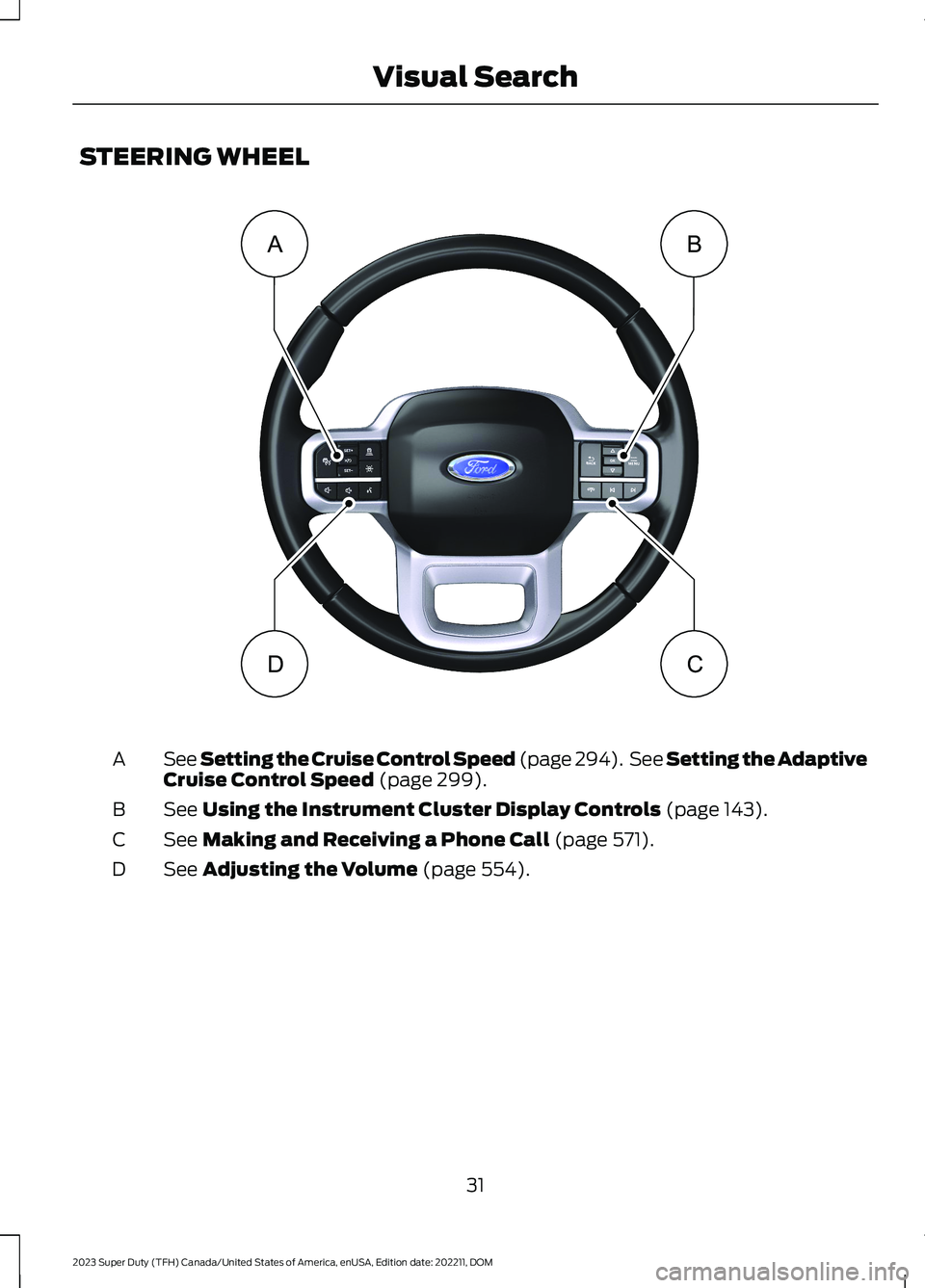
STEERING WHEEL
See Setting the Cruise Control Speed (page 294). See Setting the AdaptiveCruise Control Speed (page 299).A
See Using the Instrument Cluster Display Controls (page 143).B
See Making and Receiving a Phone Call (page 571).C
See Adjusting the Volume (page 554).D
31
2023 Super Duty (TFH) Canada/United States of America, enUSA, Edition date: 202211, DOMVisual SearchBADC E374894
Page 71 of 738
WHAT IS 911 ASSIST
911 Assist is a SYNC system feature thatcan call for help.
For more information, visitwww.owner.ford.com.
HOW DOES 911 ASSIST WORK
If a crash deploys an airbag, excluding kneeairbags and rear inflatable seatbelts, oractivates the fuel pump shut-off, yourvehicle may be able to contact emergencyservices by dialing 911 through a paired andconnected Bluetooth® enabled phone.
Not all crashes deploy an airbag or activatethe fuel pump shut-off. If a connected cellphone sustains damage or loses itsconnection to SYNC during a crash, SYNCsearches for and tries to connect to apreviously paired cell phone. SYNC thenattempts to call the emergency services.
Before making the call:
•SYNC provides about 10 seconds tocancel the call. If you fail to cancel thecall, SYNC attempts to dial 911.
•SYNC says the following, or a similarmessage: SYNC will attempt to call 911,to cancel the call, press Cancel on yourscreen or press and hold the phonebutton on your steering wheel.
If you do not cancel the call and SYNCmakes a successful call a pre-recordedmessage plays for the 911 operator. Theoccupants in your vehicle are able to talkwith the operator. Be prepared to provideyour name, phone number and locationimmediately because not all 911 systemsare capable of receiving this informationelectronically.
During an emergency call the systemtransmits vehicle data to the emergencyservice.
EMERGENCY CALL
REQUIREMENTS
WARNING: Do not wait for 911Assist to make an emergency call if youcan do it yourself. Dial emergencyservices immediately to avoid delayedresponse time which could increase therisk of serious injury or death after acrash. If you do not hear 911 Assist withinfive seconds of the crash, the system orphone may be damaged ornon-functional.
WARNING: Always place yourphone in a secure location in your vehicleso it does not become a projectile or getdamaged in a crash. Failure to do so maycause serious injury to someone ordamage the phone which could prevent911 Assist from working properly.
WARNING: Unless the 911 Assistsetting is set on before a crash, thesystem will not dial for help which coulddelay response time, potentiallyincreasing the risk of serious injury ordeath after a crash.
•SYNC is powered and working properlyat the time of the incident andthroughout feature activation and use.
•The 911 Assist feature must be set onbefore the incident.
•You must pair and connect aBluetooth® enabled and compatiblecell phone to SYNC.
•A connected Bluetooth® enabledphone must have the ability to makeand maintain an outgoing call at thetime of the incident.
67
2023 Super Duty (TFH) Canada/United States of America, enUSA, Edition date: 202211, DOM911 Assist
Page 72 of 738
•A connected Bluetooth® enabledphone must have adequate networkcoverage, battery power and signalstrength.
•The vehicle must have battery powerand be located in the U.S., Canada orin a territory in which 911 is theemergency number.
Note:If any user sets 911 Assist to on or off,that setting applies for all paired phones. If911 Assist is off and the phone connectedto SYNC, an icon displays on the status bar.
Note:Every phone operates differently.While SYNC 911 Assist works with mostcellular phones, some may have troubleusing this feature.
EMERGENCY CALL
LIMITATIONS
The SYNC 911 Assist feature only operatesin the U.S., Canada or in a territory in which911 is the emergency number. The followingare limitations of this feature:
•Your cellular phone or 911 Assisthardware sustains damage in a crash.
•The vehicle's battery or the SYNCsystem has no power.
•The phone(s) thrown from your vehicleare the ones paired and connected tothe system.
911 ASSIST VIDEOS
911 Assist Video Link
68
2023 Super Duty (TFH) Canada/United States of America, enUSA, Edition date: 202211, DOM911 Assist