2023 FORD SUPER DUTY display
[x] Cancel search: displayPage 180 of 738
REAR OCCUPANT ALERT
SYSTEM AUDIBLE WARNINGS
The first audible warning is an alert tonewithin the vehicle, which sounds when youswitch your vehicle off after the alertconditions are met. The warning soundsfor a short period of time.
The second audible warning is from thehorn. It sounds when you do not open arear door within a short period of time ofthe message appearing in the centerdisplay, the first audible warning sounding,and driver door open to close. The warningsounds for a short period of time.
176
2023 Super Duty (TFH) Canada/United States of America, enUSA, Edition date: 202211, DOMRear Occupant Alert System (If Equipped)
Page 181 of 738
WHAT IS THE MEMORY
FUNCTION
The memory function recalls the positionof these features:
•Driver seat.
•Power mirrors.
•Optional power steering column.
•Optional power adjustable pedals.
MEMORY FUNCTION
PRECAUTIONS
WARNING: Before activating thememory seat, make sure that the areaimmediately surrounding the seat is clearof obstructions and that all occupantsare clear of moving parts.
WARNING: Do not use the memoryfunction when your vehicle is moving.
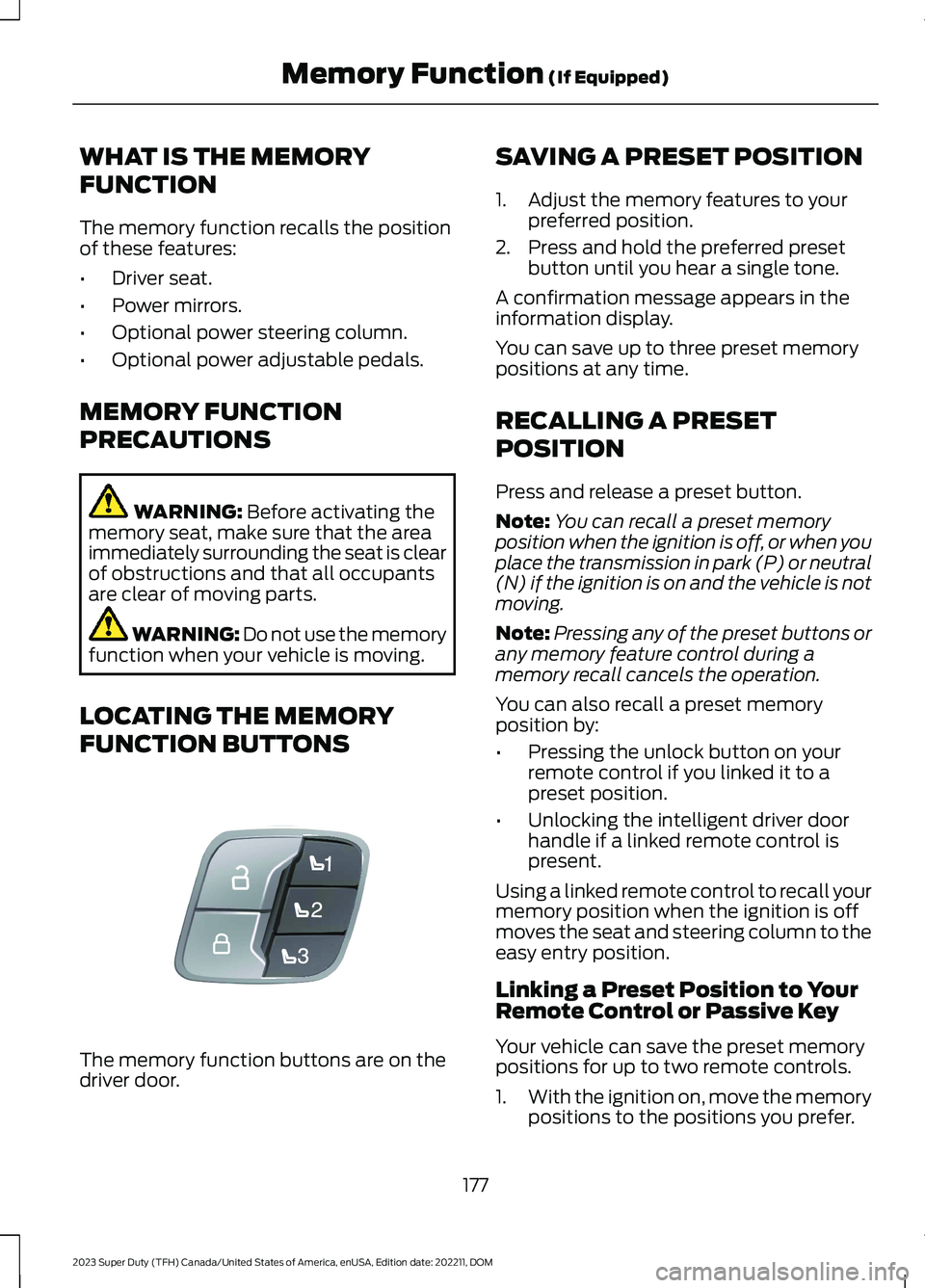
LOCATING THE MEMORY
FUNCTION BUTTONS
The memory function buttons are on thedriver door.
SAVING A PRESET POSITION
1.Adjust the memory features to yourpreferred position.
2.Press and hold the preferred presetbutton until you hear a single tone.
A confirmation message appears in theinformation display.
You can save up to three preset memorypositions at any time.
RECALLING A PRESET
POSITION
Press and release a preset button.
Note:You can recall a preset memoryposition when the ignition is off, or when youplace the transmission in park (P) or neutral(N) if the ignition is on and the vehicle is notmoving.
Note:Pressing any of the preset buttons orany memory feature control during amemory recall cancels the operation.
You can also recall a preset memoryposition by:
•Pressing the unlock button on yourremote control if you linked it to apreset position.
•Unlocking the intelligent driver doorhandle if a linked remote control ispresent.
Using a linked remote control to recall yourmemory position when the ignition is offmoves the seat and steering column to theeasy entry position.
Linking a Preset Position to YourRemote Control or Passive Key
Your vehicle can save the preset memorypositions for up to two remote controls.
1.With the ignition on, move the memorypositions to the positions you prefer.
177
2023 Super Duty (TFH) Canada/United States of America, enUSA, Edition date: 202211, DOMMemory Function (If Equipped)E307868
Page 191 of 738
WHAT IS THE ONBOARD
GENERATOR
The vehicle functions as a portablegenerator and can power devices thatrequire up to the rating listed on the poweroutlet label.
ONBOARD GENERATOR
PRECAUTIONS
WARNING: Do not connect anyvehicle power outlets to any premises.This can create a backfeed to utility lines.Failure to follow this instruction couldresult in property damage, fire, electricalshock or death.
WARNING: Do not keep electricaldevices plugged into the power outletwhenever the device is not in use. Theoutlet provides power when the vehicleis on. Failure to follow this instructioncould result in personal injury.
WARNING: Do not start the enginein a closed garage or in other enclosedareas. Exhaust fumes are toxic. Alwaysopen the garage door before you startthe engine. Failure to follow thisinstruction could result in personal injuryor death.
WARNING: Exhaust leaks mayresult in entry of harmful and potentiallylethal fumes into the passengercompartment. If you smell exhaustfumes inside your vehicle, have yourvehicle inspected immediately. Do notdrive if you smell exhaust fumes.
WARNING: The vehicle's engineruns while the generator is switched on.Running engines emit carbon monoxide.Only use the generator when the vehicleis outdoors. Failure to follow thisinstruction could result in personal injuryor death.
When you switch the power outlets on, thevehicle power down timer is disabled andthe vehicle continues to be powered on.
Note:We recommend using UL approveddevices for use with the power outlet.
Note:Make sure that plugged in devices donot exceed the ratings displayed on theoutlet covers.
Note:Unplug electrical devices from thepower outlet when they are not switchedon.
Note:Make sure there is no damage to theoutlets before driving your vehicle.
Note:Power could be limited duringextreme hot or cold temperatures tooptimize system performance.
Note:Close all outlet covers when not inuse.
Note:Automatic engine stop is disabledand the gasoline engine will continue to idlewhen the outlet is switched on.
Note:Make sure that objects are notblocking the inverter inlet and exhaust nearthe rear underseat storage compartment.
Note:The climate control system may turnon and power may be limited during extremehot or cold temperatures to optimize systemperformance.
Note:When the outlet is switched on andthe vehicle is in park (P) the engine turns off30 minutes after the low fuel warning isdisplayed. After the vehicle is turned off,generator mode only operates while drivingor until the vehicle is refueled.
187
2023 Super Duty (TFH) Canada/United States of America, enUSA, Edition date: 202211, DOMOnboard Generator (If Equipped)
Page 193 of 738
DescriptionIndicator Status
The power point isworking and thevehicle is on.
On
The power point isoff and the vehicleis off.
Off
The power point isin fault mode.Flashing
Fault Mode
The power outlet temporarily turns offpower if the device exceeds the watt limit.
1.Unplug your device.
2.Switch your vehicle off to let thesystem cool and reset the fault mode.
3.Switch your vehicle back on, but do notplug your device back in.
4.With your vehicle on, make sure theindicator light remains on.
5.Make sure your device does not exceedthe power limits and then plug in yourdevice.
Note:If a fault occurs again, your devicemay exceed the capacity available from thepower outlet.
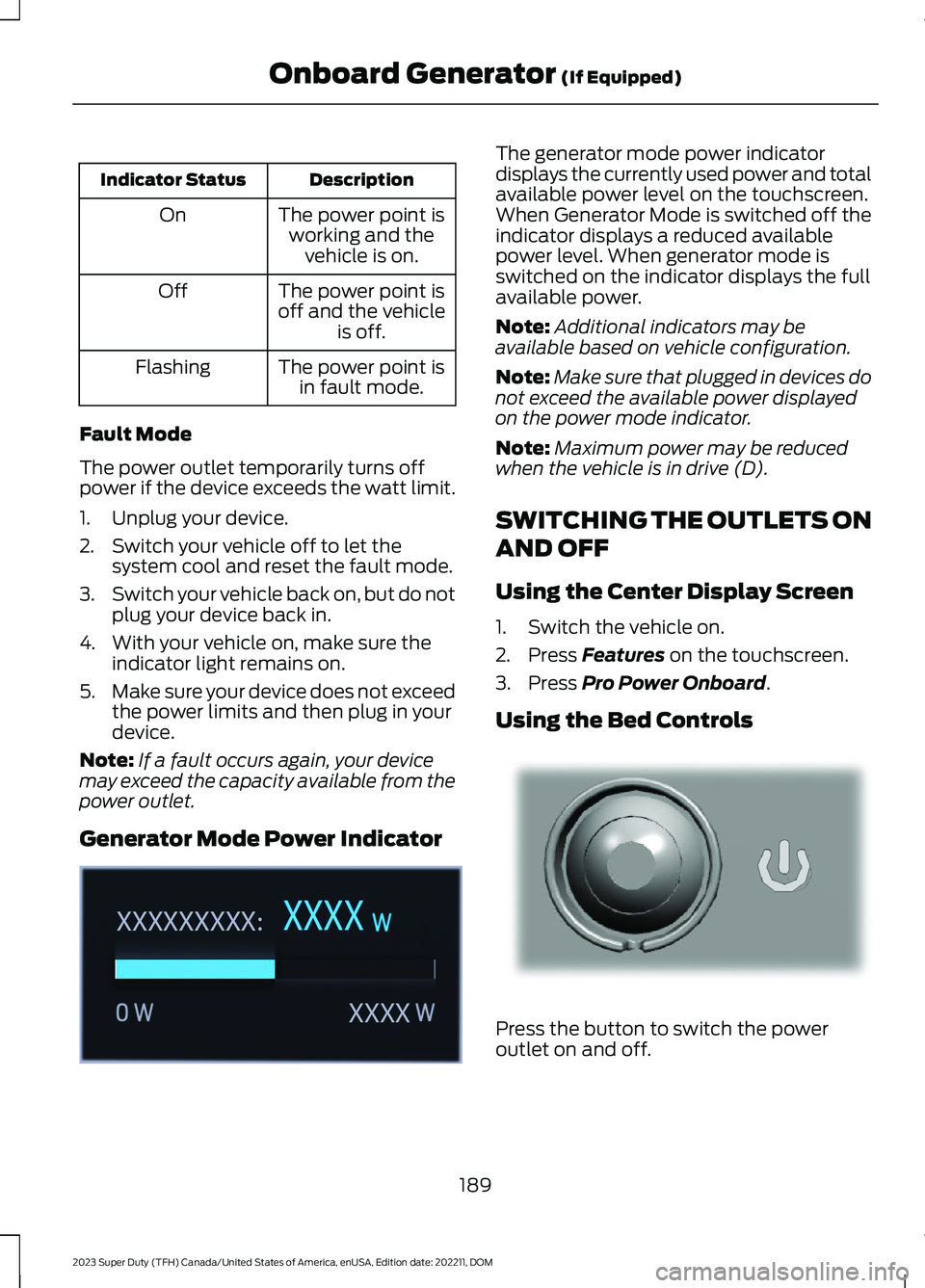
Generator Mode Power Indicator
The generator mode power indicatordisplays the currently used power and totalavailable power level on the touchscreen.When Generator Mode is switched off theindicator displays a reduced availablepower level. When generator mode isswitched on the indicator displays the fullavailable power.
Note:Additional indicators may beavailable based on vehicle configuration.
Note:Make sure that plugged in devices donot exceed the available power displayedon the power mode indicator.
Note:Maximum power may be reducedwhen the vehicle is in drive (D).
SWITCHING THE OUTLETS ON
AND OFF
Using the Center Display Screen
1.Switch the vehicle on.
2.Press Features on the touchscreen.
3.Press Pro Power Onboard.
Using the Bed Controls
Press the button to switch the poweroutlet on and off.
189
2023 Super Duty (TFH) Canada/United States of America, enUSA, Edition date: 202211, DOMOnboard Generator (If Equipped)E362360 E337175
Page 194 of 738
WHAT IS UTILITY IDLE MODE
Utility idle mode allows you to remove thekey from the ignition and keep the vehicleand bed power point running.
SWITCHING UTILITY IDLE
MODE ON AND OFF
Switching Utility Idle On
1.Start the vehicle. See Starting andStopping the Engine (page 202).
2.Press Features on the touchscreen.
3.Press Pro Power Onboard.
4.Press Generator Mode.
5.Press Utility Idle.
6.Turn the key to position 0.
7.Remove the key from the ignition.
Switching Utility Idle Off using theKey
1.Insert the key into the ignition.
2.Turn the key to position III.
Switching Utility Idle Off using theCenter Display Screen
1.Start the vehicle. See Starting andStopping the Engine (page 202).
2.Press Features on the touchscreen.
3.Press Pro Power Onboard.
4.Press Generator Mode.
5.Press Utility Idle.
6.Press Turn Vehicle Off.
WHAT IS GENERATOR MODE
Generator mode uses the vehicle engineto increase power to the bed power outletsup to the rating listed on the power outletlabel.
SWITCHING GENERATOR
MODE ON AND OFF
Using the Center Display Screen
1.Start the vehicle. See Starting andStopping the Engine (page 202).
2.Press Features on the touchscreen.
3.Press Pro Power Onboard.
4.Press Generator Mode.
Using the Instrument Panel
Press the button to switchbetween off, convenience mode,and generator mode.
RESETTING GROUND FAULT
DETECTION
After disconnecting all electrical loads theground fault can be reset using theswitches on the power point, on theinstrument panel or on the touchscreen.
Use the controls on the touchscreen to testthe ground fault detection circuit.
190
2023 Super Duty (TFH) Canada/United States of America, enUSA, Edition date: 202211, DOMOnboard Generator (If Equipped)E311311
Page 195 of 738
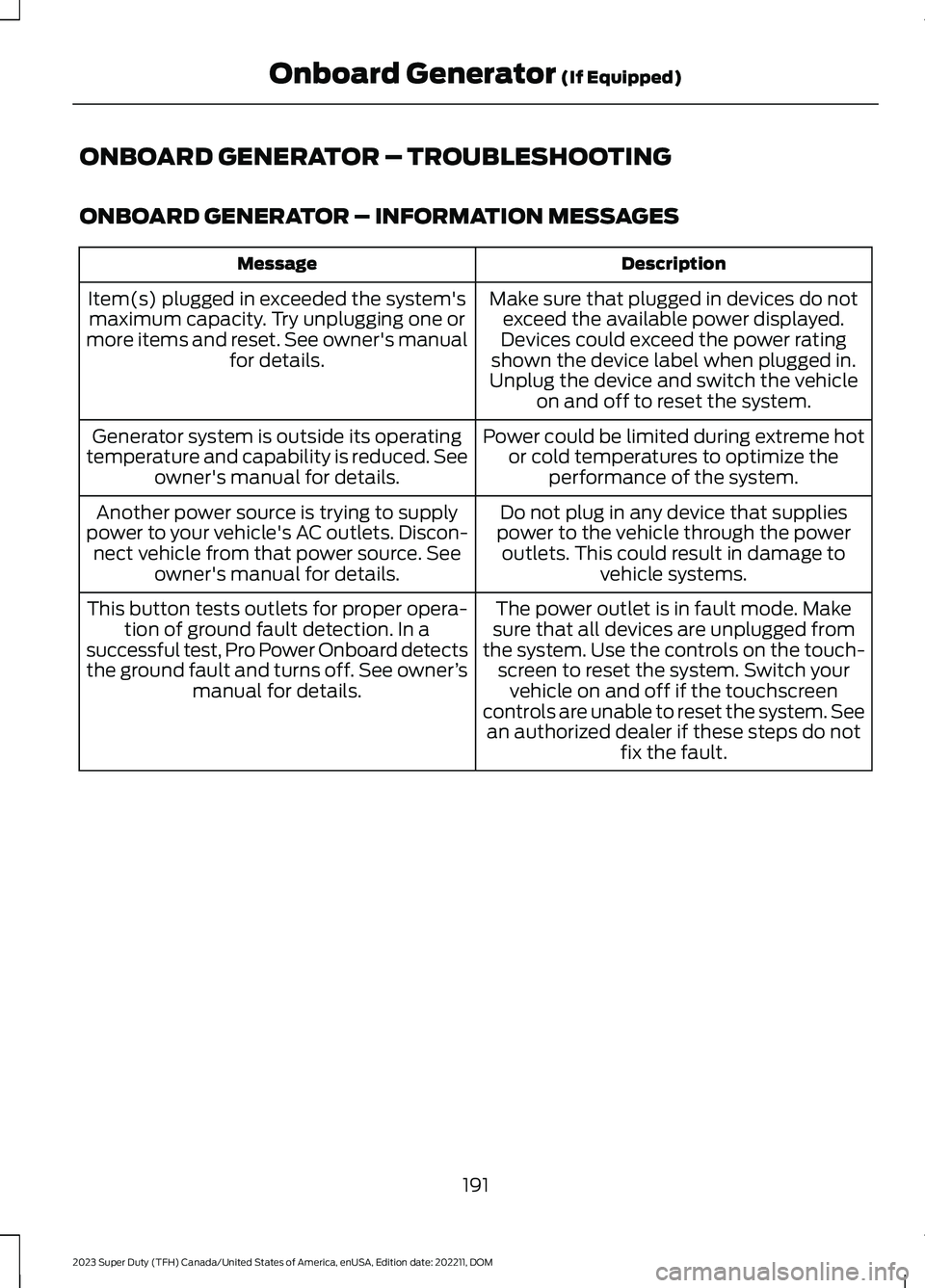
ONBOARD GENERATOR – TROUBLESHOOTING
ONBOARD GENERATOR – INFORMATION MESSAGES
DescriptionMessage
Make sure that plugged in devices do notexceed the available power displayed.Devices could exceed the power ratingshown the device label when plugged in.Unplug the device and switch the vehicleon and off to reset the system.
Item(s) plugged in exceeded the system'smaximum capacity. Try unplugging one ormore items and reset. See owner's manualfor details.
Power could be limited during extreme hotor cold temperatures to optimize theperformance of the system.
Generator system is outside its operatingtemperature and capability is reduced. Seeowner's manual for details.
Do not plug in any device that suppliespower to the vehicle through the poweroutlets. This could result in damage tovehicle systems.
Another power source is trying to supplypower to your vehicle's AC outlets. Discon-nect vehicle from that power source. Seeowner's manual for details.
The power outlet is in fault mode. Makesure that all devices are unplugged fromthe system. Use the controls on the touch-screen to reset the system. Switch yourvehicle on and off if the touchscreencontrols are unable to reset the system. Seean authorized dealer if these steps do notfix the fault.
This button tests outlets for proper opera-tion of ground fault detection. In asuccessful test, Pro Power Onboard detectsthe ground fault and turns off. See owner’smanual for details.
191
2023 Super Duty (TFH) Canada/United States of America, enUSA, Edition date: 202211, DOMOnboard Generator (If Equipped)
Page 196 of 738
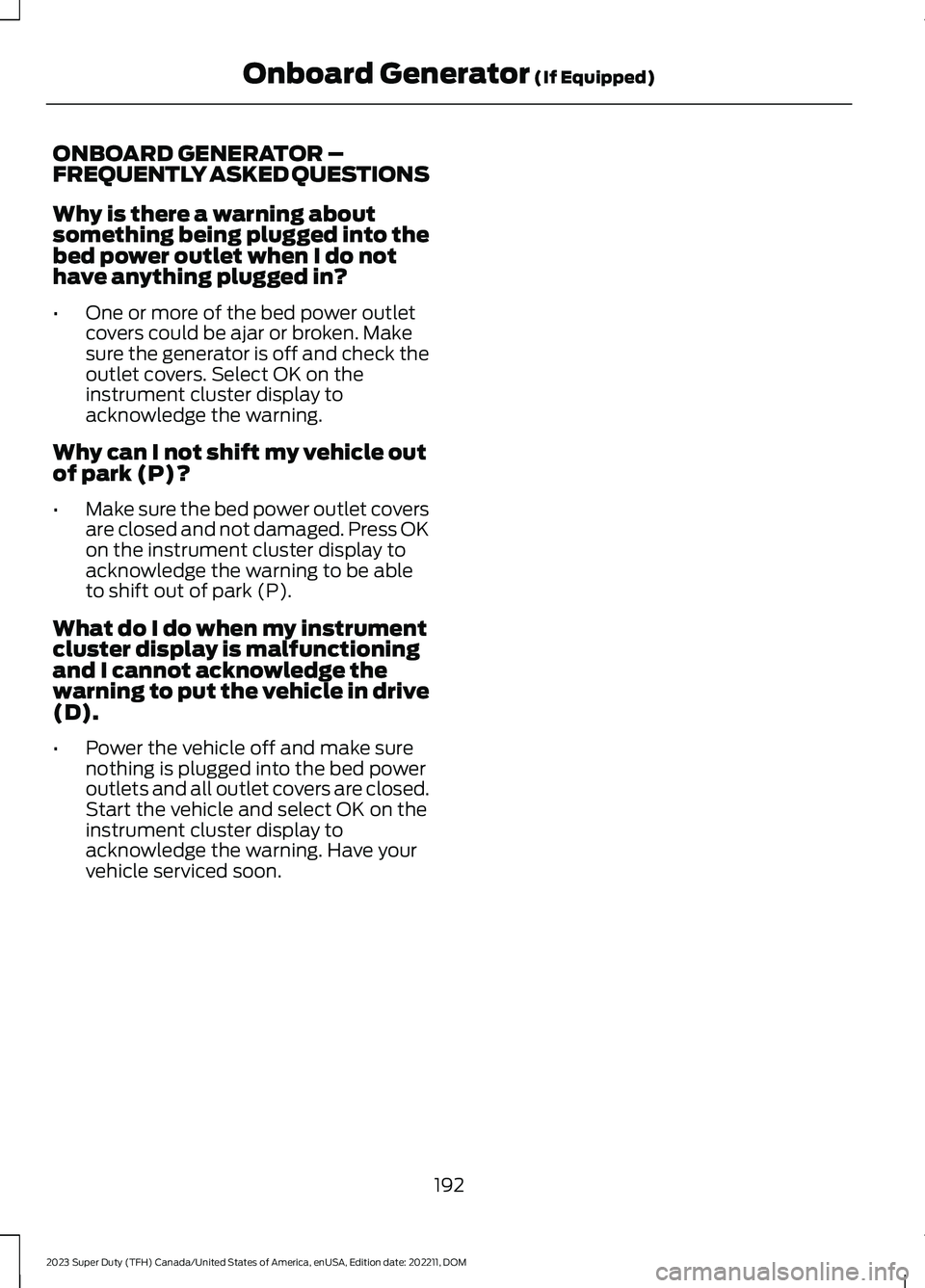
ONBOARD GENERATOR –FREQUENTLY ASKED QUESTIONS
Why is there a warning aboutsomething being plugged into thebed power outlet when I do nothave anything plugged in?
•One or more of the bed power outletcovers could be ajar or broken. Makesure the generator is off and check theoutlet covers. Select OK on theinstrument cluster display toacknowledge the warning.
Why can I not shift my vehicle outof park (P)?
•Make sure the bed power outlet coversare closed and not damaged. Press OKon the instrument cluster display toacknowledge the warning to be ableto shift out of park (P).
What do I do when my instrumentcluster display is malfunctioningand I cannot acknowledge thewarning to put the vehicle in drive(D).
•Power the vehicle off and make surenothing is plugged into the bed poweroutlets and all outlet covers are closed.Start the vehicle and select OK on theinstrument cluster display toacknowledge the warning. Have yourvehicle serviced soon.
192
2023 Super Duty (TFH) Canada/United States of America, enUSA, Edition date: 202211, DOMOnboard Generator (If Equipped)
Page 198 of 738
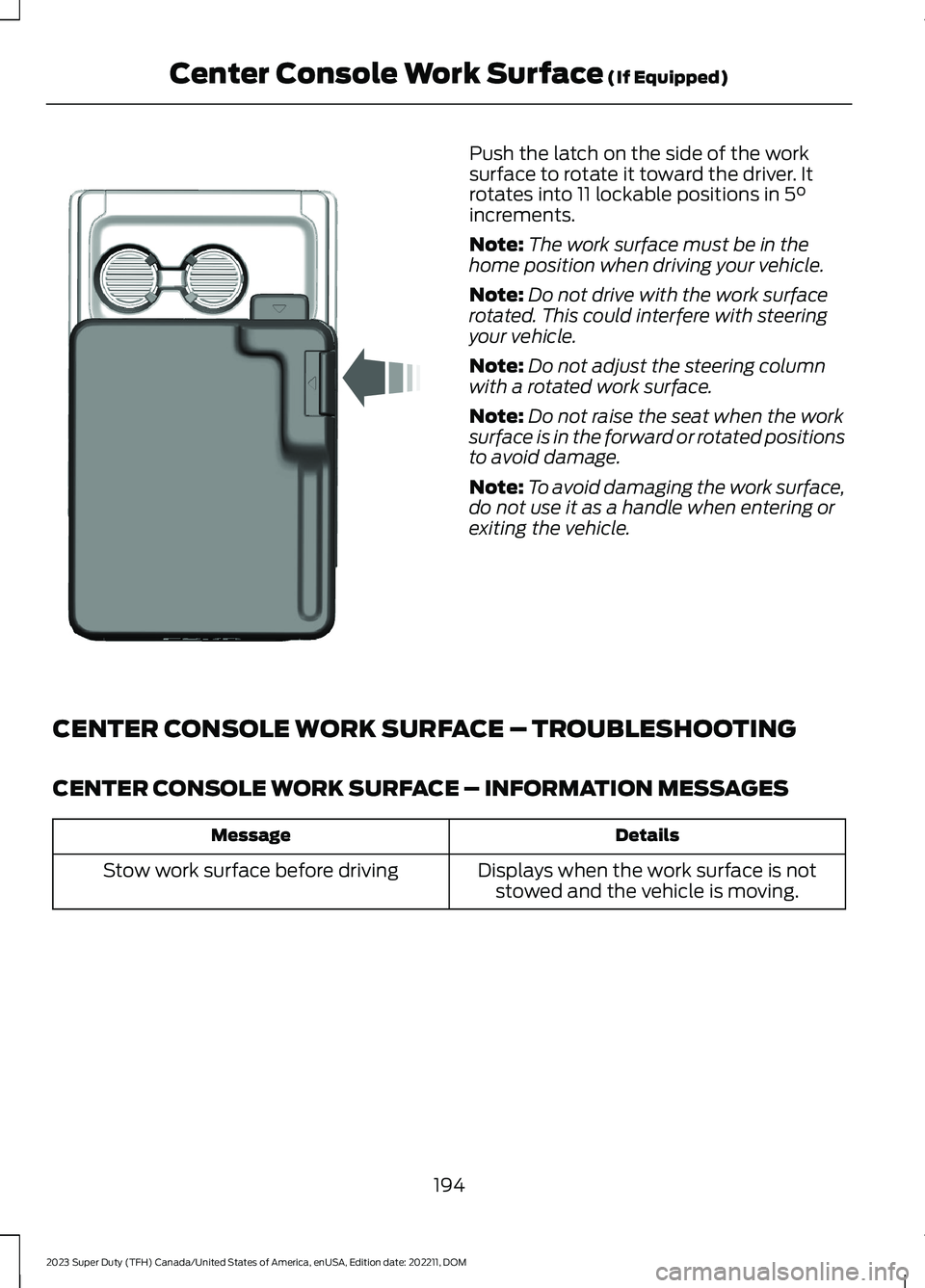
Push the latch on the side of the worksurface to rotate it toward the driver. Itrotates into 11 lockable positions in 5°increments.
Note:The work surface must be in thehome position when driving your vehicle.
Note:Do not drive with the work surfacerotated. This could interfere with steeringyour vehicle.
Note:Do not adjust the steering columnwith a rotated work surface.
Note:Do not raise the seat when the worksurface is in the forward or rotated positionsto avoid damage.
Note:To avoid damaging the work surface,do not use it as a handle when entering orexiting the vehicle.
CENTER CONSOLE WORK SURFACE – TROUBLESHOOTING
CENTER CONSOLE WORK SURFACE – INFORMATION MESSAGES
DetailsMessage
Displays when the work surface is notstowed and the vehicle is moving.Stow work surface before driving
194
2023 Super Duty (TFH) Canada/United States of America, enUSA, Edition date: 202211, DOMCenter Console Work Surface (If Equipped)E331800