2023 FORD SUPER DUTY display
[x] Cancel search: displayPage 278 of 738
TRAIL CONTROL INDICATORS
TRAIL CONTROL – TROUBLESHOOTING
TRAIL CONTROL – INFORMATION MESSAGES
DetailsMessage
Displays when you must reduce your vehicle speed touse trail control.Reduce Speed To Enter TrailControl
Displays when you must release the park brake to usetrail control.Trail Control Not Available withPark Brake Applied
Displays when you must switch off the trailer backupassist to use trail control.Trail Control Not AvailableWhile Pro Trailer BackupAssist™ Active
Displays when you successfully enabled trail controland can set a speed with the Set+ or Set- control.Trail Control Enabled Use SETButton to Set Speed
Displays when a system fault has occurred when trailcontrol was active and the driver must resume control.Trail Control Off Driver ResumeControl
Displays when the system has turned off.Trail Control Off
Displays when a system fault is present. See the trailcontrol section in your Owner's Manual. See yourauthorized dealer for diagnosis.
Trail Control Fault See Manual
Displays when you must be in drive (D), neutral (N) orreverse (R) to use trail control.Trail Control To Activate SelectGear
Displays when you must switch the cruise control offto use trail control.Trail Control Not Available withCruise Control Active
Displays when you must close the driver door to usetrail control.Trail Control Not Available withDriver Door Open
Due to some driver action, Trail Control propulsion wasturned off but the vehicle will still brake if descendinga hill. The driver must press the Trail Control switch toturn the feature OFF, they can then turn it back on.
Descent Control Now ActivePress Trail Control Switch ToExit
Displays when you must have the seatbelt on to usetrail control.Trail Control Not Available withSeatbelt Off
274
2023 Super Duty (TFH) Canada/United States of America, enUSA, Edition date: 202211, DOMTrail Control (If Equipped)E272858
Page 279 of 738
WHAT IS TRAIL TURN ASSIST
Trail turn assist can reduce the turningradius of your vehicle by applying thebrakes to the inside rear wheel inlow-speed, high steering-angle maneuvers.
TRAIL TURN ASSIST
PRECAUTIONS
Note:Do not use trail turn assist on dry,hard surfaced roads. Doing so can produceexcessive noise, increase tire wear and maydamage drive line, or braking components.Trail turn assist is only intended for slippery,or loose surfaces.
You may hear noise from the anti-lockbrake system while trail turn assist isactive. This is normal operation.
TRAIL TURN ASSIST
LIMITATIONS
Trail turn assist can only be used when thevehicle’s four-wheel drive system is in thefour-wheel drive high (4H), or four-wheeldrive low (4L) modes.
Trail Turn Assist cannot be used when thevehicle’s rear differential is locked. If therear differential has recently been lockedprior to Trail Turn Assist being turned on,Trail Turn Assist may not activate until itcan confirm that the rear differential isunlocked.
SWITCHING TRAIL TURN
ASSIST ON AND OFF
While your vehicle is in four-wheel drivehigh (4H) or four-wheel drive low (4L),press the trail turn assist button to switchthe feature on. Trail turn assist is on at thistime but does not activate until the:
•Vehicle speed is less than 12 mph(19.3 km/h).
•Rear differential is fully unlocked.
•Steering wheel is almost fully turnedto the left or right.
Switch trail turn assist off by performingany of the following:
•Press the trail turn assist button again.
•Select two-wheel drive high (2H), orfour-wheel drive auto (4A).
•Switch on the rear locking differential.
TRAIL TURN ASSIST
INDICATORS
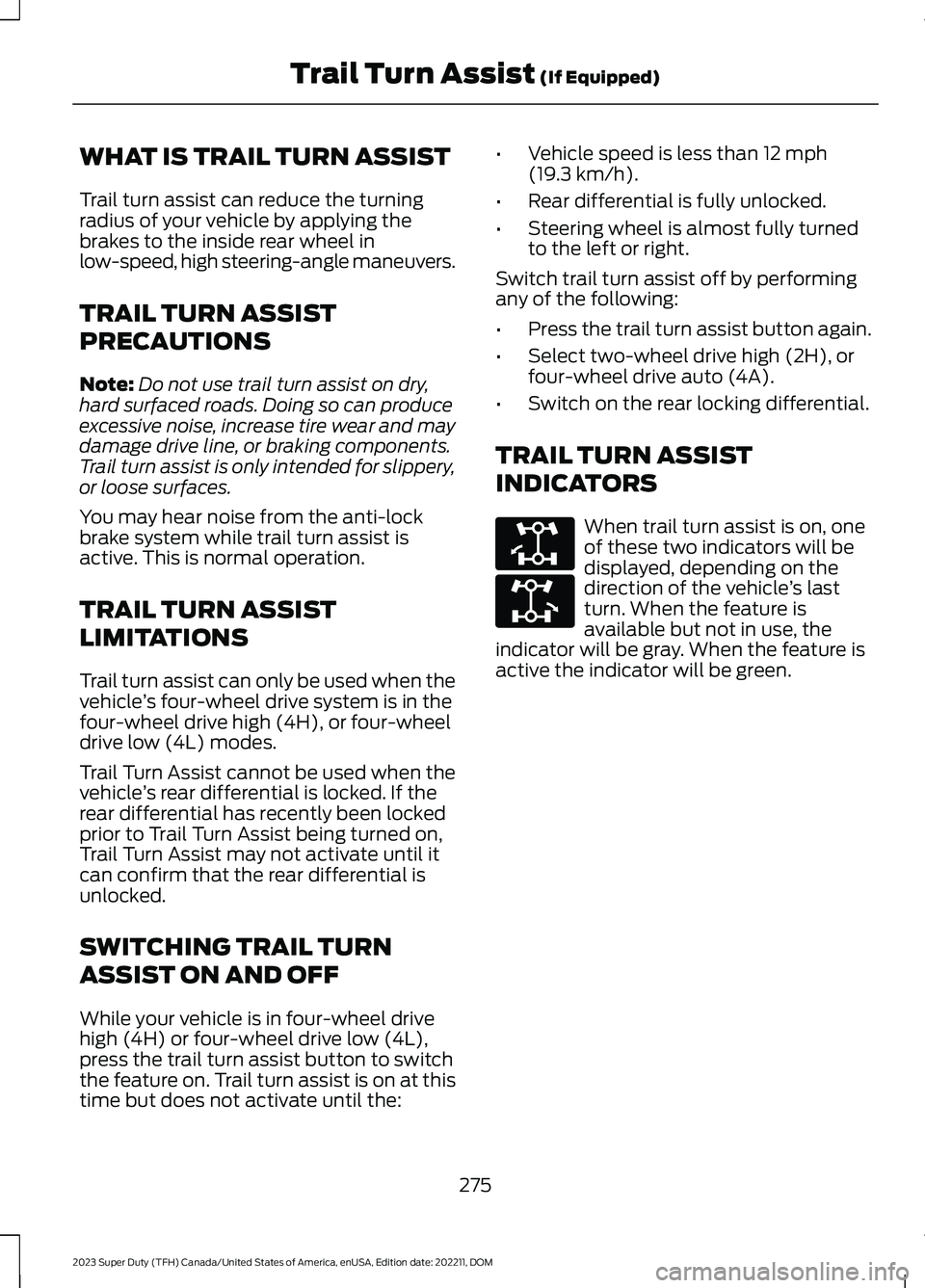
When trail turn assist is on, oneof these two indicators will bedisplayed, depending on thedirection of the vehicle’s lastturn. When the feature isavailable but not in use, theindicator will be gray. When the feature isactive the indicator will be green.
275
2023 Super Duty (TFH) Canada/United States of America, enUSA, Edition date: 202211, DOMTrail Turn Assist (If Equipped)E338899 E338900
Page 283 of 738
HYDRAULIC POWER
STEERING
HYDRAULIC POWER STEERINGGUIDELINES
To help prevent damage to the powersteering system:
•Do not hold the steering wheel at itsfurthest turning points for more thanthree to five seconds when the engineis running.
•Avoid continuously steering back andforth with elevated engine RPM as thismay overheat the system. If trying tofree a stuck vehicle, pause betweenattempts to allow the power steeringsystem to cool or seek assistance.Typical steering and driving maneuversallow the system to cool.
•Do not operate the vehicle if the powersteering pump fluid level is below theMIN mark on the reservoir.
•Some noise is normal during operation.If excessive, check for low powersteering pump fluid level beforeseeking service by your dealer.
•Heavy or uneven efforts may be causedby low power steering fluid. Check forlow power steering pump fluid levelbefore seeking service by your dealer.
•Do not fill the power steering pumpreservoir above the MAX mark on thereservoir, as this may result in leaksfrom the reservoir.
If the power steering system breaks downor if you switch the engine off, you cansteer the vehicle manually, but it takesmore effort.
If you have any steering componentsserviced or replaced, install new fasteners.Many fasteners have coatings with threadadhesive, or have prevailing torquefeatures you cannot reuse. Do not reuse abolt or nut. Torque fasteners tospecifications.
Steering Tips
If the steering wanders or pulls, check for:
•An improperly inflated tire.
•Uneven tire wear.
•Loose or worn suspensioncomponents.
•Loose or worn steering components.
•Improper vehicle alignment.
Note:A high crown in the road or highcrosswinds may also make the steeringseem to wander or pull.
Electronic Torque Overlay Steering
(If Equipped)
WARNING: The electric powersteering system has diagnostic checksthat continuously monitor the system. Ifa fault is detected, a message displaysin the information display. Stop yourvehicle as soon as it is safe to do so.Switch the ignition off. After at least 10seconds, switch the ignition on andwatch the information display for asteering system warning message. If asteering system warning messagereturns, have the system checked assoon as possible.
WARNING: If the system detectsan error, you may not feel a difference inthe steering, however a serious conditionmay exist. Have your vehicle checked assoon as possible. Failure to do so mayresult in loss of steering control.
279
2023 Super Duty (TFH) Canada/United States of America, enUSA, Edition date: 202211, DOMSteering
Page 284 of 738
The electronic torque overlay steeringsystem adds supplemental steering assistto the hydraulic gear when needed,dependent on vehicle conditions such asvehicle speed, steering wheel angle, andsteering wheel torque. The hydraulicsteering system provides the majority ofsteering assistance. The electronic torqueoverlay enables features such as pro trailerbackup assistance and lane departurewarning.
If your vehicle loses electrical power whileyou are driving, your vehicle loses electricpower steering assistance. The steeringsystem still operates, and you can steeryour vehicle with hydraulic assist. Steeringyour vehicle with only hydraulic assistrequires more effort.
Extreme continuous steering may increasethe effort required for you to steer yourvehicle. This increased effort preventsoverheating and permanent damage tothe steering system. You do not lose theability to steer your vehicle manually.Typical steering and driving maneuversallow the system to cool and return tonormal operation.
LOCATING THE HYDRAULICPOWER STEERING FLUIDRESERVOIR
The hydraulic power steering fluid reservoiris found in the engine compartment. SeeUnder Hood Overview (page 441).
CHECKING THE HYDRAULICPOWER STEERING FLUID
Check the power steering fluid. SeeScheduled Maintenance (page 591). Ifadding fluid is necessary, use onlyMERCON LV ATF.
Check the fluid level when it is at ambienttemperature.
1.Check the fluid level in the reservoir. Itshould be between the MIN and MAXrange. Do not add fluid if the level iswithin this range.
2.If the fluid level is low, add fluid to bringthe fluid level up to between the MINand MAX range.
3.Switch the engine on.
4.While the engine idles, turn the steeringwheel left and right several times.
5.Switch the engine off.
6.Recheck the fluid level in the reservoir.Do not add fluid if the level is betweenthe MIN and MAX range.
7.If the fluid is low, add fluid in smallamounts, continuously checking thelevel until it is between the MIN andMAX range. For proper fluid type, SeeCapacities and Specifications (page520). Be sure to put the cap back on thereservoir.
STEERING –
TROUBLESHOOTING
STEERING – WARNINGINDICATORS
The electric power steeringsystem indicator illuminates ifthe system detects a fault duringthe continuous diagnostic checks.
Note:If a red warning message displays,stop your vehicle as soon as it is safe to doso.
280
2023 Super Duty (TFH) Canada/United States of America, enUSA, Edition date: 202211, DOMSteeringE223375
Page 287 of 738
1.Press Settings on the touchscreen.
2.Press Driver Assistance.
3.Press Park Aid sensors.
4.Switch Front Sensors (Always) orRear Sensors (Always) on or off.
SWITCHING PARKING AID ON
AND OFF - VEHICLES WITH:
REAR PARKING AID
Muting the Audible Tone
Shift into reverse (R) and pressthe button on the rear viewcamera display screen to switchthe system's audible tone on and off.
Switching Parking Aid On and OffLong-Term
The system can be set to stay disabled inbetween ignition cycles.
1.Press Settings on the touchscreen.
2.Press Driver Assistance.
3.Press Park Aid sensors.
4.Switch Front Sensors (Always) orRear Sensors (Always) on or off.
REAR PARKING AID
WHAT IS THE REAR PARKING AID
Rear parking sensors detect objects behindyour vehicle when in reverse (R).
REAR PARKING AID LIMITATIONS
There is a decreased coverage area at theouter corners.
The rear parking aid sensors are activewhen your vehicle is in reverse (R) and thevehicle speed is less than 5 mph (8 km/h).
The sensor coverage area is up to 71 in(180 cm) from the rear bumper.
The rear parking aid detects large objectswhen you shift into reverse (R) and any ofthe following occur:
•Your vehicle is moving backward at alow speed.
•Your vehicle is stationary but an objectis approaching the rear of your vehicleat a low speed.
•Your vehicle is moving backward at alow speed and an object is movingtowards your vehicle, for exampleanother vehicle at a low speed.
The system shall provide no audiblewarning for the object behind the vehiclewhen in neutral (N) gear.
LOCATING THE REAR PARKINGAID SENSORS
The rear parking aid sensors are in the rearbumper and in the tailgate.
Note:Rear parking sensors in the tailgateactivate and provide object detection whenthe tailgate is down.
Note:Reverse braking assist is unavailablewhen the tailgate is down.
283
2023 Super Duty (TFH) Canada/United States of America, enUSA, Edition date: 202211, DOMParking Aids (If Equipped)E383616 E231381
Page 289 of 738

The warning tone continuously soundswhen an object is 12 in (30 cm) or less fromthe front bumper.
Note:If the detected object is 12 in (30 cm)or less from your vehicle, visual indicationremains on.
PARKING AID INDICATORS
The system provides object distanceindication through the center display.
•As the distance to the objectdecreases, the indicator blocksilluminate and move toward the vehicleicon.
•If there is no object detected, thedistance indicator blocks are grey.
Visual indication remains on when thetransmission is in reverse (R). When youstop your vehicle, visual indication turnsoff after four seconds.
If the parking aids are not available, thedistance indicator blocks do not display.
PARKING AIDS –
TROUBLESHOOTING
PARKING AIDS – INFORMATIONMESSAGES
If a fault is present in the parking aids, awarning message appears in theinstrument cluster or the touchscreen.
ActionMessage
The system detects a condition thatrequires service. Have your vehicle checkedas soon as possible.
Park Aid Fault
Inclement weather, ice, mud, or water isblocking the sensor, causing the system tobecome unavailable. You can typicallyclean the sensor to resolve.
Sensor Blocked
A correct trailer connection is sensed duringa given ignition cycle.Trailer Connected
285
2023 Super Duty (TFH) Canada/United States of America, enUSA, Edition date: 202211, DOMParking Aids (If Equipped)E388639
Page 291 of 738
WHAT IS THE REAR VIEW
CAMERA
The rear view camera provides a videoimage of the area behind your vehicle whenthe transmission is in reverse (R).
The rear view camera button isabove the center display.
REAR VIEW CAMERA
PRECAUTIONS
WARNING: The rear view camerasystem is a reverse aid supplementdevice that still requires the driver to useit in conjunction with the interior andexterior mirrors for maximum coverage.
WARNING: Objects that are closeto either corner of the bumper or underthe bumper, might not be seen on thescreen due to the limited coverage of thecamera system.
WARNING: Reverse your vehicleslowly. Failure to follow this instructioncould result in the loss of control of yourvehicle, personal injury or death.
WARNING: Use caution when thetailgate is ajar. If the tailgate is ajar, thecamera is out of position and the videoimage could be incorrect. All guide linesdisappear when the tailgate is ajar.Failure to follow this instruction couldresult in personal injury.
WARNING: Use caution whenturning camera features on or off whenthe transmission is not in park (P). Makesure your vehicle is not moving.
Note: When towing, the camera only seeswhat you are towing. This might not provideadequate coverage and you might not seesome objects. In some vehicles, the guidelines may disappear when you connect thetrailer tow connector.
LOCATING THE REAR VIEW
CAMERA
The rear view camera is on the tailgate. Itprovides a video image of the area behindyour vehicle.
287
2023 Super Duty (TFH) Canada/United States of America, enUSA, Edition date: 202211, DOMRear View CameraE332186
Page 292 of 738
REAR VIEW CAMERA GUIDE
LINES
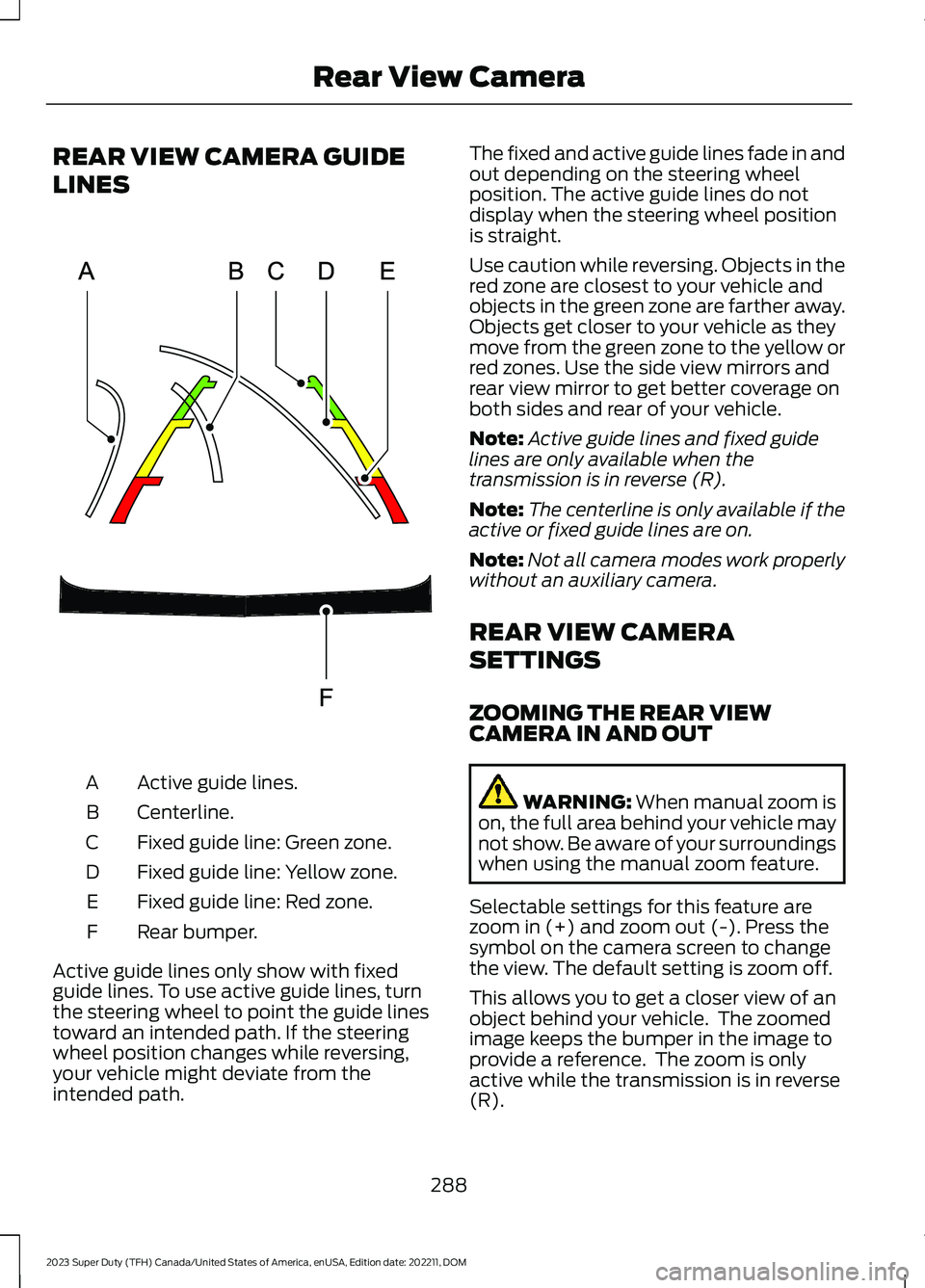
Active guide lines.A
Centerline.B
Fixed guide line: Green zone.C
Fixed guide line: Yellow zone.D
Fixed guide line: Red zone.E
Rear bumper.F
Active guide lines only show with fixedguide lines. To use active guide lines, turnthe steering wheel to point the guide linestoward an intended path. If the steeringwheel position changes while reversing,your vehicle might deviate from theintended path.
The fixed and active guide lines fade in andout depending on the steering wheelposition. The active guide lines do notdisplay when the steering wheel positionis straight.
Use caution while reversing. Objects in thered zone are closest to your vehicle andobjects in the green zone are farther away.Objects get closer to your vehicle as theymove from the green zone to the yellow orred zones. Use the side view mirrors andrear view mirror to get better coverage onboth sides and rear of your vehicle.
Note:Active guide lines and fixed guidelines are only available when thetransmission is in reverse (R).
Note:The centerline is only available if theactive or fixed guide lines are on.
Note:Not all camera modes work properlywithout an auxiliary camera.
REAR VIEW CAMERA
SETTINGS
ZOOMING THE REAR VIEWCAMERA IN AND OUT
WARNING: When manual zoom ison, the full area behind your vehicle maynot show. Be aware of your surroundingswhen using the manual zoom feature.
Selectable settings for this feature arezoom in (+) and zoom out (-). Press thesymbol on the camera screen to changethe view. The default setting is zoom off.
This allows you to get a closer view of anobject behind your vehicle. The zoomedimage keeps the bumper in the image toprovide a reference. The zoom is onlyactive while the transmission is in reverse(R).
288
2023 Super Duty (TFH) Canada/United States of America, enUSA, Edition date: 202211, DOMRear View CameraE306774