2023 FORD SUPER DUTY display
[x] Cancel search: displayPage 91 of 738
WHAT IS THE KEYLESS ENTRY
KEYPAD
The keyless entry keypad allows you tolock and unlock your vehicle using thekeypad on the window trim.
KEYLESS ENTRY KEYPAD
LIMITATIONS
The system may not function if:
•The vehicle battery has no charge.
LOCATING THE KEYLESS
ENTRY KEYPAD
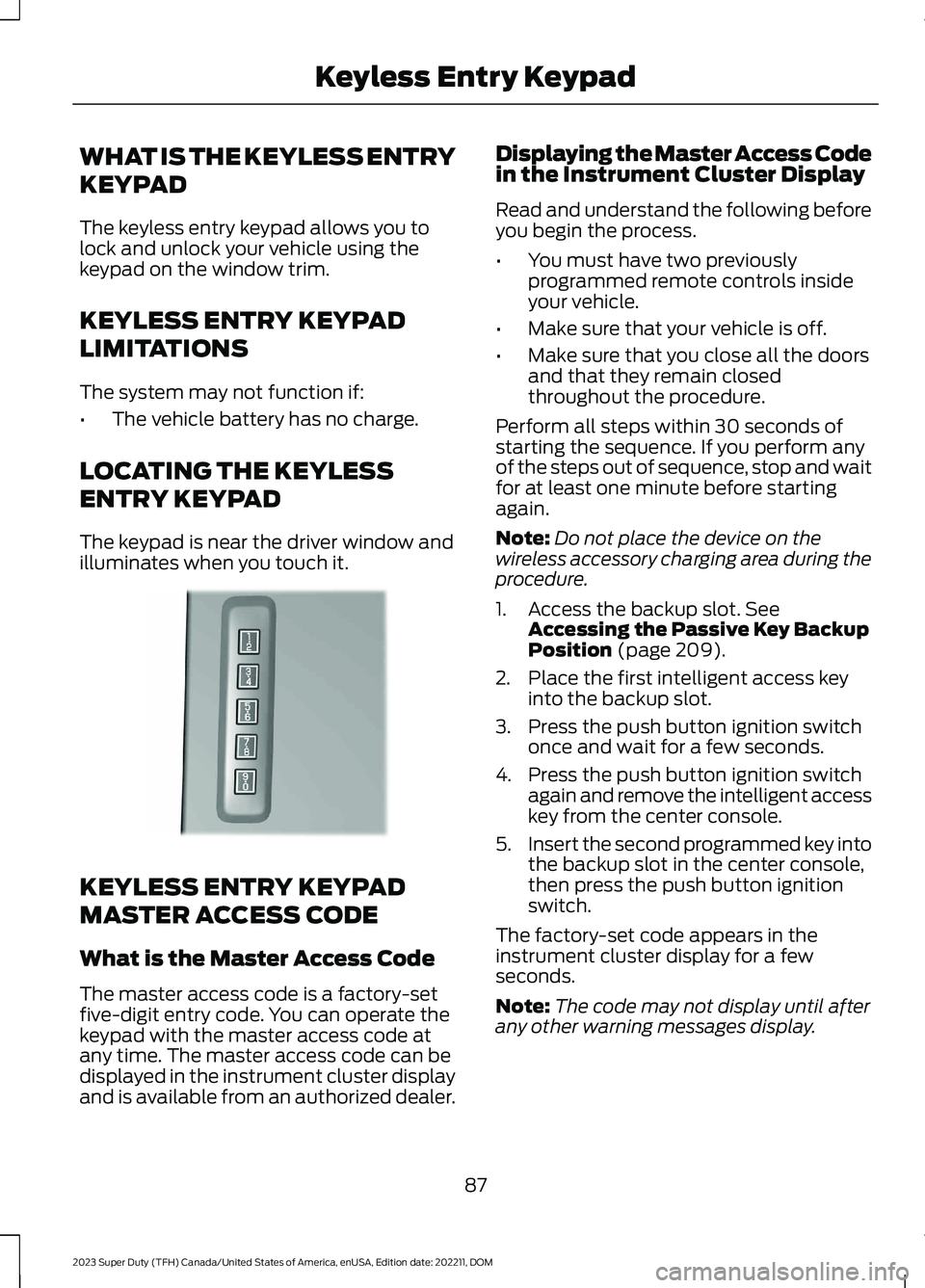
The keypad is near the driver window andilluminates when you touch it.
KEYLESS ENTRY KEYPAD
MASTER ACCESS CODE
What is the Master Access Code
The master access code is a factory-setfive-digit entry code. You can operate thekeypad with the master access code atany time. The master access code can bedisplayed in the instrument cluster displayand is available from an authorized dealer.
Displaying the Master Access Codein the Instrument Cluster Display
Read and understand the following beforeyou begin the process.
•You must have two previouslyprogrammed remote controls insideyour vehicle.
•Make sure that your vehicle is off.
•Make sure that you close all the doorsand that they remain closedthroughout the procedure.
Perform all steps within 30 seconds ofstarting the sequence. If you perform anyof the steps out of sequence, stop and waitfor at least one minute before startingagain.
Note:Do not place the device on thewireless accessory charging area during theprocedure.
1.Access the backup slot. SeeAccessing the Passive Key BackupPosition (page 209).
2.Place the first intelligent access keyinto the backup slot.
3.Press the push button ignition switchonce and wait for a few seconds.
4.Press the push button ignition switchagain and remove the intelligent accesskey from the center console.
5.Insert the second programmed key intothe backup slot in the center console,then press the push button ignitionswitch.
The factory-set code appears in theinstrument cluster display for a fewseconds.
Note:The code may not display until afterany other warning messages display.
87
2023 Super Duty (TFH) Canada/United States of America, enUSA, Edition date: 202211, DOMKeyless Entry KeypadE190936
Page 98 of 738
TAILGATE PRECAUTIONS
WARNING: It is extremelydangerous to ride in a cargo area, insideor outside of a vehicle. In a crash, peopleriding in these areas are more likely to beseriously injured or killed. Do not allowpeople to ride in any area of your vehiclethat is not equipped with seats andseatbelts. Make sure everyone in yourvehicle is in a seat and properly using aseatbelt. Failure to follow this warningcould result in serious personal injury ordeath.
OPENING THE TAILGATE
OPENING THE TAILGATE FROMINSIDE YOUR VEHICLE
The vehicle must be in park (P) to operatethe power tailgate.
Press the button on theinstrument panel.
Note:A tone sounds while the tailgateopens.
Note:The tailgate stops and reverses if itdetects an obstruction when opening.
Note:An alert sounds if the electronictailgate is in manual mode.
Note:A pop-up message appears on thetouchscreen if the tailgate is in manualmode asking if you want to change back topower mode.
OPENING THE TAILGATE FROMOUTSIDE YOUR VEHICLE
1.Unlock the vehicle with the remotecontrol, power door unlock control oryour phone as a key device.
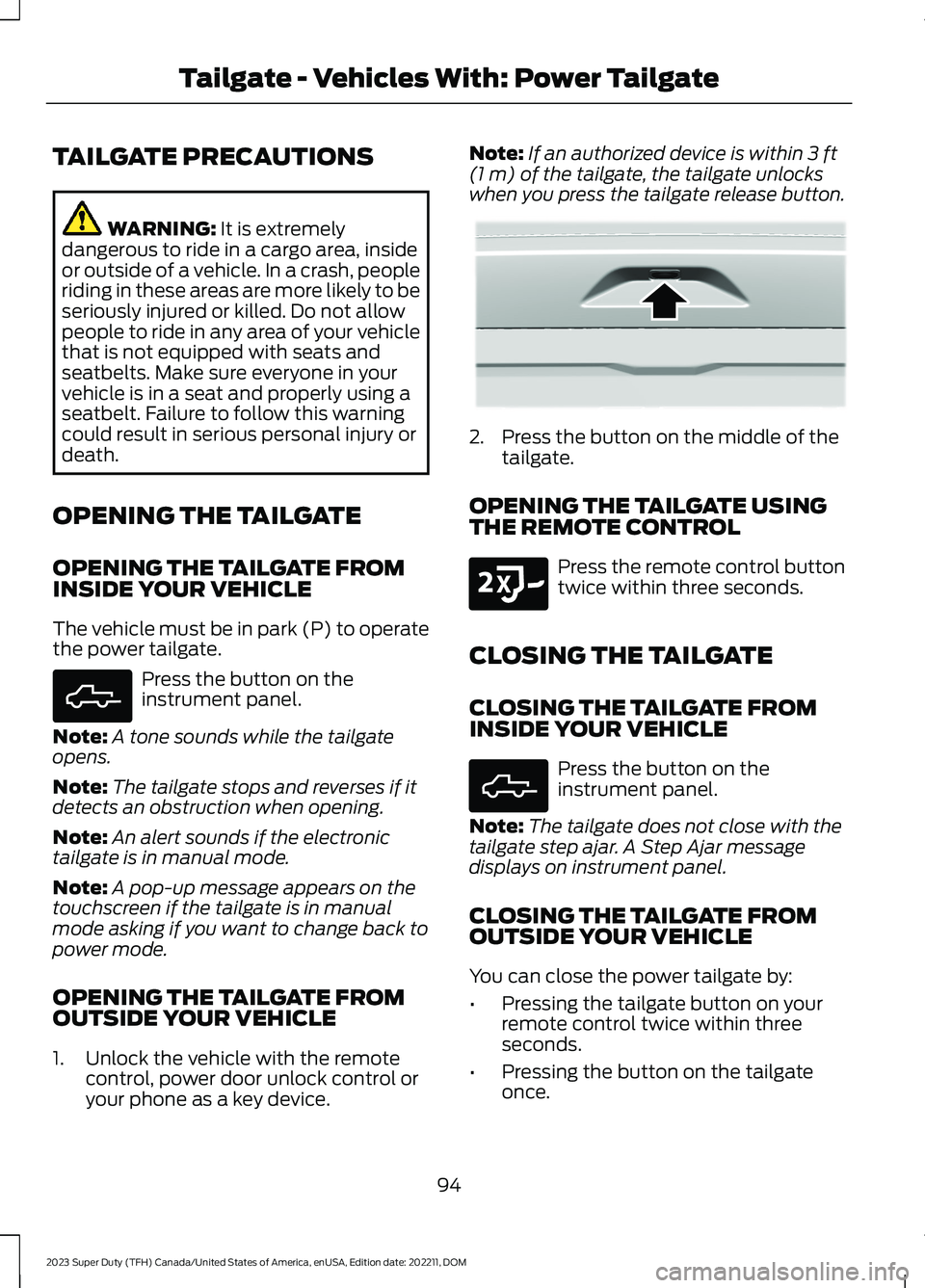
Note:If an authorized device is within 3 ft(1 m) of the tailgate, the tailgate unlockswhen you press the tailgate release button.
2.Press the button on the middle of thetailgate.
OPENING THE TAILGATE USINGTHE REMOTE CONTROL
Press the remote control buttontwice within three seconds.
CLOSING THE TAILGATE
CLOSING THE TAILGATE FROMINSIDE YOUR VEHICLE
Press the button on theinstrument panel.
Note:The tailgate does not close with thetailgate step ajar. A Step Ajar messagedisplays on instrument panel.
CLOSING THE TAILGATE FROMOUTSIDE YOUR VEHICLE
You can close the power tailgate by:
•Pressing the tailgate button on yourremote control twice within threeseconds.
•Pressing the button on the tailgateonce.
94
2023 Super Duty (TFH) Canada/United States of America, enUSA, Edition date: 202211, DOMTailgate - Vehicles With: Power TailgateE308661 E359757 E191530 E308661
Page 109 of 738
SECURITY – TROUBLESHOOTING
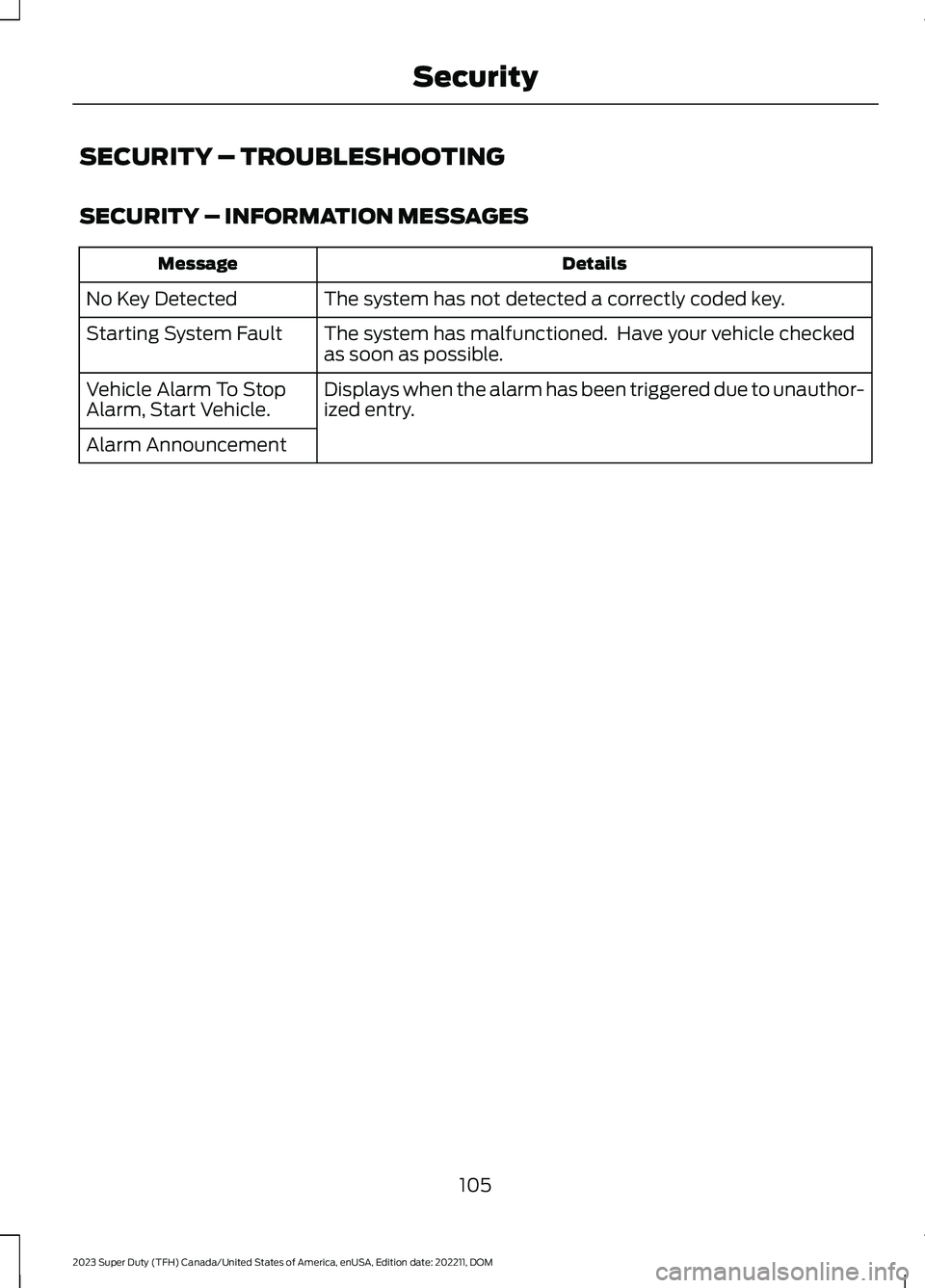
SECURITY – INFORMATION MESSAGES
DetailsMessage
The system has not detected a correctly coded key.No Key Detected
The system has malfunctioned. Have your vehicle checkedas soon as possible.Starting System Fault
Displays when the alarm has been triggered due to unauthor-ized entry.Vehicle Alarm To StopAlarm, Start Vehicle.
Alarm Announcement
105
2023 Super Duty (TFH) Canada/United States of America, enUSA, Edition date: 202211, DOMSecurity
Page 111 of 738

POWER RUNNING BOARD
PRECAUTIONS
WARNING: In extreme climates,excessive ice buildup may occur, causingthe running boards not to deploy. Makesure that the running boards havedeployed, and have finished movingbefore attempting to step on them. Therunning boards will resume normalfunction once the blockage is cleared.
WARNING: Switch off the runningboards before jacking or placing anyobject under your vehicle. Never placeyour hand between the extended runningboard and your vehicle. A moving runningboard may cause injury.
Do not use the running boards, front andrear hinge assemblies, running boardmotors, or the running board underbodymounts to lift your vehicle when jacking.Use proper jacking points.
The running boards could move slower incold temperatures.
POWER RUNNING BOARD
SETTINGS
1.Press Features on the touchscreen.
2.Press Power Running Board.
3.Press SETTINGS.
Power Boards Modes
Note:When the vehicle speed is more than3 mph (5 km/h), the option to select themodes disables, to avoid unintendedoperation.
Note:The power running boards reversedirection and move to the end of travel ifthey encounter an object when moving.Keep the power running boards andbrackets clean for optimum performance.
Off
The power running boards remain stowed,regardless of door position.
Auto
The power running boards deploy whenyou approach your vehicle with a remotecontrol, unlock the door or open the door.
The power running boards stow:
•After a few seconds when you closethe doors.
•Instantly after you close and lock thedoors.
•If you unlock the door but do not openit, after the timeout.
•If you have switched approachdetection on and do not open a doorbefore the auto timer setting expires.
•When the vehicle speed is more than3 mph (5 km/h).
Note:When you select this mode, an optiondisplays that allows you to select how longthe running boards stay deployed withoutopening the door.
Out
The power running boards remaindeployed, regardless of door position. Thepower running boards stow when thevehicle speed is more than 5 km/h, and themode changes to auto. You need to selectOut mode again if you want the powerrunning boards to stay deployed at the endof each trip.
107
2023 Super Duty (TFH) Canada/United States of America, enUSA, Edition date: 202211, DOMPower Running Boards (If Equipped)
Page 114 of 738
End of Travel Position
The steering column sets a stoppingposition just short of the end of the columnposition to prevent damage to the steeringcolumn. A new stopping position sets ifthe steering column encounters an objectwhen tilting or telescoping.
To reset the steering column to its normalstopping position:
1.Confirm there is nothing obstructingthe motion of the steering column.
2.Press and hold the steering columncontrol until the steering column stopsmoving.
3.Press the steering column controlagain.
Note:The steering column may begin tomove again.
4.When the steering column stops,continue holding the control for a fewseconds.
5.Repeat for each direction as necessary.
A new stopping position sets. The nexttime you tilt or telescope the steeringcolumn, it stops just short of the end of thecolumn position.
Memory Feature (If Equipped)
You can save and recall the steeringcolumn position with the memoryfunction. See Memory Function (page177).
Pressing the adjustment control during amemory recall cancels the operation.
Easy Entry and Exit Feature
The column moves up when you switchthe ignition off. Switch the ignition on toreturn the system to its previous settings.You can switch this feature on or off in theinstrument cluster display.
Note: If you press any adjustment ormemory button when in easy exit mode, thesystem cancels the operation.
Note:Depending on your vehicle, thecolumn may move up and in.
RESETTING THE STOPPING
POSITION - VEHICLES WITH:
POWER ADJUSTABLE
STEERING COLUMN
Note:The steering wheel stops when itdetects an obstruction. This sets a newstopping position.
To reset the steering column to its normalstopping position:
1.Confirm there is nothing obstructingthe motion of the steering column.
2.Press and hold the steering columncontrol until the steering column stopsmoving.
3.Press the steering column controlagain.
Note:The steering column may start tomove again.
4.When the steering column stops,continue holding the control for a fewseconds.
5.Repeat for each direction, as necessary.
HORN
Press on the center of thesteering wheel near the horn iconto activate the horn.
110
2023 Super Duty (TFH) Canada/United States of America, enUSA, Edition date: 202211, DOMSteering WheelE270945
Page 133 of 738
SWITCHING GLOBAL OPENING ONAND OFF
1.Using the information display controlson the steering wheel, select Settings.
2.Select Vehicle.
3.Select Windows.
4.Switch Remote Open on or off.
WINDOW BOUNCE-BACK
WHAT IS WINDOW BOUNCE-BACK
The window stops and reverses if it detectsan obstruction when closing.
OVERRIDING WINDOW BOUNCE-BACK
WARNING: If you overridebounce-back, the window does notreverse if it detects an obstacle. Takecare when closing the windows to avoidpersonal injury or damage to yourvehicle.
1.Close the window until it reaches thepoint of resistance and let it reverse.
2.Lift and hold the window control switchwithin two seconds to overridebounce-back and close the window.Bounce-back is now disabled and youcan close the window manually.
Note:The window goes past the point ofresistance and you can fully close it.
Note:If the window does not close, haveyour vehicle checked as soon as possible.
LOCKING THE REAR WINDOW
CONTROLS
Press the window control switchto lock or unlock the rear windowcontrols. It illuminates when youlock the rear window controls.
OPENING AND CLOSING THE
SLIDING WINDOWS (IF EQUIPPED)
WARNING: When closing thepower windows, verify they are free ofobstruction and make sure that childrenand pets are not in the proximity of thewindow openings.
WARNING: Do not leave childrenunattended in your vehicle and do notlet them play with the power windows.Failure to follow this instruction couldresult in personal injury.
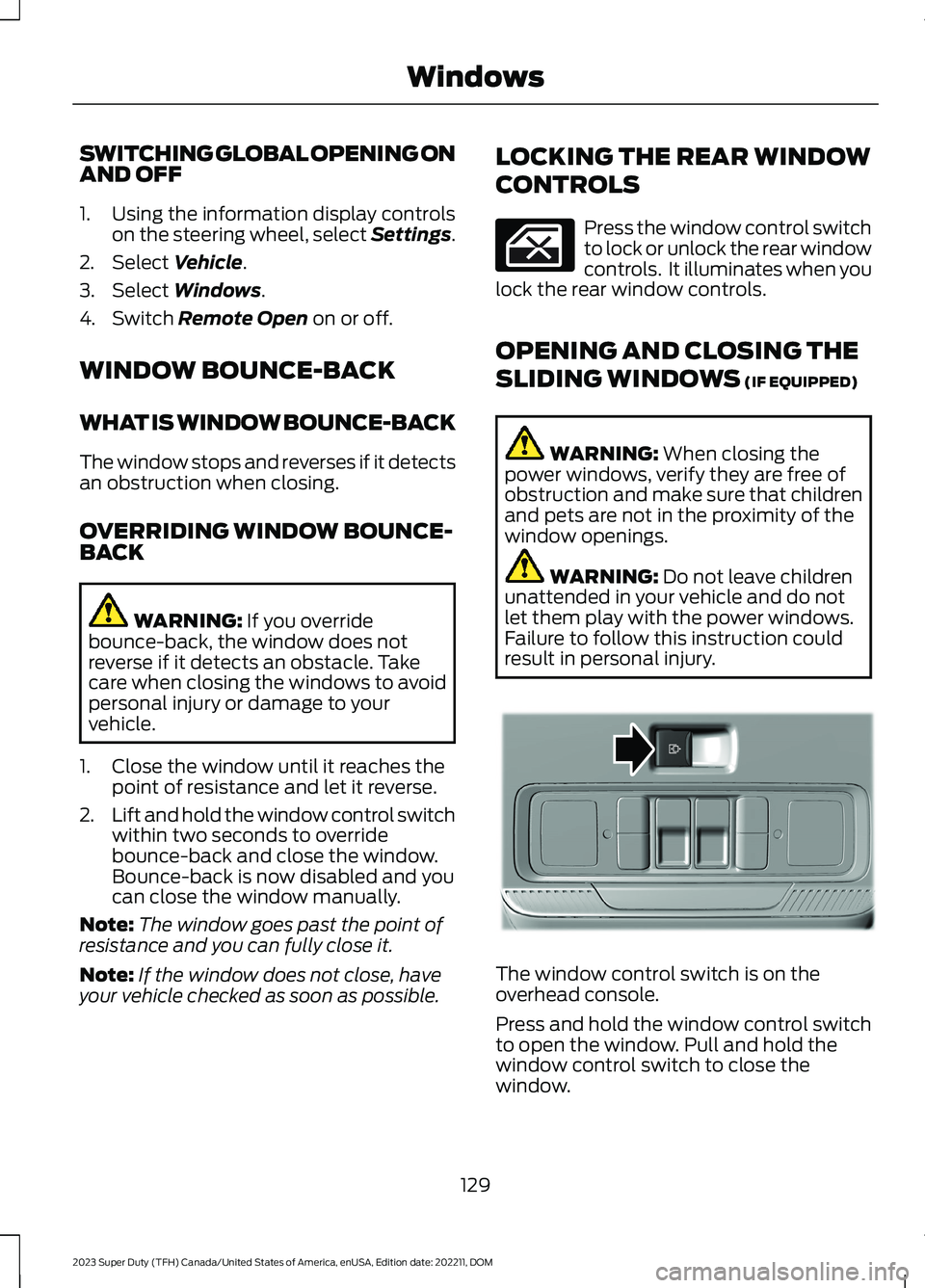
The window control switch is on theoverhead console.
Press and hold the window control switchto open the window. Pull and hold thewindow control switch to close thewindow.
129
2023 Super Duty (TFH) Canada/United States of America, enUSA, Edition date: 202211, DOMWindows E311430
Page 140 of 738
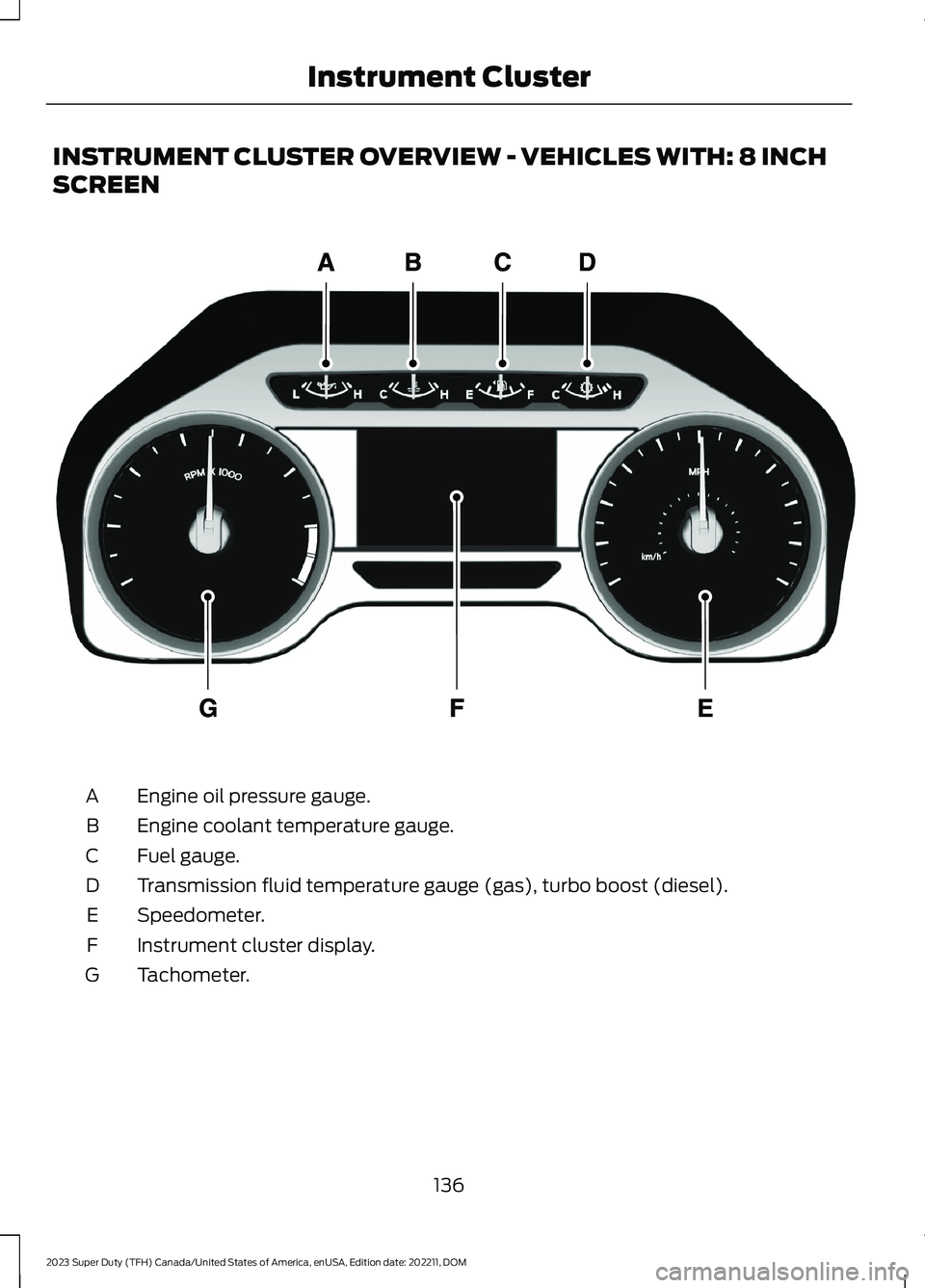
INSTRUMENT CLUSTER OVERVIEW - VEHICLES WITH: 8 INCH
SCREEN
Engine oil pressure gauge.A
Engine coolant temperature gauge.B
Fuel gauge.C
Transmission fluid temperature gauge (gas), turbo boost (diesel).D
Speedometer.E
Instrument cluster display.F
Tachometer.G
136
2023 Super Duty (TFH) Canada/United States of America, enUSA, Edition date: 202211, DOMInstrument ClusterE219638
Page 142 of 738
FUEL GAUGE LIMITATIONS
The fuel gauge may not provide anaccurate reading when your vehicle is onan incline.
LOCATING THE FUEL FILLERDOOR
The arrow adjacent to the fuel pumpsymbol indicates on which side of yourvehicle the fuel filler door is located.
WHAT IS THE LOW FUELREMINDER
A low fuel level reminder displays andsounds when the distance to emptyreaches 50 mi (80 km),25 mi (40 km),12 mi (20 km) and 0 mi (0 km).
Note:The low fuel reminder can appear atdifferent fuel gauge positions depending onfuel economy conditions. This variation isnormal.
WHAT IS DISTANCE TO EMPTY
Indicates the approximate distance yourvehicle can travel on the fuel remaining inthe tank. Changes in driving pattern cancause the value to not only decrease butalso increase or stay constant for periodsof time.
Note:When you have a trailer connected,your distance to empty accounts for thetrailer.
ENGINE COOLANT
TEMPERATURE GAUGE
Indicates the engine coolant temperature.
ENGINE OIL PRESSURE GAUGE
Indicates the engine oil pressure.
Note:This is a configurable gauge.
ENGINE OIL TEMPERATURE
GAUGE
Indicates the engine oil temperature.
Note:This is a configurable gauge.
TRANSMISSION FLUID
TEMPERATURE GAUGE
Indicates the transmission fluidtemperature.
Special operating conditions can causehigher than normal operatingtemperatures. See Special OperatingConditions Scheduled Maintenance(page 603).
Note:This is a configurable gauge.
TURBO BOOST GAUGE
Indicates the amount of manifold airpressure in the engine.
Note:This is a configurable gauge.
DIESEL EXHAUST FLUID
GAUGE
Indicates the current diesel exhaust fluidlevel.
138
2023 Super Duty (TFH) Canada/United States of America, enUSA, Edition date: 202211, DOMInstrument Cluster