Page 104 of 535

Pony
WARNING: Track Apps™ is fortrack use only. Remember that evenadvanced technology cannot defy thelaws of physics. It is always possible tolose control of a vehicle due to
inappropriate driver input for theconditions. Aggressive driving on anyroad condition can cause you to losecontrol of your vehicle increasing the riskof personal injury or property damage.
Track Apps™ provides a suite of optionsto record and optimize your trackperformances. See Track Use (page 278).
Pony
Show StatusMyMode
MyMode must be configured and saved before selection enabled.AddMyMode
Choose your applicable setting.1ExhaustMode
Quiet Start
Acceleration TimerTrack Apps
Brake Performance
Line Lock
Lap Timer
Start Option
Shift PointPerform-ance ShiftIndicatorShift Tone
Shift Light Mode
Launch ControlLaunchControlRPM
Rev Match
Show GaugesGauges
Configure MyGauges
Primary ColorMyColor
Secondary Color
Ambient Light
100
2023 Mustang (CZG) Canada/United States of America, Vehicles Built From: 14-11-2022, enUSA, Edition date: 202209, First-PrintingInformation Displays
Page 106 of 535

Vacuum.D
Cylinder head temperature.E
Transmission oil temperature.F
Axle temperature.G
Engine oil pressure.H
GENERAL INFORMATION -
VEHICLES WITH: 4.2 INCH
INSTRUMENT CLUSTER
DISPLAY SCREEN
WARNING: Driving while distractedcan result in loss of vehicle control, crashand injury. We strongly recommend thatyou use extreme caution when using anydevice that may take your focus off theroad. Your primary responsibility is thesafe operation of your vehicle. Werecommend against the use of anyhand-held device while driving andencourage the use of voice-operatedsystems when possible. Make sure youare aware of all applicable local lawsthat may affect the use of electronicdevices while driving.
Note:Some items could appear slightlydifferent or not at all if the features areoptional.
Information Display Controls
•Press the up or down arrow buttons toscroll through the list and highlight theoptions within a menu.
•Press the right arrow button to enter asub-menu.
•Press the left arrow button to exit amenu.
102
2023 Mustang (CZG) Canada/United States of America, Vehicles Built From: 14-11-2022, enUSA, Edition date: 202209, First-PrintingInformation DisplaysE249039
Page 111 of 535
Driver Assist
ModeLane Keeping Assist
Intensity
Hold OK to ResetTire Monitor
Settings
Settings
Choose your applicable setting.AlarmVehicle
Easy Entry/Exit
Choose your applicable setting.Lighting
Locks
Percent Oil Life XXX%Oil Life ResetHold OK to Reset
Park Lock Control
Choose your applicable setting.Remote Start
Tire Mobility Kit
Windows
Wipers
Choose your applicable setting.Gauge ColorMyColor
Halo
Ambient Light
Set MyColor
Displays the status of MyKeys,Admin Keys and MyKey distance.MyKey StatusMyKey
Hold OK to Create MyKeyCreate MyKey
Choose your applicable setting.911 Assist
AdvanceTrac
Do Not Disturb
107
2023 Mustang (CZG) Canada/United States of America, Vehicles Built From: 14-11-2022, enUSA, Edition date: 202209, First-PrintingInformation Displays
Page 112 of 535

Settings
Max Speed
Speed Minder
Volume Limiter
Hold OK to Clear All MyKeysClear MyKeys
Choose your applicable setting.DistanceDisplay Setup
Temperature
Tire Pressure
Language
1 See Track Use (page 278).Note:Quiet Start allows you to schedule when the Exhaust Mode turns on the Quietsetting. The time window can be from 1 to 24 hours.
GENERAL INFORMATION -
VEHICLES WITH: 12.3 INCH
INSTRUMENT CLUSTER
DISPLAY SCREEN
WARNING: Driving while distractedcan result in loss of vehicle control, crashand injury. We strongly recommend thatyou use extreme caution when using anydevice that may take your focus off theroad. Your primary responsibility is thesafe operation of your vehicle. Werecommend against the use of anyhand-held device while driving andencourage the use of voice-operatedsystems when possible. Make sure youare aware of all applicable local lawsthat may affect the use of electronicdevices while driving.
Note:Some items could appear slightlydifferent or not at all if the features areoptional.
Information Display Controls
You can control various systems on yourvehicle using the information displaycontrols on the steering wheel.
108
2023 Mustang (CZG) Canada/United States of America, Vehicles Built From: 14-11-2022, enUSA, Edition date: 202209, First-PrintingInformation Displays
Page 113 of 535
Back button.A
Arrow up.B
Voice control button.C
Arrow down.D
Pony menu button.E
Audio menu button.F
Phone buttons.G
Settings menu button.H
Navigation menu button.I
•Press one of the menu buttons to entera menu.
•Toggle (B) and (D) to scroll throughand highlight the options within amenu.
•Press the OK button.
•Press (A) to exit a menu.
•Press the open menu's button at anytime to close the menu (escapebutton).
•Press the OK button to choose andconfirm settings or messages.
Settings
Settings
Trip/Fuel Info
Auto Engine OffDriverAssistBlindspot
Pre-Collision Assist
Cross Traffic Alert
Cruise Control
Driver Alert
Hill Start Assist
Rear Park Aid
109
2023 Mustang (CZG) Canada/United States of America, Vehicles Built From: 14-11-2022, enUSA, Edition date: 202209, First-PrintingInformation DisplaysE249038
Page 115 of 535
Pony
Lap Timer
Start Option
Shift PointPerform-ance ShiftIndicatorShift Tone
Shift Light Mode
Launch ControlLaunchControlRPM
Rev Match
Show GaugesGauges
Configure MyGauges
Primary ColorMyColor
Secondary Color
Ambient Light
Create MyColor
Change with Drive ModeClusterAppear-anceNormal
Sport
Track
1 See Track Use (page 278).Note:Quiet start allows you to schedule when the exhaust mode turns on the quiet setting.The time window can be from 1 to 24 hours.
Note:Your vehicle may not have optionalfeatures like exhaust mode and line lock.
Note:The menu options for performanceshift indicator, launch control, and rev matchare for manual transmissions only.
Phone
See General Information (page 400).
Audio
See General Information (page 400).
Navigation (If Equipped)
See General Information (page 400).
111
2023 Mustang (CZG) Canada/United States of America, Vehicles Built From: 14-11-2022, enUSA, Edition date: 202209, First-PrintingInformation Displays
Page 137 of 535
SITTING IN THE CORRECT
POSITION
WARNING: Sitting improperly, outof position or with the seatback reclinedtoo far can take weight off the seatcushion and affect the decision of thepassenger sensing system, resulting inserious injury or death in the event of acrash. Always sit upright against yourseat back, with your feet on the floor.
WARNING: Do not recline the seatbackrest too far as this can cause theoccupant to slide under the seatbelt,resulting in personal injury in the eventof a crash.
WARNING: Do not place objectshigher than the top of the seat backrest.Failure to follow this instruction couldresult in personal injury or death in theevent of a sudden stop or crash.
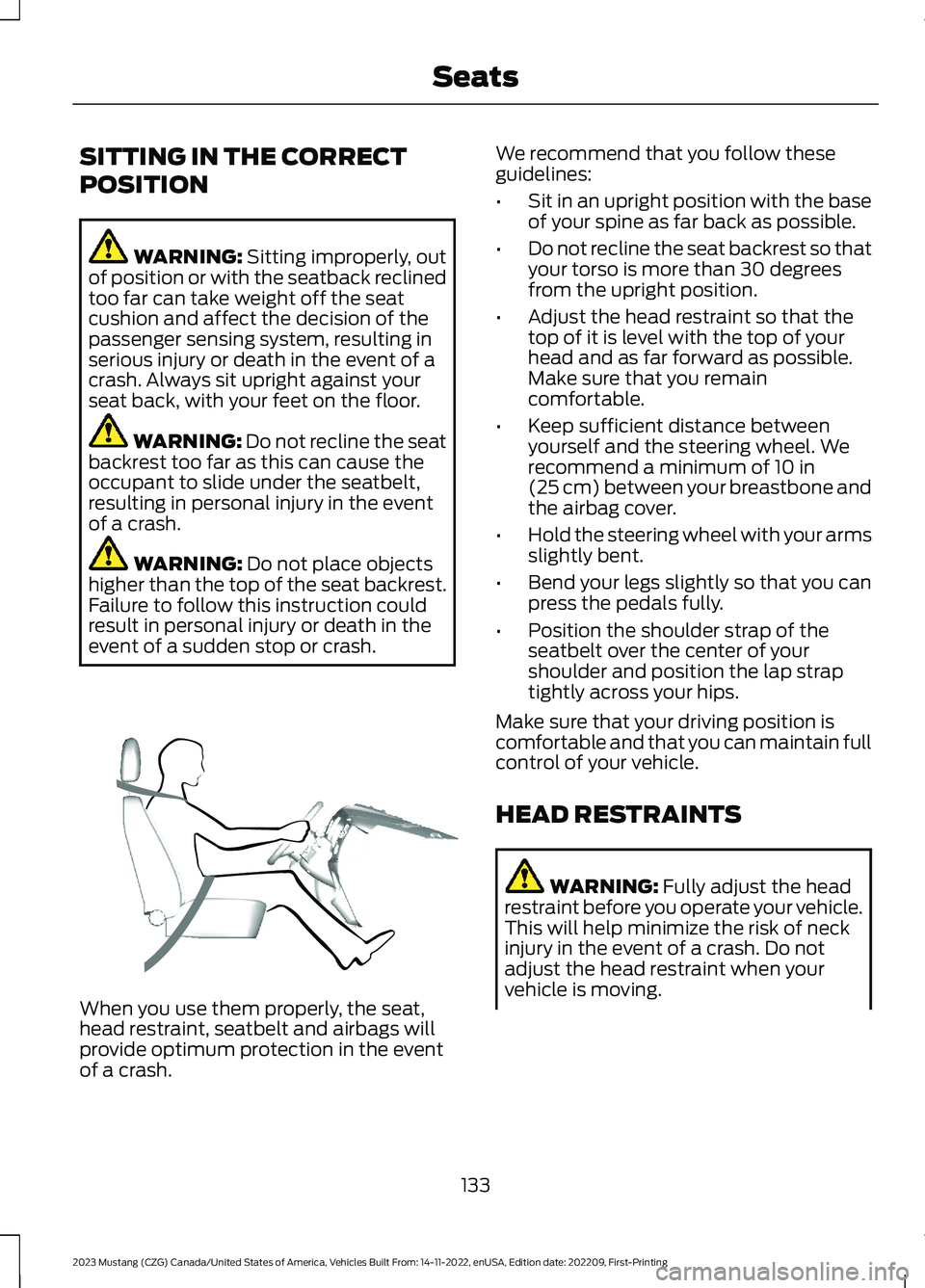
When you use them properly, the seat,head restraint, seatbelt and airbags willprovide optimum protection in the eventof a crash.
We recommend that you follow theseguidelines:
•Sit in an upright position with the baseof your spine as far back as possible.
•Do not recline the seat backrest so thatyour torso is more than 30 degreesfrom the upright position.
•Adjust the head restraint so that thetop of it is level with the top of yourhead and as far forward as possible.Make sure that you remaincomfortable.
•Keep sufficient distance betweenyourself and the steering wheel. Werecommend a minimum of 10 in(25 cm) between your breastbone andthe airbag cover.
•Hold the steering wheel with your armsslightly bent.
•Bend your legs slightly so that you canpress the pedals fully.
•Position the shoulder strap of theseatbelt over the center of yourshoulder and position the lap straptightly across your hips.
Make sure that your driving position iscomfortable and that you can maintain fullcontrol of your vehicle.
HEAD RESTRAINTS
WARNING: Fully adjust the headrestraint before you operate your vehicle.This will help minimize the risk of neckinjury in the event of a crash. Do notadjust the head restraint when yourvehicle is moving.
133
2023 Mustang (CZG) Canada/United States of America, Vehicles Built From: 14-11-2022, enUSA, Edition date: 202209, First-PrintingSeatsE68595
Page 143 of 535
cushion. This can cause the heated seatto overheat. Do not puncture the seatwith pins, needles or other pointedobjects. This damages the heatingelement and can cause the heated seatto overheat. An overheated seat maycause serious personal injury.
Note:Do not do the following:
•Place heavy objects on the seat.
•Operate the seat heater if water or anyother liquid spills on the seat. Allow theseat to dry thoroughly.
•Operate the heated seats unless theengine is running. Doing so can causethe battery to lose charge.
Press the heated seat symbol to cyclethrough the various heat settings and off.More indicator lights indicate warmersettings.
Cooled Seats
The cooled seats only function when theengine is running.
Press the cooled seat symbol to cyclethrough the various cool settings and off.More indicator lights indicate coolersettings.
If the engine falls below 350 RPM whilethe cooled seats are on, the feature turnsitself off. You will need to reactivate it.
139
2023 Mustang (CZG) Canada/United States of America, Vehicles Built From: 14-11-2022, enUSA, Edition date: 202209, First-PrintingSeatsE146322 E146309


