2023 FORD MAVERICK wheel
[x] Cancel search: wheelPage 122 of 556
4.Select a tire pressure unit.
CHANGING THE TIRE PRESSUREUNIT - VEHICLES WITH: 6.5 INCHSCREEN
You can change the tire pressure unit usingthe instrument cluster display.
1.Select Display Setup.
2.Select Tire pressure.
3.Select a pressure unit.
FUEL ECONOMY DISPLAY -
GASOLINE
An instant fuel economy gauge is providedalong with average fuel economy. Averagefuel economy is continuously averagedsince the last reset.
Note:Press and hold the OK button on thecontrols on the steering wheel to reset youraverage fuel economy.
FUEL ECONOMY DISPLAY -
HYBRID ELECTRIC VEHICLE
(HEV)
An instant fuel economy gauge is providedalong with average fuel economy. Averagefuel economy is continuously averagedsince the last reset.
When the gasoline engine is off, the instantfuel economy gauge is replaced with anelectric driving message.
Note:Press and hold the OK button on thecontrols on the steering wheel to reset youraverage fuel economy.
Note:Fuel economy display is a selectablescreen. See Customizing the InstrumentCluster Display (page 116). SeeCustomizing the Instrument ClusterDisplay (page 116).
EV COACH - HYBRID ELECTRIC
VEHICLE (HEV)
EV coach can help you get the most out ofyour vehicle's electric driving capabilities.
Note:EV coach is a selectable screen. SeeCustomizing the Instrument ClusterDisplay (page 116).
When you are accelerating or maintainingspeed you see a blue or white solid barindicating vehicle power. You may also seea blue rectangular box which shows thepower level at which the engine turns on.
•When the power level is within the box,the color of the bar is blue. This meansyou are in electric operation and theengine is off.
•When the power level is outside of thebox, the color of the bar is white. Thismeans you are in hybrid operation witha combination of the electric motorand the engine providing vehicle power.
When you are decelerating with either yourfoot off the accelerator pedal or on thebrake pedal, a green or white solid bardisplays indicating the power being usedto slow down your vehicle. You may alsosee a green rectangular box which showsthe amount of power that can berecaptured by the regenerative brakingsystem and returned to the high voltagebattery.
•When the power level is within the box,the color of the bar is green. Thismeans that the regenerative brakingsystem is being used to efficiently slowyour vehicle down and return themaximum percentage of energy to thehigh voltage battery.
•When the power level is outside of thebox, the color of the bar is white. Thismeans both the regenerative brakingsystem and conventional brakingsystem are being used.
118
2023 Maverick (CFE) Canada/United States of America, enUSA, Edition date: 202208, First-PrintingInstrument Cluster Display
Page 124 of 556
ACCESSING THE TRIP
COMPUTER - VEHICLES WITH:
4.2 INCH SCREEN
1.Use the instrument cluster displaycontrols to navigate the home screen.
2.Select the trip screen.
3.Press the menu button on the steeringwheel.
4.Select Trip 1 or Trip 2.
ACCESSING THE TRIP
COMPUTER - VEHICLES WITH:
6.5 INCH SCREEN
Using Select Screens
1.Use the instrument cluster displaycontrols to navigate the home menu.
2.Select Select Screens.
3.Use the control on the steering wheelto navigate the menu. SeeCustomizing the Instrument ClusterDisplay (page 116).
Using the Home Screen
Once the screens have been added, usethe instrument cluster display controls onthe steering wheel to view each trip screen.
RESETTING THE TRIP
COMPUTER
1.Use the instrument cluster displaycontrols to navigate the home screen.
2.Select the trip screen you want to reset.
3.Press and hold the OK button until thesystem reset confirmation appears.
RESETTING THE INDIVIDUAL
TRIP VALUES - VEHICLES
WITH: 4.2 INCH SCREEN
1.Use the instrument cluster displaycontrols to navigate the home screen.
2.Select the trip screen.
3.Press the menu button on the steeringwheel.
4.Select Reset Individual Values.
5.Select a trip value to reset.
6.Press and hold the OK button until thesystem reset confirmation appears.
CONFIGURING THE TRIP
COMPUTER - VEHICLES WITH:
4.2 INCH SCREEN
1.Use the instrument cluster displaycontrols to navigate the home screen.
2.Select the trip screen.
3.Press the menu button on the steeringwheel.
4.Select Configure View.
5.Select values to display.
TRIP DATA
Trip 1 and 2
Provides trip timer, trip average fueleconomy and total trip distance traveled.For hybrid vehicles, the trip also shows thedistance traveled on electric power onlywith the engine off.
Note:Trip 1 and 2 are selectable screens.See Accessing the Trip Computer (page120).
120
2023 Maverick (CFE) Canada/United States of America, enUSA, Edition date: 202208, First-PrintingTrip Computer
Page 126 of 556

WHAT IS REMOTE START
The system allows you to remotely startyour vehicle and to adjust the interiortemperature according to the settings thatyou chose.
REMOTE START
PRECAUTIONS
WARNING: Do not start the enginein a closed garage or in other enclosedareas. Exhaust fumes are toxic. Alwaysopen the garage door before you startthe engine. Failure to follow thisinstruction could result in personal injuryor death.
REMOTE START LIMITATIONS
Remote start does not work under thefollowing conditions:
•The alarm horn is sounding.
•The hood is open.
•The transmission is not in park (P).
•The ignition is on.
•The battery voltage is below theminimum operating voltage.
•Remote start is not enabled.
Note:Do not use remote start if the fuellevel is low.
ENABLING REMOTE START
1.Using the information display controlson the steering wheel, select Settings.
2.Select Vehicle Settings.
3.Select Remote Start.
4.Switch System on.
Note:To use remote start, make sure thatthe modem is enabled. See Enabling andDisabling the Modem (page 377).
REMOTELY STARTING AND
STOPPING THE VEHICLE
Remotely Starting the Vehicle
Press the button on the remotecontrol.
Within three seconds, press thebutton twice on the remotecontrol.
Note:You can also use the FordPass Appto start the vehicle.
Note:The turn signals flash twice.
Note:The parking lamps turn on when thevehicle is running.
Note:The horn sounds if the system failsto start.
Note:All other vehicle systems remain offwhen you have remotely started the vehicle.
Note:The vehicle remains secured whenyou have remotely started the vehicle. Avalid key must be inside your vehicle toswitch the ignition on and drive your vehicle.
Remotely Stopping the Vehicle
Within three seconds, press thebutton twice on the remotecontrol.
EXTENDING THE REMOTE
START DURATION
To extend the remote start duration duringremote start, do the following:
Press the button on the remotecontrol.
122
2023 Maverick (CFE) Canada/United States of America, enUSA, Edition date: 202208, First-PrintingRemote Start (If Equipped)E138623 E138625 E138625 E138623
Page 127 of 556

Within three seconds, press thebutton on the remote control.
Within three seconds, press thebutton again.
If the duration is set to 15 minutes, theduration extends by another 15 minutes.This provides a total of 30 minutes.
Note:Remote start can only be extendedonce.
Note:A maximum of two remote starts, orone remote start with an extension, areallowed. To reset the restart procedureswitch the vehicle to on, then to off.
REMOTE START REMOTE
CONTROL INDICATORS
Remote Control Feedback
An LED on the remote control providesstatus feedback of remote start or stopcommands.
StatusLED
Remote startsuccessful.Solid green.
Remote stopsuccessful.Solid red.
Request failed orstatus not received.Blinking red.
Status incomplete.Blinking green.
REMOTE START SETTINGS
Switching Climate Control AutoMode On and Off
1.Using the instrument cluster displaycontrols on the steering wheel, selectSettings.
2.Select Vehicle.
3.Select Remote Start.
4.Select Climate Control.
5.Select Auto or Last settings.
Note:If you switch the auto mode on, thesystem attempts to heat or cool the interiorto 72°F (22°C). When you switch the vehicleon, the climate control system returns tothe last used settings.
Note:If you switch the last settings on, thesystem remembers the last used settings.
Heated Seat Settings (If Equipped)
1.Using the instrument cluster displaycontrols on the steering wheel, selectSettings.
2.Select Vehicle.
3.Select Remote Start.
4.Select Seats.
5.Select Auto or Off.
Note:If you switch the heated seat settingson, the heated seats turn on during coldweather.
Note:You cannot adjust the heated seatsettings when you remotely start yourvehicle.
Heated Steering Wheel Settings (If
Equipped)
1.Using the instrument cluster displaycontrols on the steering wheel, selectSettings.
2.Select Vehicle.
3.Select Remote Start.
4.Select Seats and Wheel.
5.Select Auto or Off.
Note:If you switch the heated steeringwheel settings on, the heated steering wheelturns on during cold weather.
123
2023 Maverick (CFE) Canada/United States of America, enUSA, Edition date: 202208, First-PrintingRemote Start (If Equipped)E138625
Page 128 of 556
Note:You cannot adjust the heatedsteering wheel settings when you remotelystart your vehicle.
Remote Start Duration
1.Using the instrument cluster displaycontrols on the steering wheel, selectSettings.
2.Select Vehicle.
3.Select Remote Start.
4.Select Duration.
5.Press the duration you prefer.
124
2023 Maverick (CFE) Canada/United States of America, enUSA, Edition date: 202208, First-PrintingRemote Start (If Equipped)
Page 139 of 556
FRONT SEAT PRECAUTIONS
WARNING: Sitting improperly, outof position or with the seatback reclinedtoo far can take weight off the seatcushion and affect the decision of thepassenger sensing system, resulting inserious injury or death in the event of acrash. Always sit upright against yourseat back, with your feet on the floor.
WARNING: Do not recline the seatbackrest too far as this can cause theoccupant to slide under the seatbelt,resulting in personal injury in the eventof a crash.
WARNING: Do not place objectshigher than the top of the seat backrest.Failure to follow this instruction couldresult in personal injury or death in theevent of a sudden stop or crash.
WARNING: Do not adjust the driverseat or seat backrest when your vehicleis moving. This may result in sudden seatmovement, causing the loss of controlof your vehicle.
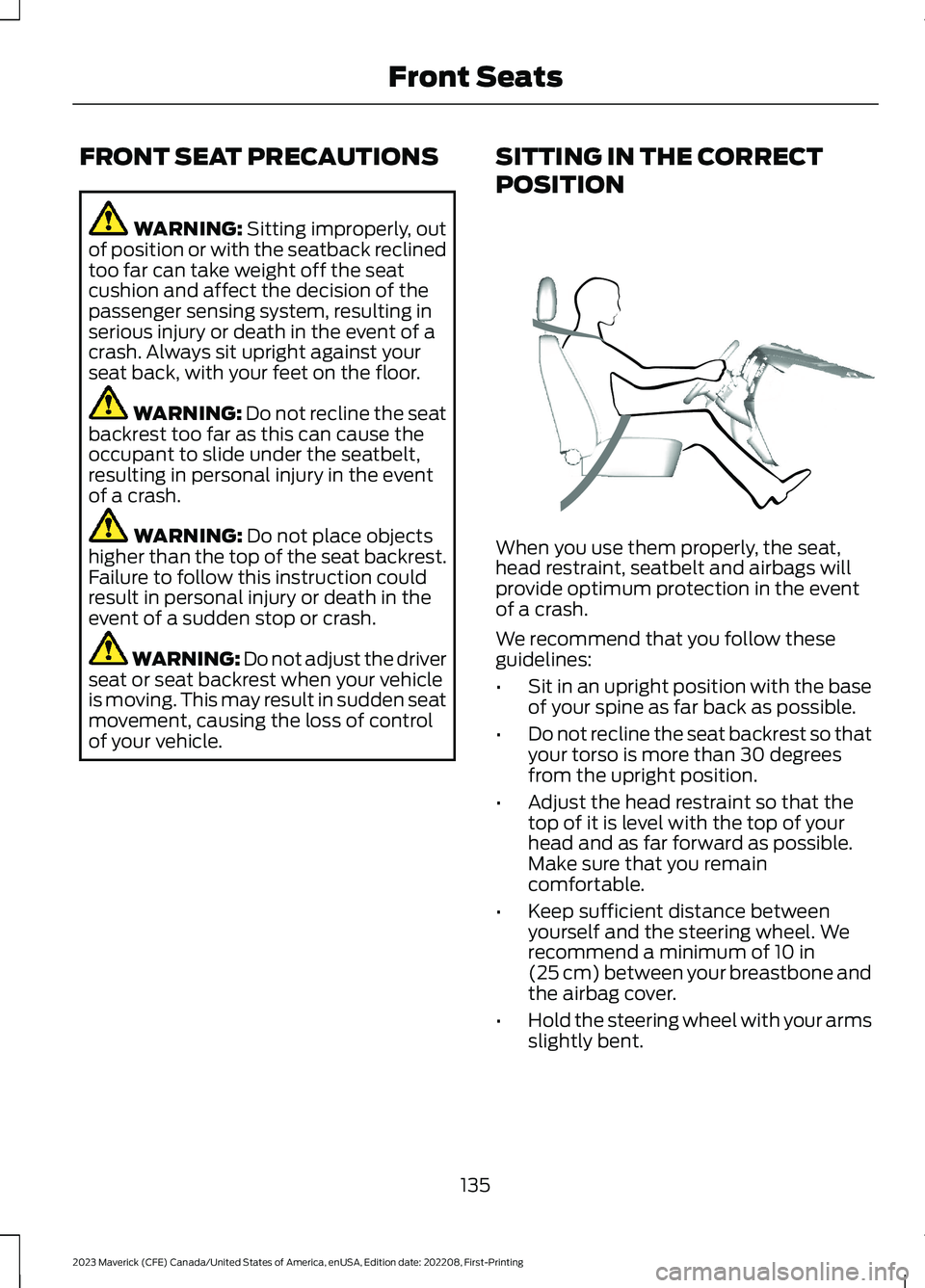
SITTING IN THE CORRECT
POSITION
When you use them properly, the seat,head restraint, seatbelt and airbags willprovide optimum protection in the eventof a crash.
We recommend that you follow theseguidelines:
•Sit in an upright position with the baseof your spine as far back as possible.
•Do not recline the seat backrest so thatyour torso is more than 30 degreesfrom the upright position.
•Adjust the head restraint so that thetop of it is level with the top of yourhead and as far forward as possible.Make sure that you remaincomfortable.
•Keep sufficient distance betweenyourself and the steering wheel. Werecommend a minimum of 10 in(25 cm) between your breastbone andthe airbag cover.
•Hold the steering wheel with your armsslightly bent.
135
2023 Maverick (CFE) Canada/United States of America, enUSA, Edition date: 202208, First-PrintingFront SeatsE68595
Page 166 of 556
2.Press Vehicle Settings.
3.Switch 30min Max Idle on or off.
Note:You cannot permanently switch offthe automatic shutdown. If you switch it off,it turns on each time you switch the ignitionon.
OVERRIDING AUTOMATIC ENGINESTOP
You can stop the engine shutdown, or resetthe timer, at any point before the30-second countdown has expired bydoing any of the following:
•Pressing the brake pedal or acceleratorpedal.
•Pressing the OK or RESET buttonduring the countdown.
Note: You cannot permanently switch offthe automatic engine shutdown feature.When you switch it off temporarily, it turnson at the next ignition cycle.
STARTING AND STOPPING
THE ENGINE –
TROUBLESHOOTING
STARTING AND STOPPING THEENGINE – WARNING LAMPS
Malfunction Indicator Lamp
If it illuminates when the engineis running, the on-boarddiagnostics system is detectinga malfunction of the vehicle emissioncontrol system.
If it flashes, engine misfire could beoccurring. Increased exhaust gastemperatures could damage the catalyticconverter or other vehicle components.Avoid heavy acceleration and deceleration,and have your vehicle checked as soon aspossible.
Powertrain Warning Lamp
If it illuminates when the engineis running, this indicates apowertrain or four-wheel drivefault. If it flashes when you are driving,immediately reduce the vehicle speed.Avoid heavy acceleration and deceleration,and have your vehicle checked as soon aspossible.
If both lamps illuminate when the engineis running, stop your vehicle as soon as itis safe to do so. Continuing to drive yourvehicle could cause reduced power or theengine to stop. Switch the ignition off andattempt to restart the engine. Have yourvehicle checked as soon as possible.
162
2023 Maverick (CFE) Canada/United States of America, enUSA, Edition date: 202208, First-PrintingStarting and Stopping the EngineE67028
Page 182 of 556
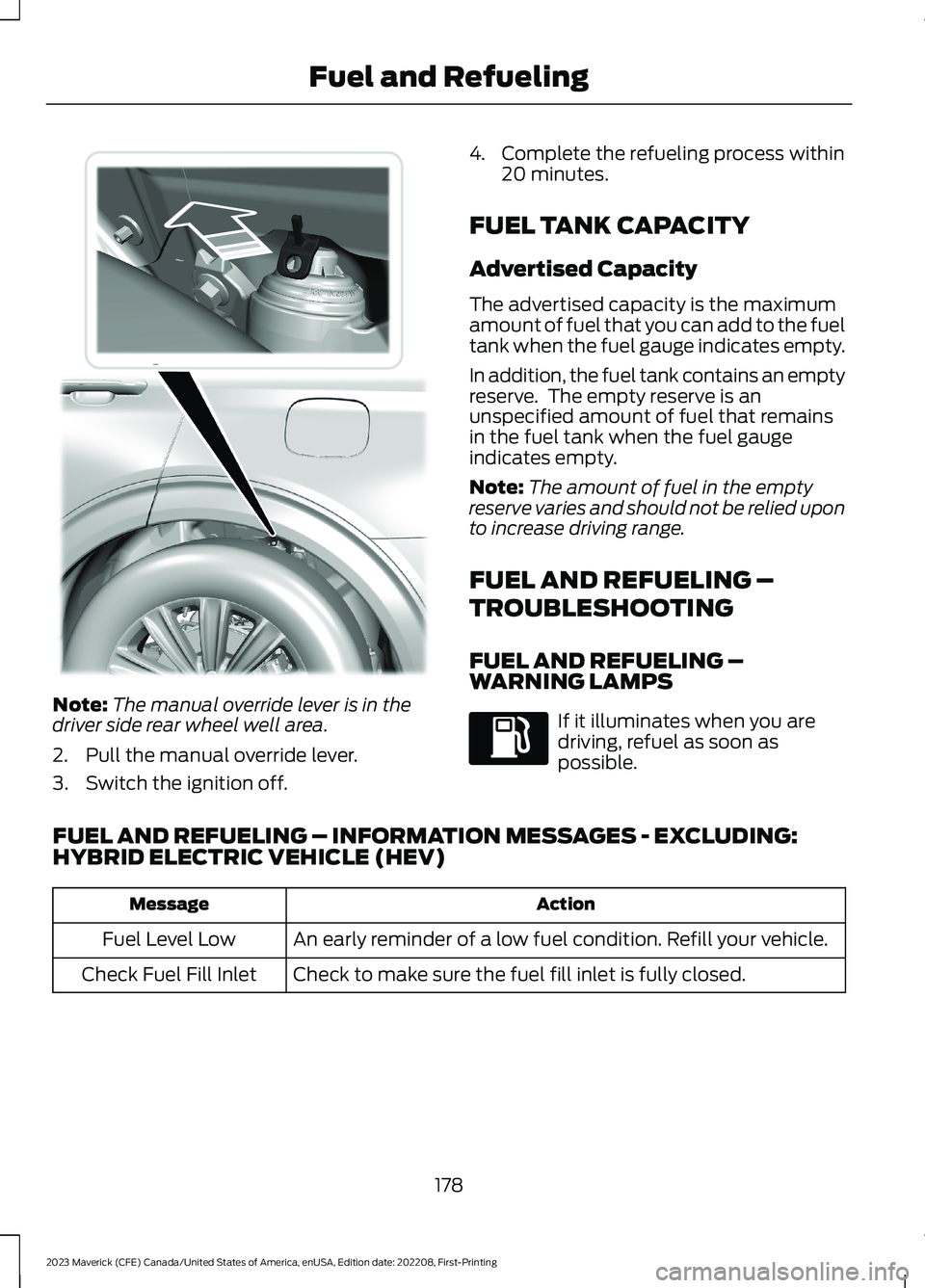
Note:The manual override lever is in thedriver side rear wheel well area.
2.Pull the manual override lever.
3.Switch the ignition off.
4.Complete the refueling process within20 minutes.
FUEL TANK CAPACITY
Advertised Capacity
The advertised capacity is the maximumamount of fuel that you can add to the fueltank when the fuel gauge indicates empty.
In addition, the fuel tank contains an emptyreserve. The empty reserve is anunspecified amount of fuel that remainsin the fuel tank when the fuel gaugeindicates empty.
Note:The amount of fuel in the emptyreserve varies and should not be relied uponto increase driving range.
FUEL AND REFUELING –
TROUBLESHOOTING
FUEL AND REFUELING –WARNING LAMPS
If it illuminates when you aredriving, refuel as soon aspossible.
FUEL AND REFUELING – INFORMATION MESSAGES - EXCLUDING:HYBRID ELECTRIC VEHICLE (HEV)
ActionMessage
An early reminder of a low fuel condition. Refill your vehicle.Fuel Level Low
Check to make sure the fuel fill inlet is fully closed.Check Fuel Fill Inlet
178
2023 Maverick (CFE) Canada/United States of America, enUSA, Edition date: 202208, First-PrintingFuel and RefuelingE297793