2023 FORD MAVERICK wheel
[x] Cancel search: wheelPage 92 of 556

ADJUSTING THE STEERING
WHEEL
WARNING: Do not adjust thesteering wheel when your vehicle ismoving.
Note:Make sure that you are sitting in thecorrect position. See Sitting in the CorrectPosition (page 135).
1.Unlock the steering column.
2.Adjust the steering wheel to the desiredposition.
3.Lock the steering column.
HORN
Press on the center of thesteering wheel near the horn iconto activate the horn.
SWITCHING THE HEATED
STEERING WHEEL ON AND OFF
(IF EQUIPPED)
To activate the heated steeringwheel, press the button on theclimate control unit. An indicatoron the button illuminates when the heatedsteering wheel is on.
Note:The engine must be running to usethis feature.
Note:A sensor regulates the temperatureof the steering wheel.
Note:The heated steering wheel mayremain on after remote starting your vehicle,depending on the remote start settings. Itmay also turn on when you start your vehicleif it was on the last time the engine wasswitched off.
88
2023 Maverick (CFE) Canada/United States of America, enUSA, Edition date: 202208, First-PrintingSteering WheelE377742 E270945 E256621
Page 95 of 556
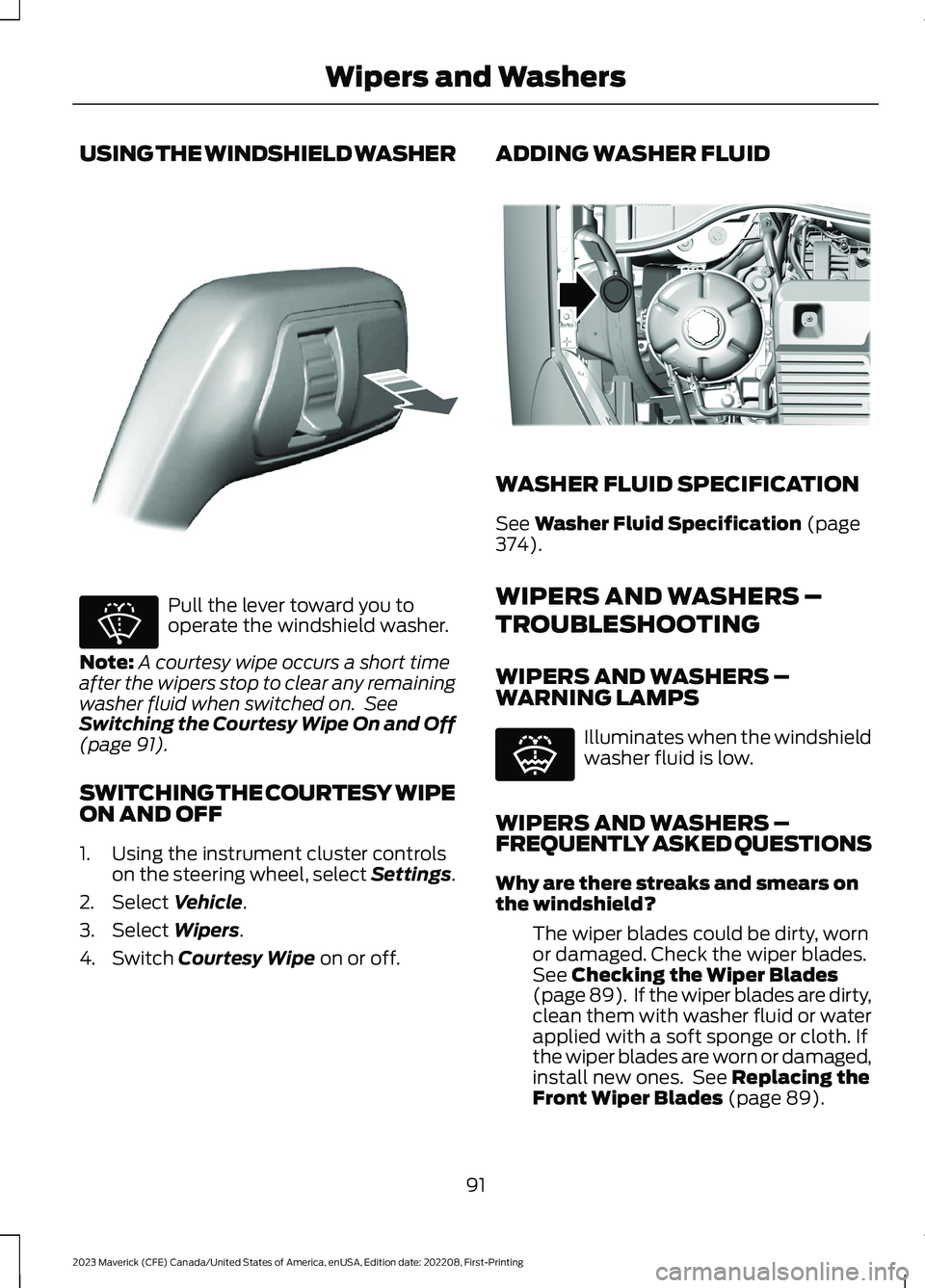
USING THE WINDSHIELD WASHER
Pull the lever toward you tooperate the windshield washer.
Note:A courtesy wipe occurs a short timeafter the wipers stop to clear any remainingwasher fluid when switched on. SeeSwitching the Courtesy Wipe On and Off(page 91).
SWITCHING THE COURTESY WIPEON AND OFF
1.Using the instrument cluster controlson the steering wheel, select Settings.
2.Select Vehicle.
3.Select Wipers.
4.Switch Courtesy Wipe on or off.
ADDING WASHER FLUID
WASHER FLUID SPECIFICATION
See Washer Fluid Specification (page374).
WIPERS AND WASHERS –
TROUBLESHOOTING
WIPERS AND WASHERS –WARNING LAMPS
Illuminates when the windshieldwasher fluid is low.
WIPERS AND WASHERS –FREQUENTLY ASKED QUESTIONS
Why are there streaks and smears onthe windshield?
The wiper blades could be dirty, wornor damaged. Check the wiper blades.See Checking the Wiper Blades(page 89). If the wiper blades are dirty,clean them with washer fluid or waterapplied with a soft sponge or cloth. Ifthe wiper blades are worn or damaged,install new ones. See Replacing theFront Wiper Blades (page 89).
91
2023 Maverick (CFE) Canada/United States of America, enUSA, Edition date: 202208, First-PrintingWipers and WashersE308825 E270967 E334429 E132353
Page 97 of 556
HEADLAMPS –
TROUBLESHOOTING
HEADLAMPS – FREQUENTLYASKED QUESTIONS
Why is there condensation in theheadlamps?
•Headlamps have vents toaccommodate normal changes in airpressure. Condensation can be anatural by-product of this design.When moist air enters the lampassembly through the vents, there is apossibility that condensation can occurwhen the temperature is cold. Whennormal condensation occurs, a finemist can form on the interior of thelens. The fine mist eventually clearsand exits through the vents duringnormal operation.
How much condensation isacceptable?
•The presence of a fine mist, forexample no streaks, drip marks or largedroplets. A fine mist covers less than50% of the lens.
How long may it take for theacceptable condensation to becleared?
•Clearing time may take as long as 48hours under dry weather conditions.
How much condensation isunacceptable?
•A water puddle inside the lamp.Streaks, drip marks or large dropletspresent on the interior of the lens.
What should I do if unacceptablecondensation is present?
•Have your vehicle checked as soon aspossible.
Why do my headlamps turn offwhen I have them switched onwhen I switch my vehicle off?
•The battery saver turns the headlampsoff after a short period of time after youswitch your vehicle off.
AUTOLAMPS
WHAT ARE AUTOLAMPS
WARNING: The system does notrelieve you of your responsibility to drivewith due care and attention. You mayneed to override the system if it does notturn the headlamps on in low visibilityconditions, for example daytime fog.
Autolamps turn the headlamps on in lowlight situations or when the windshieldwipers operate.
AUTOLAMP SETTINGS
1.Using the instrument cluster controlson the steering wheel, select Settings.
2.Select Vehicle.
3.Select Lighting.
4.Select Autolamp Delay.
5.Select a setting and press the OKbutton.
93
2023 Maverick (CFE) Canada/United States of America, enUSA, Edition date: 202208, First-PrintingExterior Lighting
Page 98 of 556
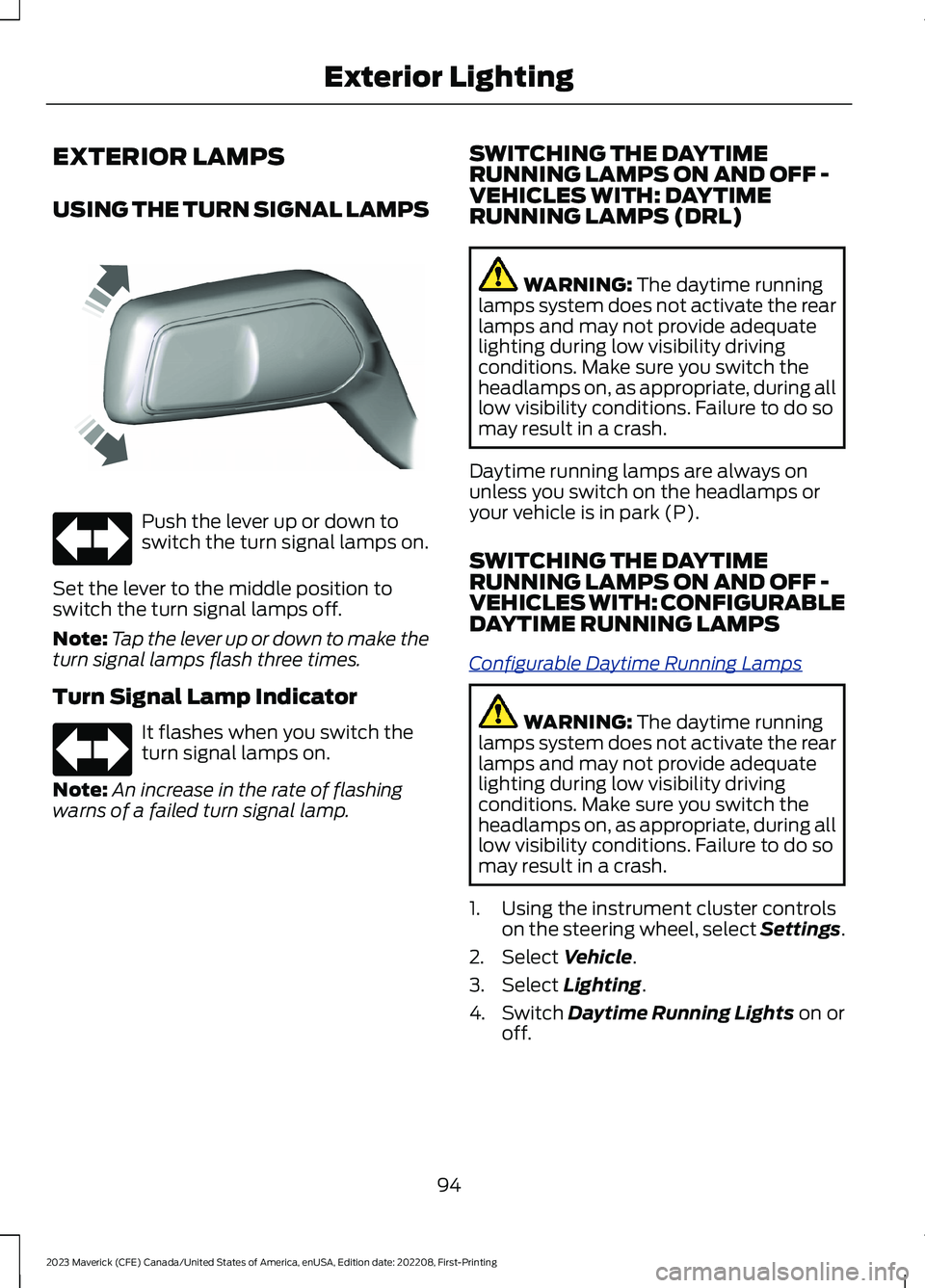
EXTERIOR LAMPS
USING THE TURN SIGNAL LAMPS
Push the lever up or down toswitch the turn signal lamps on.
Set the lever to the middle position toswitch the turn signal lamps off.
Note:Tap the lever up or down to make theturn signal lamps flash three times.
Turn Signal Lamp Indicator
It flashes when you switch theturn signal lamps on.
Note:An increase in the rate of flashingwarns of a failed turn signal lamp.
SWITCHING THE DAYTIMERUNNING LAMPS ON AND OFF -VEHICLES WITH: DAYTIMERUNNING LAMPS (DRL)
WARNING: The daytime runninglamps system does not activate the rearlamps and may not provide adequatelighting during low visibility drivingconditions. Make sure you switch theheadlamps on, as appropriate, during alllow visibility conditions. Failure to do somay result in a crash.
Daytime running lamps are always onunless you switch on the headlamps oryour vehicle is in park (P).
SWITCHING THE DAYTIMERUNNING LAMPS ON AND OFF -VEHICLES WITH: CONFIGURABLEDAYTIME RUNNING LAMPS
Configurable Daytime Running Lamps
WARNING: The daytime runninglamps system does not activate the rearlamps and may not provide adequatelighting during low visibility drivingconditions. Make sure you switch theheadlamps on, as appropriate, during alllow visibility conditions. Failure to do somay result in a crash.
1.Using the instrument cluster controlson the steering wheel, select Settings.
2.Select Vehicle.
3.Select Lighting.
4.Switch Daytime Running Lights on oroff.
94
2023 Maverick (CFE) Canada/United States of America, enUSA, Edition date: 202208, First-PrintingExterior LightingE242676 E67018 E67018
Page 100 of 556
AUTOMATIC HIGH BEAMCONTROL PRECAUTIONS
WARNING: The system does notrelieve you of your responsibility to drivewith due care and attention. You mayneed to override the system if it does notturn the high beams on or off.
WARNING: The system may notswitch the high beams off if the lights ofoncoming vehicles are hidden byobstacles, for example guard rails.
WARNING: Do not use the systemin poor visibility, for example fog, heavyrain, spray or snow.
WARNING: You may need tooverride the system when approachingother road users.
WARNING: You may need tooverride the system during inclementweather.
AUTOMATIC HIGH BEAMCONTROL REQUIREMENTS
The system turns the high beams on if allof the following occur:
•You switch the system on.
•You set the lighting control to theautolamps position.
•The ambient light level is low enoughthat you require high beams.
•There is no traffic in front of yourvehicle.
•The vehicle speed is greater thanapproximately 25 mph (40 km/h).
AUTOMATIC HIGH BEAMCONTROL LIMITATIONS
The system turns the high beams off if anyof the following occur:
•You switch the system off.
•You set the lighting control to anyposition except autolamps.
•The ambient light level is high enoughthat you do not require high beams.
•The system detects an approachingvehicle's headlamps or a leadingvehicle's tail lamps.
•The system detects severe rain, snowor fog.
•The system detects street lighting.
•The camera has reduced visibility.
•The vehicle speed falls belowapproximately 19 mph (30 km/h).
SWITCHING AUTOMATIC HIGHBEAM CONTROL ON AND OFF
1.Using the instrument cluster controlson the steering wheel, select Settings.
2.Select Vehicle.
3.Select Lighting.
4.Switch Auto High Beam on or off.
AUTOMATIC HIGH BEAMCONTROL INDICATORS
Illuminates to confirm when thesystem is ready to assist.
96
2023 Maverick (CFE) Canada/United States of America, enUSA, Edition date: 202208, First-PrintingExterior LightingE146105
Page 114 of 556
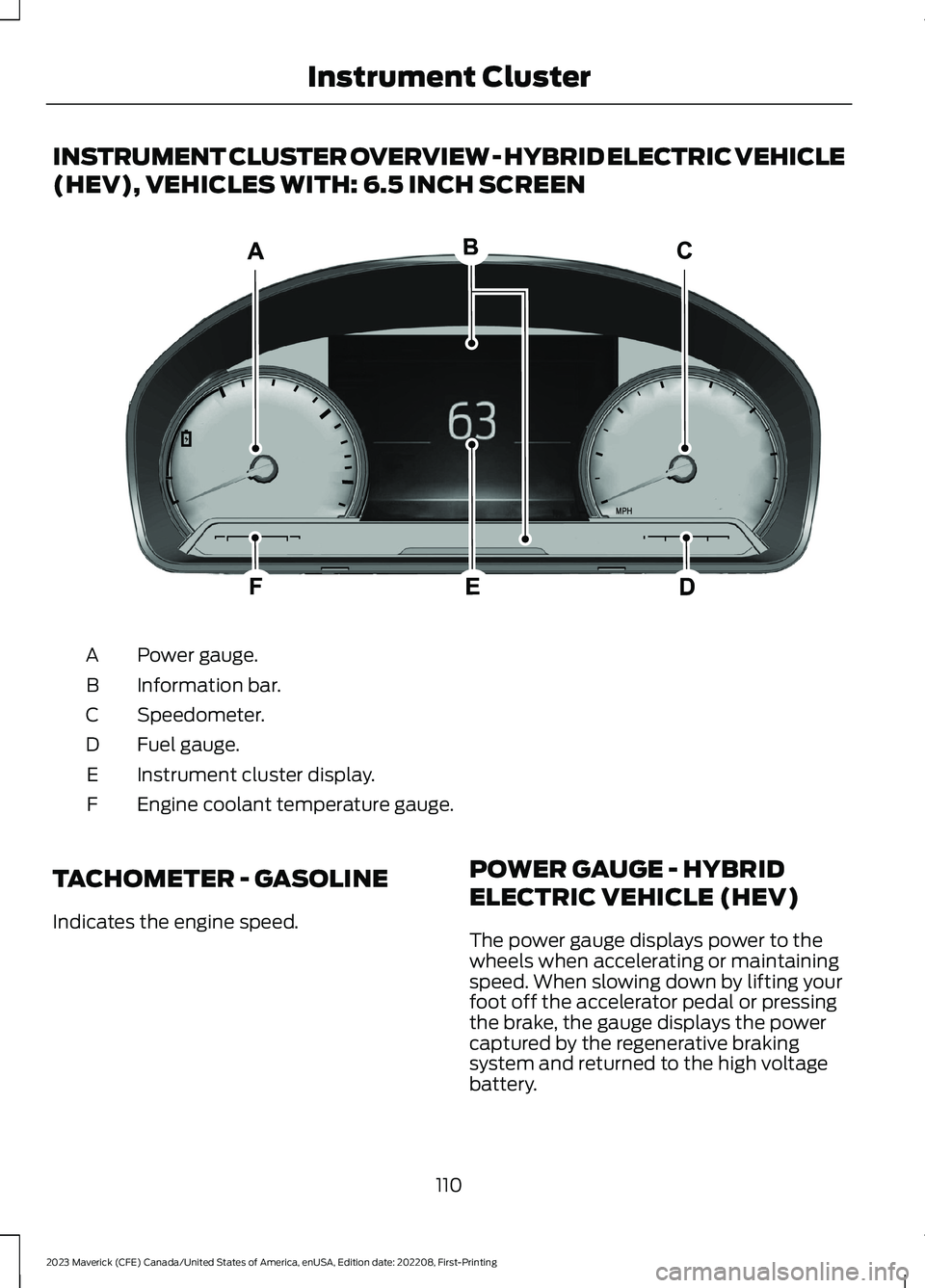
INSTRUMENT CLUSTER OVERVIEW - HYBRID ELECTRIC VEHICLE
(HEV), VEHICLES WITH: 6.5 INCH SCREEN
Power gauge.A
Information bar.B
Speedometer.C
Fuel gauge.D
Instrument cluster display.E
Engine coolant temperature gauge.F
TACHOMETER - GASOLINE
Indicates the engine speed.
POWER GAUGE - HYBRID
ELECTRIC VEHICLE (HEV)
The power gauge displays power to thewheels when accelerating or maintainingspeed. When slowing down by lifting yourfoot off the accelerator pedal or pressingthe brake, the gauge displays the powercaptured by the regenerative brakingsystem and returned to the high voltagebattery.
110
2023 Maverick (CFE) Canada/United States of America, enUSA, Edition date: 202208, First-PrintingInstrument ClusterE385954
Page 119 of 556
USING THE INSTRUMENT
CLUSTER DISPLAY CONTROLS
WARNING: Driving while distractedcan result in loss of vehicle control, crashand injury. We strongly recommend thatyou use extreme caution when using anydevice that may take your focus off theroad. Your primary responsibility is thesafe operation of your vehicle. Werecommend against the use of anyhand-held device while driving andencourage the use of voice-operatedsystems when possible. Make sure youare aware of all applicable local lawsthat may affect the use of electronicdevices while driving.
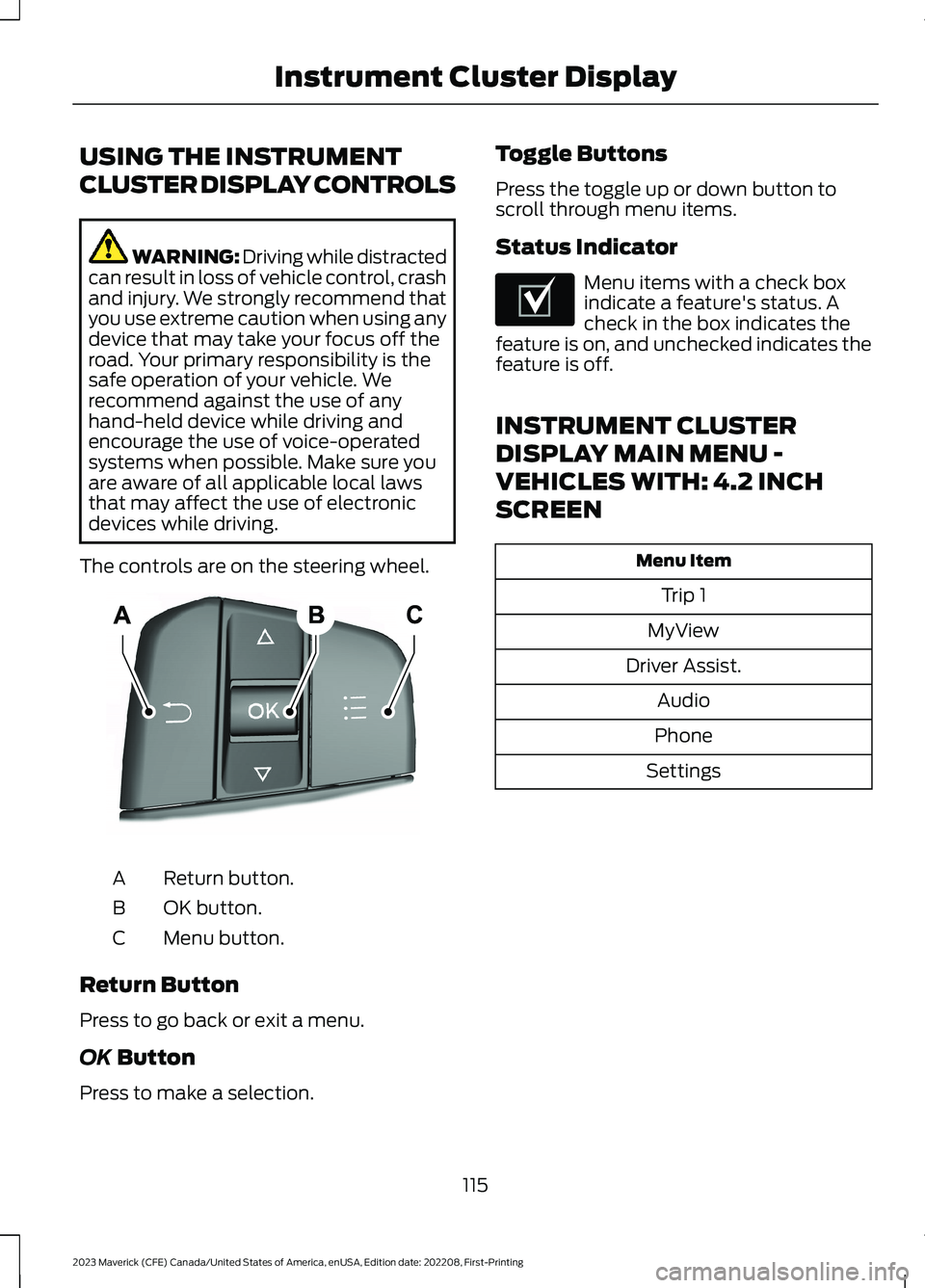
The controls are on the steering wheel.
Return button.A
OK button.B
Menu button.C
Return Button
Press to go back or exit a menu.
OK Button
Press to make a selection.
Toggle Buttons
Press the toggle up or down button toscroll through menu items.
Status Indicator
Menu items with a check boxindicate a feature's status. Acheck in the box indicates thefeature is on, and unchecked indicates thefeature is off.
INSTRUMENT CLUSTER
DISPLAY MAIN MENU -
VEHICLES WITH: 4.2 INCH
SCREEN
Menu Item
Trip 1
MyView
Driver Assist.
Audio
Phone
Settings
115
2023 Maverick (CFE) Canada/United States of America, enUSA, Edition date: 202208, First-PrintingInstrument Cluster DisplayE250032 E204495
Page 120 of 556

INSTRUMENT CLUSTER
DISPLAY MAIN MENU -
VEHICLES WITH: 6.5 INCH
SCREEN
Menu Item
Select Screens
Audio
Phone
Settings
Display Setup
CUSTOMIZING THE
INSTRUMENT CLUSTER
DISPLAY - VEHICLES WITH: 4.2
INCH SCREEN
1.Using the information display controlson the steering wheel, select MyView.
2.Press the menu button.
3.Select a screen.
4.Press the OK button.
CUSTOMIZING THE
INSTRUMENT CLUSTER
DISPLAY - VEHICLES WITH: 6.5
INCH SCREEN
Adding Screens Using SelectScreens
You can select various screens to show onthe instrument cluster display.
1.Select Select Screens.
2.Use the controls on the steering wheelto highlight a screen to add.
3.Press the OK button.
Note:The amount of screens you can addis limited. If the selected screen does notappear, you must deselect items from themenu.
Select Screens
Calm screen
Fuel economy
Trip 1
Trip 2
This trip
EV Coach
Tire pressure
Intelligent AWD
Off-Road
Trailer light check
Seatbelts
Auto StartStop
Now playing
Note:Some options may appear slightlydifferent or not at all if items are optional.
Configuring Gauges
You can select which values yourspeedometer shows in the instrumentcluster display.
1.Select Display Setup.
2.Select a speed unit to display.
116
2023 Maverick (CFE) Canada/United States of America, enUSA, Edition date: 202208, First-PrintingInstrument Cluster Display