2022 TOYOTA RAV4 HYBRID air conditioning
[x] Cancel search: air conditioningPage 5 of 752

5TABLE OF CONTENTS
1
2
3
4
5
6
7
8
9
10
5-15.Phone settingsSetup............................. 485
5-16.What to do if... (Bluetooth
®)
Troubleshooting ............ 495
5-17.Connected Services over- view
Connected Services ...... 499
Type A: Function achieved by using a smartphone or DCM.................................... 500
Type B: Function achieved by using DCM and the system
.................................... 502
Type C: Function achieved by using DCM.............. 503
Type D: Function achieved by using DCM and a smart-
phone .......................... 506
5-18.Connected Services opera- tion
Toyota Apps .................. 508
5-19.Setup Toyota Apps settings .... 512
6-1. Using the air conditioning
system and defogger
Automatic air conditioning
system ......................... 514
Heated steering wheel/seat heaters/seat ventilators 521
6-2. Using the interior lights Interior lights list ............ 524
6-3. Using the storage features List of storage features . 527Luggage compartment fea-
tures ............................ 531
6-4. Using the other interior fea- tures
Other interior features ... 536
Garage door opener ...... 546
7-1. Maintenance and care Cleaning and protecting the vehicle exterior ............ 554
Cleaning and protecting the vehicle interior ............. 557
7-2. Maintenance Maintenance requirements.................................... 560
General maintenance .... 561
Emission inspection and maintenance (I/M) programs.................................... 564
7-3. Do-it-yourself maintenance Do-it-yourself service precau-tions ............................. 565
Hood .............................. 567
Positioning a floor jack .. 568
Engine compartment ..... 570
12-volt battery................ 576
Tires .............................. 578
Tire inflation pressure .... 587
Wheels .......................... 589
Air conditioning filter ...... 591
Cleaning the hybrid battery (traction battery) air intake
vent and filter ............... 593
Wiper insert replacement .................................... 597
6Interior features
7Maintenance and care
Page 20 of 752

20Pictorial index
Energy monitor.....................................................................P.111
When the warning messages are displayed ........................ P.635
Turn signal lever ................................................................P.217
Headlight switch ................................................................P.224
Headlights/parking lights/tail lights/
license plate lights/day time running lights/LED accessory light s
*1
............................................................... ..............................P.224
Fog lights
*1............................................................... ............P.231
Windshield wiper and washer switch ..............................P.231
Rear window wiper and washer switch ...........................P.234
Usage.......................................................... .................P.231, 234
Adding washer fluid ..............................................................P.575
Warning messages ..............................................................P.635
Emergency flasher switch ....................................... ..........P.616
Hood lock release lever ........................................ .............P.567
Tilt and telescopic steering lock release lever ................P.157
Adjustment ..................................................... ......................P.157
Air conditioning system ............................. .......................P.514
Usage.......................................................... .........................P.514
Rear window defogger ........................................... ..............P.516
Audio
*1............................................................... .................P.377
Audio Plus
*1, 2
Premium Audio*1, 2
Fuel filler door opener swi tch ...........................................P.237
*1: If equipped
*2: Refer to “NAVIGATION AND MULTIMEDIA SYSTEM OWNER’S MAN-
UAL”.
E
F
G
H
I
J
K
L
Page 76 of 752

761-4. Hybrid system
The illustration is an example for explanation and may differ from the actual
item.
Warning label
Service plug
Rear electric motor (traction motor)
Hybrid battery (traction battery)
High voltage cables (orange)
Front electric motor (traction motor)
Power control unit
Air conditioning compressor
Hybrid system precautions
Take care when handling the hybrid system, as it is a high
voltage system (about 650V at maximum) as well as contains
parts that become extremely hot when the hybrid system is
operating. Obey the warning labels attached to the vehicle.
System components
A
B
C
D
E
F
G
H
Page 201 of 752

2014-1. Before driving
4
Driving
vehicle control. This is espe-
cially true on wet or slippery
surfaces.
Avoid jerky starts or sudden
acceleration.
Avoid jerky steering and
sharp turns, and slow down
before making turn.
Note that when making a turn,
the trailer wheels will be
closer than the vehicle wheels
to the inside of the turn. Com-
pensate by making a wider
than normal turning radius.
Slow down before making a
turn, in cross winds, on wet or
slippery surfaces, etc.
Increasing vehicle speed can
destabilize the trailer.
Take care when passing other
vehicles. Passing requires
considerable distance. After
passing a vehicle, do not for-
get the length of your trailer,
and be sure you have plenty
of room before changing
lanes.
To maintain engine braking
efficiency, when using engine
braking, do not use the trans-
mission in D.
Instability happens more fre-
quently when descending
steep or long downhill grades.
Before descending, slow
down and downshift. Do not
make sudden downshifts
while descending steep or long downhill grades.
Avoid holding the brake pedal
down too long or applying the
brakes too frequently. This
could cause the brakes to
overheat and result in
reduced braking efficiency.
Due to the added load of the
trailer, your vehicle’s hybrid
system may overheat on hot
days (at temperatures over
85°F [30°C]) when driving up
a long or steep grade. If the
engine coolant temperature
gauge indicates overheating,
immediately turn off the air
conditioning (if in use), pull
your vehicle off the road and
stop in a safe spot. ( P.659)
Always place wheel blocks
under both the vehicle’s and
the trailer’s wheels when
parking. Apply the parking
brake firmly, and put the
transmission in P. Avoid park-
ing on a slope, but if unavoid-
able, do so only after
performing the following:
1 Apply the brakes and keep
them applied.
2 Have someone place wheel
blocks under both the vehi-
cle’s and trailer’s wheels.
3 When the wheel blocks are in
place, release the brakes
slowly until the blocks absorb
the load.
Page 242 of 752
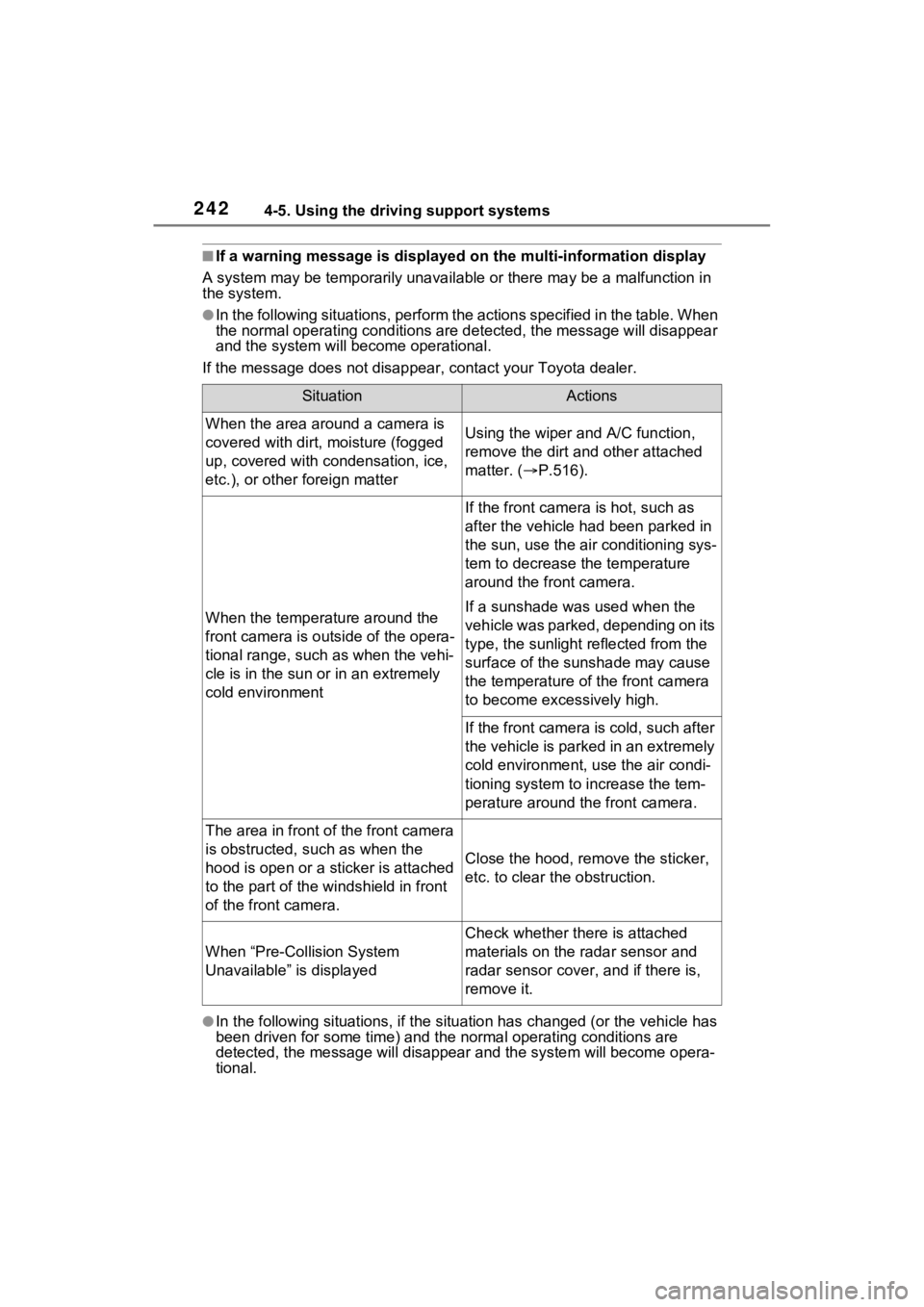
2424-5. Using the driving support systems
■If a warning message is displayed on the multi-information display
A system may be temporarily unava ilable or there may be a malfunction in
the system.
●In the following situations, perform the actions specified in t he table. When
the normal operating conditions are detected, the message will disappear
and the system will be come operational.
If the message does not disapp ear, contact your Toyota dealer.
●In the following situations, if the situation has changed (or the vehicle has
been driven for some time) and the normal operating conditions are
detected, the message will disappear and the system will become opera-
tional.
SituationActions
When the area around a camera is
covered with dirt, moisture (fogged
up, covered with condensation, ice,
etc.), or other foreign matterUsing the wiper and A/C function,
remove the dirt and other attached
matter. ( P.516).
When the temperature around the
front camera is outside of the opera-
tional range, such as when the vehi-
cle is in the sun or in an extremely
cold environment
If the front camera is hot, such as
after the vehicle had been parked in
the sun, use the air conditioning sys-
tem to decrease the temperature
around the front camera.
If a sunshade was used when the
vehicle was parked, depending on its
type, the sunlight reflected from the
surface of the sunshade may cause
the temperature of the front camera
to become excessively high.
If the front camera is cold, such after
the vehicle is parked in an extremely
cold environment, use the air condi-
tioning system to increase the tem-
perature around the front camera.
The area in front o f the front camera
is obstructed, such as when the
hood is open or a sticker is attached
to the part of the win dshield in front
of the front camera.
Close the hood, rem ove the sticker,
etc. to clear the obstruction.
When “Pre-Collision System
Unavailable” is displayed
Check whether there is attached
materials on the radar sensor and
radar sensor cover , and if there is,
remove it.
Page 286 of 752

2864-5. Using the driving support systems
detection area.
■Situations in which the system
may operate even if there is no
possibility of a collision
Instances of the RCTA function
unnecessarily detec ting a vehicle
and/or object may increase in the
following situations:
●When the parking space faces a
street and vehicles are being
driven on the street.
●When the distanc e between your
vehicle and metal objects, such as
a guardrail, wall, sign, or parked
vehicle, which may reflect electri-
cal waves toward the rear of the
vehicle, is short.
●When equipment that may
obstruct a sensor is installed, such
as a towing eyelet, bumper pro-
tector (an additi onal trim strip,
etc.), bicycle carrier, or snow
plow.
●When a vehicle passes by the side of your vehicle.
●When a detected vehicle turns
while approaching
the vehicle.
●When there are spinning objects
near your vehicle such as the fan
of an air conditioning unit.
●When water is splashed or
sprayed toward the rear bumper,
such as from a sprinkler.
●Moving objects (flags, exhaust
fumes, large rain droplets or
snowflakes, rain water on the road
surface, etc.).
●When the distance between your
vehicle and a guardrail, wall, etc.,
that enters the detection area is
short.
●Gratings and gutters.
●When a sensor or the area around
a sensor is extremely hot or cold.
●If the suspension has been modi-
fied or tires of a size other than
specified are installed.
●If the front of the v ehicle is raised
or lowered due to the carried load.
Page 290 of 752

2904-5. Using the driving support systems
●Initialization may not have been
performed after a 12-volt battery
terminal was dis connected and
reconnected. Initialize the sys-
tem. ( P.290) If this message
continues to be displayed even
after initialization, have the vehicle
inspected by your Toyota dealer.
■If a 12-volt batte ry terminal has
been disconnected and recon-
nected
The system needs to be initialized.
To initialize the system, drive the
vehicle straight ahead for 5 seconds
or more at a speed of approximately
22 mph (35 km/h) or more.
■Sensor detection information
●The sensor’s detection areas are
limited to the areas around the
vehicle’s front and rear bumpers.
●The following situations may occur
during use.
• Depending on the shape of the
object and other factors, the
detection distance may shorten,
or detection may be impossible.
• Detection may be impossible if static objects draw too close to the
sensor.
• There will be a short delay
between static object detection
and display (warning buzzer
sounds). Even at low speeds,
there is a possibilit y that the object
will come within 11. 9 in. (30 cm)
before the display is shown and
the warning buzzer sounds.
• It might be difficult to hear the
buzzer due to the volume of the
audio system or air flow noise of
the air conditioning system.
• It may be difficult to hear the sound of this system due to the
buzzers of other systems.
■Objects which the system may
not properly detect
The shape of the object may pre-
vent the sensor from detecting it.
Pay particular attention to the fol-
lowing objects:
●Wires, fences, ropes, etc.
●Cotton, snow and other materials
that absorb sound waves
●Sharply-angled objects
●Low objects
●Tall objects with upper sections
projecting outwards in the direc-
tion of your vehicle
People may not be detected if they
are wearing certain types of cloth-
ing.
■Situations in which the system
may not operate properly
Certain vehicle conditions and the
surrounding environment may affect
the ability of a sensor to correctly
detect objects. Part icular instances
where this may occur are listed
below.
●There is dirt, snow or ice on a sen-
sor. (Cleaning th e sensors will
resolve this problem.)
●A sensor is froz en. (Thawing the
area will resolve this problem.)
In especially cold weather, if a
sensor is frozen the sensor dis-
play may be displayed abnor-
mally, or objects, such as a wall,
may not be detected.
●When a sensor or the area around
a sensor is extremely hot or cold.
●On an extremely bumpy road, on
an incline, on gravel, or on grass.
●When vehicle horns, vehicle
detectors, motorcycle engines, air
brakes of large vehicles, the clear-
ance sonar of ot her vehicles or
other devices which produce ultra-
sonic waves are near the vehicle.
Page 358 of 752

3584-5. Using the driving support systems
1Eco drive mode
Suitable for driving to improve fuel
economy by more smoothly gener-
ating torque in response to acceler-
ator pedal operations compared to
normal mode and restraining air
conditioning system operations
(heating/cooling).
When the switch is turned to the left
while not in Eco drive mode, the
system switches to Eco drive mode
and the Eco drive mode indicator
illuminates on the mu lti-information
display.
2 Normal mode
Suitable for n ormal driving.
The driving mode returns to normal
mode if the switch i s pressed while
in Eco drive mode or sport mode.
3 Sport mode
Controls the steering feeling and
hybrid system to create an acceler-
ation response tha t is suitable for
sporty driving. Suitable for when
crisp handling is desired, such as
when driving on mountainous
roads.
When the switch is turned to the
right while not in sport mode, the
system switches to sport mode and
the sport mode indicator illuminates
on the multi-information display.
■When changing to a driving
mode other than normal mode
●The background color of the multi-
information display changes
according to the selected driving
mode.
●When the speedometer is set to
analog display, the speedometer
display color also changes. (For
vehicles with the 7-inch multi-
information di splay only)
●The color of the switch changes
according to the selected driving
mode. (For vehicles with the 7-
inch multi-information display
only)
■Air conditioning system opera-
tion in Eco drive mode
In Eco drive mode, heating/cooling
operations and the fan speed is con-
trolled to improve fuel efficiency.
Perform the following procedures to
increase the air conditioning perfor-
mance.
●Turn eco air conditioning mode off
( P.515)
●Adjust the fan speed ( P.515)
●Cancel Eco drive mode
Driving mode select
switch
The driving modes can be
selected to suit the driving
and usage conditions.
Selecting a driving mode