Page 62 of 148
Tire pressure specification is listed on the tire
inflation pressure label located on the driver’s
side door pillar and in the table below. For
complete tire pressure specifications and
information, please refer to the tire
specifications in your Owner’s Manual.
Ascent (Base), Premium
Tire Inflation Pressure
Front Wheel Rear Wheel Temporary Spare Tire
35 psi 35 psi 60 psi
Onyx, Limited, Touring
Tire Inflation Pressure
Front Wheel Rear Wheel Temporary Spare Tire
33 psi 33 psi 60 psi
NOTE: The temporary spare tire must be used only on a rear wheel. If a front wheel tire
gets punctured, replace the wheel with a rear wheel and install the temporary spare tire in
place of the removed rear wheel.
Tire Inflation Pressure Label
ADDITIONAL SPECIFICATIONS
60
Page 64 of 148
5Seek
Press the seek up or seek down button to seek the next or previous radio frequency.
You can also use the seek up or down buttons to select different audio tracks from
media sources. Press and hold to fast-forward or rewind.
CD Player Functions
6Load
Insert the disc into the loading slot. The CD will automatically be drawn in and begin
playing the first track.
7Eject
Press the Eject button on the left side of the loading slot to remove the CD from the
player.
Other Functions
8Home
Displays the Home screen apps. The Home screen allows you to customize which
apps appear and rearrange the icons in a personalized order.
9Map(if equipped)
Displays the map and navigation features available on the screen.
10Apps
Displays the installed apps that are available on your vehicle.
Controlling the Volume
Adjusting the Volume:Turn the volume knob to adjust the volume. The volume stays at
the level you set after an ignition cycle.
Muting the Volume:You can mute the audio system by pressing the volume knob once,
and un-mute the audio by pressing the knob again. It will un-mute automatically after an
ignition cycle.
Turning the System Off:To turn the system off, press and hold the volume knob for about
three seconds. The system remains off after an ignition cycle. Press the volume knob again
to turn the system back on.
STARLINK OVERVIEW
62
Page 67 of 148
Tips
The system may not recognize the voice command due to various types of interference.
Some causes for voice command interference are:
• The command is spoken too quickly or at a low or high volume.
• The command is incorrect or unclear.
• The window is open, the climate control system is set on high, or the ventilation is
directed toward the microphone.
• Passengers are talking while the command is spoken.
NOTE: The system is designed to recognize a variety of commands, but certain words,
accents or speech patterns may be difficult for the system to recognize.
STARLINK OVERVIEW
65
Page 68 of 148
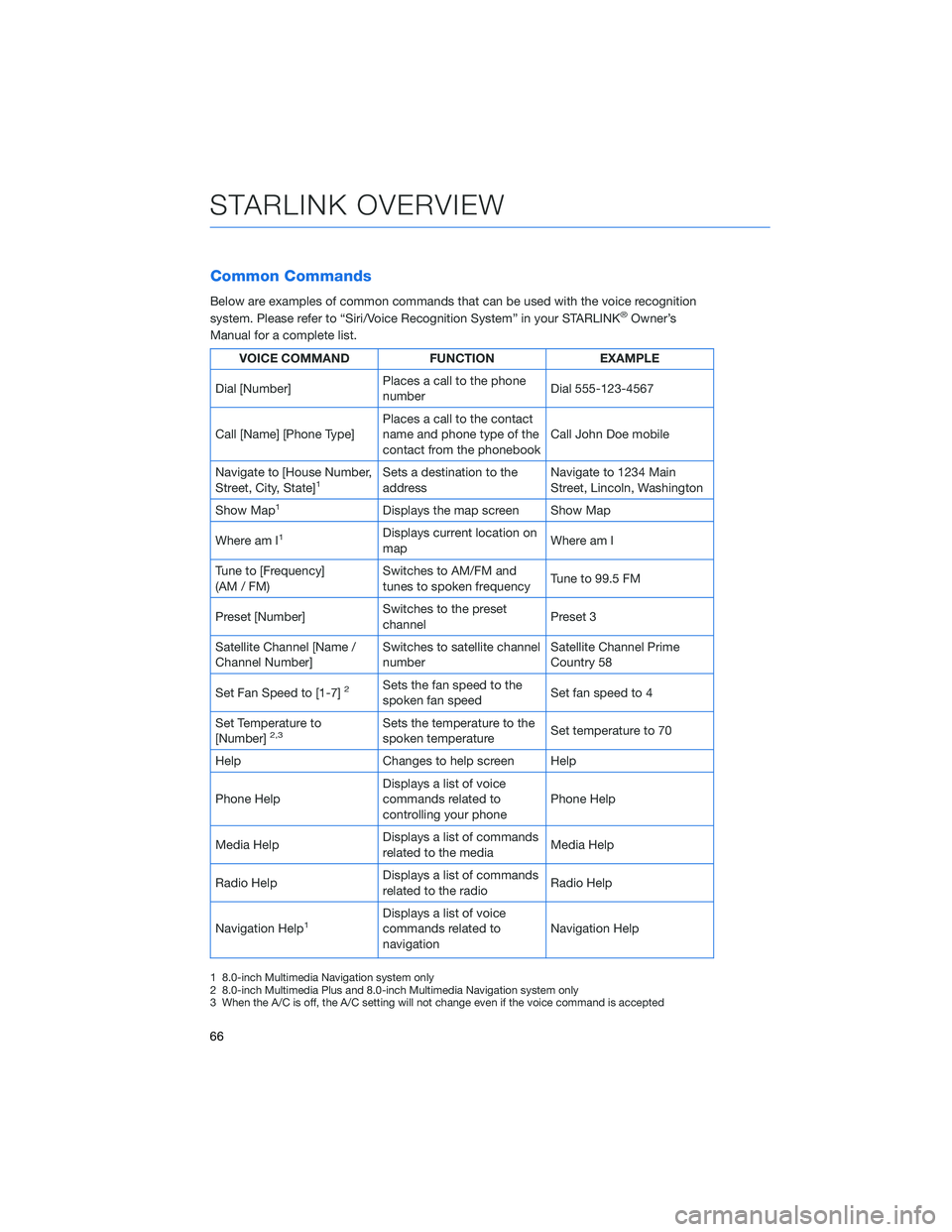
Common Commands
Below are examples of common commands that can be used with the voice recognition
system. Please refer to “Siri/Voice Recognition System” in your STARLINK®Owner’s
Manual for a complete list.
VOICE COMMAND FUNCTION EXAMPLE
Dial [Number]Places a call to the phone
numberDial 555-123-4567
Call [Name] [Phone Type]Places a call to the contact
name and phone type of the
contact from the phonebookCall John Doe mobile
Navigate to [House Number,
Street, City, State]
1Sets a destination to the
addressNavigate to 1234 Main
Street, Lincoln, Washington
Show Map
1Displays the map screen Show Map
Where am I
1Displays current location on
mapWhere am I
Tune to [Frequency]
(AM / FM)Switches to AM/FM and
tunes to spoken frequencyTune to 99.5 FM
Preset [Number]Switches to the preset
channelPreset 3
Satellite Channel [Name /
Channel Number]Switches to satellite channel
numberSatellite Channel Prime
Country 58
Set Fan Speed to [1-7]
2Sets the fan speed to the
spoken fan speedSet fan speed to 4
Set Temperature to
[Number]
2,3Sets the temperature to the
spoken temperatureSet temperature to 70
Help Changes to help screen Help
Phone HelpDisplays a list of voice
commands related to
controlling your phonePhone Help
Media HelpDisplays a list of commands
related to the mediaMedia Help
Radio HelpDisplays a list of commands
related to the radioRadio Help
Navigation Help
1Displays a list of voice
commands related to
navigationNavigation Help
1 8.0-inch Multimedia Navigation system only
2 8.0-inch Multimedia Plus and 8.0-inch Multimedia Navigation system only
3 When the A/C is off, the A/C setting will not change even if the voice command is accepted
STARLINK OVERVIEW
66
Page 69 of 148
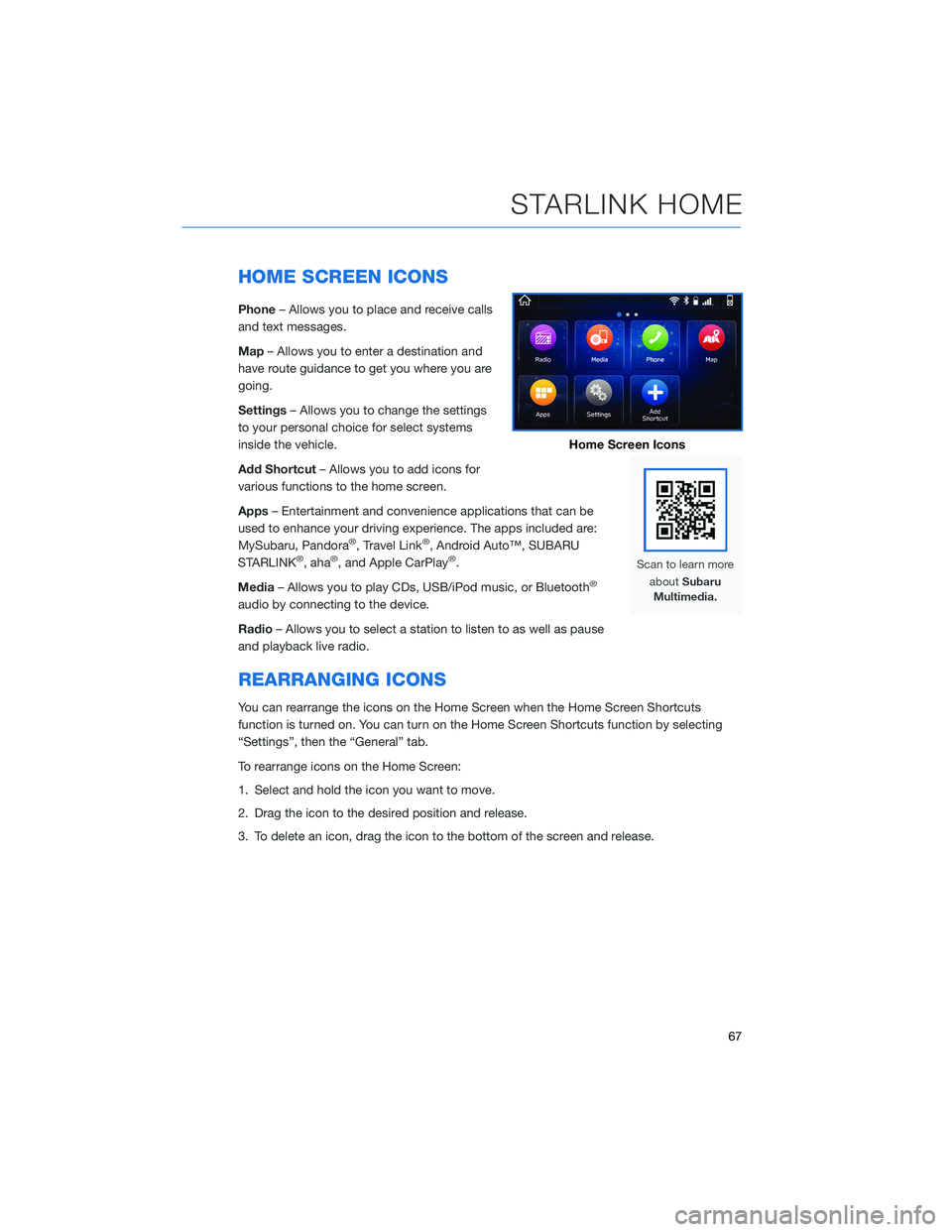
HOME SCREEN ICONS
Phone– Allows you to place and receive calls
and text messages.
Map– Allows you to enter a destination and
have route guidance to get you where you are
going.
Settings– Allows you to change the settings
to your personal choice for select systems
inside the vehicle.
Add Shortcut– Allows you to add icons for
various functions to the home screen.
Apps– Entertainment and convenience applications that can be
used to enhance your driving experience. The apps included are:
MySubaru, Pandora
®, Travel Link®, Android Auto™, SUBARU
STARLINK®, aha®, and Apple CarPlay®.
Media– Allows you to play CDs, USB/iPod music, or Bluetooth
®
audio by connecting to the device.
Radio– Allows you to select a station to listen to as well as pause
and playback live radio.
REARRANGING ICONS
You can rearrange the icons on the Home Screen when the Home Screen Shortcuts
function is turned on. You can turn on the Home Screen Shortcuts function by selecting
“Settings”, then the “General” tab.
To rearrange icons on the Home Screen:
1. Select and hold the icon you want to move.
2. Drag the icon to the desired position and release.
3. To delete an icon, drag the icon to the bottom of the screen and release.
Home Screen Icons
STARLINK HOME
67
Page 71 of 148
CREATING A DRIVER PROFILE
Creating a Driver Profile provides many benefits beyond just pairing a phone. The profile
records and remembers station presets, sound preferences, home and work address (if
equipped with navigation), phone favorites, screen icons and placement, and the
background wallpaper.
To create a driver profile:
1. On the Home screen, select “Settings”.
Then, in the General menu, select “Driver
Profile”.
2. Select “Add New Profile”.
3. Select “Enter Name” to display the
keyboard screen, and then type your name.
Now select “Next” on this screen and the
following screen.
DRIVER PROFILE
69
Page 72 of 148
4. Select a paired phone or pair a new phone
(see page 111 and page 115 in the How To
Appendix). Then select “Next”.
5. Enter a Home Address and Work Address
(if equipped with navigation). Then select
“Next”.
6. Select a wallpaper, and then select “Next”.
7. Select “Finish”.
Retrieving a Driver Profile
The system automatically retrieves the profile once you are in your Subaru with the
STARLINK®multimedia system on and your phone’s Bluetooth®active. You can also
manually retrieve or change the profile by following these steps:
1. Press the “Home” button and then select “Settings”.
2. In the General menu, select “Driver Profile”.
3. Select the profile you want to use, and then select “Activate”.
DRIVER PROFILE
70
Page 73 of 148
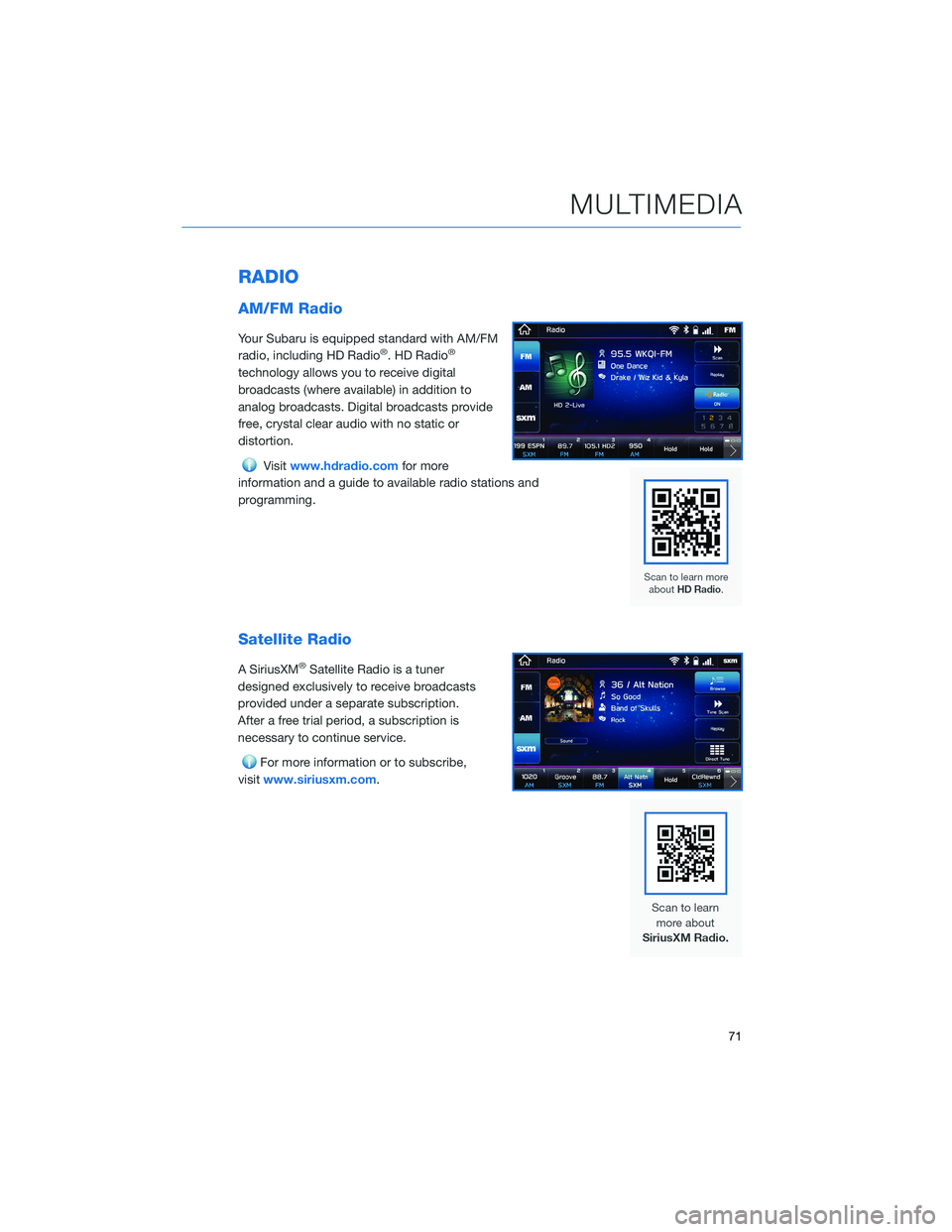
RADIO
AM/FM Radio
Your Subaru is equipped standard with AM/FM
radio, including HD Radio®. HD Radio®
technology allows you to receive digital
broadcasts (where available) in addition to
analog broadcasts. Digital broadcasts provide
free, crystal clear audio with no static or
distortion.
Visitwww.hdradio.comfor more
information and a guide to available radio stations and
programming.
Satellite Radio
A SiriusXM®Satellite Radio is a tuner
designed exclusively to receive broadcasts
provided under a separate subscription.
After a free trial period, a subscription is
necessary to continue service.
For more information or to subscribe,
visitwww.siriusxm.com.
MULTIMEDIA
71