2021 AUDI E-TRON MMI reset
[x] Cancel search: MMI resetPage 220 of 308
Media
Never leave mobile devices in the vehicle in
extremely high or low temperatures.
@) Tips
— Always follow the information found in
=> page 78.
— When you switch the ignition off, the USB
ports are still supplied with power until the
energy management intervenes.
— Do not use an additional adapter cable or
USB extension cable to connect mobile devi-
ces to the Audi music interface that already
have a cable or that must be connected with
a USB adapter cable (> page 217, fig. 146).
Using an additional adapter or US extension
cable may impair functionality.
— Functionality is not guaranteed for mobile
devices that do not conform to the USB 2.0
specification.
— USB hubs are not supported.
— Video playback through the Audi music in-
terface is not supported on Apple devices
and MTP devices (such as smartphones).
— iPod touch or iPhone malfunctions also af-
fect the operation of the MMI. Reset your
mobile device in these situations.
— Audi recommends updating the iPod touch
or iPhone software to the latest version. Re-
fer to your mobile device owner's manual
for more information.
— The USB adapter on the Audi music inter-
face will support iPod touch or iPhone devi-
ces from the 5th generation or newer with
the lightning connector.
—Aselection of supported devices can be
found in the database for tested mobile de-
vices at www.audi.com/mp3.
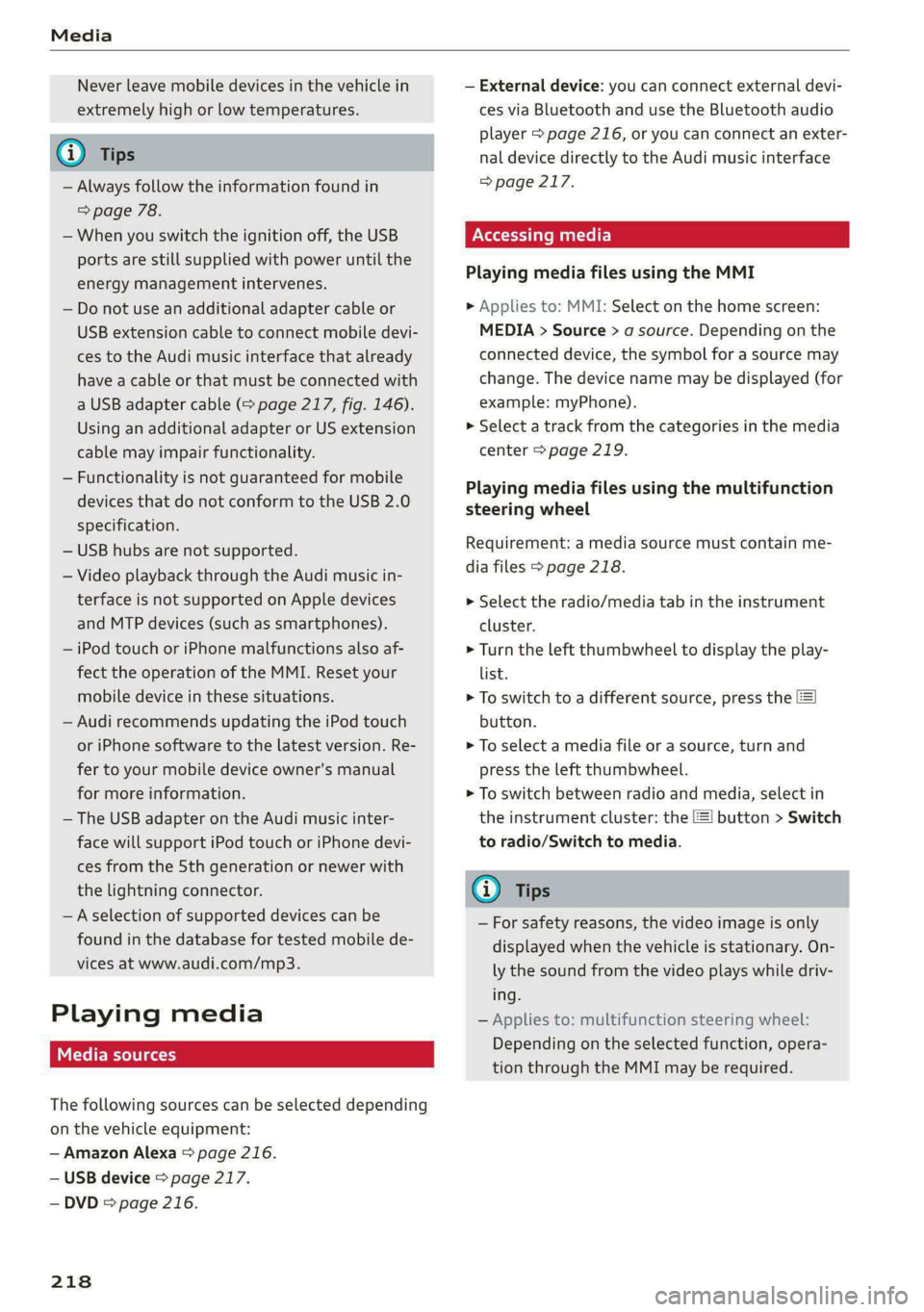
Playing media
The following sources can be selected depending
on the vehicle equipment:
— Amazon Alexa > page 216.
— USB device > page 217.
— DVD © page 216.
218
— External device: you can connect external devi-
ces via Bluetooth and use the Bluetooth audio
player > page 216, or you can connect an exter-
nal device directly to the Audi music interface
> page 217.
Accessing media
Playing media files using the MMI
> Applies to: MMI: Select on the home screen:
MEDIA > Source > a source. Depending on the
connected device, the symbol for a source may
change. The device name may be displayed (for
example: myPhone).
> Select a track from the categories in the media
center > page 219.
Playing media files using the multifunction
steering wheel
Requirement: a media source must contain me-
dia files > page 218.
> Select the radio/media tab in the instrument
cluster.
> Turn the left thumbwheel to display the play-
list.
> To switch to a different source, press the
button.
> To select a media file or a source, turn and
press the left thumbwheel.
> To switch between radio and media, select in
the instrument cluster: the EE] button > Switch
to radio/Switch to media.
G) Tips
— For safety reasons, the video image is only
displayed when the vehicle is stationary. On-
ly the sound from the video plays while driv-
ing.
— Applies to: multifunction steering wheel:
Depending on the selected function, opera-
tion through the MMI may be required.
Page 225 of 308
4KE012721BF
Media
Online additional data
Requirement: the MMI must be connected to the
Internet. A data plan must be available
=> page 190.
When the function is switched on, additional in-
formation (such as album cover, artist, track) will
be loaded depending on the availability from the
different providers.
DVD playback parental cntrl.
Playback of video DVDs can be restricted based
on age restrictions using parental control.
Displaying the DVD parental control menu
> Applies to: MMI: Select on the home screen:
MEDIA > ©} > DVD playback parental cntrl..
> Enter the PIN for parental control. The PIN set
at the factory is 1234.
> Press OK.
Switching the rating level on and off
Requirement: the DVD parental control menu
must be displayed.
> Select: Set rating level > select a rating level
(for example, level 5) > *2, or:
> To remove all restrictions, press Off.
Eight different protection levels can be set for
parental control. If you set the parental control
level at level 5, all DVDs from levels 1 - 5 can be
played. Video DVDs with a higher level will not
play.
Changing the PIN
Requirement: the DVD parental control menu
must be displayed.
> Select: Change PIN > enter a new PIN for pa-
rental control > OK.
> Repeat the entry and press OK.
@) Tips
— Not all video DVDs have parental control.
— The protection levels for the parental con-
trol are based on the US standards from the
Motion Picture Association of America
(MPAA). Note that the age levels for video
DVDs in European countries may differ.
— PIN entry for parental control will be locked
for approximately one minute if you enter
the incorrect PIN three times in a row. The
PIN can only be reset by an authorized Audi
dealer.
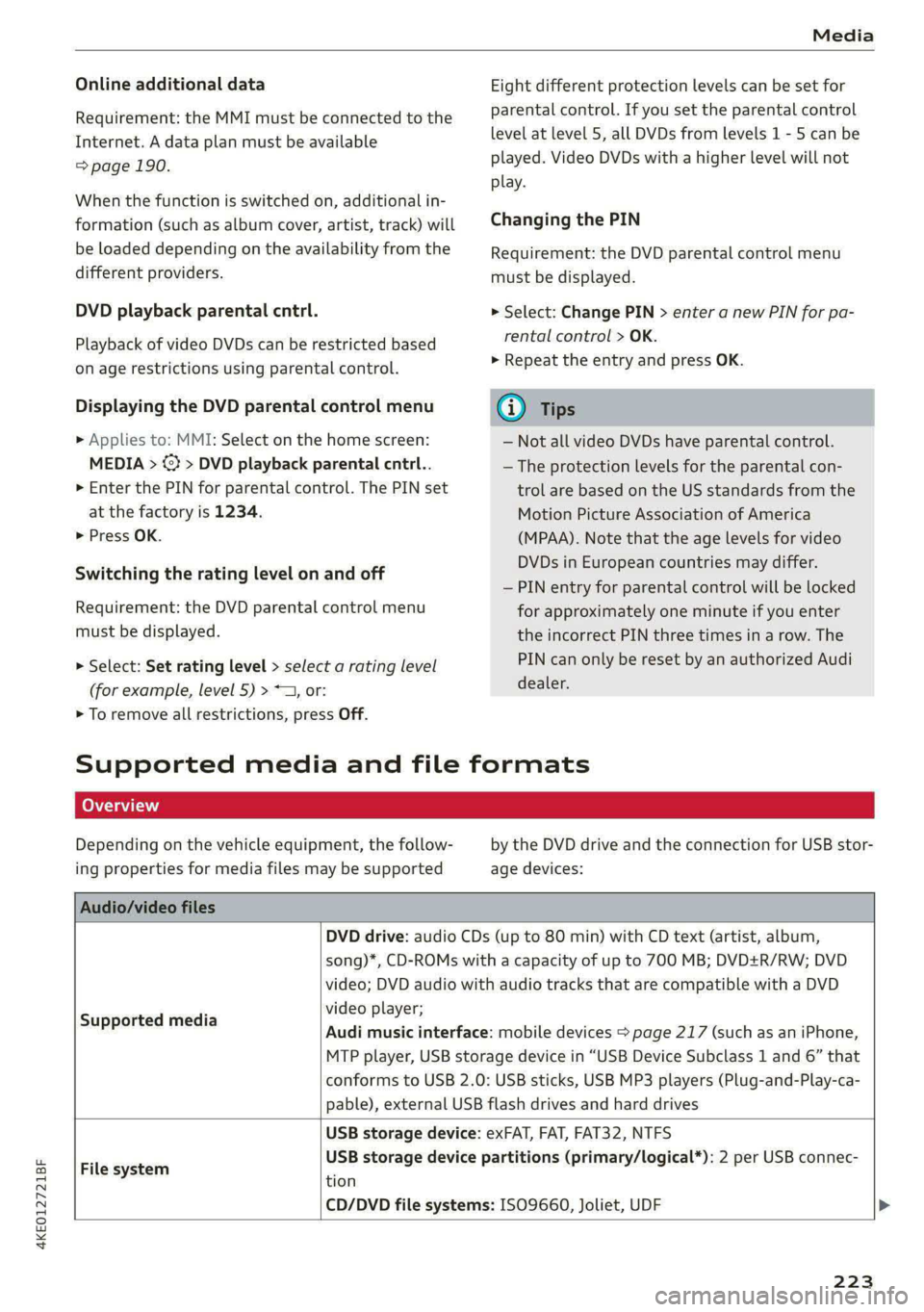
Supported media and file formats
Depending on the vehicle equipment, the follow-
ing properties for media files may be supported
by the DVD drive and the connection for USB stor-
age devices:
Audio/video files
DVD drive: audio CDs (up to 80 min) with CD text (artist, album,
song)*, CD-ROMs with a capacity of up to 700 MB; DVD+R/RW; DVD
video; DVD audio with audio tracks that are compatible with a DVD
video player;
Audi music interface: mobile devices > page 217 (such as an iPhone,
MTP player, USB storage device in “USB Device Subclass 1 and 6” that
conforms to USB 2.0: USB sticks, USB MP3 players (Plug-and-Play-ca-
pable), external USB flash drives and hard drives
Supported media
USB storage device: exFAT, FAT, FAT32, NTFS
USB storage device partitions (primary/logical*): 2 per USB connec-
File system .
tion
CD/DVD file systems: ISO9660, Joliet, UDF >
223
Page 231 of 308
4KE012721BF
Additional settings
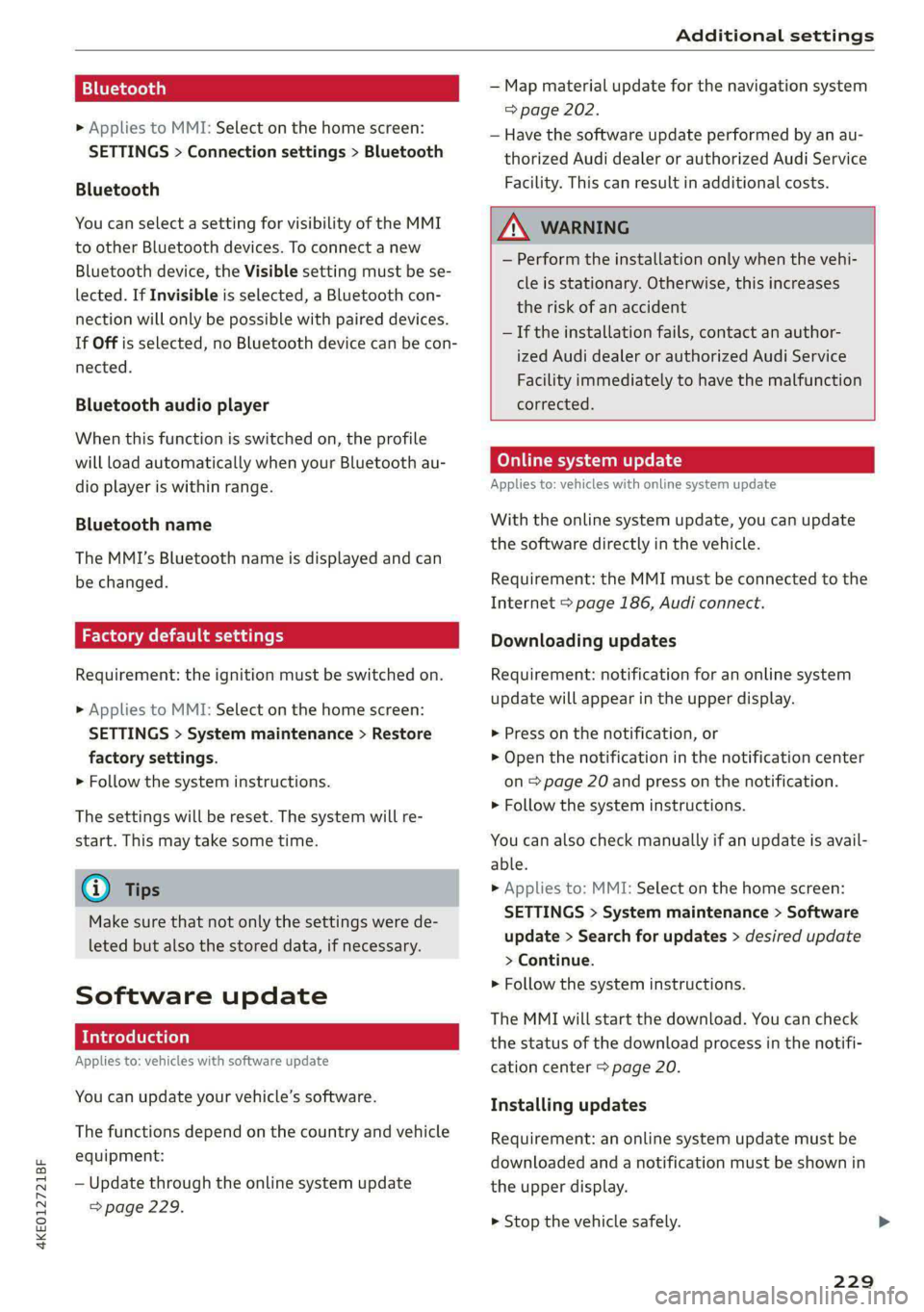
Bluetooth
> Applies to MMI: Select on the home screen:
SETTINGS > Connection settings > Bluetooth
Bluetooth
You can select a setting for visibility of the MMI
to other Bluetooth devices. To connect a new
Bluetooth device, the Visible setting must be se-
lected. If Invisible is selected, a Bluetooth con-
nection will only be possible with paired devices.
If Off is selected, no Bluetooth device can be con-
nected.
Bluetooth audio player
When this function is switched on, the profile
will load automatically when your Bluetooth au-
dio player is within range.
Bluetooth name
The MMI’s Bluetooth name is displayed and can
be changed.
Factory default settings
Requirement: the ignition must be switched on.
> Applies to MMI: Select on the home screen:
SETTINGS > System maintenance > Restore
factory settings.
> Follow the system instructions.
The settings will be reset. The system will re-
start. This may take some time.
@ Tips
Make sure that not only the settings were de-
leted but also the stored data, if necessary.
Software update
Introduction
Applies to: vehicles with software update
You can update your vehicle’s software.
The functions depend on the country and vehicle
equipment:
— Update through the online system update
=> page 229.
— Map material update for the navigation system
=> page 202.
— Have the software update performed by an au-
thorized Audi dealer or authorized Audi Service
Facility. This can result in additional costs.
ZA\ WARNING
— Perform the installation only when the vehi-
cle is stationary. Otherwise, this increases
the risk of an accident
— If the installation fails, contact an author-
ized Audi dealer or authorized Audi Service
Facility immediately to have the malfunction
corrected.
Online system update
Applies to: vehicles with online system update
With the online system update, you can update
the software directly in the vehicle.
Requirement: the MMI must be connected to the
Internet > page 186, Audi connect.
Downloading updates
Requirement: notification for an online system
update will appear in the upper display.
> Press on the notification, or
> Open the notification in the notification center
on page 20 and press on the notification.
> Follow the system instructions.
You can also check manually if an update is avail-
able.
> Applies to: MMI: Select on the home screen:
SETTINGS > System maintenance > Software
update > Search for updates > desired update
> Continue.
> Follow the system instructions.
The
MMI will start the download. You can check
the status of the download process in the notifi-
cation center > page 20.
Installing updates
Requirement: an online system update must be
downloaded and a notification must be shown in
the upper display.
> Stop the vehicle safely.
229
Page 242 of 308

Checking and Filling
Applies to MMI: Select on the home screen: VE-
HICLE > Settings & Service > Service intervals
Resetting the indicator
An authorized Audi dealer or authorized Audi
Service Facility will reset the service interval dis-
play after performing service.
@) Note
Adhering to the service intervals is critical to
maintaining the service life and value of your
vehicle. Even if the mileage on the vehicle is
low, do not exceed the time for the next serv-
ice.
240
Page 304 of 308

Index
Snow: chains’: » « sowie = awavs vw aware o cnawens oe 257
Socket
refer to Power sources..........--.000-- 78
Software information
Legalinformation................2005 231
Software version (MMI)
Version information ...............005 231,
Sound
refer to Adjusting the sound............ 228
Speed limit information
refer to Traffic sign recognition......... 134
Speed limits
refer to Traffic sign recognition......... 134
Speedometer.......... ce cece eee 11
Speed warning system.............00005 134
Starting climate control after unlocking..... 88
Starting tOOrives « « mass ¢ ¢ wewe 2 2 aeuey 8g eee 91
StEGriMGias 5 2 ues 5 2 ques & EER ee meme ES 104
‘Audi drivesselect « escasis os esos va avewine w ave 102
also refer to Steering.............0005 104
Steering lock..............0022000. 90, 104
Steering wheel
Adjusting... 0.0... cece eee eee e eens 62
Steering wheel heating................. 87
also refer to Multifunction steering wheel. . 12
Steps for determining correct load limit... 255
Stopover (navigation).................. 198
StOPDINGiws = 5 weex 2 some & s BORE ge dome & x RO 91,
Stopping the vehicle..............-..00- 91
Storage. ... 6... ee eee eee 79.
Storage compartment................00. 79
Storage compartment in the motor compart-
MONE sexs s osces 6 5 Keun & + deen & see oc ew 79
Stored stations
fefer tO PreSets a: ss ses ae nee s eames oz 210
Subtitlés:(DVD) « sews 2 x saves « ¢ eawas ¢ s ces 222
Sunshade
Rear GOOrs's & s seis 3 & nese so imaeens ov anon & 8 54
also refer to Panoramic glass roof........ 44
SUN VISOFS . 6... cece eee ees 54
Suspension .........0-. 0c cece eee eee 103
Audi drive'select » sees « 2 swe ye seen ss 102
Swapping Calls + scas is seas ve reese eee 181
Swerve assist... . 2... -.. 00 0c eee e eee eee 159
302
Symbols
Charging equipment...............004 117
NaVidatiOtiicas + mavwy + meme so meme x ¢ meee 199
“WAPI G ix: x susnws x aesmne oo awe oo wore 204
also refer to Indicator lights.............. 7
SYNC (climate control system) ............ 85
SYStEM SELLIMNGS « wwasiss ss muons so semaine aw caecen 228
T
Tail lights
Cleaning... 6... cee eee eee eee 262
Technical data............ 0-0. e eee eee 290
Technical modifications..............0.5 285
Felephometis wccsanse « samces xs ease oa maw eo 175
Accepting/ending acall................ 181
Audi phone boxX<<. : «ess: eres: veces: 177
Charging the battery (USB)............. 178
Charging the battery (wireless) ......... 178
Connecting a mobile phone............ 175
Dialing anumber..............-00000- 181
Exterior antenna............00--..0 eee 178
Mobile device reminder signal.......... 179
Options during a phonecall............ 181
Playing music... 0.0... cee ee eee eee eee 216
Temperature display (outside temperature)... 13
Texts NpPUt’s cesses oe sessess 2 x maxes oH mewn 3 2 REN 22
TeXt:MESSAGES scesess s & Heres & ¥ Kates vo HHI 183
also refer to Text messages............ 183
TieZd OWNS: & & scene vo savin 6 a axaieore wrasse oe suas 82
Tightening specification
Wheel bolts..............0 0002 e eee ee 272
Tightening specification (wheel bolts) .... . 272
TMC ss sscoane oo aeons woo cose © o aesnene w Hieverite © 14
Timer (high-voltage battery)............. 116
Tire Mobility System (tire repair set)....... 267
TineS s gun & & wueey & & soup & 2 BeemE x oe Eee 241
Loose wheel warning.............-.4.. 256
Low-profile tires.............0000000. 257
Repailt S@ts « = mse & = seuss s a ewe & Ee 267
Replacing « icasai a © savas « 0 eaves ov omnes © ¥ oe 269
Service life... 0.0.0... 50.0. c cece eee 250
Tite PrOSSUTG cas = s sows © s ees © bBo oye 251
Tire pressure monitoring system.... 258, 259
Tire pressure table.................00. 252
Tire pressure (trailer mode)............ 126