Page 85 of 219
5-9
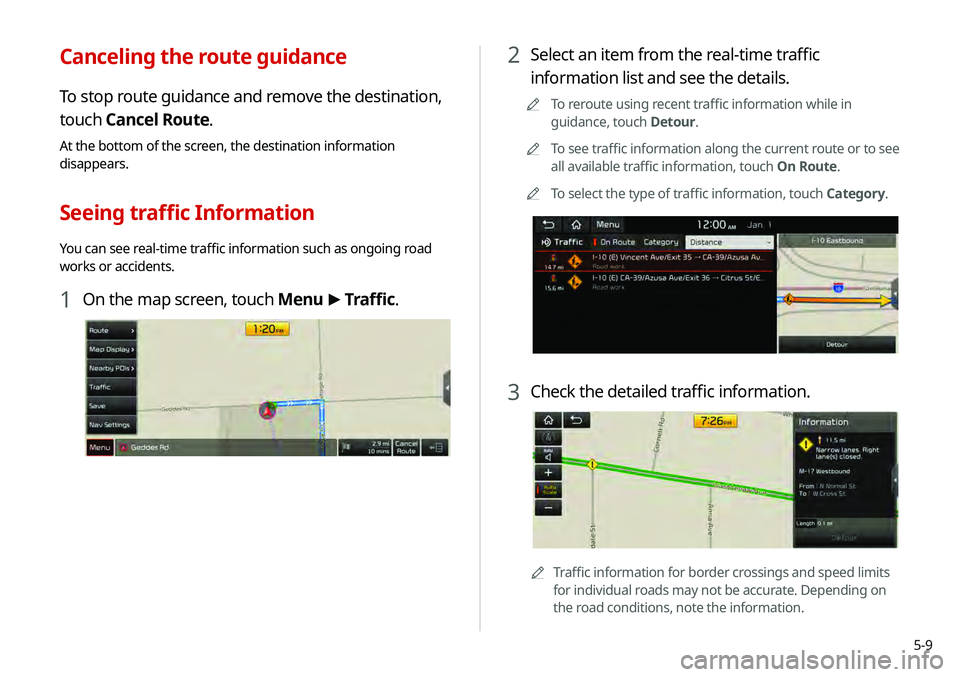
2 Select an item from the real-time traffic
information list and see the details.
0000
A
To reroute using recent traffic information while in
guidance, touch Detour.
0000
A
To see traffic information along the current route or to see
all available traffic information, touch On Route.
0000
A
To select the type of traffic information, touch Category.
3 Check the detailed traffic information.
0000
A
Traffic information for border crossings and speed limits
for individual roads may not be accurate. Depending on
the road conditions, note the information.
Canceling the route guidance
To stop route guidance and remove the destination,
touch Cancel Route.
At the bottom of the screen, the destination information
disappears.
Seeing traffic Information
You can see real-time traffic information such as ongoing road
works or accidents.
1 On the map screen, touch Menu >
Traffic.
Page 87 of 219
5-11
3 Select a destination from the search result.
0000
A
You can see the sites in the list on the preview screen at
the right.
4 Check the location of the destination and then
touch Start Guidance.
2 Enter the location data such as place name,
address, or coordinates and then touch OK.
0000
A
When there are any similar matches, the
recommendations appear at the right of keypad.
0000
A
To access the online user’s manual on the Places screen,
touch Menu >
User’s Manual on Web (QR Code) and
then scan the displayed QR code.
Page 88 of 219
5-12
2 Select the desired destination from the list.
0000
A
To categorize the searched items, select a category.
0000
A
To change the sorting order, touch
and select a sorting
criteria.
0000
A
To access the online user’s manual on the Previous
Destinations screen, touch Menu >
User’s Manual on
Web (QR Code) and then scan the displayed QR code.
3 Check the location of the destination and then
touch Start Guidance.
Deleting a previous destination
1 On the Previous Destinations screen, touch
Delete.
2 Select the destination(s) to delete and touch
Delete.
You can delete the selected place(s) or all places.
Searching by previous destinations
You can set a destination by selecting from the recently searched
ones.
1 On the Navigation Menu screen, touch Previous
Destinations.
The navigated destinations appear in the list.
Page 90 of 219
5-14
Displaying the points of interest on the map
You can set to display nearby points of interest on the map.
On the map screen, touch Menu >
Nearby POIs and
then select an item to display on the map.
0000A On the map screen, touch Menu >
Nearby POIs, select a
type to change, and then touch Edit POI to edit the POI type
to display.
3 Select a destination from the search result.
0000
A
To categorize the searched items, select a category.
0000
A
To change the sorting order, touch
on the drop-down
list and then select the sorting criteria.
4 Check the location of the destination and then
touch Start Guidance.
0000
A
To change the type of nearby POIs on the map, touch
Menu >
Nearby POIs >
Edit POI.
0000
A
To see nearby POIs during guidance on the map, touch
Menu >
Nearby POIs >
All POI Categories.
Page 91 of 219
5-15
3 Check the location of the destination and then
touch Start Guidance.
Searching for emergency services
1 On the Navigation Menu screen, touch
Emergency.
Searching for restaurants
1 On the Navigation Menu screen, touch
Restaurants.
2 Select a destination from the search result.
0000
A
To change the sorting order, touch on the drop-down
list and then select the sorting criteria.
0000
A
To access the online user’s manual on the Restaurants
screen, touch Menu >
User’s Manual on Web (QR Code)
and then scan the displayed QR code.
Page 92 of 219
5-16
Editing the route
You can edit the current route so that you can travel via waypoints
on the way to the destination. You can add up to two waypoints.
Setting a waypoint
You can search for a desired place and set it as a waypoint.
1 On the Navigation Menu screen, touch the
desired search method to search for a waypoint.
0000
A
For more information about the waypoint search: > see
“ Searching by keyword,” “Searching by previous destinations,”
“ Searching the nearby points of interest ,” “Searching for
restaurants,” “Searching for emergency services.”
2 Select the type of emergency service.
0000
A
Use the location information at the bottom of the screen,
if necessary to contact the desired emergency service.
0000
A
To access the online user’s manual on the Emergency
screen, touch Menu >
User’s Manual on Web (QR Code)
and then scan the displayed QR code.
3 Select a destination from the search result.
4 Check the location of the destination and then
touch Start Guidance.
Page 96 of 219
5-20
5 Check the location and information of the current
position and then touch Done.
6 If necessary, touch Save after making changes.
2 On the Address Book screen, touch My Places.
0000
A
To access the online user’s manual on the Address Book
screen, touch Menu >
User’s Manual on Web (QR Code)
and then scan the displayed QR code.
3 Touch Add.
4 Touch Places and enter a keyword for a search.
0000
A
You can also search for the place by using other methods.
> See “ Various ways to find routes.”
Page 97 of 219
5-21
Registering a frequently visited place as
a favorite place
You can register your home, office, or other frequently visited
place as a favorite.
1 At the bottom of the Navigation Menu screen,
select a button that has
.
2 Touch Places and enter a keyword for a search.
0000
A
You can also search for the place by using other methods.
> See “ Various ways to find routes.”
3 Check the location and information of the current
position and then touch Done.
The selected place is saved as a favorite and displayed as a
shortcut button at the bottom of the Navigation Menu screen.
Registering the current position as a
favorite place
1 On the map screen, touch Menu >
Save.
2 If necessary, touch Save after making changes.
The place is registered as a favorite place.