Page 158 of 219
8-80000
A
When the storage space is not sufficient, data is automatically
deleted from the oldest ones.
0000
A
To make a call to the selected location, make sure that your
mobile phone has been connected to Bluetooth or Phone
Projection.
Contacting the UVO Center
You can contact a UVO Center representative directly to request
help or make inquiries about using the UVO services.
Perform any of the following methods:
\225On the All Menus screen, touch UVO
>
Virtual Assistant.
\225 Press the [] button on the vehicle.
0000
A
To end the call, touch End on the screen or press the [
]
button.
0000
A
This feature is not available during a Bluetooth call.
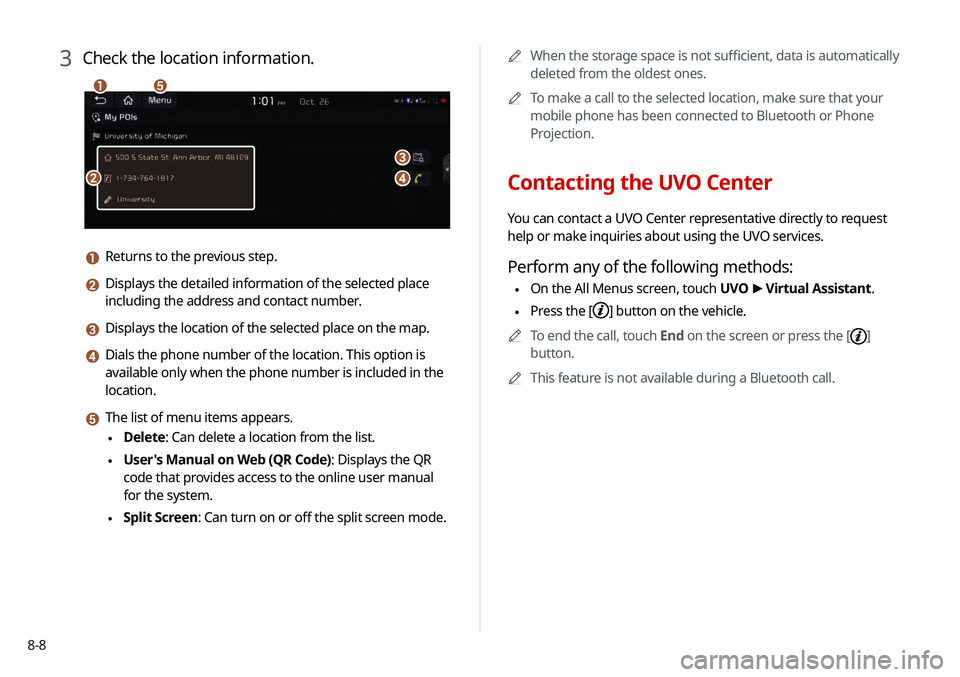
3 Check the location information.
\037
\036
\035
\034
\033
a Returns to the previous step.
b Displays the detailed information of the selected place
including the address and contact number.
c Displays the location of the selected place on the map.
d Dials the phone number of the location. This option is
available only when the phone number is included in the
location.
e The list of menu items appears.
\225Delete: Can delete a location from the list.
\225User's Manual on Web (QR Code): Displays the QR
code that provides access to the online user manual
for the system.
\225Split Screen: Can turn on or off the split screen mode.
Page 163 of 219
9-3
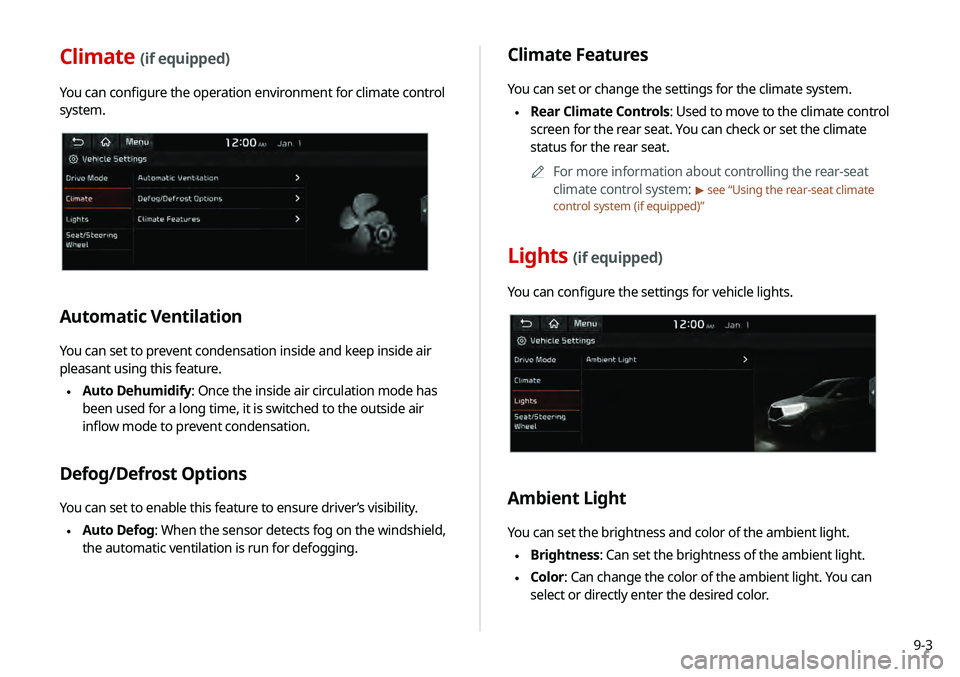
Climate Features
You can set or change the settings for the climate system.
\225Rear Climate Controls: Used to move to the climate control
screen for the rear seat. You can check or set the climate
status for the rear seat.
0000
A
For more information about controlling the rear-seat
climate control system:
> see “Using the rear-seat climate
control system (if equipped)”
Lights (if equipped)
You can configure the settings for vehicle lights.
Ambient Light
You can set the brightness and color of the ambient light.
\225 Brightness: Can set the brightness of the ambient light.
\225Color: Can change the color of the ambient light. You can
select or directly enter the desired color.
Climate (if equipped)
You can configure the operation environment for climate control
system.
Automatic Ventilation
You can set to prevent condensation inside and keep inside air
pleasant using this feature.
\225Auto Dehumidify: Once the inside air circulation mode has
been used for a long time, it is switched to the outside air
inflow mode to prevent condensation.
Defog/Defrost Options
You can set to enable this feature to ensure driver’s visibility.
\225Auto Defog: When the sensor detects fog on the windshield,
the automatic ventilation is run for defogging.
Page 177 of 219
9-17
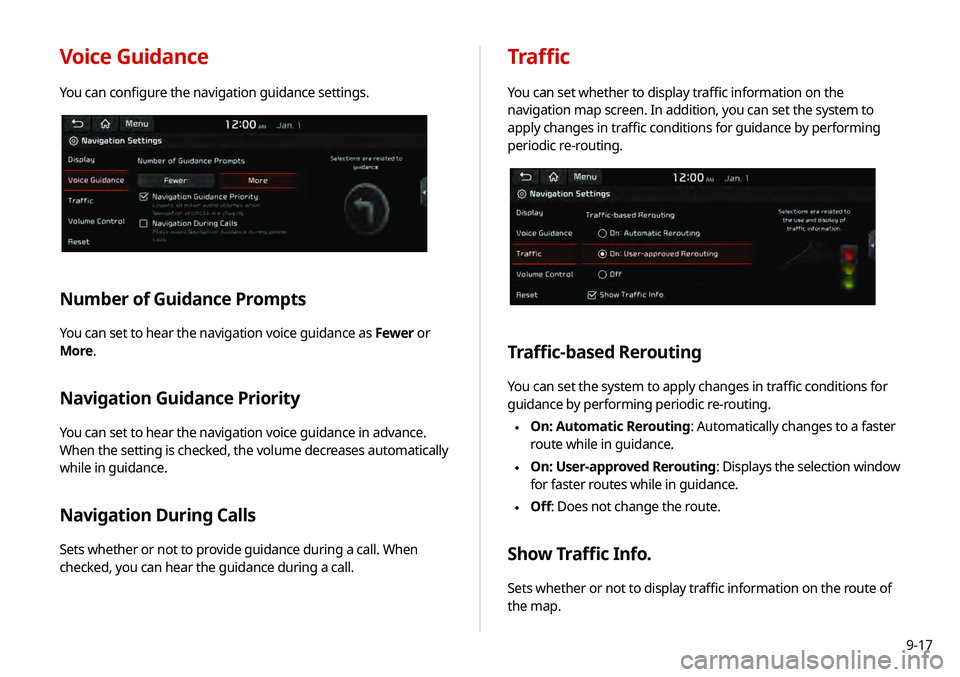
Voice Guidance
You can configure the navigation guidance settings.
Number of Guidance Prompts
You can set to hear the navigation voice guidance as Fewer or
More.
Navigation Guidance Priority
You can set to hear the navigation voice guidance in advance.
When the setting is checked, the volume decreases automatically
while in guidance.
Navigation During Calls
Sets whether or not to provide guidance during a call. When
checked, you can hear the guidance during a call.
Traffic
You can set whether to display traffic information on the
navigation map screen. In addition, you can set the system to
apply changes in traffic conditions for guidance by performing
periodic re-routing.
Traffic-based Rerouting
You can set the system to apply changes in traffic conditions for
guidance by performing periodic re-routing.
\225 On: Automatic Rerouting: Automatically changes to a faster
route while in guidance.
\225On: User-approved Rerouting
: Displays the selection window
for faster routes while in guidance.
\225 Off: Does not change the route.
Show Traffic Info.
Sets whether or not to display traffic information on the route of
the map.
Page 180 of 219
9-20
Modem Information
You can check the modem information for use of the UVO service.
Modem Status
You can check the modem status for use of the UVO service.
3 Read the terms of use and touch Accept.
0000
A
The feature is activated and appears at the top right
of the screen.
0000
A
When an airbag is deployed, the system automatically
makes a call to 911 and sends your location to the 911
operator.
Page 181 of 219
9-21
Configuring the general
system settings
You can configure general settings for date, time, language, and
the like. You can also check information of the system.
1 On the All Menus screen, touch Setup >
General.
The general settings screen appears.
2 Configure the settings required:
Date/Time
You can set the system date and time automatically or manually.
You can also set the time display mode.
GPS Time
After receiving the time from GPS, it sets the system date and
time automatically.
0000
A
To manually set the date and time, uncheck GPS Time, touch
the current date and time below GPS Time, and then set the
date and time.
24 Hours
The system time is displayed in the 24-hour format.
0000
A
For example, when 24 Hours is checked and the current time
is 01:08 pm, the system screen displays the time as “13:08.”
When the checkbox is deselected, the time display changes to
“01:08 PM.”
Daylight Saving Time
Displays the system time in the format of Daylight Saving Time.
Page 183 of 219
9-23
System Info
You can check the system software version and storage space.
You can also update the system software, use your smartphone
to access the online user’s manual of the system, or initialize all
system settings to default values.
SW Info/Update
You can see the versions of system components. You can also
update the system to the latest version.0000
A
For details on how to update the system software:
> see
“ Updating the system software and map .”
Screen Saver
You can select the items to display on the screen saver in standby
mode.
Digital
Displays the digital clock and date on the system screen saver.
Analog
Displays the analog clock and date on the system screen saver.
None
Displays nothing on the system screen saver.
Page 184 of 219
9-24
Configuring the display
settings
You can change the system display settings such as display
brightness.
1 On the All Menus screen, touch Setup >
Display.
The display settings screen appears.
2 Configure the settings required:
Storage
You can check the storage space of the system memory where
voice memos can be saved.
User's Manual on Web (QR Code)
You can access the online user’s manual of the system by
scanning the QR code with your smartphone.
Reset
You can initialize all system settings including general settings
and navigation settings.
\334Caution
When initialize is performed, all user data in the system including
the location data is deleted.
Page 185 of 219
9-25
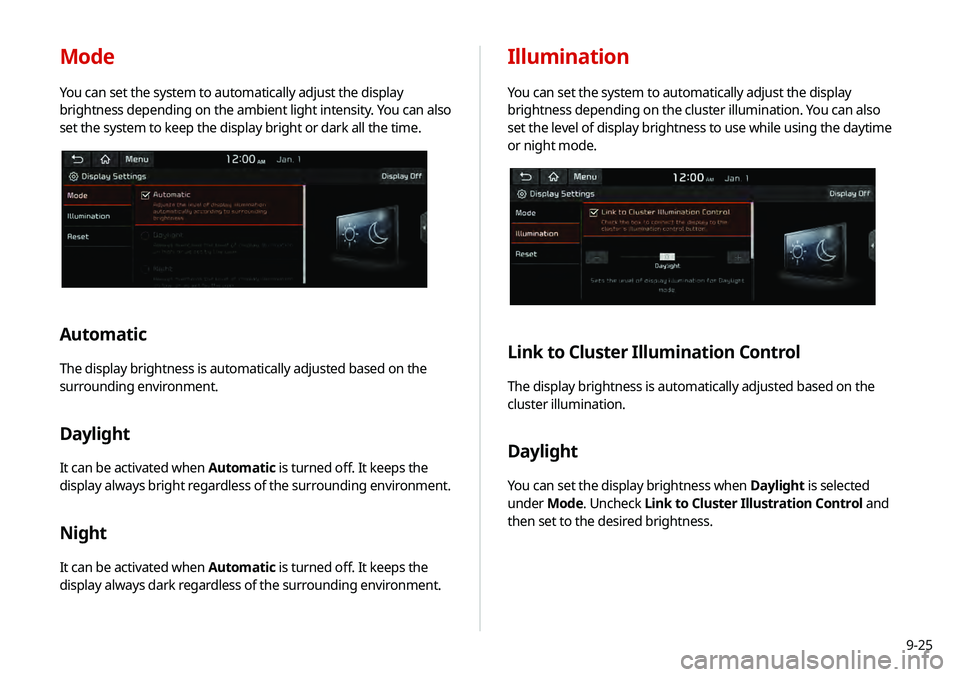
Illumination
You can set the system to automatically adjust the display
brightness depending on the cluster illumination. You can also
set the level of display brightness to use while using the daytime
or night mode.
Link to Cluster Illumination Control
The display brightness is automatically adjusted based on the
cluster illumination.
Daylight
You can set the display brightness when Daylight is selected
under Mode. Uncheck Link to Cluster Illustration Control and
then set to the desired brightness.
Mode
You can set the system to automatically adjust the display
brightness depending on the ambient light intensity. You can also
set the system to keep the display bright or dark all the time.
Automatic
The display brightness is automatically adjusted based on the
surrounding environment.
Daylight
It can be activated when Automatic is turned off. It keeps the
display always bright regardless of the surrounding environment.
Night
It can be activated when Automatic is turned off. It keeps the
display always dark regardless of the surrounding environment.


