Page 186 of 219
9-26
Updating the system software
and map
You can update the navigation map and infotainment system.
Please visit your local dealership to update your system.0000
A
Any changes made after the update file is created are not
reflected in the map. As a result, certain roads, buildings, and
speed limits on the map may not be up to date.
0000
A
Depending on the total data amount, an update may take
several minutes.
0000
A
Do not turn off the system or remove the storage device while
the update is in progress. When power supply is cut off or the
storage device is removed from the system, it may damage
the data or cause a system malfunction.
Night
You can set the display brightness when Night is selected under
Mode. Uncheck Link to Cluster Illustration Control and then
set to the desired brightness.
Reset
You can initialize all display settings such as brightness.
Page 188 of 219
10-2
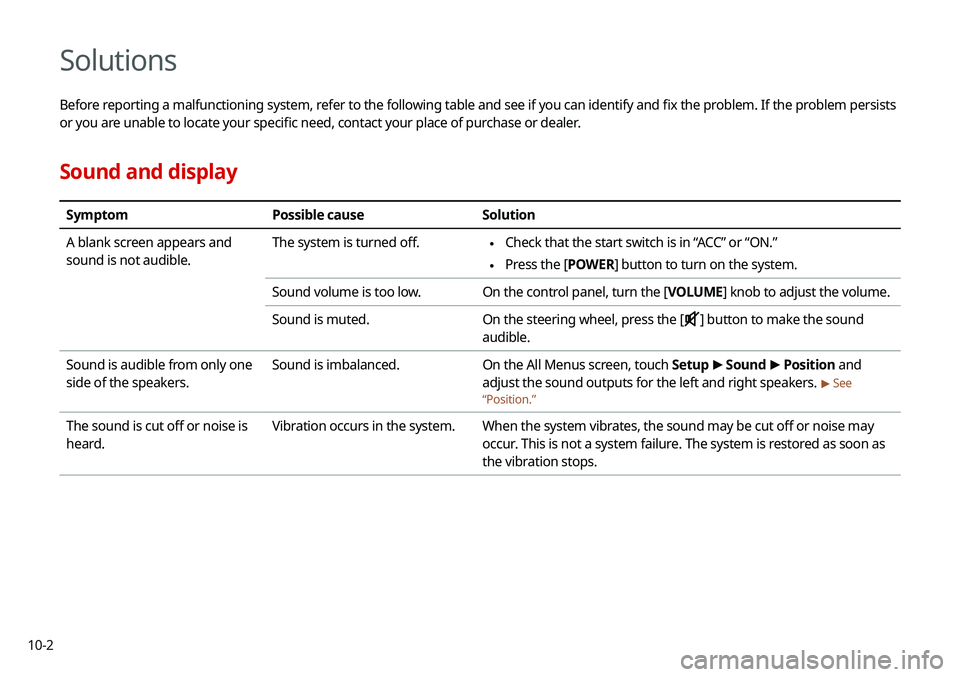
Solutions
Before reporting a malfunctioning system, refer to the following table and see if you can identify and fix the problem. If the problem persists
or you are unable to locate your specific need, contact your place of purchase or dealer.
Sound and display
SymptomPossible cause Solution
A blank screen appears and
sound is not audible. The system is turned off.
\225
Check that the start switch is in “ACC” or “ON.”
\225Press the [
POWER] button to turn on the system.
Sound volume is too low. On the control panel, turn the [VOLUME] knob to adjust the volume.
Sound is muted. On the steering wheel, press the [
] button to make the sound
audible.
Sound is audible from only one
side of the speakers. Sound is imbalanced.
On the All Menus screen, touch Setup >
Sound >
Position and
adjust the sound outputs for the left and right speakers.
> See
“ Position.”
The sound is cut off or noise is
heard. Vibration occurs in the system.
When the system vibrates, the sound may be cut off or noise may
occur. This is not a system failure. The system is restored as soon as
the vibration stops.
Page 192 of 219
10-6
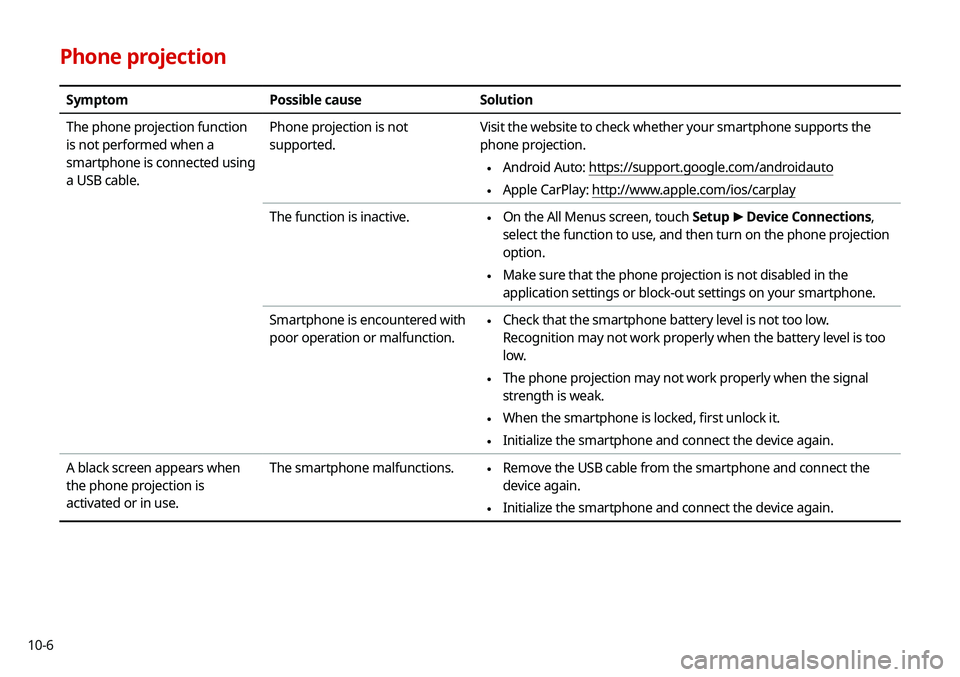
Phone projection
SymptomPossible cause Solution
The phone projection function
is not performed when a
smartphone is connected using
a USB cable. Phone projection is not
supported.
Visit the website to check whether your smartphone supports the
phone projection.
\225
Android Auto: https://support.google.com/androidauto
\225Apple CarPlay: http://www.apple.com/ios/carplay
The function is inactive.
\225 On the All Menus screen, touch Setup
>
Device Connections,
select the function to use, and then turn on the phone projection
option.
\225 Make sure that the phone projection is not disabled in the
application settings or block-out settings on your smartphone.
Smartphone is encountered with
poor operation or malfunction.
\225 Check that the smartphone battery level is not too low.
Recognition may not work properly when the battery level is too
low.
\225The phone projection may not work properly when the signal
strength is weak.
\225When the smartphone is locked, first unlock it.
\225Initialize the smartphone and connect the device again.
A black screen appears when
the phone projection is
activated or in use. The smartphone malfunctions.
\225
Remove the USB cable from the smartphone and connect the
device again.
\225Initialize the smartphone and connect the device again.
Page 194 of 219
10-8
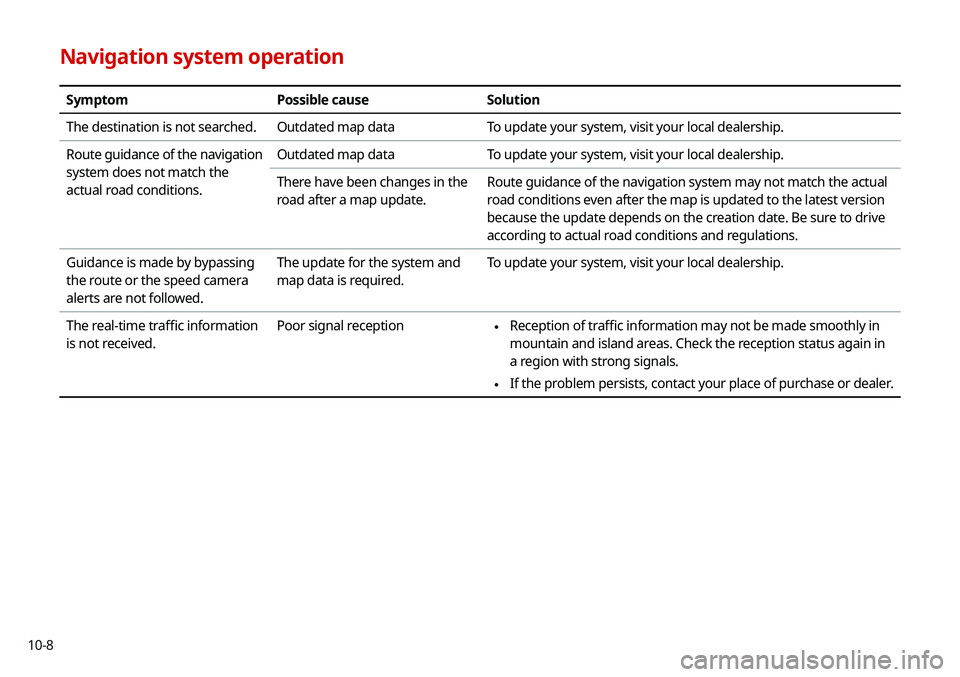
Navigation system operation
SymptomPossible causeSolution
The destination is not searched. Outdated map dataTo update your system, visit your local dealership.
Route guidance of the navigation
system does not match the
actual road conditions. Outdated map data
To update your system, visit your local dealership.
There have been changes in the
road after a map update. Route guidance of the navigation system may not match the actual
road conditions even after the map is updated to the latest version
because the update depends on the creation date. Be sure to drive
according to actual road conditions and regulations.
Guidance is made by bypassing
the route or the speed camera
alerts are not followed. The update for the system and
map data is required.
To update your system, visit your local dealership.
The real-time traffic information
is not received. Poor signal reception
\225
Reception of traffic information may not be made smoothly in
mountain and island areas. Check the reception status again in
a region with strong signals.
\225If the problem persists, contact your place of purchase or dealer.
Page 195 of 219
10-9
System status indicator icons
You can see the system status by checking the status indicator
icons at the top right of the system screen.
Different status indicator icons appear when each function is
performed. The meanings of the icons are as follows:
Mute/memo recording
Navigation sound muted
Radio/Media sound muted
All sound outputs muted
Recording a voice memo
Bluetooth/call
Battery level of the connected Bluetooth device
Connecting a phone via Bluetooth
Connecting an audio device via Bluetooth
Connecting a phone and an audio device via Bluetooth
Making a call via a Bluetooth phone
Bluetooth phone’s microphone off
Downloading the list of recent calls from the connected
Bluetooth phone
Downloading the contact list from the connected
Bluetooth phone
Bluetooth phone’s signal strength

