2019 MERCEDES-BENZ SPRINTER traction control
[x] Cancel search: traction controlPage 51 of 354
Va
ns US A,LLC ("DVUSA") expressly disclaims
any and all liability arising from theex traction of
th is information byunauthorized Mercedes-Benz
personnel.
DV USA will not share EDR data with others with‐
out the consent of theve hicle owners or, if the
ve hicle is leased, without the consent of the les‐
see. Exceptions tothis representation include
re sponses tosubpoenas bylaw enforcement; by
fe deral, state or local go vernment; in connection
with or arising out of litigation in volvin gDV USA or
its subsidiaries and af filiates; or, as requ ired by
la w.
Wa rning: The EDR is a component of the
Re stra int Sy stem Module. Tamp ering with, alter‐
ing, modifying or removing the EDR component
may result in a malfunction of theRe stra int Sys‐
te m Module and other sy stems.
St ate la wsorregulations rega rding EDRs that
con flict with federal regulation are pre-em pted.
This means that in theev ent of such conflict, the
fe deral regulation go verns. As of December 20 16 ,
17 states ha veenacted la wsrelating toEDRs. Co
pyright Information on free and open-source software
Information on license
for free and open-sou rce
software used in your vehicle can be found on the
data storage medium in your vehicle document
wa llet and with updates on thefo llowing website:
http://www.mercedes-benz.com/opensource. Information on
regis tere d trademar ks R
Bluetoo th®
is a regis tere d trademark of Blue‐
toot h SIG Inc.
R DTS™ is a regis tere d trademark of DTS, Inc.
R Dolby ®
and MLP™ are regis tere d trademar ks
of DOLBY Laboratories.
R BabySmart™, ESP ®
and PRE-SAFE ®
are regis‐
te re d trademar ksof Daimler AG.
R HomeLink ®
is a regis tere d trademark of John‐
son Controls.
R iPod ®
and iTunes ®
are regis tere d trademar ks
of Apple Inc.
R Burmes ter®
is a regis tere d trademark of
Burmes terAu diosy steme GmbH.
R Microsoft ®
and Windo wsMedia ®
are regis‐
te re d trademar ksof Microsoft Corporation. R
SIRIUS ®
is a regis tere d trademark of Sirius
XM Radio Inc.
R HD Radio™ is a regis tere d trademark of iBiq‐
uity Digital Corporation.
R Graceno te®
is a regis tere d trademark of
Graceno te, Inc.
R ZAGA TSurvey ®
and related brands are regis‐
te re d trademar ksof ZagatSur vey, LLC. General no
tes27
Page 123 of 354
#
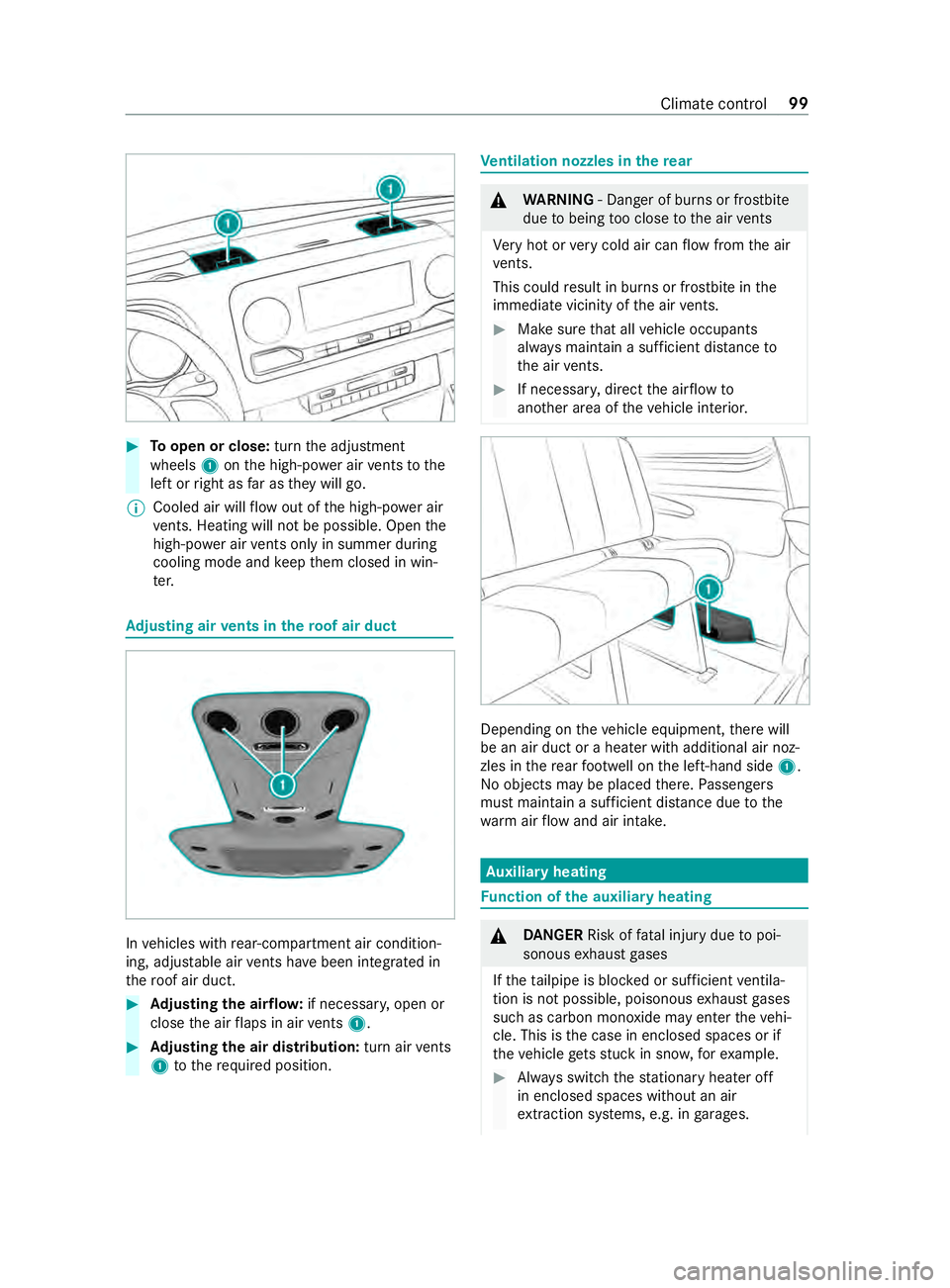
Toopen or close: turnthe adjustment
wheels 1onthe high-po wer air vents tothe
left or right as far as they will go.
% Cooled air will
flow out of the high-po wer air
ve nts. Heating will not be possible. Open the
high-po wer air vents only in summer du ring
cooling mode and keep them closed in win‐
te r. Ad
justing air vents in thero of air duct In
vehicles with rear-compartment air condition‐
ing, adjus table air vents ha vebeen integrated in
th ero of air duct. #
Adjusting the air flow: if necessar y,open or
close the air flaps in air vents 1. #
Adjusting the air distribution: turn airvents
1 tothere qu ired position. Ve
ntilation nozzles in there ar &
WARNING ‑ Danger of bu rns or frostbite
due tobeing too close tothe air vents
Ve ry hot or very cold air can flow from the air
ve nts.
This could result in burns or frostbite in the
immediate vicinity of the air vents. #
Makesure that all vehicle occupants
alw ays maintain a suf ficient dis tance to
th e air vents. #
If necessa ry, direct the air flow to
ano ther area of theve hicle interior. Depending on
theve hicle equipment, there will
be an air duct or a heater with additional air noz‐
zles in there ar foot we ll on the left-hand side 1.
No objects may be placed there. Passengers
must maintain a suf ficient dis tance due tothe
wa rm airflow and air intake. Au
xiliary heating Fu
nction of the auxiliary heating &
DANG ER Risk of fata l injury due topoi‐
sonous exhaust gases
If th eta ilpipe is bloc ked or suf ficient ventila‐
tion is not possible, poisonous exhaust gases
such as carbon monoxide may enter theve hi‐
cle. This is the case in enclosed spaces or if
th eve hicle getsst uck in sn ow,fo rex ample. #
Always switch thest ationary heater off
in enclosed spaces without an air
ex traction sy stems, e.g. in garage s. Climate
control 99
Page 132 of 354

Information about transport
byrail
Tr ansporting your vehicle byrail may be subject
to cer tain restrictions or requ ire special meas‐
ures tobe take n in some countries due tovarying
tunnel heights and loading standards.
Yo u can obtain information about this from any
authorized Mercedes-Benz Center.
Note s on brakes &
WARNING Risk of skidding and of an
accident due toshifting down on slippery
ro ad sur faces
If yo u shift down on slippery road sur faces to
inc rease the engine braking ef fect, the drive
wheels may lose traction. #
Do not shift down on slippery road sur‐
fa ces toinc rease the engine braking
ef fect. &
WARNING Risk of accident due tothe
brake sy stem overheating
If yo u lea veyour foot on the brake pedal
when driving, the brake sy stem may overheat.
This increases the braking dis tance and the
brake sy stem may evenfa il. #
Never use the brake pedal as a foot re st. #
Do not depress the brake pedal and the
accelerator pedal at the same time
while driving. Downhill
gradients
On long and steep downhill gradients you should
obse rveth efo llowing instructions:
R invehicles with an automatic transmission,
shift down toshift ranges 2or 1in good time
so that the engine is running at a medium to
high engine speed (/ page117).
% Cha
nge the shift range in good time when
cruise control is acti vated. Obser vethe driv‐
ing tips (/ page105).
Yo uth ereby make use of the braking ef fect of the
engine and do not ha vetobrake as of tento main‐
tai nth e speed. This relie vesth e load on the
service brake and pr events the brakes from over‐
heating and wearing tooqu ickl y. Heavy and light loads &
WARNING Risk of accident due tothe
brake sy stem overheating
If yo u lea veyour foot on the brake pedal
when driving, the brake sy stem may overheat.
This increases the braking dis tance and the
brake sy stem may evenfa il. #
Never use the brake pedal as a foot re st. #
Do not depress the brake pedal and the
accelerator pedal at the same time
while driving. If
th e brakes ha vebeen subjected toa heavy
load, do not stop theve hicle immediately. Drive
on for a short while. The brakes cool down more
qu ickly in the air flow.
If th e brakes ha vebeen used only moderatel y,
yo u should occasionally test their ef fectiveness.
To do this, brake more firm lyfrom a higher speed
while paying attention tothe tra ffic conditions.
The brakes will grip better as a result.
We tro ad sur faces
If yo u ha vebeen driving for a long time in heavy
ra in without braking, there may be a dela yed
re sponse when youfirs t apply the brakes. This
may also occur af ter driving thro ugh a car wash
or deep water.Yo u must depress the brake pedal
more firm ly. Main tain a longer di stance tothe
ve hicle in front.
While paying attention tothe tra ffic conditions,
yo u should brake theve hicle firm ly af ter driving
on a wetro ad sur face or thro ugh a car wash. This
heats the brake discs so that they dry more
qu ickl y,which pr otects them against cor rosion.
Limited braking ef fect on salt-trea tedro ads:
R a layer of salt on the brake discs or brakepads
can increase braking dis tances conside rably,
or braking may happen on only one side
R maintain an especially lar gesafe dis tance to
th eve hicle in front
To remo vethe la yer of salt:
R apply the brakes from time totime, paying
attention totraf fic conditions
R carefully dep ress the brake pedal at the end
of a journey and af terth est art of a new jour‐
ney
Checking the brakepad thickness
In addition tomonitoring using the brakepad wear
sensor, regular lymonitor and check all of the 108
Driving and pa rking
Page 134 of 354

Information about driving in winter
&
DANG ER Risk of fata l injury due topoi‐
sonous exhaust gases
If th eta ilpipe is bloc ked or suf ficient ventila‐
tion is not possible, poisonous exhaust gases
such as carbon monoxide may enter theve hi‐
cle. This is the case if theve hicle getsst uck
in sn ow,fo rex ample. #
Keep theta ilpipe and the area around
th eve hicle free from snow when the
engine or thest ationary heater are run‐
ning. #
Open a window on the windward side of
th eve hicle toensure an adequate sup‐
ply of fresh air. &
WARNING Risk of skidding and of an
accident due toshifting down on slippery
ro ad sur faces
If yo u shift down on slippery road sur faces to
inc rease the engine braking ef fect, the drive
wheels may lose traction. #
Do not shift down on slippery road sur‐
fa ces toinc rease the engine braking
ef fect. Ve
hicles with automatic transmissions may roll in
neut ral position 005Cfor only a short time. Allowing
th e wheels torollfo r longer, e.g. when towing,
causes transmission damage.
If th eve hicle thre atens toskid, or cannot be stop‐
ped when tr aveling at a low speed, you can stabi‐
lize theve hicle using thefo llowing measures:
R Shift the automatic transmission toneutral
position 005C.
R Tryto maintain control of theve hicle using
cor rective steering.
Drive particularly carefully on slippery roads.
Av oid sudden acceleration, steering and braking
maneuver.
Ha ve your vehicle winterized at a qualified spe‐
cialist workshop in good time at the onset of win‐
te r.
Obser vethe instructions in the section "No tes on
snow chains" (/ page 233).
Re gular lych eck theve hicle and remo vesnow or
ice when tr aveling in wintry conditions. An accumulation of snow and ice, particular
ly
when frozen, in the area around the air intake,
moving parts, the axles and the wheel housing,
may cause thefo llowing problems:
R Obstruction of the air intake
R Damage tovehicle parts
R Malfunctions due torestriction of mobility
intended bythe design (e.g. reduced steering
mo vement)
If th ere is any damage, inform a qualified special‐
ist workshop.
Information about driving off-road &
WARNING Risk of accident if you do not
ke ep toline of fall on inclines
If yo u drive at an angle or turn on an incline,
th eve hicle could slip side ways, tip and roll‐
ove r. #
Always drive on inclines in the line of fall
(straight up or down) and do not turn. &
WARNING Risk of inju rydue toacceler‐
ating forc e during off-road driving
When driving off-road on une ven su rfaces,
th efo rc e of theve hicle's acceleration af fects
yo ur body from all directions.
Yo u could, forex ample, be thro wn from your
seat. #
Alwayswe ar a seat belt when driving
off- road. &
WARNING Risk of inju ryto the hands
when driving over obs tacles
If yo u drive over obs tacles or in tire ruts, the
st eering wheel may fold back and cause inju‐
ri es tothe hands. #
Steering wheel must alw ays be held
securely with bo thhands. #
When driving over obs tacles, expect
increased steering forc es at short
notice. &
WARNING Risk offire due toflammable
materials on hot parts of theex haust sys‐
tem
Flammable material such as lea ves, grass or
twigs may ignite if they come into contact
wi th hot parts of theex haust sy stem. 11 0
Driving and pa rking
Page 161 of 354

Depending on
theve hicle's equipment, thera dar
sensors are integrated behind the bumpers
and/or behind thera diator grill. Keep these parts
free of dirt, ice and slush (/ page212). The se n‐
sors must not be co vered, forex ample bybicycle
ra ck s, overhanging loads or sticke rs. Af ter a colli‐
sion, ha vethe function of thera dar sensors
ch ecked at a qualified specialist workshop as
damage (bo thvisible or non-visible) may ha ve
occur redto the bumper or radiator trim. Fu
nction of driving sy stems and driving
saf ety sy stems In
this section, you will find information about the
fo llowing driving sy stems and driving saf ety sys‐
te ms:
R ABS ( Anti-lock braking system)
(/ page 137)
R ASC (Acceleration SkidControl)
(/ page 137)
R BAS (B rake Assist System) (/ page137)
R ESP ®
(Electronic Stability Program)
(/ page 138)
R EBD ( Electronic Brakeforce Distribution)
(/ page 139)
R Active Brake Assi st (/ page 139)
R Cruise co ntrol (/ page 141)
R Active Dis tance Assi stDISTRONIC
(/ page 143)
R Hill start assist
R HOLD function (/ page145)
R Parking Assist PARKTRONIC ( /page 145)
R Rear view camera (/ page147)
R 360° Camera (/ page149)
R ATTENTION ASSIST (/ page151)
R Blind Sp otAssi st (/ page 152)
R Active Lane Keeping Assist (/ page155) Fu
nctions of ABS (Anti-lock Braking Sy stem) Obser
vethe impor tant sa fety guidelines forthe
driving saf ety sy stem.
ABS cont rols the brake pressure in critical situa‐
tions:
R the wheels are pr evented from lo cking when
braking, e.g. during maximum full-s top brak‐
ing or when there is insuf ficient tire traction. R
thesteerability of theve hicle in term s of
ph ysical possibilities is ensured when brak‐
ing.
R ABS is active from speeds of appr ox. 3 mph
(5 km/h). On a slippery road sur face, ABS
inter venes even if you on lybrake gently.
Sy stem limitations
If th ere is a malfunction and theye llow 0025 ABS
wa rning lamp lights up continuously in the instru‐
ment display af terst arting the engine, ABS may
be impaired or inoperative.
If ABS inter venes, you will feel a pulsing in the
brake pedal. The pulsating brake pedal may be an
indication of hazardous road conditions and func‐
tions as a reminder totake extra care while driv‐
ing.
If ABS in terv enes: keep the brake pedal firm ly
depressed until the braking situation has passed.
To car ryout maximum full-s top braking:
dep ress the brake pedal with full forc e. Fu
nction of BAS (Brake Assist Sy stem) &
WARNING Risk of an accident caused by
a malfunction in BAS (Brake Assi stSys‐
te m)
If BA S is malfunctioning, the braking dis tance
in an emergency braking situation is
increased. #
Depress the brake pedal with full force
in emer gency braking situations. ABS
pr eve nts the wheels from locking. BA
S suppo rts yo u with additional braking forc e in
an emer gency braking situation.
If yo u depress the brake pedal quickl y,BA S is
acti vated:
R BAS au tomatically boosts the braking forc e of
th e brakes
R BAS can sho rten the braking dis tance
R ABS pr events the wheels from locking
When youre lease the brake pedal, the brakes
function as usual again. BAS is deactivated. Fu
nctions of ASR (Acceleration Skid Control) ASR can neither
reduce therisk of an accident
nor override the la wsof ph ysics if the driver does
not pay attention when pulling away or accelerat‐
ing. ASR is only an aid. Alw ays adapt your driving Driving and parking
137
Page 166 of 354
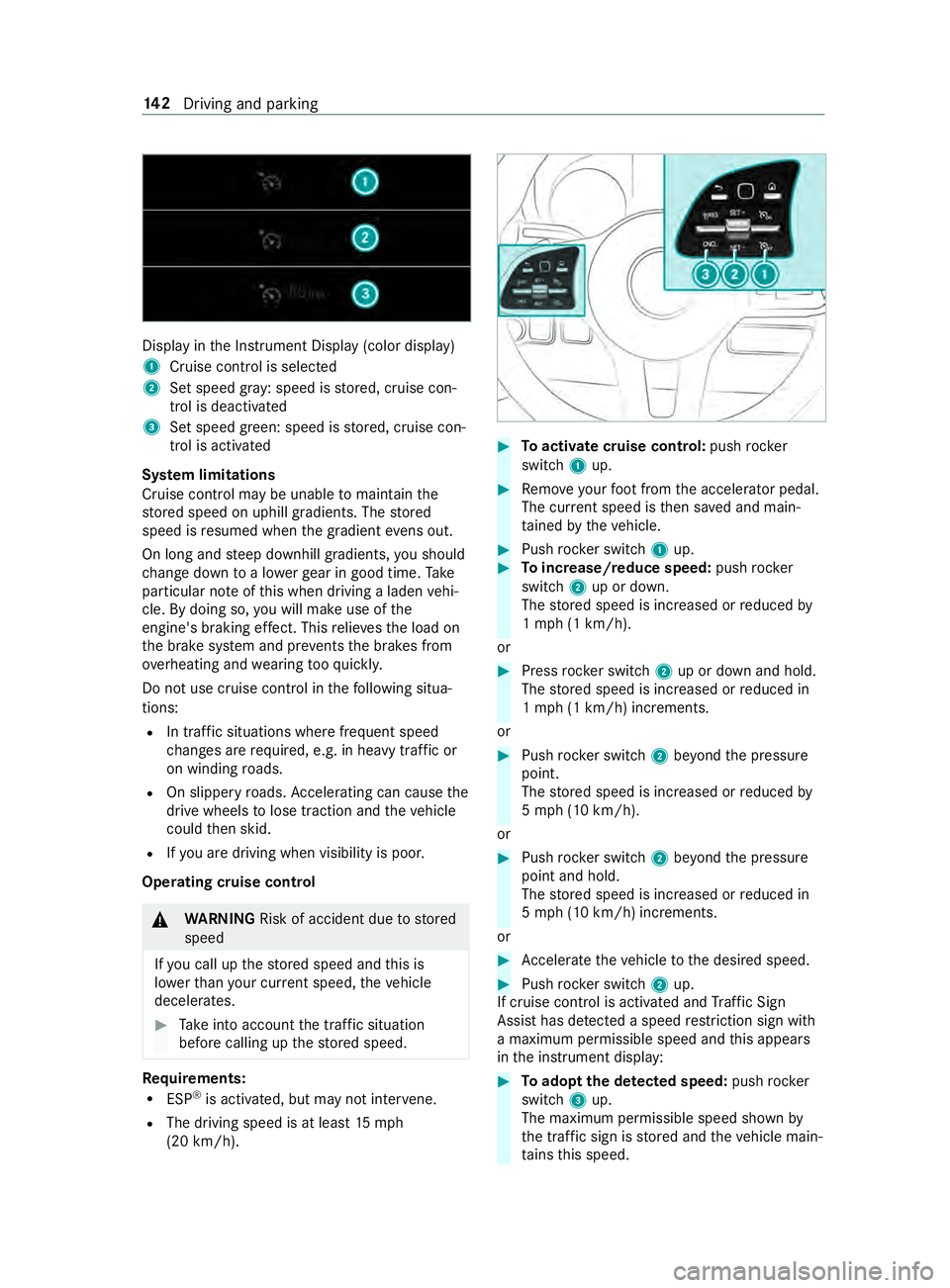
Displ
ayinthe Instrument Display (color display)
1 Cruise cont rol is selec ted
2 Set speed gr ay: speed is stored, cruise con‐
trol is deactivated
3 Set speed green: speed is stored, cruise con‐
trol is activated
Sy stem limitations
Cruise control may be unable tomaintain the
st ored speed on uphill gradients. The stored
speed is resumed when the gradient evens out.
On long and steep downhill gradients, you should
ch ange down toa lo werge ar in good time. Take
particular no teofthis when driving a laden vehi‐
cle. By doing so, you will make use of the
engine's braking ef fect. This relie vesth e load on
th e brake sy stem and pr events the brakes from
ove rheating and wearing tooqu ickl y.
Do not use cruise control in thefo llowing situa‐
tions:
R In traf fic situations whe refrequent speed
ch anges are requ ired, e.g. in heavy traf fic or
on winding roads.
R On slippe ryroads. Accele rating can cause the
drive wheels tolose traction and theve hicle
could then skid.
R Ifyo u are driving when visibility is poor.
Operating cruise cont rol&
WARNING Risk of accident due tostored
speed
If yo u call up thestored speed and this is
lo we rth an your cur rent speed, theve hicle
decelerates. #
Take into account the tra ffic situation
before calling up thestored speed. Re
quirements:
R ESP ®
is activated, but may not inter vene.
R The driving speed is at least 15mph
(20 km/h). #
Toactivate cruise control: pushrock er
switch 1up. #
Remo veyour foot from the accelerator pedal.
The cur rent speed is then sa ved and main‐
ta ined bytheve hicle. #
Push rocker switch 1up. #
Toincrease/reduce speed: pushrock er
switch 2up or down.
The stored speed is increased or reduced by
1 mp h (1 km/h).
or #
Press rocker switch 2up or down and hold.
The stored speed is increased or reduced in
1 mp h (1 km/h) increments.
or #
Push rocker switch 2beyond the pressure
point.
The stored speed is increased or reduced by
5 mp h (10 km/h).
or #
Push rocker switch 2beyond the pressure
point and hold.
The stored speed is increased or reduced in
5 mp h (10 km/h) increments.
or #
Accele rate theve hicle tothe desired speed. #
Push rocker switch 2up.
If cruise cont rol is activated and Traf fic Sign
Assi sthas de tected a speed restriction sign wi th
a maximum permissible speed and this appears
in the instrument display: #
Toadopt the de tected speed: pushrocker
switch 3up.
The maximum permissible speed shown by
th e traf fic sign is stored and theve hicle main‐
ta ins this speed. 14 2
Driving and pa rking
Page 188 of 354
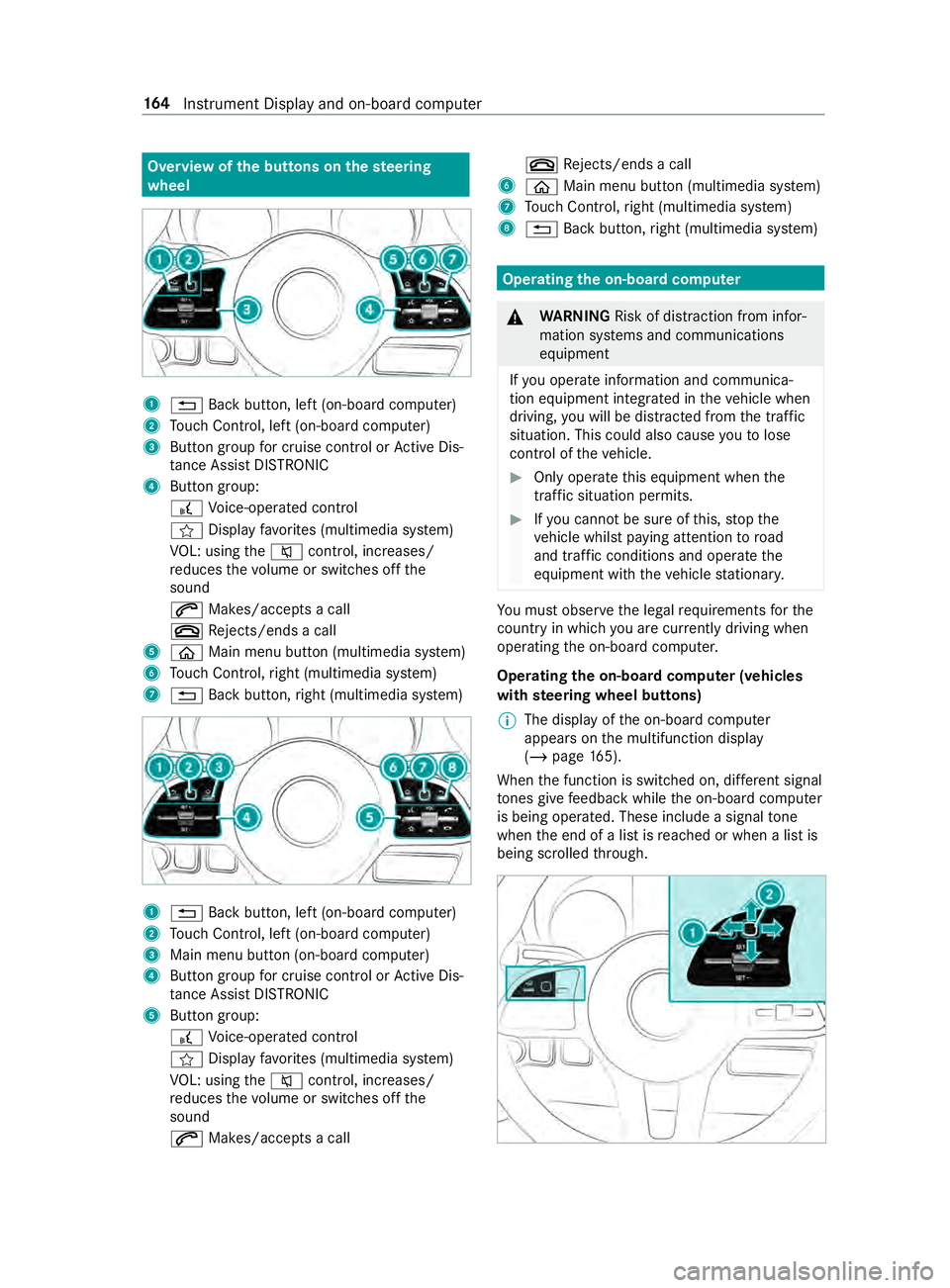
Overview of
the but tons on thest eering
wheel 1
0038 Back button, left (on-board computer)
2 Touch Control, left (on-board computer)
3 Button group for cruise control or Active Dis‐
ta nce Assi stDISTRONIC
4 Button group:
£ Voice-opera ted control
004B Display favo rite s (multimedia sy stem)
VO L: using the0063 control, inc reases/
re duces thevo lume or switches off the
sound
0061 Makes/accepts a call
0076 Rejects/ends a call
5 00E2 Main menu button (multimedia sy stem)
6 Touch Control, right (multimedia sy stem)
7 0038 Back button, right (multimedia sy stem) 1
0038 Back button, left (on-board computer)
2 Touch Control, left (on-board computer)
3 Main menu button (on-board computer)
4 Button group for cruise control or Active Dis‐
ta nce Assi stDISTRONIC
5 Button group:
£ Voice-opera ted control
004B Display favo rite s (multimedia sy stem)
VO L: using the0063 control, inc reases/
re duces thevo lume or switches off the
sound
0061 Makes/accepts a call 0076
Rejects/ends a call
6 00E2 Main menu button (multimedia sy stem)
7 Touch Control, right (multimedia sy stem)
8 0038 Back button, right (multimedia sy stem) Operating
the on-boa rdcompu ter &
WARNING Risk of distraction from infor‐
mation sy stems and communications
equipment
If yo u operate information and communica‐
tion equipment integ rated in theve hicle when
driving, you will be distracted from the tra ffic
situation. This could also cause youto lose
control of theve hicle. #
Only operate this equipment when the
traf fic situation permits. #
Ifyo u cannot be sure of this, stop the
ve hicle whilst paying attention toroad
and traf fic conditions and ope rate the
equipment with theve hicle stationar y. Yo
u must obse rveth e legal requirements forthe
country in whi chyou are cur rently driving when
ope rating the on-board computer.
Operating the on-boa rdcompu ter (vehicles
with steering wheel but tons)
% The display of
the on-board computer
appears on the multifunction display
(/ page 165).
When the function is switched on, dif fere nt signal
to nes gi vefeedback while the on-board computer
is being operated. These include a signal tone
when the end of a list is reached or when a list is
being scrolled thro ugh. 16 4
Instrument Display and on-board computer
Page 193 of 354

Operating media playback with
the on-boa rd
compu ter On-board computer:
4 Media 1
Media source
2 Current track and track number
3 Artist's name
4 Name of the album
The following displa ysare available on the media
menu:
R Media source selection list
R Current pl ayback #
Select and con firm the media source. #
Select and confirm there qu ired playbac k.
% This is how
toselect a station when TVisthe
media source. Dialing a
telephone number using the on-
board compu ter &
WARNING Risk of distraction from infor‐
mation sy stems and communications
equipment
If yo u operate information and communica‐
tion equipment integ rated in theve hicle when
driving, you will be distracted from the tra ffic
situation. This could also cause youto lose
control of theve hicle. #
Only operate this equipment when the
traf fic situation permits. #
Ifyo u cannot be sure of this, stop the
ve hicle whilst paying attention toroad
and traf fic conditions and ope rate the
equipment with theve hicle stationar y. When using
the phone, you must obse rvethe
legal requirements forth e count ryin which you
are cur rently driving. Re
quirements:
R The mobile phone is connec tedto the multi‐
media sy stem.
On-board computer: 4 Phone
Select one of thefo llowing options:
R Prev ious calls
R Phone book
R Call status
Ve hicles with MBUX multimedia sy stem: the
most recent telephone calls (dialed numbe rs,
accep ted and missed calls) are displa yed on the
Phone menu. #
Select and confirm a telephone numbe r.
If only one telephone number has been
sa ve dfo r the entr y:thete lephone number
is dialed. #
If se veralte lephone numbers ha vebeen
sa ve dfo r the entr y:select and confirm a
te lephone numbe r.
The telephone number is dialed.
Ins tead of the selected telephone numbe rs,the
fo llowing displa ysmay appear:
R Please Wait : The application is cur rently start‐
ing. If no Blue tooth®
connection tothe mobile
phone is es tablished, the menu for authoriz‐
ing and connecting a mobile phone will be
displa yed in the multimedia sy stem
(/ page 182).
R Updating Data…: The call list is being upda‐
ted.
R Importing Contacts: The mobile phone's con‐
ta cts, or a memo rymedium's contacts are
being impor ted.
Ac cepting/rejecting a call
When you are called, theIncoming Call message
appears on the displa y. #
Press 0061toaccept the call or 0076to
re ject it.
Yo u can also accept or reject the call using the
0061 or0076 buttons on thesteering wheel. Instrument Display and on-board computer
16 9