2019 MERCEDES-BENZ SPRINTER charging
[x] Cancel search: chargingPage 26 of 354

Symbols
..................................................... 4At
agl ance ................................................. 6
Cockpit ........................................................ 6
Instrument clus ter ....................................... 7
Overhead control panel ............................. 10
Door control panel .................................... .14
Emergencies and breakdowns ................... 16Genera
l notes.......................................... 18
Environmental pr otection .......................... 18
Mercedes-Benz Genuine Parts ...................18
Information about attachments, add-
on equipment, ins tallations and con‐
ve rsions .................................................... .19
Operating Instructions ...............................20
Service and vehicle operation ...................20
Operating saf ety ........................................ 21
Declarations of conformity ........................ 22
Diagno stics connection ............................ .22
No tes on changes tothe engine output ..... 23
Qualified specialist workshop .................... 23
Ve hicle registration ................................... 23
Cor rect use of theve hicle .........................23
Multi Purpose Vehicle ................................ 24
Information on problems with your
ve hicle .......................................................24
Re porting saf ety defects ............................ 24
Limited Warranty ...................................... .24
QR codes forre scue card .......................... 24
Data storage ..............................................25
Copyright .................................................. .27Occupant saf
ety...................................... 28
Re stra int sy stem ........................................28
Seat belts .................................................. 30
Airbags ...................................................... 32
Children in theve hicle ...............................34
No tes on pets in theve hicle ......................40 Opening and closing
...............................41
SmartK ey................................................... 41
Doo rs........................................................ 44
Sliding door ............................................... 45
Electrical sliding door ................................ 46
Re ar-end doors .......................................... 50
Pa rtition sliding door .................................. 51
Electrical step ............................................ 52
Side window ..............................................53
Anti-theft pr otection ..................................55 Seats and
stowage .................................. 59
Co rrect driver's seat position .................... 59
Seats ......................................................... 59
Ad justing thesteering wheel ..................... 71
St ow age areas .......................................... .72
Bottle holder .............................................. 74
Cup holder ................................................ .74
Ashtr ayand cigar ette lighter ...................... 74
Soc kets ...................................................... 75
Wi relessly charging the mobile phone
and coupling with theex terior antenna ..... 77
Ins talling or removing thefloor mats ......... 78 Light and vision
....................................... 79
Ex terior lighting ......................................... 79
Ad justing the interior lighting .................... 82
Changing bulbs .......................................... 83
Wi ndshield wipe rs..................................... 88
Mir rors ...................................................... 90
Using sun visors ........................................ 92 Climate control
....................................... 93
Overview of climate control sy stems ......... 93
Operating climate control sy stems ............ 95
Operating air vents .................................... 98
Au xilia ryheating ........................................99
Operating cargo compartment ventila‐
tion .......................................................... 102 Driving and pa
rking .............................. 103
Driving .................................................... .103
Battery main switch ................................. 11 4
Au tomatic transmission ........................... 11 5
All-wheel drive .......................................... 11 8
DSR (Downhill Speed Regulation) ............ 12 0
Electronic le vel control ............................ 121
Re fueling ................................................ .125
Pa rking .................................................... 13 2
Driving and driving sa fety sy stems ..........1 36
Wo rkmode ............................................. .156
Tr ailer operation ...................................... 157 Instrument Display and on-board
compu
ter............................................... 16 3
Overview of Instrument Display ............... 16 3
Overview of the buttons on thesteer‐
ing wheel .................................................1 64
Operating the on-board computer ........... 16 4
Overview of the displa yson the multi‐
function display ....................................... 16 5
Setting the instrument lighting ................1 662
Contents
Page 46 of 354
&
WARNING Risk offire due toflammable
materials on hot parts of theex haust sys‐
tem
Flammable material such as lea ves, grass or
twigs may ignite if they come into contact
wi th hot parts of theex haust sy stem. #
When driving on unpa vedro ads or off-
ro ad, regular lych eck theve hicle under‐
side. #
Remo vetrapped plants or other flam‐
mable material. #
Ifth ere is damage, consult a qualified
specialist workshop immediately. *
NO
TEDama getotheve hicle In
thefo llowing situations, in particular, there
is a risk of damage totheve hicle:
R The vehicle becomes grounded, e.g. on a
high curb or an unpa vedro ad
R The vehicle is driven toofast over an
obs tacle, e.g. a curb, speed bu mpor pot‐
hole
R A heavy object strike sth e underbody or
ch assis components
In situations such as this, the body, the
underbody, chassis components, wheels or
tires could be damaged without the damage
being visible. Components damaged in this
wa y can unexpectedly fail or, in the case of an
accident, may not absorb the loads that arise
as intended.
If th e underbody paneling is damaged, flam‐
mable materials such as lea ves, grass or
twigs can collect between the underbody and
th e underbody paneling. These materials may
ignite if they come into contact wi thhot parts
on theex haust sy stem. #
Have theve hicle checked and repaired
immediately at a qualified specialist
wo rkshop.
or #
If driving saf ety is impaired while con‐
tinuing your journe y,pull over and stop
th eve hicle immediately in accordance
with the traf fic conditions, and contact
a qu alified specialist workshop. Declarations of conformity
Information about
the decla ration of conform‐
ity for wi reless vehicle components USA:
"The wireless devices of this vehicle comply
with Part15 ofthe FCC Rules. Operation is sub‐
ject tothefo llowing two conditions: 1) These
devices may not cause harmful inter fere nce, and
2) These devices must acce ptany inter fere nce
re ceived, including inter fere nce that may cause
undesired operation. Changes or modi fications
not expressly appr ovedby the party responsible
fo r compliance could void the user's authority to
operate the equipment."
Canada: "The wireless devices of this vehicle
comply with Industry Canada license-e xemp t RSS
st andard(s). Operation is subject tothefo llowing
two conditions: (1) These devices may not cause
inter fere nce, and (2) These devices must acce pt
any inter fere nce, including inter fere nce that may
cause undesired operation of the device."
USA: "Wireless charging sy stem for mobile devi‐
ces (model: WMI2 Wireless Mobile Inter face): this
device complies with Part18 ofthe FCC Rules."
The name and address of there sponsible party
is:
peiker acustic GmbH
Max-Planc k-St r.28-32
61 381 Friedrichsdorf
Germany Diagnostics connection
The diagnostics connection is only intended for
th e connection of diagnostic devices at a quali‐
fi ed specialist workshop. &
WARNING Risk of accident due tocon‐
necting devices tothe diagnostics con‐
nection
If yo u connect equipment toa diagnostics
connection in theve hicle, it may af fect the
operation of vehicle sy stems.
As a result, the operating saf ety of theve hicle
could be af fected. #
Only connect equipment toa diagnos‐
tics connection in theve hicle which is
appr ovedfo ryo ur vehicle byMercedes-
Benz. 22
General no tes
Page 47 of 354

&
WARNING Risk of accident due to
objects in the driver's foot we ll
Objects in the driver's foot we ll may impede
pedal tr avel or block a depressed pedal.
This jeopardizes the operating and road
saf ety of theve hicle. #
Stow all objects in theve hicle securely
so that they cannot getinto the driver's
fo ot we ll. #
Always ins tallth efloor mats securely
and as prescribed in order toensure
th at there is alw ays suf ficient room for
th e pedals. #
Do not use loose floor mats and do not
place floor mats on top of one ano ther. *
NO
TEBattery discharging from using
devices connec tedto the diagnostics
connection Using devices at
the diagnostics connection
drains the batter y. #
Check thech arge leve l of the batter y. #
Ifth ech arge leve l is lo w,charge the bat‐
te ry, e.g. bydriving a considerable dis‐
ta nce. Connecting equipment
tothe diagnostics connec‐
tion can lead toemissions monitoring information
being reset, forex ample. This may lead tothe
ve hicle failing tomeet therequ irements of the
next emissions inspection du ring the main
inspection. Note
s onchanges tothe engine output
Output inc reases can:
R change the emission values.
R lead tomalfunctions.
R result in consequential damage.
The operating saf ety of the engine is not guaran‐
te ed in all situations.
Any tamp ering with the engine management in
order toinc rease the engine output will lead to
th e loss of the New Vehicle Limited Warranty and
ot her warranty entitlements.
If yo u sell theve hicle, inform the buyer of any
alterations totheve hicle's engine output. If you
do not inform the buyer, this may con stitute a
punishable of fense under national legislation. Qualified speciali
stwo rkshop
A qu alified specialist workshop has the necessary
special skills, tools and qualifications tocor rectly
car ryout any necessary workon your vehicle.
This particular lyapplies tosaf ety-re leva nt wo rks.
Alw ays ha vethefo llowing workon theve hicle
car ried out at a qualified specialist workshop:
R safety-re leva nt wo rks
R service and maintenance work
R repair work
R modifications as well as ins tallations and con‐
ve rsions
R workon electronic component parts
Mercedes-Benz recommends that you use an
authorized Mercedes-Benz Center forth is pur‐
pose. Ve
hicle registration
Mercedes-Benz may ask its service cen terto
car ryout tech nical inspections on cer tain vehi‐
cles. The quality or saf ety of theve hicle is
impr oved as a result of the inspection.
Mercedes-Benz can only inform you about vehicle
ch ecks if it Mercedes-Benz has your registration
data.
In thefo llowing cases your vehicle may not be
re gis tere dto yo uye t:
R You did not pur chase your vehicle at an
authorized specialist dealer.
R Your vehicle has not yet been inspected at an
au thorized Mercedes-Benz Center.
It is advisable toregis teryo ur vehicle with an
authorized Mercedes-Benz Center.
Inform Mercedes-Benz as soon as possible about
any change in address or vehicle ownership.
Yo u can do this, forex ample, at an authorized
Mercedes-Benz Center. Cor
rect use of theve hicle
If yo ure mo ve wa rning sticke rs,ot hers may failto
re cognize the dangers. Lea ve warning sticke rs in
position.
Obser vethefo llowing information in particular
when operating theve hicle:
R Safety no tes in these Operating Instructions
R Tech nical da taforth eve hicle General no
tes23
Page 97 of 354
pants). The
values are specified on theve hi‐
cle identification plate on the B-pillar.
R the load must not pr otru de abo vethe upper
edge of the seat backrests.
R if possible, alw ays transport the load in the
cargo compa rtment.
R fastenthe load tothe tie-down eyes and
spread the load as evenly as possible.
R use tie-down eyes and fastening components
which are suitable forth ewe ight and size of
th e load. Overview of
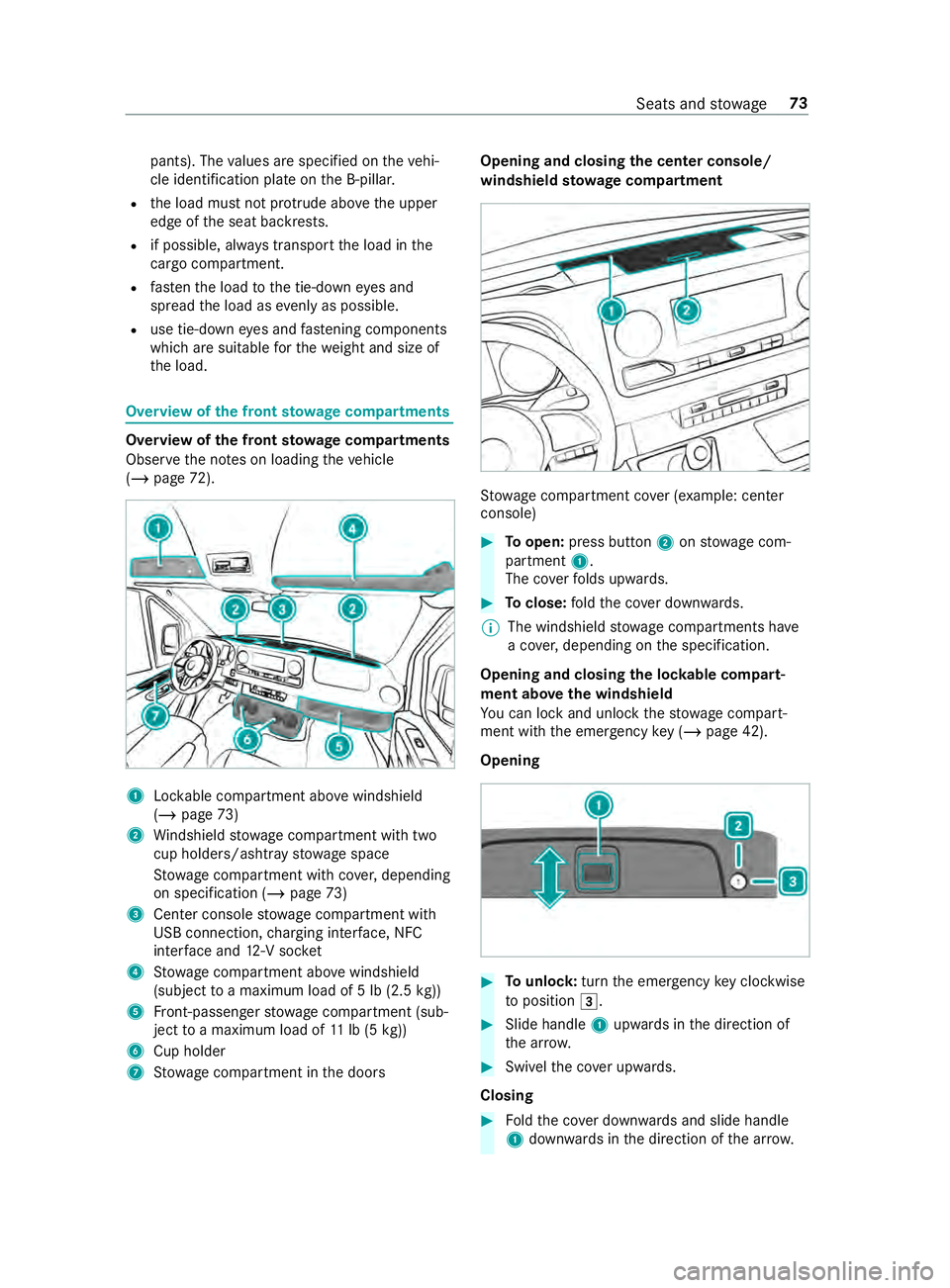
the front stowage compa rtments Overvi
ewofthe front stowage compa rtments
Obser vethe no tes on loading theve hicle
(/ page 72). 1
Lockable compartment abo vewindshield
(/ page 73)
2 Windshield stowage compartment with two
cup holde rs/ashtr aystow age space
St ow age compartment with co ver,depending
on specification (/ page73)
3 Center console stowage compartment with
USB connection, charging inter face, NFC
inter face and 12-V soc ket
4 Stow age compartment abo vewindshield
(subject toa maximum load of 5 lb (2.5 kg))
5 Front-passenger stowage compartment (sub‐
ject toa maximum load of 11lb (5 kg))
6 Cup holder
7 Stow age compartment in the doors Opening and closing
the center console/
windshield stowage compa rtment St
ow age compartment co ver (e xamp le: cen ter
console) #
Toopen: press button 2onstow age com‐
partment 1.
The co verfo lds upwards. #
Toclose: fold the co ver down wards.
% The windshield
stowage compartments ha ve
a co ver,depending on the specification.
Opening and closing the loc kable compart‐
ment abo vethe windshield
Yo u can lock and unlo ck thestow age compart‐
ment with the emer gency key (/ page 42).
Opening #
Tounlo ck:turn the emer gency key clo ckwise
to position 0049. #
Slide handle 1upwards in the direction of
th e ar row. #
Swivelth e co ver upwards.
Closing #
Foldthe co ver down wards and slide handle
1 down wards inthe direction of the ar row. Seats and
stowage 73
Page 101 of 354
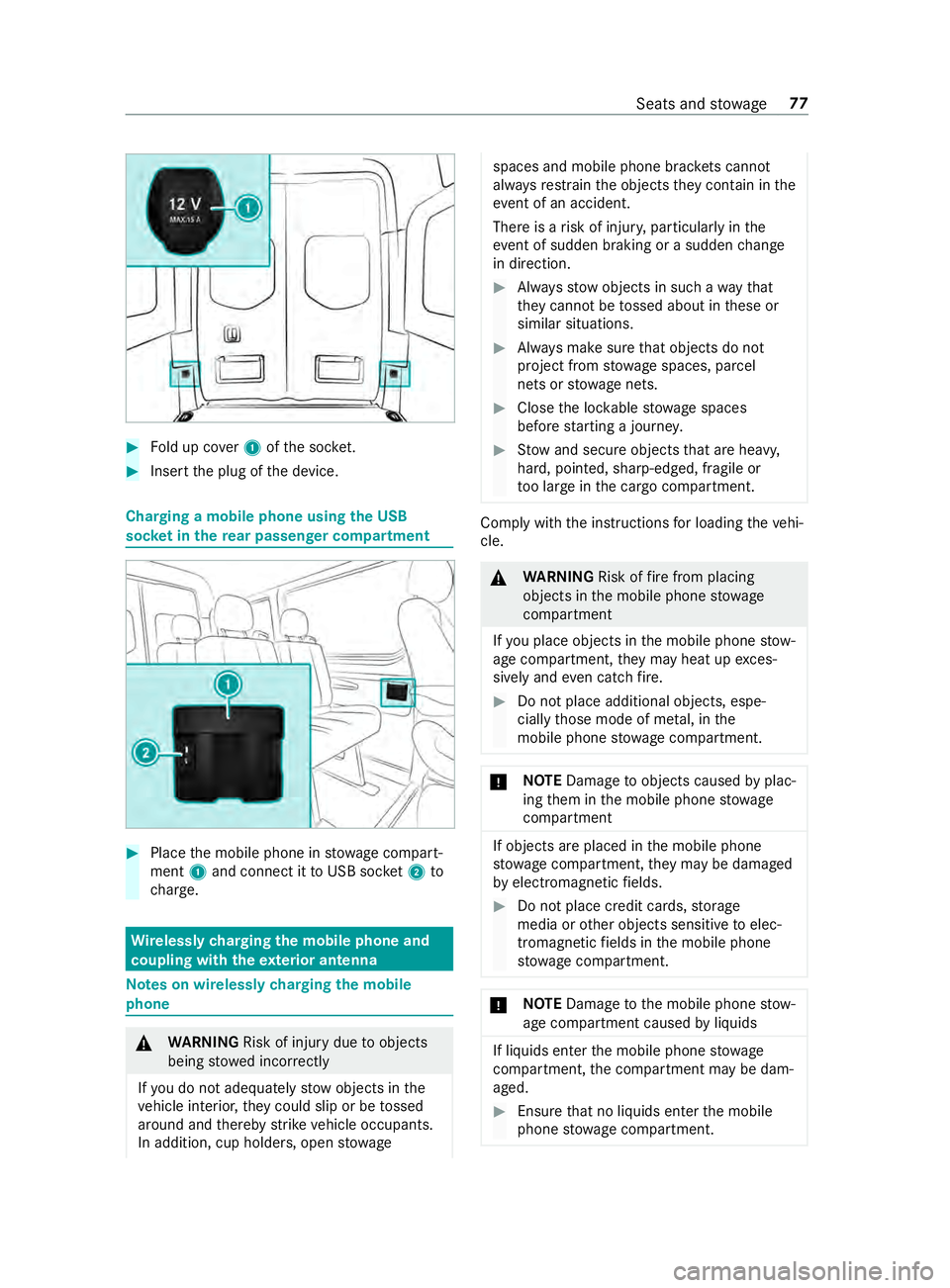
#
Fold up co ver1 ofthe soc ket. #
Inse rtthe plug of the device. Charging a mobile phone using
the USB
soc ket in the rear passen ger co mpartment #
Place the mobile phone in stowage compart‐
ment 1and connect it toUSB soc ket2 to
ch arge. Wire
lessly charging the mobile phone and
coupling with theex terior antenna Note
s on wirelessly charging the mobile
phone &
WARNING Risk of inju rydue toobjects
being stowed incor rectly
If yo u do not adequately stowobjects in the
ve hicle interior, they could slip or be tossed
around and thereby strike vehicle occupants.
In addition, cup holders, open stowage spaces and mobile phone brac
kets cannot
al wa ys restra in the objects they contain in the
eve nt of an accident.
The reis a risk of injur y,particular lyin the
eve nt of sudden braking or a sudden change
in direction. #
Alwaysstow objects in such a wayth at
th ey cannot be tossed about in these or
similar situations. #
Always make sure that objects do not
project from stowage spaces, parcel
nets or stowage nets. #
Close the loc kable stow age spaces
before starting a journe y. #
Stow and secure objects that are heavy,
hard, poin ted, sharp-edged, fragile or
to o lar geinthe cargo compartment. Comply with
the instructions for loading theve hi‐
cle. &
WARNING Risk offire from placing
objects in the mobile phone stowage
compartment
If yo u place objects in the mobile phone stow‐
age compartment, they may heat up exces‐
sively and even catch fire. #
Do not place additional objects, espe‐
cially those mode of me tal, in the
mobile phone stowage compartment. *
NO
TEDama getoobjects caused byplac‐
ing them in the mobile phone stowage
compartment If objects are placed in
the mobile phone
stow age compartment, they may be dama ged
by electromagnetic fields. #
Do not place credit cards, storage
media or other objects sensitive toelec‐
tromagnetic fields in the mobile phone
stow age compartment. *
NO
TEDama getothe mobile phone stow‐
age compartment caused byliquids If liquids enter
the mobile phone stowage
compartment, the compartment may be dam‐
aged. #
Ensure that no liquids enter the mobile
phone stowage compartment. Seats and
stowage 77
Page 102 of 354

Obser
vethefo llowing no tes on wireless charging:
R The charging function is only available when
th e ignition is switched on.
R In some cases, it may not be possible to
ch arge small mobile phones at every position
of the mobile phone recep tacle.
R It may not be possible tocharge large mobile
phones that do not rest inthe mobile phone
re cep tacle.
R The mobile phone can warm up during the
ch arging process. This depends on the appli‐
cations (apps) cur rently running.
R For more ef ficient charging, the pr otective
case should be remo ved from the mobile
phone. Pr otective cases designed for wireless
ch arging are an exception.
R When charging, the mat should be used if
possible. Charging
the mobile phone in the front wire‐
lessly Requ
irements:
R The mobile phone must be suitable for wire‐
less charging. A list of compatible mobile
phones can be found at:
http://www.mercedes-benz.com/connect #
Open theflap of stowage compartment 1
abo vethe media displa y. #
Place the mobile phone as cent rally as possi‐
ble with the display facing up wards on the
mar ked sur face of mat 2.
When thech arging symbol is shown in the
multimedia sy stem, the mobile phone is being
ch arge d.
Malfunctions during charging are shown in
th e multimedia sy stem displa y.
% The mat can be
remo vedfo r cleaning, e.g.
with clean, luk ewarmwater. Installing or
removing the floor mats &
WARNING Risk of accident due to
objects in the driver's foot we ll
Objects in the driver's foot we ll may impede
pedal tr avel or block a depressed pedal.
This jeopardizes the operating and road
saf ety of theve hicle. #
Stow all objects in theve hicle securely
so that they cannot getinto the driver's
fo ot we ll. #
Always ins tallth efloor mats securely
and as prescribed in order toensure
th at there is alw ays suf ficient room for
th e pedals. #
Do not use loose floor mats and do not
place floor mats on top of one ano ther. #
Toinstall: press pushbuttons 1onto hold‐
ers 2. #
Toremo ve: pull thefloor mats off holders
2. 78
Seats and stowage
Page 107 of 354
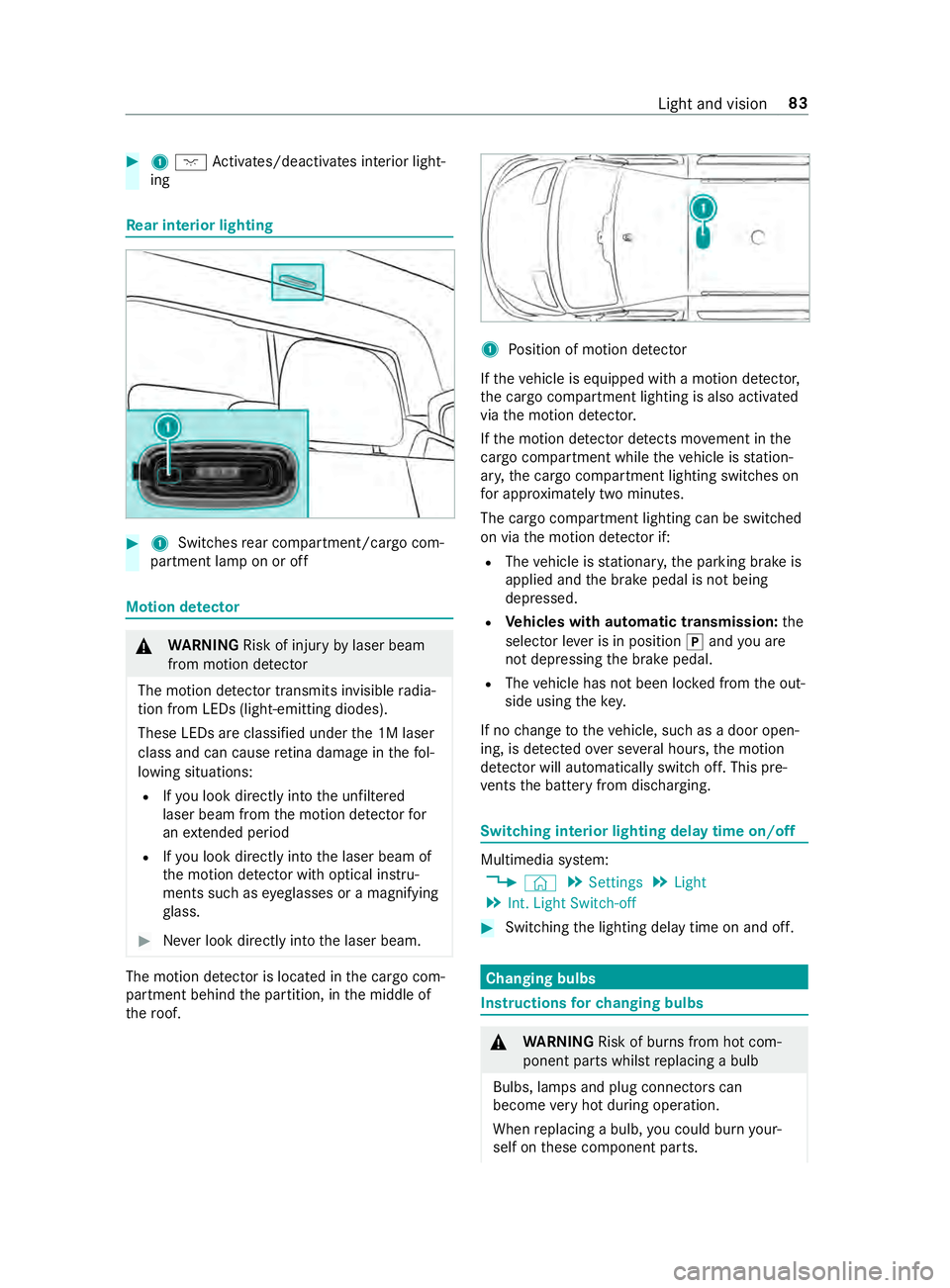
#
1004A Activates/deacti vates interior light‐
ing Re
ar interior lighting #
1 Switches rear compartment/cargo com‐
partment lamp on or off Motion de
tector &
WARNING Risk of inju ryby laser beam
from motion de tector
The motion de tector transmits invisible radia‐
tion from LEDs (light-emitting diodes).
These LEDs are classified under the 1M laser
class and can cause retina dama geinthefo l‐
lowing situations:
R Ifyo u look directly into the unfiltered
laser beam from the motion de tector for
an extended pe riod
R Ifyo u look direct lyinto the laser beam of
th e motion de tector wi thoptical instru‐
ments such as eyeglasses or a magnifying
gl ass. #
Never look directly into the laser beam. The motion de
tector is loca ted in the cargo com‐
partment behind the partition, in the middle of
th ero of. 1
Position of motion de tector
If th eve hicle is equipped with a motion de tector,
th e cargo compartment lighting is also activated
via the motion de tector.
If th e motion de tector de tects mo vement in the
cargo compa rtment while theve hicle is station‐
ar y, the cargo compartment lighting switches on
fo r appro ximately two minu tes.
The cargo compartment lighting can be switched
on via the motion de tector if:
R The vehicle is stationar y,the parking brake is
applied and the brake pedal is not being
depressed.
R Vehicles with automatic transmission: the
selector le ver is in position 005Dand you are
not depressing the brake pedal.
R The vehicle has not been loc ked from the out‐
side using thekey.
If no change totheve hicle, such as a door open‐
ing, is de tected over se veral hours, the motion
de tector will au tomatically switch off. This pre‐
ve nts the battery from discharging. Switching interior lighting delay time on/off
Multimedia sy
stem:
4 © 5
Settings 5
Light
5 Int. Light Switch-off #
Switching the lighting delay time on and off. Changing bulbs
Instructions
forch anging bulbs &
WARNING Risk of bu rns from hot com‐
ponent parts whilst replacing a bulb
Bulbs, lamps and plug connectors can
become very hot during operation.
When replacing a bulb, you could burn your‐
self on these component parts. Light and vision
83
Page 148 of 354

#
Toswitch electronic le vel control on
again: press button 4again.
The indicator lamp on button 4goes out.
Using the but ton in the control panel #
Park theve hicle, leaving the ignition switched
on. #
Tolowe r automatical ly:brie fly press the
lo we r section of switch 2.
Electronic le vel control automatically lo wers
th eve hicle. #
Tostop the mo vement, brief lypress the upper
section of switch 1. #
Toraise todriving le vel:briefly press the
upper section of swit ch1.
Electronic le vel control automatically raises
th eve hicle tothe driving le vel. #
Tostop the mo vement, brief lypress the lo wer
section of switch 2. #
Toswitch on automaticall y:drive at over
6.2 mph (10 km/h) or release the parking
brake.
Elect ronic le vel control controls theve hicle
le ve l automaticall y. Using electronic le
vel control forch arging
with air in an emer gency Only
forve hicles with valves for electronic le vel
control emergency charging. If electronic le velcontrol is malfunctioning and
theve hicle is lean‐
ing, you can raise or lo werth eve hicle bycon‐
necting an extern al compressed-air source toone
of the emer gency valves (tire valves). If elect ronic
le ve l control is deactivated, you can drive on
carefully tothe nearest qualified specialist work‐
shop and ha vethe malfunction remedied.
* NO
TEDama gedue topressure being too
high If
th e pressure in the air suspension bello ws
is too high, the compressed-air lines or the air
suspension bello wsmay be dama ged. #
Ensure you obse rveth e maximum per‐
missible operating pressure of 600 kPa
(6 bar/87 psi). #
Apply the parking brake. #
Vehicles with automatic transmission:
shift the transmission toposition 005D. #
Switch off electronic le vel control
(/ page 123). #
Switch off the engine and open the hood
(/ page 202). #
Unscr ewtheva lve cap of the cor responding
va lve. #
Connect theex tern al compressed-air source. #
Raise or lo werth eve hicle le velby charging or
re leasing compressed air until the driving
le ve l has been reached and theve hicle is in a
horizontal position. While doing so, ensure
yo u obse rveth e maximum permissible oper‐
ating pressure of 600 kPa (6 bar/87 psi). #
Disconnect theex tern al compressed-air
source. #
Tighten theva lve caps on theva lves. #
Close the hood (/ page 202). #
Drive on carefully tothe nearest qualified
specialist workshop. 124
Driving and pa rking