2019 MERCEDES-BENZ SPRINTER traction control
[x] Cancel search: traction controlPage 197 of 354
Overview and operation
Overview of
the MBUX multimedia sy stem &
WARNING Risk of distraction from infor‐
mation sy stems and communications
equipment
If yo u operate information and communica‐
tion equipment integ rated in theve hicle when
driving, you will be distracted from the tra ffic
situation. This could also cause youto lose
control of theve hicle. #
Only operate this equipment when the
traf fic situation permits. #
Ifyo u cannot be sure of this, stop the
ve hicle whilst paying attention toroad
and traf fic conditions and ope rate the
equipment with theve hicle stationar y. Yo
u must obse rveth e legal requirements forthe
country in whi chyou are cur rently driving when
ope rating the multimedia sy stem.
MBUX stands for Mercedes-Benz User Experi‐
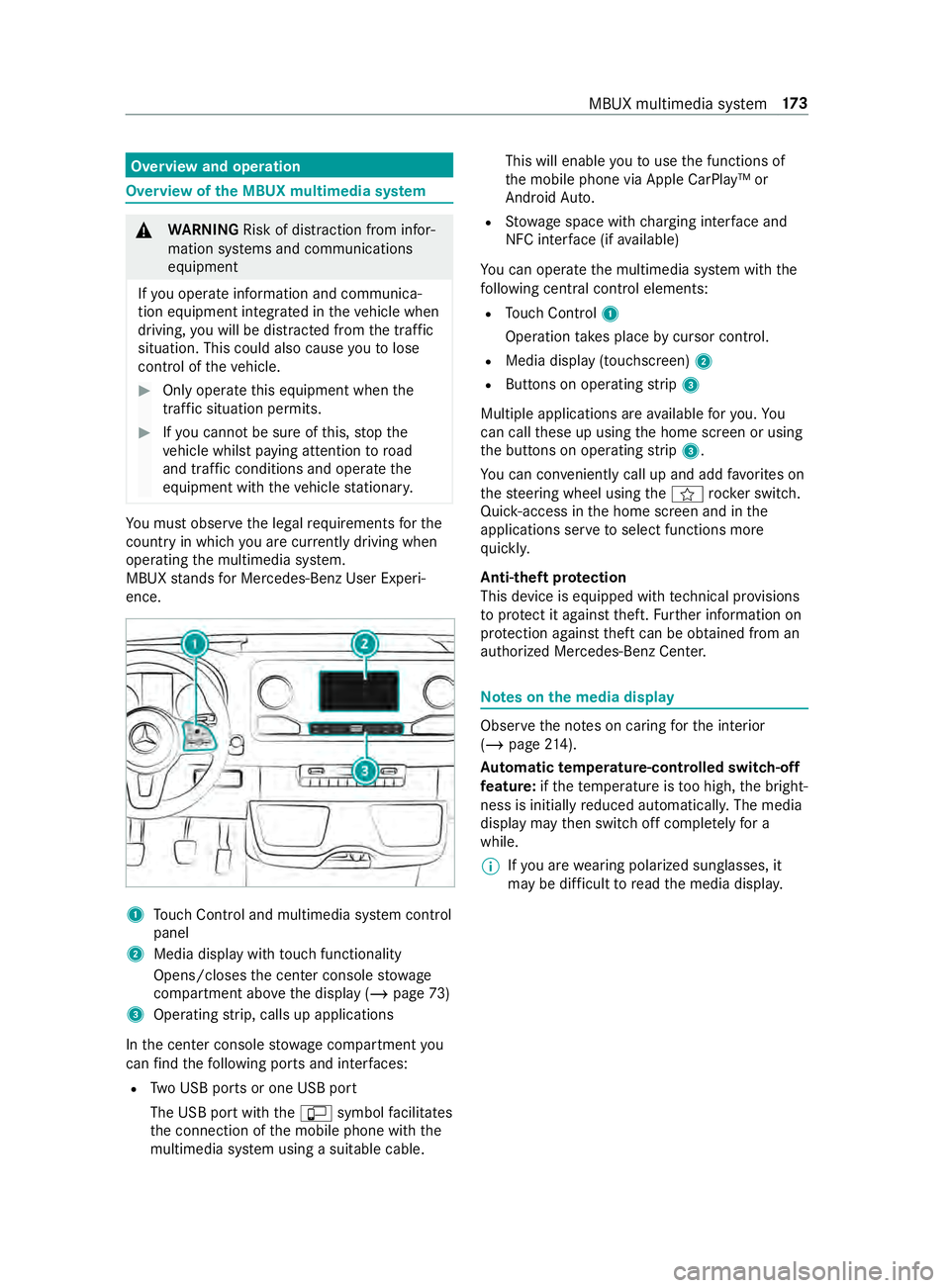
ence. 1
Touch Control and multimedia sy stem cont rol
panel
2 Media display with touch functionality
Opens/closes the center console stowage
compartment abo vethe display (/ page73)
3 Operating strip, calls up applications
In the center console stowage compartment you
can find thefo llowing ports and inter faces:
R Two USB ports or one USB port
The USB port with the00C2 symbol facilitates
th e connection of the mobile phone with the
multimedia sy stem using a suitable cable. This will enable
youto use the functions of
th e mobile phone via Apple CarPlay™ or
Android Auto.
R Stow age space with charging inter face and
NFC inter face (if available)
Yo u can operate the multimedia sy stem with the
fo llowing central control elements:
R Touch Control 1
Operation takes place bycursor control.
R Media display (tou chscreen) 2
R Buttons on operating strip 3
Multiple applications are available foryo u. Yo u
can call these up using the home screen or using
th e buttons on operating strip 3.
Yo u can con veniently call up and add favo rite s on
th esteering wheel using the004B rock er switch.
Quic k-access in the home screen and in the
applications ser vetoselect functions more
qu ickl y.
Anti-theft pr otection
This device is equipped with tech nical pr ovisions
to protect it against theft. Further information on
pr otection against theft can be obtained from an
authorized Mercedes-Benz Center. Note
s onthe media display Obser
vethe no tes on caring forth e interior
(/ page 214).
Au tomatic temperature-cont rolled switch-off
fe ature: ifth ete mp erature is too high, the bright‐
ness is initially reduced automaticall y.The media
display may then switch off comple tely for a
while.
% If
yo u are wearing polarized sun glasses, it
may be dif ficult toread the media displa y. MBUX multimedia sy
stem 17 3
Page 202 of 354
#
Press on a phone number until theOPTIONS
menu is shown. #
Select Save as Favorite.
The contact is added as a favo rite. #
Tosto reara dio station as a global favo r‐
ite: set a radio station (/ page193). #
Press on thera dio station until theOPTIONS
menu is shown. #
Select Save as Favorite.
The radio station is added as a favo rite.
Re naming favo rites #
Tap on © inthe media displa y.
The home screen is shown. #
Swipe up until FAVORITESis shown. #
Press on a favo rite until theOPTIONS menu is
shown. #
Select Rename . #
Ente rth e name. #
Select OK.
Moving favo rites
Moving favo rite s in thefa vo rite s menu #
Tap on © inthe media displa y.
The home screen is shown. #
Swipe up until FAVORITESis shown. #
Press on a favo rite until theOPTIONS menu is
shown. #
Select Move. #
Movethefa vo rite to the new position. #
Tap on 00FB.
Deleting favo rites #
Tap on © inthe media displa y.
The home screen is shown. #
Swipe up until FAVORITESis shown. #
Press on a favo rite until theOPTIONS menu is
shown. #
Select Delete. #
Select Yes. Entering
characters Using
thech aracter input function &
WARNING Risk of distraction from infor‐
mation sy stems and communications
equipment
If yo u operate information and communica‐
tion equipment integ rated in theve hicle when
driving, you will be distracted from the tra ffic
situation. This could also cause youto lose
control of theve hicle. #
Only operate this equipment when the
traf fic situation permits. #
Ifyo u cannot be sure of this, stop the
ve hicle whilst paying attention toroad
and traf fic conditions and ope rate the
equipment with theve hicle stationar y. Yo
u must obse rveth e legal requirements forthe
country in whi chyou are cur rently driving when
ope rating the multimedia sy stem.
Character entry can be carried out with these
cont rol elements:
R Touch Control
R Touchsc reen (media display)
Character entry take s place bycursor control
when using theTo uch Control.
Character input can be star ted with a control ele‐
ment and resumed with ano ther. #
When theke yboard is shown, en terth ech ar‐
acters on the cont rol element byswiping and
pressing or bytapping (touchscreen).
or #
Write thech aracter on theto uchsc reen.
Examples of character ent ry:
R Renaming a favo rite
R Enter a telephone number 17 8
MBUX multimedia sy stem
Page 206 of 354
Te
lephone Te
lephony Te
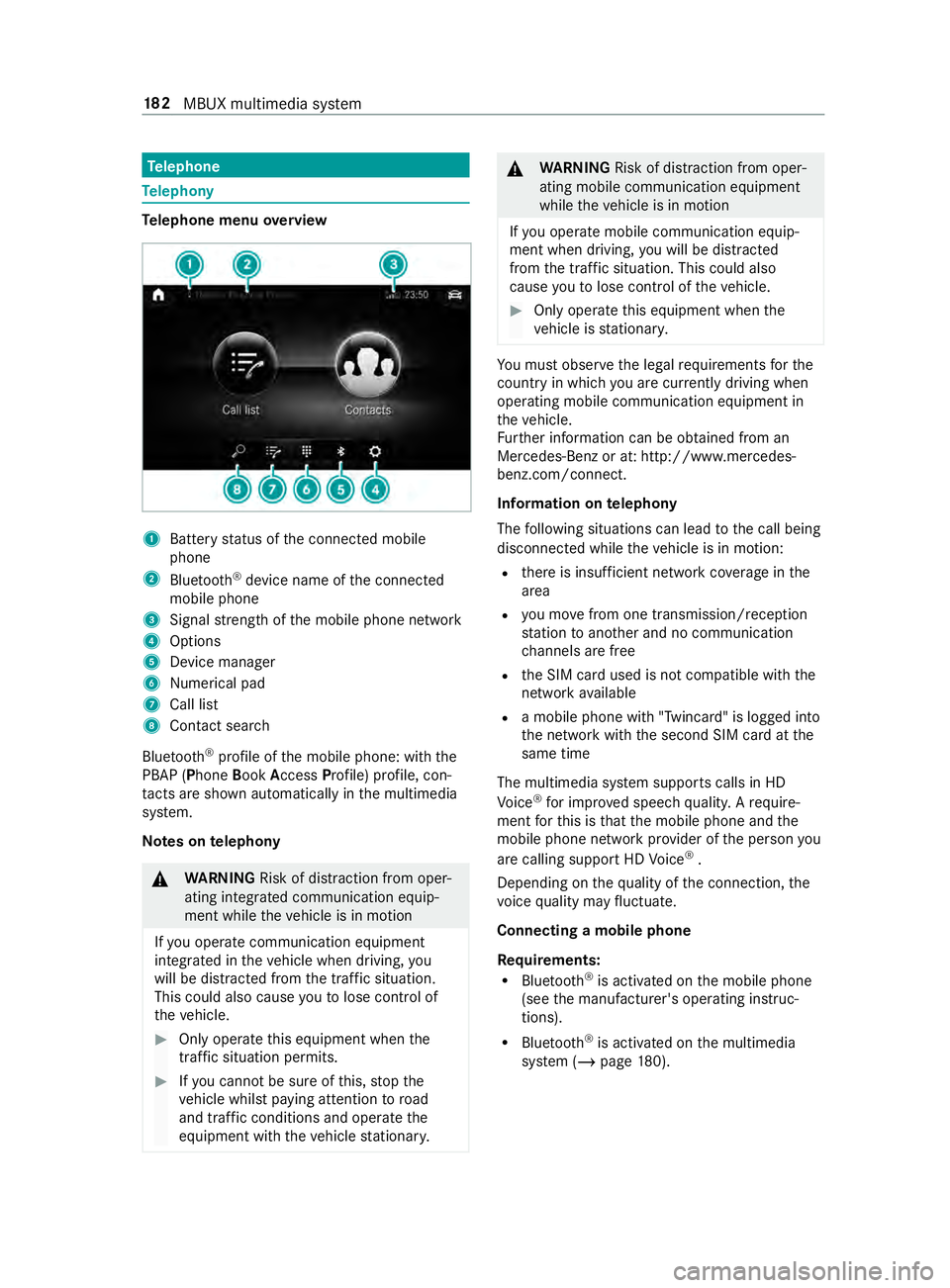
lephone menu overview 1
Battery status of the connected mobile
phone
2 Blue tooth ®
device name of the connected
mobile phone
3 Signal stre ngth of the mobile phone network
4 Options
5 Device manager
6 Nume rical pad
7 Call li st
8 Contact sea rch
Blu etoo th®
profile of the mobile phone: with the
PBAP (Phone BookAccess Profile) profile, con‐
ta cts are shown au tomatically in the multimedia
sy stem.
Note s ontelephony &
WARNING Risk of distraction from oper‐
ating integrated communication equip‐
ment while theve hicle is in motion
If yo u operate communication equipment
integ rated in theve hicle when driving, you
will be distracted from the tra ffic situation.
This could also cause youto lose control of
th eve hicle. #
Only operate this equipment when the
traf fic situation permits. #
Ifyo u cannot be sure of this, stop the
ve hicle whilst paying attention toroad
and traf fic conditions and ope rate the
equipment with theve hicle stationar y. &
WARNING Risk of distraction from oper‐
ating mobile communication equipment
while theve hicle is in motion
If yo u operate mobile communication equip‐
ment when driving, you will be distracted
from the traf fic situation. This could also
cause youto lose control of theve hicle. #
Only operate this equipment when the
ve hicle is stationar y. Yo
u must obse rveth e legal requirements forthe
country in whi chyou are cur rently driving when
ope rating mobile communication equipment in
th eve hicle.
Fu rther information can be obtained from an
Mercedes-Benz or at: http://www.mercedes-
benz.com/connect.
Information on telephony
The following situations can lead tothe call being
disconnected while theve hicle is in motion:
R there is insuf ficient network co verage inthe
area
R you mo vefrom one transmission/reception
st ation toano ther and no communication
ch annels are free
R the SIM card used is not compatible with the
network available
R a mobile phone with "Twincard" is logged into
the network with the second SIM card at the
same time
The multimedia sy stem supports calls in HD
Vo ice ®
for impr oved speech quality. A require‐
ment forth is is that the mobile phone and the
mobile phone network pr ovider of the person you
are calling support HD Voice ®
.
Depending on thequ ality of the connection, the
vo ice quality may fluctuate.
Connecting a mobile phone
Re quirements:
R Blue tooth ®
is activated on the mobile phone
(see the manufacturer's operating instruc‐
tions).
R Blue tooth ®
is activated on the multimedia
sy stem (/ page180). 18 2
MBUX multimedia sy stem
Page 210 of 354
Making a call from
the call list
Multimedia sy stem:
4 © 5
Phone #
Select +Recent Calls. #
Select an entry.
The call is made.
Calling up additional options in the call list
Multimedia sy stem:
4 © 5
Phone #
Select +Recent Calls. #
For pr eviously stored contacts: select 0048in
th e line of an entry.
The sear chresults are displa yed. Apple CarPlay™
Overview of Apple CarPlay™
&
WARNING Risk of distraction from infor‐
mation sy stems and communications
equipment
If yo u operate information and communica‐
tion equipment integ rated in theve hicle when
driving, you will be distracted from the tra ffic
situation. This could also cause youto lose
control of theve hicle. #
Only operate this equipment when the
traf fic situation permits. #
Ifyo u cannot be sure of this, stop the
ve hicle whilst paying attention toroad
and traf fic conditions and ope rate the
equipment with theve hicle stationar y. Yo
u must obse rveth e legal requirements forthe
country in whi chyou are cur rently driving when
ope rating the multimedia sy stem.
iPhone ®
functions can be used via the multime‐
dia sy stem using Apple CarPlay™. They are oper‐
ated using theto uchsc reen, Touch Control or the
Siri ®
vo ice-operated control sy stem. You can acti‐
va te thevo ice-opera ted control sy stem bypress‐
ing and holding the£ button on the multifunc‐
tion steering wheel.
Only one mobile phone at a time can be connec‐
te d via Apple CarPlay™ tothe multimedia sy stem.
The availability of Apple CarPlay™ may vary
according tothe count ry.
The service pr ovider is responsible forth is appli‐
cation and the services and content connected to
it. Information on Apple CarPlay™
When Apple CarPlay™ is being used,
the iPod ®
media source is not available forth ere spective
iPhone ®
.
Connecting an iPhone ®
via Apple CarPlay™
(with cable)
Re quirements:
R The multimedia sy stem is equipped with the
function.
R The cur rent version of your device's operating
sy stem is being used (see the manufacturer's
operating instructions).
R The full range of functions for Apple CarPlay™
is only available with an In tern et connection. #
Connect the iPhone ®
to the00C2 USB port
on the multimedia sy stem using a suitable
cable (/ page190). #
Ifno other device is connected with the sys‐
te m via Blue tooth®
: confirm the data pr otec‐
tion pr ovisions. #
If ano ther device is connected via Blue tooth®
or Apple CarPlay™ (wireless) with the sy stem:
ta p on theTap here to start Apple CarPlay
for:
or #
Select the iPhone ®
in the device list
under the application.
The pr evious connection via Blue tooth®
or
Apple CarPlay™ (wireless) is disconnected.
The device newly connected via cable is
active.
Ac cepting/rejecting the data pr otection pro‐
visions
A message with the data pr otection pr ovisions
appears. #
Select Accept & Start.
Exiting Apple CarPlay™ #
Press 00E2button.
% If Apple CarPlay™
was not displa yed full-
screen before disconnecting, the application
st arts in the bac kground when reconnected.
Yo u can call up Apple CarPlay™ in the main
menu. 18 6
MBUX multimedia sy stem
Page 211 of 354

Connecting an iPhone
®
via Apple CarPlay™
(wireless)
Requ irements:
R The multimedia sy stem is equipped with the
function.
R The cur rent version of your device's operating
sy stem is being used (see the manufacturer's
operating instructions).
R Blue tooth ®
is activated on the device (see the
manufacturer's operating instructions).
R The device is "visible" forot her devices.
R There is an Internet connection forth e full
ra nge of functions for Apple CarPlay™.
Multimedia sy stem:
4 © 5
Phone 5
00A5
Sear ching for a mobile phone #
Select Connect New Device.
The available iPhone ®
is shown.
Connecting a mobile phone #
Select the iPhone ®
. #
Select Start Apple CarPlay.
% It is possible at any time
toswitch between
connection via Blue tooth®
or via Apple Car‐
Play™ (wireless) in the device list.
Ac cepting/rejecting the data pr otection pro‐
visions
A message with the data pr otection pr ovisions
appears. #
Select Accept & Start.
% When
the Apple CarPlay™ connection is
active, you can swit chStart Automatically on
or off.
Exiting Apple CarPlay™ #
Press the00E2 button.
% If Apple CarPlay™
was not displa yed in the
fo re ground before disconnecting, the applica‐
tion starts in the bac kground when reconnec‐
te d. You can call up Apple CarPlay™ in the
main menu.
Calling up Apple CarPlay™ sound settings
Multimedia sy stem:
4 © 5
Smartphone 5
Apple CarPlay
5 Z #
Select sound settings. Ending Apple CarPlay™ #
Toend the connection of Apple Carplay™
(cable): disconnect the connection via the
connecting cable between the iPhone ®
and
multimedia sy stem. #
Toend the connection of Apple Carplay™
(wireless): de-authorize the iPhone ®
in the device list under
the application.
% Re
gardless of whe ther the connection is via
cable or wireless, Mercedes-Benz recom‐
mends disconnection only when theve hicle
is stationar y. Android
Auto Android
Autoove rview &
WARNING Risk of distraction from infor‐
mation sy stems and communications
equipment
If yo u operate information and communica‐
tion equipment integ rated in theve hicle when
driving, you will be distracted from the tra ffic
situation. This could also cause youto lose
control of theve hicle. #
Only operate this equipment when the
traf fic situation permits. #
Ifyo u cannot be sure of this, stop the
ve hicle whilst paying attention toroad
and traf fic conditions and ope rate the
equipment with theve hicle stationar y. Yo
u must obse rveth e legal requirements forthe
country in whi chyou are cur rently driving when
ope rating the multimedia sy stem.
Mobile phone functions can be used with Android
Au tousing the Android operating sy stem on the
multimedia sy stem. It is operated using the
to uchsc reen or thevo ice-operated control sys‐
te m. You can activate thevo ice-opera ted control
sy stem bypressing and holding the£ button
on the multifunction steering wheel.
Only one mobile phone at a time can be connec‐
te d via Android Auto to the multimedia sy stem.
The availability of Android Autoand Android Auto
apps may vary according tothe count ry.
The service pr ovider is responsible forth is appli‐
cation and the services and content connected to
it. MBUX multimedia sy
stem 187
Page 213 of 354
Media
Information about media mode
Information about suppor
tedfo rm ats and
data storage media &
WARNING Risk of distraction when han‐
dling da tastorage media
If yo u handle a data storage medium while
driving, your attention is diver ted from the
traf fic conditions. This could also cause you
to lose control of theve hicle. #
Only handle a data storage medium
when theve hicle is stationar y. The multimedia sy
stem supports thefo llow‐
ing form ats and data media:
Pe rm issible
fi le sy stems FA
T32, exFA T,NTFS
Pe rm issible
data car riers USB devices, iPod
®
/iPhone ®
,
MTP devices, Blue tooth®
audio
equipment
Suppor ted
fo rm ats: Au
dio: MP3, WMA, AAC, WAV,
FL AC , AL AC R
The multimedia sy stem supports a total of up
to 50,000 files.
R Data storage media up to2 TB are suppor ted
(32‑bit address space).
% Obser vethefo llowing no tes:
R Due tothe wide range of USB devices
av ailable on the mar ket, pl ayback cann ot
be guaranteed for all USB devices.
R MP3 pla yers must support Media Trans fer
Pr otocol (MTP).
Information on copyright pr otection and
tradema rks
Au dio files that you create or reproduce yourself
fo r playback aregeneral lysubject tocopyright
pr otection. In many count ries, reproductions,
eve nfo r private use, are not permitted without
th e prior consent of the copyright holder. Make
sure that you kn owabout the applicable copy‐
ri ght regulations and that you comply with these. Manufactured under license from Dolby Laborato‐
ri
es. Dolb y,Dol byAudio and the double-D symbol
are trademar ksof Dolby Laboratories. Graceno
te,th e Graceno telogo and logotype,
"P ow ered byGracen ote", MusicID and Pla ylist
Plus are either regis tere d trademar ksor trade‐
mar ksof Graceno te, Inc. in theUn ited States
and/or other countries. Fo
rDT SPa tents, see http://pa tents.dts.com.
Manufactu red under license from DTS Licensing
Limi ted. DT S,the Symbol, & DTS and the Symbol
to ge ther are regis tere d trademar ks, and DTSTru‐
Vo lume is a trademark of DTS, Inc. ©
DT S, Inc. All
Rights Reser ved. MBUX multimedia sy
stem 18 9
Page 256 of 354
Information on noise or unusual driving
ch aracteristics
While driving, pay attention tovibrations, noises
and unusual driving characteristics, e.g. pulling to
one side. This may indicate damage tothe wheels
or tires. If you suspect that a tire is defective,
re duce your speed. Stop theve hicle as soon as
possible tocheck if wheels and tires ha vebeen
damaged or are no longer functioning properly.
Hidden tire damage could also be causing the
unusual driving characteristics. If no signs of
damage can be de tected, ha vethe tires and
wheels checked at a qualified specialist work‐
shop. Note
s onregular lyinspecting wheels and
tires &
WARNING Risk of accident from dam‐
aged tires
Dama ged tires can cause tire pressure loss.
As a result, you could lose control of your
ve hicle. #
Check the tires regularly for signs of
dama geand replace any damaged tires
immediatel y. Check
the wheels and tires of your vehicle for
damage regular ly, i.e. at least every two weeks,
as well as af ter driving off-road or on rough
ro ads. Damaged wheels can lead toa loss of tire
pressure.
Look out forth efo llowing types of damage, for
ex ample:
R cuts in the tires
R punctures in the tires
R tears in the tires
R bulges on tires
R deformation or se vere cor rosion on wheels &
WARNING Risk ofhydroplaning because
tire tread is too low
Insuf ficient tire tread will result in reduced
tire traction. The tire tread will no longer be
able todissipate water.
This increases therisk of hydroplaning on wet
ro ad sur faces, pa rticularly when tra veling at
an inappropriate speed. If
th e tire pressure is too high or too lo w,tires
may exhibit dif fere nt le vels of wear at dif fer‐
ent locations on the tire tread. #
Regular lych eck the tire tread dep thand
th e condition of the tire tread across
th e entire width of all tires.
Minimum tread dep thfor use:
R In summer: 00CEin (3 mm)
R In winter: 00CFin (4 mm) #
For saf etyre asons, ha vethe tires
re placed before the legally prescribed
limit forth e minimum tire tread dep this
re ached. Conduct
thefo llowing checks regular lyon all
wheels, at least once a month or as requ ired, e.g.
before a long journey or when driving off- road:
R check the tire pressure (/ page 234)
R check theva lve caps
Va lves must be pr otected from moisture and
dirt with valve caps specifically appr oved by
Mercedes-Benz foryo ur vehicle.
R visually inspect the tread dep thand the tire
tread across the whole tire width
Fo r use in summer, the minimum tread dep th
is 00CE in (3 mm) and for use in winter 00CFin
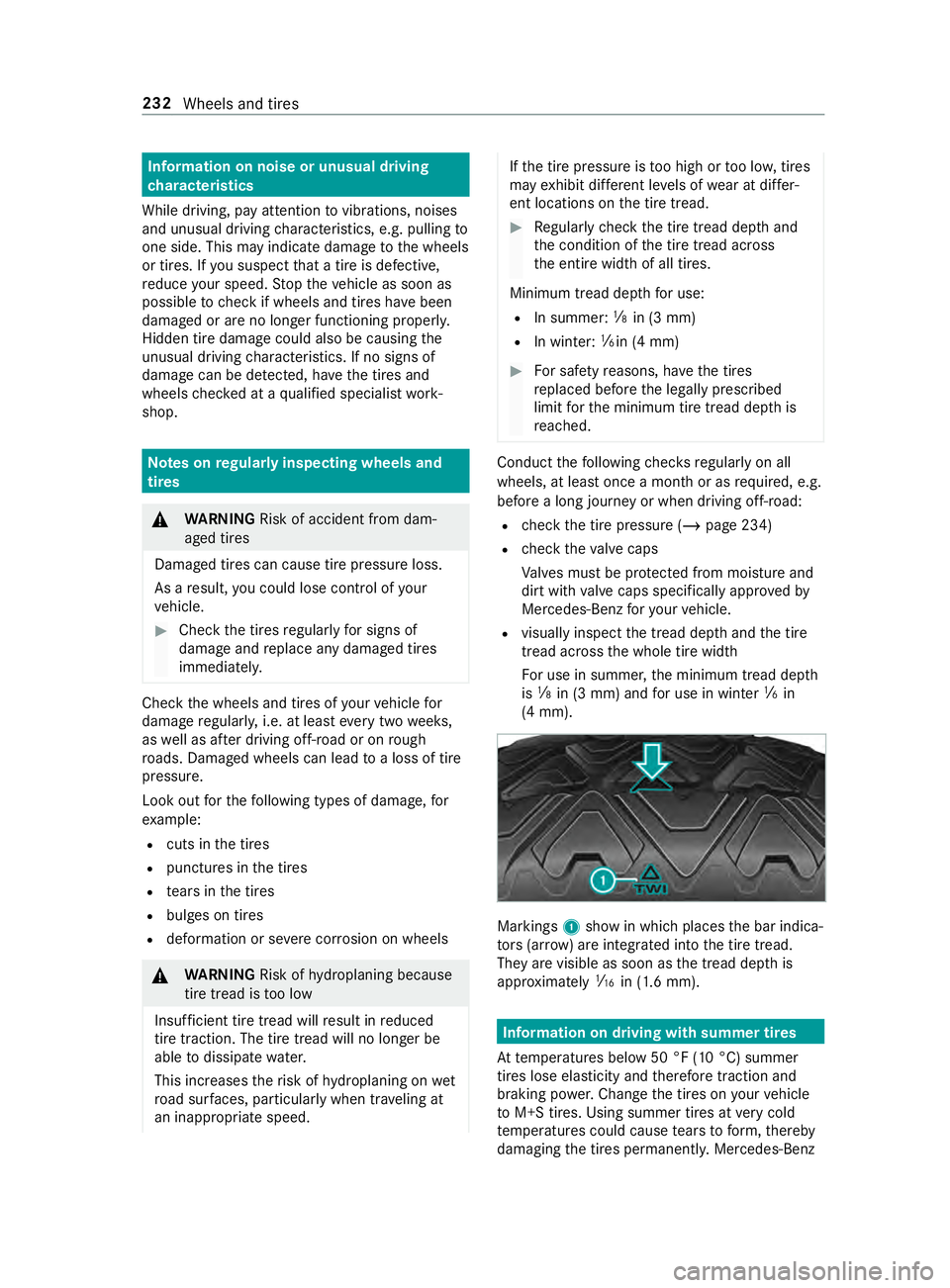
(4 mm). Markings
1show in which places the bar indica‐
to rs (ar row ) are integ rated into the tire tread.
They are visible as soon as the tread dep this
appr oximately 00CDin (1.6 mm). Information on driving with summer tires
At temp eratures below 50 °F (10 °C) summer
tires lose elasticity and therefore traction and
braking po wer.Chan gethe tires on your vehicle
to M+S tires. Using summer tires at very cold
te mp eratures could cause tears toform ,th ereby
damaging the tires permanentl y.Mercedes-Benz 232
Wheels and tires
Page 271 of 354
Ra
ting. You can find the Gross Axle Weight Rating
on the B-pillar on the driver's side.
Speed rating: the speed rating is pa rtof the tire
identification. It specifies the speed range for
which a tire is appr oved.
GV W (Gross Vehicle Weight): the Gross Vehicle
We ight includes thewe ight of theve hicle includ‐
ing fuel, tools, the spare wheel, accessories
ins talled, occupants, luggage and the trailer
dr aw bar nose weight if applicable. The Gross Vehi‐
cle Weight must ne verex ceed the Gross Vehicle
We ight Rating (GVWR) specified on the B-pillar on
th e driver's side.
GV WR (Gross Vehicle Weight Rating): the
GV WR is the maximum permitted gross weight of
th e fully laden vehicle (weight of theve hicle
including all accessories, occupants, fuel, lug‐
ga ge and the trailer dr awbar nose weight if appli‐
cable). The Gross Vehicle Weight Rating is speci‐
fi ed on theve hicle identification plate on the B-
pillar on the driver's side.
Maximum weight of the laden vehicle: the
maximum weight is the sum of theve hicle's curb
we ight, weight of the accessories, maximum load
and thewe ight of thefa ctory ins talled optional
equipment.
Kilopascal (kPa): metric unitfor tire pressu re.
6.9 kPa are the equivalent of 1 psi. Ano ther unit
fo r tire pressu reis bar. 100 kilopascals (kPa) are
th e equivalent of 1 bar.
Load index: in additiontothe load-bearing index,
th e load index may also be imprinted on the side‐
wa ll of the tire. This specifies the load-bearing
capacity more precisel y.
Curb weight: thewe ight of a vehicle with stand‐
ard equipment including the maximum capacity
of fuel, oil and coolant. It also includes the air-
conditioning sy stem and optional equipment if
th ese are ins talled on theve hicle, but does not
include passengers or luggage.
Maximum tire load: the maximum tire load is
th e maximum permissible weight in kilog rams or
lbs for which a tire is appro ved.
Maximum permissible tire pressure: maximum
permissible tire pressure for one tire.
Maximum load on one tire: maximum load on
one tire. This is calculated bydividing the maxi‐
mum axle load for one axle bytwo.
PSI (pounds per square in ch):standard unit of
measurement for tire pressu re. Aspect
ratio: relationship between tire height
and tire width in percent.
Ti re pressure: pressure inside the tire applying
an outward forc eto eve rysquare inch of the
tire's su rface. The tire pressure is specified in
pounds per square inch (psi), in kilopascal (kPa)
or in bar. The tire pressure should only be cor rec‐
te d when the tires are cold.
Ti re pressure on cold tires: the tires are cold
when theve hicle has been par ked with the tires
out of direct sunlight for at least thre e hours and
th eve hicle has been driven less than 1 mile
(1.6 km).
Ti re contact sur face: the part of the tire that
comes into con tact wi th thero ad.
Ti re bead: the purpose of the tire bead is to
ensure that the tire sits securely on the wheel
ri m. There are se veral wire cores in the tire bead
to preve ntthe tire from changing length on the
wheel rim.
Side wall:the part of the tire between the tread
and the tire bead.
Special equipment weight: the combined
we ight of those optional extras that we igh more
th an there placed standard parts and more than
5 lbs (2.3 kg). These op tionalextras, su chas
high-pe rformance brakes, le vel control sy stem, a
ro of luggage rack or a high-per form ance batter y,
are not included in the curb weight and the
we ight of the accessories.
TIN (Tire Identification Number): a unique iden‐
tification number which can be used bya tire
manufacturer toidentify tires, forex ample for a
product recall, and thus identify the pur chasers.
The TIN is made up of the manufacturer identifi‐
cation code, tire size, tire type code and the man‐
ufacturing date.
Load-bearing index: the load-bearing index (also
load index) is a code that con tains the maximum
load-bearing capacity of a tire.
Tr action: traction is there sult of friction between
th e tires and thero ad sur face.
We ar indicator: narrow bars (tread wear bars)
th at are distributed overth e tire tread. If the tire
tread is le vel with the bars, thewe ar limit of
1/ 16 in (1.6 mm) has been reached.
Distribution of vehicle occupants: distribution
of vehicle occupants over designated seat posi‐
tions in a vehicle. Wheels and tires
247